2007年6月29日
今天客户方服务器上突然有一个功能保存了,查看日志信息后发现,错误信息:
Could not instantiate class XXX from tuple at AliasToBeanConstructorResultTransformer...
Google了很久才发现有可能是HQL语句中别名的问题,具体原因未知,现在处理办法是,将下面的语句中的别名去掉:
StringBuffer hql = new StringBuffer("select new ContractItem(l, "
+ " pi.unitPrice, " + " pi.currencyType, " + "pi.currencyTypeDisplay," + " pi.units, "
+ " sum(pi.quantity + pi.adjQuantity), " + " pp, " + " pi.task) "
+ " from PurchasePlanItem pi " + " join pi.purchasePlan pp"
+ " join pi.priorList l " + " where l.supplierNo = ? "
+ " and pp.id in (");
具体是否可以解决,还要看一会儿的部署情况。
上篇文章中我简单阐述了军工企业信息化遇到的困境,而我们公司(西安融智软件有限公司www.xardmu.com)则主要是面向军工企业进行软件产品的研发和定制项目的开发的。
在产品实施和项目研发过程中,我们的前端技术人员需要做大量的浏览器兼容性的工作。痛苦至极啊~而且,即便完成了兼容性的修改,浏览器端的JS解析又变成了巨大的瓶颈!例如我们有一个项目为了提高用户使用的时的方便性,使用了EXTJS4,结果在IE6下性能极其低下。我们的P8是一个项目管理软件,需要使用到基于EXTJS的Gantt组件,但是此组件在IE6下十分不稳定,而且经常导致IE6崩溃。
介于上面的种种问题,我们开始寻找从浏览器上解决问题的方法,例如使用FireFox或者Chrome,因为军工企业都有域,所以通过域安装一款软件是十分容易的。经过权衡,我们决定使用Chrome做为我们软件的入口。
在企业内部署Chrome其实有三种方式:
1.直接使用Chrome的某一个版本,对此版本进行精简和简单的参数配置,或者内置一些自定义的插件,直接进行部署。
优点:技术门槛较低,只需要简单的精简安装文件和配置参数即可。
缺点:无法通过统一的策略管理局域网内所有的部署情况和策略。
2.使用Google提供的Chrome商业版,通过Google提供的商业版可以轻松定制自己企业内部的Chrome,并生成分发文件,同时可以通过配合域策略完成对局域网内的客户端的行为进行限制。
优点:此版本是11年放出的,一直和多个大型企业紧密合作,相信不久将会形成更加完善的方案,从而在企业级应用市场站稳脚跟。
缺点:需要在线安装。
3.使用Google的Chrome Frame,一个让披着IE外壳的Chrome,拥有Chrome的所有性能,只是披着IE的外壳而已。
优点:对于较老一些的企业,而且企业内部又拥有大量的IE时代产物的企业,绝对是一个好选择。
缺点:需要在线安装。原有软件代码需要修改,才能在用户浏览时使用Chrome模式。
看到痛苦了吧?都需要在线安装。看来下一步只能开始研究Chrome的源码,修改并编译属于自己的浏览器了。。。
最近在做项目的过程中,有些时候需要用Oracle的BLOB/CLOB类型存储一些很长的文章,一直不知道怎么来进行相关的检索,经过不懈的努力,终于能够解决这个问题了。查询语句如下:
select count(*) from 表名 where dbms_lob.instr(表名.列名, utl_raw.cast_to_raw(convert('关键词','utf8')), 1, 1) > 0;
需要注意的是,这个解决方案只能查询BLOB/CLOB中存储的是经过处理的字符串。
本方法在Oracle 10g上测试通过
转自http://commandos.blog.51cto.com/154976/128732
作为一个技术人员,谁不知道构架?
前一段时间公司找开发人员谈心,有位领导问一位开发人员,大致对话如下:
A:“你了解咱们现在产品的构架吗?能不能谈谈你对构架的看法?”
B:“… …”
A:“说说看吧~”
B:“我不懂构架!构架是什么?咱们现在的产品还有构架呢?”
作为一个有3年工作经验,2家公司经历的VC程序员来说,我觉得,这几年的积累是白做了!这样的思想永远都只能停留在写程序上~
一个产品没有构件,就如同一个人没有灵魂一样!他不是没有,只是你没有去思考,没有去发现他而已!
我记得袁洪刚说过,“一个伟大的产品背后一定有一个伟大构架师!”,我坚信这一点~产品好坏一方面决定于对现实问题的解决程度,另一方面是构架的好坏!
几年前,中国的软件公司里面很少出现构架师/架构师这样的角色,这几年开始有改观了,越来越多的人开始认识到很多错误的问题,其实从一开始就是错的。很多事情并没有谋定而后动。一味的追求简单,到最后变成了下线很简单了!
说自己不知道构架的开发人员有两种,新手和没有思想的新手,拼命的同时我们也应该停下脚步想想,抬起头看看天空。别总把经验的缺失都归结于时间的长短,更应该想想自己是否真的积累过。
Wazaabi 2.0 基于 Eclipse3.4/EMF/GEF 的动态界面设计和现实组件,依赖EMF进行界面描述,依赖GEF进行界面显示。
比较起XUI,XSWT,它的设计器更加的完善,功能比较1.0版本也有很大的提高,而且作者也提出了使用EMF进行数据绑定的思路和实现。

麻烦的是它本身只提供了Fill和Row两种布局,Button、Text、List、Label这些基本控件。还好作者的文档功底不错,简单几张图就把自己的设计思路描述的清清楚楚,高手所为,赞一个!
在它基础上可以很简单的进行扩展,而且比扩展VE要简单的多~这是我喜欢的!现在对它的使用本人还是处于观望态度,一方面等待它的持续更新,另一方面等待E4的激动人心的放出!
有兴趣的朋友可以看看http://www.wazaabi.org/index.php?title=Main_Page
明显第一种构架比第二种构架好很多,但是我们偏偏在第二种构架上面挣扎了半年的时间。
总是有各种各样的接口和推辞说业务太复杂,客户催的太紧,没办法把业务放到服务器上,成本太高了!已经是2009年了,10年前大家就意识到维护是关键,业务一定要封装,不能分散于客户端… …10年后的今天我们竟然还在挣扎!完全没有思想,完全没有设计,完全没有接口,完全没有OO… …!!!
项目告一段落我要拼命的重构,彻底抽离公共业务,彻底剥离特殊业务,我要OO,我要接口,我要设计,我甚至还要SOA!
我错了!我认错!可是为什么公司还有那么多的人还是不认错呢?做了10年的产品,10年前的东西竟然比10年后的东西还好用!做了10年还是死缠烂打在10年前的原型之上~他们比我更悲哀~
粗心大意,老犯错!
今天上午在调试EJB3调用WebService时一直遇到MySQL报出的这个问题。郁闷坏了,只是执行了一句update而已,就导致这样错误… …
经过半个小时排查,终于找到问题所在了。原因是分布式事务引起的。
场景描述:
EJB3操作A表-->调用WebService-->WebService操作B表
在操作A表的时候需要等待WebService的调用,如果没有异常,则可以提交事务,如果出现异常,则不能提交事务;
在操作B表的时候需要处理异常;
一个简单的分布式事务,一般情况下是没有问题的~但是由于我的粗心大意,做成了EJB3也在操作B表,这样就导致了表被锁死的情况出现~真是郁闷啊!
以前我们的产品重启RCP应用程序的时候都是找到本地路径的EXE程序,然后使用:
1 Runtime runtime = Runtime.getRuntime();
2runtime.exec("cmd.exe /c " + excuteStr );
重新启动应用程序,太复杂,而且上次打开的参数都会丢失。
今天早上翻看了一下Eclipse的org.eclipse.update.ui CVS,找到了:
PlatformUI.getWorkbench().restart();
使用这个重新启动RCP应用程序,非常的方便,而且参数都在,即使在开发环境下也一样没有问题!
VE已经死亡很久了,整个Eclipse社区中,最悲壮的真的要属VE了。
伟大的目标,没落的贵族!记得去年在北京的时候,经常有朋友问我VE怎么安装。呵呵VE2.0开始安装真的很复杂,偌大的Eclipse-WIKI里面还真的没有写多少关于VE安装的内容。
去年下载过VE的源码,打算在VE的基础上做一个自己的设计工具,但是研究了很久,发现CVS上的源码都过于陈旧了,然后就再也没有关注过它了。
很久没有真正的关注过Eclipse了,今天上来看看,发现VE真的回来了!
现在VE的领导者是深圳的亚松(在西安有分公司,我还真想去试试... ...),而亚松最让我崇拜的大牛就是Yves YANG,呵呵,EclipseWord的大牛哦!
我在自己公司的产品里面也引入了建模的概念,下一步就是根据模型来生成界面,再下一步就是改造VE,让二次开发人员开发起来更容易更加简单。
祝福VE,希望有了亚松,VE会更好。
预告下一个系列文章:
企业信息系统建模的思考;
新VE源码分析;
我见过最好的软件界面绘制工具http://www.balsamiq.com/
真正能达到又快又好!
做人何惧艰险,豪情不变年复一年,做人有苦有甜,善恶分开两边,都为梦中的明天!
上面这段签名是抄老莫的,每读一次都会有不同的体会。
没有维护Blog已经有两个多月了,这两个月一直在北京出差,已经待了两个月了,还得再待一个月!每次出差离开西安总是感觉不舒服,而且从心里要好长时间才能适应,所以就一直没有维护Blog。
晚上和一位美女吃饭,聊天中突然聊到了这个问题,仔细想想为什么做什么都觉得没有意思?为什么会不适应外界环境的改变?为什么觉得一切都不爽?
是因为没有了激情,最近缺少了激情!缺少了创造的激情,缺少了生活的激情,缺少了工作的激情,缺少了写Blog的激情... ...
重拾激情,这才是重要的!做人何惧艰险!人生路上本来就充满了艰险,要勇敢面对,无论是失意还是快乐... ...何必在乎得失,终究一切都会过去!抓紧时间,去实现自己梦想!
老版本的Eclipse多国语言项目只维护到3.2.1版本,以后就再也没有维护了,我觉得主要的问题是,语言包太大,一个包中会有多种语言,对于RCP版本的产品汉化起来很不舒服,明明我只要中文,结果要加入N个语言进来,而且还是20M的包~
Eclipse的http://download.eclipse.org/eclipse/downloads/最近刚刚放出一个叫做Babel project的项目,这个项目就是在解决国际化的问题,这个项目旨在为每一个插件提供独立的单语言包,这样在做RCP项目的时候,可以根据需要,打不同的包就可以了~!
周五的下午测试了一下,汉化率绝对在99%以上,而且很多地方的汉化还是很到位的~再有哪些客户看不懂的地方的了~
只是有一个很小的麻烦,就是RCP原来的异常对话框中的内容,每一句后面都会有\n,莫非多国语言的时候\n被转义了?
希望可以得到改进!
Neil Bartlett的当下工作就是完成《OSGi in Practice》,今天他在Blog中已经放出了本书的一个预览版本(第二章)。一下是书的目录:
Introduction
First Steps in OSGi
Bundle Dependencies
Introduction to Services
Example: Mailbox Reader GUI
The Whiteboard Pattern
Declarative Services
The Extender Pattern
Integrating Third-party Libraries
Building Web Applications
从PDF的授权看是“署名的,非商业的,可流传的”,我估计这本书上市的时间应该很近了,而且官方的PDF版本也会同步推出的~
喜欢的朋友可以下下来看看,写的很详细,个人认为是本好书,而且此作者应该是Eclipse基金会的人,所以对OSGI的理解也不错有什么问题~
ps:连接地址:http://neilbartlett.name/blog/osgibook/
SQL文件中有Functions,Type,那么在sqlplus中要start直接执行SQL文件怎么办?例如:
CREATE OR REPLACE FUNCTION strcat(input varchar2 )
RETURN varchar2
PARALLEL_ENABLE AGGREGATE USING strcat_type;
将上面的Functions写入SQL文件中,然后在sqlplus中用start执行此文件,后果是此Functions并没有被创建到数据库中,在后面加上commit;也是没有用处的,提示的效果是SQL并没有结束,sqlplus并没有真正执行。
这怎么办?Google了老半天,也没有人写到这个问题,但是看看人家写Functions和我写的有一点点区别,修改一下!
CREATE OR REPLACE FUNCTION strcat(input varchar2 )
RETURN varchar2
PARALLEL_ENABLE AGGREGATE USING strcat_type;
/
在Functions最后一行加上一个/,再执行就OK了~看来sqlplus是把/作为一个Functions或者Type的结束符了!大家注意了!
Shell.open()非常重要!
今天在做SWT中显示OCX控件,照着Demo写的,但是不知道为什么每次执行到:Variant pVarResult = auto.invoke(dispIdMember, rgvarg);
JVM都会直接退出~error如下:
| #
# An unexpected error has been detected by HotSpot Virtual Machine:
#
# EXCEPTION_ACCESS_VIOLATION (0xc0000005) at pc=0x73d321b9, pid=3696, tid=2208
#
# Java VM: Java HotSpot(TM) Client VM (1.5.0_04-b05 mixed mode, sharing)
# Problematic frame:
# C [MFC42.DLL+0x21b9]
#
# An error report file with more information is saved as hs_err_pid3696.log
#
# If you would like to submit a bug report, please visit:
# http://java.sun.com/webapps/bugreport/crash.jsp
# [error occurred during error reporting, step 270, id 0xc0000005] |
寻便了网络也没有解决办法,刚开始以为是JVM版本的问题,于是换了3个版本都是同样的问题~真是郁闷!
最后通过和Demo代码的比较,发现Demo中有一句shell.open(),注释掉此句,Demo也是引起JVM退出!在代码中加入shell.open(),搞定!
原来这个open方法还有这么多的玄机啊,但是javadoc上却只字未提!
早上看到Google的人肉搜索的招聘广告,兴冲冲的发了邮件,申请,结果:
尊敬的朋友,
非常感谢您在4月1日积极参与谷歌人肉搜索志愿者招聘,这是谷歌于2008年4月1日"愚人节"推出的让大家"会心一笑 暂解烦忧"的小笑话,在此谨祝大家"愚人节"快乐,天天快乐。
如果您对谷歌公司招聘感兴趣,欢迎进一步登录我们的招聘网站寻找自己真正心仪的职位。http://www.google.cn/intl/zh-CN/jobs/
谷歌肉搜组
Dear Friends,
Thank you very much for your interest in the job positions of Google's "Grassroots search" volunteers on April 1. This is a joke that Google China does on April 1, 2008 to give you some light-hearted mood. Hope you laughed because of it :-). Here, we want to wish everyone "Happy April 1st day and Happy Everyday."
Google Grassroots Search Engineer and Product Group
晕~被欺骗了!写的跟真的一样的:
关于人肉搜索
什么是人肉搜索?
人肉搜索与刺青、美白、护肤、减肥等直接在人肉上施行的种种行为无关。顾名思义,人肉搜索就是利用现代信息科技,变传统的网络信息搜索为人找人,人问人,人碰人,人挤人、人挨人的关系型网络社区活动,变枯燥乏味的查询过程为一人提问、八方回应,一石激起千层浪,一声呼唤惊醒万颗真心的人性化搜索体验。人肉搜索不仅可以在最短时间内揭露某某门背后的真相,为某三某七找到大众认可的道德定位,还可以在网络无法触及的地方,探寻并发现最美丽的丛林少女,最感人的高山牧民,最神秘的荒漠洞窟,最浪漫的终极邂逅…… 人肉搜索追求的最高目标是:不求最好,但求最肉。
谷歌为什么要创建人肉搜索引擎?
谷歌自进入中国市场以来,一直致力于根据本地需求改进用户的搜索体验。谷歌很早就意识到,自发的、分散的、有意或无意的人肉搜索行为早在中国互联网诞生之初就存在并茁壮成长着。中国互联网界发生的几乎每一起重大事件,尤其是娱乐性事件,都有可能成为人肉搜索技术的试金石。为了丰富人民群众的业余文化生活,为了使广大网民在最短时间内赶超人肉搜索的世界水平,谷歌决定投入巨资打造亚太地区最大的人肉搜索引擎。
谷歌人肉搜索引擎有哪些特点?
- 规模最大:第一期工程拟招募人肉搜索志愿者2500万名,完成后将成为亚太地区最大的人肉搜索引擎。
- 创新最多:256项专利技术,1024篇相关论文,4096次用户调研,65536轮预览版测试。
- 领域最全:搜索范围涵盖娱乐、影视、体育、社会、名人、百姓、历史、地理、物种、太空等领域。
- 速度最快:平均查询响应时间32秒。
- 挖掘最深:曾在预览版测试中,用时128秒,成功定位了中国大陆生产的第一只自动冲水马桶。
人肉搜索招聘需求
人肉搜索志愿者管理专员
组织和领导以志愿者为核心的超大规模人肉搜索团队,整合来自数千万搜索志愿者的小道消息,从茫茫人海中发掘信息背后的奥秘。严格管理,制止人肉搜索过程中可能出现的扯皮、造假、谣传、起哄、攻讦、谩骂等不文明行为,创造合理、有序、创新、务实的人肉搜索新秩序。
能力要求:
- 博士以上学历
- 管理学、传播学或相关专业毕业
- 掌握五种以上方言
- 有八卦主义精神和凡事不着调作风者优先
请将您的中英文简历以文本或HTML的格式发至renrou-jobs@google.com, 并在邮件的标题中注明“人肉搜索志愿者管理专员”。邮件正文请使用中文,所有英文信息请以附件形式提交。
人肉搜索志愿者(兼职)
在业余时间为人肉搜索引擎奉献智慧、汗水和好心情。利用谷歌研发的人肉搜索平台,与其他数千万志愿者并肩工作,使用并行人肉计算的方式,对疑难问题坚持不动摇、不软弱、不抛弃、不放弃的肉骨茶原则,为广大网民提供第一手的,带有人情味儿的,具有震撼力和可传播性的搜索结果。
能力要求:
- 学历不限,专业任选
- 有强烈的好奇心和求知欲
- 对常人无法获取的信息有敏锐的感知能力和打破砂锅问到底的坚定信念
- 自备联网电脑一台,电话机一部,粉笔若干,餐巾纸一箱,《八卦人物风云榜》16开大字本一套共40册
请将您的中英文简历以文本或HTML的格式发至renrou-jobs@google.com, 并在邮件的标题中注明“人肉搜索志愿者(兼职)”。邮件正文请使用中文,所有英文信息请以附件形式提交。
致猎头公司:对于未签约的猎头公司提供的简历,谷歌将不支付任何费用。
此次RAP放出了draw2d_in_RAP的Demo,主要展示的是draw2D在RAP框架上的应用,还没有下载真正的Demo试用,但是从视频上看,好像是融合了flex来做图形展示和拖拽,有兴趣的朋友可以看看Demo的代码,然后告诉我~
上次e4放出的基于web的IDE就使用flash作为代码展示和编辑的编辑器,看来Eclipse社团也感觉到纯的js基本上不能完成任务了。
Demo下载地址:http://www.innoopract.com/fileadmin/user_upload/Bilder/Films/draw2d_640x480.mp4
关注过上一篇文章的朋友,基本都对最后说到的微软要支持SWT的开发提出了不少自己的看法。
下面我们再来看看来自cnBate.com的新闻:
|
Java程序员们可能会经常遇到Windows下的UI问题,Java程序总是和Windows的外观统一不起来,特别是Vista,难度更高.
而现在,微软微软宣布它将为Eclipse基金会提供了标准的widget工具,这意味着Java将与Windows Presentation Foundation实现互通,允许应用程序原生采用Windows VIsta的外观.
这也是微软未来开放计划的一部分,微软认为一个日益开放,透明的方式正在出现.之前,微软还成立了Linux的互操作性实验室,并与JBoss,Zend Technologies等公司实现了技术合作.
|
微软真的在开源,不但支持了Linux,而且还来关注SWT,而且还有微软最近在收购Yahoo!,它最近非常关注开源事业,也许他真的要搅局,也许他真的是想做些事情,也许几年之后微软摇身一变真的变成了一个开源斗士了!
微软更换了首席构架师,他的做事风格在改变,我想微软是在向开源界证明自己的实力,是想让人们相信自己,也许过几年微软还果真出了一个开源版本的windows了~

早上,习惯性的打开GoogleReader,看看世界的变化。发现Planet Eclipse上已经有参加EclipseCON2008的朋友把Eclipse4.0(简称e4)Demo地址以及一些截图放到Blog上了~我们就来欣赏一下Eclipse的巨大变化吧!
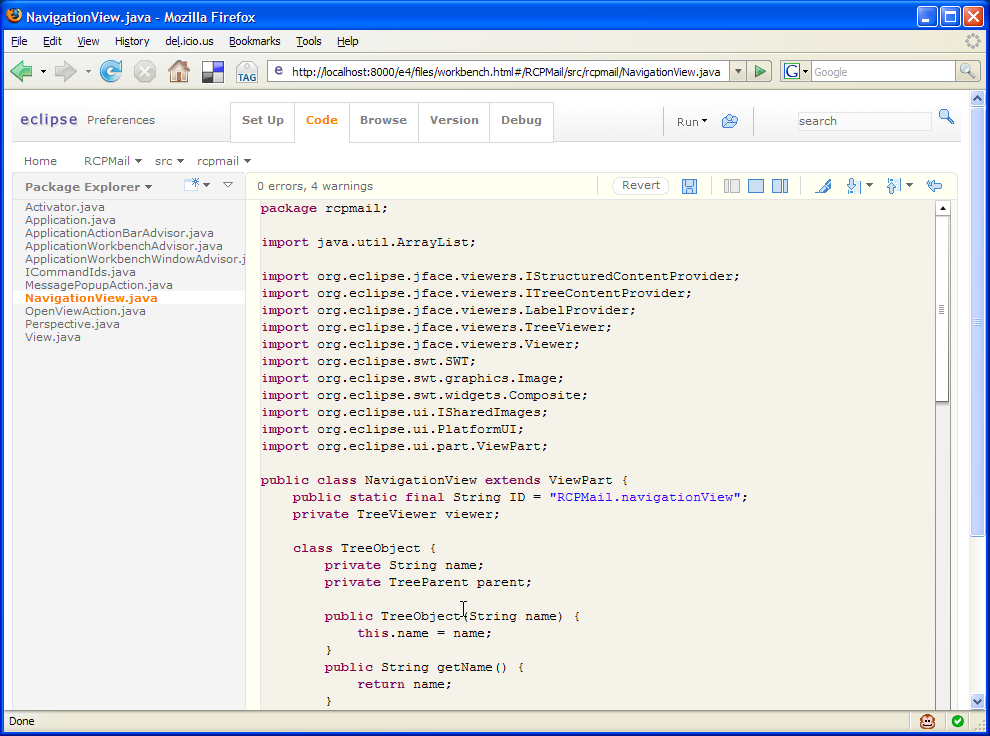
呵呵,是不是很可怕,一个基于web的开发工具?我在Eclipse的Wiki上已经看到这个截图的Demo了,但是还没有时间试用~
此次放出的e4的demo基本上都是swt的调整,比方说可以使用swt来做flex,使用swt来做DOJO~,从这些方面就可以看到Eclipse正在向基金会想想的那样为e4提供一个基于web应用的平台,我想这个平台应该就是RAP了~而且从Demo上看,e4将会大大的涉足到web应用领域中,期待他们为我们带来再一次的惊呼!!!
http://wiki.eclipse.org/E4/Running_the_demos (e4的demo)
还有一个令人振奋的消息,不知道是好事还是坏事-----微软已经决定进入Eclipse基金会,并打算开始资助SWT项目了。
Earlier this week, the teams and developers working on the various projects of Eclipse began an intense debate regarding the next steps in the future of Eclipse, all triggered by the announcement of the incubation project titled 'e4' on the Eclipse committer mailing-list:
The Eclipse Project PMC is announcing a new component, called E4, as part of the Eclipse Project Incubator.
Component Description:
During the Eclipse Project 3.4 release cycle, one of the important plan items was "Create the Eclipse 4.0 Plan". The intent of this work was to identify the most pressing issues that would impact the ongoing success of Eclipse, and come up with a plan to address them. The result was the design of a new platform "e4", which will be the basis for Eclipse 4.0.
The goal of the e4 component is to provide a public venue for the initial explorations that were done, leading up to the e4 design. We expect to continue to work in this area until we have reached consensus on how the full e4 effort will be structured.
The e4 moniker is a reference to Eclipse 4.0, which would be the next major release number for the classic Eclipse distribution and platform projects. The last three major Eclipse releases shared these version number relationships:
Callisto corresponded to the Eclipse platform v3.2,
Europa corresponded to the Eclipse platform v3.3, and the upcoming
Ganymede release corresponds to the Eclipse platform 3.4.
Historically it has been common practice for these plan documents to outline the thematic goals for a given release of what is commonly called the
Eclipse top-level project. Traditionally, the top-level project has encompassed the Eclipse platform, the Java development tools, the Plug-in development tools, and all other components of the commonly referred-to Eclipse 'classic' distribution (the Java and Eclipse Plug-in IDE). This plan format has been used since the 2.1 release of Eclipse, and each prior plan is available
on the Eclipse top-level project site. The e4 announcement is a somewhat different approach in that community involvement is being asked prior to the drafting of any plan.
Initially, the e4 project is little more than a community gathering point; a place to track early changes and ideas in code. The goal of opening this project now has been described by many of those involved as an effort to get community input and ideas at
EclipseCon 2008, and to then begin drafting a plan based on the community input after that point. Kevin McGuire, an Eclipse committer who primarily works on the Platform UI team, described e4 in this way:
We on the platform team care passionately about Eclipse. We know you do too. We want to see it live a long, healthy life. We want it to serve its community as best it can. When we can’t achieve that it makes us sad. It’s clear to us that for Eclipse as a platform to remain long lived, vibrant, and relevant, it must be able to change. But the weight of a zillion plug-ins, projects, and API means the path of least resistance is stagnation, and the effort to effect change given the current constraint system is becoming monumental.
Therefore, two things must happen:
- A new space must be carved out in which experimentation can happen, leading to change.
- New people must get involved, bringing with them their energy, ideas, requirements, knowledge, passion.
These two are intrinsically tied.
That is e4.
While there was some heated discussion over the format and approach of the initial project announcement, the e4 project is likely to become a central test-bed for the various transformations that Eclipse will go through to reach its next major milestone. In the past, major version number increments for Eclipse have represented significant changes for the Eclipse project. The transition to Eclipse 3.0 encompassed the move of Eclipse to the OSGi platform, the announcement and creation of Eclipse rich-client platform, and both a look-and-feel and performance overhaul. The expectation is that Eclipse 4.0 will also represent such a major shift.
InfoQ will continue to cover future Eclipse planning decisions as they become available.
EclipseCON2008 only 1 week left!
又一次开源界的盛会EclipseCON2008就要召开了~据我了解此次盛会将会吸引更多的开源厂商,领袖,开发者参与,其中就有来自微软的Sam Ramji(微软开源的Labs),关于OSGi的讨论依然是重头戏。
虽然Eclipse的RAP的发布也有半年多了,也在开源界引起了不小的反响,但是RAP还是没有得到广泛的应用,来自RAP的主力开发商Innoopract Informationssysteme GmbH的消息,此次EclipseCON2008大会也会给RAP带来更多的利好消息,毕竟关于RAP的讨论被安排在第二场,仅次于第一场OSGi的议题。
Eclipse4.0也被提上了讨论日程,在介绍中提到,Eclipse3.0主要在力推RCP平台,而Eclipse4.0将会将会带来一个全新的用户界面以及新的用户体验,将带领Eclipse进入到WEB应用中,我想在Eclipse4.0的时候RAP应用,将变成Eclipse的主推平台了。
还有很多关于其他项目的讨论,但是我一直关注的VE的消息,好像还是不被人们注意,可见VE基本上已经死亡,而且我认为可以算是Eclipse基金会中比较失败的一个项目了!
预祝此次大会硕果累累,祝Eclipse越走越好!
预言了两天,终于决定在我们的RCP客户端中增加执行JRuby的功能。说是预言其实也没有什么好预言的,JRuby早有耳闻,Ruby也一直在学习。其实要解决的问题只有一个---解决Java实例如何给JRuby,然后有JRuby操作,其实不难,JRbuy官方的WIKI上有一个例子,但是那个例子有太多硬编码的问题,稍稍改造,将硬编码的内容抽取到JRuby中,就好了~
我想说的其实是在RCP中加入JRuby的作用是:
实施人员只需要写脚本就可以随意操作界面上的任意东西;
使产品更进一步达到零二次开发的阶段;
使用JRuby来开发SWT的界面,还是有比较复杂,在熟悉SWT开发和JRuby的情况下画一个比较复杂的界面时候就会非常复杂!这里还是建议使用类似于XSWT等XML界面描述语言,然后配合脚本完成功能。
下面给出一个可以在运行JRuby的SWTShell:
| package com.glnpu.jruby; import java.util.ArrayList;
import java.util.List; import org.eclipse.swt.SWT;
import org.eclipse.swt.events.SelectionAdapter;
import org.eclipse.swt.events.SelectionEvent;
import org.eclipse.swt.widgets.Button;
import org.eclipse.swt.widgets.Display;
import org.eclipse.swt.widgets.Shell;
import org.eclipse.swt.widgets.Text;
import org.jruby.Ruby;
import org.jruby.javasupport.JavaEmbedUtils;
import org.jruby.runtime.builtin.IRubyObject; public class RunJRUBY extends Shell { private RunJRUBY run;
private Text text;
/**
* Launch the application
* @param args
*/
public static void main(String args[]) {
try {
Display display = Display.getDefault();
RunJRUBY shell = new RunJRUBY(display, SWT.SHELL_TRIM);
shell.open();
shell.layout();
while (!shell.isDisposed()) {
if (!display.readAndDispatch())
display.sleep();
}
} catch (Exception e) {
e.printStackTrace();
}
} /**
* Create the shell
* @param display
* @param style
*/
public RunJRUBY(Display display, int style) {
super(display, style);
run = this;
createContents();
} /**
* Create contents of the window
*/
protected void createContents() {
setText("SWT Application");
setSize(500, 375); text = new Text(this, SWT.V_SCROLL | SWT.BORDER | SWT.WRAP | SWT.H_SCROLL);
text.setBounds(0, 0, 492, 312); final Button button = new Button(this, SWT.NONE);
button.addSelectionListener(new SelectionAdapter() {
public void widgetSelected(final SelectionEvent e) {
Ruby runtime = Ruby.getDefaultInstance();
try {
//允许传对象,作为参数给JRuby
IRubyObject rootRubyObject = JavaEmbedUtils.newRuntimeAdapter().eval( runtime, text.getText() );
JavaEmbedUtils.invokeMethod( runtime, rootRubyObject, "run", new Object[] {run}, null );
//不传对象,直接运行JRbuy
//runtime.evalScriptlet(text.getText());
} catch (Exception e1) {
System.err.println(e1.toString());
e1.printStackTrace();
}
}
});
button.setText("button");
button.setBounds(335, 326, 48, 22);
//
} @Override
protected void checkSubclass() {
// Disable the check that prevents subclassing of SWT components
} } |
下面是可以执行的JRuby代码:
| require 'java'
module SWTTest
include_package 'org.eclipse.swt'
include_package 'org.eclipse.swt.layout'
include_package 'org.eclipse.swt.widgets'
include_package 'org.eclipse.swt.events'
end
class TestDialog < SWTTest::Dialog
@shell
@parentShell
def initialize shell
super(shell, SWTTest::SWT::NONE)
@parentShell = shell
open
end
def open
createContents()
@shell.open();
@shell.layout();
end
def createContents
@shell = SWTTest::Shell.new(@parentShell, SWTTest::SWT::DIALOG_TRIM | SWTTest::SWT::APPLICATION_MODAL)
@shell.setSize(500, 375);
@shell.setText("SWT Dialog");
button = SWTTest::Button.new(@shell, SWTTest::SWT::PUSH)
button.setText("Test Button 1")
button.setBounds(147, 116, 48, 22);
end
end
class TestMain
def run shell
TestDialog.new shell
end
end
TestMain.new |
在JRuby代码的最下面有一个TestMain的类,主要是用于调用的~这一点是和其他的写法不同的!
至于它有多强大,就看大家怎么用了~而且java和JRuby是运行在同一个JVM之上的,它可以使用此JVM下的所有对象!
不要用年终考评来订立学习目标,要利用年终考评来记录个人的成长。
要让每一位程序设计师都明白,写出零错误程序是很不容易的,所以应该多花功夫用各种方法做最彻底的测试。
纠正程序设计师以为加除错码会花太多时间的观念,应该训练程序设计师第一个反应是考虑加上除错码是否有道理,第二是考虑加除错码是否符合项目的目标与工作的优先级。
不要让凡事不能的态度阻碍了创新。
不要让程序设计师以为使用者并不在乎软件的质量。
不要给使用者次品,宁愿延期交货,务必追求质量完美。
程序设计师必须经常以使用者的观点来看自己写的程序,程序设计师必须能体会使用者的感受。
在包装盒里的每一件东西,都是产品的一部分。
将程序的可共享性当作优先考虑的目标之一,否则程序设计师将经常做重复的工作。
从您的每件工作中创造最大的资源,不管是利用现有的杠杆,或是创造新的杠杆。
如果进度发生落后,那表示有个地方出错了。您应该找出问题,并加以解决,不要一味要求组员加班,在问题没有解决之前,加班是没有用的。
别误信加班等于增加生产能力,长期的加班只会伤害生产能力,对项目没有帮助。
周末是属于组员私人的时间,不是公司的。公司不应该以打败竞争对手为理由,要求员工周末加班。
强调思考的重要性,而不是长时间工作。
训练开发小组懂得在正常工作时间内掌握好工作的效率,不要让他们超时工作,因为超时工作只是浪费时间的假面具。
与程序设计师共同研拟出一份每日活动的时间表,把无法预期的临时公务变成固定时间处理的事情,并且把程序开发的工作放在最优先的地位,不要让其他次要的事情干扰到写程序。
主管应该把自己视为团队中的一分子,与其他人平等,而不是高高在上。
用看程序的方式找错,是既懒惰又无效率的方法;
| 随时睁大雪亮的眼睛,看看是不是有个悬而未决的问题,一定要有个人(或是由主管自己)来负责研究到底哪里出错,也许这种研究既花时间又无聊,但总比灾难发生之后再来花好几个星期收拾残局要好得多。 |
问了错的问题,而导致错的答案,训练自己问出正确的问题!
| 如果您能很清楚告诉别人,您想要的究竟是什么,这样别人才能给您真正需要的帮助,而不是做一些似是而非的虚工。 |
勉强自己接下不可能完成的任务,实在是以长痛代替短痛的做法,而且长痛的是整个团队,该拒绝的时候绝对不能含糊;
不要为了讨好别人而伤害双方的工作进程,您永远要根据自己的目标,做适当的决策。
必须保护项目不受外界的左右,尤其是当这种操控来自特权人物之手。
副产品对公司或产品都没有策略上的价值,充其量只是一种消费者回馈。
不值得开发的功能就不要做。
软件产品的开发,不能只为了有趣、挑战性,或是够有个性够令人眩目。
遵循标准重于一切,特别是关于使用者界面的部分。
确定您所要求的报告真的值得属下暂停工作,花那么多时间去写。
请注意定期会议的价值,确定它值得每个人放下手上的工作。
召开任何会议之前,请确定本次会议的目的是什么,达成这个目的的条件是什么,然后,务必达到开会的目的。
不要利用进程表来驱使项目的进行,这对小组的士气伤害太大了。
让日程表维持适度的紧迫,但又是可以做到的,好让组员振奋、不松懈,专心致力于项目的推进。
绝对不要草率定出不可能的期限,导致组员为了赶进度而损害产品的质量。
把长期的大项目,分成几个完整而独立的小项目,各小项目必须有一个主题。
为了保持创意的活力和团队士气,必须让每一个小项目都有令人兴奋的结果。
不要让程序设计师的学习停滞不前,要让程序设计师有机会磨练不同领域的技术,培养十八般武艺样样精通的组员。
训练新进程序设计师时,先培养他对整个公司所有项目都有价值的技术,然后才培养本项目独有的技术。
不要舍不得放您最优秀的程序设计师到别的项目去。如果他在您的项目已经没有新的东西可学,为了公司和他个人的前途,您应该把他推荐到别的项目,让他的成长永不间断。
确定每位组员、每两个月都有一项技术上进步。
一发现某处需要改进,就立即采取更正的行动。
首先还是先看一下书评。
下面是来自china-pub的书评:
| 作者详细描述了他在美国领导项目的各种实际的策略方法,教您如何开发高质量的软件,而且绝不延误。本书是为每一位从事研发工作的朋友而写,相信您在读过本书之后,一定急于推荐给您的主管、同事和您的朋友。 |
卓越的领导者从不同的角度看世界。若是公司被大火烧得精光,他非但不为丢饭碗惊慌,反而利用火焰来烧烤一顿大餐。当每个人都摇头离去,卓越的领导者仍有充分的信心保持乐观,对每件事都从正面角度来思考。就因为凡事都看光明面,卓越的领导者并不把失败当失败,反将其当作学习克服障碍的经验。正因如此,卓越的领导者乐意尝试各种稀奇古怪的想法,并从中获得重大的突破,即使不成功,他只把这次经验当成获得信息的方式之一。这种领导人不一定要有经验,而是需要强烈的进取心和明确的理想,能够将理想与他人沟通,鼓舞他人共同追寻理想的能力,再加上一点机会,这就是能将理想实现的卓越领导者。
每当有人完成了一项新的功能或特色,就发个e -mail 给大家。
例如:
| “我已完成Faxmangler 的搜寻与取代功能。Frank”
主管应该看一下结果,然后回一个:
“我检查过F a x m a n g l e r的搜寻与取代,不太顺畅,请再修改。Hubie”
或是:
“很好,继续加油!Hubie”
想想看,如果大家经常收送这类正面的e - m a i l,一定会觉得充满干劲,这和可恨的进度报告多么不同!程序设计师会很乐意看见这类的好消息,当自己送出完成工作的信息时,也会很有成就感;没有人会觉得这是很讨厌的报告。 |
每当进度快要落后了,就到我的办公室私下讨论原因,我们一起开动脑筋寻求解决之道。
例如:
| 当某位程序设计师觉得自己可能要落后了,我会和他谈,研究将来如何避免这种事情。是我们在制定进程时疏漏了某一个重要环节吗?或是时间表定得太乐观了?是不是有个错虫( b u g )在作祟,害得程序很难写或无法测试?不论问题是什么,我们一定想办法解决掉,并且预防它将来再发生。 |
尽可能减少项目中小组彼此间的依赖。
目标越是明确,达成目标的过程就会越有效率。
建立最适当的程序设计优先考虑顺序,并且让所有的程序设计师确实遵守。
| 排出一个优先级表: - 体积大小(size)
- 速度(speed)
- 坚固性(robustness)
- 安全性(safety)
- 可测试性(testability)
- 容易维护(maintainability)
- 简洁(simplicity)
- 再用性(reusability)
- 可移植性(portability)
|
一旦您掌握了这个概念,把它应用在项目上,您可以大声说自己确实是在聪明地工作,而不是辛苦地工。
一发现Bug就立即清除掉,别拖延。
作者给出的提示:
错虫愈晚清除,时间花得愈多。
在开发的过程就立即除虫,可以让您早些学到经验,然后就不会再犯同样的错误;相反地,如果到了项目后期才发现,您可能已经犯过多次同样的错误而不自知。 发现错虫而立即除错是一种缓冲器,提醒那些讲求快速而不够谨慎的程序设计师,以后多加小心。 若能保持没有任何错虫,您就能比较准确估出项目的完成时间。 要求错虫随时发现随时改,等于是在开发过程中引进一个小小的质量管理机制,多方的防微杜渐,保护产品的正确性。 |
学习前人的经验;
好方法要让大家分享;
项目只要有偏差,就需要调整,绝对不可以放任自流!
定期暂停手边的工作,然后往前思考,随时做必要的修正,以避免未来的大障碍。
| 有什么事情是我今天能做,而且可以帮助项目在未来几个月内顺利进行的? |
总结本书中的54条法则得到:
- 建议一只和谐的团队;
- 给团队一个明确的目标,让大家都知道这个目标并把它印入脑海;
- 让品保人员明白自己不仅仅是为了Bug而加入团队的;
- 建立合适的检查点和里程碑,并利用检查点和里程碑检验团队的健康度;
- 不要害怕延误,要不断的修正方法但不要过度的修正目标;
- 努力让团队中成员产生共鸣;
希望大家共勉!
法则二十七:
Be like the doctors 用医生的方法
当病人已经药石罔效时,医生通常会对病情有所保留,避免病人太过悲观或恐惧,并且尽量鼓励病人保持希望,最好能让病人有个期望完成的目标。
医生绝对不会斩钉截铁地断言什么医疗行为一定会有什么样的结果,反而是以
一种自在且充满信心的口吻说:“试试看吧,一切都还没有确定呢。
另外一件应该向医生学习的事情是,即使是再小再简单的医疗行为,都带着几分风险,所以医生会说:“当然,任何情况都是有可能的,治愈率再高我都不能跟你说百分之百没问题。
法则二十八:
Remember the triangle:features, resources, times 软件开发金三角:特色、资源和时间
作为一位软件开发的领导人,你得集中注意力在三件事情:资源(人和钱)、特色(产品与其品质)和时间。这三件事是软件开发的核心,其他的都是外围。
资源、特色和时间是三角形的三个边,任何一边的变化,都会影响到另外一边或两边。所以如果时间落后了,去看你的三角形,看看对特色和资源的影响;当有人谈到可以增加什么功能特色时,你得立刻谈起时间和资源,以显得你思虑周
详反应敏捷。所以,管理者的第一要务是把这个三角形放在心里,随时利用这个模式来思考问题,你会发现答案都在这个三角形内。
法则二十九:
Don't know what you don't know 不懂别装懂
法则三十:
Don't go dark 建立适当的检查点
法则三十一:
Beware of a guy in a room 留心没有检查点的组员
法则三十二:
If you build it, it will ship 软件要经常建构,就能顺利推出
法则三十三:
Get a known state and stay there 掌握实际情况
法则三十四:
Use ZD milestones 零缺点里程碑
零缺点不代表软件中没有错虫,也不表示没有遗漏的功能,而是指团队的成品达到了事先规划的品质水准,也经过测试验证,就是零缺点里程碑。
法则三十五:
Nobody reaches the ZD milestone until everybody does 所有组员一起到达零缺点里程碑
法则三十六:
Every milestone deserves a no-blame postmortem 完成每个里程碑后,心平气和地检讨
法则三十七:
Stick to both the letter and the spirit of the milestones 把握里程碑的实质意义与精神
法则三十八:
Get a handle on "normal" 培养正常的团队运作
法则三十九:
A handful of milestones is a handful 里程碑不宜太多,才好掌握
法则四十:
Every little milestone has a meaning (story) all its own 每一个里程碑应有专属的宗旨
法则四十一:
Look for the natural milestones 寻找自然出现的里程碑
以下是六种自然出现的里程碑:
1. 产品设计趋于稳定。
2. 中间产品被明确定义。
3. 团队真正了解要花多少时间和努力才能完成目标(通常这会发生很多次,而且多半是进度落后的时候)。
4. 产品设计被删减,或是资源增加,或是进度延误,
或是三者同时发生。
5. 开发活动停止。
6. 产品进入除错或稳定阶段。
法则四十二:
When you slip, don't fall 如果滑了一跤,别就此倒地不起
- 进度落后与道德无关,请切记!
- 不要隐瞒事实。
- 化阻力为助力,利用进度落后来激发效率。
进度落后不是问题,被进度落后吓倒才是问题。进度落后并不代表产品的难度太高而无法开发。但是如果进度已经落后却未被察觉,那表示组员们不思考、不观察、不讨论,此时组织可说是濒临瓦解了。
善用你的迟延,这是最能看出你领导能力的时候,此时也是组员最脆弱也最需要你的时候,在这个时候组员最能把你的话听进去,此时组员的学习能力最强。如果你在办公室内激动得大喊大叫,指天骂地,那就错失了赢得组员的心的大好机会。你必须说:“O K,进度落后了,让我们来看看问题出在那里?⋯⋯今天下午五点在会议室,我们要检讨每一个细节,问题一定要设法解决!”当组员了解到你不是企图卸责或算帐,而是真诚地想解决问题,就会乐意把一切开诚布公地摊开来谈,大家一起研究问题,从各种角度去设法克服问题。“进度落后”反而变成大家宝贵的成长经验。
法则四十三:
Don't trade a bad date for an equally bad date 不要因为进度落后而更改最后期限
进度落后的程度是与计划的不确定性成正比。
法则四十四:
After a slip, hit the next milestone, no matter what延误了这个里程碑,就一定要如期到达下一个里程碑
我们必须明白,每一次的延误,就是你和团队信心的一次受挫,所以,延误这个里程碑时,最好的补救办法就是无论如何绝不延误下一个里程碑。团队必须挽回对自己的信心和对理想的承诺;因此,下一个任务必须准时完成的意义更重大,团队需要重建信心。
法则四十五:
A good slip is a net positive 把延误当作宝贵的学习机会
法则四十六:
See the forest 见树亦见林
如果本项目有六个模块,各有9 0 %的部分已经完成,那么你已经完成了5 4 %。每个模块完成了九成,听起来是个挺不错的成绩,但不能当成整个项目完成了百分之九十,它们之间不是相加的关系。你必须“见树亦见林”。如果任何一个模块完成比率是零,那么整个项目的完成率也是零。
法则四十七:
The world changes, so should you 世界在变,所以你也得跟着改变
虽然你想做些改变,你未必有勇气实行。
伟大的软件必定只有一个中心思想,至于品质能够实现到什么程度,依赖领导者能否带领团队融合无数个小而重要的改变。如果你能在混乱中辨识出对项目最有意义的改变,并且引导团队去适应它,将它融入团队的精神中,将来就会在产品中表现出这项改变,呈现在顾客眼前。
法则四十八:
Violate at least one sacred cow 关怀多于要求
法则四十九:
Beta is not the time to change Beta测试版不是修改功能的时候
法则五十:
The Beta is for spin development Beta测试是暖身活动
法则五十一:
Triage ruthlessly 急救术
法则五十二:
Don't shake the Jell-0 小心保持软件的稳定
法则五十三:
Compete with the superior story 伟大的软件应该有一个伟大的故事
法则五十四:
Create a winning image 建立赢家形象
我讨论的进度条主要是JFace的进度条,RCP已经提供了完善的Job组件,为什么还要用JFace的进度条呢?原因是我要在登陆界面上做进度处理,也就是使用Eclipse3.3提供的AbstractSplashHandler特性,可以将原有的启动画面替换成为一个登陆界面,启动这个登陆界面时,Eclipse的Platform此时还没有启动,所以不能使用RCP本身的Job组件了。
由于是一个检测服务器是否联通的测试,所以并不知道测试的真实时间,所以就是要使用“傻瓜进度条”了,也就是反复走的进度条陈刚的代码如下:
| button.addSelectionListener(new SelectionAdapter() {
private boolean stopFlag;// 停止标志 private void go() {
for (int i = 0; i < 10; i++) {// 循环10次,每次间隔一秒
System.out.println("第" + (i + 1) + "个任务执行完毕");
if (stopFlag) {// 监控是否要让停止后台任务
System.out.println("被中断了");
return;
}
try {
Thread.sleep(1000);
} catch (Throwable t) {}
}
stopFlag = true;// 执行完毕后把标志位设为停止,好通知给进度框
System.out.println("全部任务执行完毕");
} public void widgetSelected(SelectionEvent e) {
stopFlag = false;// 每次都设初值为false
new Thread() {// 把后台任务放到一个新开线程里执行
public void run() {
go();
}
}.start();
showProgressDialog();// 打开一个进度框
} private void showProgressDialog() {
IRunnableWithProgress runnable = new IRunnableWithProgress() {
public void run(IProgressMonitor monitor) {
monitor.beginTask("正在执行中......", 30);
int i = 0;
while (true) {
// 监听是否单击了进度框的“取消”按钮,stopFlag则是监听后台任务是否停止
if (monitor.isCanceled() || stopFlag) {
stopFlag = true; // 单击了“取消”按钮要设标志位为停止,好通知后台任务中断执行
break;// 中断处理
}
// i到30后清零。并将进度条重新来过
if ((++i) == 30) {
i = 0;
monitor.beginTask("正在执行中......", 30);
}
// 进度条每前进一步体息一会,不用太长或太短,时间可任意设。
try {
Thread.sleep(99);
} catch (Throwable t) {}
monitor.worked(1);// 进度条前进一步
}
monitor.done();// 进度条前进到完成
}
};
try {
new ProgressMonitorDialog(s).run(true, true, runnable);
} catch (Exception e) {
e.printStackTrace();
}
}
}); |
主要是使用两个线程交替使用,第一个线程处理业务,第二个线程监控第一个线程查看它是否结束,如果结束或者被点击cancele则停止进度条的进程,如果一直没有关闭的指令,则反复开始---累加---结束---开始---累加---结束。
我们几乎是把陈刚的代码原原本本的抄袭了一下,仅仅是替换了go()中的内容,但是发现一个问题
new ProgressMonitorDialog(s).run(true, true, runnable);
使用此句的话,JFace的线程永远不会启动;
替换为
new ProgressMonitorDialog(s).run(false, true, runnable);
使用此句的话,JFace的线程可以启动,运行正常,但是cancele不能响应,UI界面完全卡死!
第一个参数的名字fork~乍看去,什么意思都没有,但是看看API才发现内藏很大的玄机,如果为true则此线程为一个非UI线程,大家知道非UI线程是不会阻塞UI的;如果为false则此线程为一个UI线程,大家也知道UI线程如果使用不当很容易阻塞UI的。
关键的问题是我们和陈刚的代码几乎一摸一样他的进度条就启动,我的进度条就不启动!为什么?(这点至今不明白!)
详查API发现如果fork为false的时候还是另有洞天的:
| This implementation of IRunnableContext#run(boolean, boolean, IRunnableWithProgress) runs the given IRunnableWithProgress using the progress monitor for this progress dialog and blocks until the runnable has been run, regardless of the value of fork. The dialog is opened before the runnable is run, and closed after it completes. It is recommended that fork is set to true in most cases. If fork is set to false, the runnable will run in the UI thread and it is the runnable's responsibility to call Display.readAndDispatch() to ensure UI responsiveness. |
API中说的很明白,如果fork为false时需要在线程中调用Display.readAndDispatch()方法,以避免UI被阻塞!
大家如果在JFace的开发中如果使用了进度条,发现UI被阻塞的话,就想想我哦!!!呵呵只用在进程中调用一下Display.readAndDispatch()就解决了!
设计
软件的设计─每一位团队成员都必须参与─这表示团队整体对功能需求的了解程度。
软件设计的第一要诀是:将全团队中最好的想法组织起来,去满足顾客内心最深处的需要。(带领团队做案例研讨,带领大家思考如何解决一切的疑难,让每一件事都在该做的时候做好。)
法则十九:
Go for greatness 追求卓越
法则二十:
State your theme 设定主题
重点是产品的功能特色不能像是一袋子随便抓过来的东西,应该把与主题无关的东西都删掉,而且你的目标也必须符合统一性(unity of purpose)才行,这一点是与主题互为一体的两面。将资金投注在这个目标上,让所有的人都完全明白这个目标,并且为这个目标努力,做得到这些的话,你的产品就会完全包含这个目标。
法则二十一:
Minimize dependencies 不要倚赖不确定的事
法则二十二:
Propitiate the gods 平息顾客的愠怒
法则二十三:
Portability is for canoes. 软件的可移植性
法则二十四:
Design time at design time 在设计时将时间因素考虑在内
开发
法则二十五:
Don't accept dictation 拒绝不合理的命令
千万不要一味的唯命是从,在必要的时候拒绝!敢于拒绝!
如果在上位者不让真正执行任务的人来估计所需的进度,那就是专制。
开发进度表应该由下而上来拟定,每一个人负责自己的工作,也负责设定它的时间表,负责准时完成工作。责任和充分授权是一体的两面,二者兼备才能拟出合理的开发计划。一种非常有趣的进度估算方法!
法则二十六:
Now go play 把工作当作游戏吧
法则六:
Watch the ratio 注意人员的组成比例
“基本原则是开发人员和品保人员的比例不超过2:1”这个是作者为我们提出的建议,而在SUN这个比例被修改为1:1,甚至是1:2,可见在项目中品保人员比开发人员更加重要!
“其实真正负责软件如期完成的是品保人员。当进度落后时,我们第一个要看的是品保人员:人数够不够?有没有充分授权?有没有确实参与设计?进度上能不能跟开发人员配合良好?能不能一有问题出现就立刻提出警告?品保人员和开发人员的理念一致吗?是不是跟开发人员过度亲密而放水?”
“一个健全的软件开发团队一定要符合上述的人数比例原则,平均每一位品保人员所支援的开发人员不超过两位。”能做到吗?至少在我们公司这个,基本上,很难!
法则七:
Use feature teams 运用特色监督小组
融入任务(I d e n t i t y) 充分的授权和责任感,使人具有控制权和影响力,愈能使自己与任务融为一体。
建立共识(C o n s e n s u s) 共识是特色监督小组的气氛。
地位平等(B a l a n c e) 由于特色监督小组的每一位成员都是不同的背景、专长,不同的工作角色和不同的观念,没有谁比谁优越的情形,所以每个人的地位都是平等的。
权威是来自学识,而非职位。
在一个理想的项目中,基本上有两种角色存在:创造者(c r e a t o r)和推动者(f ac i l i t a t o r)。创造者是一些专业人员,例如开发程序、行销、软件品保和文件撰写;而推动者则负责凝聚团队共识和维持最佳的开发环境。
法则八:
Use program managers 项目经理的职责
项目经理是软件开发团队的一份子,他的职责是:
• 领导大家定义出一个成功的产品。
• 引导大家对产品注入深切的期望和信念。
• 带领团队将理想实现,变成可预见的产品诞生。
项目经理应该要有技术的背景,而且必须在两种层面非常专精:一是对开发产品所使用的技术很熟悉,二是拥有建构软件的技术领导能力。项目经理必须精于哄骗、驱策、鼓励、要求他的团队做出最好的软件和表现出最好的工作效能,他清楚知道软件制作过程中每一项的投入和产出细节,他必须懂得用最好的方式定义产品和维持健全的技术。最后,项目经理还必须是团队的发言人,面对媒体、客户、以及整个组织。
项目经理是软件开发的核心人物。
你想了解这个团队?看看他们的软件就知道了,反之亦然。
团队精神:
1. 一群人同心协力,集合大家的脑力,共同创造一项智能财产。
2. 个人的创造力是一种神奇的东西,源自于潜在的人类心智潜能,它被情感丰富,而被技术束缚。
3. 一群人全心全意地贡献自己的创造力,结合成巨大的力量。结合的创造力由于这一群人的互动关系、彼此激荡,而更加复杂。
4. 这种复杂的情况之下,领导变成像是人际互动的交响乐指挥,辅助并疏导各种微妙的人际沟通。
5. 在团体中的沟通和互动是正确而健康时,能够使这一群人的力量完全结合,会产生相加相乘的效果,抵销互斥。沟通顺畅能使思想在团队中充分交流传达。
6. 团队工作的品质比时程更重要,而作品的伟大是需要对“团队精神”特别加强,才能达成。“团队精神”可视为个别成员精神的平均值,而个人的精神( p s y c h e)则是使他能感觉、能思考、能推论的内在力量。
7. 倘若忽视了“团队精神”,则只会有平庸的成果。
法则九:
Be an authority , not an authority figure 要权威,不要霸权
权威的目的是让每一位团队成员都有自己的专业权威,和团队的专业自信,这才是管理者真正的权威。
竞争
创新无处不在,绝对不可以停滞不前!
如果你无法时时掌握时代的脉搏,如果你怠于响应周围迅速而剧烈的变化,特别是竞争者的行动,如果你不能持续地创新原有的技术,永远保持领先,那么别人马上就会趁虚而入,取代你而成为市场上的优胜者,掳获顾客的心和他们的荷包。
确定了你的情况之后,应该先考虑采取标准步法。
标准步法:
法则十:
Alone? A market without a competitor ain't 没有竞争对手?未必是好事
(注:任何人都有敌人!)
法则十一:
Dead beat? Break out of a feature shoot-out 竞争者紧追不舍?推出创新的功能特色(注:想法设法的压制你的敌人!)
法则十二:
Behind? Ship more often with new stuffs 落后竞争对手?加大投入,更快推出新版本(注:沉下心来,夺回领地!)
法则十三:
Ahead? Don't ever look back 领先竞争对手?不要回头(注:挑战自己,战胜自己!)
准时地、经常地推出新产品是软件开发产业中最大的金科玉律。
法则十四:
Take the Oxygen along 保持新鲜
快速变迁的节奏是信息社会的常态,你必须快速前进,否则就落伍了。
顾客
想方设法的让顾客迷恋上你的产品!
法则十五:
Enrapture the customer 给顾客惊喜
顾客最低的希望是你能够理解他所感受到的痛苦经验。
法则十六:
Find the sweet spot 寻找靶心
法则十七:
It's a relationship, not a sale 与顾客建立关系,而不是卖产品
法则十八:
Cycle rapidly 加速产品推出的周期
带过项目的朋友一定都看过或者听说过这本书吧,其实这本书是来自“微软管理经典著作”之中的一本,其他两本是《微软项目:求生法则》、《微软研发:制胜策略》这三本书我会精读细读的(虽然我不带项目~),从中取其精华写成笔记与大家分享。
首先看一下《微软团队:成功秘诀》分别在china-pub和豆瓣上的书评把:
china-pub
| 本书叙述了吉姆.麦卡锡带领微软Visual C++开发团队的故事,告诉读者如何构建一个优秀的软件开发团队,如何在一段时间内成功地开发一个软件,而且此后不断地完成新版,并一直受到市场的肯定。他将自己思考的结晶和种种惨痛的教训归纳出54条言简意赅的法则,从产品设计、程序开发到成功的营销,无所不包,在微软,本书是每一位项目经理的必读圣经。 |
豆瓣
|
作为一位经验丰富的老手,作者将自己思考的结晶和种种惨痛的教训归纳出54条言简意赅的法则,从产品设计、程序开发与构建、准时推出产品,到成功的营销,无所不包。您将会发现本书就像软件开发本身一样迷人有趣。本书是为软件设计者、开发人员、营销人员、技术主管,以及所有亟欲一窥软件开发奥秘的人士所写的。
|
法则一:
Establish a shared vision 建立一个共同的目标
在团队总建立共同的目标是非常重要的,团队中的成员只有当有了共同的目标之后才能有归属感,才能对憧憬中的产品产生荣誉感,才能在管理中更好的调动各个成员的积极性,从而将团队推向正轨,让产品如期发布!
“团队中每一位成员都必须非常清楚我们要做什么、成品会是什么模样、基本的产品策略是什么、什么时候必须完成。凡是与共同目标相冲突的看法都必须转化成一致,而不是把它消音。和谐的共识是绝对必要的,否则软件不可能做得好,很多事会复杂化而难以收拾。”
所谓目标是共同的希望,对未来的事情所描绘出来的景象,比方说作者在给VC++项目组开会时候的描述“Visual C++是最伟大、最值得骄傲的产品,你们难道不这么认为吗?我知道我们可以如期完成它,而且用它来给对手一个迎头痛击,不只我一个人这么想吧?我们将创造微软的明日世界,我们会大有作为的,不是吗?”其实他已经给VC++了一个很好的目标,他让成员们觉得,我们都是在伟大事情,一但在团队中形成了荣誉感,你会发现你的团队将会空前的团结!
法则二:
Get their heads into the game 使大家主动投入
“如果每个人都在认真思考如何使团队更有效率,这个团队自然就比较容易表现出高效率,反之亦然。”让每一个人都参与进来,需要管理者能够调动每一个人的积极性~让大家都主动的去思考问题,为产品主动的出谋划策。
需要管理者去倾听每一个愿意说的成员的言论或者主意,需要判断的这些言论或者主意的能力,面对好的想法,也许它不切实际,但是也不要一棒子打死,而是要进行诱导,让他下次可以提出更好的更切实际的想法来。
鼓励创新而非抹杀它!
为什么组员会怠于思考或是不敢说出想法?
• 因为他们认为没有人会重视他的想法。
• 因为他们认为该由别人告诉他该做什么事。
• 因为他们认为这样做没有什么好处,只会使老板皱眉头罢了。
• 管理者只管发号施令而已。
法则三:
Create a multi-release technologyplan 建立开发多版本的技术规划
授权共决,其实就是全民参与,无论是对待成员的新想法还是对待项目的技术规范时都使用全民参与。(这样好吗?安全吗?)
法则四:
Don't flip the bozo bit 别做笨蛋
软件产业中最重要的事情是“让大家思考!”。
“在微软我们把这种人叫作b o z o,意思是笨蛋。永远没有人会注意笨蛋的所作所为,即使他真的有贡献,他也不会有任何份量。笨蛋当然是不可信任的,你对笨蛋惟一的期望是但愿他不要搞砸事情。
在我的部门里,这种德行是不允许的。我要每一个人都全心全力地投入,每个人都得有贡献,每一个人都可以侃侃而谈我们的产品─如何在市场上竞争、何时出新版本等等,而且每个人对产品的看法都一致,不会众说纷云。
将自己的意见强行加诸于他人者,其实是笨蛋。”
需要随时防范组员出现“江郎才尽”病!
法则五:
Use scouts 刺探敌情
必须有一个人或者有一些人去观察未来的发展趋势,预言新技术。这个角色是非常重要的!
“这次他们学乖了,事先派了两位最优秀的组员担任“侦察员”,做了一次彻底的技术调查和完善的规划,终于在危机爆发之前将之化解。”
““侦察员”就是为科技的改变而准备的,如果你决定永远停着不动,那你不需要“侦察员”。”软件公司中如果没有这个角色还叫软件公司吗?
VE在Eclipse的众多项目中沉寂了一年的时间,现在终于有动作了!至少是计划已经放出了~真是让人欣慰啊!
我每天都要看Eclipse的各大新闻组,VE虽然说是沉寂了一年,但是新闻组里面还是比较热闹的,每天都有一两篇问题更新。
Visual Editor Project 2007-2008 Roadmap
Project focus
In general, the main theme is to get the project back on track and in good shape.
From a goals perspective, we have the following alternatives:
-
- focus exclusively on Swing, SWT and RCP and do it extremely well; deprecate everything else.
- continue to provide a more generic editing framework, and supporting visual editing of non-java target such as GWT, HTML, Groovy, XForms, Web pages, EXSWT, etc.
My head tells me to go with (1) and my heart with (2).
Release Timeline
- VE 1.3.0 Milestone 1:
- Q1 2008, have a stable working VE based on Europa
- VE 1.3.0 Milestone 2: Q2 2008
- Investigate performance enhancements (single VM)
- Fix major bugs
- Add support for non Java visual target (Groovy contribution, XForms)
- VE 1.3.0 Release: Q2 2008
- VE 1.3.1 : maintenance for 1.3.0 Q3 2008
- VE 1.3.2 : maintenance for 1.3.0 Q4 2008
- VE 1.4.0 Milestone 1: Q2 2008
- Work on Ganymede compatibility
- VE 1.4.0 Milestone 2: Q3 2008
- VE 1.4.0 Milestone 3: Q3 2008
- VE 1.4.0 Release: Q4 2008
Retrieved from "http://wiki.eclipse.org/VE/Roadmap"
我最期待的还是VE对于生成XML文件的扩展~加油啊~VE!
有朋友在blog中给我留言,说找到RAP的官方地址,现在我就在此公布一下,有兴趣的朋友可以去看看Demo。
官方首页
http://www.eclipse.org/rap/
Demo地址
http://www.eclipse.org/rap/demos.php 此页面提供3个Demo,其中的SWT的官方Demo的RAP实现在RAP的发行包中,自己下载下来,自己RUN起来就能看到了;
RAP开发领头公司
Innoopract 从开发人员列表和官方网站的支持力度上,此公司最强!(好像是家德国公司!) 1&1 CAS
I impleted my File upload/download system with rap internal Browser + servlet.
upload dialog:
public class FileUploadDialog extends TitleAreaDialog {
	private Browser browser;
	public FileUploadDialog(Shell parentShell) {
		super(parentShell);
	}
	/**
	 * Create contents of the dialog
	 * @param parent
	 */
	@Override
	protected Control createDialogArea(Composite parent) {
		Composite area = (Composite) super.createDialogArea(parent);
		Composite container = new Composite(area, SWT.NONE);
		container.setLayout(new FillLayout());
		container.setLayoutData(new GridData(GridData.FILL_BOTH));
browser = new Browser(container, SWT.NONE);
String url = "http://"+RWT.getRequest().getServerName()+":"+RWT.getRequest().getServerPort()+"/web/fileupload.jsp";
String html = "<?xml version=\"1.0\" encoding=\"utf-8\" ?><html><head><title>upload file</title></head><body>"+
"<form action=\""+url+"\" enctype=\"MULTIPART/FORM-DATA\" method=\"post\"><br />File Name:</br><input type=\"file\""+
" name=\"filename\"/><br><input type=\"submit\" value=\"upload\"/></form></body></html> ";
browser.setText(html);
setMessage("select a local file");
return area;
}
	/**
	 * Return the initial size of the dialog
	 */
	@Override
	protected Point getInitialSize() {
		return new Point(382, 280);
	}
	protected void configureShell(Shell newShell) {
		super.configureShell(newShell);
		newShell.setText("upload file");
	}
}
file upload sevlet:
public class FileUploadServlet extends HttpServlet {
	private static final long serialVersionUID = -7245361228773015964L;
	private String uploadPath = "/upload/"; // server file repository
	private String tempPath = "/upload/tmp/"; //temp file folder
public void doPost(HttpServletRequest request, HttpServletResponse response)
throws IOException, ServletException {
try {
DiskFileUpload fu = new DiskFileUpload();
// max file size fu.setSizeMax(-1);
// buffer size
fu.setSizeThreshold(4096);
// temp path
fu.setRepositoryPath(tempPath);
			// get all uploa file
			List fileItems = fu.parseRequest(request);
			Iterator i = fileItems.iterator();
			while (i.hasNext()) {
				FileItem fi = (FileItem) i.next();
				// get the upload file name
				String fileName = fi.getName();
				String sep = System.getProperty("file.separator");
				int index = fileName.lastIndexOf(sep);
				if(index >-1){
					fileName = fileName.substring(fileName.lastIndexOf(sep));
				}
				fi.write(new File(uploadPath + fileName));
				response.getWriter().println(fileName+"upload success");
			}
		} catch (Exception e) {
		 //do something?
			e.printStackTrace();
		}
	}
	public void init() throws ServletException {
		if (!new File(uploadPath).isDirectory())
			new File(uploadPath).mkdirs();
		if (!new File(tempPath).isDirectory())
			new File(tempPath).mkdirs();
	}
}
registe servlet:
public class HttpServiceTracker extends ServiceTracker {
       public HttpServiceTracker(BundleContext context) {
           super(context, HttpService.class.getName(), null);
       }
public Object addingService(ServiceReference reference) {
final HttpService httpService = (HttpService) context
.getService(reference);
try {
//regist file upload servlet
HttpContext commonContext = new BundleEntryHttpContext(context
.getBundle(), fileFolder);
httpService.registerResources(fileContext, "/", commonContext);
Servlet adaptedJspServlet = new ContextPathServletAdaptor(
new FileUploadServlet(),
fileContext);
httpService.registerServlet(fileContext + "/fileupload.file",
adaptedJspServlet, null, commonContext);
           } catch (Exception e) {
               e.printStackTrace();
           }
           return httpService;
       }
public void removedService(ServiceReference reference, Object service) {
final HttpService httpService = (HttpService) service;
httpService.unregister(fileContext);
httpService.unregister(fileContext + "/fileupload.jsp");
super.removedService(reference, service);
}
}
start servlet:
  add these code to the bundle start up method.
 	public void start(BundleContext context) throws Exception {
		super.start(context);
		plugin = this;
       httpServiceTracker = new HttpServiceTracker(context);
       httpServiceTracker.open();
       System.out.println("IM resource servlet started...");
	}
这个实现是在RAP中使用Browser+servlet实现的文件上传功能;
其实在RAP的cvs上已经放出了org.eclipse.rwt.widgets.upload,专用于上传的组件,测试了一下,效果还不错,有进度条提示;不过在IE6下,有点难看了,在FF3下不能使用;
Eclipse-RAP项目真的可以算是Eclipse-RCP开发者的福音,一套软件的开发成本,两套软件的特性~对于正在寻求C/S向B/S转移的公司来说,可以算是一个福音了。
公司最近正在做调整,打算将原有7大软件产品,在B/S上重新打造一番~前景很不错,市场价值非常大~我们所关心的并不是市场价值究竟有多大(有上面的大领导撑着,我们不用担心),我们关心的是,如何打破原有的B/S开发模式,让程序员们能高速的开发出需要系统,而且这些系统又能遵守共同的特点,原有的B/S开发模式只可能让程序员原来越不OO了,很有可能陷入JS的陷阱中。
我们把目光转移到了GWT上,他确实可以让JAVA开发人员只专注的写JAVA就可以了,一切都是它的事情了~但是最麻烦的事情,就是速度问题,编译的时候很慢,而且还提出了模块的概念,不好理解,放弃它的另一个最重要的原因是它并不是一个框架,只是一个工具集而已。
然后,我们发现了RAP-Rich Ajax Platform,从它的首页上并看不出什么特别,但是深入Demo,才真的发现别有洞天啊~原来一切来的都是那么简单~~~~它其实就是依照与Eclipse-RCP的基础运行时做了一套自己的基础运行时RAP,换句话说就是原本开发好的RCP项目,可以在仅增加一个扩展点的基础上,平滑的过度到RAP上,立即从一个C/S程序变成了一个B/S程序~真的很令人震惊!今天早上和同事配合,将我们几个月前做的4个插件,用了一早上的时间迁移到RAP上,几乎原有功能完全保留!
如果你也是用RCP做开发的话,建议你可以试试RAP,它会给你一想不到的体验!
需要注意的是,RAP是去年10月份才正式发布的1.0版本,所以还是有很多东西是没有,还是需要一段时间的等待,特别是在1.1发布后,几乎支持所有SWT的特性了~
为了深入的讨论RAP,我已经开放了Eclipse-RAP分类,慢慢会有更多的关于RAP的文章出现,努力丰富一下RAP的中文文档!
2007年10月份eclipse放出RAP-Rich Ajax Platform,这么长的时间过去,它的影响力还是不够~为什么,因为它的文档太少,资源太少,知道的人更少~
昨天,把玩了一下RAP,被它的思想震惊了~它是把Eclipse-RCP的思想带入了B/S的开发,它提供的不仅仅是Ajax的内容,更多的是提供了一个框架,一个可以同Eclipse-RCP框架互换的框架~
中规中矩开发好的RCP程序,可以在几乎不用改动任何代码的基础上增加2项配置,一个类以及一个底层框架,就可以完全过度到B/S上~
我们的项目,用了半个小时改造完成的~
RCP+RAP也许是一个新的方向~
摘要: 上次贴了几张图片出来显摆,这次彻底公布代码~大家看看原理就好,有兴趣的朋友可以和我联系,把SWT里面的控件都封装一下,做一套验证框架出来~
1package com.glnpu.dmp.controls;
2
3import org.eclipse.swt.SWT;
4imp... 阅读全文
为什么要打造仿淘宝注册的Text呢,不为什么,因为它好看!呵呵,这个不算理由,其实最重要的原因是因为最近在开发过程中,发现验证是个最麻烦的事情,虽然Eclipse和JFace为我们已经提供了比较好用的“高级”对话框和向导页了,对于简单的应用,他们两个用起来是非常简单,如果要验证的东西非常多,而且还有交叉验证(我自己起的名字,就是填了A就不再验证BCD的错在了,或者填了C就要验证AD存在)处理起来了就麻烦了,前两天以为新同事接手一端代码,发现里面竟然有20+个监听器,验证逻辑复杂的要死~为了解决这个问题。再结合B/S的开发经验,我认为,完全没有必要当用户把所有的必填项全都填了以后再把OK按键打开,不然永远置灰~大家做过的哪个B/S程序是这样的?不都是他爱填填,不爱填拉到,点确定的时候我告诉,或者是,我以上来就告诉你哪些必填,不填的,点击确定继续提醒!
OK,闲话少说,先看看淘宝的注册吧~我一直认为淘宝的注册界面是国内客户体验度最好的~

首先界面一打开就是这样的提示,在input框的左下脚又一个蓝色的小箭头,代表此文本框必填;

当获得焦点以后改变,后面的提示框高亮,着重提醒用户;

如果没有填,必填项,提交的时候的提示;

填写正确的提示;
OK,分析了上面的四种状态,那么我们来确定我们需要做成什么样子的~首先,我们需要;

必填提醒状态

填写正确提醒状态

错误填写提醒状态
还有就是鼠标移动到三种图标上的浮动框详细说明,因为我们不可能像淘宝那样,一个控件占那么大位置,用户界面还需要放更多的东西。
大致的任务交代清楚了,下一次再写详细的实现过程。
Sun将一个新的开源项目——PDF Renderer——作为SwingLabs的一部分于近日发布.
Sun 对该项目的描述是:“一个100%用Java编写的PDF渲染器和查看器”.PDF Renderer可以用来将可移植文档格式(Portable Document Format,PDF)从文件中解析出来,并以AWT图像或任何Graphics2D的实现形式在panel中显示.该项目与SwingLabs的其他部 分一样,都是以LGPL许可发布的.
在项目首页上列出了一些潜在的用途:
在用户自己的应用中查看PDF.
提供PDF文件的打印预览.
将PDF绘制为PNG图像,用以在服务器端的Web应用中显示.
将PDF合并到3D场景中.
在PDF之上绘图,并可以在网络查看器中进行标注.


虽然这个项目是在2007年12月被开源的,但是它却有一段颇久的历史:
在2003年,Sun实验室的一群研究员开发出了PDF Renderer,当时它还是一款视频协作工具,Sun(TM)Labs Meeting Suite的一部分.这个工具在Sun内部的分布式会议中得到了广泛应用.Meeting Suite的设计初衷是方便人们使用OpenOffice创建的文稿做发言.
现在,这个公众项目还只是处于早期阶段,所以文档资源还很凌乱,也没有很大的用户社区.但是,Joshua Marinacci希望通过把这个项目开源,把那些可能为项目贡献力量的开发者们凝聚成一个社区:
虽然最原始的代码是来自Sun的,但我们希望能获得社区的高度参与.为保证这一点,我们聘请了Elluminate的Tom Oke来管理这个项目.他将担任项目所有者和首席架构师的角色.他很快掌握了现有的代码,并期待着与其他的参与者进行讨论.
我们最开始的目标是将PDF输出成OpenOffice格式,所以有些特性被遗漏掉了.它实现了绝大多数的PDF 1.4规范,但是少了透明度(transparency),填充表单(fill-in forms)和某些特定的字体编码.我们希望有兴趣的开发者可以帮助我们完成这些特性.
另外,Josh还将这个项目与其他PDF库进行了比较:JPedal使用了GPL许可,所以有些应用根本就没法用它.我们认为对于类似这样的库而言,使用LGPL是更好的选择.iText不是一个查看器/渲染器.它可以生成PDF文档,但并不能查看文档.这让iText和SwingLabs PDF Renderer变成了优秀的合作伙伴.我期盼着看到人们如何将它们进行合并.
访问:PDF Renderer: a 100% Java PDF renderer and viewer
夜火:凯文米特尼克的《欺骗的艺术》,想必是无人不知无人不晓了吧,但是完整中文版一直没找到,今天看到鬼仔那发了完整的中文版,还有doc和pdf 2种格式,转来给大家共享之~

直接给下载(我的box好像流量超了):
fs2you: 欺骗的艺术[中文完整版].zip
box: 欺骗的艺术[中文完整版].zip
夜火PS:碰巧找到了译者发布的下载链接,提供之,作为备用:http://www.hhacker.com/down/load/php.php?file=Deception.zip ,并严重感谢Hhacker team的王小瑞和龙之冰点翻译此书
今天下午在Adobe的官方网站上才看到了Flex开源的消息:

Adobe这次开源 Flex,事实上是“早有预谋”的。早在 labs.adobe.com 建设的时候,Flex 团队就有将 Flex 开源的计划,并且当时也将 Flex-Ajax-Bridge 在 GPL 协议下开源了。

而这次 Flex 开源和以前不同,Adobe 会将几乎整个Flex平台组件在 Mozilla Public License 下发布,包括以下部分:
* Flex 编译器;
* Flex 命令行调试工具;
* 源码查看工具;
* 测试框架;
* Flex 核心组件库(包括 Apollo 组件);
* 封装脚本;
* Flex-Ajax Bridge(将会改用 MPL 协议发布);
更多的细节内容可以参考官方 Wiki。
Adobe Flex 这次开源,可以说是意义深远。首先,这次开源对于 Adobe 和开发者来说都是双赢的。通过开源,Flex 开发者可以通过阅读研究 Flex 源码,更深刻的理解 Flex 并进一步增强它,从而在 Flex 平台上创造出更多更出色的应用;而对于 Adobe 来说,开源 Flex 开发者的加入,不仅可以使得 Flex 利用最小的成本得到最佳的完善和发展,同时由于开源的刺激,势必会为 Flex 带来更多的开发者,这对于一个平台的普及是非常有意义的。
开源界的不断发展,使得越来越多的商业公司看到了它的美好前景。Google、IBM、Oracle 等巨头纷纷在开源领域获利,作为应用软件巨头 Adobe 自然也不会错过。Flex 的开源可以看作是 Adobe 迈出的第一步。同时,Adobe 选择开源的产品始终围绕着 Flash 应用领域,而且选择的协议为 Mozilla Public License,使我们看到了 Adobe 想进一步掌控下一代互联网标准,甚至桌面应用平台的野心。试想搭载着 Adobe 种种绚丽技术的 Firefox,微软的 IE+SilverLight 也会吃不消吧。盖茨加油吧,呵呵。
“jQuery 是继 prototype 之后又一个优秀的 Javascrīpt 框架。其宗旨是——WRITE LESS,DO MORE,写更少的代码,做更多的事情。它是轻量级的 js 库(压缩后只有21k) ,这是其它的 js 库所不及的,它兼容 CSS3,还兼容各种浏览器 (IE 6.0+, FF 1.5+, Safari 2.0+, Opera 9.0+)。 jQuery 是一个快速的,简洁的 javaScript 库,使用户能更方便地处理 HTML documents、events、实现动画效果,并且方便地为网站提供 AJAX 交互。 jQuery 还有一个比较大的优势是,它的文档说明很全,而且各种应用也说得很详细,同时还有许多成熟的插件可供选择。 jQuery 能够使用户的 html 页保持代码和 html 内容分离,也就是说,不用再在 html 里面插入一堆js来调用命令了,只需定义 id 即可。 ”
这里提供了 240 多个jQuey的插件,实在是太多了!如下:
表单验证(Form Validation)
jQuery Validation.
Auto Help.
Simple jQuery form validation.
jQuery XAV - form validations.
jQuery AlphaNumeric.
Masked Input.
TypeWatch Plugin.
Text limiter for form fields.
Ajax Username Check with jQuery.
文件上载(File upload)
Ajax File Upload.
jQUploader.
Multiple File Upload plugin.
jQuery File Style.
Styling an input type file.
Progress Bar Plugin.
表单-选取框(Form - Select Box stuff)
jQuery Combobox.
jQuery controlled dependent (or Cascadign) Select List.
Multiple Selects.
Select box manipulation.
Select Combo Plugin.
jQuery - LinkedSelect
Auto-populate multiple select boxes.
Choose Plugin (Select Replacement).
表单基本,输入框等(Form Basics, Input Fields, Checkboxes etc.)
jQuery Form Plugin.
jQuery-Form.
jLook Nice Forms.
jNice.
Ping Plugin.
Toggle Form Text.
ToggleVal.
jQuery Field Plugin.
jQuery Form’n Field plugin.
jQuery Checkbox manipulation.
jTagging.
jQuery labelcheck.
Overlabel.
3 state radio buttons.
ShiftCheckbox jQuery Plugin.
Watermark Input.
jQuery Checkbox (checkboxes with imags).
jQuery SpinButton Control.
jQuery Ajax Form Builder.
jQuery Focus Fields.
jQuery Time Entry.
时间日期以及颜色选取(Time, Date and Color Picker)
jQuery UI Datepicker.
jQuery date picker plugin.
jQuery Time Picker.
Time Picker.
ClickPick.
TimePicker.
Farbtastic jQuery Color Picker Plugin.
Color Picker by intelliance.fr.
投票(Rating Plugins)
jQuery Star Rating Plugin.
jQuery Star Rater.
Content rater with asp.net, ajax and jQuery.
Half-Star Rating Plugin.
搜索(Search Plugins)
jQuery Suggest.
jQuery Autocomplete.
jQuery Autocomplete Mod.
jQuery Autocomplete by AjaxDaddy.
jQuery Autocomplete Plugin with HTML formatting.
jQuery Autocompleter.
AutoCompleter (Tutorial with PHP&MySQL).
quick Search jQuery Plugin.
文本编辑(Inline Edit & Editors)
jTagEditor.
WYMeditor.
jQuery jFrame.
Jeditable - edit in place plugin for jQuery.
jQuery editable.
jQuery Disable Text Select Plugin.
Edit in Place with Ajax using jQuery.
jQuery Plugin - Another In-Place Editor.
TableEditor.
tEditable - in place table editing for jQuery.
多媒体(Audio, Video, Flash, SVG, etc)
jMedia - accessible multi-media embedding.
JBEdit - Ajax online Video Editor.
jQuery MP3 Plugin.
jQuery Media Plugin.
jQuery Flash Plugin.
Embed QuickTime.
SVG Integration.
图象类(Photos/Images/Galleries)
ThickBox.
jQuery lightBox plugin.
jQuery Image Strip.
jQuery slideViewer.
jQuery jqGalScroll 2.0.
jQuery - jqGalViewII.
jQuery - jqGalViewIII.
jQuery Photo Slider.
jQuery Thumbs - easily create thumbnails.
jQuery jQIR Image Replacement.
jCarousel Lite.
jQPanView.
jCarousel.
Interface Imagebox.
Image Gallery using jQuery, Interface & Reflactions.
simple jQuery Gallery.
jQuery Gallery Module.
EO Gallery.
jQuery ScrollShow.
jQuery Cycle Plugin.
jQuery Flickr.
jQuery Lazy Load Images Plugin.
Zoomi - Zoomable Thumbnails.
jQuery Crop - crop any image on the fly.
Image Reflection.
Google Map
jQuery Plugin googlemaps.
jMaps jQuery Maps Framework.
jQmaps.
jQuery & Google Maps.
jQuery Maps Interface forr Google and Yahoo maps.
jQuery J Maps - by Tane Piper.
游戏(Games)
Tetris with jQuery.
jQuery Chess.
Mad Libs Word Game.
jQuery Puzzle.
jQuery Solar System (not a game but awesome jQuery Stuff).
表格(Tables, Grids etc.)
UI/Tablesorter.
jQuery ingrid.
jQuery Grid Plugin.
Table Filter - awesome!.
TableEditor.
jQuery Tree Tables.
Expandable “Detail” Table Rows.
Sortable Table ColdFusion Costum Tag with jQuery UI.
jQuery Bubble.
TableSorter.
Scrollable HTML Table.
jQuery column Manager Plugin.
jQuery tableHover Plugin.
jQuery columnHover Plugin.
jQuery Grid.
TableSorter plugin for jQuery.
tEditable - in place table editing for jQuery.
jQuery charToTable Plugin.
jQuery Grid Column Sizing.
jQuery Grid Row Sizing.
统计图(Charts, Presentation etc.)
jQuery Wizard Plugin .
jQuery Chart Plugin.
Bar Chart.
边框,圆角,背景(Border, Corners, Background)
jQuery Corner.
jQuery Curvy Corner.
Nifty jQuery Corner.
Transparent Corners.
jQuery Corner Gallery.
Gradient Plugin.
文字、链接(Text and Links)
jQuery Spoiler plugin.
Text Highlighting.
Disable Text Select Plugin.
jQuery Newsticker.
Auto line-height Plugin.
Textgrad - a text gradient plugin.
LinkLook - a link thumbnail preview.
pager jQuery Plugin.
shortKeys jQuery Plugin.
jQuery Biggerlink.
jQuery Ajax Link Checker.
Tooltips
jQuery Plugin - Tooltip.
jTip - The jQuery Tool Tip.
clueTip.
BetterTip.
Flash Tooltips using jQuery.
ToolTip.
菜单导航(Menus, Navigations)
jQuery Tabs Plugin - awesome! . [demo nested tabs.]
another jQuery nested Tab Set example (based on jQuery Tabs Plugin).
jQuery idTabs.
jdMenu - Hierarchical Menu Plugin for jQuery.
jQuery SuckerFish Style.
jQuery Plugin Treeview.
treeView Basic.
FastFind Menu.
Sliding Menu.
Lava Lamp jQuery Menu.
jQuery iconDock.
jVariations Control Panel.
ContextMenu plugin.
clickMenu.
CSS Dock Menu.
jQuery Pop-up Menu Tutorial.
Sliding Menu.
对齐,幻灯以及折叠(Accordions, Slide and Toggle stuff)
jQuery Plugin Accordion.
jQuery Accordion Plugin Horizontal Way.
haccordion - a simple horizontal accordion plugin for jQuery.
Horizontal Accordion by portalzine.de.
HoverAccordion.
Accordion Example from fmarcia.info.
jQuery Accordion Example.
jQuery Demo - Expandable Sidebar Menu.
Sliding Panels for jQuery.
jQuery ToggleElements.
Coda Slider.
jCarousel.
Accesible News Slider Plugin.
Showing and Hiding code Examples.
jQuery Easing Plugin.
jQuery Portlets.
AutoScroll.
Innerfade.
拖拽(Drag and Drop)
UI/Draggables.
EasyDrag jQuery Plugin.
jQuery Portlets.
jqDnR - drag, drop resize.
Drag Demos.
XML XSL JSON Feeds
XSLT Plugin.
jQuery Ajax call and result XML parsing.
xmlObjectifier - Converts XML DOM to JSON.
jQuery XSL Transform.
jQuery Taconite - multiple Dom updates.
RSS/ATOM Feed Parser Plugin.
jQuery Google Feed Plugin.
浏览器(Browserstuff)
Wresize - IE Resize event Fix Plugin.
jQuery ifixpng.
jQuery pngFix.
Link Scrubber - removes the dotted line onfocus from links.
jQuery Perciformes - the entire suckerfish familly under one roof.
Background Iframe.
QinIE - for proper display of Q tags in IE.
jQuery Accessibility Plugin.
jQuery MouseWheel Plugin.
对话框(Alert, Prompt, Confirm Windows)
jQuery Impromptu.
jQuery Confirm Plugin.
jqModal.
SimpleModal.
CSS
jQuery Style Switcher.
JSS - Javascript StyleSheets.
jQuery Rule - creation/manipulation of CSS Rules.
jPrintArea.
DOM, Ajax and other jQuery plugins
FlyDOM.
jQuery Dimenion Plugin.
jQuery Loggin.
Metadata - extract metadata from classes, attributes, elements.
Super-tiny Client-Side Include Javascript jQuery Plugin.
Undo Made Easy with Ajax.
JHeartbeat - periodically poll the server.
Lazy Load Plugin.
Live Query.
jQuery Timers.
jQuery Share it - display social bookmarking icons.
jQuery serverCookieJar.
jQuery autoSave.
jQuery Puffer.
jQuery iFrame Plugin.
Cookie Plugin for jQuery.
jQuery Spy - awesome plugin.
Effect Delay Trick.
jQuick - a quick tag creator for jQuery.
Metaobjects.
elementReady.
二个多月前中文输入法
小企鹅输入法开源项目终止的导火索就是被指责代码写得很糟糕。当然这里不是讨论小企鹅,而是引出另外一个问题,为什么许多公司把他们的软件当作宝贝,
闭源、私有的真正理由也许就是避免尴尬。在冠冕堂皇的理由之下掩盖了真实的理由:隐藏低劣质量的代码。举例:Windows,它证明花数十亿美元和使用数以千计的程序员确实可以生产一个不错的软件。有两种形式的丑陋代码,一种是Good ugly code(Windows),它整体上不能算第一流,但运行良好,没有多少缺陷;另一种就是bad ugly code,则是令人讨厌的。
最近西安的华南虎吵得沸沸扬扬的,今天你告我,明天我告你!事情是一件接一件,什么“搜虎队”,什么“《科学》转载”,什么“周老汉告网易”,什么“关克Bolg被黑”,现在又是李昌钰博士介入!
事情越来越好玩了,每周一到周末最大快乐就是把上周有关周老汉的新闻看看,然后笑笑~
今早上华商网一看~吓我一条“神探李昌钰或鉴定虎照 结果可能出乎所有人意料 2007-12-01 07:23:06”一切来的都是那么突然~连神探李博士都惊动了~喜欢看犯罪类电视的朋友应该对李昌钰博士不陌生,他是现在美国警界官职最高的亚裔,著名的犯罪鉴定专家,连他都要关注华南虎事件了~
再看看
“神探”李昌钰对“华南虎照片”发表意见(图)
核心提示:李昌钰表示,照片中的老虎长时间保持静态不合常理,而照片中的老虎和年画中的老虎斑纹形状相同,姿态也很相像。

神探李昌钰针对第29张照片的虎纹提出了质疑
相关新闻:进入华南虎专题
红网12月2日报道,今天上午8点左右,正在广西讲学的“神探”李昌钰对“华南虎照片”发表了初步意见,他表示,照片中的老虎长时间保持静态不合常理,而照片中的老虎和年画中的老虎斑纹形状相同,姿态也很相像。
网易新闻主编林少梅说,网易工作人员昨天赶到广西南宁,今天上午把照片和年画带给李昌钰鉴定,由于李昌钰时间安排很紧张,他在看了32张照片以后从物证比对的角度进行分析。“李昌钰老师对华南虎事件很感兴趣,今天早上他说了一下初步的意见。我们会向李老师所在的美国纽海文大学刑事鉴定中心发出正式的委托申请,等他回美国和鉴定中心的数码照片专家们商议之后,将作出正式的答复”,林少梅说。
根据网易提供的录音,李昌钰说,“这些照片都是静态的,没有什么移动,照片中很多绿色的树叶,所以一定是生长的季节,这样的季节通常树林里应该有一些蚊子苍蝇,老虎会一直动驱赶这些昆虫”。
另外,李昌钰对照片中的老虎和年画中的老虎进行了对比,“它的斑纹,开始是两个小的线条,然后有一个圆圈圈,接着是两个小线条,这里一个像字母‘Y'的纹,这是很特殊的象征”。李昌钰指出,年画虎也有同样的花纹,“是巧合呢,还是同样一张,我就不太知道。假如老虎专家告诉你,老虎斑纹是不一样的,那这两个就太巧合了。所以,初步观察,两个老虎斑纹、形状同样,同时姿态很相像。至于照片是不是合成的,要进一步研究”。 (本文来源:红网 )
联系李昌钰、照片鉴定好戏那个都是网易的人玩的,都是因为周老汉为了40万,告网易!这次惨了吧~网易不好惹的!钱是小事,关键是让网易丢人了~让我们看看鉴定专家的正式鉴定意见吧~
用Java编写应用时,有时需要在程序中调用另一个现成的可执行程序或系统命令,这时可以通过组合使用Java提供的Runtime类和Process类的方法实现。下面是一种比较典型的程序模式:
...
Process process = Runtime.getRuntime().exec(".\\p.exe");
process.waitfor( );
...
在上面的程序中,第一行的“.\\p.exe”是要执行的程序名,Runtime.getRuntime()返回当前应用程序的Runtime对象,该对象的exec()方法指示Java虚拟机创建一个子进程执行指定的可执行程序,并返回与该子进程对应的Process对象实例。通过Process可以控制该子进程的执行或获取该子进程的信息。第二条语句的目的等待子进程完成再往下执行。
但在windows平台上,如果处理不当,有时并不能得到预期的结果。下面是笔者在实际编程中总结的几种需要注意的情况:
1、执行DOS的内部命令
如果要执行一条DOS内部命令,有两种方法。一种方法是把命令解释器包含在exec()的参数中。例如,执行dir命令,在NT上, 可写成exec("cmd.exe /c dir"),在windows 95/98下,可写成“command.exe /c dir”,其中参数“/c”表示命令执行后关闭Dos立即关闭窗口。另一种方法是,把内部命令放在一个批命令my_dir.bat文件中,在Java程序中写成exec("my_dir.bat")。如果仅仅写成exec("dir"),Java虚拟机则会报运行时错误。前一种方法要保证程序的可移植性,需要在程序中读取运行的操作系统平台,以调用不同的命令解释器。后一种方法则不需要做更多的处理。
2、打开一个不可执行的文件
打开一个不可执行的文件,但该文件存在关联的应用程序,则可以有两种方式。 以打开一个word文档a.doc文件为例,Java中可以有以下两种写法:
exec("start .\\a.doc");
exec(" c:\\Program Files\\Microsoft Office\\office\\winword.exe .\\a.doc");
显然,前一种方法更为简捷方便。
3、执行一个有标准输出的DOS可执行程序
在windows平台上,运行被调用程序的DOS窗口在程序执行完毕后往往并不会自动关闭,从而导致Java应用程序阻塞在waitfor( )。导致该现象的一个可能的原因是,该可执行程序的标准输出比较多,而运行窗口的标准输出缓冲区不够大。解决的办法是,利用Java提供的Process类提供的方法让Java虚拟机截获被调用程序的DOS运行窗口的标准输出,在waitfor()命令之前读出窗口的标准输出缓冲区中的内容。一段典型的程序如下:
...
String ls_1;
Process process = Runtime.getRuntime().exec("cmd /c dir \\windows");
BufferedReader bufferedReader = new BufferedReader( \
new InputStreamReader(process.getInputStream());
while ( (ls_1=bufferedReader.readLine()) != null)
System.out.println(ls_1);
process.waitfor( );
...
以上内容为转载~下面内容为原创!
今天在做客户端程序的自动更新,简单描述一下,就是从服务器上将更新包下载下来,然后在本地解压缩,最后删掉~功能很简单~
但是问题出在使用JAVA的ZIP模块做文件的解压缩不是想象的那么简单,资源需要释放,一个不小心就没有办法删除掉原有ZIP文件了~资源的占用确实是个大问题,但是好在,客户端程序更新完是要重启的,一切都烟消云散了~对于删除不掉ZIP文件的问题,我也流氓一下~用DEL硬删除~此处一定要注意!
Process process = Runtime.getRuntime().exec("cmd /c del f:\\aaa.doc");
这样的调用是没有问题~
Process process = Runtime.getRuntime().exec("del f:\\aaa.doc");
这样写是不可能对的~
记录一下,警告一下后人!
今天同事在做调用EJB读取properties文件时报出
java.lang.IllegalArgumentException: Malformed \uxxxx encoding
异常!没有见过!
这个properties文件中配置了文件夹的真实路径,但是java的Properties竟然无法读取!真是郁闷!
g.cn了一下,才发现其中原由,原来java在读取properties文件是遇到\就会出现
java.lang.IllegalArgumentException: Malformed \uxxxx encoding
异常,问题在这里!
仅仅把里面出现的\转换为/就可以了!
今天早上的Blog大家都看到了,大家的留言我也一一拜读过了~感谢 , , , , 等的回复。
下午反省了一下自己的代码,得出一下结论和疑问,有时间,请大家再讨论一下。
1.反省代码,整理所有用过的对象,特别上查询完数据库返回的上万条记录的结果集,一一将他们制空,然后再System.gc()看看效果;
2.因为是通用数据查询平台,那么结果集的展示形式是可以由实施人员自由定义的,比方说字体,颜色,图片等等,虽然我没有使用JFace对资源封装的统一标准组件,但是绝对是在使用完一一做了销毁处理,我的疑问是,我对资源做了销毁处理,是不是这部分资源在虚拟机中的占用空间依旧存在,也就是并没有真正的销毁他们;
这里谈谈自己的实践经验,如果真的是资源的问题,首先出问题的还轮不到Javaw,Eclipse马上就会出来叫嚣,告诉你没有足够的资源的可以使用,不能创建GC,字体,颜色或者是图片等等,如果还是不解决,客户端的GUI马上就会变形,变的面目全非~
3.我现在碰到的问题还不是内存不足,或者内存溢出,而是Javaw的内存占有再不断的递增,并不是某一个恒定值区间;
希望大家再次赐教!
最近在公司从事一个通用的数据查询平台的开发,是一个基于Eclipse-RCP的应用,项目现在基本进入改进和修正BUG阶段。
但是现在碰到了令人头疼的问题,程序在测试人员的机器上跑上半个多小时,整个应用程序的内存会占到300m以上,如果是做频繁的大数据查询,内存涨的更快。
我加了每分钟调用一次System.gc()的线程,唯一的改观是在Eclipse下面的内存进度显示上,会出现小范围的减少,但是从任务管理器中检视应用程序的内存,还是居高不下~
Java本身吃内存,我能理解,Eclipse-RCP也会加载大量的东西,我也能理解,大数据量的加载更可怕,我更能理解,但是无论怎么调用System.gc()都没有什么反应,我就不能理解了~
希望做过这方面的研究或者应用的朋友帮忙解答,或者谈谈经验~也可以帮助我做一些改善~
我用代码硬生生的把Eclipse-RCP丑陋的Coolbar替换掉了,但是不爽的是,Viewer上使用的是CTabFolder,而这个CTabFolder的产生,我没有办法操控,希望有高手指点。
修改代码如下:
1package test;
2
3import org.eclipse.swt.SWT;
4import org.eclipse.swt.graphics.Point;
5import org.eclipse.swt.layout.FillLayout;
6import org.eclipse.swt.widgets.Composite;
7import org.eclipse.swt.widgets.Shell;
8import org.eclipse.ui.application.ActionBarAdvisor;
9import org.eclipse.ui.application.IActionBarConfigurer;
10import org.eclipse.ui.application.IWorkbenchWindowConfigurer;
11import org.eclipse.ui.application.WorkbenchWindowAdvisor;
12import org.eclipse.ui.internal.WindowTrimProxy;
13import org.eclipse.ui.internal.WorkbenchMessages;
14import org.eclipse.ui.internal.WorkbenchWindowConfigurer;
15import org.eclipse.ui.internal.layout.TrimLayout;
16
17import com.hexapixel.widgets.generic.ColorCache;
18import com.hexapixel.widgets.ribbon.RibbonTab;
19import com.hexapixel.widgets.ribbon.RibbonTabFolder;
20
21
 public class ApplicationWorkbenchWindowAdvisor extends WorkbenchWindowAdvisor
  {
{
22
23 private TrimLayout defaultLayout;
24 private Composite topComposite;
25 private WindowTrimProxy topCompositeTrim;
26 private Composite pageComposite;
27
28
 public ApplicationWorkbenchWindowAdvisor(IWorkbenchWindowConfigurer configurer) {
29 super(configurer);
30 }
}
31
32 public ActionBarAdvisor createActionBarAdvisor(IActionBarConfigurer configurer) {
33 return new ApplicationActionBarAdvisor(configurer);
34 }
35
36 public void preWindowOpen() {
37 IWorkbenchWindowConfigurer configurer = getWindowConfigurer();
38 configurer.setInitialSize(new Point(400, 300));
39 configurer.setShowCoolBar(false);
40 configurer.setShowStatusLine(false);
41 configurer.setTitle("Hello RCP");
42 }
43
44 @Override
45 public void createWindowContents(Shell shell) {
46 shell.setBackground(ColorCache.getInstance().getColor(182, 206, 238));
47 // TODO Auto-generated method stub
48 defaultLayout = new TrimLayout();
49 defaultLayout.setSpacing(2, 2, 2, 2);
50 defaultLayout.setMargins(2, 2);
51 shell.setLayout(defaultLayout);
52
53 //topComposite
54 topComposite = new Composite(shell, SWT.None);
55 topComposite.setLayout(new FillLayout(SWT.VERTICAL));
56 topComposite.setBackground(ColorCache.getInstance().getColor(182, 206, 238));
57
58 final RibbonTabFolder ftf = new RibbonTabFolder(topComposite, SWT.NONE);
59 RibbonTab ft0 = new RibbonTab(ftf, "Home");
60 RibbonTab ft1 = new RibbonTab(ftf, "Insert");
61 new RibbonTab(ftf, "Page Layout");
62 new RibbonTab(ftf, "References");
63
64 topCompositeTrim = new WindowTrimProxy(topComposite,"org.eclipse.ui.internal.WorkbenchWindow.topBar", WorkbenchMessages.TrimCommon_Main_TrimName, SWT.NONE, true);
65
66
67
68
69 pageComposite = (Composite) ((WorkbenchWindowConfigurer) getWindowConfigurer()).createPageComposite(shell);
70 setLayoutDataForContents();
71 }
72
73 private void setLayoutDataForContents() {
74 updateLayoutDataForContents();
75
76 }
77
78 private void updateLayoutDataForContents() {
79 if (defaultLayout == null) {
80 return;
81 }
82 defaultLayout.addTrim(SWT.TOP, topCompositeTrim);
83 topComposite.setVisible(true);
84
85 pageComposite.setBackground(ColorCache.getInstance().getColor(182, 206, 238));
86 defaultLayout.setCenterControl(pageComposite);
87
88 }
89
90 }
}
91
相信吗,这是SWT做的!这个就是Nebula项目维护者的新作~SWT Ribbon~前一段时间一直把玩的SWT Gantt也是他的作品,非常好用,功能十分强加~
读过他的代码的朋友也许都有感觉,他的代码思路非常清晰,代码量不大,但是丝丝入扣,寥寥几行就能把功能实现~高手中高手~
再赞一下Nebula的Grid,有了它,我已经不再考虑使用Table了~有时间大家都研究研究吧~
10.1忙七天,呵呵又跟5.1一样,没的休息~没办法,谁让咱们干这行了呢?老大的话就是命令,客户才不管你是死是活呢~
部门要开始新一轮的扩张了,第一批进来6个开发人员,这次又是20个毕业生免费培训,层层筛选最后留10个。这种招人的方法确实很有效果~不过最辛苦的还是我们,每天不但要拼命的赶进度,还是给学生们培训~
这次要好好的给学生们讲讲SWT和JFace,好好的给自己培养几个得力助手~
10.1结束了,大家都加油吧~
9月18日IBM放出了酝酿已久的Lotus Symphony来对抗微软,这个上世纪八十年代就出现的小子,现在又返老还童了!
今天,趁着加班的事件,网速不错,拖了回来,来感受一下Lotus Symphony的优秀,不!应该是感受一下Eclipse的优秀!
Lotus Symphony是一个基于Eclipse-RCP的应用,不过启动速度确实不敢恭维,重要的还是它的界面,确实可以和Office2007有一拼~、
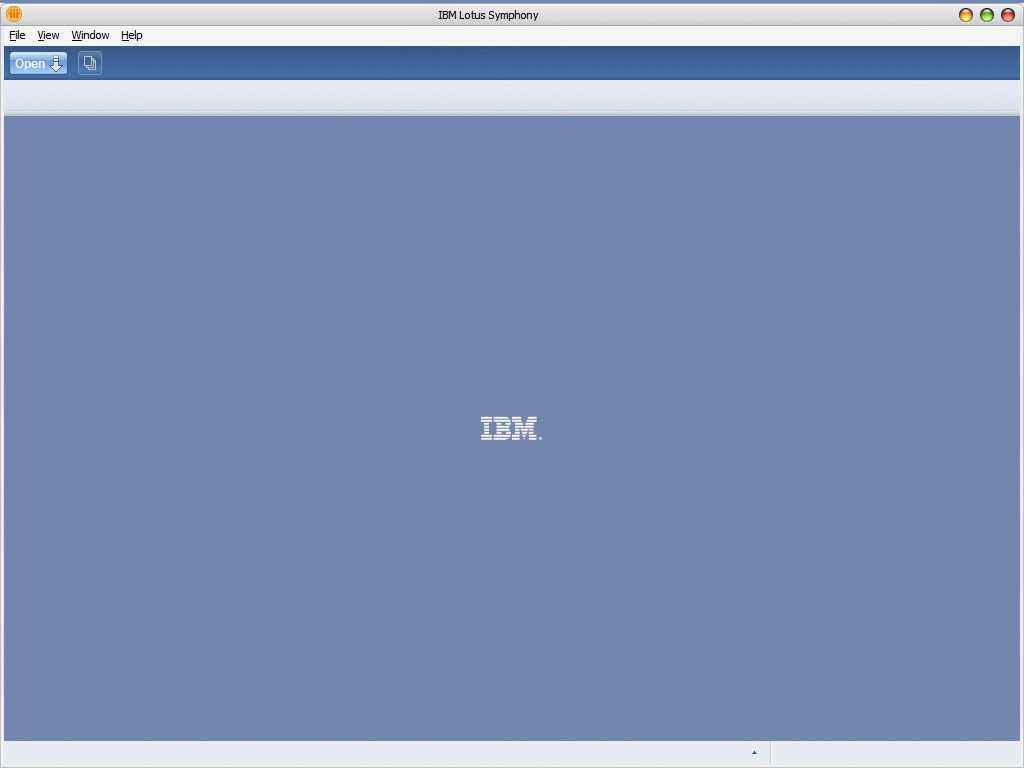
主启动界面
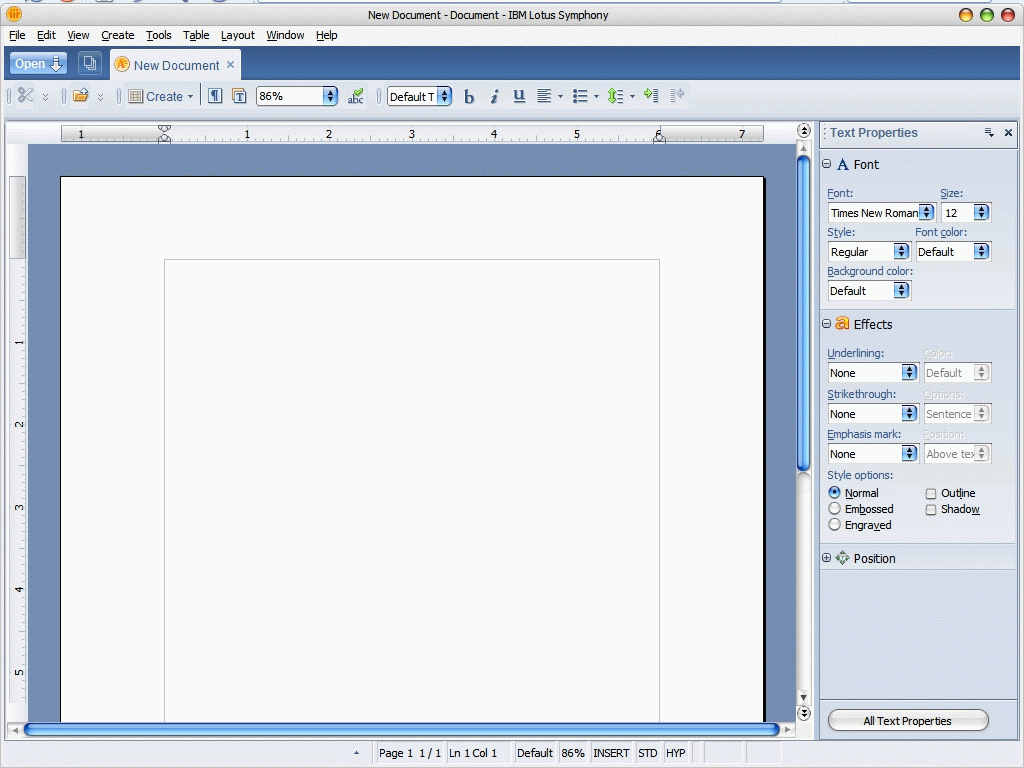
媲美Word的Lotus Symphony Documents
虽然从功能上Lotus Symphony 和Office还差的很远,但是我们终于又看到了一个敢和微软叫板的产品了~而且还是在Eclipse基础上构建的~这点是让人兴奋的,以后再有人问我,Eclipse-RCP有什么成功的案例,我就给他看Lotus Symphony!
此外IBM为Lotus Symphony 还在Eclipse基础上做了很多的新东西,有有待于慢慢研究~传说是Lotus Symphony 是开源的,但是在官方站上并没有找到CVS或者SVN地址~这点是让人无奈的!
ORM中,一对多关系一般都是单向的,简单的说是孩子们知道自己的父亲,父亲不知道自己的儿子们,在需要的时候再去取得自己儿子们~
今天,我们加班对实体关系进行有优化,出现了一片白痴的儿子~没有一个儿子知道自己的父亲,而自己的父亲反倒知道自己的孩子们~真可怕!
我们是基于SWT的开发,所有对象取下来,其实在SWT上全是对象,什么都可以找到了~不像BS的开发,东西取下来,每一次操作都要面向一次数据,这样的修改也是很合理的~
总之今天是长见识了,白痴的儿子们万岁!
使用SWT做开发的朋友,一定要注意~资源是一个杀手!对于我们这些无知的开发人员,使用了资源,不释放它,比不写程序或者不提供这个功能还可怕~因为它经不起考验,到了时间肯定完蛋!
前两个天就遇到了这个,同事写了一个插件,一次性从数据库中取得1W以上的数据然后组织成树表格,显示给客户~取得数据的速度,树组装的速度,树展开的速度,都做了反复的优化,一切优化完成以后,就宣布完成!但是没有测,当我连续打开4个树以后,程序就非掉了~
我先加大rcp的启动内存,没用!疯狂调用cg,没用!而且这中错误错的很奇怪,如果是内存异常,应该是JVM报出的,但是这次不是,仔细阅读异常,竟然是SWT打开图片,颜色,字体的时候的异常~肯定是资源问题了!
因为以前一直再用Jface的treeviewer组件,所以一直没有关心资源的问题~但是1W的数据,使用的SWT的原生Tree组装的~而且还用了一些字体~
排查代码,竟然发现有字体被new出,但是没有释放~问题就出在这里~
调用了
Font font = new Font (display, "Courier", 10, SWT.NORMAL);
那么就应该在不在需要这个Font的时候调用
font.dispose();
两个原则:
第一条是"谁占用,谁释放",第二条是"父构件被销毁,子构件也同时被销毁"。
最近一直在忙,忙的不亦乐乎了~做了很多事情...属于商业机密,所以没有办法一一点出~
终于闲一下,维护维护Blog吧~
今天说说Eclipse3.3国际化的问题,Eclipse-RCP项目做做国际化的时候,存在两个层面,一个是控件上的中文,另一个是Plugin.xml中的中文信息,控件上的中文,没有什么可说的,用一个类,加一个资源文件就可以了~主要的问题是Plugin.xml中的中文信息;
根据各大网站和资料的中描述,Plugin.xml中中文信息用一下方法处理:
1.在Plugin.xml同目录下新建plugin.properties;
2.将Plugin.xml文件中中文部分替换成%xxxx;
不知道这样的办法是不是在Eclipse3.3以前的版本中有用,反正我在Eclipse3.3中,这招没有用,PDE可以解析到%XXX的内容,但是启动应用程序以后没有任何效果,所有修改的地方都显示为%XXX了~
解决办法就是:
请在插件的 MANIFEST.MF 文件后面添加上 Bundle-Localization: plugin 和一个回车应该可以解决你的问题。
在MF中多加一句就好了~
遇到同类问题的朋友注意了~
最近迷上了爬山,N久都没有更新过Blog~惭愧啊。最近打算写一遍关于Gantt控件的东西。请专注吧~
摘要: 好像从1.03开始Jfc就已经提供了在SWT中使用JFC的专用包和类,只是没有人写这些东西而已~今天我就贴一些Demo,以后再也不用SWT_AWT了~
1/**//* =========================================================== 2 *... 阅读全文
摘要: 1package com.glnpu.dmp.test; 2 3import java.awt.Color; 4import java.awt.Font; 5import java.awt.Frame; 6import&nbs... 阅读全文
今天碰到了需要访问注册表的问题,索性研究一下下~JDK1.4开始,sun就已经提供了访问注册表的jar包了,但是好像大家都不是很感兴趣~没有几个人说它好用的。
google得到Windows Registry~好东西,底层使用jni直接访问WIN32下的注册表~可以实现对整个注册表的完全掌控,可增可减~呵呵出了问题不管我事!
本着好东西要分享的原则,贡献一下搜索的成果物!
http://trustice.com/java/jnireg/
JWS(Java Web Start)高级应用!
咱不写什么快速构建JWS发布,什么轻松入门JWS一类的水贴~写就写点高级应用~我还是觉得写大家都会的技术不叫原创,原创是创造大家不知道的东西~
JWS古以有之,但是由于WEB的盛行,还得JWS不被人重视~其实JWS还是很好的东西,SUN还是在苦心的经营他~一次又一次的更新,一次又一次的升级,使用JWS启动JAVA桌面应用程序越来越快,部署起来也越来越方便了~
首先向想要用JWS来部署JAVA应用程序的朋友推荐JRE6.0,它比JRE5.0改进了很多地方,其中最好的一点是,JRE6.0对JAR文件进行了压缩处理,而JRE5.0则是直接下载JAR文件到本地,好处就是如何客户用了JRE6.0那么他们能难拿到我们开发出来的JAR文件,更不要说做反编译了~而且对JAR文件进行处理,大大加快了JAVA应用程序的启动速度。
其次就是进入正题!使用JWS发布JAVA应用程序应该算是小儿科了,JWS的优势就是可以每次启动的时候去服务器上动态的更新JAR文件,但是有一点JNLP文件如何更新?如果我修改了JWS的描述文件JNLP文件,JWS怎么去更新东东啊?
我们都知道JWS有个高速缓冲,他把要启动的东东都放到了高速缓冲中,并记录下JAR文件的修改时间,然后每次使用JNLP通过JWS启动JAVA应用时,他会对比看看服务器上的JAR文件的修改时间是不是已经更新了,如果更新了,他认为JAR文件有更新,然后就下载到本地~但是JNLP文件却一直在本地高速缓冲中放着,他是不会更新的~
处理办法就是使用SUN为我们准备好的JnlpDownloadServlet来做~JnlpDownloadServlet其实一直在我们本地,他就放在JDK下面,具体怎么用还是请参阅JWS的开发手册吧!
它解决的原理其实是使用JNLP里面的version这个属性~如果不使用JnlpDownloadServlet来处理,version这个属性根本无用,而且还会报错~只有用了JnlpDownloadServlet以后version才能发挥作用,我们可以给JNLP文件打上version,然后每次如果有JNLP更新,那么只要更新version的内容就可以了,而且在客户端的JWS管理器中,会对每一个version进行记录!非常好用~但是需要非常仔细的配置version~还是比较痛苦的一件事情!
在八卦一下JAVAEYE,麻烦的要死~问个问题没有人回答,还评我为新手~开网站的都是爷~爷不去了!
庆祝一下,感谢大家多日以来的支持,我会再接再厉,再创佳绩!
留贴庆祝~无内容!
闲来无聊,一边开着妖精宝宝(传说中的美女~http://blog.sina.com.cn/wings)的Blog听音乐,一边读读《Programming Ruby》,享受哦!
前一段时间写了篇Blog,推了一下Python,说了一下Ruby,~给大家心理上造成了不少的创伤~偶现在醒悟了,不管是什么,它都属于动态语言,各有各的好处~各有各的优势~一样各有各的害处~。
ROR现在这么火,一定有它的道理,绝对不是空穴来风的~和Java相比Ruby无疑,灵活了许多,简洁了许多~那放荡不经的语法风格,那吊儿郎当的定义方式,确实让我着迷~写多了JS的朋友再写JAVA,一定恨死了处处的类型定义~一样的写了几次attr_reader以后,我看见满屏幕的getter方法就想吐~看到New对象就像自杀~
玩笑,玩笑,其实也没有那么痛苦,毕竟JAVA是强类型语言,处处保证安全,Ruby等弱类型语言,注重的是开发速度~编程新手连类,实例的关系都搞不清,还是不好玩Ruby的好~小心葬送自己!还有就是放荡不经的语法风格,是一人一个放法~没有多少经验的哥们儿,看上几个人写的,一定会死的,更不要说维护了~一样的代码,N个人N种写法~
再说说书,上星期去了一下书店,果然N多ROR的书上架了,老板跟我说,很不爽,没有多少人知道这东西,自己也是听说网上炒的火,进了卖不出去~从此可以看出ROR还在整个技术浪潮的初期,还需要更多的人和公司努力推~什么都不说了,是好东西就用,是烂东西,大家都不要看了~
最让我郁闷的就是《Programming Ruby》中文版,卖99个大洋~怎么不去抢啊~!!!
上次把同事研究的用JWS发布EclipseRCP应用的预言文档发到Bolg上了,那个版本是用于Eclipse3.2.2-的,到了Eclipse3.3以后有不少东东都发生了变化。特此留文一篇,记录一下。
先看不同在哪里:
1.Eclipse3.3的启动方式不同于Eclipse3.2.2-的版本;
2.Eclipse3.3加入了对Vista的支持,所以SWT有所变化;
先看第一个不同对我们的影响:
没有了startup.jar了~对我们的形象不小哦!看看没有了Startup.jar以后启动Eclipse是如何实现的:
Eclipse的启动彻底被org.eclipse.equinox.launcher_1.0.0.v20070606.jar接管了~org.eclipse.equinox.launcher_1.0.0.v20070606.jar的包结构基本和Startup.jar基本一样但是还是有区别的。
所以根据我上一次文章的所说的需要Startup.jar了~不需要再让feature下放东东了~加认证什么都一样了~
需要修改生成的JNPL文件,主要需要修改一下两个地方:
1 <jar href="plugins/org.eclipse.equinox.launcher_1.0.0.v20070606.jar"/>
<application-desc main-class="org.eclipse.equinox.launcher.WebStartMain">
启动Jar文件以及启动类~
支持了Vista以后对我们的影响:
生成的org.eclipse.rcp_3.3.0.v20070607-8y8eE8NEbsN3X_fjWS8HPNG.jnlp中被多包含*wpt*.jar的引用,这些是在我们下载的Eclipse3.3里面没有的~但是还是生成了引用,这个应该是pdt的BUG~Eclipse的BUG LIST上面已经提到了~
如果非要在Vista上跑,就自己找找吧·如果不是,那么直接删掉就好了~
一定要注意第一个问题~没有了Startup.jar以后,千万不要把org.eclipse.equinox.launcher_1.0.0.v20070606.jar当Startup.jar用,在外面也放一份~启动的时候JWS会包错的,会说JAR包重复!
1:盛唐人口达到100万,并且是人类历史上第一个达到百万的城市 ,当时的西安是世界的经济中心!
2:看地图就会发现,有8条河组成一种很奇怪的图形环绕着这座伟大的城市
3:唐朝的时候,皇帝住在大明宫,因为这里是西安城区地势最高的地方,可以鸟瞰全城
4:西安有条龙脉,头向北,饮渭河之水,尾朝南,吸天地之灵气,从秦岭里冲出,龙头就是今天的龙首村附近
5:唐朝的皇宫和汉朝的皇宫是对称的,一个在东边,一个在西边,都在“龙头”附近,是西安最高的地方
6:动物园后面有个小山,那是秦始皇父亲的陵墓
7:吕洞宾被点化成仙的酒馆在八仙庵前,那里有一石碑。
8:中国最古老的巷:大小“学习巷” 盛唐时候,那里居住着几万胡人,在那里学习汉语,故名。
9:西安有一处圆形城墙,那是唐朝遗留的建筑,含光门是原版唐朝的城门,西安城墙是在唐朝皇城基础上修筑的
10:日本京都的规划完全照搬长安城,包括朱雀门和朱雀大街
11:朱雀大街宽超过100米,青石铺路
12:现在城墙围住的面积在唐朝时期只是皇城
13:唐时候长安城面积是现在西安城墙内面积的10倍
14:鼎盛时期留学生有10万
15:日本密教真言宗等6个教派发源于西安
16:西安霸河是秦穆公振兴秦国,独霸西戎后为纪念霸业而命名的河。
17:端履门的意思是官员在这里必须端正朝服,整装入觐
18:下马陵,为纪念独尊儒术的董仲书,汉朝规定必须在他陵墓前下马。
19:大雁塔曾经是科考中榜之人留名的地方,白居易也曾留过。是为雁塔题名
20:大雁塔是个著名的斜塔,大概向西倾斜了一米
21:在唐朝时,阿富汗和吉尔吉斯坦的大部分,朝鲜半岛的大部分属于中国。
22:买东西的典故来自“东西木头市”,买“东西木头市的东西”天长地久就是买“东西”了,现今街道在西安城区原址
23:钟楼原来不在大家看到的那里,而是今天朝西300米的位置
24:修钟楼的目的是为了破坏西安王气,压制西安龙脉,当时看来,洪武的次子是除了永乐外最有希望当皇帝的
25:李隆基在兴庆宫办公,现存勤政殿殿址,李白让杨贵妃磨墨,高力士脱靴就在那里,也就是在那里,当李隆基落寞的做自己的太上皇的时候,高力士一直伴随着他,并且在他的儿子想杀他的时候档在他面前喝退官兵。
26:羊肉泡馍距离已经有2000多年历史了。
27:雁塔是饱经风霜,曾经遭受雷击,现金去参观,走是封闭了数百年又重新开启的大门
28:西安楼观台是老子讲道的地方
29:烽火戏诸侯的事情发生在现今西安城东的骊山上,而当时的帝王宫殿,在今西安城的西郊!
30:西安是一个“开元通宝”比“乾隆通宝”要多的多的城市
31:唐朝时候西安城市中轴线在今天的西边,兴庆宫就在东墙边,他的湖水连接着今天的曲江
32:大雁塔的位置原来城墙开了个口子,有专门通道连接城区和曲江,一片湖水延伸到城外
33:今天西安野生动物园的位置是原来汉朝时候的皇家狩猎的御苑,平民以前是不可以靠近的
34:西安野生植物园是原来汉朝的皇家园林,很多珍奇斗艳的名贵花种,今天那里还保留了独有的数十个品种
35:渭河河床原来比现在要靠南,只因为一场大地震,居然向北移动了两公里
36:西安南2环路下面原来是条河,在明朝的时候是一条防洪渠,在唐朝的时候,也是联系几条水系的景观水面
37:日语有200-700个音接近西安方言,称之为唐音,比方他们把“是不是”念:dei shi ga 西安人叫:dei shi
38:长安城墙曾经在师大附近,有唐天坛遗址,现在高新区7公里的百米绿化带下面就是价值连城的唐长安城墙
39:唐人民风彪悍,开放,看看那时候女人穿的衣服。在体育场前面的雕塑,唐仕女打马球图。李白等都善技击
40:如果大家在高空看过西安的话,就会发现,西安周边有5个丘陵,组成一个漂亮的5边形,将西安围绕在中间
41:西安周边的山川河流丘陵组成的图案是一个八卦状,任何一个地方在周易中都有独特的含义,可以说巧夺天工
42:秦岭由东向西绵延千里,只是在西安的位置向南有个凹陷,西安附近,渭河距离山很远,而其他地方距山都很近
43:西安南边有上百个峪口,就是山里的河把山劈开后的河道,古人的意味是将山川精华全部汇集到西安城
45:将近800公里的渭河所有的大支流都在河北边,只是流过西安附近时,接收了一条南岸注入的大支流
44:西安城墙为什么南边最短?是因为有人想把原来位于城内的庙移动到称外。庙不能搬,那就搬城墙
46:原来宫殿里的空调是从冬天的河里取冰,保存入夏,这些冰就保存在西安南边的翠化山附近,并有专人看管
47:唐朝末年,拆毁西安城,顺渭河而下去修建洛阳,奇怪的是这些木材到了华山就被莫名挡住了,无法入黄河
49:现在的西安咸阳机场是国内第4大航空港
50:西安为什么叫长安?因为在这里,统治者可以长治久安,生活富足,是天府之国
51:神舟飞船上的百分之80的零件都是西安制造
52:西安高新产业开发区,是中国第3大高新产业示范区,世界500强中有210家落户西安高新区!
53:现在的西安在校大学生120万,数量仅次于北京位踞全国第二,世界第三。
54:西安是国内摇滚音乐的发祥地,目前知名的摇滚乐队一半以上都出自西安。
55:西安拥有全国唯一的火箭发动机机生产基地――――零六七基地
56:国内第一只彩色显像管诞生于西安
57:中国第一架民用客机诞生于西安,最大战斗机生产基地在西安
58:国内最大的手机锂电池原料生产基地在西安
出租车司机:伙计~我交车你从挡一辆~
中巴售票员:伙计~刚才下去的那个人~想割你的包~
餐馆老板:伙计~发票完了~你明天来拿~
交通协管员:急着揍球~拦都拦不住~
出租车司机:警察~湿你伯~
警察:少皮干~200块~
清洁工:脏的跟松一样~
烤肉老板:还洗松手尼~赶紧穿肉~一会儿买主就来咧~
糊辣汤老板:买松捏呢~赶紧干活~鼻都留到锅里咧~
菜盒子老板:今儿赶紧去批发市场买50斤酣水油~500个**袋~没有油和塑料袋了
卖菜的:俄给他交锤子税~
球迷:贼!~贼!~ 贼!~
市长:我们是世界级文明古城!
1,在使用TableViewer时,要实现隔列换色是比较容易的,只要在标签提供器里加上表格的颜色提供器的实现就可以,代码也很简单.如下:
public class XXXXLableProvider implements ITableLabelProvider, ITableColorProvider {
private Color[] bg = new Color[]{new Color(null, 255,255,255), new Color(null, 247,247,240)};
private Color[] force = new Color[]{new Color(null, 0,0,0), new Color(null, 0,0,0)};
.....
public Color getForeground(Object element, int columnIndex) {
return force[columnIndex%2];
}
public Color getBackground(Object element, int columnIndex) {
return bg[columnIndex%2];
}
}
bg是背景色,分两种,force是前景色,也是两种,分别对应,想换成其它的颜色,修改两个定义部分就可以了.
2,但要实现隔行换色就比较麻烦些了,不过还是可以实现,实现原理也很简单,就是记录上一次的对象,与本次对象如果不同就换颜色,否则一直使用当前颜色.代码如下:
public class XXXXLableProvider implements ITableLabelProvider, ITableColorProvider {
private Color[] bg = new Color[]{new Color(null, 255,255,255), new Color(null, 247,247,240)};
private Color[] force = new Color[]{new Color(null, 0,0,0), new Color(null, 0,0,0)};
private Object current = null;
private int currentColor = 0;
......
public Color getForeground(Object element, int columnIndex) {
return force[currentColor];
}
public Color getBackground(Object element, int columnIndex) {
if (current != element) {
currentColor = 1 - currentColor;
current = element;
}
return bg[currentColor];
}
}
颜色也是和上面一样,不过这样做出来的隔行换色毕竟还不是SWT表格本身支持的,如果表格行没有充满,在后面看到的还是表格的背景色(默认白色)
老婆当的模特~~像素比较底,凑合了~
第一次真正的玩J2EE服务器,难免有些新奇,还有些茫然!
下午在服务器上装了一个JBOSS4.2GA,正式使用JBOSS4.2GA对外提供EJB服务。但是万万没有想到,竟然用IP不能访问!不会是服务器上的小狮子把它给费了吧?关!关了N个杀毒软件,N个防火墙,还是如此!郁闷!
GOOGLE一下才知道,原来J2EE服务器是需要部署的!直到今天才明白部署的含义,没有那么简单,搞个解压缩扔的服务器上,启动,走人!J2EE服务器比这复杂的多。它要处理更多的东东,里面有更多的XML!现在真的开始佩服各位J2EE的先驱们,真是厉害啊,那么多参数都能找到最重要的几个!
到底怎么才能用IP访问JBOSS呢?很简单!给run.bat搞个快捷方式,然后把 -b 192.168.0.130 加上,就是我们所说的加启动参数。搞定!
有朋友在Blog中给我留言,问我要SWT打印表格的源代码~于是乎就在www.ceclipse.org中找了又找,终于又一次找到了;
现在把地址贴上来,供需要的朋友下载。如果有更好的实现,或者有改进,请Email我一下,并且贴到www.ceslipse.org上,供大家贡献!
http://www.eclipseworld.org/bbs/read-cec-tid-5299-keyword-.html
最近都没有更新Blog,My爸爸来了~来看我了~周么要陪陪他在西安好好逛逛,所以没有时间更新和学习了~
周末忙里偷闲看了把《变形金刚》,发现里面有好多赞助商出现,ebuy,雪弗莱,诺基亚都有赞助~偶然发现Apache也有赞助嫌疑。
最大的疑点:男猪脚身边的那条吉娃娃,它叫什么名字?Mojo!晕~那不是Maven2的东东吗?
What is a Mojo? A mojo is a Maven plain Old Java Object. Each mojo is an executable goal in Maven, and a plugin is a distribution of one or more related mojos.
有嫌疑吧?Apache现在要力挺Maven2了?
玩笑玩笑~~~
Eclipse3.3以前,大家在启动Eclipse时可能都会注意到在任务管理器中的Eclipse.exe进程内存只占用了3xxxK左右,而会有一个javaw.exe的进程占了100M左右,这个原理大家肯定都知道,Eclipse.exe只是做一次启动引导罢了,剩下主要做事的是javaw.exe了~
Eclipse3.3开始,我们会发现在发布包里面多了一个eclipsec.exe的程序,是用命令行启动Eclipse用的,使用eclipsec.exe启动以后会开一个dos的窗口,如果把这个DOS的窗口关了,Eclipse也就关闭了,这个启动方式跟以前的方式是一样的。直接用Eclipse.exe启动Eclipse的时候,注意一下你的任务管理器,里面没有javaw.exe了,只有一个Eclipse.exe,占内存100M左右~省了点内存哦~
这可能就是Eclipse3.3在启动速度上的改进吧,但是我是没有感觉到有多大的提升。
一下是来自Blogool的信:
亲爱的阿南:
感谢您对于博狗网(
Blogool.com)的关注以及“博客口碑”计划的支持。经过我们的系统认证您的博客 BlogJava-实践-全程(
http://www.blogjava.net/leeguannan/) 已经取得参与“博客口碑”的认证资质。
系统为您评估的传播价值是35元。
请您进入博客口碑系统(
http://koubei.blogool.com),并完善个人资料,用以我们对您进行可预期的支付
。传播值每季度会自动更新一次,请您以定期核查,若您有任何问题,请联络博狗客服。再次感谢您支持“博客口碑”计划并认同价值激励。
Blogool全体人员祝您使用愉快。
Blogool.com ©2007 All Rights Reserved
有钱挣?不错~大家以后要多写Blog啊~还有,我还拿到了~博邻网送出的T恤~~
jQuery,一个继prototype.js以后另一个新的js开发简化包。既然是在prototype.js以后的新东东,性能和使用上一定强过prototype.js了~
中文化做的也不错已经出现了一个中文小社区http://jquery.org.cn/,做AJAX的朋友可以研究研究,我只是在http://www.diglog.com/上看到新闻,所以才八卦一下的~下面是性能对比:
| Browser |
jQuery 1.1.2 |
jQuery 1.1.3 |
% Improvement |
| IE 6 |
4890ms |
661ms |
740% |
| Firefox 2 |
5629ms |
567ms |
993% |
| Safari 2 |
3575ms |
475ms |
753% |
| Opera 9.1 |
3196ms |
326ms |
980% |
| Average improvement: |
867% |
不知道它以前和prototype.js对比的结果如何,这次提升性能可是很吓人的~
另一组同能产品对比:
| Browser |
Prototype |
jQuery |
Mootools |
Ext |
Dojo |
| IE 6 |
1476ms |
661ms |
1238ms |
672ms |
738ms |
| Firefox 2 |
219ms |
567ms |
220ms |
951ms |
440ms |
| Safari 2 |
1568ms |
475ms |
909ms |
417ms |
527ms |
| Opera 9.1 |
220ms |
326ms |
217ms |
296ms |
220ms |
从上面看IE真的是可怕~再牛的东东,碰到IE都是垃圾~
Download:
今天无意间看到Scriptaculous项目,大概留意了以下他的加载器。
此项目一共有5个JS文件,当要用此项目到自己的项目中时只需要:
<script src="javascripts/prototype.js" type="text/javascript"></script>
<script src="javascripts/scriptaculous.js" type="text/javascript"></script>
就可以引入其他的四个JS了,这里的prototype.js并非必备,如果哦只需要某一个js被引入则可以使用:
<script src="scriptaculous.js?load=effects,dragdrop" type="text/javascript"></script>
是不是很好的功能?自己实现一个加载器就省去在页面上大量的引入JS的工作了,现在让我们再看看它的原理
var Scriptaculous = ...{
Version: '1.6.5',
require: function(libraryName) ...{
// inserting via DOM fails in Safari 2.0, so brute force approach
document.write('<script type="text/javascript" src="'+libraryName+'"></script>');
},
load: function() ...{
if((typeof Prototype=='undefined') ||
(typeof Element == 'undefined') ||
(typeof Element.Methods=='undefined') ||
parseFloat(Prototype.Version.split(".")[0] + "." +
Prototype.Version.split(".")[1]) < 1.5)
throw("script.aculo.us requires the Prototype JavaScript framework >= 1.5.0");
$A(document.getElementsByTagName("script")).findAll( function(s) ...{
return (s.src && s.src.match(/scriptaculous.js(?.*)?$/))
}).each( function(s) ...{
var path = s.src.replace(/scriptaculous.js(?.*)?$/,'');
var includes = s.src.match(/?.*load=([a-z,]*)/);
(includes ? includes[1] : 'builder,effects,dragdrop,controls,slider').split(',').each(
function(include) ...{ Scriptaculous.require(path+include+'.js') });
});
}
}

Scriptaculous.load();
一共就两个方法,load()判断加入的JS是什么目录下的什么文件,以及有没有prototype.js和他的版本;require()直接调用document.write()朝页面追加JS的引入代码。自己写加载器的时候只需要修改load()方法,加入自己的规则以及文件名称,其他的都不需要修改,这样就可以在页面上省去大量代码了
我也不知道如何评审,只是这几天遇到了很多问题,才想到是不是要考虑一下如何评审才对了。
我们项目每一个阶段都有做评审,而且都是全组参加,相互评审,并认真的记录评审的过程,提了很多意见。但是这些意见真的有意义吗?你说的写的代码有问题? 凭什么?凭经验?还是凭感觉?如果你要是感觉不出来是不是评审就没有意义了?
评审也要有条件,什么样的代码合格?什么样的文档有意义?不是谁说了算的,应该是有条目规定的,上面要说明,符合1,2,3的的代码才合格,文档才有意义!
评审就是让几乎任何人都可以参与,都可以明白你写的对不对!
再转移一篇~
搞开发不但不要怕改需求的,更不能害怕问题。BUG,ERROR在正常不过了,一般一天都能看见几十次,慢慢的我都养成了,一天不看到eclipse的控制台不出字,一天都觉得不爽~
遇到问题,首先不能害怕。害怕会发生什么?害怕以后就会紧张,一紧张原本合理的思路马上被满头大汉代替,然后呢?错误依旧存在,IE开了无数个google,狗狗都逛了一天也没有解决!所以遇到问题以后不能紧张,要保持平静。
log4j知道是干什么的吧,一个好的开发人员会在开发过程中作好log,一旦发生了错误,很快可以定位到错误代码的范围,开发时不做log早晚要加的,与其以后浪费时间,还不如开发的时候就加上,看看自己清晰的log,再复杂,再少见的errror都简单了许多。
对于打印出的异常,先看看再说,根据异常的类型判断一下异常出现代码的类型和在自己程序中的位置,然后再下手,不要看到异常就乱改一通,运气好了马上搞定!运气不好,越改问题越多,越改越乱,越改越烦,改到最后这段程序还不如重写算了,反正也没有人能看了。
如果是以前没有看到过的异常,怎么办?马上google?不需要吧?建议还是认真看看异常,先判断清楚是谁挂了,再哪里挂的。找到主谋了再google也不晚,每遇到一个问题,我们都应该成长才对,是吧?最近在做一个soa的项目,主要是基于xfire框架发布web services 然后其他客户端再调用,在编写客户端单元测试时就经常看到红红的error,对付这玩艺首先要判断清楚错误究竟是由谁报出的,是客户端访问代码的异常,还是因为服务器端引发的异常,找到了罪魁祸首修正起来不就简单多了。不能马上google的原因还有一个就是网上基本上找不到中文关于xfire深度应用的文章,出了错误只能凭着自己垃圾的英语和几篇像两天一样的帖子慢慢的寻找解决方案。(在次强烈谴责xfire开发团队,不要忙着申请apache.org的孵化项目了,还是改改BUG吧!)
处理完问题以后不要马上就结束,应该总结,小小的沉淀一下好不好?虽然说的是,程序员要到一定的时候才能沉淀出东西,我看还是“每天沉淀”,“每天反思”来的实在!
处理问题也是有方法的,应该被提升一下,建议大虾们写上一本《如何处理问题》的妙书或者妙文出来,小弟一定深刻拜读!
以前CSDNBlog上的文章,今天集体转移一下~
今天21:00是Europa发布的时间,我一直在www.eclipse.org上守候~终于被我等到了,http://www.eclipse.org/downloads/大约是在21:06左右做的更新,到了21:08在进去就已经已经改版了~这次界面好像更漂亮了~而且这次整个产品线也非常的清晰了~
Eclipse Packages
 |
Eclipse IDE for Java Developers - Windows (78 MB)
The essential tools for any Java developer, including a Java IDE, a CVS client, XML Editor and Mylyn. Find out more...
|
Windows
Linux
MacOSX
|
 |
Eclipse IDE for Java EE Developers - Windows (123 MB)
Tools for Java developers creating JEE and Web applications, including a Java IDE, tools for JEE and JSF, Mylyn and others. Find out more... |
Windows
Linux
MacOSX
|
 |
Eclipse IDE for C/C++ Developers - Windows (62 MB)
An IDE for C/C++ developers. Find out more... |
Windows
Linux
MacOSX
|
 |
Eclipse for RCP/Plug-in Developers - Windows (152 MB)
A complete set of tools for developers who want to create Eclipse plug-ins or Rich Client Applications. It includes a complete SDK, developer tools and source code. Find out more... |
Windows
Linux
MacOSX
|
 |
Eclipse Classic - Windows (140 MB)
The classic Eclipse SDK: the Eclipse Platform, Java Development Tools, and Plug-in Development Environment, including source and both user and programmer documentation. Find out more... |
Windows
Linux
MacOSX |
复制过来样式丢了~但是没有关系,我们一样能看到,他的生产线清晰了许多~
RCP开发终于也被独立出来了,看来这次改动不小~RCP终于被Eclipse拿出来重力推进了~
在此留贴庆祝一下~