Database Profiling
MongoDB Profiler is a db profiling system that can help identify inefficient
or slow queries and operations.
Levels of profiles available are:
Level | Setting |
0 | Off. & No profiling |
1 | On & only includes slow operations |
2 | On & Includes all operations |
We can enable it by setting the Profile level value using the following
command in mongo shell :
"db.setProfilingLevel(1)"
By default, mongod records slow queries to its log, as defined by slowOpThresholdMs.
NOTE
Enabling database profiler puts negative impact on MongoDB’s performance.
It’s better to enable it for specific intervals & minimal on Production Servers.
We can enable profiling on a mongod basis but This setting will not propagate
across a replica set and sharded cluster.
We can view the output in the system.profile collection in mongo shell using show profile command, or using following:
db.system.profile.find( { millis : { $gt : 200 } } )
Command returns operations that took longer than 200 ms. Similarly we
can change the values as per our need.
Enabling profile for an entire mongod instance.
For the purpose of development in testing, we can enable database profiling/settings for an
entire mongod instance. The profiling level will be applied to all databases.
NOTE:
We can't enable the profiling settings on a mongos instance. To enable the profiling in
shard clusters, we have to enable/start profiling for each mongod instance in cluster.
Query for the recent 10 entries
db.system.profile.find().limit(10).sort( { ts : 1 } ).pretty()
Collection with the slowest queries(No. Of queries)
db.system.profile.group({key: {ns: true}, initial: {count: 0}, reduce: function(obj,prev){ prev.count++;}})
Collection with the slowest queries(No. Of millis spent)
db.system.profile.group({key: {ns: true}, initial: {millis: 0}, reduce: function(obj, prev){ prev.millis += obj.millis;}})
Most recent slow query
db.system.profile.find().sort({$natural: -1}).limit(1)
Single slowest query(Right now)
db.system.profile.find().sort({millis: -1}).limit(1)
1.echo "mount -t nfs -o nolock ${IP}:${remote_dir} ${local_dir}" >> /etc/rc.local
2.echo "${IP}:/home/logs /home/logs nfs defaults 0 0" >> /etc/fstab
关于/etc/rc.local
rc.local也是我经常使用的一个脚本。该脚本是在系统初始化级别脚本运行之后再执行的,因此可以安全地在里面添加你想在系统启动之后执行的脚本。常见的情况是你可以再里面添加nfs挂载/mount脚本。此外,你也可以在里面添加一些调试用的脚本命令。例如,我就碰到过这种情况:samba服务总是无法正常运行,而检查发现,samba是在系统启动过程中就该启动执行的,也就是说,samba守护程序配置保证了这种功能本应该正确执行。碰到这种类似情况,一般我也懒得花大量时间去查为什么,我只需要简单的在/etc/rc.local脚本里加上这么一行:
/etc/init.d/samba start
这样就成功的解决了samba服务异常的问题。
使用自定义CONNECTION FACTORY,这样会覆盖SPRING 的AUTO CONFIGURATION。
ActiveMQConnectionFactoryFactory.java
import java.lang.reflect.InvocationTargetException;
import java.util.Collections;
import java.util.List;
import org.apache.activemq.ActiveMQConnectionFactory;
import org.springframework.boot.autoconfigure.jms.activemq.ActiveMQConnectionFactoryCustomizer;
import org.springframework.boot.autoconfigure.jms.activemq.ActiveMQProperties;
import org.springframework.boot.autoconfigure.jms.activemq.ActiveMQProperties.Packages;
import org.springframework.util.Assert;
import org.springframework.util.StringUtils;
/**
* Factory to create a {@link ActiveMQConnectionFactory} instance from properties defined
* in {@link SecondaryActiveMQProperties}.
*
* @author Phillip Webb
* @author Venil Noronha
*/
class ActiveMQConnectionFactoryFactory {
private static final String DEFAULT_EMBEDDED_BROKER_URL = "vm://localhost?broker.persistent=false";
private static final String DEFAULT_NETWORK_BROKER_URL = "tcp://localhost:61616";
private final ActiveMQProperties properties;
private final List<ActiveMQConnectionFactoryCustomizer> factoryCustomizers;
ActiveMQConnectionFactoryFactory(ActiveMQProperties properties,
List<ActiveMQConnectionFactoryCustomizer> factoryCustomizers) {
Assert.notNull(properties, "Properties must not be null");
this.properties = properties;
this.factoryCustomizers = (factoryCustomizers != null) ? factoryCustomizers : Collections.emptyList();
}
public <T extends ActiveMQConnectionFactory> T createConnectionFactory(Class<T> factoryClass) {
try {
return doCreateConnectionFactory(factoryClass);
}
catch (Exception ex) {
throw new IllegalStateException("Unable to create " + "ActiveMQConnectionFactory", ex);
}
}
private <T extends ActiveMQConnectionFactory> T doCreateConnectionFactory(Class<T> factoryClass) throws Exception {
T factory = createConnectionFactoryInstance(factoryClass);
if (this.properties.getCloseTimeout() != null) {
factory.setCloseTimeout((int) this.properties.getCloseTimeout().toMillis());
}
factory.setNonBlockingRedelivery(this.properties.isNonBlockingRedelivery());
if (this.properties.getSendTimeout() != null) {
factory.setSendTimeout((int) this.properties.getSendTimeout().toMillis());
}
Packages packages = this.properties.getPackages();
if (packages.getTrustAll() != null) {
factory.setTrustAllPackages(packages.getTrustAll());
}
if (!packages.getTrusted().isEmpty()) {
factory.setTrustedPackages(packages.getTrusted());
}
customize(factory);
return factory;
}
private <T extends ActiveMQConnectionFactory> T createConnectionFactoryInstance(Class<T> factoryClass)
throws InstantiationException, IllegalAccessException, InvocationTargetException, NoSuchMethodException {
String brokerUrl = determineBrokerUrl();
String user = this.properties.getUser();
String password = this.properties.getPassword();
if (StringUtils.hasLength(user) && StringUtils.hasLength(password)) {
return factoryClass.getConstructor(String.class, String.class, String.class).newInstance(user, password,
brokerUrl);
}
return factoryClass.getConstructor(String.class).newInstance(brokerUrl);
}
private void customize(ActiveMQConnectionFactory connectionFactory) {
for (ActiveMQConnectionFactoryCustomizer factoryCustomizer : this.factoryCustomizers) {
factoryCustomizer.customize(connectionFactory);
}
}
String determineBrokerUrl() {
if (this.properties.getBrokerUrl() != null) {
return this.properties.getBrokerUrl();
}
if (this.properties.isInMemory()) {
return DEFAULT_EMBEDDED_BROKER_URL;
}
return DEFAULT_NETWORK_BROKER_URL;
}
}
TwinJmsConnectionFactoryConfiguration.java
import java.util.stream.Collectors;
import org.apache.activemq.ActiveMQConnectionFactory;
import org.messaginghub.pooled.jms.JmsPoolConnectionFactory;
import org.springframework.beans.factory.ObjectProvider;
import org.springframework.boot.autoconfigure.condition.ConditionalOnProperty;
import org.springframework.boot.autoconfigure.jms.JmsPoolConnectionFactoryFactory;
import org.springframework.boot.autoconfigure.jms.activemq.ActiveMQConnectionFactoryCustomizer;
import org.springframework.boot.autoconfigure.jms.activemq.ActiveMQProperties;
import org.springframework.boot.context.properties.ConfigurationProperties;
import org.springframework.context.annotation.Bean;
import org.springframework.context.annotation.Configuration;
import org.springframework.context.annotation.Primary;
import org.springframework.context.annotation.Profile;
@Configuration
@Profile({"local"})
public class TwinJmsConnectionFactoryConfiguration {
@Bean
@ConfigurationProperties(prefix = "spring.activemq.primary")
public ActiveMQProperties primaryActiveMQProperties() {
return new ActiveMQProperties();
}
@Bean(destroyMethod = "stop")
@Primary
@ConditionalOnProperty(prefix = "spring.activemq.pool", name = "enabled", havingValue = "true")
public JmsPoolConnectionFactory connectionFactory(ActiveMQProperties primaryActiveMQProperties,
ObjectProvider<ActiveMQConnectionFactoryCustomizer> factoryCustomizers) {
ActiveMQConnectionFactory connectionFactory = new ActiveMQConnectionFactoryFactory(primaryActiveMQProperties,
factoryCustomizers.orderedStream().collect(Collectors.toList()))
.createConnectionFactory(ActiveMQConnectionFactory.class);
return new JmsPoolConnectionFactoryFactory(primaryActiveMQProperties.getPool())
.createPooledConnectionFactory(connectionFactory);
}
////////////////////////////////////////////////////////////////////////////////
@Bean
@ConfigurationProperties(prefix = "spring.activemq.sescond")
public ActiveMQProperties sescondActiveMQProperties() {
return new ActiveMQProperties();
}
@Bean(destroyMethod = "stop")
@ConditionalOnProperty(prefix = "spring.activemq.pool", name = "enabled", havingValue = "true")
public JmsPoolConnectionFactory sescondPooledJmsConnectionFactory(ActiveMQProperties sescondActiveMQProperties,
ObjectProvider<ActiveMQConnectionFactoryCustomizer> factoryCustomizers) {
ActiveMQConnectionFactory connectionFactory = new ActiveMQConnectionFactoryFactory(sescondActiveMQProperties,
factoryCustomizers.orderedStream().collect(Collectors.toList()))
.createConnectionFactory(ActiveMQConnectionFactory.class);
return new JmsPoolConnectionFactoryFactory(sescondActiveMQProperties.getPool())
.createPooledConnectionFactory(connectionFactory);
}
}
From here:
The difference between the PooledConnectionFactory and the CachingConnectionFactory is a difference in implementation. Below are some of the characteristics that differ between them:
Although both the PooledConnectionFactory and the CachingConnectionFactory state that they each pool connections, sessions and producers, the PooledConnectionFactory does not actually create a cache of multiple producers. It simply uses a singleton pattern to hand out a single cached producer when one is requested. Whereas the CachingConnectionFactory actually creates a cache containing multiple producers and hands out one producer from the cache when one is requested.
The PooledConnectionFactory is built on top of the Apache Commons Pool project for pooling JMS sessions. This allows some additional control over the pool because there are features in Commons Pool that are not being used by the PooledConnectionFactory. These additional features include growing the pool size instead of blocking, throwing an exception when the pool is exhausted, etc. You can utilize these features by creating your own Commons Pool GenericObjectPool using your own customized settings and then handing that object to the PooledConnectionFactory via the setPoolFactory method. See the following for additional info: http://commons.apache.org/pool/api-1.4/org/apache/commons/pool/impl/GenericObjectPoolFactory.html
The CachingConnectionFactory has the ability to also cache consumers. Just need to take care when using this feature so that you know the consumers are cached according to the rules noted in the blog post.
But most importantly, the CachingConnectionFactory will work with any JMS compliant MOM. It only requires a JMS connection factory. This is important if you are using more than one MOM vendor which is very common in enterprise organizations (this is mainly due to legacy and existing projects). The important point is that the CachingConnectionFactory works very well with many different MOM implementations, not only ActiveMQ.
From here:
If you have clustered ActiveMQs, and use failover transport it has been reported that CachingConnectionFactory is not a right choice.
The problem I’m having is that if one box goes down, we should start sending messages on the other, but it seems to still be using the old connection (every send times out). If I restart the program, it’ll connect again and everything works. Source: Autoreconnect problem with ActiveMQ and CachingConnectionFactory
The problem is that cached connections to the failed ActiveMQ was still in use and that created the problem for the user. Now, the choice for this scenario is PooledConnectionFactory.
If you’re using ActiveMQ today, and chances are that you may switch to some other broker (JBoss MQ, WebSphere MQ) in future, do not use PooledConnectionFactory, as it tightly couples your code to ActiveMQ.
这时发现如果处理总数足够大时,被处理的ITEMS总数会少于应该处理的总数。
+------------+--------------+-------------+-----------------+------------------+--------------------+----------------+-----------+-------------------------
| READ_COUNT | FILTER_COUNT | WRITE_COUNT | READ_SKIP_COUNT | WRITE_SKIP_COUNT | PROCESS_SKIP_COUNT | ROLLBACK_COUNT | EXIT_CODE | EXIT_MESSAGE
-+------------+--------------+-------------+-----------------+------------------+--------------------+----------------+-----------+-------------------------
| 1 | 0 | 1 | 0 | 0 | 0 | 0 | COMPLETED |
| 30006 | 0 | 29947 | 0 | 59 | 0 | 61 | COMPLETED | Waited for 101 results.
To see how many connections are configured for your DB to use:
select @@max_connections;
To change it:
set global max_connections = 200;
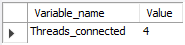
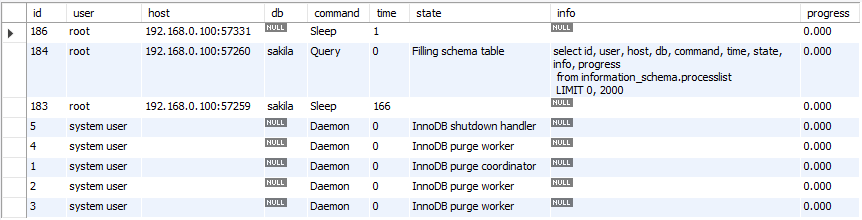
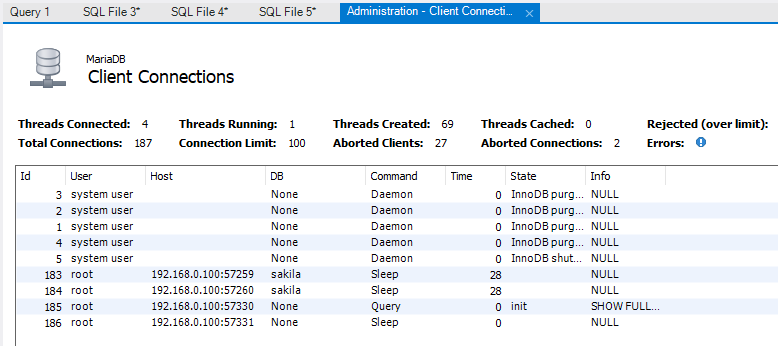
To see how many are connected at the current time:
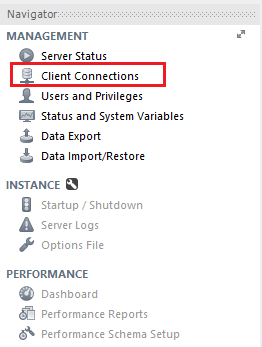
show processlist;
vi /etc/my.cnf
[mysqld]
max_connections = 500