First they ignore you
then they ridicule you
then they fight you
then you win
    -- Mahatma Gandhi
Chinese => English     英文 => 中文             
随笔-143  评论-744  文章-0  trackbacks-0
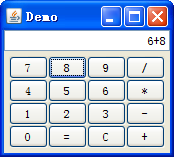
最近一直很忙,为了放松放松,自己就用Groovy写了个计算器玩玩,顺便也给还不太了解Groovy中SwingBuilder的朋友展示一下SwingBuilder的用法。

注意:请使用最新版本的Groovy,否则显示有问题


运行结果:


/*
 * Copyright 2007 the original author or authors.
 * 
 * Licensed under the Apache License, Version 2.0 (the "License");
 * you may not use this file except in compliance with the License.
 * You may obtain a copy of the License at
 * 
 *      
http://www.apache.org/licenses/LICENSE-2.0
 * 
 * Unless required by applicable law or agreed to in writing, software
 * distributed under the License is distributed on an "AS IS" BASIS,
 * WITHOUT WARRANTIES OR CONDITIONS OF ANY KIND, either express or implied.
 * See the License for the specific language governing permissions and
 * limitations under the License.
 
*/

package  edu.ecust.swing

import  groovy.swing. *
import  javax.swing. *
import  java.awt. *

/**
 * Groovy Calculator for studying SwingBuilder
 * 
 * 
@author  Daniel Sun(realbluesun@hotmail.com)
 *
 * 
@since  0.1
 
*/

class  GroovyCalculator {
    def swing 
=   new  SwingBuilder()
    JFrame frame
    def toolkit 
=  Toolkit.getDefaultToolkit()
    def screenSize 
=  toolkit.getScreenSize()
    
    
    def WIDTH 
=   320
    def HEIGHT 
=   200
    
int  X  =  (screenSize.width  -  WIDTH)  /   2
    
int  Y  =  (screenSize.height  -  HEIGHT)  /   2
    
    
boolean  flag  =   false
    
    
private   void  run() {
        UIManager.setLookAndFeel(UIManager.getSystemLookAndFeelClassName())
        frame 
=  swing.frame(title:  ' Demo ' ,
                            size: [WIDTH, HEIGHT],
                            location: [X, Y],
                            defaultCloseOperation: javax.swing.WindowConstants.DISPOSE_ON_CLOSE) {


            panel(layout: 
new  BorderLayout()) {
                textField(id: 
" expr " , constraints: BorderLayout.NORTH)
                
                panel(constraints: BorderLayout.CENTER) {
                    tableLayout {
                        tr {
                            td {
                                button(text:
" 7 " ) {
                                    action(getAction(
" 7 " ))
                                }
                            }
                            td {
                                button(text:
" 8 " ) {
                                    action(getAction(
" 8 " ))
                                }
                            }
                            td {
                                button(text:
" 9 " ) {
                                    action(getAction(
" 9 " ))
                                }
                            }
                            td {
                                button(text:
" / " ) {
                                    action(getAction(
" / " ))
                                }
                            }
                        }
                        tr {
                            td {
                                button(text:
" 4 " ) {
                                    action(getAction(
" 4 " ))
                                }
                            }
                            td {
                                button(text:
" 5 " ) {
                                    action(getAction(
" 5 " ))
                                }
                            }
                            td {
                                button(text:
" 6 " ) {
                                    action(getAction(
" 6 " ))
                                }
                            }
                            td {
                                button(text:
" * " ) {
                                    action(getAction(
" * " ))
                                }
                            }
                        }
                        tr {
                            td {
                                button(text:
" 1 " ) {
                                    action(getAction(
" 1 " ))
                                }
                            }
                            td {
                                button(text:
" 2 " ) {
                                    action(getAction(
" 2 " ))
                                }
                            }
                            td {
                                button(text:
" 3 " ) {
                                    action(getAction(
" 3 " ))
                                }
                            }
                            td {
                                button(text:
" - " ) {
                                    action(getAction(
" - " ))
                                }
                            }
                        }
                        tr {
                            td {
                                button(text:
" 0 " ) {
                                    action(getAction(
" 0 " ))
                                }
                            }
                            td {
                                button(text:
" = " ) {
                                    action(name:
" = " , closure:  this . & eval)
                                }
                            }
                            td {
                                button(text:
" C " ) {
                                    action(name:
" C " , closure:  this . & clear)
                                }
                            }
                            td {
                                button(text:
" + " ) {
                                    action(getAction(
" + " ))
                                }
                            }
                        }
                    }
                }
            }
        }
        
        swing.expr.setEditable(
false )
        swing.expr.setHorizontalAlignment(JTextField.RIGHT)
        swing.expr.setBackground(Color.WHITE)
        
        frame.pack()
        frame.setResizable(
false )
        frame.setVisible(
true )
    }
    
    
private   void  append(EventObject evt  =   null ) {
        
if  (flag) {
            swing.expr.text 
=   ""
            flag 
=   false
        }
        
        String name 
=  evt.source.text
        swing.expr.text 
<<=  name
        swing.expr.text 
=  swing.expr.text.replaceAll( " // " " / " )
    }
    
    
private   void  clear(EventObject evt  =   null ) {
        swing.expr.text 
=   ""
    }
    
    
private   void  eval(EventObject evt  =   null ) {
        String expr 
=  swing.expr.text
        
        def b
=   new  Binding()
        def conf
= new  org.codehaus.groovy.control.CompilerConfiguration()
        conf.setSourceEncoding(
' unicode ' )
        def groovyShell 
=   new  GroovyShell(b,conf)
        
        
try  {
            swing.expr.text 
=  groovyShell.evaluate(expr)
        } 
catch  (Throwable t) {
            swing.expr.text 
=   " invalid expression! "
            flag 
=   true
        }
        
    }
    
    def getAction(name) {
        
return  swing.action(name:name, closure:  this . & append)
    }
    
    
static   void  main(args) {
        
new  GroovyCalculator().run()
    }

}


附:朝花夕拾——Groovy & Grails
posted on 2007-08-05 20:52 山风小子 阅读(1681) 评论(14)  编辑  收藏 所属分类: Groovy & Grails

评论:
# re: Groovy高效编程——利用SwingBuilder轻松构造GUI 2007-08-06 11:12 | Sun
看代码挺奇怪的。。。
好不好用
对移植方面有没有限制  回复  更多评论
  
# re: Groovy高效编程——利用SwingBuilder轻松构造GUI 2007-08-06 13:42 | SoulEngineer
对!支持山风多写写Groovy的Grails以外的代码!比如Jasperreport里Groovy的应用,SWT的Groovy的应用等。  回复  更多评论
  
# re: Groovy高效编程——利用SwingBuilder轻松构造GUI 2007-08-06 14:47 | 远离尘嚣
Exception in thread "main" groovy.lang.MissingPropertyException: No such property: expr for class: groovy.swing.SwingBuilder
at groovy.lang.MetaClassImpl.getProperty(MetaClassImpl.java:975)
山风,这是啥子错?出师不利啊...  回复  更多评论
  
# re: Groovy高效编程——利用SwingBuilder轻松构造GUI 2007-08-06 19:19 | 山风小子
@远离尘嚣
我发现贴出来的代码中会被blogjava的编辑器插入空格等,
这个程序是基于Groovy1.1beta2的,我调试成功后才贴代码的
所以您遇到的问题可能是Groovy版本问题,也可能是复制了‘变味’后的代码:)  回复  更多评论
  
# re: Groovy高效编程——利用SwingBuilder轻松构造GUI 2007-08-06 19:19 | 山风小子
@SoulEngineer
有时间的话,我会的 :)  回复  更多评论
  
# re: Groovy高效编程——利用SwingBuilder轻松构造GUI 2007-08-06 19:20 | 山风小子
@Sun
Groovy本身都是用纯Java写的,所以无需担心移植性问题 :)  回复  更多评论
  
# re: Groovy高效编程——利用SwingBuilder轻松构造GUI 2007-08-06 22:57 | 远离尘嚣
山风兄弟,我猜是版本问题了,应该不是代码'变味',因为我是在eclipse里编辑,语法没有'见红',说明代码拷贝没问题.无论我在eclipse里运行,还是在命令行用groovy执行,都报一样的错,并且,我google了一下,好像这是一个bug,groovy官网上的bug report,有人已报料呢,参见:http://jira.codehaus.org/browse/GROOVY-1933
后来,我查阅了javaDOC API文档,看到最新的groovy版本 Groovy (1.1-beta-2)上的groovy.swing.SwingBuilder这个类,确实没有属性:expr(我的控制台上报错:找不到属性expr于类groovy.swing.SwingBuilder中),而你用的groovy版本中,SwingBuilder类貌似是有这个属性的.不知你的代码是工作在哪个groovy版本下?
最后,我发现一个灵异的现象,我写的另一个小程序,代码如下:
package com.airtoy.groovy.demo;

println "Nice ${cheese} Gromit!"
def cheese = "changed"
def myClosure = {println "hello $it"}('world')
执行时,报类似错误,说该类中找不到cheese属性,并且eclipse对话窗口也报那个错:
!MESSAGE An internal error occurred during: "Match Job".
!STACK 0
java.lang.StringIndexOutOfBoundsException: String index out of range: -3
(注: -3这个在不同情况下值不同,执行你的Calculator时,是其它负值,但都系索引越界)
而我把def cheese ="changed"这一行,放在println那句前面后,执行就正确了.我就有个疑问了:难道groovy作为script执行时,语句是有顺序的吗?而不像javascript或是php那样,变量定义是全局性?(意即第一行的语句可以引用最后一行语句才定义的变量)
山风赐教.  回复  更多评论
  
# re: Groovy高效编程——利用SwingBuilder轻松构造GUI 2007-08-07 19:57 | 山风小子
@远离尘嚣
panel(layout: new BorderLayout()) {
textField(id: " expr " , constraints: BorderLayout.NORTH)
...
}
中的id: " expr "就是swing.expr的由来,别忘了Groovy是动态语言,属性和行为可以在运行时添加和修改的 :)

应该先定义后引用:
def cheese = "changed"
println "Nice ${cheese} Gromit!"  回复  更多评论
  
# re: Groovy高效编程——利用SwingBuilder轻松构造GUI 2007-08-07 20:01 | 山风小子
@远离尘嚣
对了,GroovyEclipse这个plugin自带的Groovy是1.0 final,而我现在用的是最新版1.1beta2,所以需要运行此程序请安装Groovy1.1beta2,目前也提供了Installer,我建议下载这个安装文件版本,双击XXX.groovy即可运行Groovy程序:)  回复  更多评论
  
# re: Groovy高效编程——利用SwingBuilder轻松构造GUI 2007-08-08 01:40 | 远离尘嚣
山风,我用的是苹果的mac osx Tiger系统,groovy的installer安装,我是没办法用了,不过我一向喜欢压缩包解压缩,嘻嘻  回复  更多评论
  
# re: Groovy高效编程——利用SwingBuilder轻松构造GUI 2007-08-08 02:01 | 远离尘嚣
山风,谢谢你的提示,我的程序不能执行,果然是因为拷贝了'变味'的代码,因为拷贝过去的代码,字串引号里,首尾都有空格,不影响编译,但会引起运行期错误,看来,还是蛮隐蔽的呀,这个问题,今后开发groovy,就不会再犯这样错误了.
id: " expr 这个,就是因为expr前有空格,所以执行时,报expr属性不存在,去掉空格就好了.
现在可以执行了,但我的苹果系统上的这个程序,有问题,就是GUI上,只出现两竖排'计算器按键',如下布局:
------------------------
|_________________|
|____7____|___/___ |
|____4____|___*___|
|____1____|___-___|
|____0____|___+___|
不知是不是程序有问题?有空看看,其实我GUI程序,兴趣不大. ;)  回复  更多评论
  
# re: Groovy高效编程——利用SwingBuilder轻松构造GUI 2007-08-08 20:12 | 山风小子
@远离尘嚣
> 现在可以执行了,但我的苹果系统上的这个程序,有问题,就是GUI上,只出现两竖排'计算器按键'
这个问题我使用Groovy1.0final时遇到过,在Groovy1.1beta中已经修正了。

温馨提示: 请运行groovysh看一下你当前使用的Groovy的版本号是多少 :)  回复  更多评论
  
# re: Groovy高效编程——利用SwingBuilder轻松构造GUI 2007-08-09 13:05 | 远离尘嚣
我的groovy版本就是1.1 beta2的,上贴忘记交代版本,本来记着的。不好意思。  回复  更多评论
  
# re: Groovy高效编程——利用SwingBuilder轻松构造GUI 2007-08-09 19:24 | 山风小子
@远离尘嚣
呵呵,那你等到Groovy1.1final发布后再试试吧 :)  回复  更多评论


标题  
姓名  
主页
验证码 *  
内容(请不要发表任何与政治相关的内容)  
  登录  使用高级评论  新用户注册  返回页首  恢复上次提交      
该文被作者在 2007-08-06 19:21 编辑过