HTTP1.1的链接,默认是长链接,不会主动关闭。
LINUX会默认保留链接5天再关闭。
建立HTTP链接其实也是调用TCL的协议去建立,包括开始的时候有三次握手,关闭的时候有四次握手。关闭链接双方都可以发起。
但这些链接可能会被防火墙关掉而不通知建立链接的双方,因此设置需设置链接的存活期。
使用httpClient的链接池时,要设置池中的链接存活期或设置存活策略。
检测存活期只在每次发送数据时,才检测取出的链接是否超过存活期,如超过则关闭。
设置存活期的策略:
import java.util.concurrent.TimeUnit;
import org.apache.http.HeaderElement;
import org.apache.http.HeaderElementIterator;
import org.apache.http.HttpResponse;
import org.apache.http.conn.ConnectionKeepAliveStrategy;
import org.apache.http.message.BasicHeaderElementIterator;
import org.apache.http.protocol.HTTP;
import org.apache.http.protocol.HttpContext;
import org.apache.http.util.Args;
public class MyConnectionKeepAliveStrategy implements ConnectionKeepAliveStrategy{
private int timeToLive;
private TimeUnit timeUnit;
public MyConnectionKeepAliveStrategy(int timeToLive, TimeUnit timeUnit) {
this.timeToLive = timeToLive;
this.timeUnit = timeUnit;
}
@Override
public long getKeepAliveDuration(final HttpResponse response, final HttpContext context) {
Args.notNull(response, "HTTP response");
final HeaderElementIterator it = new BasicHeaderElementIterator(
response.headerIterator(HTTP.CONN_KEEP_ALIVE));
while (it.hasNext()) {
final HeaderElement he = it.nextElement();
final String param = he.getName();
final String value = he.getValue();
if (value != null && param.equalsIgnoreCase("timeout")) {
try {
return Long.parseLong(value) * 1000;
} catch(final NumberFormatException ignore) {
//do nothing
}
}
}
return timeUnit.toMillis(timeToLive);
}
}
《HttpClient官方文档》2.6 连接维持存活策略
http://ifeve.com/httpclient-2-6/httpclient连接池管理,你用对了?
http://ifeve.com/http-connection-pool/HttpClient连接池的一些思考
https://zhuanlan.zhihu.com/p/85524697HTTP协议的Keep-Alive 模式
https://www.jianshu.com/p/49551bda6619
通常要用到取某个时间段内的数据,那么时间段要如何定义?
取2020-12-01这天的数据,"2020-12-01 00:00:00" <= time < "2020-12-02 00:00:00"。
apache common3中提供了相应的方法:
startDate = DateUtils.parseDate(startDateStr, DATE_PATTERN);
String endDateStr = args.getOptionValues(END_DATE).get(0);
endDate = DateUtils.parseDate(endDateStr, DATE_PATTERN);
//清零开始日期,返回类似2020-12-01 00:00:00
startDate = DateUtils.truncate(startDate, Calendar.DATE);
//取结束日期的上限,返回隔天的时间,2020-12-02 00:00:00
endDate = DateUtils.ceiling(endDate, Calendar.DATE);"。
apache common3中提供了相应的方法:
https://dev.twsiyuan.com/2017/09/tcp-states.html
在開發基於 HTTP 的網路應用服務時,當有大量連線要求,或是與長連線 (Persistent connection) 要求時,常常遇到底層 TCP 的連線斷線錯誤,導致服務不穩定。因此研究了解 TCP 的連線狀態機制,並嘗試用自己的方式整理筆記,希望能從基礎知識中找到解決錯誤的線索,或是任何能更進一步優化服務的手段。
僅紀錄 TCP 連線狀態以及建立或是斷開連線流程,關於進一步的 TCP 封包協定可參考 Reference 連線。
TCP 建立連線 (Open)
通常的 TCP 連線建立流程與狀態,需要三次的訊息交換來建立連線 (three-way handshaking):
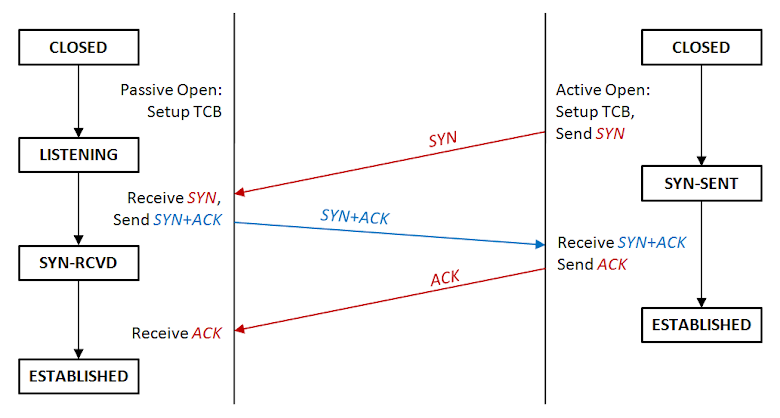
TCP 建立連線流程圖
其中左邊通常為 server,右邊則為 client,文字流程描述:
- Server 建立 TCB,開啟監聽連線,進入狀態 LISTENING
- Client 發出連線要求 SYN,進入狀態 SYN-SENT,等待回應
- Server 收到 SYN 要求,回應連線傳送 SYN+ACK,並進入狀態 SYN-RCVD (SYN-RECEIVED)
- Client 收到 SYN+ACK 確認完成連線進入狀態 ESTABLISHED,並送出 ACK
- Server 收到 ACK 確認連線完成,也進入狀態 ESTABLISHED
- 雙方開始傳送交換資料
該些名詞與狀態說明:
- CLOSED:連線關閉狀態
- LISTENING:監聽狀態,被動等待連線
- SYN-SENT:主動送出連線要求 SYN,並等待對方回應
- SYN-RCVD:收到連線要求 SYN,送出己方的 SYN+ACK 後,等待對方回應
- ESTABLISHED:確定完成連線,可開始傳輸資料
- TCB:Transmission Control Block,see wiki
- SYN:Synchronous,表示與對方建立連線的同步符號
- ACK:Acknowledgement,表示發送的數據已收到無誤
在建立連線時,可能會發生雙方同步建立連線的情形 (Simultaneous open),常見於 P2P 的應用中,其 TCP 建立連線的流程不太一樣:
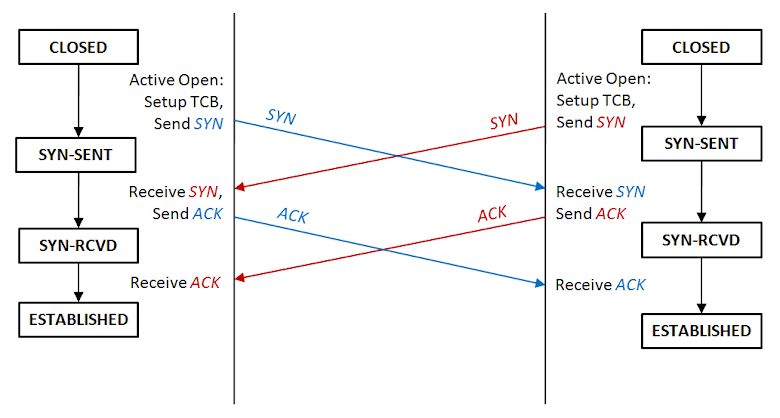
TCP 同步建立連線流程圖
畫成 TCP 狀態流程圖會是這樣:
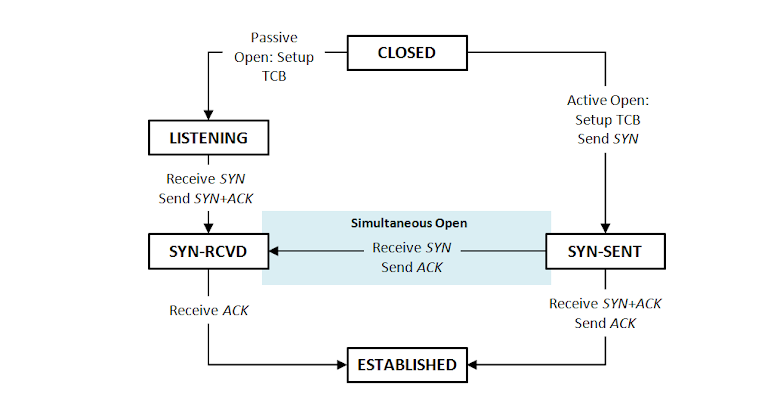
TCP Open 狀態圖
TCP 斷開連線 (Close)
TCP 關閉流程如下,比建立連線還要複雜一些,需要經過四次的訊息交換 (four-way handshaking),要注意的是可以是由 server 發起主動關閉,抑或是 client 發起主動關閉:
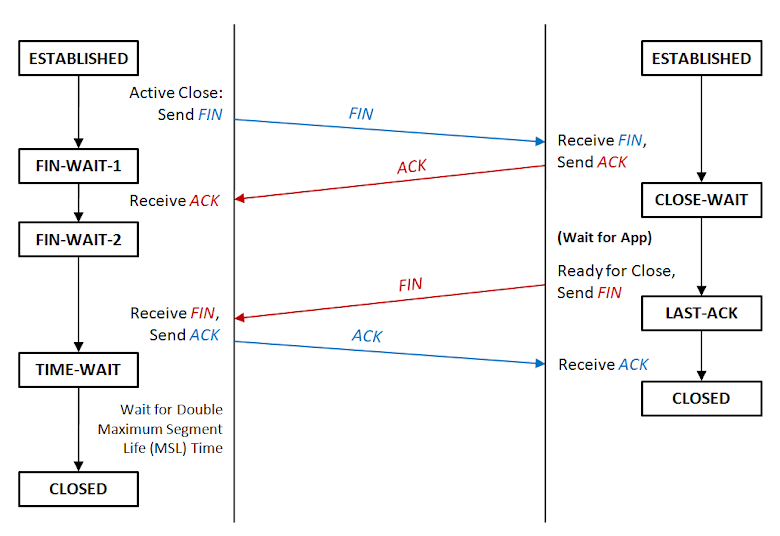
TCP 關閉連線流程圖
其中左邊通常為 client 狀態 (由 client 主動發起關閉連線),右邊則為 server 狀態,文字流程描述:
- Client 準備關閉連線,發出 FIN,進入狀態 FIN-WAIT-1
- Server 收到 FIN,發回收到的 ACK,進入狀態 CLOSE-WAIT,並通知 App 準備斷線
- Client 收到 ACK,進入狀態 FIN-WAIT-2,等待 server 發出 FIN
- Server 確認 App 處理完斷線請求,發出 FIN,並進入狀態 LAST-ACK
- Client 收到 FIN,並回傳確認的 ACK,進入狀態 TIME-WAIT,等待時間過後正式關閉連線
- Server 收到 ACK,便直接關閉連線
該些名詞與狀態說明:
- ESTABLISHED:連線開啟狀態
- CLOSE-WAIT:等待連線關閉狀態,等待 App 回應
- LAST-ACK:等待連線關閉狀態,等待遠端回應 ACK 後,便關閉連線
- FIN-WAIT-1:等待連線關閉狀態,等待遠端回應 ACK
- FIN-WAIT-2:等待連線關閉狀態,等待遠端回應 FIN
- TIME-WAIT:等待連線關閉狀態,等段一段時候,保證遠端有收到其 ACK 關閉連線 (網路延遲問題)
- CLOSED:連線關閉狀態
- FIN:表示關閉連線的同步符號
- ACK:Acknowledgement,表示發送的數據已收到無誤
有可能連線的雙方同時發起關閉,雖然機率還蠻低的:
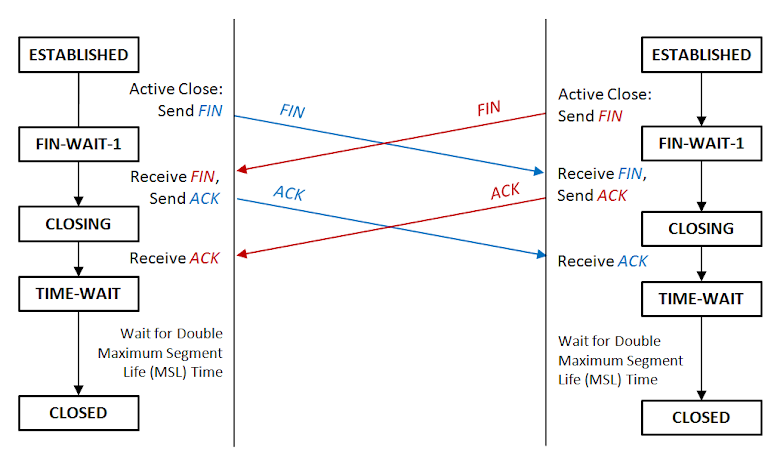
TCP 同步關閉連線流程圖
這邊多一個狀態:
- CLOSING:等待連線關閉狀態,等待遠端回應 ACK
畫成 TCP 狀態流程圖會是這樣:
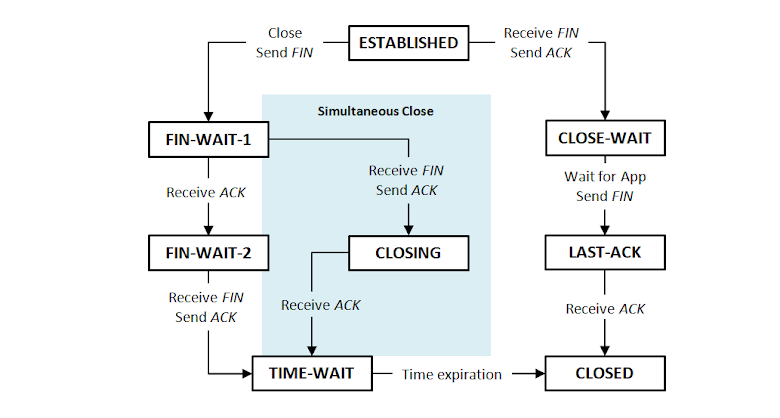
TCP Close 狀態圖
查詢現在電腦的 TCP 狀態
查詢目前所有的連線狀態 (Windows & Linux):
netstat -a
Reference
import java.util.concurrent.TimeUnit;
import org.apache.http.client.config.RequestConfig;
import org.apache.http.impl.client.CloseableHttpClient;
import org.apache.http.impl.client.HttpClients;
import org.apache.http.impl.conn.PoolingHttpClientConnectionManager;
import org.springframework.context.annotation.Bean;
import org.springframework.context.annotation.Configuration;
@Configuration
public class HttpClientConfiguration {
@Bean
public PoolingHttpClientConnectionManager poolingHttpClientConnectionManager() {
PoolingHttpClientConnectionManager result =
new PoolingHttpClientConnectionManager(5, TimeUnit.MINUTES);
result.setMaxTotal(20);
result.setDefaultMaxPerRoute(20);
return result;
}
@Bean
public RequestConfig requestConfig(KycProperties kycProperties) {
return RequestConfig
.custom()
.setConnectionRequestTimeout(kycProperties.getHttpConnectionTimeout())
.setConnectTimeout(kycProperties.getHttpConnectionTimeout())
.setSocketTimeout(kycProperties.getHttpConnectionTimeout())
.build();
}
@Bean
public CloseableHttpClient httpClient(PoolingHttpClientConnectionManager poolingHttpClientConnectionManager, RequestConfig requestConfig) {
return HttpClients
.custom()
.setConnectionManager(poolingHttpClientConnectionManager)
.setDefaultRequestConfig(requestConfig)
.build();
}
}
Troubleshooting Spring's RestTemplate Requests Timeout
https://tech.asimio.net/2016/12/27/Troubleshooting-Spring-RestTemplate-Requests-Timeout.html
a
httpclient超时重试记录
https://blog.csdn.net/wanghao112956/article/details/102967930
A/pom.xml:
<groupId>com.dummy.bla</groupId>
<artifactId>parent</artifactId>
<version>0.1-SNAPSHOT</version>
<packaging>pom</packaging>
B/pom.xml
<parent>
<groupId>com.dummy.bla</groupId>
<artifactId>parent</artifactId>
<version>0.1-SNAPSHOT</version>
</parent>
<groupId>com.dummy.bla.sub</groupId>
<artifactId>kid</artifactId>
B/pom.xml中需要显式注明父pom的版本号,但从MAVEN3.5之后,可以用变量表示了:
A/pom.xml:
<groupId>com.dummy.bla</groupId>
<artifactId>parent</artifactId>
<version>${revision}</version>
<packaging>pom</packaging>
<properties>
<revision>0.1-SNAPSHOT</revision>
</properties>
B/pom.xml
<parent>
<groupId>com.dummy.bla</groupId>
<artifactId>parent</artifactId>
<version>${revision}</version>
</parent>
<groupId>com.dummy.bla.sub</groupId>
<artifactId>kid</artifactId>
https://stackoverflow.com/questions/10582054/maven-project-version-inheritance-do-i-have-to-specify-the-parent-version/51969067#51969067
https://maven.apache.org/maven-ci-friendly.html
缘起
今天在看一个bug,之前一个分支的版本是正常的,在新的分支上上加了很多日志没找到原因,希望回溯到之前的版本,确定下从哪个提交引入的问题,但是还不想把现在的修改提交,也不希望在Git上看到当前修改的版本(带有大量日志和调试信息)。因此呢,查查Git有没有提供类似功能,就找到了git stash的命令。
综合下网上的介绍和资料,git stash(git储藏)可用于以下情形:
- 发现有一个类是多余的,想删掉它又担心以后需要查看它的代码,想保存它但又不想增加一个脏的提交。这时就可以考虑
git stash。 - 使用git的时候,我们往往使用分支(branch)解决任务切换问题,例如,我们往往会建一个自己的分支去修改和调试代码, 如果别人或者自己发现原有的分支上有个不得不修改的bug,我们往往会把完成一半的代码
commit提交到本地仓库,然后切换分支去修改bug,改好之后再切换回来。这样的话往往log上会有大量不必要的记录。其实如果我们不想提交完成一半或者不完善的代码,但是却不得不去修改一个紧急Bug,那么使用git stash就可以将你当前未提交到本地(和服务器)的代码推入到Git的栈中,这时候你的工作区间和上一次提交的内容是完全一样的,所以你可以放心的修Bug,等到修完Bug,提交到服务器上后,再使用git stash apply将以前一半的工作应用回来。 - 经常有这样的事情发生,当你正在进行项目中某一部分的工作,里面的东西处于一个比较杂乱的状态,而你想转到其他分支上进行一些工作。问题是,你不想提交进行了一半的工作,否则以后你无法回到这个工作点。解决这个问题的办法就是
git stash命令。储藏(stash)可以获取你工作目录的中间状态——也就是你修改过的被追踪的文件和暂存的变更——并将它保存到一个未完结变更的堆栈中,随时可以重新应用。
git stash用法
1. stash当前修改
git stash会把所有未提交的修改(包括暂存的和非暂存的)都保存起来,用于后续恢复当前工作目录。
比如下面的中间状态,通过git stash命令推送一个新的储藏,当前的工作目录就干净了。
$ git status
On branch master
Changes to be committed:

new file:   style.css

Changes not staged for commit:

modified:   index.html

$ git stash Saved working directory and index state WIP on master: 5002d47 our new homepage
HEAD is now at 5002d47 our new homepage

$ git status
On branch master nothing to commit, working tree clean
需要说明一点,stash是本地的,不会通过git push命令上传到git server上。
实际应用中推荐给每个stash加一个message,用于记录版本,使用git stash save取代git stash命令。示例如下:
$ git stash save "test-cmd-stash"
Saved working directory and index state On autoswitch: test-cmd-stash
HEAD 现在位于 296e8d4 remove unnecessary postion reset in onResume function
$ git stash list
stash@{0}: On autoswitch: test-cmd-stash
2. 重新应用缓存的stash
可以通过git stash pop命令恢复之前缓存的工作目录,输出如下:
$ git status
On branch master
nothing to commit, working tree clean
$ git stash pop
On branch master
Changes to be committed:
     new file:   style.css

Changes not staged for commit:
      modified:   index.html
Dropped refs/stash@{0} (32b3aa1d185dfe6d57b3c3cc3b32cbf3e380cc6a)
这个指令将缓存堆栈中的第一个stash删除,并将对应修改应用到当前的工作目录下。
你也可以使用git stash apply命令,将缓存堆栈中的stash多次应用到工作目录中,但并不删除stash拷贝。命令输出如下:
$ git stash apply
On branch master
Changes to be committed:
      new file:   style.css
Changes not staged for commit:
      modified:   index.html
3. 查看现有stash
可以使用git stash list命令,一个典型的输出如下:
$ git stash list
stash@{0}: WIP on master: 049d078 added the index file
stash@{1}: WIP on master: c264051 Revert "added file_size"
stash@{2}: WIP on master: 21d80a5 added number to log
在使用git stash apply命令时可以通过名字指定使用哪个stash,默认使用最近的stash(即stash@{0})。
4. 移除stash
可以使用git stash drop命令,后面可以跟着stash名字。下面是一个示例:
$ git stash list
stash@{0}: WIP on master: 049d078 added the index file
stash@{1}: WIP on master: c264051 Revert "added file_size"
stash@{2}: WIP on master: 21d80a5 added number to log
$ git stash drop stash@{0}
Dropped stash@{0} (364e91f3f268f0900bc3ee613f9f733e82aaed43)
或者使用git stash clear命令,删除所有缓存的stash。
5. 查看指定stash的diff
可以使用git stash show命令,后面可以跟着stash名字。示例如下:
$ git stash show
  index.html | 1 +
  style.css | 3 +++
  2 files changed, 4 insertions(+)
在该命令后面添加-p或--patch可以查看特定stash的全部diff,如下:
$ git stash show -p
diff --git a/style.css b/style.css
new file mode 100644
index 0000000..d92368b
--- /dev/null
+++ b/style.css @@ -0,0 +1,3 @@
+* {
+  text-decoration: blink;
+}
diff --git a/index.html b/index.html
index 9daeafb..ebdcbd2 100644
--- a/index.html
+++ b/index.html
@@ -1 +1,2 @@
+<link rel="stylesheet" href="style.css"/>
6. 从stash创建分支
如果你储藏了一些工作,暂时不去理会,然后继续在你储藏工作的分支上工作,你在重新应用工作时可能会碰到一些问题。如果尝试应用的变更是针对一个你那之后修改过的文件,你会碰到一个归并冲突并且必须去化解它。如果你想用更方便的方法来重新检验你储藏的变更,你可以运行 git stash branch,这会创建一个新的分支,检出你储藏工作时的所处的提交,重新应用你的工作,如果成功,将会丢弃储藏。
$ git stash branch testchanges
Switched to a new branch "testchanges"
# On branch testchanges
# Changes to be committed:
#   (use "git reset HEAD <file>..." to unstage)
#
#      modified:   index.html
#
# Changes not staged for commit:
#   (use "git add <file>..." to update what will be committed)
#
#      modified:   lib/simplegit.rb
#
Dropped refs/stash@{0} (f0dfc4d5dc332d1cee34a634182e168c4efc3359)
这是一个很棒的捷径来恢复储藏的工作然后在新的分支上继续当时的工作。
7. 暂存未跟踪或忽略的文件
默认情况下,git stash会缓存下列文件:
- 添加到暂存区的修改(staged changes)
- Git跟踪的但并未添加到暂存区的修改(unstaged changes)
但不会缓存一下文件:
- 在工作目录中新的文件(untracked files)
- 被忽略的文件(ignored files)
git stash命令提供了参数用于缓存上面两种类型的文件。使用-u或者--include-untracked可以stash untracked文件。使用-a或者--all命令可以stash当前目录下的所有修改。
至于git stash的其他命令建议参考Git manual。
小结
git提供的工具很多,恰好用到就可以深入了解下。更方便的开发与工作的。
参考资料
- 6.3 Git工具-储藏(Stashing)
- Git Stash 历险记
- Git Stash用法
- Git Stash
https://stackoverflow.com/questions/35312677/how-to-use-month-using-aggregation-in-spring-data-mongo-dbAggregation agg = newAggregation(
project("id")
.andExpression("month(createdDate)").as("month_joined")
.andExpression("year(createdDate)").as("year"),
match(Criteria.where("year").is(2016)),
group("month_joined").count().as("number"),
project("number").and("month_joined").previousOperation(),
sort(ASC, "number")
);
AggregationResults<JoinCount> results = mongoTemplate.aggregate(agg,
"collectionName", JoinCount.class);
List<JoinCount> joinCount = results.getMappedResults();