
2006年11月22日
此问题是由于升级 macos sonoma 14.2.1 引起的
解决办法,重新安装xcode
rm -rf /Library/Developer/CommandLineTools
xcode-select --install
posted @
2024-02-04 13:57 一凡 阅读(65) |
评论 (0) |
编辑 收藏# Springboot
整合activiti
源代码:
https://gitee.com/yifan88899/acttest
## 版本说明
- springboot 2.4.2
- activiti 7.1.0.M6
- mysql 8.0.28
## 插件安装
- Activiti BPMN visualizer
## Bpmn
流程图位置
- 流程图xml
和png
需放在resources/processes
下
## Test
- Test Case
都可执行,包括:
- 流程查询
- 流程部署
- 流程启动
- 流程拾取、完成操作
## Mysql
- 需要启动Mysql8
- 数据库名Activiti7
- activiti
会版建表
posted @
2023-11-10 15:56 一凡 阅读(114) |
评论 (0) |
编辑 收藏1、打开my.cnf 加入 skip-grant-tables2、mysql.service stop && mysql.service start
3、清空root密码 并 退出
update mysql.user set authentication_string='' where user='root';
4、mysql.service stop && mysql.service start
5、mysql -root 免密登录并修改root密码
alter user 'root'@
'%' identified
by 'pass$123';
alter user 'root'@
'localhost' identified
by 'pass$123';
确定是否支持远程登录,host中有%的记录即支持
select host, user, authentication_string, plugin from user;
posted @
2021-08-05 18:06 一凡 阅读(221) |
评论 (0) |
编辑 收藏posted @
2021-06-22 17:46 一凡 阅读(99) |
评论 (0) |
编辑 收藏#!/usr/bin/expect
####################
set pass xxxx
set user yyyy
####################
spawn ssh -p 35000 -o StrictHostKeyChecking=no "${user}@xgrelay.xxxx.com"
expect {
-re ".*Dkey.*" { gets stdin dkey; send "$dkey\r"; exp_continue}
-re "Option>:" { send "1\r" ;}
-re "Password>:" { send "$pass\r" ; exp_continue }
-re "password:" { send "$pass\r" ; exp_continue }
}
posted @
2021-01-18 11:35 一凡 阅读(180) |
评论 (0) |
编辑 收藏-- data export csv 其中 $1=$1 如果不加指定分隔符不生效mysql -uadmin -ptest -h127.0.0.1 -P3306 -e "select * from test where create_time > unix_timestamp('2020-09-10 00:00:00') and status = 99" | awk '{OFS=","}{$1=$1;print $0}'#csv中文转码
tmpfn="exempt-update-3.30.csv";iconv -c -s -f UTF-8 -t GBK $tmpfn > /tmp/$tmpfn && mv /tmp/$tmpfn .
posted @
2020-09-10 22:08 一凡 阅读(204) |
评论 (0) |
编辑 收藏#!/bin/bash
for f in "$@"; do
if [ -f "$f" ]; then
iconv -s -c -f UTF8 -t GBK "$f" > /tmp/$f.tmp
mv /tmp/$f.tmp "$f"
fi
done
posted @
2020-04-20 10:03 一凡 阅读(198) |
评论 (0) |
编辑 收藏# -*- coding: utf-8 -*-
#!/usr/bin/python
import re
import io
import sys
# obj = re.compile(r'(?P<ip>.*?)- - \[(?P<time>.*?)\] "(?P<request>.*?)" (?P<status>.*?) (?P<bytes>.*?) "(?P<referer>.*?)" "(?P<ua>.*?)"')
# example:xxxx"id":2640914,"orderId":144115188137125591xxxx"state":10xxxxx"
# 日志整行都需要匹配,需要用的用具体正则匹配,如(\d{7}),不需要的用(.*)匹配,总之所有需要或不需要部分都用()括起来
obj = re.compile(r'(.*"id":)(\d{7})(.*"orderId":)(\d{18})(.*"state":)(\d{2})(.*)')
def load_log(path):
# 读取文件
with io.open(path, mode="r", encoding="utf-8") as f:
for line in f:
line = line.strip()
parse(line)
def stdin():
# 读取管道输入
for line in sys.stdin:
parse(line)
def parse(line):
# 解析单行nginx日志
try:
result = obj.match(line)
print(result.group(2,4,6))
except:
pass
if __name__ == '__main__':
# load_log("/tmp/227.log")
stdin()
posted @
2020-02-29 02:10 一凡 阅读(307) |
评论 (0) |
编辑 收藏- 新增中间件cors
func Cors() gin.HandlerFunc {
return func(c *gin.Context) {
method := c.Request.Method
c.Header("Access-Control-Allow-Origin", "*") //必选
c.Header("Access-Control-Allow-Headers", "*") //可选 �如果request有header, 必选
//c.Header("Access-Control-Allow-Credentials", "true") //可选
//c.Header("Access-Control-Allow-Methods", "*") //可选
//c.Header("Access-Control-Expose-Headers", "*") //可选
//放行所有OPTIONS方法
if method == "OPTIONS" {
c.AbortWithStatus(http.StatusOK)
}
// 处理请求
c.Next()
}
}
- 在router里增加cors,必须在group之前,全局设置
r.Use(gin.Logger(), gin.Recovery(), cors.Cors())
- 测试代码,header设置不能多于cors设置
<!DOCTYPE html>
<html lang="en">
<head>
    <meta charset="UTF-8">
    <title>Title</title>
</head>
<link type="test/css" href="css/style.css" rel="stylesheet">
<script type="text/javascript" src="https://code.jquery.com/jquery-3.2.1.min.js"></script>
<script type="text/javascript">
 $(function(){
 $("#cors").click(
 function(){
 $.ajax({
 headers:{
 "Content-Type":"application/json;charset=UTF-8",
 "Access":"adsad",
 "Access-Token":"eyJhbGciOiJIUzI1NiIsInR5cCI6IkpXVCJ9.eyJ1c2VybmFtZSI6InRlc3QiLCJwYXNzd29yZCI6InRlc3QxMjM0NTYiLCJleHAiOjE1NzczMzY3MTIsImlzcyI6Imdpbi1ibG9nIn0.wMlQXqZO2V0LR-FIgDh45LWI0OYMYi6an_NvRmF0Nug"
 },
 url:"http://127.0.0.1:8000/api/v1/articles",
 success:function(data){
 console.log("start");
 console.log(data);
            }
         })
      });
   });
</script>
<body>
   <input type="button" id="cors" value="core跨域测试">
</body>
</html>
- 请求的headers数量、名称与cors里的设置需要严格对应,不然报错如下
Access to XMLHttpRequest at 'http://127.0.0.1:8000/api/v1/articles' from origin 'http://localhost:9999' has been blocked by CORS policy: Request header field access is not allowed by Access-Control-Allow-Headers in preflight response.
posted @
2019-12-26 11:17 一凡 阅读(341) |
评论 (0) |
编辑 收藏
1、在main函数中增加全局配置,其中@name就是你确定的鉴权参数名,我的是token, @
in header 说明参数放在header,你的鉴权代码需要从header中获取
// @title gin-blog API
// @version 0.0.1
// @description This is a gin blog example
// @securityDefinitions.apikey ApiKeyAuth
// @in header
// @name token
// @BasePath /
2、在具体的handler里添加如下注释,此处的ApiKeyAuth和main中的apike对应,切记不要修改
// @Security ApiKeyAuth
3、swagger页面如下:
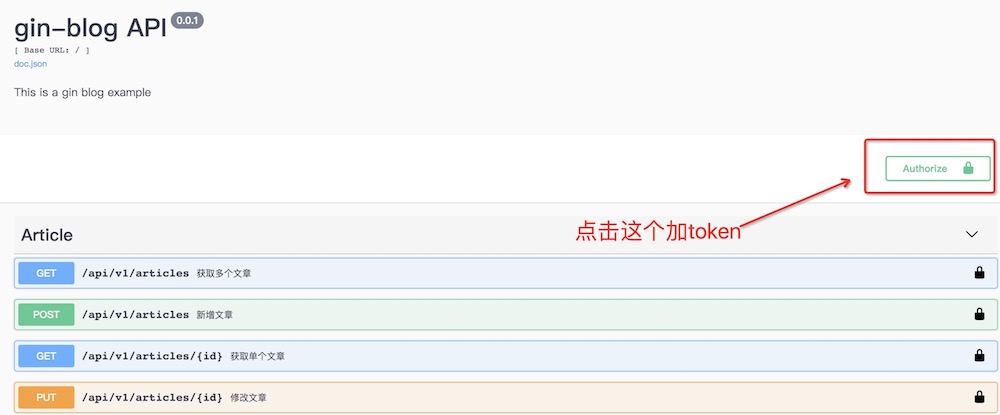
4、添加token后,后续所有有鉴权接口的header里自动携带token
posted @
2019-12-23 16:08 一凡 阅读(2036) |
评论 (0) |
编辑 收藏posted @
2019-11-19 16:41 一凡 阅读(161) |
评论 (0) |
编辑 收藏
- golang
./go_extract_json 0.95s user 0.12s system 99% cpu 1.081 total
- shell
bash segment.sh 0.64s user 0.07s system 101% cpu 0.695 total
- perl
perl extract.pl 39.57s user 0.54s system 98% cpu 40.579 total
posted @
2019-09-20 18:13 一凡 阅读(227) |
评论 (0) |
编辑 收藏- Invalid bound statement (not found)
在接口名称及方法名称对应OK的情况下,在application.properties中添加:
mybatis.mapperLocations=classpath:mapper/*Mapper.xml
mybatis.typeAliasesPackage=com.willpower.entity
posted @
2019-04-03 21:41 一凡 阅读(144) |
评论 (0) |
编辑 收藏推荐:
https://github.com/wming3/.vimToIDE
posted @
2017-05-08 16:33 一凡 阅读(237) |
评论 (0) |
编辑 收藏http://www.iteye.com/news/32170
Guice OKHttp Retrofit
posted @
2017-03-02 17:36 一凡 阅读(146) |
评论 (0) |
编辑 收藏http://www.iteye.com/news/32119
posted @
2017-02-10 18:57 一凡 阅读(163) |
评论 (0) |
编辑 收藏http://www.iteye.com/news/31877
posted @
2016-10-11 15:26 一凡 阅读(182) |
评论 (0) |
编辑 收藏 //mysql
mysql -uroot -proot -h127.0.0.1 testdb -e " select a, b, c, d from t_test where a='xxxx'" | sed 's/\t/","/g;s/^/"/;s/$/"/;s/\n//g' > /tmp/xxxxx.csv
posted @
2015-01-22 18:55 一凡 阅读(379) |
评论 (0) |
编辑 收藏 http://www.oracle.com/
wget下载方法:
1、在打开浏览器的开发者工具
2、在network里找到类似
http://download.oracle.com/otn/java/jdk/6u45-b06/jdk-6u45-linux-x64.bin?AuthParam=1416809306_8aff16bf46c832f44260abcc951c58eawget http://download.oracle.com/otn/java/jdk/6u45-b06/jdk-6u45-linux-x64.bin\?AuthParam=1416809306_8aff16bf46c832f44260abcc951c58ea
注意:红色,由于?是通配符,需要转义一下。
posted @
2014-11-24 14:09 一凡 阅读(232) |
评论 (0) |
编辑 收藏set hlsearch "高亮度反白
set backspace=2 "可随时用倒退键删除
set autoindent "自动缩排
set ruler "可显示最后一行的状态
set showmode "左下角那一行的状态
set nu "可以在每一行的最前面显示行号
set bg=dark "显示不同的底色色调
syntax on "进行语法检验,颜色显示
set wrap "自动折行
set shiftwidth=4
set tabstop=4
set softtabstop=4
set expandtab "将tab替换为相应数量空格
set smartindent
"phpcomplete
filetype plugin on
autocmd FileType php set omnifunc=phpcomplete#CompletePHP
"php-doc
source /home/qiaoy/sf/php-doc.vim
inoremap <C-P> <ESC>:call PhpDocSingle()<CR>i
nnoremap <C-P> :call PhpDocSingle()<CR>
vnoremap <C-P> :call PhpDocRange()<CR>
"neocomplcache
if &term=="xterm"
set t_Co=8
set t_Sb=^[[4%dm
set t_Sf=^[[3%dm
endif
let g:neocomplcache_enable_at_startup = 1
"autoload .vimrc
autocmd! bufwritepost .vimrc source %
posted @
2014-09-17 14:27 一凡 阅读(287) |
评论 (0) |
编辑 收藏#!/bin/bash
for((i=0; i<100; i++));do
curl -i -H "xxx -H "Accept:application/json" -H "Content-Type:application/json" -sd '{"xxx": 563,"xxx": 1,"xxx": 0,"xxx": "{\"xxx\":0,\"xxx\":\"xxx\"}"}' -H "Cookie: JSESSIONID=4F8F7834CEABB668BE84BD3B61AEBE9E" http://test.com;
done
posted @
2014-08-20 13:23 一凡 阅读(319) |
评论 (0) |
编辑 收藏pasting
log4j.properties 使用
一.参数意义说明
输出级别的种类
ERROR、WARN、INFO、DEBUG
ERROR 为严重错误 主要是程序的错误
WARN 为一般警告,比如session丢失
INFO 为一般要显示的信息,比如登录登出
DEBUG 为程序的调试信息
配置日志信息输出目的地
log4j.appender.appenderName = fully.qualified.name.of.appender.
class1.org.apache.log4j.ConsoleAppender(控制台)
2.org.apache.log4j.FileAppender(文件)
3.org.apache.log4j.DailyRollingFileAppender(每天产生一个日志文件)
4.org.apache.log4j.RollingFileAppender(文件大小到达指定尺寸的时候产生一个新的文件)
5.org.apache.log4j.WriterAppender(将日志信息以流格式发送到任意指定的地方)
配置日志信息的格式
log4j.appender.appenderName.layout = fully.qualified.name.of.layout.
class1.org.apache.log4j.HTMLLayout(以HTML表格形式布局),
2.org.apache.log4j.PatternLayout(可以灵活地指定布局模式),
3.org.apache.log4j.SimpleLayout(包含日志信息的级别和信息字符串),
4.org.apache.log4j.TTCCLayout(包含日志产生的时间、线程、类别等等信息)
控制台选项
Threshold=DEBUG:指定日志消息的输出最低层次。
ImmediateFlush=
true:默认值是true,意谓着所有的消息都会被立即输出。
Target=System.err:默认情况下是:System.out,指定输出控制台
FileAppender 选项
Threshold=DEBUF:指定日志消息的输出最低层次。
ImmediateFlush=
true:默认值是true,意谓着所有的消息都会被立即输出。
File=mylog.txt:指定消息输出到mylog.txt文件。
Append=
false:默认值是true,即将消息增加到指定文件中,false指将消息覆盖指定的文件内容。
RollingFileAppender 选项
Threshold=DEBUG:指定日志消息的输出最低层次。
ImmediateFlush=
true:默认值是true,意谓着所有的消息都会被立即输出。
File=mylog.txt:指定消息输出到mylog.txt文件。
Append=
false:默认值是true,即将消息增加到指定文件中,false指将消息覆盖指定的文件内容。
MaxFileSize=100KB: 后缀可以是KB, MB 或者是 GB. 在日志文件到达该大小时,将会自动滚动,即将原来的内容移到mylog.log.1文件。
MaxBackupIndex=2:指定可以产生的滚动文件的最大数。
log4j.appender.A1.layout.ConversionPattern=%-4r %-5p %d{yyyy-MM-dd HH:mm:ssS} %c %m%n
日志信息格式中几个符号所代表的含义:
-X号: X信息输出时左对齐;
%p: 输出日志信息优先级,即DEBUG,INFO,WARN,ERROR,FATAL,
%d: 输出日志时间点的日期或时间,默认格式为ISO8601,也可以在其后指定格式,比如:%d{yyy MMM dd HH:mm:ss,SSS},输出类似:2002年10月18日 22:10:28,921
%r: 输出自应用启动到输出该log信息耗费的毫秒数
%c: 输出日志信息所属的类目,通常就是所在类的全名
%t: 输出产生该日志事件的线程名
%l: 输出日志事件的发生位置,相当于%C.%M(%F:%L)的组合,包括类目名、发生的线程,以及在代码中的行数。举例:Testlog4.main (TestLog4.java:10)
%x: 输出和当前线程相关联的NDC(嵌套诊断环境),尤其用到像java servlets这样的多客户多线程的应用中。
%%: 输出一个"%"字符
%F: 输出日志消息产生时所在的文件名称
%L: 输出代码中的行号
%m: 输出代码中指定的消息,产生的日志具体信息
%n: 输出一个回车换行符,Windows平台为"/r/n",Unix平台为"/n"输出日志信息换行
可以在%与模式字符之间加上修饰符来控制其最小宽度、最大宽度、和文本的对齐方式。如:
1)%20c:指定输出category的名称,最小的宽度是20,如果category的名称小于20的话,默认的情况下右对齐。
2)%-20c:指定输出category的名称,最小的宽度是20,如果category的名称小于20的话,"-"号指定左对齐。
3)%.30c:指定输出category的名称,最大的宽度是30,如果category的名称大于30的话,就会将左边多出的字符截掉,但小于30的话也不会有空格。
4)%20.30c:如果category的名称小于20就补空格,并且右对齐,如果其名称长于30字符,就从左边较远输出的字符截掉。
二.文件配置Sample1
log4j.rootLogger=DEBUG,A1,R
#log4j.rootLogger=INFO,A1,R
# ConsoleAppender 输出
log4j.appender.A1=org.apache.log4j.ConsoleAppender
log4j.appender.A1.layout=org.apache.log4j.PatternLayout
log4j.appender.A1.layout.ConversionPattern=%-d{yyyy-MM-dd HH:mm:ss,SSS} [%c]-[%p] %m%n
# File 输出 一天一个文件,输出路径可以定制,一般在根路径下
log4j.appender.R=org.apache.log4j.DailyRollingFileAppender
log4j.appender.R.File=blog_log.txt
log4j.appender.R.MaxFileSize=500KB
log4j.appender.R.MaxBackupIndex=10
log4j.appender.R.layout=org.apache.log4j.PatternLayout
log4j.appender.R.layout.ConversionPattern=%d{yyyy-MM-dd HH:mm:ss,SSS} [%t] [%c] [%p] - %m%n
文件配置Sample2
下面给出的Log4J配置文件实现了输出到控制台,文件,回滚文件,发送日志邮件,输出到数据库日志表,自定义标签等全套功能。
log4j.rootLogger=DEBUG,CONSOLE,A1,im
#DEBUG,CONSOLE,FILE,ROLLING_FILE,MAIL,DATABASE
log4j.addivity.org.apache=
true###################
# Console Appender
###################
log4j.appender.CONSOLE=org.apache.log4j.ConsoleAppender
log4j.appender.Threshold=DEBUG
log4j.appender.CONSOLE.Target=System.out
log4j.appender.CONSOLE.layout=org.apache.log4j.PatternLayout
log4j.appender.CONSOLE.layout.ConversionPattern=[framework] %d - %c -%-4r [%t] %-5p %c %x - %m%n
#log4j.appender.CONSOLE.layout.ConversionPattern=[start]%d{DATE}[DATE]%n%p[PRIORITY]%n%x[NDC]%n%t[THREAD] n%c[CATEGORY]%n%m[MESSAGE]%n%n
#####################
# File Appender
#####################
log4j.appender.FILE=org.apache.log4j.FileAppender
log4j.appender.FILE.File=file.log
log4j.appender.FILE.Append=
false log4j.appender.FILE.layout=org.apache.log4j.PatternLayout
log4j.appender.FILE.layout.ConversionPattern=[framework] %d - %c -%-4r [%t] %-5p %c %x - %m%n
# Use
this layout
for LogFactor 5 analysis
########################
# Rolling File
########################
log4j.appender.ROLLING_FILE=org.apache.log4j.RollingFileAppender
log4j.appender.ROLLING_FILE.Threshold=ERROR
log4j.appender.ROLLING_FILE.File=rolling.log
log4j.appender.ROLLING_FILE.Append=
true log4j.appender.ROLLING_FILE.MaxFileSize=10KB
log4j.appender.ROLLING_FILE.MaxBackupIndex=1
log4j.appender.ROLLING_FILE.layout=org.apache.log4j.PatternLayout
log4j.appender.ROLLING_FILE.layout.ConversionPattern=[framework] %d - %c -%-4r [%t] %-5p %c %x - %m%n
####################
# Socket Appender
####################
log4j.appender.SOCKET=org.apache.log4j.RollingFileAppender
log4j.appender.SOCKET.RemoteHost=localhost
log4j.appender.SOCKET.Port=5001
log4j.appender.SOCKET.LocationInfo=
true # Set up
for Log Facter 5
log4j.appender.SOCKET.layout=org.apache.log4j.PatternLayout
log4j.appender.SOCET.layout.ConversionPattern=[start]%d{DATE}[DATE]%n%p[PRIORITY]%n%x[NDC]%n%t[THREAD]%n%c[CATEGORY]%n%m[MESSAGE]%n%n
########################
# Log Factor 5 Appender
########################
log4j.appender.LF5_APPENDER=org.apache.log4j.lf5.LF5Appender
log4j.appender.LF5_APPENDER.MaxNumberOfRecords=2000
########################
# SMTP Appender
#######################
log4j.appender.MAIL=org.apache.log4j.net.SMTPAppender
log4j.appender.MAIL.Threshold=FATAL
log4j.appender.MAIL.BufferSize=10
log4j.appender.MAIL.From=chenyl@yeqiangwei.com
log4j.appender.MAIL.SMTPHost=mail.hollycrm.com
log4j.appender.MAIL.Subject=Log4J Message
log4j.appender.MAIL.To=chenyl@yeqiangwei.com
log4j.appender.MAIL.layout=org.apache.log4j.PatternLayout
log4j.appender.MAIL.layout.ConversionPattern=[framework] %d - %c -%-4r [%t] %-5p %c %x - %m%n
########################
# JDBC Appender
#######################
log4j.appender.DATABASE=org.apache.log4j.jdbc.JDBCAppender
log4j.appender.DATABASE.URL=jdbc:mysql:
//localhost:3306/test
log4j.appender.DATABASE.driver=com.mysql.jdbc.Driver
log4j.appender.DATABASE.user=root
log4j.appender.DATABASE.password=
log4j.appender.DATABASE.sql=INSERT INTO LOG4J (Message) VALUES ('[framework] %d - %c -%-4r [%t] %-5p %c %x - %m%n')
log4j.appender.DATABASE.layout=org.apache.log4j.PatternLayout
log4j.appender.DATABASE.layout.ConversionPattern=[framework] %d - %c -%-4r [%t] %-5p %c %x - %m%n
log4j.appender.A1=org.apache.log4j.DailyRollingFileAppender
log4j.appender.A1.File=SampleMessages.log4j
log4j.appender.A1.DatePattern=yyyyMMdd-HH'.log4j'
log4j.appender.A1.layout=org.apache.log4j.xml.XMLLayout
###################
#自定义Appender
###################
log4j.appender.im = net.cybercorlin.util.logger.appender.IMAppender
log4j.appender.im.host = mail.cybercorlin.net
log4j.appender.im.username = username
log4j.appender.im.password = password
log4j.appender.im.recipient = corlin@yeqiangwei.com
log4j.appender.im.layout=org.apache.log4j.PatternLayout
log4j.appender.im.layout.ConversionPattern =[framework] %d - %c -%-4r [%t] %-5p %c %x - %m%n
三.高级使用
实验目的:
1.把FATAL级错误写入2000NT日志
2. WARN,ERROR,FATAL级错误发送email通知管理员
3.其他级别的错误直接在后台输出
实验步骤:
输出到2000NT日志
1.把Log4j压缩包里的NTEventLogAppender.dll拷到WINNT/SYSTEM32目录下
2.写配置文件log4j.properties
# 在2000系统日志输出
log4j.logger.NTlog=FATAL, A8
# APPENDER A8
log4j.appender.A8=org.apache.log4j.nt.NTEventLogAppender
log4j.appender.A8.Source=JavaTest
log4j.appender.A8.layout=org.apache.log4j.PatternLayout
log4j.appender.A8.layout.ConversionPattern=%-4r %-5p [%t] %37c %3x - %m%n
3.调用代码:
Logger logger2 = Logger.getLogger("NTlog");
//要和配置文件中设置的名字相同
logger2.debug("debug!!!");
logger2.info("info!!!");
logger2.warn("warn!!!");
logger2.error("error!!!");
//只有这个错误才会写入2000日志
logger2.fatal("fatal!!!");
发送email通知管理员:
1. 首先下载JavaMail和JAF,
http:
//java.sun.com/j2ee/ja/javamail/index.html
http:
//java.sun.com/beans/glasgow/jaf.html
在项目中引用mail.jar和activation.jar。
2. 写配置文件
# 将日志发送到email
log4j.logger.MailLog=WARN,A5
# APPENDER A5
log4j.appender.A5=org.apache.log4j.net.SMTPAppender
log4j.appender.A5.BufferSize=5
log4j.appender.A5.To=chunjie@yeqiangwei.com
log4j.appender.A5.From=error@yeqiangwei.com
log4j.appender.A5.Subject=ErrorLog
log4j.appender.A5.SMTPHost=smtp.263.net
log4j.appender.A5.layout=org.apache.log4j.PatternLayout
log4j.appender.A5.layout.ConversionPattern=%-4r %-5p [%t] %37c %3x - %m%n
3.调用代码:
//把日志发送到mail
Logger logger3 = Logger.getLogger("MailLog");
logger3.warn("warn!!!");
logger3.error("error!!!");
logger3.fatal("fatal!!!");
在后台输出所有类别的错误:
1. 写配置文件
# 在后台输出
log4j.logger.console=DEBUG, A1
# APPENDER A1
log4j.appender.A1=org.apache.log4j.ConsoleAppender
log4j.appender.A1.layout=org.apache.log4j.PatternLayout
log4j.appender.A1.layout.ConversionPattern=%-4r %-5p [%t] %37c %3x - %m%n
2.调用代码
Logger logger1 = Logger.getLogger("console");
logger1.debug("debug!!!");
logger1.info("info!!!");
logger1.warn("warn!!!");
logger1.error("error!!!");
logger1.fatal("fatal!!!");
--------------------------------------------------------------------
全部配置文件:log4j.properties
# 在后台输出
log4j.logger.console=DEBUG, A1
# APPENDER A1
log4j.appender.A1=org.apache.log4j.ConsoleAppender
log4j.appender.A1.layout=org.apache.log4j.PatternLayout
log4j.appender.A1.layout.ConversionPattern=%-4r %-5p [%t] %37c %3x - %m%n
# 在2000系统日志输出
log4j.logger.NTlog=FATAL, A8
# APPENDER A8
log4j.appender.A8=org.apache.log4j.nt.NTEventLogAppender
log4j.appender.A8.Source=JavaTest
log4j.appender.A8.layout=org.apache.log4j.PatternLayout
log4j.appender.A8.layout.ConversionPattern=%-4r %-5p [%t] %37c %3x - %m%n
# 将日志发送到email
log4j.logger.MailLog=WARN,A5
# APPENDER A5
log4j.appender.A5=org.apache.log4j.net.SMTPAppender
log4j.appender.A5.BufferSize=5
log4j.appender.A5.To=chunjie@yeqiangwei.com
log4j.appender.A5.From=error@yeqiangwei.com
log4j.appender.A5.Subject=ErrorLog
log4j.appender.A5.SMTPHost=smtp.263.net
log4j.appender.A5.layout=org.apache.log4j.PatternLayout
log4j.appender.A5.layout.ConversionPattern=%-4r %-5p [%t] %37c %3x - %m%n
全部代码:Log4jTest.java
/*
* 创建日期 2003-11-13
*/ package edu.bcu.Bean;
import org.apache.log4j.*;
//import org.apache.log4j.nt.*;
//import org.apache.log4j.net.*;
/**
* @author yanxu
*/ public class Log4jTest
{
public static void main(String args[])
{
PropertyConfigurator.configure("log4j.properties");
//在后台输出
Logger logger1 = Logger.getLogger("console");
logger1.debug("debug!!!");
logger1.info("info!!!");
logger1.warn("warn!!!");
logger1.error("error!!!");
logger1.fatal("fatal!!!");
//在NT系统日志输出
Logger logger2 = Logger.getLogger("NTlog");
//NTEventLogAppender nla = new NTEventLogAppender();
logger2.debug("debug!!!");
logger2.info("info!!!");
logger2.warn("warn!!!");
logger2.error("error!!!");
//只有这个错误才会写入2000日志
logger2.fatal("fatal!!!");
//把日志发送到mail
Logger logger3 = Logger.getLogger("MailLog");
//SMTPAppender sa = new SMTPAppender();
logger3.warn("warn!!!");
logger3.error("error!!!");
logger3.fatal("fatal!!!");
}
}
posted @
2014-07-17 11:10 一凡 阅读(214) |
评论 (0) |
编辑 收藏mac : lsof -i:8080
linux : netstat -anltp | grep 8080
posted @
2014-07-15 14:20 一凡 阅读(5479) |
评论 (1) |
编辑 收藏openssl rand 16 -base64
posted @
2014-06-16 16:48 一凡 阅读(262) |
评论 (0) |
编辑 收藏打开多个文件:
一、vim还没有启动的时候:
1.在终端里输入
vim file1 file2 ... filen便可以打开所有想要打开的文件
2.vim已经启动
输入
:e file
可以再打开一个文件,并且此时vim里会显示出file文件的内容。
3.同时显示多个文件:
:sp //水平切分窗口
:vsplit //垂直切分窗口
二、在文件之间切换:
1.文件间切换
Ctrl+6 //两文件间的切换
:bn //下一个文件
:bp //上一个文件
:ls //列出打开的文件,带编号
:b1~n //切换至第n个文件
对于用(v)split在多个窗格中打开的文件,这种方法只会在当前窗格中切换不同的文件。
2.在窗格间切换的方法
Ctrl+w+方向键——切换到前/下/上/后一个窗格
Ctrl+w+h/j/k/l ——同上
Ctrl+ww——依次向后切换到下一个窗格中
posted @
2014-02-19 18:34 一凡 阅读(33919) |
评论 (2) |
编辑 收藏find . ! -wholename '*.svn*' ! -wholename '*template_c*' -type f -exec grep -H test {} --color \;
posted @
2014-02-18 17:19 一凡 阅读(340) |
评论 (0) |
编辑 收藏curl -A "android;15;default" -d "detail=aaaaa" "http://test.com/"
posted @
2013-12-18 11:07 一凡 阅读(290) |
评论 (0) |
编辑 收藏update test set create_time=concat('2013-10-01 ', floor(10+rand()*10),':',floor(10+rand()*49),':',floor(10+rand()*49)) where create_time='0000-00-00 00:00:00'
posted @
2013-12-05 16:51 一凡 阅读(773) |
评论 (1) |
编辑 收藏load data infile
'/tmp/test.txt' into table test
character set utf8 (col1,col2,col3

);
绿色部分在mysql参考手册中都没有描述,坑爹啊!!!!!!!!posted @
2013-12-02 14:52 一凡 阅读(618) |
评论 (0) |
编辑 收藏#17点至23点
ls -l xxxx.log.20131117{1[7-8],2[0-3]}
posted @
2013-11-20 18:26 一凡 阅读(212) |
评论 (0) |
编辑 收藏ctrl键组合
ctrl+a:光标移到行首。
ctrl+b:光标左移一个字母
ctrl+c:杀死当前进程。
ctrl+d:退出当前 Shell。
ctrl+e:光标移到行尾。
ctrl+h:删除光标前一个字符,同 backspace 键相同。
ctrl+k:清除光标后至行尾的内容。
ctrl+l:清屏,相当于clear。
ctrl+r:搜索之前打过的命令。会有一个提示,根据你输入的关键字进行搜索bash的history
ctrl+u: 清除光标前至行首间的所有内容。
ctrl+w: 移除光标前的一个单词
ctrl+t: 交换光标位置前的两个字符
ctrl+y: 粘贴或者恢复上次的删除
ctrl+d: 删除光标所在字母;注意和backspace以及ctrl+h的区别,这2个是删除光标前的字符
ctrl+f: 光标右移
ctrl+z : 把当前进程转到后台运行,使用’ fg ‘命令恢复。比如top -d1 然后ctrl+z ,到后台,然后fg,重新恢复
esc组合
esc+d: 删除光标后的一个词
esc+f: 往右跳一个词
esc+b: 往左跳一个词
esc+t: 交换光标位置前的两个单词。
posted @
2013-11-07 14:04 一凡 阅读(280) |
评论 (0) |
编辑 收藏set nocompatible "关闭vi兼容
set enc=utf-8
"set number "显示行号
filetype plugin on "文件类型
set history=500 "历史命令
syntax on "语法高亮
"set autoindent "ai 自动缩进
"set smartindent "智能缩进
set showmatch "括号匹配
set ruler "右下角显示光标状态行
set nohls "关闭匹配的高亮显示
set incsearch "设置快速搜索
set foldenable "开启代码折叠
"set fdm=manual "手动折叠
set foldmethod=syntax "自动语法折叠
set modeline "自动载入模式行
"自动插入modeline
func! AppendModeline()
let l:modeline = printf(" vim: set ts=%d sw=%d tw=%d :",
\ &tabstop, &shiftwidth, &textwidth)
let l:modeline = substitute(&commentstring, "%s", l:modeline, "")
call append(line("$"), l:modeline)
endfunc
"按\ml,自动插入modeline
nnoremap <silent> <Leader>ml :call AppendModeline()<CR>
"空格展开折叠
nnoremap <space> @=((foldclosed(line('.')) < 0) ? 'zc' : 'zo')<CR>
"set tabstop=4
"set shiftwidth=4
set ts=4
set sw=4
set expandtab
"自动tab
if has("autocmd")
filetype plugin indent on
endif
autocmd filetype python setlocal et sta sw=4 sts=4
"根据文件类型自动插入文件头
autocmd BufNewFile *.py,*.sh exec ":call SetTitle()"
func SetTitle()
if &filetype == 'sh'
call setline(1, "\#!/bin/bash")
call append(line("."), "\# Author:itxx00@gmail.com")
call append(line(".")+1, "")
else
call setline(1, "\#!/bin/env python")
call append(line("."), "\#coding:utf-8")
call append(line(".")+1, "\#Author:itxx00@gmail.com")
call append(line(".")+2, "")
endif
endfunc
"新建文件后自动定位至文件末尾
autocmd BufNewFile * normal G
"F2去空行
nnoremap <F2> :g/^\s*$/d<CR>
posted @
2013-10-25 21:24 一凡 阅读(331) |
评论 (0) |
编辑 收藏
访问mysql出现如下error:
ERROR 1045 (28000): Access denied for user 'root'@'121.39.50.24' (using password: YES)
时,用root登录到数据库服务器,执行:
set password for 'root'@'%'=PASSWORD('abc123');
注:有时grant授权后也不行,必须再执行如上命令
posted @
2013-10-25 11:36 一凡 阅读(234) |
评论 (0) |
编辑 收藏
1、查看java证书的别名:
>keytool -list -keystore test.jks -v
执行命令后找到别名
2、下载jks2pfx:
http://www.willrey.com/support/jks2pfx.rar
3、解压jks2pfx后,进入此目录
D:\jks2pfx>JKS2PFX.bat ../tmp/test.jks pass mykey store C:\Program Files\Java\jdk1.7.0_05\bin
要转的jks 密码 别名 导出文件名 jdk路径
posted @
2013-06-19 19:05 一凡 阅读(1967) |
评论 (0) |
编辑 收藏
摘自:
http://www.oschina.net/code/snippet_1030827_21294 <?php
/*
新浪的IP查询接口:
新浪的:http://counter.sina.com.cn/ip?ip=IP地址
返回Js数据,感觉不是很精确,可以把问号后面的去掉,直接返回本机对应的IP所在地
有道的IP查询接口:
返回XML数据:http://www.yodao.com/smartresult-xml/search.s?type=ip&q=0.0.0.0
返回JSON数据:http://www.yodao.com/smartresult-xml/search.s?jsFlag=true&type=ip&q=0.0.0.0
把0.0.0.0换成需查询的IP地址即可,这个应该是用纯真的数据库
太平洋电脑网IP查询接口:
http://whois.pconline.com.cn/?ip=0.0.0.0
把0.0.0.0换成IP地址,页面上还有其他无关内容,这些内容是告诉我们哪些接口可以调用、接口调用参数和使用方法等
查询手机号码归属地接口:
返回XML数据:http://www.youdao.com/smartresult-xml/search.s?type=mobile&q=13888880000
返回JSON数据:http://www.youdao.com/smartresult-xml/search.s?jsFlag=true&type=mobile&q=13888880000
身份证查询接口:
返回XML数据:http://www.youdao.com/smartresult-xml/search.s?type=id&q=身份证号
返回JSON数据:http://www.youdao.com/smartresult-xml/search.s?jsFlag=true&type=id&q=身份证号
*/
echo file_get_contents("接口网址和参数");
?>
posted @
2013-05-14 12:10 一凡 阅读(840) |
评论 (1) |
编辑 收藏iconv -f from-encoding -t to-encoding inputfile
如:iconv -f GBK -t UTF8 test.txt
posted @
2013-05-08 18:53 一凡 阅读(228) |
评论 (0) |
编辑 收藏/usr/local/mysql55/bin/mysql --defaults-file=/usr/local/mysql55/var/my.cnf -uroot -pdev -e "select * from report.appcontent into outfile '/tmp/appcontent.csv' fields terminated by ',' optionally enclosed by '\"' escaped by '\"' lines terminated by '\r\n'"
posted @
2013-05-08 18:21 一凡 阅读(570) |
评论 (0) |
编辑 收藏cmake . -DCMAKE_INSTALL_PREFIX=/usr/local/mysql55 \
-DDEFAULT_CHARSET=gbk \
-DDEFAULT_COLLATION=gbk_chinese_ci \
-DWITH_EXTRA_CHARSETS:STRING=gbk,gb2312,utf8 \
-DWITH_MYISAM_STORAGE_ENGINE=1 \
-DWITH_INNOBASE_STORAGE_ENGINE=1 \
-DWITH_READLINE=1 \
-DENABLED_LOCAL_INFILE=1 \
-DWITH_PARTITION_STORAGE_ENGINE=1 \
-DWITH_ARCHIVE_STORAGE_ENGINE=1 \
-DMYSQL_UNIX_ADDR=/usr/local/mysql55/mysql.sock \
-DSYSCONFDIR=/usr/local/mysql55/conf \
-DMYSQL_DATADIR=/var/mysql/data
make
make install
posted @
2013-03-13 11:24 一凡 阅读(293) |
评论 (0) |
编辑 收藏>>>
>>> print urllib.quote("测试abc")
%E6%B5%8B%E8%AF%95abc
>>>
>>>
>>> print urllib.unquote("%E6%B5%8B%E8%AF%95abc")
测试abc
>>>
posted @
2013-03-05 09:57 一凡 阅读(950) |
评论 (0) |
编辑 收藏 find . -name *.php -exec grep 总记录数 {} -H \;
posted @
2013-02-22 11:36 一凡 阅读(330) |
评论 (0) |
编辑 收藏- 200 - 请求已成功,请求所希望的响应头或数据体将随此响应返回。
- 206 - 服务器已经成功处理了部分 GET 请求
- 301 - 被请求的资源已永久移动到新位置
- 302 - 请求的资源现在临时从不同的 URI 响应请求
- 400 - 错误的请求。当前请求无法被服务器理解
- 401 - 请求未授权,当前请求需要用户验证。
- 403 - 禁止访问。服务器已经理解请求,但是拒绝执行它。
- 404 - 文件不存在,资源在服务器上未被发现。
- 500 - 服务器遇到了一个未曾预料的状况,导致了它无法完成对请求的处理。
- 503 - 由于临时的服务器维护或者过载,服务器当前无法处理请求。
HTTP 协议状态码定义可以参阅:Hypertext Transfer Protocol -- HTTP/1.1
posted @
2013-01-05 12:11 一凡 阅读(262) |
评论 (0) |
编辑 收藏posted @
2012-11-05 15:32 一凡 阅读(4991) |
评论 (0) |
编辑 收藏#/bin/bash
del_user() {
echo "请输入用户名:"
read user
echo "请确认是否删除(y/n)?"
read isDel
if [ $isDel = 'y' ]; then
userdel -r $user
echo -e "\t\t\t\t|------------------------------|"
echo -e "\t\t\t\t|------- 用户 '$user' 已删除 ------|"
echo -e "\t\t\t\t|------------------------------|"
fi
}
add_user() {
echo "请输入用户名:"
read user
useradd $user -d /work/$user
passwd $user
echo -e "\t\t\t\t|------------------------------|"
echo -e "\t\t\t\t|------- 用户 "$user" 已创建 ------|"
echo -e "\t\t\t\t|------------------------------|"
}
menu() {
while :
do
echo "1.添加用户"
echo "2.删除用户"
echo "0.退出"
echo -e "\n请选择:"
read choice
case $choice in
1) add_user;;
2) del_user;;
0) exit;;
*) menu;;
esac
done
}
menu
posted @
2012-10-17 11:25 一凡 阅读(279) |
评论 (0) |
编辑 收藏git clone http://github.com/gmarik/vundle.git ~/.vim/bundle/vundle
打开vim,执行如下命令:
:BundleInstall
:BundleSearch
:BundleClean
.vimrc
" For vundle
set nocompatible
filetype off
set rtp+=~/.vim/bundle/vundle/
call vundle#rc()
Bundle 'gmarik/vundle'
" vim-scripts repos
Bundle 'bash-support.vim'
Bundle 'perl-support.vim'
filetype plugin indent on
"let g:winManagerWindowLayout = "FileExplorer"
let g:winManagerWindowLayout = "FileExplorer|TagList"
map <c-w><c-f> :FirstExplorerWindow<cr>
map <c-w><c-b> :BottomExplorerWindow<cr>
map <c-w><c-t> : WMToggle<cr>
let g:persistentBehaviour=0
let g:winManagerWidth=30
nmap <silent><F8> :WMToggle<cr>
posted @
2012-08-24 18:23 一凡 阅读(1469) |
评论 (0) |
编辑 收藏sed -i "s/zhangsan/lisi/g" `grep -l zhangsan zzzzz_*`
posted @
2012-08-10 17:40 一凡 阅读(221) |
评论 (0) |
编辑 收藏
1、修改机器名
$sudo vi /etc/hostname
2、修改时区
$rm /etc/localetime
$ln -s /usr/share/zoneinfo/Asia/Shanghai /etc/localetime
posted @
2012-07-12 11:33 一凡 阅读(807) |
评论 (1) |
编辑 收藏引自:http://blog.csdn.net/lyuan13141234/article/details/5667570
在linux下,编译链接的时候,经常会遇到这样一个问题,undefined reference to.....,引起这个问题的原因在于在链接的时候缺少选项。下面举几个例子,并给出解决办法。
1、undefined reference to `dlerror'
undefined reference to `dlopen'
undefined reference to `dlerror'
解决办法:在makefile的LDFLAGS后面把选项 -ldl 添加上即可。
2、undefined reference to `main'
解决办法:在makefile的LDFLAGS后面添加 -nostartfiles 选项。
3、undefined reference to `pthread_setspecific'
undefined reference to `pthread_key_delete'
undefined reference to `pthread_key_create'
解决办法:在makefile的LDFLAGS后面添加 -lpthread 选项。
4、undefined reference to `clock_gettime'
解决办法:在makefile的LDFLAGS后面添加 -lrt 选项。
不过要注意的是,如果undefined reference to后面的内容是在自己的文件中声明或定义的东西,就不能用这种方法来解决了。这时就需要检查一下自己的makefile涉及到源文件、头文件的地方是否出错了,也有可能是其他的原因。
posted @
2012-07-04 17:29 一凡 阅读(5319) |
评论 (1) |
编辑 收藏
$ find . -name *.egg
./python/setuptools-0.6c11-py2.7.egg
./python/dist/protobuf-2.4.1-py2.7.egg
将这两个文件加用户环境
export PYTHONPATH=$SRC_DIR/protobuf-2.3.0-py2.5.egg:$SRC_DIR/setuptools-0.6c9-py2.5.egg
protocol buffer的安装
$ wget "http://protobuf.googlecode.com/files/protobuf-2.4.1.tar.bz2"
$ tar jxvf protobuf-2.4.1.tar.bz2
$ cd protobuf-2.4.1
$ ./configure
$ make
$ make check
$ make install
protocol buffer对python的支持
$ cd python/
$ python setup.py test
$ python setup.py install
1、下载最新版:http://www.python.org/download/
2、安装
$./configure
$make
$make install
与google Ad Exchange 代表处索取requester.tar.gz
$tar zxvf requester.tar.gz
$cd requester
$make
$python2.7 requester.py --url=http://127.0.0.1:8000 --max_qps=1 --requests=1
posted @
2012-07-03 15:27 一凡 阅读(1403) |
评论 (0) |
编辑 收藏
代码如下:(
说明:在车东代码的基础上加了ie和firefox兼容部分及html)测了几款手机:
小米:: 自带浏览器:
支持 iphone4s:: safari:
不支持 QQ浏览器:
不支持 UC8.3.1:
不支持NOKIA5238::自带浏览器:
支持 UC8.3:
不支持<?xml version="1.0" encoding="UTF-8"?>
<!DOCTYPE html PUBLIC "-//WAPFORUM//DTD XHTML Mobile 1.0//EN" "http://www.wapforum.org/DTD/xhtml-mobile10.dtd">
<html xmlns="http://www.w3.org/1999/xhtml">
<head>
<script defer language="javascript" type="text/javascript">
document.onclick = clickStat;
function clickStat() {
// 创建空html标签
e=arguments[0]||window.event;
var image=document.createElement("img");
//image.alt="abc";
image.height=0;
image.width=0;
x=e.clientX;
y=e.clientY;
//记录点击坐标
image.src="http://localhost:8080/r?width=" + screen.width + "&x=" + x + "&y=" + y;
//向服务器发送数据
document.body.insertBefore(image);
return true;
}
</script>
</head>
<body>
测试abc
</body>
</html>
posted @
2012-04-26 17:01 一凡 阅读(3845) |
评论 (1) |
编辑 收藏
本文实现二叉树的递归创建、遍历及深度计算。即输入:abd##e##cf###(按二叉树结构输入)
二叉树:

返回结果如下:

完整代码如下:
#include <stdio.h>
//树结构
typedef struct tree {
char data;
struct tree *lchild, *rchild;
} tree;
//创建树
struct tree* create_tree() {
char node_data;
scanf("%c", &node_data);
if(node_data == '#') {
return NULL;
} else {
struct tree *T = NULL;
T = (struct tree*)malloc(sizeof(struct tree));
T->data = node_data;
T->lchild = create_tree();
T->rchild = create_tree();
return T;
}
}
//先序遍历
void pre_traverse(struct tree *T) {
if(T == NULL) {
return;
} else {
printf("%c\t", T->data);
pre_traverse(T->lchild);
pre_traverse(T->rchild);
}
}
//中序遍历
void mid_traverse(struct tree *T) {
if(T == NULL) {
return;
} else {
mid_traverse(T->lchild);
printf("%c\t", T->data);
mid_traverse(T->rchild);
}
}
//后序遍历
void aft_traverse(struct tree *T) {
if(T == NULL) {
return;
} else {
aft_traverse(T->lchild);
aft_traverse(T->rchild);
printf("%c\t", T->data);
}
}
//深度
int tree_deepth(struct tree *T) {
int i,j;
if(!T) {
return 0;
} else {
if(T->lchild)
i = tree_deepth(T->lchild);
else
i = 0;
if(T->rchild)
j = tree_deepth(T->rchild);
else
j = 0;
return i > j ? (i + 1) : (j + 1);
}
}
int main(int argc, char **argv) {
struct tree *T = create_tree();
if(T) {
printf("%s\n", "先序:");
pre_traverse(T);
printf("\n%s\n", "中序:");
mid_traverse(T);
printf("\n%s\n", "后序:");
aft_traverse(T);
printf("\n%s\n", "深度:");
int deepth = tree_deepth(T);
printf("%d\n", deepth);
printf("\n");
}
return 0;
}
posted @
2012-04-09 17:19 一凡 阅读(315) |
评论 (0) |
编辑 收藏
最开心的事:我的宝贝女儿出生了(2011.2.15),给我带来了很多快乐,小家伙到今天已10个月零16天了,在学着走路,很可爱,希望她能快乐成长
最冲动的事:换了一辆车,科鲁兹1.8se --> 新迈腾2.0至尊型,有点冲动,不过家里添了一个小公主,大空间的车也是必要的啊,哈哈
最不解的事: 家庭生活中鸡毛事,家里人为这些生气,不开心值得吗?不解又躲不开,先从自己做起吧,改造自己
最大的感悟:自从为人父母后,深刻的体会到了做父母的不易,以后要更加孝敬老人、照顾老人
工作上的事,还是很平稳,工资比去年多了些,但在行业同水平里还是偏底的,毕业到现在换了不少公司了,不想再换了,如果不出什么意外,我想把现在公司做为我最后打工公司。今年负责的产品比较稳定,在技术上没有什么突破,感觉对什么都是三分钟热度,看不下去,钻不进去,明年计划在技术方面要加强学习,争取有所突破。
就写这么多了,这个叫流水体吧^_^比去年写的多了点.....
posted @
2011-12-31 16:16 一凡 阅读(309) |
评论 (0) |
编辑 收藏#encode
quote("客户")
#decode
print urllib.unquote('%CF%CA%BB%A8')
#utf8编码的解码方法,其中ignore参数可忽略不正确的数据
print de(str).decode("utf8","ignore")
#gbk编码的解码方法,其中ignore参数可忽略不正确的数据
print de(str).decode("utf8","ignore")
posted @
2011-12-29 16:53 一凡 阅读(223) |
评论 (0) |
编辑 收藏dir /tc /o-d /a-d *.* >d:\allfiles.txt
posted @
2011-10-21 17:17 一凡 阅读(973) |
评论 (0) |
编辑 收藏
查看系统环境是否设置了“LD_LIBRARY_PATH”
办法一:
如没有设置,就将你的so路径设置为LD_LIBRARY_PATH:
export LD_LIBRARY_PATH="your so path"
或将上面命令添加到~/.bashrc里,执行:
source ~/.bashrc
办法二:
如没设置,将你的so拷至LD_LIBRARY_PATH路径下并执行:
/sbin/ldconfig -v
通过以上两种办法之一就能解决此问题,当然还可以修改/etc/ld.so.conf,但需要root权限,总之办法不止这两种,大家灵活应用吧。
posted @
2011-09-13 18:12 一凡 阅读(343) |
评论 (0) |
编辑 收藏在linux a上执行:
$ssh-keygen -t rsa #不需要任何输入,一路回车
$scp ~/.ssh/id_rsa.pub to linux B
在liunx b上执行:
$cat id_rsa.pub >>~/.ssh/authorized_keys
posted @
2011-09-07 12:18 一凡 阅读(331) |
评论 (0) |
编辑 收藏
如下代码:
private long testTime = 60 * 24 * 3600 * 1000;
testTime应该等于5184000000,但实际值为889032704,造成了int数据溢出。
开发中要牢记。
posted @
2011-08-31 11:30 一凡 阅读(209) |
评论 (0) |
编辑 收藏
可以通过加编译参数encoding gbk,执行时加-Dfile.encoding="GBK"的办法来解决,具体命令行:
javac -encoding gbk TTT.java
java -Dfile.encoding="GBK" TTT
posted @
2011-06-24 15:38 一凡 阅读(322) |
评论 (0) |
编辑 收藏
http://woodpecker.org.cn/diveintopython/toc/index.html
posted @
2011-03-16 16:39 一凡 阅读(271) |
评论 (0) |
编辑 收藏
春节过完了,也该总结一下我的2010了,这一年我过的很纠结,在辞职自己干和继续打工之间纠结,在年过30的恐慌中,对自己未来职业规划的迷茫中渡过,不管怎么说这一年算是过来了。这一年收获的不少,工作上很平稳,按部就班的,生活上我们也有了小宝宝(快要来到我们身边了),我很期待。
2011年我还得坚持,为了我们的小宝再打工一年......
不多写了,也不细写了,哈哈
posted @
2011-02-12 13:37 一凡 阅读(259) |
评论 (0) |
编辑 收藏
gcc test_get_ad.c -o test_get_ad -ldl
posted @
2010-11-03 13:06 一凡 阅读(289) |
评论 (0) |
编辑 收藏摘自:http://edu.codepub.com/2009/0929/15909.php
应用举例
(1) 判断int型变量a是奇数还是偶数
a&1 = 0 偶数
a&1 = 1 奇数
(2) 取int型变量a的第k位 (k=0,1,2……sizeof(int)),即a>>k&1
(3) 将int型变量a的第k位清0,即a=a&~(1 < <k)
(4) 将int型变量a的第k位置1, 即a=a ¦(1 < <k)
(5) int型变量循环左移k次,即a=a < <k ¦a>>16-k (设sizeof(int)=16)
(6) int型变量a循环右移k次,即a=a>>k ¦a < <16-k (设sizeof(int)=16)
(7)整数的平均值
对于两个整数x,y,如果用 (x+y)/2 求平均值,会产生溢出,因为 x+y 可能会大于INT_MAX,但是我们知道它们的平均值是肯定不会溢出的,我们用如下算法:
int average(int x, int y) //返回X,Y 的平均值
{
return (x&y)+((x^y)>>1);
}
(8)判断一个整数是不是2的幂,对于一个数 x >= 0,判断他是不是2的幂
boolean power2(int x)
{
return ((x&(x-1))==0)&&(x!=0);
}
(9)不用temp交换两个整数
void swap(int x , int y)
{
x ^= y;
y ^= x;
x ^= y;
}
(10)计算绝对值
int abs( int x )
{
int y ;
y = x >> 31 ;
return (x^y)-y ; //or: (x+y)^y
}
(11)取模运算转化成位运算 (在不产生溢出的情况下)
a % (2^n) 等价于 a & (2^n - 1)
(12)乘法运算转化成位运算 (在不产生溢出的情况下)
a * (2^n) 等价于 a < < n
(13)除法运算转化成位运算 (在不产生溢出的情况下)
a / (2^n) 等价于 a>> n
例: 12/8 == 12>>3
(14) a % 2 等价于 a & 1
(15) if (x == a) x= b;
else x= a;
等价于 x= a ^ b ^ x;
(16) x 的 相反数 表示为 (~x+1)
实例
功能 ¦ 示例 ¦ 位运算
----------------------+---------------------------+--------------------
去掉最后一位 ¦ (101101->10110) ¦ x >> 1
在最后加一个0 ¦ (101101->1011010) ¦ x < < 1
在最后加一个1 ¦ (101101->1011011) ¦ x < < 1+1
把最后一位变成1 ¦ (101100->101101) ¦ x ¦ 1
把最后一位变成0 ¦ (101101->101100) ¦ x ¦ 1-1
最后一位取反 ¦ (101101->101100) ¦ x ^ 1
把右数第k位变成1 ¦ (101001->101101,k=3) ¦ x ¦ (1 < < (k-1))
把右数第k位变成0 ¦ (101101->101001,k=3) ¦ x & ~ (1 < < (k-1))
右数第k位取反 ¦ (101001->101101,k=3) ¦ x ^ (1 < < (k-1))
取末三位 ¦ (1101101->101) ¦ x & 7
取末k位 ¦ (1101101->1101,k=5) ¦ x & ((1 < < k)-1)
取右数第k位 ¦ (1101101->1,k=4) ¦ x >> (k-1) & 1
把末k位变成1 ¦ (101001->101111,k=4) ¦ x ¦ (1 < < k-1)
末k位取反 ¦ (101001->100110,k=4) ¦ x ^ (1 < < k-1)
把右边连续的1变成0 ¦ (100101111->100100000) ¦ x & (x+1)
把右起第一个0变成1 ¦ (100101111->100111111) ¦ x ¦ (x+1)
把右边连续的0变成1 ¦ (11011000->11011111) ¦ x ¦ (x-1)
取右边连续的1 ¦ (100101111->1111) ¦ (x ^ (x+1)) >> 1
去掉右起第一个1的左边 ¦ (100101000->1000) ¦ x & (x ^ (x-1))
判断奇数 (x&1)==1
判断偶数 (x&1)==0
例如求从x位(高)到y位(低)间共有多少个1
public static int FindChessNum(int x, int y, ushort k)
{
int re = 0;
for (int i = y; i <= x; i++)
{
re += ((k >> (i - 1)) & 1);
}
return re;
}
posted @
2010-10-29 12:21 一凡 阅读(1477) |
评论 (0) |
编辑 收藏目录结构:com/test/JniTest.java
package : com.test
javac com/test/JniTest.java
javah -classpath ./ -jni com.test.JniTest
在当前目录下生成:
com_test_JniTest.h
posted @
2010-10-27 12:17 一凡 阅读(353) |
评论 (0) |
编辑 收藏方法一:
进入MySQL安装目录 打开MySQL配置文件 my.ini 或 my.cnf查找 max_connections=100 修改为 max_connections=1000 ,服务里重起MySQL即可
注意:如果新增max_connections,必须放在mysqld下,如:
 [mysqld]
max_connections=300方法二:
登录至数据库,执行以下命令:
set GLOBAL max_connections=500;
show variables like 'max_con%';
posted @
2010-09-16 14:08 一凡 阅读(267) |
评论 (0) |
编辑 收藏
需求:广告按权重展现
基本算法描述如下:
1、每个广告增加权重
2、将所有匹配广告的权重相加sum,
3、以相加结果为随机数的种子,生成1~sum之间的随机数rd
4、.接着遍历所有广告,访问顺序可以随意.将当前节点的权重值加上前面访问的各节点权重值得curWt,判断curWt >= rd,如果条件成立则返回当前节点,如果不是则继续累加下一节点. 直到符合上面的条件,由于rd<=sum 因此一定存在curWt>=rd。
特别说明:
此算法和广告的顺序无关
测试代码如下:
import java.util.ArrayList;
import java.util.Collections;
import java.util.Comparator;
import java.util.LinkedHashMap;
import java.util.List;
import java.util.Map;

 public class Test {


 /** *//**
* @param args
 */
*/
@SuppressWarnings("unchecked")
public static void main(String[] args) {
List<Node> arrNodes = new ArrayList<Node>();
Node n = new Node(10, "测试1");
arrNodes.add(n);
n = new Node(20, "测试2");
arrNodes.add(n);
n = new Node(30, "测试3");
arrNodes.add(n);
n = new Node(40, "测试4");
arrNodes.add(n);
//Collections.sort(arrNodes, new Node());
Map<String, Integer> showMap = null;
int sum = getSum(arrNodes);
int random = 0;
Node kw = null;
for(int k = 0; k < 20; k++) {
showMap = new LinkedHashMap<String, Integer>();
for(int i = 0; i < 100; i++) {
random = getRandom(sum);
kw = getKW(arrNodes, random);
if(showMap.containsKey(kw.kw)) {
showMap.put(kw.kw, showMap.get(kw.kw) + 1);
} else {
showMap.put(kw.kw, 1);
}
//System.out.println(i + " " +random + " " + getKW(arrNodes, random));
}
System.out.print(k + " ");
System.out.println(showMap);
}
}
public static Node getKW(List<Node> nodes, int rd) {
Node ret = null;
int curWt = 0;
for(Node n : nodes){
curWt += n.weight;
if(curWt >= rd) {
ret = n;
break;
}
}
return ret;
}
public static int getSum(List<Node> nodes) {
int sum = 0;
for(Node n : nodes)
sum += n.weight;
return sum;
}
public static int getRandom(int seed) {
return (int)Math.round(Math.random() * seed);
}
 }
}
class Node implements Comparator{
int weight = 0;
String kw = "";
public Node() {}
public Node(int wt, String kw) {
this.weight = wt;
this.kw = kw;
}
public String toString(){
StringBuilder sbBuilder = new StringBuilder();
sbBuilder.append(" weight=").append(weight);
sbBuilder.append(" kw").append(kw);
return sbBuilder.toString();
}
public int compare(Object o1, Object o2) {
Node n1 = (Node)o1;
Node n2 = (Node)o2;
if(n1.weight > n2.weight)
return 1;
else
return 0;
}
}posted @
2010-08-31 17:08 一凡 阅读(3412) |
评论 (0) |
编辑 收藏#!/bin/bash
MYSQL_HOME="/home/work/local/mysql5"
MYSQL_SRC_HOME="mysql-5.1.38"
cd $MYSQL_SRC_HOME
make clean
./configure \
--prefix=$MYSQL_HOME \
--with-tcp-port=3308 \
--enable-thread-safe-client \
--enable-local-infile \
--with-unix-socket-path=$MYSQL_HOME/mysql.sock \
--with-charset=gbk \
--with-innodb \
--with-extra-charsets=gbk,utf8,ascii,big5,latin1 \
--enable-static \
--enable-assemble
make
make install
cd $MYSQL_HOME
cp ./share/mysql/my-huge.cnf ./my.cnf
./bin/mysql_install_db
./bin/mysqld_safe &
posted @
2010-08-30 16:43 一凡 阅读(253) |
评论 (0) |
编辑 收藏posted @
2010-08-30 14:41 一凡 阅读(178) |
评论 (0) |
编辑 收藏:
http://www.javaeye.com/topic/748178
posted @
2010-08-30 14:40 一凡 阅读(148) |
评论 (0) |
编辑 收藏posted @
2010-08-30 14:33 一凡 阅读(205) |
评论 (0) |
编辑 收藏摘自:http://hi.baidu.com/zhouqleilo/blog/item/f76297127ed0c9085aaf5330.html
经常使用的正则表达式
^
行首
$
行尾
. 任意一个字符
* 任意多个字符
\ 转义字符
^ [ t h e ]
以t h e开头行
[ S s ] i g
n a [ l L ] 匹配单词s i g n a l、s
i g n a L、S i g n a l、S i g n a L
[Ss]igna[lL]".
同上,但加一句点
[ m a y M A
Y ] 包含m a y大写或小写字母的行
^ U S E R $
只包含U S E R的行
[tty]$
以t t y结尾的行
\ .
带句点的行
^ d . . x .
. x . . x 对用户、用户组及其他用户组成员有可执行权限的目录
^ [ ^ l ] 排除关联目录的目录列表
^[^d] ls –l |
grep ^[^d] 只显示非文件夹的文件
[ . * 0 ]
0之前或之后加任意字符
[ 0 0 0 * ]
0 0 0或更多个
[ iI]
大写或小写I
[ i I ] [ n
N ] 大写或小写i或n
[ ^ $ ]
空行
[ ^ . * $ ]
匹配行中任意字符串
^ . . . . .
. $ 包括6个字符的行
[a- zA-Z]
任意单字符
[ a - z ] [ a - z ] * 至少一个小写字母
[ ^ 0 - 9 "
$ ] 非数字或美元标识
[ ^ 0 - 0 A
- Z a - z ] 非数字或字母
[ 1 2 3 ]
1到3中一个数字
[ D d ] e v
i c e 单词d e v i c e或D
e v i c e
D e . . c e
前两个字母为D e,后跟两个任意字符,
最后为c e
" ^ q
以^ q开始行
^ . $
仅有一个字符的行
^".[0-9][0-9]
以一个句点和两个数字开始的行
' " D e v i c e " ' 单词d e v i c e
D e [ V v ] i c e \ . 单词D e v i c e或d e v i c e
([0-9]{2}/[a-zA-Z]{3}/[0-9]{4}) 对
日期格式08/Jun/2010
([0-9]{1,3}\.[0-9]{1,3}\.[0-9]{1,3}\.[0-9]{1,3}) I P地址格式
[ ^ . * $ ]
匹配任意行
[A-Za-z]* 匹配所有单词
功能说明:查找文件里符合条件的字符串。
语 法:grep
[-abcEFGhHilLnqrsvVwxy][-A<显示列数>][-B<显示列数>][-C<显示列数>]
[-d<进行动作>][-e<范本样式>][-f<范本文件>][--help][范本样式][文件或目录...]
补充说明:grep指令用于查找内容包含指定的范本样式的文件,如果发现某文件的内容符合所指定的范本样式,预设
grep指令会把含有范本样式的那一列显示出来。若不指定任何文件名称,或是所给予的文件名为“-”,则grep指令会从标准输入设备读取数据。
参 数:
-a或--text 不要忽略二进制的数据。
-A<显示列数>或--after-context=<显示列数>
除了显示符合范本样式的那一列之外,并显示该列之后的内容。
-b或--byte-offset 在显示符合范本样式的那一列之前,标示出该列第一个字符的位编号。
-B<显示列数>或--before-context=<显示列数>
除了显示符合范本样式的那一列之外,并显示该列之前的内容。
-c或--count 计算符合范本样式的列数。
-C<显示列数>或--context=<显示列数>或-<显示列数>
除了显示符合范本样式的那一列之外,并显示该列之前后的内容。
-d<进行动作>或--directories=<进行动作>
当指定要查找的是目录而非文件时,必须使用这项参数,否则grep指令将回报信息并停止动作。
-e<范本样式>或--regexp=<范本样式> 指定字符串做为查找文件内容的范本样式。
-E或--extended-regexp 将范本样式为延伸的普通表示法来使用。
-f<范本文件>或--file=<范本文件>
指定范本文件,其内容含有一个或多个范本样式,让grep查找符合范本条件的文件内容,格式为每列一个范本样式。
-F或--fixed-regexp 将范本样式视为固定字符串的列表。
-G或--basic-regexp 将范本样式视为普通的表示法来使用。
-h或--no-filename 在显示符合范本样式的那一列之前,不标示该列所属的文件名称。
-H或--with-filename 在显示符合范本样式的那一列之前,表示该列所属的文件名称。
-i或--ignore-case 忽略字符大小写的差别。
-l或--file-with-matches 列出文件内容符合指定的范本样式的文件名称。
-L或--files-without-match 列出文件内容不符合指定的范本样式的文件名称。
-n或--line-number 在显示符合范本样式的那一列之前,标示出该列的列数编号。
-q或--quiet或--silent 不显示任何信息。
-r或--recursive 此参数的效果和指定“-d recurse”参数相同。
-s或--no-messages 不显示错误信息。
-v或--revert-match 反转查找。
-V或--version 显示版本信息。
-w或--word-regexp 只显示全字符合的列。
-x或--line-regexp 只显示全列符合的列。
-y 此参数的效果和指定“-i”参数相同。
--help 在线帮助。
posted @
2010-07-15 19:40 一凡 阅读(758) |
评论 (0) |
编辑 收藏摘自:http://learn.akae.cn/media/ch03s03.html
Man Page
Man Page是Linux开发最常用的参考手册,由很多页面组成,每个页面描述一个主题,这些页面被组织成若干个Section。FHS(Filesystem Hierarchy Standard)标准规定了Man Page各Section的含义如下:
表 3.1. Man Page的Section
| Section |
描述 |
| 1 |
用户命令,例如ls(1) |
| 2 |
系统调用,例如_exit(2) |
| 3 |
库函数,例如printf(3) |
| 4 |
特殊文件,例如null(4)描述了设备文件/dev/null、/dev/zero的作用 |
| 5 |
系统配置文件的格式,例如passwd(5)描述了系统配置文件/etc/passwd的格式 |
| 6 |
游戏 |
| 7 |
其它杂项,例如bash-builtins(7)描述了bash的各种内建命令 |
| 8 |
系统管理命令,例如ifconfig(8) |
注意区分用户命令和系统管理命令,用户命令通常位于/bin和/usr/bin目录,系统管理命令通常位于/sbin和/usr/sbin目录,一般用户可以执行用户命令,而执行系统管理命令经常需要root权限。系统调用和库函数的区别将在第 2 节 “main函数和启动例程”说明。
Man Page中有些页面有重名,比如敲man printf命令看到的并不是C函数printf,而是位于第1个Section的系统命令printf,要查看位于第3个Section的printf函数应该敲man 3 printf,也可以敲man -k printf命令搜索哪些页面的主题包含printf关键字。本书会经常出现类似printf(3)这样的写法,括号中的3表示Man Page的第3个Section,或者表示“我这里想说的是printf库函数而不是printf命令”。
posted @
2010-06-21 15:20 一凡 阅读(420) |
评论 (0) |
编辑 收藏
执行到./configure --enable-shared一步时提示:
checking host system type... Invalid configuration `x86_64-unknown-linux-gnu ': machine `x86_64-unknown ' not recognized
解决办法:
cp /usr/share/libtool/config.guess . (覆盖到相关软件自带的config.guess,t1lib在解压包的ac-tools下)
cp /usr/share/libtool/config.sub . (覆盖到相关软件自带的config.sub)
./configure --enable-shared --enable-static
make libdir=/usr/lib64
make libdir=/usr/lib64 install
使用64位函数库编译.
posted @
2010-06-01 17:31 一凡 阅读(838) |
评论 (0) |
编辑 收藏
linux下用cp更新so后重启服务会出core原因:
用cp更新so会改变so的inode,服务找不到原来的inode,所以出core
解决办法:
1、先mv so,再cp so就不会出core了
2、先rm so,再cp so就不会出core了
posted @
2010-05-28 15:35 一凡 阅读(361) |
评论 (0) |
编辑 收藏
1、安装jprofiler6 google一下
2、修改~/.bashrc,根据你的安装路径配置:
export LD_LIBRARY_PATH='/home/work/jprofiler6/bin/linux-x64'
export JPROFILER_HOME='/home/work/jprofiler6/bin/linux-x64'
3、启动java应用程序
java -agentlib:jprofilerti=port=8849 -Xbootclasspath/a:/home/work/jprofiler6/bin/agent.jar JavaApp
posted @
2010-05-26 10:12 一凡 阅读(347) |
评论 (0) |
编辑 收藏
1、查看库函数原型:
在命令模式下,光标停在要看的函数上 ctrl+w i
2、查看库函数帮助:
在命令模式下,光标停在要看的函数上 shift+k(K)
posted @
2010-05-21 17:44 一凡 阅读(245) |
评论 (0) |
编辑 收藏
1、copy /etc/vimrc ~/.vimrc
2、vi ~/.vimrc
添加配置
export TERM=xterm-color
即可语法高亮
.vimrc
if v:lang =~ "utf8$" || v:lang =~ "UTF-8$"
set fileencodings=utf-8,latin1
endif
set nocompatible " Use Vim defaults (much better!)
set bs=2 " allow backspacing over everything in insert mode
"set ai " always set autoindenting on
"set backup " keep a backup file
set viminfo='20,\"50 " read/write a .viminfo file, don't store more
" than 50 lines of registers
set history=50 " keep 50 lines of command line history
set ruler " show the cursor position all the time
" Only do this part when compiled with support for autocommands
if has("autocmd")
" In text files, always limit the width of text to 78 characters
autocmd BufRead *.txt set tw=78
" When editing a file, always jump to the last cursor position
autocmd BufReadPost *
\ if line("'\"") > 0 && line ("'\"") <= line("$") |
\ exe "normal! g'\"" |
\ endif
endif
if has("cscope")
set csprg=/usr/bin/cscope
set csto=0
set cst
set nocsverb
" add any database in current directory
if filereadable("cscope.out")
cs add cscope.out
" else add database pointed to by environment
elseif $CSCOPE_DB != ""
cs add $CSCOPE_DB
endif
set csverb
endif
" Switch syntax highlighting on, when the terminal has colors
" Also switch on highlighting the last used search pattern.
if &t_Co > 2 || has("gui_running")
syntax on
set hlsearch
endif
if &term=="xterm"
set t_Co=8
set t_Sb=^[[4%dm
set t_Sf=^[[3%dm
endif
posted @
2010-05-11 11:32 一凡 阅读(1247) |
评论 (0) |
编辑 收藏
摘自:http://dikar.javaeye.com/blog/643436
如题,我这里简单说下我现在离线分析java内存的方式,所谓离线,就是需要dump出正在运行的java系统中的一些运行时堆栈数据,然后拿到线下来分析,分析可以包括内存,线程,GC等等,同时不会对正在运行的生产环境的机器造成很大的影响,对应着离线分析,当然是在线分析了,这个我在后面会尝试下,因为离线分析有些场景还是模拟不出来,需要借助LR来模拟压力,查看在线的java程序运行情况了。
首先一个简单的问题,如何dump出java运行时堆栈,这个SUN就提供了很好的工具,位于JAVA_HOME/bin目录下的jmap(java memory map之意),如果需要dump出当前运行的java进程的堆栈数据,则首先需要获得该java进程的进程ID,在linux下可以使用
- ps -aux
-
- ps -ef | grep java
ps -aux
ps -ef | grep java
或者使用jdk自带的一个工具jps,例如
/JAVA_HOME/bin/jps
找到了当前运行的java进程的id后,就可以对正在运行的java进程使用jmap工具进行dump了,例如使用以下命令:
- JAVA_HOME/bin/jmap -dump:format=b,file=heap.bin <pid>
JAVA_HOME/bin/jmap -dump:format=b,file=heap.bin <pid>
其中file = heap.bin的意思是dump出的文件名叫heap.bin, 当然你可以选择你喜欢的名字,我这里选择叫*.bin是为了后面使用方便,<pid>表示你需要dump的java进程的id。
这里需要注意的是,记住dump的进程是java进程,不会是jboss的进程,weblogic的进程等。dump过程中机器load可能会升高,但是在我这里测试发现load升的不是特别快,同时dump时需要的磁盘空间也比较大,例如我这里测试的几个系统,分别是500M 800M 1500M 3000M,所以确保你运行jmap命令时所在的目录中的磁盘空间足够,当然现在的系统磁盘空间都比较大。
以上是在java进程还存活的时候进行的dump,有的时候我们的java进程crash后,会生成一个core.pid文件,这个core.pid文件还不能直接被我们的java 内存分析工具使用,需要将其转换为java 内存分析工具可以读的文件(例如使用jmap工具dump出的heap.bin文件就是很多java 内存分析工具可以读的文件格式)。将core.pid文件转换为jmap工具dump出的文件格式还可以继续使用jmap工具,这个的说明可以见我前几篇中的一个转载(Create Java heapdumps with the help of core dumps ),这里我在补充点
- jmap -heap:format=b [java binary] [core dump file]
-
-
- jmap -dump:format=b,file=dump.hprof [java binary] [core dump file]
-
-
- 64位下可以指定使用64位模式
-
- jmap -d64 -dump:format=b,file=dump.hprof [java binary] [core dump file]
jmap -heap:format=b [java binary] [core dump file]
jmap -dump:format=b,file=dump.hprof [java binary] [core dump file]
64位下可以指定使用64位模式
jmap -d64  -dump:format=b,file=dump.hprof [java binary] [core dump file]
需要说明一下,使用jmap转换core.pid文件时,当文件格式比较大时,可能大于2G的时候就不能执行成功(我转换3G文件大小的时候没有成功)而报出
Error attaching to core file: Can't attach to the core file
查过sun的bug库中,这个bug还没有被修复,我想还是由于32位下用户进程寻址大小限制在2G的范围内引起的,在64位系统和64位jdk版本中,转换3G文件应该没有什么大的问题(有机会有环境得需要测试下)。如果有兴趣分析jmap转换不成功的同学,可以使用如下命令来分析跟踪命令的执行轨迹,例如使用
- strace jmap -heap:format=b [java binary] [core dum
strace jmap -heap:format=b [java binary] [core dum
对于strace的命令的说明,同样可以参考我前几篇文章中的一个 strace命令用法
同时对于core.pid文件的调试我也补充一下, 其中>>表示命令提示符
- >>gdb JAVA_HOME/bin/java core.pid
-
- >>bt
>>gdb JAVA_HOME/bin/java  core.pid
>>bt
bt后就可以看到生成core.pid文件时,系统正在执行的一个操作,例如是哪个so文件正在执行等。
好了说了这么多,上面都是怎么生成java 运行期DUMP文件的,接下来我们就进入分析阶段,为了分析这个dump出的文件,需要将这个文件弄到你的分析程序所在的机器上,例如可以是windows上,linux上,这个和你使用的分析工具以及使用的操作系统有关。不管使用什么系统,总是需要把生产环境下打出的dump文件搞到你的分析机器上,由于dump出的文件经常会比较大,例如达到2G,这么大的文件不是很好的从生产环境拉下来,因此使用FTP的方式把文件拖到分析机器上,同时由于单个文件很大,因此为了快速的将文件下载到分析机器,我们可以使用分而治之的思想,先将文件切割为小文件下载,然后在合并为一个大文件即可,还好linux提供了很方便的工具,例如使用如下命令
- $ split -b 300m heap.bin
-
- $ cat x* > heap.bin
$ split -b 300m heap.bin
$ cat x* > heap.bin
在上面的 split 命令行中的 “300m” 表示分割后的每个文件为 300MB,“heap.bin” 为待分割的dump文件,分割后的文件自动命名为 xaa,xab,xac等
cat 命令可将这些分割后的文件合并为一个文件,例如将所有x开头的文件合并为heap.bin
如果我们是利用一个中间层的FTP服务器来保存数据的,那么我们还需要连接这个FTP服务器把合并后的文件拉下来,在windows下我推荐使用一个工具,速度很快而且简单,
winscp http://winscp.net/eng/docs/lang:chs
好了分析的文件终于经过一翻周折到了你的分析机器上,现在我们就可以使用分析工具来分析这个dump出的程序了,这里我主要是分析内存的问题,所以我说下我选择的内存分析工具,我这里使用的是开源的由SAP 和IBM 支持的一个内存分析工具
Memory Analyzer (MAT)
http://www.eclipse.org/mat/
我建议下载 Stand-alone Eclipse RCP 版本,不要装成eclipse的插件,因为这个分析起来还是很耗内存。
下载好了,解压开来就可以直接使用了(基于eclipse的),打开以后,在菜单栏中选择打开文件,选择你刚刚的dump文件,然后一路的next就可以了,最后你会看到一个报告,这个报告里会告诉你可能的内存泄露的点,以及内存中对象的一个分布,关于mat的使用请参考官方说明,当然你也可以自己徜徉在学习的海洋中 。
对于dump文件的分析还可以使用jdk中提供的一个jhat工具来查看,不过这个很耗内存,而且默认的内存大小不够,还需要增加参数设置内存大小才能分析出,不过我看了下分析出的结果不是很满意,而且这个用起来很慢。还是推荐使用mat 。
posted @
2010-05-07 10:31 一凡 阅读(2927) |
评论 (0) |
编辑 收藏参考手册里的9语言结构,9.3用户变量,9.4系统变量
设置用户变量的一个途径是执行SET语句:
SET @var_name = expr [, @var_name = expr] ...
也可以用语句代替SET来为用户变量分配一个值。在这种情况下,分配符必须为:=而不能用=,因为在非SET语句中=被视为一个比较 操作符,如下所示:
mysql> SET @t1=0, @t2=0, @t3=0;
mysql> SELECT @t1:=(@t2:=1)+@t3:=4,@t1,@t2,@t3;
对于使用select语句为变量赋值的情况,若返回多条记录,则变量的值为最后一条记录的值,不过不建议在这种情况下使用;若返回结果为空,即没有记录,此时变量的值为上一次变量赋值时的值,如果没有对变量赋过值,则为NULL。
一般我们可以这么使用:
set @tmp=0
select @tmp:=tmp from table_test;
set @tmp=@tmp+1
系统变量就直接拷贝吧:
MySQL可以访问许多系统和连接变量。当服务器运行时许多变量可以动态更改。这样通常允许你修改服务器操作而不需要停止并重启服务器。
mysqld服务器维护两种变量。全局变量影响服务器整体操作。会话变量影响具体客户端连接的操作。
当服务器启动时,它将所有全局变量初始化为默认值。这些默认值可以在选项文件中或在命令行中指定的选项进行更改。服务器启动后,通过连接服务器并执行SET GLOBAL var_name语句,可以动态更改这些全局变量。要想更改全局变量,必须具有SUPER权限。
服务器还为每个连接的客户端维护一系列会话变量。在连接时使用相应全局变量的当前值对客户端的会话变量进行初始化。对于动态会话变量,客户端可以通过SET SESSION var_name语句更改它们。设置会话变量不需要特殊权限,但客户端只能更改自己的会话变量,而不能更改其它客户端的会话变量。
对于全局变量的更改可以被访问该全局变量的任何客户端看见。然而,它只影响更改后连接的客户的从该全局变量初始化的相应会话变量。不影响目前已经连接的客户端的会话变量(即使客户端执行SET GLOBAL语句也不影响)。
可以使用几种语法形式来设置或检索全局或会话变量。下面的例子使用了sort_buffer_sizeas作为示例变量名。
要想设置一个GLOBAL变量的值,使用下面的语法:
mysql> SET GLOBAL sort_buffer_size=value;
mysql> SET @@global.sort_buffer_size=value;
要想设置一个SESSION变量的值,使用下面的语法:
mysql> SET SESSION sort_buffer_size=value;
mysql> SET @@session.sort_buffer_size=value;
mysql> SET sort_buffer_size=value;
LOCAL是SESSION的同义词。
如果设置变量时不指定GLOBAL、SESSION或者LOCAL,默认使用SESSION。参见13.5.3节,“SET语法”。
要想检索一个GLOBAL变量的值,使用下面的语法:
mysql> SELECT @@global.sort_buffer_size;
mysql> SHOW GLOBAL VARIABLES like 'sort_buffer_size';
要想检索一个SESSION变量的值,使用下面的语法:
mysql> SELECT @@sort_buffer_size;
mysql> SELECT @@session.sort_buffer_size;
mysql> SHOW SESSION VARIABLES like 'sort_buffer_size';
这里,LOCAL也是SESSION的同义词。
当你用SELECT @@var_name搜索一个变量时(也就是说,不指定global.、session.或者local.),MySQL返回SESSION值(如果存在),否则返回GLOBAL值。
对于SHOW VARIABLES,如果不指定GLOBAL、SESSION或者LOCAL,MySQL返回SESSION值。
当设置GLOBAL变量需要GLOBAL关键字但检索时不需要它们的原因是防止将来出现问题。如果我们移除一个与某个GLOBAL变量具有相同名字的SESSION变量,具有SUPER权限的客户可能会意外地更改GLOBAL变量而不是它自己的连接的SESSION变量。如果我们添加一个与某个GLOBAL变量具有相同名字的SESSION变量,想更改GLOBAL变量的客户可能会发现只有自己的SESSION变量被更改了。
关于系统启动选项和系统变量的详细信息参见5.3.1节,“mysqld命令行选项”和5.3.3节,“服务器系统变量”。在5.3.3.1节,“动态系统变量”中列出了可以在运行时设置的变量。
posted @
2010-05-05 13:43 一凡 阅读(3130) |
评论 (0) |
编辑 收藏JVM内存模型以及垃圾回收
摘自:http://hi.baidu.com/xuwanbest/blog/item/0587d82f2c44a73d1e30892e.html
JAVA堆的描述如下:
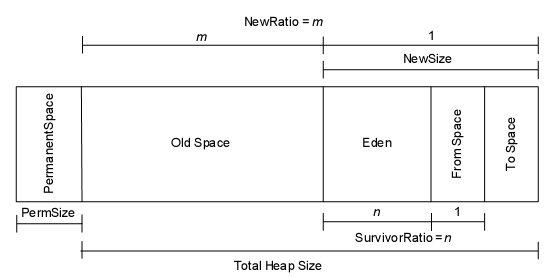
内存由 Perm 和 Heap 组成. 其中
Heap = {Old + NEW = { Eden , from, to } }
JVM内存模型中分两大块,一块是 NEW Generation, 另一块是Old Generation. 在New Generation中,有一个叫Eden的空间,主要是用来存放新生的对象,还有两个Survivor Spaces(from,to), 它们用来存放每次垃圾回收后存活下来的对象。在Old Generation中,主要存放应用程序中生命周期长的内存对象,还有个Permanent Generation,主要用来放JVM自己的反射对象,比如类对象和方法对象等。
垃圾回收描述:
在New Generation块中,垃圾回收一般用Copying的算法,速度快。每次GC的时候,存活下来的对象首先由Eden拷贝到某个Survivor Space, 当Survivor Space空间满了后, 剩下的live对象就被直接拷贝到Old Generation中去。因此,每次GC后,Eden内存块会被清空。在Old Generation块中,垃圾回收一般用mark-compact的算法,速度慢些,但减少内存要求.
垃圾回收分多级,0级为全部(Full)的垃圾回收,会回收OLD段中的垃圾;1级或以上为部分垃圾回收,只会回收NEW中的垃圾,内存溢出通常发生于OLD段或Perm段垃圾回收后,仍然无内存空间容纳新的Java对象的情况。
当一个URL被访问时,内存申请过程如下:
A. JVM会试图为相关Java对象在Eden中初始化一块内存区域
B. 当Eden空间足够时,内存申请结束。否则到下一步
C. JVM试图释放在Eden中所有不活跃的对象(这属于1或更高级的垃圾回收), 释放后若Eden空间仍然不足以放入新对象,则试图将部分Eden中活跃对象放入Survivor区
D. Survivor区被用来作为Eden及OLD的中间交换区域,当OLD区空间足够时,Survivor区的对象会被移到Old区,否则会被保留在Survivor区
E. 当OLD区空间不够时,JVM会在OLD区进行完全的垃圾收集(0级)
F. 完全垃圾收集后,若Survivor及OLD区仍然无法存放从Eden复制过来的部分对象,导致JVM无法在Eden区为新对象创建内存区域,则出现”out of memory错误”
JVM调优建议:
ms/mx:定义YOUNG+OLD段的总尺寸,ms为JVM启动时YOUNG+OLD的内存大小;mx为最大可占用的YOUNG+OLD内存大小。在用户生产环境上一般将这两个值设为相同,以减少运行期间系统在内存申请上所花的开销。
NewSize/MaxNewSize:定义YOUNG段的尺寸,NewSize为JVM启动时YOUNG的内存大小;MaxNewSize为最大可占用的YOUNG内存大小。在用户生产环境上一般将这两个值设为相同,以减少运行期间系统在内存申请上所花的开销。
PermSize/MaxPermSize:定义Perm段的尺寸,PermSize为JVM启动时Perm的内存大小;MaxPermSize为最大可占用的Perm内存大小。在用户生产环境上一般将这两个值设为相同,以减少运行期间系统在内存申请上所花的开销。
SurvivorRatio:设置Survivor空间和Eden空间的比例
内存溢出的可能性
1. OLD段溢出
这种内存溢出是最常见的情况之一,产生的原因可能是:
1) 设置的内存参数过小(ms/mx, NewSize/MaxNewSize)
2) 程序问题
单个程序持续进行消耗内存的处理,如循环几千次的字符串处理,对字符串处理应建议使用StringBuffer。此时不会报内存溢出错,却会使系统持续垃圾收集,无法处理其它请求,相关问题程序可通过Thread Dump获取(见系统问题诊断一章)单个程序所申请内存过大,有的程序会申请几十乃至几百兆内存,此时JVM也会因无法申请到资源而出现内存溢出,对此首先要找到相关功能,然后交予程序员修改,要找到相关程序,必须在Apache日志中寻找。
当Java对象使用完毕后,其所引用的对象却没有销毁,使得JVM认为他还是活跃的对象而不进行回收,这样累计占用了大量内存而无法释放。由于目前市面上还没有对系统影响小的内存分析工具,故此时只能和程序员一起定位。
2. Perm段溢出
通常由于Perm段装载了大量的Servlet类而导致溢出,目前的解决办法:
1) 将PermSize扩大,一般256M能够满足要求
2) 若别无选择,则只能将servlet的路径加到CLASSPATH中,但一般不建议这么处理
3. C Heap溢出
系统对C Heap没有限制,故C Heap发生问题时,Java进程所占内存会持续增长,直到占用所有可用系统内存
其他:
JVM有2个GC线程。第一个线程负责回收Heap的Young区。第二个线程在Heap不足时,遍历Heap,将Young 区升级为Older区。Older区的大小等于-Xmx减去-Xmn,不能将-Xms的值设的过大,因为第二个线程被迫运行会降低JVM的性能。
为什么一些程序频繁发生GC?有如下原因:l 程序内调用了System.gc()或Runtime.gc()。l 一些中间件软件调用自己的GC方法,此时需要设置参数禁止这些GC。l Java的Heap太小,一般默认的Heap值都很小。l 频繁实例化对象,Release对象。此时尽量保存并重用对象,例如使用StringBuffer()和String()。如果你发现每次GC后,Heap的剩余空间会是总空间的50%,这表示你的Heap处于健康状态。许多Server端的Java程序每次GC后最好能有65%的剩余空间。经验之谈:1.Server端JVM最好将-Xms和-Xmx设为相同值。为了优化GC,最好让-Xmn值约等于-Xmx的1/3[2]。2.一个GUI程序最好是每10到20秒间运行一次GC,每次在半秒之内完成[2]。注意:1.增加Heap的大小虽然会降低GC的频率,但也增加了每次GC的时间。并且GC运行时,所有的用户线程将暂停,也就是GC期间,Java应用程序不做任何工作。2.Heap大小并不决定进程的内存使用量。进程的内存使用量要大于-Xmx定义的值,因为Java为其他任务分配内存,例如每个线程的Stack等。2.Stack的设定每个线程都有他自己的Stack。
-Xss 每个线程的Stack大小
Stack的大小限制着线程的数量。如果Stack过大就好导致内存溢漏。-Xss参数决定Stack大小,例如-Xss1024K。如果Stack太小,也会导致Stack溢漏。3.硬件环境硬件环境也影响GC的效率,例如机器的种类,内存,swap空间,和CPU的数量。如果你的程序需要频繁创建很多transient对象,会导致JVM频繁GC。这种情况你可以增加机器的内存,来减少Swap空间的使用[2]。4.4种GC第一种为单线程GC,也是默认的GC。,该GC适用于单CPU机器。第二种为Throughput GC,是多线程的GC,适用于多CPU,使用大量线程的程序。第二种GC与第一种GC相似,不同在于GC在收集Young区是多线程的,但在Old区和第一种一样,仍然采用单线程。-XX:+UseParallelGC参数启动该GC。第三种为Concurrent Low Pause GC,类似于第一种,适用于多CPU,并要求缩短因GC造成程序停滞的时间。这种GC可以在Old区的回收同时,运行应用程序。-XX:+UseConcMarkSweepGC参数启动该GC。第四种为Incremental Low Pause GC,适用于要求缩短因GC造成程序停滞的时间。这种GC可以在Young区回收的同时,回收一部分Old区对象。-Xincgc参数启动该GC。
posted @
2010-05-04 09:29 一凡 阅读(305) |
评论 (0) |
编辑 收藏一款开源的压力测试工具,可以根据配置对一个WEB站点进行多用户的并发访问,记录每个用户所有请求过程的相应时间,并在一定数量的并发访问下重复进行。
获取:http://www.joedog.org/
官方提供ftp下载
解压:
# tar -zxf siege-latest.tar.gz
进入解压目录:
# cd siege-2.65/
安装:
#./configure ; make
#make install
使用
siege -c 200 -r 10 -f example.url
-c是并发量,-r是重复次数。 url文件就是一个文本,每行都是一个url,它会从里面随机访问的。
example.url内容:
http://www.taoav.com
http://www.tuhaoduo.com
http://www.tiaonv.com
结果说明
Lifting the server siege… done.
Transactions: 3419263 hits //完成419263次处理
Availability: 100.00 % //100.00 % 成功率
Elapsed time: 5999.69 secs //总共用时
Data transferred: 84273.91 MB //共数据传输84273.91 MB
Response time: 0.37 secs //相应用时1.65秒:显示网络连接的速度
Transaction rate: 569.91 trans/sec //均每秒完成 569.91 次处理:表示服务器后
Throughput: 14.05 MB/sec //平均每秒传送数据
Concurrency: 213.42 //实际最高并发数
Successful transactions: 2564081 //成功处理次数
Failed transactions: 11 //失败处理次数
Longest transaction: 29.04 //每次传输所花最长时间
Shortest transaction: 0.00 //每次传输所花最短时间
posted @
2010-04-09 23:03 一凡 阅读(515) |
评论 (0) |
编辑 收藏
mysql8.x:
alter mysql.user 'root'@'%' identified by '123456';
mysql 5.x:
GRANT ALL PRIVILEGES ON *.* TO 'monitor'@'%' IDENTIFIED BY 'monitor' WITH GRANT OPTION;
posted @
2010-03-16 15:38 一凡 阅读(334) |
评论 (0) |
编辑 收藏
又回到了工作状态,过去的一年收获很多,希望今年再接再励
posted @
2010-03-08 17:08 一凡 阅读(160) |
评论 (0) |
编辑 收藏
大致总结了一下linux下各种格式的压缩包的压缩、解压方法。但是部分方法我没有用到,也就不全,希望大家帮我补充,我将随时修改完善,谢谢!
整理:会游泳的鱼
来自:www.LinuxByte.net
最后更新时间:2005-2-20
.tar
解包:tar xvf FileName.tar
打包:tar cvf FileName.tar DirName
(注:tar是打包,不是压缩!)
———————————————
.gz
解压1:gunzip FileName.gz
解压2:gzip -d FileName.gz
压缩:gzip FileName
.tar.gz 和 .tgz
解压:tar zxvf FileName.tar.gz
压缩:tar zcvf FileName.tar.gz DirName
———————————————
.bz2
解压1:bzip2 -d FileName.bz2
解压2:bunzip2 FileName.bz2
压缩: bzip2 -z FileName
.tar.bz2
解压:tar jxvf FileName.tar.bz2
压缩:tar jcvf FileName.tar.bz2 DirName
———————————————
.bz
解压1:bzip2 -d FileName.bz
解压2:bunzip2 FileName.bz
压缩:未知
.tar.bz
解压:tar jxvf FileName.tar.bz
压缩:未知
———————————————
.Z
解压:uncompress FileName.Z
压缩:compress FileName
.tar.Z
解压:tar Zxvf FileName.tar.Z
压缩:tar Zcvf FileName.tar.Z DirName
———————————————
.zip
解压:unzip FileName.zip
压缩:zip FileName.zip DirName
———————————————
.rar
解压:rar x FileName.rar
压缩:rar a FileName.rar DirName
rar请到:http://www.rarsoft.com/download.htm 下载!
解压后请将rar_static拷贝到/usr/bin目录(其他由$PATH环境变量指定的目录也可以):
[root@www2 tmp]# cp rar_static /usr/bin/rar
———————————————
.lha
解压:lha -e FileName.lha
压缩:lha -a FileName.lha FileName
lha请到:http://www.infor.kanazawa-it.ac.jp/~ishii/lhaunix/下载!
>解压后请将lha拷贝到/usr/bin目录(其他由$PATH环境变量指定的目录也可以):
[root@www2 tmp]# cp lha /usr/bin/
———————————————
.rpm
解包:rpm2cpio FileName.rpm | cpio -div
———————————————
.deb
解包:ar p FileName.deb data.tar.gz | tar zxf -
———————————————
.tar .tgz .tar.gz .tar.Z .tar.bz .tar.bz2 .zip .cpio .rpm .deb .slp .arj .rar .ace .lha .lzh .lzx .lzs .arc .sda .sfx .lnx .zoo .cab .kar .cpt .pit .sit .sea
解压:sEx x FileName.*
压缩:sEx a FileName.* FileName
sEx只是调用相关程序,本身并无压缩、解压功能,请注意!
sEx请到: http://sourceforge.net/projects/sex下载!
解压后请将sEx拷贝到/usr/bin目录(其他由$PATH环境变量指定的目录也可以):
[root@www2 tmp]# cp sEx /usr/bin/
gzip 命令
减少文件大小有两个明显的好处,一是可以减少存储空间,二是通过网络传输文件时,可以减少传输的时间。gzip 是在 Linux 系统中经常使用的一个对文件进行压缩和解压缩的命令,既方便又好用。
语法:gzip [选项] 压缩(解压缩)的文件名
该命令的各选项含义如下:
-c 将输出写到标准输出上,并保留原有文件。
-d 将压缩文件解压。
-l 对每个压缩文件,显示下列字段:
压缩文件的大小;未压缩文件的大小;压缩比;未压缩文件的名字
-r 递归式地查找指定目录并压缩其中的所有文件或者是解压缩。
-t 测试,检查压缩文件是否完整。
-v 对每一个压缩和解压的文件,显示文件名和压缩比。
-num 用指定的数字 num 调整压缩的速度,-1 或 --fast 表示最快压缩方法(低压缩比),
-9 或--best表示最慢压缩方法(高压缩比)。系统缺省值为 6。
指令实例:
gzip *
% 把当前目录下的每个文件压缩成 .gz 文件。
gzip -dv *
% 把当前目录下每个压缩的文件解压,并列出详细的信息。
gzip -l *
% 详细显示例1中每个压缩的文件的信息,并不解压。
gzip usr.tar
% 压缩 tar 备份文件 usr.tar,此时压缩文件的扩展名为.tar.gz。
posted @
2010-01-14 11:03 一凡 阅读(262) |
评论 (0) |
编辑 收藏
# /etc/init.d/mysql stop
# mysqld_safe --user=mysql --skip-grant-tables --skip-networking &
# mysql -u root mysql
mysql> UPDATE user SET Password=PASSWORD(’newpassword’) where USER=’root’;
mysql> FLUSH PRIVILEGES;
mysql> quit
# /etc/init.d/mysql restart
# mysql -uroot -p
Enter password: <输入新设的密码newpassword>
mysql>
posted @
2010-01-08 11:12 一凡 阅读(2168) |
评论 (0) |
编辑 收藏
/meCall
发表于2007-09-26, 13:00
匹配中文字符的正则表达式: [u4e00-u9fa5]
评注:匹配中文还真是个头疼的事,有了这个表达式就好办了
匹配双字节字符(包括汉字在内):[^x00-xff]
评注:可以用来计算字符串的长度(一个双字节字符长度计2,ASCII字符计1)
匹配空白行的正则表达式:ns*r
评注:可以用来删除空白行
匹配HTML标记的正则表达式:<(S*?)[^>]*>.*?|<.*? />
评注:网上流传的版本太糟糕,上面这个也仅仅能匹配部分,对于复杂的嵌套标记依旧无能为力
匹配首尾空白字符的正则表达式:^s*|s*$
评注:可以用来删除行首行尾的空白字符(包括空格、制表符、换页符等等),非常有用的表达式
匹配Email地址的正则表达式:w+([-+.]w+)*@w+([-.]w+)*.w+([-.]w+)*
评注:表单验证时很实用
匹配网址URL的正则表达式:[a-zA-z]+://[^s]*
评注:网上流传的版本功能很有限,上面这个基本可以满足需求
匹配帐号是否合法(字母开头,允许5-16字节,允许字母数字下划线):^[a-zA-Z][a-zA-Z0-9_]{4,15}$
评注:表单验证时很实用
匹配国内电话号码:d{3}-d{8}|d{4}-d{7}
评注:匹配形式如 


 0511-4405222
 或 021-87888822
匹配腾讯QQ号:[1-9][0-9]{4,}
评注:腾讯QQ号从10000开始
匹配中国邮政编码:[1-9]d{5}(?!d)
评注:中国邮政编码为6位数字
匹配身份证:d{15}|d{18}
评注:中国的身份证为15位或18位
匹配ip地址:d+.d+.d+.d+
评注:提取ip地址时有用
匹配特定数字:
^[1-9]d*$ //匹配正整数
^-[1-9]d*$ //匹配负整数
^-?[1-9]d*$ //匹配整数
^[1-9]d*|0$ //匹配非负整数(正整数 + 0)
^-[1-9]d*|0$ //匹配非正整数(负整数 + 0)
^[1-9]d*.d*|0.d*[1-9]d*$ //匹配正浮点数
^-([1-9]d*.d*|0.d*[1-9]d*)$ //匹配负浮点数
^-?([1-9]d*.d*|0.d*[1-9]d*|0?.0+|0)$ //匹配浮点数
^[1-9]d*.d*|0.d*[1-9]d*|0?.0+|0$ //匹配非负浮点数(正浮点数 + 0)
^(-([1-9]d*.d*|0.d*[1-9]d*))|0?.0+|0$ //匹配非正浮点数(负浮点数 + 0)
评注:处理大量数据时有用,具体应用时注意修正
匹配特定字符串:
^[A-Za-z]+$ //匹配由26个英文字母组成的字符串
^[A-Z]+$ //匹配由26个英文字母的大写组成的字符串
^[a-z]+$ //匹配由26个英文字母的小写组成的字符串
^[A-Za-z0-9]+$ //匹配由数字和26个英文字母组成的字符串
^w+$ //匹配由数字、26个英文字母或者下划线组成的字符串
在使用RegularExpressionValidator验证控件时的验证功能及其验证表达式介绍如下:
只能输入数字:“^[0-9]*$”
只能输入n位的数字:“^d{n}$”
只能输入至少n位数字:“^d{n,}$”
只能输入m-n位的数字:“^d{m,n}$”
只能输入零和非零开头的数字:“^(0|[1-9][0-9]*)$”
只能输入有两位小数的正实数:“^[0-9]+(.[0-9]{2})?$”
只能输入有1-3位小数的正实数:“^[0-9]+(.[0-9]{1,3})?$”
只能输入非零的正整数:“^+?[1-9][0-9]*$”
只能输入非零的负整数:“^-[1-9][0-9]*$”
只能输入长度为3的字符:“^.{3}$”
只能输入由26个英文字母组成的字符串:“^[A-Za-z]+$”
只能输入由26个大写英文字母组成的字符串:“^[A-Z]+$”
只能输入由26个小写英文字母组成的字符串:“^[a-z]+$”
只能输入由数字和26个英文字母组成的字符串:“^[A-Za-z0-9]+$”
只能输入由数字、26个英文字母或者下划线组成的字符串:“^w+$”
验证用户密码:“^[a-zA-Z]w{5,17}$”正确格式为:以字母开头,长度在6-18之间,
只能包含字符、数字和下划线。
验证是否含有^%&’,;=?$”等字符:“[^%&’,;=?$x22]+”
只能输入汉字:“^[u4e00-u9fa5],{0,}$”
验证Email地址:“^w+[-+.]w+)*@w+([-.]w+)*.w+([-.]w+)*$”
验证InternetURL:“^http://([w-]+.)+[w-]+(/[w-./?%&=]*)?$”
验证电话号码:“^((d{3,4})|d{3,4}-)?d{7,8}$”
正确格式为:“XXXX-XXXXXXX”,“XXXX-XXXXXXXX”,“XXX-XXXXXXX”,
“XXX-XXXXXXXX”,“XXXXXXX”,“XXXXXXXX”。
验证身份证号(15位或18位数字):“^d{15}|d{}18$”
验证一年的12个月:“^(0?[1-9]|1[0-2])$”正确格式为:“01”-“09”和“1”“12”
验证一个月的31天:“^((0?[1-9])|((1|2)[0-9])|30|31)$”
正确格式为:“01”“09”和“1”“31”。
匹配中文字符的正则表达式: [u4e00-u9fa5]
匹配双字节字符(包括汉字在内):[^x00-xff]
匹配空行的正则表达式:n[s| ]*r
匹配HTML标记的正则表达式:/<(.*)>.*<!--1-->|<(.*) />/
匹配首尾空格的正则表达式:(^s*)|(s*$)
匹配Email地址的正则表达式:w+([-+.]w+)*@w+([-.]w+)*.w+([-.]w+)*
匹配网址URL的正则表达式:http://([w-]+.)+[w-]+(/[w- ./?%&=]*)?
(1)应用:计算字符串的长度(一个双字节字符长度计2,ASCII字符计1)
String.prototype.len=function(){return this.replace([^x00-xff]/g,”aa”).length;}
(2)应用:javascript中没有像vbscript那样的trim函数,我们就可以利用这个表达式来实现
String.prototype.trim = function()
{
return this.replace(/(^s*)|(s*$)/g, “”);
}
(3)应用:利用正则表达式分解和转换IP地址
function IP2V(ip) //IP地址转换成对应数值
{
re=/(d+).(d+).(d+).(d+)/g //匹配IP地址的正则表达式
if(re.test(ip))
{
return RegExp.$1*Math.pow(255,3))+RegExp.$2*Math.pow(255,2))+RegExp.$3*255+RegExp.$4*1
}
else
{
throw new Error(”Not a valid IP address!”)
}
}
(4)应用:从URL地址中提取文件名的javascript程序
s=”http://www.9499.net/page1.htm”;
s=s.replace(/(.*/){0,}([^.]+).*/ig,”$2″) ; //Page1.htm
(5)应用:利用正则表达式限制网页表单里的文本框输入内容
用正则表达式限制只能输入中文:onkeyup=”value=”/blog/value.replace(/[”^u4E00-u9FA5]/g, '’) ” onbeforepaste=”clipboardData.setData(’text’,clipboardData.getData(’text’).replace(/[^u4E00-u9FA5]/g,'’))”
用正则表达式限制只能输入全角字符: onkeyup=”value=”/blog/value.replace(/[”^uFF00-uFFFF]/g,'’) ” onbeforepaste=”clipboardData.setData(’text’,clipboardData.getData(’text’).replace(/[^uFF00-uFFFF]/g,'’))”
用正则表达式限制只能输入数字:onkeyup=”value=”/blog/value.replace(/[”^d]/g,'’) “onbeforepaste= “clipboardData.setData(’text’,clipboardData.getData(’text’).replace(/[^d]/g,'’))”
用正则表达式限制只能输入数字和英文:onkeyup=”value=”/blog/value.replace(/[W]/g,”‘’) “onbeforepaste=”clipboardData.setData(’text’,clipboardData.getData(’text’).replace(/[^d]/
posted @
2009-10-14 09:59 一凡 阅读(312) |
评论 (0) |
编辑 收藏
在windows安装目录下找到dwmapi.api.dll改名就可解决此问题
posted @
2009-09-09 10:12 一凡 阅读(400) |
评论 (0) |
编辑 收藏
不平凡的一年,难忘的一年
posted @
2009-09-03 17:45 一凡 阅读(195) |
评论 (0) |
编辑 收藏 cd mysql_path
 find ./ -name mysql.server
cd mysql.server_path
mysql.server start
停止
mysql.server stop
posted @
2009-08-05 18:29 一凡 阅读(288) |
评论 (0) |
编辑 收藏以root连接到服务器上后,可以添加新账户。下面的语句使用GRANT来设置四个新账户:
mysql> GRANT ALL PRIVILEGES ON *.* TO 'monty'@'localhost'IDENTIFIED BY 'some_pass' WITH GRANT OPTION;
mysql> GRANT ALL PRIVILEGES ON *.* TO 'monty'@'%'IDENTIFIED BY 'some_pass' WITH GRANT OPTION;
mysql> GRANT RELOAD,PROCESS ON *.* TO 'admin'@'localhost';
mysql> GRANT USAGE ON *.* TO 'dummy'@'localhost';
用GRANT语句创建的账户有下面的属性:
·其中两个账户有相同的用户名monty和密码some_pass。两个账户均为超级用户账户,具有完全的权限可以做任何事情。一个账户 ('monty'@'localhost')只用于从本机连接时。另一个账户('monty'@'%')可用于从其它主机连接。请注意monty的两个账户必须能从任何主机以monty连接。没有localhost账户,当monty从本机连接时,mysql_install_db创建的localhost的匿名用户账户将占先。结果是,monty将被视为匿名用户。原因是匿名用户账户的Host列值比'monty'@'%'账户更具体,这样在user表排序顺序中排在前面。
·一个账户有用户名admin,没有密码。该账户只用于从本机连接。授予了RELOAD和PROCESS管理权限。这些权限允许admin用户执行mysqladmin reload、mysqladmin refresh和mysqladmin flush-xxx命令,以及mysqladmin processlist。未授予访问数据库的权限。你可以通过GRANT语句添加此类权限。
·一个账户有用户名dummy,没有密码。该账户只用于从本机连接。未授予权限。通过GRANT语句中的USAGE权限,你可以创建账户而不授予任何权限。它可以将所有全局权限设为'N'。假定你将在以后将具体权限授予该账户。
1. 从MySQL删除用户账户
要想移除账户,应使用DROP USER语句:
DROP USER user [, user] ...
2. 限制账户资源
要想用GRANT语句设置资源限制,使WITH子句来命名每个要限制的资源和根据每小时记数的限制值。例如,要想只以限制方式创建可以访问customer数据库的新账户,执行该语句:
mysql> GRANT ALL ON customer.* TO 'francis'@'localhost'
-> IDENTIFIED BY 'frank'
-> WITH MAX_QUERIES_PER_HOUR 20
-> MAX_UPDATES_PER_HOUR 10
-> MAX_CONNECTIONS_PER_HOUR 5
-> MAX_USER_CONNECTIONS 2;
要想设置或更改已有账户的限制,在全局级别使用GRANT USAGE语句(在*.*)。下面的语句可以将francis的查询限制更改为100:
mysql> GRANT USAGE ON *.* TO 'francis'@'localhost' WITH MAX_QUERIES_PER_HOUR 100;
该语句没有改变账户的已有权限,只修改了指定的限制值。
要想取消已有限制,将该值设置为零。例如,要想取消francis每小时可以连接的次数的限制,使用该语句:
mysql> GRANT USAGE ON *.* TO 'francis'@'localhost' WITH MAX_CONNECTIONS_PER_HOUR 0;
当账户使用资源时如果有非零限制,则对资源使用进行记数。
3. 设置账户密码
4. 可以用mysqladmin命令在命令行指定密码:
shell> mysqladmin -u user_name -h host_name password "newpwd"
该命令重设密码的账户为user表内匹配User列的user_name和Host列你发起连接的客户端的记录。
为账户赋予密码的另一种方法是执行SET PASSWORD语句:
mysql> SET PASSWORD FOR 'jeffrey'@'%' = PASSWORD('biscuit');
只有root等可以更新mysql数据库的用户可以更改其它用户的密码。如果你没有以匿名用户连接,省略FOR子句便可以更改自己的密码:
mysql> SET PASSWORD = PASSWORD('biscuit');
你还可以在全局级别使用GRANT USAGE语句(在*.*)来指定某个账户的密码而不影响账户当前的权限:
mysql> GRANT USAGE ON *.* TO 'jeffrey'@'%' IDENTIFIED BY 'biscuit';
一般情况下最好使用上述方法来指定密码,你还可以直接修改user表:
· 要想在创建新账户时建立密码,在Password列提供一个值:
· shell> mysql -u root mysql
· mysql> INSERT INTO user (Host,User,Password) VALUES('%','jeffrey',PASSWORD('biscuit'));
· mysql> FLUSH PRIVILEGES;
·
· 要想更改已有账户的密码,使用UPDATE来设置Password列值:
· shell> mysql -u root mysql
· mysql> UPDATE user SET Password = PASSWORD('bagel') WHERE Host = '%' AND User = 'francis';
· mysql> FLUSH PRIVILEGES;
当你使用SET PASSWORD、INSERT或UPDATE指定账户的密码时,必须用PASSWORD()函数对它进行加密。(唯一的特例是如果密码为空,你不需要使用PASSWORD())。需要使用PASSWORD()是因为user表以加密方式保存密码,而不是明文。如果你忘记了,你可能会象这样设置密码:
shell> mysql -u root mysql
mysql> INSERT INTO user (Host,User,Password) VALUES('%','jeffrey','biscuit');
mysql> FLUSH PRIVILEGES;
结果是密码'biscuit'保存到user表后没有加密。当jeffrey使用该密码连接服务器时,值被加密并同保存在user表中的进行比较。但是,保存的值为字符串'biscuit',因此比较将失败,服务器拒绝连接:
shell> mysql -u jeffrey -pbiscuit test
Access denied
如果你使用GRANT ... IDENTIFIED BY语句或mysqladmin password命令设置密码,它们均会加密密码。在这种情况下,不需要使用 PASSWORD()函数。
posted @
2009-08-05 18:21 一凡 阅读(3635) |
评论 (0) |
编辑 收藏
# /etc/init.d/mysql stop
# mysqld_safe --user=mysql --skip-grant-tables --skip-networking &
# mysql -u root mysql
mysql> UPDATE user SET Password=PASSWORD('newpassword') where USER='root';
mysql> FLUSH PRIVILEGES;
mysql> quit
# /etc/init.d/mysql restart
# mysql -uroot -p
Enter password: <输入新设的密码newpassword>
posted @
2009-08-05 18:01 一凡 阅读(277) |
评论 (0) |
编辑 收藏ZoneAlarm 进程关闭过慢可以采取以下办法解决:
1. 开始 > 运行 > 输入 "regedit" > 确认
2. 将 HKEY_CURRENT_USER\Control Panel\Desktop 下的HungAppTimeout 键值的数字改成 6000
3. 重新启动计算机
posted @
2009-07-17 10:53 一凡 阅读(270) |
评论 (0) |
编辑 收藏
1.下载jsch-0.1.24.jar及commons-net-ftp-2.0.jar
2.设置eclipse: window -- preferences -- ant -- Runtime -- Ant Home Entries (Default)下填加上面两个包即可在eclipse 的所有工程里使用这些功能,挺爽
3.ant task 网上很多,搜一下,推荐参考:http://www.blogjava.net/Good-Game/archive/2009/03/13/248113.html
4.ftp task:
<target name="ftp" depends="compile">
<ftp server="192.168.223" port="21" userid="work" password="abc123" remotedir="/home/work/coin/WEB-INF/lib/" depends="yes" verbose="yes">
<fileset dir="dist">
<include name="*.jar" />
</fileset>
</ftp>
</target>
posted @
2009-07-01 16:36 一凡 阅读(868) |
评论 (0) |
编辑 收藏import java.lang.reflect.InvocationTargetException;
import java.lang.reflect.Method;
import org.apache.commons.lang.StringUtils;
import com.sun.org.apache.commons.beanutils.PropertyUtils;
/** *//**
* create_date : 2009-6-16
*/
public class TestBean {
private String uid;
private String uname;
private String sex;
public String getUid() {
return uid;
}
public void setUid(String uid) {
this.uid = uid;
}
public String getUname() {
return uname;
}
public void setUname(String uname) {
this.uname = uname;
}
public String getSex() {
return sex;
}
public void setSex(String sex) {
this.sex = sex;
}
public String check() {
Method[] methods = this.getClass().getMethods();
for (int i = 0; i < methods.length; i++) {
Method method = methods[i];
if (method.getName().startsWith("get")) {
try {
if(StringUtils.isBlank((String)method.invoke(this))){
return method.getName().substring(3);
}
} catch (IllegalArgumentException e) {
e.printStackTrace();
} catch (IllegalAccessException e) {
e.printStackTrace();
} catch (InvocationTargetException e) {
e.printStackTrace();
}
}
}
return null;
}
public static void main(String[] args) {
TestBean tBean = new TestBean();
tBean.setUid("1234");
System.out.println(tBean.check());
}
}
posted @
2009-06-16 15:35 一凡 阅读(530) |
评论 (0) |
编辑 收藏 在awk中使用shell变量的情况经常出现 , 使用 awk -v实现, 代码如下:
var="abc"
awk -v "fst=$var" '{print fst}'
posted @
2009-06-09 16:29 一凡 阅读(285) |
评论 (0) |
编辑 收藏
人生, 让房贷给废了
一手字,让键盘给废了
电视剧,让广告给废了
广告, 让脑白金给废了
猪肉, 让瘦肉精给废了
英雄, 让美人给废了
女孩, 让大款给废了
帅哥, 让富婆给废了
干部, 让人民币给废了
医德, 让医药代表给废了
书信, 让电话给废了
饭店, 让政府签单给废了
国足, 让足协给废了
运动员,让兴奋剂给废了
生命, 让医疗费给废了
胃, 让酒给废了
肺, 让香烟给废了
儿子, 让媳妇给废了
农民, 让欠薪给废了
法律, 让法院给废了
睡眠, 让夜总会给废了
景点, 让黄金周给废了
小孩, 让三鹿给废了
一个群,让不说话的给废了!
|
posted @
2009-04-29 13:56 一凡 阅读(385) |
评论 (0) |
编辑 收藏
在eclipse中,只有按下"."才会有代码提示功能,通过修改配置来实现多种条件触发代码提示:
1、进入window --> preferences --> java --> Editor --> Content Assist
改一下Auto activation triggers for java: 将"."改为".abc"
2、导出eclipse的Preferences:file->export->General->Preferences 保存为pre.epf
3、打开pre.epf文件,查找“content_assist_autoactivation”,将“.”改为“.abcdefghijklmnopqrstuvwxyz(,”保存
4、导入Preferences:file->import 选文件pre.epf
你会发现,在编辑器里输入刚才加入的任何一个字都会有代码提示,哈哈!
posted @
2009-03-24 14:45 一凡 阅读(437) |
评论 (2) |
编辑 收藏
问题:在firefox中相同URL不去访问,所以在刷新验证码时就出问题了,不去访问servlet。
解决办法如下:
function refresh(){
//重新获取验证码图片的src属性
document.getElementById("imageField").src='/servlet/MyGraphics'+'?r='+Math.random();
}
注意:"+'?r='+Math.random()"是必须的
posted @
2009-02-17 16:04 一凡 阅读(1053) |
评论 (4) |
编辑 收藏Ctrl+D 删除当前行
Ctrl+Alt+↓ 复制当前行到下一行(复制增加)
Ctrl+Alt+↑ 复制当前行到上一行(复制增加)
Alt+↓ 当前行和下面一行交互位置(特别实用,可以省去先剪切,再粘贴了)
Alt+↑ 当前行和上面一行交互位置(同上)
Alt+← 前一个编辑的页面
Alt+→ 下一个编辑的页面(当然是针对上面那条来说了)
Alt+Enter 显示当前选择资源(工程,or 文件 or文件)的属性
Shift+Enter 在当前行的下一行插入空行(这时鼠标可以在当前行的任一位置,不一定是最后)
Shift+Ctrl+Enter在当前行插入空行(原理同上条)
Ctrl+Q 定位到最后编辑的地方
Ctrl+L 定位在某行 (对于程序超过100的人就有福音了)
Ctrl+M 最大化当前的Edit或View (再按则反之)
Ctrl+/ 注释当前行,再按则取消注释
Ctrl+O 快速显示 OutLine
Ctrl+T 快速显示当前类的继承结构
Ctrl+W 关闭当前Editer
Ctrl+K 参照选中的Word快速定位到下一个
Ctrl+E 快速显示当前Editer的下拉列表(如果当前页面没有显示的用黑体表示)
Ctrl+/(小键盘) 折叠当前类中的所有代码
Ctrl+×(小键盘) 展开当前类中的所有代码
Ctrl+Space 代码助手完成一些代码的插入(但一般和输入法有冲突,可以修改输入法的热键,也可以暂用Alt+/来代替)
Ctrl+Shift+E 显示管理当前打开的所有的View的管理器(可以选择关闭,激活等操作)
Ctrl+J 正向增量查找(按下Ctrl+J后,你所输入的每个字母编辑器都提供快速匹配定位到某个单词,如果没有,
则在stutes line中显示没有找到了,查一个单词时,特别实用,这个功能Idea两年前就有了)
Ctrl+Shift+J 反向增量查找(和上条相同,只不过是从后往前查)
Ctrl+Shift+F4 关闭所有打开的Editer
Ctrl+Shift+X 把当前选中的文本全部变为小写
Ctrl+Shift+Y 把当前选中的文本全部变为小写
Ctrl+Shift+F 格式化当前代码
Ctrl+Shift+P 定位到对于的匹配符(譬如{}) (从前面定位后面时,光标要在匹配符里面,后面到前面,则反之)
posted @
2009-02-11 14:09 一凡 阅读(269) |
评论 (0) |
编辑 收藏
由于lucene2.0+heritrix一书示例用的网站(http://mobile.pconline.com.cn/,http:
//mobile.163.com/)改版了,书上实例不能运行,我又找了一个http://mobile.younet.com/进行开发并成功实现示
例,希望感兴趣的同学,近快实践,如果此网站也改了就又得改extractor了,哈哈!
search的Extractor代码如下,(别和书上实例相同)供大家参考:附件里有完整代码
package com.luceneheritrixbook.extractor.younet;
import java.io.BufferedWriter;
import java.io.File;
import java.io.FileWriter;
import java.io.IOException;
import java.util.Date;
import org.htmlparser.Node;
import org.htmlparser.NodeFilter;
import org.htmlparser.Parser;
import org.htmlparser.filters.AndFilter;
import org.htmlparser.filters.HasAttributeFilter;
import org.htmlparser.filters.HasChildFilter;
import org.htmlparser.filters.TagNameFilter;
import org.htmlparser.tags.ImageTag;
import org.htmlparser.util.NodeIterator;
import org.htmlparser.util.NodeList;
import com.luceneheritrixbook.extractor.Extractor;
import com.luceneheritrixbook.util.StringUtils;
/**
* <p></p>
* @author cnyqiao@hotmail.com
* @date Feb 6, 2009
*/
public class ExtractYounetMoblie extends Extractor {
@Override
public void extract() {
BufferedWriter bw = null;
NodeFilter title_filter = new AndFilter(new TagNameFilter("div"), new HasAttributeFilter("class", "mo_tit"));
NodeFilter attribute_filter = new AndFilter(new TagNameFilter("p"), new HasChildFilter(new AndFilter(new TagNameFilter("span"), new HasAttributeFilter("class", "gn_sp1 blue1"))));
NodeFilter img_filter = new AndFilter(new TagNameFilter("span"), new HasChildFilter(new TagNameFilter("img")));
//提取标题信息
try {
//Parser根据过滤器返回所有满足过滤条件的节点
// 迭代逐渐查找
NodeList nodeList=this.getParser().parse(title_filter);
NodeIterator it = nodeList.elements();
StringBuffer title = new StringBuffer();
while (it.hasMoreNodes()) {
Node node = (Node) it.nextNode();
String[] names = node.toPlainTextString().split(" ");
for(int i = 0; i < names.length; i++)
title.append(names[i]).append("-");
title.append(new Date().getTime());
//创建要生成的文件
bw = new BufferedWriter(new FileWriter(new File(this.getOutputPath() + title + ".txt")));
//获取当前提取页的完整URL地址
int startPos = this.getInuputFilePath().indexOf("mirror") + 6;
String url_seg = this.getInuputFilePath().substring(startPos);
url_seg = url_seg.replaceAll("\\\\", "/");
String url = "http:/" + url_seg;
//写入当前提取页的完整URL地址
bw.write(url + NEWLINE);
bw.write(names[0] + NEWLINE);
bw.write(names[1] + NEWLINE);
}
// 重置Parser
this.getParser().reset();
Parser attNameParser = null;
Parser attValueParser = null;
//Parser parser=new Parser("http://www.sina.com.cn");
NodeFilter attributeName_filter = new AndFilter(new TagNameFilter("span"), new HasAttributeFilter("class", "gn_sp1 blue1"));
NodeFilter attributeValue_filter = new AndFilter(new TagNameFilter("span"), new HasAttributeFilter("class", "gn_sp2"));
String attName = "";
String attValue = "";
// 迭代逐渐查找
nodeList=this.getParser().parse(attribute_filter);
it = nodeList.elements();
while (it.hasMoreNodes()) {
Node node = (Node) it.nextNode();
attNameParser = new Parser();
attNameParser.setEncoding("GB2312");
attNameParser.setInputHTML(node.toHtml());
NodeList attNameNodeList = attNameParser.parse(attributeName_filter);
attName = attNameNodeList.elements().nextNode().toPlainTextString();
attValueParser = new Parser();
attValueParser.setEncoding("GB2312");
attValueParser.setInputHTML(node.toHtml());
NodeList attValueNodeList = attValueParser.parse(attributeValue_filter);
attValue = attValueNodeList.elements().nextNode().toPlainTextString();
bw.write(attName.trim() + attValue.trim());
bw.newLine();
}
// 重置Parser
this.getParser().reset();
String imgUrl = "";
String fileType ="";
// 迭代逐渐查找
nodeList=this.getParser().parse(img_filter);
it = nodeList.elements();
while (it.hasMoreNodes()) {
Node node = (Node) it.nextNode();
ImageTag imgNode = (ImageTag)node.getChildren().elements().nextNode();
imgUrl = imgNode.getAttribute("src");
fileType = imgUrl.trim().substring(imgUrl
.lastIndexOf(".") + 1);
//生成新的图片的文件名
String new_iamge_file = StringUtils.encodePassword(imgUrl, HASH_ALGORITHM) + "." + fileType;
//imgUrl = new HtmlPaserFilterTest().replace(new_iamge_file, "+", " ");
//利用miorr目录下的图片生成的新的图片
this.copyImage(imgUrl, new_iamge_file);
bw.write(SEPARATOR + NEWLINE);
bw.write(new_iamge_file + NEWLINE);
}
} catch(Exception e) {
e.printStackTrace();
} finally {
try{
if (bw != null)
bw.close();
}catch(IOException e){
e.printStackTrace();
}
}
}
}
运行书上的heritrix实例,并按书上的默认设置进行抓取如下URI:(请自己分析整理)
http://mobile.younet.com/files/list_1.html
http://mobile.younet.com/files/list_2.html
http://mobile.younet.com/files/list_3.html
posted @
2009-02-09 15:44 一凡 阅读(2382) |
评论 (5) |
编辑 收藏
转自:http://feirou520.javaeye.com/blog/290311
不同的Linux之间copy文件常用有3种方法 ,第一种就是ftp,也就是其中一台Linux安装ftp Server,这样可以另外一台使用ftp的client程序来进行文件的copy。第二种方法就是采用samba服务,类似Windows 文件copy的方式来操作,比较简洁方便,第三种就是利用scp命令来进行文件复制。
scp是有Security的文件copy,基于ssh登录。操作起来比较方便,比如要把当前一个文件copy到远程另外一台主机上,可以如下命令。
scp /home/daisy/full.tar.gz root@172.19.2.75:/home/root
然后会提示你输入另外那台172.19.2.75主机的root用户的登录密码,接着就开始cp和ungzip了
如果想反过来操作,把文件从远程主机copy到当前系统,也很简单。
scp root@172.19.2.75:/home/root /home/daisy/full.tar.gz
例如:
copy 本地的档案到远程的机器上
scp /etc/lilo.conf k@net67.ee.oit.edu.tw:/home/k
会将本地的 /etc/lilo.conf 这个档案 copy 到 net67.ee.oit.edu.tw,使用者 k 的家目录下。
copy远程机器上的档案到本地来
scp k@net67.ee.oit.edu.tw:/etc/lilo.conf /etc
会将 net67.ee.oitdu.tw 中 /etc/lilo.conf 档案 copy 到本地的 /etc 目录下。
保持从来源 host 档案的属性
scp –p k@net67.ee.tw:/etc/lilo.conf /etc
在此必须注意使用者的权限是否可读取远程上的档案,若想知道更多关于 scp 的使用方法,可去看看 scp 的使用手册。
ssh-keygen
产生公开钥 (pulib key) 和私人钥 (private key),以保障 ssh 联机的安性, 当 ssh 连 shd 服务器,会交换公开钥上,系统会检查 /etc/ssh_know_hosts 内储存的 key,如果找到客户端就用这个 key 产生一个随机产生的session key 传给服务器,两端都用这个 key 来继续完成 ssh 剩下来的阶段。
它会产生 identity.pub、identity 两个档案,私人钥存放于identity,公开钥 存放于 identity.pub 中,接下来使用 scp 将 identity.pub copy 到远程机器的家目录下.ssh下的authorized_keys。 .ssh/authorized_keys(这个 authorized_keys 档案相当于协议的 rhosts 档案),之后使用者能够不用密码去登入。RSA的认证绝对是比 rhosts 认证更来的安全可靠。
执行:
scp identity.pub k@linux1.ee.oit.edu.tw:.ssh/authorized_keys
若在使用 ssh-keygen 产生钥匙对时没有输入密码,则如上所示不需输入密码即可从 net67.ee.oit.edu.tw 去登入 linux1.ee.oit.edu.tw。在此,这里输入的密码可以跟帐号的密码不同,也可以不输入密码。
posted @
2008-12-30 18:44 一凡 阅读(420) |
评论 (0) |
编辑 收藏
1、查看CPU位数:getconf LONG_BIT或arch或
file /sbin/init或cat /proc/cpuinfo | grep "model name" | cut -d ':' -f 2
2、查看CPU信息:more /proc/cpuinfo
posted @
2008-12-11 12:01 一凡 阅读(227) |
评论 (0) |
编辑 收藏--查看数据库的字符集
show variables like 'character\_set\_%';
show variables like 'collation_%';
--设置数据库字符编码
set names GBK
alter database payment character set GBK;
create database mydb character set GBK;
set character_set_client=gbk;
set character_set_connection=gbk;
set character_set_database=gbk;
set character_set_results=gbk;
set character_set_server=gbk;
set character_set_system=gbk;
set collation_connection=gbk;
set collation_database=gbk;
set collation_server=gbk;
posted @
2008-11-25 13:26 一凡 阅读(683) |
评论 (0) |
编辑 收藏
mysql4.1.2的默认字符集是latin1,latin1属于ISO8859-1的子集(或者是一回事?毛深入研究),写入时需要为iso8859-1的编码,读出时要转换成gbk编码,就不会是乱码。
Class.forName("org.gjt.mm.mysql.Driver");
String url ="jdbc:mysql://localhost/mysql";
Connection conn=DriverManager.getConnection(url,"root","root");
Statement stmt=conn.createStatement();
String a="老哈斯蒂芬";
a=new String(a.getBytes("GBK"),"iso8859-1");
stmt.executeUpdate("insert into zquan (name) value ('"+a+"')");
ResultSet rs=stmt.executeQuery("select name from zquan");
while(rs.next()){
String aaa=rs.getString(1);
System.out.println(new String(aaa.getBytes("iso8859-1"),"GB2312"));
}
posted @
2008-11-25 11:12 一凡 阅读(881) |
评论 (0) |
编辑 收藏转自:http://mhbjava.javaeye.com/blog/26591
1.
<ec:table
items="presidents"
var="pres"
imagePath="${pageContext.request.contextPath}/images/*.gif"
action="${pageContext.request.contextPath}/presidents.run"
filterable="false"
sortable="false" >
...
</ec:table>
<ec:table>里的属性还有:
a. rowsDisplayed,rowsDisplayed也可以在extremecomponents.properties文件中设定
b. showPagination ,如果你想在一页中显示所有行,只需要设置showPagination为false。
c. TableTag关联了很多样式属性:
<ec:table cellspacing="0" cellpadding="0" border="0" width="80%" styleClass="" />
所有这些都是可选的。
2.
使用highlightRow属性可以设置行的高亮显示,它的值为true或false,默认值为false。
<ec:table items="presidents" var="pres" action="${pageContext.request.contextPath}/presidents.run" >
<ec:row highlightRow="true">
<ec:column property="name"/>
<ec:column property="term"/>
</ec:row>
</ec:table>
设置highlightRow属性后,它将插入设置行css类的javascript脚本,默认的css 类为highlight。你可以使用highlightClass来使用定制的css类。
3.
为了便于你对于行数据进行动态交互处理,提供了onclick、onmouseover和 onmouseout属性。
<ec:row onclick="" onmouseover="" onmouseout="" />
4.
RowTag关联了很多样式属性:
<ec:row styleClass="" highlightClass="" />
5.
提供可选取值方法的主要原因是使你能够对其他类型的html标签提供动作支持,例如显示 一幅图片或者通过定义href使该列成为到其它页的一个链接。
<ec:table items="presidents" var="pres" action="${pageContext.request.contextPath}/presidents.run" >
<ec:row>
<ec:column property="lastName">
<a href="http://goto.president.detail">${pageScope.pres.lastName}</a>
</ec:column>
</ec:row>
</ec:table>
6。
<ec:column property="time" title="时间" parse="yyyy-MM-dd" format="yyyy年MM月dd日" cell="date"/>
7。
TableTag
中有filterable和sortable属性,ColumnTag中也有相同的属性。
列的filterable和sortable属性将覆盖表的filterable和sortable属性设置。当你需要除了对表中的一、两列之外的
所有列进行过滤和排序时,十分便利。
<ec:table items="presidents" action="${pageContext.request.contextPath}/presidents.run" >
<ec:row>
<ec:column property="firstName" filterable="false"/>
<ec:column property="lastName" sortable="false"/>
</ec:row>
</ec:table>
8。视图问题:
viewsAllowed
属性制定类允许使用的视图。视图包括:html、pdf、xls、csv,以及任何定制的视图。
如果你指定一个或几个视图,那么列仅能使用这些指定的视图。例如:你指定viewsAllowed="pdf",这意味着
这列只允许PDF导出,而不能进行其他格式的导出或html视图。
<ec:table items="presidents" action="${pageContext.request.contextPath}/presidents.run" >
<ec:row>
<ec:column property="firstName"/>
<ec:column property="lastName" viewsAllowed="pdf"/>
</ec:row
</ec:table>
viewsDenied
属性制定类不允许使用的视图。视图包括:html、pdf、xls、csv,以及任何定制的视图。
如果你指定一个或几个视图,那么列仅这些指定的视图不能被使用。例如:你指定viewsDenied="html",这意味着
这列不允许使用html试图,但能进行任何形式的导出。
<ec:table items="presidents" action="${pageContext.request.contextPath}/presidents.run" >
<ec:row>
<ec:column property="firstName"/>
<ec:column property="lastName" viewsDenied="html"/>
</ec:row>
</ec:table>
9。ParameterTag
eXtremeTable
能够指定是否处理所有的参数。默认为处理所有的参数,这意味着当你进行
过滤、排序、分页时,所有的参数都被eXtremeTable保存并传到JSP中。通常这是你需要的功能,
然而,有时候你需要只允许一些特定的参数保存到eXtremeTable中。我喜欢把它看作锁定extremeTable,
可以通过设置表的autoIncludeParameters属性值为false来到达目的:
<ec:table
items="presidents"
action="${pageContext.request.contextPath}/presidents.run"
autoIncludeParameters=”false” >
...
</ec:table>
甚至当表被锁定时,你仍然可以通过简单地使用parameter标签来包含一些你想使用的参数。下例 包含了foo参数:
<ec:table
items="presidents"
action="${pageContext.request.contextPath}/presidents.run"
autoIncludeParameters=”false” >
<ec:parameter name=”foo” value=”${param.foo}”/>
...
</ec:table>
现在所有的eXtremeTable参数都被锁定。但过滤、排序和翻页时,foo参数仍将被传递。
10. .propeties取代
为了替代硬编码eXtremeTable使用的默认属性值,我在属性文件中配置所有用到的属性。 如果你需要覆盖任何默认的设置,你可以创建自己的extremecomponents.properties文件 并设置你想改变的值。
为了设置属性文件,你应该如下例所示在/WEB-INF/web.xml文件中声明一个context-param,并 指定你的属性文件的路径:
<context-param>
<param-name>extremecomponentsPreferencesLocation</param-name>
<param-value>/org/extremesite/resource/extremecomponents.properties</param-value></context-param>
你可以认为属性文件为你提供了一个对所有的eXtremeTables声明全局设置的一个方法。 创建属性文件的最大好处就是避免在标签中复制、粘贴相同的属性。典型的extremecomponents.properties文件如下所示:
table.imagePath=/extremesite/images/*.gif
table.rowsDisplayed=12
column.parse.date=yyyy-MM-dd
column.format.date=MM/dd/yyyy
column.format.currency=$###,###,##0.00
在属性文件定义的TableTag使用最多的两个属性是:imagePath和rowsDisplayed。如果你不在属性文件中声明 这些属性,你需要在每个eXtremeTable中添加他们。典型的表如下所示:
<ec:table
items="presidents"
action="${pageContext.request.contextPath}/presidents.run"
imagePath="${pageContext.request.contextPath}/images/*.gif"
rowsDisplayed="12" title="Presidents" > ...</ec:table>
如果在属性文件声明imagePath和rowsDisplayed,则表如下所示:
<ec:table
items="presidents"
action="${pageContext.request.contextPath}/presidents.run"
title="Presidents" > ...</ec:table>
正如你所见,属性文件避免了重复编码。
在属性文件定义的ColumnTag使用最多的两个属性是:parse和format。如果你不在属性文件中声明 这些属性,你需要在每个eXtremeTable中添加他们。典型的列使用日期cell如下所示:
<ec:column property="dateOfBirth" cell=”date” parse=”yyyy-MM-dd” format=”MM/dd/yyyy”/>
如果在属性文件声明parse和format,则列如下所示:
<ec:column property="dateOfBirth" cell=”date”/>
当然你仍然可以定义parse和format属性来覆盖全局设置,但是大多数工程对于日期使用一致的parse 和format。需要注意属性文件中parse.date和format.date的声明语法。
下例为使用货币cell的典型列:
<ec:column property="salary" cell=”currency” format=”$###,###,##0.00”/>
如果在属性文件声明format,则列如下所示:
<ec:column property="salary" cell=”currency”/>
另外,你可以声明一个定制的format并在列中通过使用列的basis来使用它,我把这想象为named属性。因此如果你的 extremecomponents.properties文件如下所示:
table.format.myCustomDate=yy-MM-dd
那么列可以如下使用定制的format:
<ec:column property="dateOfBirth" cell="date" format=”myCustomDate”>
11。ExportTag
eXtremeTable
具有导出不同格式文件的功能,导出的数据为过滤和排序后的所有结果集,
分页不会影响返回的结果集。换句话说,如果表数据分多页显示,那么所有页的数据都将被导出。 导出的格式为Microsoft Excel
(OpenOffice Calc)、PDF和CSV。
使用ExportXlsTag导出Microsoft Excel (OpenOffice Calc):
<ec:table items="presidents" action="${pageContext.request.contextPath}/presidents.run" />
<ec:exportXls fileName="presidents.xls" tooltip="Export Excel"/>
...
</ec:table>
使用ExportPdfTag导出PDF。所有要做的就是指定fileName属性和一些样式属性:
<ec:table items="presidents" action="${pageContext.request.contextPath}/presidents.run" />
<ec:exportPdf
fileName="presidents.pdf" tooltip="Export PDF"
headerColor="blue" headerBackgroundColor="red"
headerTitle="Presidents"/> ...
</ec:table>
使用ExportCsvTag导出CSV。当使用CSV导出是默认的分隔符为‘,’(comma)。你可以使用 delimiter属性来指定为其他的符号。下面为指定‘|’(pipe)为CSV分隔符的示例:
<ec:table items="presidents" action="${pageContext.request.contextPath}/presidents.run" />
<ec:exportCsv fileName="presidents.txt" tooltip="Export CSV" delimiter="|"/>
...
</ec:table>
posted @
2008-11-11 11:20 一凡 阅读(633) |
评论 (0) |
编辑 收藏
来源:
ChinaUnix博客 作者: 发布时间:2007-01-02 04:13:00
a w k是一种程式语言,对文件资料的处理具有非常强的功能。awk 名称是由他三个最初设计
者的姓氏的第一个字母而命名的: Alfred V. Aho、Peter J. We i n b e rg e r、Brian W. Kernighan。
a w k最初在1 9 7 7年完成。1 9 8 5年发表了一个新版本的a w k,他的功能比旧版本增强了不少。a w k 能够用非常短的程式对文件里的资料做修改、比较、提取、打印等处理。如果使用C 或P a s c a l
等语言编写程式完成上述的任务会十分不方便而且非常花费时间,所写的程式也会非常大。a w k不仅仅是个编程语言,他还是L i n u
x系统管理员和程式员的一个不可缺少的工具。a w k语言本身十分好学,易于掌控,并且特别的灵活。 gawk 是G N U计划下所做的a w
k,gawk 最初在1 9 8 6年完成,之后不断地被改进、更新。
gawk 包含awk 的所有功能。
6.1 gawk的主要功能
gawk 的主要功能是针对文件的每一行( l i n e ),也就是每一条记录,搜寻指定的格式。当某
一行符合指定的格式时,gawk 就会在此行执行被指定的动作。gawk 依此方式自动处理输入文
件的每一行直到输入文件档案结束。
g a w k经常用在如下的几个方面:
• 根据需求选择文件的某几行,几列或部分字段以供显示输出。
• 分析文件中的某一个字出现的频率、位置等。
• 根据某一个文件的信息准备格式化输出。
• 以一个功能十分强大的方式过滤输出文件。
• 根据文件中的数值进行计算。
6.2 怎么执行gawk程式
基本上有两种方法能执行g a w k程式。
如果gawk 程式非常短,则能将gawk 直接写在命令行,如下所示:
gawk ’program’ input-file1 input-file2 ...
其中program 包括一些pattern 和a c t i o n。
如果gawk 程式较长,较为方便的做法是将gawk 程式存在一个文件中,
gawk 的格式如下所示:
gawk -f program-file input-file1 input-file2 ...
gawk 程式的文件不止一个时,执行gawk 的格式如下所示:
gawk -f program-file1 -f program-file2 ... input-file1 input-file2 ...
6.3 文件、记录和字段
一般情况下,g a w k能处理文件中的数值数据,但也能处理字符串信息。如果数据没有
存储在文件中,能通过管道命令和其他的重定向方法给g a w k提供输入。当然, g a w k只能处
理文本文件(A S C I I码文件)。
电话号码本就是个g a w k能处理的文件的简单例子。电话号码本由非常多条目组成,每一
个条目都有同样的格式:姓、名、地址、电话号码。每一个条目都是按字母顺序排列。
在g a w k中,每一个这样的条目叫做一个记录。他是个完整的数据的集合。例如,电话号
码本中的Smith John这个条目,包括他的地址和电话号码,就是一条记录。
记录中的每一项叫做一个字段。在g a w k中,字段是最基本的单位。多个记录的集合组成了
一个文件。
大多数情况下,字段之间由一个特别的字符分开,像空格、TA B、分号等。这些字符叫做
字段分隔符。请看下面这个/ e t c / p a s s w d文件:
t p a r k e r ; t 3 6 s 6 2 h s h ; 5 0 1 ; 1 0 1 ; Tim Parker;/home/tparker;/bin/bash
etreijs;2ys639dj3h;502;101;Ed Tr e i j s ; / h o m e / e t r e i j s ; / b i n / t c s h
y c h o w ; 1 h 2 7 s j ; 5 0 3 ; 1 0 1 ; Yvonne Chow;/home/ychow;/bin/bash
你能看出/ e t c / p a s s w d文件使用分号作为字段分隔符。/ e t c / p a s s w d文件中的每一行都包括
七个字段:用户名;口令;用户I D;工作组I D;注释; h o m e目录;启始的外壳。如果你想要
查找第六个字段,只需数过五个分号即可。
但考虑到以下电话号码本的例子,你就会发现一些问题:
Smith John 13 Wilson St. 555-1283
Smith John 2736 Artside Dr Apt 123 555-2736
Smith John 125 Westmount Cr 555-1726
虽然我们能够分辨出每个记录包括四个字段,但g a w k却无能为力。电话号码本使用空格作
为分隔符,所以g a w k认为S m i t h是第一个字段, John 是第二个字段,1 3是第三个字段,依次类
推。就g a w k而言,如果用空格作为字段分隔符的话,则第一个记录有六个字段,而第二个记
录有八个字段。
所以,我们必须找出一个更好的字段分隔符。例如,像下面相同使用斜杠作为字段分隔
符:
Smith/John/13 Wilson St./555-1283
Smith/John/2736 Artside Dr/Apt/123/555-2736
Smith/John/125 Westmount Cr/555-1726
如果你没有指定其他的字符作为字段分隔符,那么g a w k将缺省地使用空格或TA B作为字段
分隔符。
6.4 模式和动作
在g a w k语言中每一个命令都由两部分组成:一个模式( p a t t e r n)和一个相应的动作
(a c t i o n)。只要模式符合,g a w k就会执行相应的动作。其中模式部分用两个斜杠括起来,而动
作部分用一对花括号括起来。例如:
/ p a t t e r n 1 / { a c t i o n 1 }
/ p a t t e r n 2 / { a c t i o n 2 }
/ p a t t e r n 3 / { a c t i o n 3 }
所有的g a w k程式都是由这样的一对对的模式和动作组成的。其中模式或动作都能够被省
略,不过两个不能同时被省略。如果模式被省略,则对于作为输入的文件里面的每一行,动作
都会被执行。如果动作被省略,则缺省的动作被执行,既显示出所有符合模式的输入行而不做
所有的改动。
下面是个简单的例子,因为gawk 程式非常短,所以将gawk 程式直接写在外壳命令行:
gawk ’/tparker/’ /etc/passwd
此程式在上面提到的/ e t c / p a s s w d文件中寻找符合t p a r k e r模式的记录并显示(此例中没有动
作,所以缺省的动作被执行)。
让我们再看一个例子:
gawk ’/UNIX/{print $2}’ file2.data
此命令将逐行查找f i l e 2 . d a t a文件中包含U N I X的记录,并打印这些记录的第二个字段。
你也能在一个命令中使用多个模式和动作对,例如:
gawk ’/scandal/{print $1} /rumor/{print $2}’ gossip_file
此命令搜索文件g o s s i p _ f i l e中包括s c a n d a l的记录,并打印第一个字段。然后再从头搜索
g o s s i p _ f i l e中包括r u m o r的记录,并打印第二个字段。
6.5 比较运算和数值运算
g a w k有非常多比较运算符,下面列出重要的几个:
= = 相等
! = 不相等
> 大于
= 大于等于
100’ testfile
将会显示文件testfile 中那些第四个字段大于1 0 0的记录。
下表列出了g a w k中基本的数值运算符。
运算符说明示例
+ 加法运算2+6
- 减法运算6-3
* 乘法运算2*5
/ 除法运算8/4
^ 乘方运算3^2 (=9)
% 求余数9%4 (=1)
例如:
{print $3/2}
显示第三个字段被2除的结果。
在g a w k中,运算符的优先权和一般的数学运算的优先权相同。例如:
{print $1+$2*$3}
显示第二个字段和第三个字段相乘,然后和第一个字段相加的结果。
你也能用括号改动优先次序。例如:
{print ($1+$2)*$3}
显示第一个字段和第二个字段相加,然后和第三个字段相乘的结果。
6.6 内部函数
g a w k中有各种的内部函数,目前介绍如下:
6.6.1 随机数和数学函数
sqrt(x) 求x 的平方根
sin(x) 求x 的正弦函数
cos(x) 求x 的余弦函数
a t a n 2 ( x,y) 求x / y的余切函数
log(x) 求x 的自然对数
exp(x) 求x 的e 次方
int(x) 求x 的整数部分
rand() 求0 和1之间的随机数
srand(x) 将x 设置为r a n d ( )的种子数
6.6.2 字符串的内部函数
• i n d e x ( i n,find) 在字符串in 中寻找字符串find 第一次出现的地方,返回值是字符串
find 出目前字符串in 里面的位置。如果在字符串in 里面未找到字符串f i n d,则返回值为
0。
例如:
print index("peanut"," a n " )
显示结果3。
• length(string) 求出string 有几个字符。
例如:
l e n g t h ( " a b c d e " )
显示结果5。
• m a t c h ( s t r i n g,r e g e x p ) 在字符串string 中寻找符合regexp 的最长、最靠左边的子字
符串。返回值是regexp 在string 的开始位置,即i n d e x值。match 函数将会设置系统变量
R S TA RT 等于i n d e x的值,系统变量RLENGTH 等于符合的字符个数。如果不符合,则会
设置R S TA RT 为0、RLENGTH 为- 1。
• s p r i n t f ( f o r m a t,e x p r e s s i o n 1,. . . ) 和printf 类似,不过sprintf 并不显示,而是返回字符
串。
例如:
sprintf("pi = %.2f (approx.)",2 2 / 7 )
返回的字符串为pi = 3.14 (approx.)
• s u b ( r e g e x p,r e p l a c e m e n t,t a rg e t ) 在字符串t a rget 中寻找符合regexp 的最长、最靠左的
地方,以字串replacement 代替最左边的r e g e x p。
例如:
str = "water,w a t e r,e v e r y w h e r e "
s u b ( / a t /, " i t h ",s t r )
结果字符串s t r会变成
w i t h e r,w a t e r,e v e r y w h e r e
• g s u b ( r e g e x p,r e p l a c e m e n t,t a rget) 和前面的s u b类似。在字符串t a rget 中寻找符合
r e g e x p的所有地方,以字符串replacement 代替所有的r e g e x p。
例如:
s t r = " w a t e r,w a t e r,e v e r y w h e r e "g s u b ( / a t /, " i t h ",s t r )
结果字符串s t r会变成
w i t h e r,w i t h e r,e v e r y w h e r e
• s u b s t r ( s t r i n g,s t a r t,length) 返回字符串string 的子字符串,这个子字符串的长度为
l e n g t h,从第start 个位置开始。
例如:
s u b s t r ( " w a s h i n g t o n ",5,3 )
返回值为i n g
如果没有length ,则返回的子字符串是从第start 个位置开始至结束。
例如:
s u b s t r ( " w a s h i n g t o n ",5 )
返回值为i n g t o n。
• tolower(string) 将字符串s t r i n g的大写字母改为小写字母。
例如:
tolower("MiXeD cAsE 123")
返回值为mixed case 123。
• toupper(string) 将字符串s t r i n g的小写字母改为大写字母。
例如:
toupper("MiXeD cAsE 123")
返回值为MIXED CASE 123。
6.6.3 输入输出的内部函数
• close(filename) 将输入或输出的文件filename 关闭。
• system(command) 此函数允许用户执行操作系统的指令,执行完毕后将回到g a w k程
序。
例如:
BEGIN {system("ls")}
6.7 字符串和数字
字符串就是一连串的字符,他能被g a w k逐字地翻译。字符串用双引号括起来。数字不能
用双引号括起来,并且g a w k将他当作一个数值。例如:
gawk ’$1 != "Tim" {print}’ testfile
此命令将显示第一个字段和Ti m不相同的所有记录。如果命令中Ti m两边不用双引号,
g a w k将不能正确执行。
再如:
gawk ’$1 == "50" {print}’ testfile
此命令将显示所有第一个字段和5 0这个字符串相同的记录。g a w k不管第一字段中的数值
的大小,而只是逐字地比较。这时,字符串5 0和数值5 0并不相等。
6.8 格式化输出
我们能让动作显示一些比较复杂的结果。例如:
gawk ’$1 != "Tim" {print $1,$ 5,$ 6,$2}’ testfile
将显示t e s t f i l e文件中所有第一个字段和Ti m不相同的记录的第一、第五、第六和第二个字
段。
进一步,你能在p r i n t动作中加入字符串,例如:
gawk ’$1 != "Tim" {print "The entry for ",$ 1,"is not Tim. ",$2}’ testfile
p r i n t动作的每一部分用逗号隔开。
借用C语言的格式化输出指令,能让g a w k的输出形式更为多样。这时,应该用p r i n t f而不
是p r i n t。例如:
{printf "%5s likes this language\n",$ 2 }
p r i n t f中的%5s 部分告诉gawk 怎么格式化输出字符串,也就是输出5个字符长。他的值由
printf 的最后部分指出,在此是第二个字段。\ n是回车换行符。如果第二个字段中存储的是人
名,则输出结果大致如下:
Tim likes this language
G e o ff likes this language
Mike likes this language
Joe likes this language
gawk 语言支持的其他格式控制符号如下:
• c 如果是字符串,则显示第一个字符;如果是整数,则将数字以ASCII 字符的形式显示。
例如:
printf “% c”,6 5
结果将显示字母A。
• d 显示十进制的整数。
• i 显示十进制的整数。
• e 将浮点数以科学记数法的形式显示。
例如:
print “$ 4 . 3 e”,1 9 5 0
结果将显示1 . 9 5 0 e + 0 3。
• f 将数字以浮点的形式显示。
• g 将数字以科学记数法的形式或浮点的形式显示。数字的绝对值如果大于等于0 . 0 0 0 1则
以浮点的形式显示,否则以科学记数法的形式显示。
• o 显示无符号的八进制整数。
• s 显示一个字符串。
• x 显示无符号的十六进制整数。1 0至1 5以a至f表示。
• X 显示无符号的十六进制整数。1 0至1 5以A至F表示。
• % 他并不是真正的格式控制字符,% %将显示%。
当你使用这些格式控制字符时,你能在控制字符前给出数字,以表示你将用的几位或几
个字符。例如,6 d表示一个整数有6位。再请看下面的例子:
{printf "%5s works for %5s and earns %2d an hour",$ 1,$ 2,$ 3 }
将会产生类似如下的输出:
Joe works for Mike and earns 12 an hour
当处理数据时,你能指定数据的精确位数
{printf "%5s earns $%.2f an hour",$ 3,$ 6 }
其输出将类似于:
Joe earns $12.17 an hour
你也能使用一些换码控制符格式化整行的输出。之所以叫做换码控制符,是因为g a w k对
这些符号有特别的解释。下面列出常用的换码控制符:
\a 警告或响铃字符。
\b 后退一格。
\f 换页。
\n 换行。
\r 回车。
\t Ta b。
\v 垂直的t a b。
6.9 改动字段分隔符
在g a w k中,缺省的字段分隔符一般是空格符或TA B。但你能在命令行使用- F选项改动字
符分隔符,只需在- F后面跟着你想用的分隔符即可。
gawk -F" ;"’/tparker/{print}’ /etc/passwd
在此例中,你将字符分隔符设置成分号。注意: - F必须是大写的,而且必须在第一个引号
之前。
6.10 元字符
g a w k语言在格式匹配时有其特别的规则。例如, c a t能够和记录中所有位置有这三个字符
的字段匹配。但有时你需要一些更为特别的匹配。如果你想让c a t只和c o n c a t e n a t e匹配,则需要
在格式两端加上空格:
/ cat / {print}
再例如,你希望既和c a t又和C AT匹配,则能使用或(|):
/ cat | CAT / {print}
在g a w k中,有几个字符有特别意义。下面列出能用在g a w k格式中的这些字符:
• ^ 表示字段的开始。
例如:
$3 ~ /^b/
如果第三个字段以字符b开始,则匹配。
• $ 表示字段的结束。
例如:
$3 ~ /b$/
如果第三个字段以字符b结束,则匹配。
• . 表示和所有单字符m匹配。
例如:
$3 ~ /i.m/
如果第三个字段有字符i,则匹配。
• | 表示“或”。
例如:
/ c a t | C AT/
和cat 或C AT字符匹配。
• * 表示字符的零到多次重复。
例如:
/UNI*X/
和U N X、U N I X、U N I I X、U N I I I X等匹配。
• + 表示字符的一次到多次重复。
例如:
/UNI+X/
和U N I X、U N I I X等匹配。
• \{a,b\} 表示字符a次到b次之间的重复。
例如:
/ U N I \ { 1,3 \ } X
和U N I X、U N I I X和U N I I I X匹配。
• ? 表示字符零次和一次的重复。
例如:
/UNI?X/
和UNX 和U N I X匹配。
• [] 表示字符的范围。
例如:
/I[BDG]M/
和I B M、I D M和I G M匹配
• [^] 表示不在[ ]中的字符。
例如:
/I[^DE]M/
和所有的以I开始、M结束的包括三个字符的字符串匹配,除了I D M和I E M之外。
6.11 调用gawk程式
当需要非常多对模式和动作时,你能编写一个g a w k程式(也叫做g a w k脚本)。在g a w k程式
中,你能省略模式和动作两边的引号,因为在g a w k程式中,模式和动作从哪开始和从哪结
束时是非常显然的。
你能使用如下命令调用g a w k程式:
gawk -f script filename
此命令使g a w k对文件f i l e n a m e执行名为s c r i p t的g a w k程式。
如果你不希望使用缺省的字段分隔符,你能在f选项后面跟着F选项指定新的字段分隔符
(当然你也能在g a w k程式中指定),例如,使用分号作为字段分隔符:
gawk -f script -F";" filename
如果希望gawk 程式处理多个文件,则把各个文件名罗列其后:
gawk -f script filename1 filename2 filename3 ...
缺省情况下, g a w k的输出将送往屏幕。但你能使用L i n u x的重定向命令使g a w k的输出送
往一个文件:
gawk -f script filename > save_file
6.12 BEGIN和END
有两个特别的模式在g a w k中非常有用。B E G I N模式用来指明g a w k开始处理一个文件之前执行一些动作。B E G I N经常用来初始化数值,设置参数等。E N D模式用来在文件处理完成后
执行一些指令,一般用作总结或注释。
BEGIN 和E N D中所有要执行的指令都应该用花括号括起来。BEGIN 和E N D必须使用大写。
请看下面的例子:
BEGIN { print "Starting the process the file" }
$1 == "UNIX" {print}
$2 > 10 {printf "This line has a value of %d",$ 2 }
END { print "Finished processing the file. Bye!"}
此程式中,先显示一条信息: Starting the process the file,然后将所有第一个字段等于
U N I X的整条记录显示出来,然后再显示第二个字段大于10 的记录,最后显示信息: F i n i s h e d
processing the file. Bye!。
6.13 变量
在g a w k中,能用等号( = )给一个变量赋值:
var1 = 10
在g a w k中,你不必事先声明变量类型。
请看下面的例子:
$1 == "Plastic" { count = count + 1 }
如果第一个字段是P l a s t i c,则c o u n t的值加1。在此之前,我们应当给c o u n t赋予过初值,一
般是在B E G I N部分。
下面是比较完整的例子:
BEGIN { count = 0 }
$5 == "UNIX" { count = count + 1 }
END { printf "%d occurrences of UNIX were found",count }
变量能和字段和数值一起使用,所以,下面的表达式均为合法:
count = count + $6
count = $5 - 8
count = $5 + var1
变量也能是格式的一部分,例如:
$2 > max_value {print "Max value exceeded by ",$2 - max_value}
$4 - var1 $2){
print "The first column is larger"
}
else {
print "The second column is larger"
} )
6.15.2 while 循环
while 循环的语法如下:
while (expression){
c o m m a n d s
}
例如:
# interest calculation computes compound interest
# inputs from a file are the amount,interest_rateand years
{var = 1
while (var 0){
print line[var]
v a r - -
}
}
此段程式读取一个文件的每一行,并用相反的顺序显示出来。我们使用N R作为数组的下
标来存储文件的每一条记录,然后在从最后一条记录开始,将文件逐条地显示出来。
6.17 用户自定义函数
复杂的gawk 程式常常能使用自己定义的函数来简化。调用用户自定义函数和调用内部
函数的方法相同。函数的定义能放在gawk 程式的所有地方。
用户自定义函数的格式如下:
function name (parameter-list) {
b o d y - o f - f u n c t i o n
}
name 是所定义的函数的名称。一个正确的函数名称可包括一序列的字母、数字、下标线
( u n d e r s c o r e s ),不过不可用数字做开头。p a r a m e t e r-list 是函数的全部参数的列表,各个参数之
间以逗点隔开。body-of-function 包含gawk 的表达式,他是函数定义里最重要的部分,他决定
函数实际要做的事情。
下面这个例子,会将每个记录的第一个字段的值的平方和第二个字段的值的平方加起来。
{print "sum =",S q u a r e S u m ( $ 1,$ 2 ) }
function SquareSum(x,y) {
s u m = x * x + y * y
return sum
}
到此,我们已知道了g a w k的基本用法。g a w k语言十分易学好用,例如,你能用g a w k
编写一段小程式来计算一个目录中所有文件的个数和容量。如果用其他的语言,如C语言,则
会十分的麻烦,相反,g a w k只需要几行就能完成此工作。
6.18 几个实例
最后,再举几个g a w k的例子:
gawk ’{if (NF > max) max = NF}
END {print max}’
此程式会显示所有输入行之中字段的最大个数。
gawk ’length($0) > 80’
此程式会显示出超过80 个字符的每一行。此处只有模式被列出,动作是采用缺省值显示
整个记录。
gawk ’NF > 0’
显示拥有至少一个字段的所有行。这是个简单的方法,将一个文件里的所有空白行删除。
gawk ’BEGIN {for (i = 1; i max) max = NF}
END {print max}’
此程式会显示所有输入行之中字段的最大个数。
gawk ’length($0) > 80’
此程式会显示出超过80 个字符的每一行。此处只有模式被列出,动作是采用缺省值显示
整个记录。
gawk ’NF > 0’
显示拥有至少一个字段的所有行。这是个简单的方法,将一个文件里的所有空白行删除。
gawk ’BEGIN {for (i = 1; i
posted @
2008-10-30 12:20 一凡 阅读(449) |
评论 (0) |
编辑 收藏
名称: crontab
使用权限: 所有使用者
使用方式:
crontab file [-u user] ——用指定的文件替代目前的crontab。
crontab -[-u user] ——用标准输入替代目前的crontab.
crontab -l[user] ——列出用户目前的crontab.
crontab -e[user] ——编辑用户目前的crontab.
crontab -d[user] ——删除用户目前的crontab.
crontab -c dir ——指定crontab的目录。
crontab文件的格式:M H D m d cmd.
M: 分钟(0-59)。
H:小时(0-23)。
D:天(1-31)。
m: 月(1-12)。
d: 一星期内的天(0~6,0为星期天)。
cmd要运行的程序,程序被送入sh执行,这个shell只有USER,HOME,SHELL这三个环境变量
说明 :
crontab
是用来让使用者在固定时间或固定间隔执行程序之用,换句话说,也就是类似使用者的时程表。-u user 是指设定指定 user
的时程表,这个前提是你必须要有其权限(比如说是 root)才能够指定他人的时程表。如果不使用 -u user 的话,就是表示设定自己的时程表。
参数 :
crontab -e : 执行文字编辑器来设定时程表,内定的文字编辑器是 VI,如果你想用别的文字编辑器,则请先设定 VISUAL 环境变数来指定使用那个文字编辑器(比如说 setenv VISUAL joe)
crontab -r : 删除目前的时程表
crontab -l : 列出目前的时程表
crontab file [-u user] ——用指定的文件替代目前的crontab。
时程表的格式如下 :
f1 f2 f3 f4 f5 program
其中 f1 是表示分钟,f2 表示小时,f3 表示一个月份中的第几日,f4 表示月份,f5 表示一个星期中的第几天。program 表示要执行的程序。
当 f1 为 * 时表示每分钟都要执行 program,f2 为 * 时表示每小时都要执行程序,其余类推。
当 f1 为 a-b 时表示从第 a 分钟到第 b 分钟这段时间内要执行,f2 为 a-b 时表示从第 a 到第 b 小时都要执行,其余类推。
当 f1 为 */n 时表示每 n 分钟个时间间隔执行一次,f2 为 */n 表示每 n 小时个时间间隔执行一次,其馀类推。
当 f1 为 a, b, c,... 时表示第 a, b, c,... 分钟要执行,f2 为 a, b, c,... 时表示第 a, b, c...个小时要执行,其馀类推。
使用者也可以将所有的设定先存放在档案 file 中,用 crontab file 的方式来设定时程表。
例子 :
#每天早上7点执行一次 /bin/ls :
0 7 * * * /bin/ls
在 12 月内, 每天的早上 6 点到 12 点中,每隔3个小时执行一次 /usr/bin/backup :
0/3 6-12 * 12 * /usr/bin/backup
#周一到周五每天下午 5:00 寄一封信给 alex@domain.name :
0 17 * * 1-5 mail -s "hi" alex@domain.name < /tmp/maildata
#每月每天的午夜 0 点 20 分, 2 点 20 分, 4 点 20 分....执行 echo "haha"
20 0-23/2 * * * echo "haha"
注意 :
当程序在你所指定的时间执行后,系统会寄一封信给你,显示该程序执行的内容,若是你不希望收到这样的信,请在每一行空一格之后加上 > /dev/null 2>&1 即可
例子2 :
#每天早上6点10分
10 6 * * * date
#每两个小时
0 */2 * * * date
#晚上11点到早上8点之间每两个小时,早上8点
0 23-7/2,8 * * * date
#每个月的4号和每个礼拜的礼拜一到礼拜三的早上11点
0 11 4 * mon-wed date
#1月份日早上4点
0 4 1 jan * date
原文地址:http://h1yn.itpub.net/post/2084/222108
posted @
2008-10-30 11:32 一凡 阅读(1509) |
评论 (0) |
编辑 收藏
举例:
oracle:
select decode(pay_name,'aaaa','bbb',pay_name),sum(comm_order),sum(suc_order),sum(suc_amount) From payment.order_tab group by decode(pay_name,'aaaaa','bbbb',pay_name)
转换成mysql:实现
select case when pay_name='aaa' then 'bbb' else pay_name end ,sum(comm_order),sum(suc_order),sum(suc_amount) From payment.order_tab group by case when pay_name='aaa' then 'bbb' else pay_name end
在mysql中有decode()是这样解释的:一种是加密,另外一种是比较
在Oracle中:
语法:DECODE(control_value,value1,result1[,value2,result2…] [,default_result]);control _value试图处理的数值。DECODE函数将该数值与后面的一系列的偶序相比较,以决定返回值。
value1是一组成序偶的数值。如果输入数值与之匹配成功,则相应的结果将被返回。对应一个空的返回值,可以使用关键字NULL于之对应
result1 是一组成序偶的结果值。
default_result 未能与任何一个值匹配时,函数返回的默认值。
例如:
selectdecode( x , 1 , ‘x is 1 ’, 2 , ‘x is 2 ’, ‘others’) from dual
当x等于1时,则返回‘x is 1’。
当x等于2时,则返回‘x is 2’。
否则,返回others’。
需要,比较2个值的时候,可以配合SIGN()函数一起使用。
SELECT DECODE( SIGN(5 -6), 1 'Is Positive', -1, 'Is Nagative', 'Is Zero')
同样,也可以用CASE实现:
SELECT CASE SIGN(5 - 6)

            WHEN  1  THEN  'Is Positive'

            WHEN -1 THEN  'Is Nagative'

            ELSE 'Is Zero' END

            FROM DUAL
|
此外,还可以在Order by中使用Decode。
例如:表table_subject,有subject_name列。要求按照:语、数、外的顺序进行排序。这时,就可以非常轻松的使用Decode完成要求了。
select * from table_subject order by decode(subject_name, '语文', 1, '数学', 2, , '外语',3)(责任编辑:卢兆林)
posted @
2008-10-28 18:26 一凡 阅读(10655) |
评论 (0) |
编辑 收藏
最近在项目里用到resin,以前也用过,但记不得是什么版本了,这次可把我给折腾的死了,TNND
我的项目架构是struts1.2+spring2+hibername3+eXtremeComponet,用这个eXtremeComponet的输出EXCEL或PDF时必需加filter,在resin-3.2.0、resin-3.1.6、resin-3.1.2下只要加上filter页面和action之间传递的中文就是乱码,去掉就OK,但又没了输出EXCEL或PDF,郁闷呀,后来又换成resin-3.0.26,一试一点问题也没有,没时间搞清是什么问题!只能先让这个项目上线再说了,有人知道怎么回,请回复一下,谢谢
posted @
2008-09-19 17:02 一凡 阅读(272) |
评论 (0) |
编辑 收藏
摘自http://www.blogjava.net/zilong/archive/2007/04/04/108415.html
很多网页都是框架结构的,在很多的情况下会通过按钮点击事件或链接,跳出框架转到其它界面。例如说点击“注销登录”返回到登录界面。
一、通过运行脚本跳出框架有以下几种写法:
1. <script language = javascript>window.open('Login.aspx','_top')</script>"
2. <script language = javascript>window.open('Login.aspx','_parent')</script>"
3. <script language = javascript>window.parent.location.href='login.aspx'</script>
4. Response.Write("<script>window.parent.opener=null;window.top.close();</script>")
Response.Write("<script>window.open('index.aspx','');</script>")
这种方法会先关闭原框架窗口,再重新打开一个新的窗口。这在很多功能界面对浏览器进行了改变设置,而回到登陆界面又用缺省设置的情况下适用。
二、链接跳出框架
这种情况就很简单了,加上 target="_top" 属性就可以了。
posted @
2008-08-20 11:03 一凡 阅读(351) |
评论 (0) |
编辑 收藏
有时mysql会占用过多cpu,解决办法之一是查看mysql线程的运行情况
mysqladmin proc stat
mysqladmin proc stat -i 1 (间隔1s)
mysqladmin kill pid (kill掉死锁的线程的pid)
posted @
2008-08-11 16:34 一凡 阅读(228) |
评论 (0) |
编辑 收藏
1、mysql导出表
/mysqldump -uroot -p -t dbName table -w "order_status=60 and date(init_time) >= '2008-05-01'and date(init_time) < '2008-07-11'" > dbName_table.txt
mysql导出库
/mysqldump -u 用户名 -p 数据库名 > 导出的文件名
2、mysql导入
a ./mysql -uroot -p dbName < path/filename.sql
b. mysql>\. /path/filename.sql
mysqldump默认是lock-tables的,如果是Innodb加上--single-transaction,其它的存储引擎加上--skip-lock-tables备份的时候就不会锁表了。
posted @
2008-08-07 16:54 一凡 阅读(263) |
评论 (0) |
编辑 收藏
这是一些在工作中常用到的一些小技术,拿出来和大家分享
1.用:set list来查看所有不可见字符,反之用:set nolist关闭
2.vim操作ftp,打开:
:e
ftp://192.168.0.1/1.txt
保存(如果不存在则创建):
:w
ftp://192.168.0.1/1.txt
读取:
:r
ftp://192.168.0.1/1.txt
以上操作第一次打开时需要输入用户名和密码,
以后就不用了,vim 会记住的。
3.Ctrl+R 是在编辑时或者命令行界面下调入寄存器值的热键,Ctrl+R+/ 会得到上一次查询的条件,Ctrl+R+<寄存器名>; 相当于 Normal 模式下的 "<寄存器名>;p 命令
4.vim在编辑一个文件时如果打开多个文件,:args <CTRL-R>;% file2 file3
5.如何删除连续两行之间的回车符,使连续的两行成为一行,Jx
6.想显示行号,可以用 :set nu
7.vim中光标在C函数和系统调用上时,按K进入man手册页
8.V
打开"可视模式"(不是虚拟模式,虚拟是 virtual)后,可以有很多种办法移动光标的,不一定非得用 h j k l , 比如可以搜索定位,
也可以用 [[ ]] ][ [] } { 等段落定位的命令. v]] v[[ v} 这样就可以选中一大块,而不用一行一行地选 还有 H L
这些都可以用. 详细请 help motion 另外, vim 内置了很多以 a 打头的文本对象, 如 a{ 表示一个 {} 块, ap
表示一个段落等等。=a{ 就可以重排当前语法块.
9.全选的命令是 ggVG gg表示到第一行第一个字母, V进入visual line G则到文件尾。
10.vim是否支持将语法高亮度显示的结果保存为一个html文档,:TOhtml
11.用:split new | r!ls 来获得外部命令的输入,其中r !ls 则表示执行外部命令 ls,并且捕获(读入)它的输出。
12.vi中用``就可以回到刚才的位置,vim中用ctrl+o
13.用:set ai的命令来启动自动缩进。用:syntax on命令来启动语法着色
14.在"插入模式"下删除光标到行尾的字符,^od$,^o 表示同时按住 Ctrl 和 O 键,其实也可以是^oD,还有就是如果要删除到某个字符位置的话,就用^odfx,x表示要删除到的字符
15.自动缩进set autoindent 和set cindent
16.括号自动补全:iab ( ()
17.删除所有偶数行<ESC>;ggqajddq10000@a
18.排版代码gg=G
19.:args查看正在编辑的文件名或者用ctrl+g
20.gj gk 分别可以向下、向上移动一个物理行
posted @
2008-07-16 16:35 一凡 阅读(746) |
评论 (0) |
编辑 收藏
这部分简要介绍一下TCP/IP的内部结构,为讨论与互联网有关的安全问题打下基础。TCP/IP协议组之所以流行,部分原因是因为它可以用在各
种各样的信道和底层协议(例如T1和X.25、以太网以及RS-232串行接口)之上。确切地说,TCP/IP协议是一组包括TCP协议和IP协议,
UDP(User Datagram Protocol)协议、ICMP(Internet Control Message
Protocol)协议和其他一些协议的协议组。
TCP/IP协议的开发研制人员将Internet分为五个层次,以便于理解,它也称为互联网分层模型或互联网分层参考模型,如下表:
应用层(第五层)
传输层(第四层)
互联网层(第三层)
网络接口层(第二层)
物理层(第一层)
物理层:对应于网络的基本硬件,这也是Internet物理构成,即我们可以看得见的硬设备,如PC机、互连网服务器、网络设备等,必须对这些硬设备的电气特性作一个规范,使这些设备都能够互相连接并兼容使用。
网络接口层:它定义了将资料组成正确帧的规程和在网络中传输帧的规程,帧是指一串资料,它是资料在网络中传输的单位。
互联网层:本层定义了互联网中传输的“信息包”格式,以及从一个用户通过一个或多个路由器到最终目标的"信息包"转发机制。
传输层:为两个用户进程之间建立、管理和拆除可靠而又有效的端到端连接。
应用层:它定义了应用程序使用互联网的规程。
详细请看
参考资料:
http://baike.baidu.com/view/7649.htm
posted @
2008-07-16 11:38 一凡 阅读(198) |
评论 (0) |
编辑 收藏
By:dcboy / Comment:0 / Views: 5199
任务调度的crond常驻命令
crond 是linux用来定期执行程序的命令。当安装完成操作系统之后,默认便会启动此任务调度命令。crond命令每分锺会定期检查是否有要执行的工作,如果有要执行的工作便会自动执行该工作。而linux任务调度的工作主要分为以下两类:
1、系统执行的工作:系统周期性所要执行的工作,如备份系统数据、清理缓存
2、个人执行的工作:某个用户定期要做的工作,例如每隔10分钟检查邮件服务器是否有新信,这些工作可由每个用户自行设置
Crontab是UNIX系统下的定时任务触发器,其使用者的权限记载在下列两个文件中:
|
文件
|
含义
|
|
/etc/cron.deny
|
该文件中所列的用户不允许使用Crontab命令
|
|
/etc/cron.allow
|
该文件中所列的用户允许使用Crontab命令
|
|
/var/spool/cron/
|
是所有用户的crontab文件
|
|
/var/spool/cron/crontabs
|
/var/spool/cron/crontabs
|
Crontab命令的格式为:crontab –l|-r|-e|-i [username],其参数含义如表一:
|
参数名称
|
含义
|
示例
|
|
-l
|
显示用户的Crontab文件的内容
|
crontabl –l
|
|
-i
|
删除用户的Crontab文件前给提示
|
crontabl -ri
|
|
-r
|
从Crontab目录中删除用户的Crontab文件
|
crontabl -r
|
|
-e
|
编辑用户的Crontab文件
|
crontabl -e
|
用户所建立的Crontab文件存于/var/spool/cron中,其文件名与用户名一致。
它的格式共分为六段,前五段为时间设定段,第六段为所要执行的命令段,
格式如下:* * * * * <command>
其时间段的含义如表二:
|
段
|
含义
|
取值范围
|
|
第一段
|
代表分钟
|
0—59
|
|
第二段
|
代表小时
|
0—23
|
|
第三段
|
代表日期
|
1—31
|
|
第四段
|
代表月份
|
1—12
|
|
第五段
|
代表星期几,0代表星期日
|
0—6
|
例:如果用户的Crontab文件的内容是:29 19 * * * echo its dinner time,则系统每天的19:29显示‘its dinner time’
示例(创建一个cron全过程,每分钟都会在test.txt里输入当前时间):
1. 以普通用户登录linux系统(我用的是CentOS4.1)
2. $crontab –e
说明:系统默认的编辑器是VIM,如果不是请加上以下shell:
$EDITOR=vi
$export EDITOR
3. 输入”*/1 * * * * date >> $HOME/test.txt”,save and exit VIM
4. $su root
5. $cd /etc/init.d
6. ./crond restart
下面看看看几个具体的例子:
● 0 */2 * * * /sbin/service httpd restart 意思是每两个小时重启一次apache
● 50 7 * * * /sbin/service sshd start 意思是每天7:50开启ssh服务
● 50 22 * * * /sbin/service sshd stop 意思是每天22:50关闭ssh服务
● 0 0 1,15 * * fsck /home 每月1号和15号检查/home 磁盘
● 1 * * * * /home/bruce/backup 每小时的第一分执行 /home/bruce/backup这个文件
● 00 03 * * 1-5 find /home "*.xxx" -mtime +4 -exec rm {} \; 每周一至周五3点钟,在目录/home中,查找文件名为*.xxx的文件,并删除4天前的文件。
● 30 6 */10 * * ls 意思是每月的1、11、21、31日是的6:30执行一次ls命令
posted @
2008-06-30 11:57 一凡 阅读(282) |
评论 (0) |
编辑 收藏
命令如下:
$RESIN_HOME/bin/httpd.sh -conf $RESIN_HOME/conf/resin.conf -Djava.awt.headless=true -server 'servername' -pid 'log/coinstat.pid' -verbose start
posted @
2008-06-20 16:03 一凡 阅读(434) |
评论 (0) |
编辑 收藏
1.命令行参数(Command-line arguments)
-install (Windows) install Resin as a service (but doesn't automatically start.)
-install-as xxx (Windows) install Resin as a named service (but doesn't utomatically start.)
-remove (Windows) install Resin as a service (but doesn't automatically start.)
-remove-as xxx (Windows) remove Resin as a named service (but doesn't automatically start.)
2.JDK参数(JDK arguments:在Httpd.sh参数的配置)
<1>.文件位置:${resin30}/bin/httpd.sh
<2>.args='-J-server -Xms200m -Xmx1024m -Xloggc:./log/gc.log -XX:MaxNewSize=256m -XX:MaxPermSize=256m -Djava.awt.headless=true'
参数说明:
(1)J-server -Xms200m -Xmx1024m 其中,-Xms200m 表示启动时,初时内存大小,-Xmx1024m最大内存占用大小。(-Xmn100m可选)
(2)-XX:MaxNewSize=256m -XX:MaxPermSize=256m 表示:内存的永久保存区域(PermGen space)的大小,PermGen space的全称是Permanent Generation space,是指内存的永久保存区域OutOfMemoryError: PermGen space从表面上看就是内存溢出,解决方法也一定是加大内存。说说为什么会内存益出:这一部分用于存放Class和Meta的信息,Class在被 Load的时候被放入PermGen space区域,它和和存放Instance的Heap区域不同,GC(Garbage Collection)不会在主程序运行期对PermGen space进行清理
一般 -XX:PermSize=64M -XX:MaxNewSize=256m -XX:MaxPermSize=128m这些值不需要设置的,除非perm溢出,设置一下MaxPermSize就行,启动脚本加上-server后,也不用在设置MaxNewSize。
(3)-Djava.awt.headless=true 解决在linux/unix验证码图片不能显示的问题。
3.通用 JVM 参数
指定传递到启动应用程序服务器进程的 Java 虚拟机代码的命令行参数。
下面是可以在“通用 JVM 参数”字段中输入的可选命令行参数。如果输入多个自变量,请在每个自变量之间输入空格。
重要: 如果该参数表明它仅适用于 IBM Developer Kit,您就无法为另一个 JVM 使用该参数,例如 Sun JDK 或 HP JDK。
-Xquickstart
可以使用 -Xquickstart 来以低于缺省方式的优化级别进行初始编译。之后,根据采样结果的不同,可以采用缺省方式下初始编译的级别来进行重新编译。适合于早期的平均速度比长期运行吞吐量更为重要的应用程序 -Xquickstart。在某些调试方案、测试装置和短时间运行的工具中,可以将启动时间缩短 15% 到 20%。
-Xverify:none
如果在类装入期间要跳过类验证阶段,可以使用 -Xverify:none。在启用即时(JIT)编译器的情况下使用 -Xverify:none 能够将启动时间缩短 10-15%。
-Xnoclassgc
可以使用 -Xnoclassgc 来禁用类垃圾回收。此操作可以提高类重用程度,并可以略微提高性能。但是,其代价是您无法收集这些类拥有的资源。可以使用 verbose:gc 配置设置(此设置将输出类垃圾回收统计信息)来监控垃圾回收。检查这些统计信息将帮助您理解再生的资源和再生资源必需的垃圾回收量之间的平衡。然而,如果在您的工作负载中反复地垃圾回收同一组类,那么您应该禁用垃圾回收。缺省情况下,启用类垃圾回收。
-Xgcthreads
可以同时使用数个垃圾回收线程,这也称为并行垃圾回收。在“通用 JVM 参数”字段中输入此值时,还要输入您的机器的处理器数,例如,-Xgcthreadsn,其中 n 是处理器数。在具有 n 个处理器的节点上,缺省线程数是 n。如果您的机器有多个处理器,那么您应该使用并行垃圾回收。此参数仅对于 IBM Developer Kit 是有效的。
-Xnocompactgc
可以使用 -Xnocompactgc 来禁用堆压缩,这是成本最高的垃圾回收操作。在 IBM Developer Kit 中避免压缩。如果您禁用堆压缩,那么消除了所有相关的开销。
-Xinitsh
可以使用 -Xinitsh 来设置存储类对象的堆的初始大小。方法定义和静态字段也与类对象一起存储。尽管系统堆大小没有上限,但是设置初始大小,以避免产生涉及调用操作系统内存管理器的扩展系统堆大小的花销。您可以通过了解 WebSphere Application Server 产品中装入的类数目(大约是 8,000 个类)以及它们的平均大小,来计算理想的初始系统堆大小。了解应用程序可帮助您将它们计算进去。您只可以为 IBM Developer Kit 使用此参数。
-Xgpolicy
可以使用 -Xgpolicy 来设置垃圾回收策略。如果垃圾回收策略(gcpolicy)设置为 optavgpause,使用并发作标记跟踪在堆满之前从堆栈启动的应用程序线程。垃圾回收器暂停变得协调统一了,并且长时间的暂停也不再明显了。其代价是吞吐量降低,这是因为线程可能必须要执行额外的操作。缺省的建议值为 optthruput。输入值 -Xgcpolicy:[optthruput|optavgpause]。您只可以为 IBM Developer Kit 使用此参数。
-XX
基于 Sun 的 Java Development Kit(JDK)V1.4.2 有生成垃圾回收功能,这允许分隔内存池以包含不同时效的对象。垃圾回收循环根据时效收集与其他对象彼此独立的对象。使用其他参数,您可以单独设置内存池的大小。为了实现更好的性能,您应该对包含短期存活对象的池的大小进行设置,以使该池中的对象的存活时间不会超过一个垃圾回收循环。新生成的池的大小由 NewSize 和 MaxNewSiz 参数确定。
第一次垃圾回收循环中存活下来的对象转移到另一个池中。生还者池的大小由参数 SurvivorRatio 确定。如果垃圾回收变成了瓶颈,您可以尝试定制生成池设置。要监控垃圾回收统计信息,使用 Tivoli Performance Viewer 中的对象统计信息或 verbose:gc 配置设置。输入下列值:
-XX:NewSize (lower bound)
-XX:MaxNewSize (upper bound)
-XX:SurvivorRatio=NewRatioSize
缺省值为:NewSize=2m MaxNewSize=32m SurvivorRatio=2。但是,如果 JVM 的堆大小大于 1GB,那么应该使用值:-XX:newSize=640m -XX:MaxNewSize=640m -XX:SurvivorRatio=16,或者将堆的总大小的 50% 到 60% 分配给新生成的池。
-Xminf
可以使用 -Xminf 来指定最小可用堆大小百分比。如果可用空间低于指定量,那么堆增长。在启用复位的方式中,此选项指定中间件和瞬态堆的可用空间的最小百分率。这是
-server | -client
基于 Sun 的 Java Development Kit(JDK)V1.4.2 中的 Java 热点技术引入了一种自适应 JVM,该 JVM 包含用于随着时间的推移而优化字节码执行的算法。JVM 以两种方式运行,分别为 -server 和 -client。如果您使用缺省值 -client 方式,将会获得较快的启动时间以及较小的内存占用量,但是获得的扩展性能也较低。如果有足够的时间来允许 HotSpot JVM 通过执行连续执行字节代码来热身,您可以使用 -server 方式以增强性能。在大多数情况下,应该使用 -server 方式,这将长时间地保持运行时执行高效运行。您可以监控进程大小以及服务器启动时间,来检查 -client 和 -server 之间的区别。
posted @
2008-06-20 15:50 一凡 阅读(1602) |
评论 (0) |
编辑 收藏
用MyEclipse写web工程时,总是显示jsp文件错误,很不爽,我们可以不让它进行语法检查:
右键你的工程-- MyEclipse --
Exclude From Validation即可以去掉语法检查。
posted @
2008-06-02 18:49 一凡 阅读(2151) |
评论 (0) |
编辑 收藏
请到这里下载我的录像:
http://download.csdn.net/source/457437
jetty-7.0.0pre1在MyEclipse 5.0M1中应用配置
公司有一个项目需要使用一个嵌入式web server,在网上找了一通也没找着一篇完整的文章,现整理一份出来,便与大家参考。
需特别注意的是Jetty 6.0以前的版本和后来的是有差别的,以下为jetty-7.0.0pre1在myEclipse 5.0M1中应用配置步骤:
它的原理在网上很多,看源代码也好,我这里只说明应用
我的环境:
windows 2000 + JDK 1.5.0_08 + Eclipse 3.2.1 + MyEclipse 5.0M1
录像从第2步开始
1、下载jetty-7.0.0pre1
我下的是最新版的,下载地址:ftp://ftp.mortbay.org/pub/
解压到相应的目录,我解到了d:/
2、打开myEclipse,
a.新建java工程JettyTest
b.建立source folder src
c.建立目录 conf, contexts, logs, webapps
d.在webapps建立manage目录作为web工作目录
e.在src下建包com.willpower.jetty
f.将D:\jetty-7.0.0pre1\lib下的三个jar包加入工程的classpath, 将D:\jetty-7.0.0pre1\lib\jsp-2.1下的四个jar包加入工程的classpath
g.copy D:\jetty-7.0.0pre1\etc下的jetty.xml, webdefault.xml和realm.properties到conf下
h.copy D:\jetty-7.0.0pre1\contexts下的test.xml到contexts下并改名为manage.xml
i.修改jetty.xml, manage.xml
j.在webapps/manage下新建index.jsp
k.在src/com.willpower.jetty 里新建Start.java并加入main(),加入以下代码:
Server server = new Server(8080);
server.setHandler(new DefaultHandler());
XmlConfiguration cfg = null;
try {
cfg = new XmlConfiguration(new FileInputStream("./conf/jetty.xml"));
cfg.configure(server);
server.start();
System.out.println("Jetty Started ...");
} catch (FileNotFoundException e) {
e.printStackTrace();
} catch (SAXException e) {
e.printStackTrace();
} catch (IOException e) {
e.printStackTrace();
} catch (Exception e) {
e.printStackTrace();
}
l.运行Start类,用IE访问http://localhost:8080/, 点击/manage ---> org.mortbay.jetty.webapp.WebAppContext@bb05de
刚才是因为忘记修改jetty.xml所致
到此Jetty运行JSP成功
停止服务
3、继续在Jetty中运行servlet
a.在webapps/manage下建立WEB-INF, 并新建web.xml用于配置servlet, 并将contexts下的webdefalut.xml的内容copy到web.xml里
修改contexts下的manage.xml
b.在src下新建包com.willpower.servlet, 并新建servlet Manage
request.setCharacterEncoding("GB2312");
String name = request.getParameter("name");
System.out.println("您提交的数据为:" + name);
System.out.println("OK");
c.在web.xml里配置servlet, 将下面的代码加入web.xml的servlet配置区域
<servlet>
<servlet-name>Manage</servlet-name>
<servlet-class>com.willpower.servlet.Manage</servlet-class>
<load-on-startup>1</load-on-startup>
</servlet>
<servlet-mapping>
<servlet-name>Manage</servlet-name>
<url-pattern>/Manage</url-pattern>
</servlet-mapping>
d.修改webapps/manage/index.jsp,加入以下代码
<br>
<form name="manage" method="Post" action="/manage/Manage">
<input type="text" name="name" />
<input type="submit" name="button2" value="提交" />
</form>
e.运行Start类,用IE访问http://localhost:8080/, 点击/manage ---> org.mortbay.jetty.webapp.WebAppContext@bb05de
f.到此Jetty运行servlet成功
停止服务
希望对大家有所帮助 2008-05-16 18:16
posted @
2008-05-16 18:26 一凡 阅读(1798) |
评论 (0) |
编辑 收藏
转自
�http://blog.csdn.net/shengbox/archive/2007/09/18/1789647.aspx
照编译原理的观点,程序运行时的内存分配有三种策略,分别是静态的,栈式的,和堆式的.
静态存储分配是指在编译时就能确定
每个数据目标在运行时刻的存储空间需求,因而在编译时就可以给他们分配固定的内存空间.这种分配策略要求程序代码中不允许有可变数据结构(比如可变数组)
的存在,也不允许有嵌套或者递归的结构出现,因为它们都会导致编译程序无法计算准确的存储空间需求.
栈式存储分配也可称为动态存储分配,是
由一个类似于堆栈的运行栈来实现的.和静态存储分配相反,在栈式存储方案中,程序对数据区的需求在编译时是完全未知的,只有到运行的时候才能够知道,但是
规定在运行中进入一个程序模块时,必须知道该程序模块所需的数据区大小才能够为其分配内存.和我们在数据结构所熟知的栈一样,栈式存储分配按照先进后出的
原则进行分配。
静态存储分配要求在编译时能知道所有变量的存储要求,栈式存储分配要求在过程的入口处必须知道所有的存储要求,而堆式存储分
配则专门负责在编译时或运行时模块入口处都无法确定存储要求的数据结构的内存分配,比如可变长度串和对象实例.堆由大片的可利用块或空闲块组成,堆中的内
存可以按照任意顺序分配和释放.
堆和栈的比较
上面的定义从编译原理的教材中总结而来,除静态存储分配之外,都显得很呆板和难以理解,下面撇开静态存储分配,集中比较堆和栈:
从堆和栈的功能和作用来通俗的比较,堆主要用来存放对象的,栈主要是用来执行程序的.而这种不同又主要是由于堆和栈的特点决定的:
在编程中,例如C/C++中,所有的方法调用都是通过栈来进行的,所有的局部变量,形式参数都是从栈中分配内存空间的。实际上也不是什么分配,只是从栈顶
向上用就行,就好像工厂中的传送带(conveyor belt)一样,Stack Pointer会自动指引你到放东西的位置,你所要做的只是把东西放
下来就行.退出函数的时候,修改栈指针就可以把栈中的内容销毁.这样的模式速度最快,当然要用来运行程序了.需要注意的是,在分配的时候,比如为一个即将
要调用的程序模块分配数据区时,应事先知道这个数据区的大小,也就说是虽然分配是在程序运行时进行的,但是分配的大小多少是确定的,不变的,而这个"大小
多少"是在编译时确定的,不是在运行时.
堆是应用程序在运行的时候请求操作系统分配给自己内存,由于从操作系统管理的内存分配,所以在分配
和销毁时都要占用时间,因此用堆的效率非常低.但是堆的优点在于,编译器不必知道要从堆里分配多少存储空间,也不必知道存储的数据要在堆里停留多长的时
间,因此,用堆保存数据时会得到更大的灵活性。事实上,面向对象的多态性,堆内存分配是必不可少的,因为多态变量所需的存储空间只有在运行时创建了对象之
后才能确定.在C++中,要求创建一个对象时,只需用new命令编制相关的代码即可。执行这些代码时,会在堆里自动进行数据的保存.当然,为达到这种灵活
性,必然会付出一定的代价:在堆里分配存储空间时会花掉更长的时间!这也正是导致我们刚才所说的效率低的原因,看来列宁同志说的好,人的优点往往也是人的
缺点,人的缺点往往也是人的优点(晕~).
JVM中的堆和栈
JVM是基于堆栈的虚拟机.JVM为每个新创建的线程都分配一个堆栈.也就是说,对于一个Java程序来说,它的运行就是通过对堆栈的操作来完成的。堆栈以帧为单位保存线程的状态。JVM对堆栈只进行两种操作:以帧为单位的压栈和出栈操作。
我们知道,某个线程正在执行的方法称为此线程的当前方法.我们可能不知道,当前方法使用的帧称为当前帧。当线程激活一个Java方法,JVM就会在线程的
Java堆栈里新压入一个帧。这个帧自然成为了当前帧.在此方法执行期间,这个帧将用来保存参数,局部变量,中间计算过程和其他数据.这个帧在这里和编译
原理中的活动纪录的概念是差不多的.
从Java的这种分配机制来看,堆栈又可以这样理解:堆栈(Stack)是操作系统在建立某个进程时或者线程(在支持多线程的操作系统中是线程)为这个线程建立的存储区域,该区域具有先进后出的特性。
每一个Java应用都唯一对应一个JVM实例,每一个实例唯一对应一个堆。应用程序在运行中所创建的所有类实例或数组都放在这个堆中,并由应用所有的线程
共享.跟C/C++不同,Java中分配堆内存是自动初始化的。Java中所有对象的存储空间都是在堆中分配的,但是这个对象的引用却是在堆栈中分配,也
就是说在建立一个对象时从两个地方都分配内存,在堆中分配的内存实际建立这个对象,而在堆栈中分配的内存只是一个指向这个堆对象的指针(引用)而已。
GC的思考
Java为什么慢?JVM的存在当然是一个原因,但有人说,在Java中,除了简单类型(int,char等)的数据结构,其它都是在堆中分配内存(所以说Java的一切都是对象),这也是程序慢的原因之一。
我的想法是(应该说代表TIJ的观点),如果没有Garbage Collector(GC),上面的说法就是成立的.堆不象栈是连续的空间,没有办法指
望堆本身的内存分配能够象堆栈一样拥有传送带般的速度,因为,谁会为你整理庞大的堆空间,让你几乎没有延迟的从堆中获取新的空间呢?
这个时
候,GC站出来解决问题.我们都知道GC用来清除内存垃圾,为堆腾出空间供程序使用,但GC同时也担负了另外一个重要的任务,就是要让Java中堆的内存
分配和其他语言中堆栈的内存分配一样快,因为速度的问题几乎是众口一词的对Java的诟病.要达到这样的目的,就必须使堆的分配也能够做到象传送带一样,
不用自己操心去找空闲空间.这样,GC除了负责清除Garbage外,还要负责整理堆中的对象,把它们转移到一个远离Garbage的纯净空间中无间隔的
排列起来,就象堆栈中一样紧凑,这样Heap Pointer就可以方便的指向传送带的起始位置,或者说一个未使用的空间,为下一个需要分配内存的对象"
指引方向".因此可以这样说,垃圾收集影响了对象的创建速度,听起来很怪,对不对?
那GC怎样在堆中找到所有存活的对象呢?前面说了,在建
立一个对象时,在堆中分配实际建立这个对象的内存,而在堆栈中分配一个指向这个堆对象的指针(引用),那么只要在堆栈(也有可能在静态存储区)找到这个引
用,就可以跟踪到所有存活的对象.找到之后,GC将它们从一个堆的块中移到另外一个堆的块中,并将它们一个挨一个的排列起来,就象我们上面说的那样,模拟
出了一个栈的结构,但又不是先进后出的分配,而是可以任意分配的,在速度可以保证的情况下,Isn't it great?
但是,列宁同志
说了,人的优点往往也是人的缺点,人的缺点往往也是人的优点(再晕~~).GC()的运行要占用一个线程,这本身就是一个降低程序运行性能的缺陷,更何况
这个线程还要在堆中把内存翻来覆去的折腾.不仅如此,如上面所说,堆中存活的对象被搬移了位置,那么所有对这些对象的引用都要重新赋值.这些开销都会导致
性能的降低.
此消彼长,GC()的优点带来的效益是否盖过了它的缺点导致的损失,我也没有太多的体会,Bruce Eckel 是Java的支持者,王婆卖瓜,话不能全信.个人总的感觉是,Java还是很慢,它的发展还需要时间.
上面的体会是我看了TIJ.3rdEdition.Revision4.0中第四章之后得出的,内容和前面的有些不同.我没有看过侯捷的中文版本,但我觉得,在关键问题上,原版的TIJ的确更值得一读.所以和中文版配合起来学习是比较不错的选择.
我只能算一个Java的初学者,没想到起了这么个题目,却受到这么多人的关注,欣喜之余,也决心尽力写好下面的每一篇.不过这一篇完了,我就该准备赴美签
证了,如果成功,那就要等到8月27号CS的研究生院开学之后,才有时间会开始研究下一章了,希望可以多从原版中获取一点经验.
posted @
2008-05-07 09:44 一凡 阅读(297) |
评论 (0) |
编辑 收藏
Linux 包含了一个叫 gdb 的 GNU 调试程序. gdb 是一个用来调试 C 和 C++ 程序的强力调试器. 它使你能在程序运行时观察程序的内部结构和内存的使用情况. 以下是 gdb 所提供的一些功能:
1、启动你的程序,可以按照你的自定义的要求随心所欲的运行程序。
2、可让被调试的程序在你所指定的调置的断点处停住。(断点可以是条件表达式)
3、当程序被停住时,可以检查此时你的程序中所发生的事。
4、动态的改变你程序的执行环境。
当你启动
gdb 后, 你能在命令行上指定很多的选项. 可以以下面的方式来运行
gdb gdb <fname>
当你用这种方式运行
gdb , 你能直接指定想要调试的程序. 这将告诉
gdb 装入名为 fname 的可执行文件. 你也可以用
gdb 去检查一个因程序异常终止而产生的 core 文件, 或者与一个正在运行的程序相连. 你可以参考
gdb 指南页或在命令行上键入
gdb -h 得到一个有关这些选项的说明的简单列表.
为调试编译代码
为了使
gdb 正常工作, 你必须使你的程序在编译时包含调试信息. 调试信息包含你程序里的每个变量的类型和在可执行文件里的地址映射以及源代码的行号.
gdb 利用这些信息使源代码和机器码相关联.
在编译时用 -g 选项打开调试选项.
| 命 令 |
描 述 |
| file |
装入想要调试的可执行文件. |
| kill |
终止正在调试的程序. |
| list |
列出产生执行文件的源代码的一部分. |
| next |
执行一行源代码但不进入函数内部. |
| step |
执行一行源代码而且进入函数内部. |
| run |
执行当前被调试的程序 |
| quit |
终止 gdb |
| watch |
使你能监视一个变量的值而不管它何时被改变. |
| break |
在代码里设置断点, 这将使程序执行到这里时被挂起. |
| make |
使你能不退出 gdb 就可以重新产生可执行文件. |
| shell |
使你能不离开 gdb 就执行 UNIX shell 命令. |
(a)设置断点
break 20;---在第20行设置断点
break func;---在函数func的入口处设置断点
(b)取消断点
delete break 20;---取消第20行的断点
delete break func;---取消函数func入口处的断点
(c)运行代码
run;
r;
(d)显示变量或函数值
display;
p;
(e)单步执行
next;
n;
(f)跳步执行
step;
s;
(g)循环执行
continue;
c;
(h)列出运行栈内容
bt;
一个调试示例
——————
源程序:tst.c
1 #include <stdio.h>
2
3 int func(int n)
4 {
5 int sum=0,i;
6 for(i=0; i<n; i++)
7 {
8 sum+=i;
9 }
10 return sum;
11 }
12
13
14 main()
15 {
16 int i;
17 long result = 0;
18 for(i=1; i<=100; i++)
19 {
20 result += i;
21 }
22
23 printf("result[1-100] = %d \n", result );
24 printf("result[1-250] = %d \n", func(250) );
25 }
编译生成执行文件:(Linux下)
cc -g tst.c -o tst
使用GDB调试:
gdb tst <---------- 启动GDB
GNU gdb 5.1.1
Copyright 2002 Free Software Foundation, Inc.
GDB is free software, covered by the GNU General Public License, and you are
welcome to change it and/or distribute copies of it under certain conditions.
Type "show copying" to see the conditions.
There is absolutely no warranty for GDB. Type "show warranty" for details.
This GDB was configured as "i386-SuSE-linux"...
(gdb) l <-------------------- l命令相当于list,从第一行开始例出原码。
1 #include <stdio.h>
2
3 int func(int n)
4 {
5 int sum=0,i;
6 for(i=0; i<n; i++)
7 {
8 sum+=i;
9 }
10 return sum;
(gdb) <-------------------- 直接回车表示,重复上一次命令
11 }
12
13
14 main()
15 {
16 int i;
17 long result = 0;
18 for(i=1; i<=100; i++)
19 {
20 result += i;
(gdb) break 16 <-------------------- 设置断点,在源程序第16行处。
Breakpoint 1 at 0x8048496: file tst.c, line 16.
(gdb) break func <-------------------- 设置断点,在函数func()入口处。
Breakpoint 2 at 0x8048456: file tst.c, line 5.
(gdb) info break <-------------------- 查看断点信息。
Num Type Disp Enb Address What
1 breakpoint keep y 0x08048496 in main at tst.c:16
2 breakpoint keep y 0x08048456 in func at tst.c:5
(gdb) r <--------------------- 运行程序,run命令简写
Starting program: /home/hchen/test/tst
Breakpoint 1, main () at tst.c:17 <---------- 在断点处停住。
17 long result = 0;
(gdb) n <--------------------- 单条语句执行,next命令简写。
18 for(i=1; i<=100; i++)
(gdb) n
20 result += i;
(gdb) n
18 for(i=1; i<=100; i++)
(gdb) n
20 result += i;
(gdb) c <--------------------- 继续运行程序,continue命令简写。
Continuing.
result[1-100] = 5050 <----------程序输出。
Breakpoint 2, func (n=250) at tst.c:5
5 int sum=0,i;
(gdb) n
6 for(i=1; i<=n; i++)
(gdb) p i <--------------------- 打印变量i的值,print命令简写。
$1 = 134513808
(gdb) n
8 sum+=i;
(gdb) n
6 for(i=1; i<=n; i++)
(gdb) p sum
$2 = 1
(gdb) n
8 sum+=i;
(gdb) p i
$3 = 2
(gdb) n
6 for(i=1; i<=n; i++)
(gdb) p sum
$4 = 3
(gdb) bt <--------------------- 查看函数堆栈。
#0 func (n=250) at tst.c:5
#1 0x080484e4 in main () at tst.c:24
#2 0x400409ed in __libc_start_main () from /lib/libc.so.6
(gdb) finish <--------------------- 退出函数。
Run till exit from #0 func (n=250) at tst.c:5
0x080484e4 in main () at tst.c:24
24 printf("result[1-250] = %d \n", func(250) );
Value returned is $6 = 31375
(gdb) c <--------------------- 继续运行。
Continuing.
result[1-250] = 31375 <----------程序输出。
Program exited with code 027. <--------程序退出,调试结束。
(gdb) q <--------------------- 退出gdb。
posted @
2008-04-18 15:51 一凡 阅读(506) |
评论 (0) |
编辑 收藏
示例:
d=`date +%d`
echo "size" $'\t' "month" $'\t' "day" $'\t' "time" $'\t' "dir/file"
ls -l */* | awk '{if($5 > 0 && $7 == '$d') print $5 "\t" $6 "\t" $7 "\t" $8 "\t" $9}'
值得注意的是
d=`date +%d`, 这里的引号不是“;”右边的键而是“tab”上面的那个
posted @
2008-04-18 13:45 一凡 阅读(7629) |
评论 (3) |
编辑 收藏echo "size" $'\t' "month" $'\t' "day" $'\t' "time" $'\t' "dir/file"
posted @
2008-04-17 12:08 一凡 阅读(1442) |
评论 (0) |
编辑 收藏
window --> preferences --> MyEclipse --> DataBase Explorer --> Drivers
jar: 用db2jcc.jar 和 db2jcc_license_cu.jar连接
driver :COM.ibm.db2.jdbc.
net.DB2Driver
而不是默认的COM.ibm.db2.jdbc.app.DB2Driver
url:jdbc:db2://<host_name>:6789/<dbname>
posted @
2008-04-17 10:17 一凡 阅读(1676) |
评论 (0) |
编辑 收藏
1、发送源码
import java.io.BufferedReader;
import java.io.BufferedWriter;
import java.io.File;
import java.io.FileReader;
import java.io.IOException;
import java.io.OutputStream;
import java.io.OutputStreamWriter;
import java.net.HttpURLConnection;
import java.net.URL;
/**
* 通过HTTP上传文件
* @author cnyqaio@hotmail.com
* @create 2008-4-14
*/
public class PostUrl {
HttpURLConnection conn = null;
BufferedWriter bWriter = null;
OutputStream os = null;
OutputStreamWriter osw = null;
FileReader fr = null;
BufferedReader br = null;
String str = "";
char c = '\n';
String filename = "d:/shchinamobile.log";
/**
* 通过HTTP协议以POST形式发送指定文件至指定url
* @param url
* @throws IOException
*/
public void sendPost(String url) {
try {
File f = new File(filename);
URL url1 = new URL(url);
conn = (HttpURLConnection)url1.openConnection();
conn.setRequestMethod("POST");
conn.setRequestProperty("Content-Type", "application/x-www-form-urlencoded");
conn.setRequestProperty("Connection", "Keep-Alive");
conn.setUseCaches( false);
conn.setDoOutput(true);
osw = new OutputStreamWriter(conn.getOutputStream());
fr = new FileReader(f);
br = new BufferedReader(fr);
while((str = br.readLine()) != null) {
osw.write(str);
osw.write(c);
}
osw.flush() ;
osw.close() ;
if (conn.getResponseCode() != HttpURLConnection.HTTP_OK)
System.out.println( "connect failed!");
} catch (IOException e) {
e.printStackTrace(System.out);
}
finally
{
if (osw != null)
try {
osw.close() ;
} catch (IOException e1) {
e1.printStackTrace(System.out);
}
if (conn != null)
conn.disconnect() ;
}
}
public static void main(String[] args) {
PostUrl pu = new PostUrl();
try {
pu.sendPost("http://127.0.0.1:8080/testjava/testp.jsp");
} catch (Exception e) {
e.printStackTrace();
}
}
}
2、接收JSP
<%
System.err.println("This a struts page.");
//接收上传的文件内容的临时文件的文件名
String tempFileName=new String("tempFileName1");
//tempFile1对象指向这个临时文件
File tempFile1=new File("D:/",tempFileName);
//outputFile1文件输出流指向这个临时文件
FileOutputStream outputFile1=new FileOutputStream(tempFile1);
//得到客户端提交的所有数据
InputStream fileSource1=request.getInputStream();
//将得到的客户端的数据写入临时文件
byte b[]=new byte[1000];
int n;
while((n=fileSource1.read(b))!=-1)
outputFile1.write(b,0,n);
//关闭输出流和输入流
outputFile1.close();
fileSource1.close();
%>
已测试通过
还可以通HttpClient来发送,请参照:
http://www.blogjava.net/willpower88/archive/2008/04/14/192679.html
posted @
2008-04-14 12:00 一凡 阅读(11166) |
评论 (1) |
编辑 收藏
摘要: 一般的情况下我们都是使用IE或者Navigator浏览器来访问一个WEB服务器,用来浏览页面查看信息或者提交一些数据等等。所访问的这些页面有的仅
仅是一些普通的页面,有的需要用户登录后方可使用,或者需要认证以及是一些通过加密方式传输,例如HTTPS。目前我们使用的浏览器处理这些情况都不会构
成问题。不过你可能在某些时候需要通过程序来访问这样的一些页面,比如从别人的网页中“偷R...
阅读全文
posted @
2008-04-14 10:35 一凡 阅读(10061) |
评论 (1) |
编辑 收藏
EXTRACT extracts and returns the value of a specified datetime field from a datetime or interval value expression.
The field you are extracting must be a field of the datetime_value_expr or interval_value_expr. For example, you can extract only YEAR, MONTH, and DAY from a DATE value. Likewise, you can extract TIMEZONE_HOUR and TIMEZONE_MINUTE only from the TIMESTAMP WITH TIME ZONE datatype.
eg.
- SELECT EXTRACT(
YEAR FROM SYSDATE) FROM DUAL; return Current Year
- SELECT EXTRACT(
MONTH FROM SYSDATE) FROM DUAL; return Current Month
- SELECT EXTRACT(
DAY FROM SYSDATE) FROM DUAL; return Current Day
- SELECT EXTRACT(
HOUR FROM SYSDATE) FROM DUAL;Error
Correct:SELECT EXTRACT(HOUR FROM TIMESTAMP '2005-10-10 10:10:10') FROM DUAL;
- SELECT EXTRACT(
MINUTE FROM SYSDATE) FROM DUAL;Error
Correct:SELECT EXTRACT(MINUTE FROM TIMESTAMP '2005-10-10 10:10:10') FROM DUAL;
以上是EXTRACT()函数的使用说明,英文部分有个很重要的部分.就是extract 抽取年月日部分和时分部分的使用方法是不同的.
EXTRACT(
YEAR FROM SYSDATE)中FROM 的下一个参数是日期类型的时候可以抽取年月日.就是说这个参数是日期类型的时候就可以抽取年\月\日,而抽取不了时\分部分.抽取时分部分得在FROM 后面加带
TIMESTAMP 且后面加时间字符.
这里要注意,在(MINUTE FROM TIMESTAMP '2005-10-10 10:10:10')中,如果把'2005-10-10 10:10:10'用日期类型的字段来代替并转换成字符类型后,也是错误的,估计是这方法的问题.
比如(MINUTE FROM TIMESTAMP to_date(to_char(日期类型,'YYYY-MM-DD hh24:mi:ss'),'YYYY-MM-DD hh24:mi:ss')),这样执行不了的.
如果真要从日期类型的字段中抽取时\分部分用to_char() 函数就可以了.比如to_char(日期类型,'hh24:mi')
posted @
2008-04-07 15:24 一凡 阅读(1302) |
评论 (1) |
编辑 收藏
/ 根目录
/bin 常用的命令 binary file 的目錄
/boot 存放系统启动时必须读取的档案,包括核心 (kernel) 在内
/boot/grub/menu.lst GRUB设置
/boot/vmlinuz 内核
/boot/initrd 核心解壓縮所需 RAM Disk
/dev 系统周边设备
/etc 系统相关设定文件
/etc/DIR_COLORS 设定颜色
/etc/HOSTNAME 设定用户的节点名
/etc/NETWORKING 只有YES标明网络存在
/etc/host.conf 文件说明用户的系统如何查询节点名
/etc/hosts 设定用户自已的IP与名字的对应表
/etc/hosts.allow 设置允许使用inetd的机器使用
/etc/hosts.deny 设置不允许使用inetd的机器使用
/etc/hosts.equiv 设置远端机不用密码
/etc/inetd.conf 设定系统网络守护进程inetd的配置
/etc/gateways 设定路由器
/etc/protocols 设定系统支持的协议
/etc/named.boot 设定本机为名字服务器的配置文件
/etc/sysconfig/network-scripts/ifcfg-eth0 设置IP
/etc/resolv.conf 设置DNS
/etc/X11 X Window的配置文件,xorg.conf 或 XF86Config 這兩個 X Server 的設定檔
/etc/fstab 记录开机要mount的文件系统
/etc/inittab 设定系统启动时init进程将把系统设置成什么样的runlevel
/etc/issue 记录用户登录前显示的信息
/etc/group 设定用户的组名与相关信息
/etc/passwd 帐号信息
/etc/shadow 密码信息
/etc/sudoers 可以sudo命令的配置文件
/etc/securetty 设定哪些终端可以让root登录
/etc/login.defs 所有用户登录时的缺省配置
/etc/exports 设定NFS系统用的
/etc/init.d/ 所有服務的預設啟動 script 都是放在這裡的,例如要啟動或者關閉
/etc/xinetd.d/ 這就是所謂的 super daemon 管理的各項服務的設定檔目錄
/etc/modprobe.conf 内核模块额外参数设定
/etc/syslog.conf 日志设置文件
/home 使用者家目录
/lib 系统会使用到的函数库
/lib/modules kernel 的相关模块
/var/lib/rpm rpm套件安装处
/lost+found 系統不正常產生錯誤時,會將一些遺失的片段放置於此目錄下
/mnt 外设的挂载点
/media 与/mnt类似
/opt 主机额外安装的软件
/proc 虚拟目录,是内存的映射
/proc/version 内核版本
/proc/sys/kernel 系统内核功能
/root 系统管理员的家目录
/sbin 系统管理员才能执行的指令
/srv 一些服務啟動之後,這些服務所需要取用的資料目錄
/tmp 一般使用者或者是正在執行的程序暫時放置檔案的地方
/usr 最大的目录,存许应用程序和文件
/usr/X11R6: X-Window目录
/usr/src: Linux源代码
/usr/include:系统头文件
/usr/openwin 存放SUN的OpenWin
/usr/man 在线使用手册
/usr/bin 使用者可執行的 binary file 的目錄
/usr/local/bin 使用者可執行的 binary file 的目錄
/usr/lib 系统会使用到的函数库
/usr/local/lib 系统会使用到的函数库
/usr/sbin 系统管理员才能执行的指令
/usr/local/sbin 系统管理员才能执行的指令
/var 日志文件
/var/log/secure 記錄登入系統存取資料的檔案,例如 pop3, ssh, telnet, ftp 等都會記錄在此檔案中
/var/log/wtmp 記錄登入者的訊息資料, last
/var/log/messages 幾乎系統發生的錯誤訊息
/var/log/boot.log 記錄開機或者是一些服務啟動的時候,所顯示的啟動或關閉訊息
/var/log/maillog 紀錄郵件存取或往來( sendmail 與 pop3 )的使用者記錄
/var/log/cron 記錄 crontab 這個例行性服務的內容
/var/log/httpd, /var/log/news, /var/log/mysqld.log, /var/log/samba, /var/log/procmail.log:
分別是幾個不同的網路服務的記錄檔
一些常用的基本命令:
uname -a 查看内核版本
ls -al 显示所有文件的属性
pwd 显示当前路径
cd - 返回上一次目录 cd ~ 返回主目录
date s 设置时间、日期
cal 显示日历 cal 2006
bc 计算器具
man & info 帮助手册
locale 显示当前字体 locale -a 所有可用字体 /etc/sysconfig/i18n设置文件
LANG=en 使用英文字体
sync 将数据同步写入硬盘
shutdonw -h now & halt& poweroff 关机
reboot 重启
startx & init 5 进入图形介面
/work & ?work 向上、下查找文档内容
chgrp 改变档案群组 chgrp testing install.log
chown 改变所属人 chown root:root install.log
chmod 改变属性 chmod 777 install.log read=4 write=2 execute=1
cp 复制 cp filename
rm 删除文件 rm -rf filename 强制删除文件
rmdir 删除文件夹
mv 移动 mv 123.txt 222.txt 重命名
mkdir 创建文件夹
touch 创建文件 更新当前时间
cat 由第一行开始显示 cat |more 分页
nl 在内容前加行号
more & less 一面一面翻动
head -n filename 显示第N行内容
tail -n filename 显示后N行内容
od 显示非纯文档
df -h 显示分区空间
du 显示目录或文件的大小
fdisk 分区设置 fdisk -l /dev/hda 显示硬盘分区状态
mkfs 建立各种文件系统 mkfs -t ext3 /dev/ram15
fsck 检查和修复LINUX档案
ln 硬链接 ln -s 软件链接
whereis 查找命令
locate 查找
find 查找 find / -name "***.***"
which 查看工具
whoami 显示当前用户
gcc -v 查看GCC版本
chattr +i filename 禁止删除 chattr -i filename 取消禁止
lsattr 显示隐藏档属性
updatedb 更新资料库
mke2fs 格式化 mkfs -t ext3
dd if=/etc/passwd of=/tmp/passwd.bak 备份
mount 列出系统所有的分区
mount -t iso9660 /dev/cdrom /mnt/cdrom 挂载光盘
mount -t vfat /dev/fd0 /mnt/floppy 挂载软盘
mount -t vfat -o iocharset=utf8,umask=000 /dev/hda2 /mnt/hda2 挂载fat32分区
mount -t ntfs -o nls=utf8,umask=000 /dev/hda3 /mnt/hda3 挂载ntfs分区
Linux-NTFS Project: http://linux-ntfs.sourceforge.net/
umount /mnt/hda3 缷载
ifconfig 显示或设置网络设备
service network restart 重启网卡
ifdown eth0 关闭网卡
ifup eth0 开启网卡
clear 清屏
history 历史记录 !55 执行第55个指令
stty 设置终端 stty -a
fdisk /mbr 删除GRUB
at 僅進行一次的工作排程
crontab 循環執行的例行性命令 [e]编辑,[l]显示,[r]删除任务
& 后台运行程序 tar -zxvf 123.tar.gz & --------->后台运行
jobs 观看后台暂停的程序 jobs -l
fg 将后台程序调到前台 fg n ------>n是数字,可以指定进行那个程序
bg 让工作在后台运行
kill 结束进程 kill -9 PID [9]强制结束,[15]正常结束,[l]列出可用的kill信号
ps aux 查看后台程序
top 查看后台程序 top -d 2 每两秒更新一次 top -d 2 -p10604 观看某个PID
top -b -n 2 > /tmp/top.txt ----->將 top 的資訊進行 2 次,然後將結果輸出到 /tmp/top.txt
pstree 以树状图显示程序 [A]以 ASCII 來連接, [u]列出PID, [p]列出帐号
killall 要刪除某個服務 killall -9 httpd
free 显示内存状态 free -m -------->以M为单位显示
uptime 显示目前系统开机时间
netstat 显示网络状态 netstat -tulnp------>找出目前系統上已在監聽的網路連線及其 PID
dmesg 显示开机信息 demsg | more
nice 设置优先权 nice -n -5 vi & ----->用 root 給一個 nice 植為 -5 ,用於執行 vi
renice 调整已存在优先权
runlevel 显示目前的runlevel
depmod 分析可载入模块的相依性
lsmod 显示已载入系统的模块
modinfo 显示kernel模块的信息
insmod 载入模块
modprobe 自动处理可载入模块
rmmod 删除模块
chkconfig 检查,设置系统的各种服务 chkconfig --list ----->列出各项服务状态
ntsysv 设置系统的各种服务
cpio 备份文件
压缩命令:
*.Z compress 程式壓縮的檔案;
*.bz2 bzip2 程式壓縮的檔案;
*.gz gzip 程式壓縮的檔案;
*.tar tar 程式打包的資料,並沒有壓縮過;
*.tar.gz tar 程式打包的檔案,其中並且經過 gzip 的壓縮
compress filename 压缩文件 加[-d]解压 uncompress
gzip filename 压缩 加[-d]解压 zcat 123.gz 查看压缩文件内容
bzip2 -z filename 压缩 加[-d]解压 bzcat filename.bz2 查看压缩文件内容
tar -cvf /home/123.tar /etc 打包,不压缩
tar -xvf 123.tar 解开包
tar -zxvf /home/123.tar.gz 以gzip解压
tar -jxvf /home/123.tar.bz2 以bzip2解压
tar -ztvf /tmp/etc.tar.gz 查看tar内容
cpio -covB > [file|device] 份份
cpio -icduv < [file|device] 还原
vi一般用法
一般模式 编辑模式 指令模式
h 左 a,i,r,o,A,I,R,O :w 保存
j 下 进入编辑模式 :w! 强制保存
k 上 dd 删除光标当前行 :q! 不保存离开
l 右 ndd 删除n行 :wq! 保存后离开
0 移动到行首 yy 复制当前行 :e! 还原原始档
$ 移动到行尾 nyy 复制n行 :w filename 另存为
H 屏幕最上 p,P 粘贴 :set nu 设置行号
M 屏幕中央 u 撤消 :set nonu 取消行号
L 屏幕最下 [Ctrl]+r 重做上一个动作 ZZ 保存离开
G 档案最后一行 [ctrl]+z 暂停退出 :set nohlsearch 永久地关闭高亮显示
/work 向下搜索 :sp 同时打开两个文档
?work 向上搜索 [Ctrl]+w 两个文档设换
gg 移动到档案第一行 :nohlsearch 暂时关闭高亮显示
认识SHELL
alias 显示当前所有的命令别名 alias lm="ls -al" 命令别名 unalias lm 取消命令别名
type 类似which
exprot 设置或显示环境变量
exprot PATH="$PATH":/sbin 添加/sbin入PATH路径
echo $PATH 显示PATH路径
bash 进入子程序
name=yang 设定变量
unset name 取消变量
echo $name 显示变量的内容
myname="$name its me" & myname='$name its me' 单引号时$name失去变量内容
ciw=/etc/sysconfig/network-scripts/ 设置路径
env 列出所有环境变量
echo $RANDOM 显示随意产生的数
set 设置SHELL
PS1='[\u@\h \w \A #\#]\$ ' 提示字元的設定
[root@linux ~]# read [-pt] variable -----------读取键盘输入的变量
參數:
-p :後面可以接提示字元!
-t :後面可以接等待的『秒數!』
declare 声明 shell 变量
ulimit -a 显示所有限制资料
ls /tmp/yang && echo "exist" || echo "not exist"
意思是說,當 ls /tmp/yang 執行後,若正確,就執行echo "exist" ,若有問題,就執行echo "not exist"
echo $PATH | cut -d ':' -f 5 以:为分隔符,读取第5段内容
export | cut -c 10-20 读取第10到20个字节的内容
last | grep 'root' 搜索有root的一行,加[-v]反向搜索
cat /etc/passwd | sort 排序显示
cat /etc/passwd | wc 显示『行、字数、字节数』
正规表示法
[root@test root]# grep [-acinv] '搜尋字串' filename
參數說明:
-a :將 binary 檔案以 text 檔案的方式搜尋資料
-c :計算找到 '搜尋字串' 的次數
-i :忽略大小寫的不同,所以大小寫視為相同
-n :順便輸出行號
-v :反向選擇,亦即顯示出沒有 '搜尋字串' 內容的那一行!
grep -n 'the' 123.txt 搜索the字符 -----------搜尋特定字串
grep -n 't[ea]st' 123.txt 搜索test或taste两个字符---------利用 [] 來搜尋集合字元
grep -n '[^g]oo' 123.txt 搜索前面不为g的oo-----------向選擇 [^]
grep -n '[0-9]' 123.txt 搜索有0-9的数字
grep -n '^the' 123.txt 搜索以the为行首-----------行首搜索^
grep -n '^[^a-zA-Z]' 123.txt 搜索不以英文字母开头
grep -n '[a-z]$' 123.txt 搜索以a-z结尾的行---------- 行尾搜索$
grep -n 'g..d' 123.txt 搜索开头g结尾d字符----------任意一個字元 .
grep -n 'ooo*' 123.txt 搜索至少有两个oo的字符---------重複字元 *
sed 文本流编辑器 利用脚本命令来处理文本文件
awd 模式扫描和处理语言
nl 123.txt | sed '2,5d' 删除第二到第五行的内容
diff 比较文件的差异
cmp 比较两个文件是否有差异
patch 修补文件
pr 要打印的文件格式化
帐号管理
/etc/passwd 系统帐号信息
/etc/shadow 帐号密码信息 经MD5 32位加密
在密码栏前面加『 * 』『 ! 』禁止使用某帐号
/etc/group 系统群组信息
/etc/gshadow
newgrp 改变登陆组
useradd & adduser 建立新用户 ---------> useradd -m test 自动建立用户的登入目录
useradd -m -g pgroup test --------->指定所属级
/etc/default/useradd 相关设定
/etc/login.defs UID/GID 有關的設定
passwd 更改密码 -----------> passwd test
usermod 修改用户帐号
userdel 删除帐号 ----------->userdel -r test
chsh 更换登陆系统时使用的SHELL [-l]显示可用的SHELL;[-s]修改自己的SHELL
chfn 改变finger指令显示的信息
finger 查找并显示用户信息
id 显示用户的ID -----------> id test
groupadd 添加组
groupmod 与usermod类似
groupdel 删除组
su test 更改用户 su - 进入root,且使用root的环境变量
sudo 以其他身份来执行指令
visudo 编辑/etc/sudoers 加入一行『 test ALL=(ALL) ALL 』
%wheel ALL = (ALL) ALL 系统里所有wheel群组的用户都可用sudo
%wheel ALL = (ALL) NOPASSWD: ALL wheel群组所有用户都不用密码NOPASSWD
User_Alias ADMPW = vbird, dmtsai, vbird1, vbird3 加入ADMPW组
ADMPW ALL = NOPASSWD: !/usr/bin/passwd, /usr/bin/passwd [A-Za-z]*, \
!/usr/bin/passwd root 可以更改使用者密码,但不能更改root密码 (在指令前面加入 ! 代表不可)
PAM (Pluggable Authentication Modules, 嵌入式模組)
who & w 看谁在线
last 最近登陆主机的信息
lastlog 最近登入的時間 读取 /var/log/lastlog
talk 与其他用户交谈
write 发送信息 write test [ctrl]+d 发送
mesg 设置终端机的写入权限 mesg n 禁止接收 mesg y
wall 向所有用户发送信息 wall this is q test
mail 写mail
/etc/default/useradd 家目录默认设置
quota 显示磁盘已使用的空间与限制 quota -guvs ----->秀出目前 root 自己的 quota 限制值
quota -vu 查询
quotacheck 检查磁盘的使用空间与限制 quotacheck -avug ----->將所有的在 /etc/mtab 內,含有 quota 支援的 partition 進行掃瞄
[-m] 强制扫描
quota一定要是独立的分区,要有quota.user和quota.group两件文件,在/etc/fstab添加一句:
/dev/hda3 /home ext3 defaults,usrquota,grpquota 1 2
chmod 600 quota* 设置完成,重启生效
edquota 编辑用户或群组的quota [u]用户,[g]群组,[p]复制,[t]设置宽限期限
edquota -a yang edquota -p yang -u young ----->复制
quotaon 开启磁盘空间限制 quotaon -auvg -------->啟動所有的具有 quota 的 filesystem
quotaoff 关闭磁盘空间限制 quotaoff -a -------->關閉了 quota 的限制
repquota -av 查閱系統內所有的具有 quota 的 filesystem 的限值狀態
Quota 從開始準備 filesystem 的支援到整個設定結束的主要的步驟大概是:
1、設定 partition 的 filesystem 支援 quota 參數:
由於 quota 必須要讓 partition 上面的 filesystem 支援才行,一般來說, 支援度最好的是 ext2/ext3 ,
其他的 filesystem 類型鳥哥我是沒有試過啦! 啟動 filesystem 支援 quota 最簡單就是編輯 /etc/fstab ,
使得準備要開放的 quota 磁碟可以支援 quota 囉;
2、建立 quota 記錄檔:
剛剛前面講過,整個 quota 進行磁碟限制值記錄的檔案是 aquota.user/aquota.group,
要建立這兩個檔案就必須要先利用 quotacheck 掃瞄才行喔!
3、編輯 quota 限制值資料:
再來就是使用 edquota 來編輯每個使用者或群組的可使用空間囉;
4、重新掃瞄與啟動 quota :
設定好 quota 之後,建議可以再進行一次 quotacheck ,然後再以 quotaon 來啟動吧!
开机流程简介
1、載入 BIOS 的硬體資訊,並取得第一個開機裝置的代號;
2、讀取第一個開機裝置的 MBR 的 boot Loader (亦即是 lilo, grub, spfdisk 等等) 的開機資訊;
3、載入 Kernel 作業系統核心資訊, Kernel 開始解壓縮,並且嘗試驅動所有硬體裝置;
4、Kernel 執行 init 程式並取得 run-level 資訊;
5、init 執行 /etc/rc.d/rc.sysinit 檔案;
6、啟動核心的外掛模組 (/etc/modprobe.conf);
7、init 執行 run-level 的各個批次檔( Scripts );
8、init 執行 /etc/rc.d/rc.local 檔案;
9、執行 /bin/login 程式,並等待使用者登入;
10、登入之後開始以 Shell 控管主機。
在/etc/rc.d/rc3.d內,以S开头的为开机启动,以K开头的为关闭,接着的数字代表执行顺序
GRUB vga设定
彩度\解析度 640x480 800x600 1024x768 1280x1024 bit
256 769 771 773 775 8 bit
32768 784 787 790 793 15 bit
65536 785 788 791 794 16 bit
16.8M 786 789 792 795 32 bit
./configure 检查系统信息 ./configure --help | more 帮助信息
make clean 清除之前留下的文件
make 编译
make install 安装
rpm -q ----->查询是否安装 rpm -ql ------>查询该套件所有的目录
rpm -qi ----->查询套件的说明资料 rpm -qc[d] ----->设定档与说明档
rpm -ivh ---->安装 rpm -V -------->查看套件有否更动过
rpm -e ------>删除 rpm -Uvh ------->升级安装
--nodeps ----->强行安装 --test ----->测试安装
posted @
2008-03-19 15:21 一凡 阅读(358) |
评论 (2) |
编辑 收藏
Time resources
Memory resources
IO resources
Command info
详细的内容如下:
Time Resources
E 执行指令所花费的时间,格式是:[hour]:minute:second。请注意这个数字并不代表实际的 CPU 时间。
e 执行指令所花费的时间,单位是秒。请注意这个数字并不代表实际的 CPU 时间。
S 指令执行时在核心模式(kernel mode)所花费的时间,单位是秒。
U 指令执行时在使用者模式(user mode)所花费的时间,单位是秒。
P 执行指令时 CPU 的占用比例。其实这个数字就是核心模式加上使用者模式的 CPU 时间除以总时间。
Memory Resources
M 执行时所占用的实体记忆体的最大值。单位是 KB
t 执行时所占用的实体记忆体的平均值,单位是 KB
K 执行程序所占用的记忆体总量(stack+data+text)的平均大小,单位是 KB
D 执行程序的自有资料区(unshared data area)的平均大小,单位是 KB
p 执行程序的自有堆叠(unshared stack)的平均大小,单位是 KB
X 执行程序间共享内容(shared text)的平均值,单位是 KB
Z 系统记忆体页的大小,单位是 byte。对同一个系统来说这是个常数
IO Resources
F 此程序的主要记忆体页错误发生次数。所谓的主要记忆体页错误是指某一记忆体页已经置换到置换档(swap file)中,而且已经分配给其他程序。此时该页的内容必须从置换档里再读出来。
R 此程序的次要记忆体页错误发生次数。所谓的次要记忆体页错误是指某一记忆体页虽然已经置换到置换档中,但尚未分配给其他程序。此时该页的内容并未被破坏,不必从置换档里读出来
W 此程序被交换到置换档的次数
c 此程序被强迫中断(像是分配到的 CPU 时间耗尽)的次数
w 此程序自愿中断(像是在等待某一个 I/O 执行完毕,像是磁碟读取等等)的次数
I 此程序所输入的档案数
O 此程序所输出的档案数
r 此程序所收到的 Socket Message
s 此程序所送出的 Socket Message
k 此程序所收到的信号 ( Signal )数量
Command Info
C 执行时的参数以及指令名称
x 指令的结束代码 ( Exit Status )
-p or --portability
这个选项会自动把显示格式设定成为:
real %e
user %U
sys %S
这么做的目的是为了与 POSIX 规格相容。
-v or --verbose
这个选项会把所有程式中用到的资源通通列出来,不但如一般英文语句,还有说明。对不想花时间去熟习格式设定或是刚刚开始接触这个指令的人相当有用。
范例:
利用下面的指令
time -v ps -aux
我们可以获得执行 ps -aux 的结果和所花费的系统资源。如下面所列的资料:
USER PID %CPU %MEM VSZ RSS TTY STAT START TIME COMMAND
root 1 0.0 0.4 1096 472 ? S Apr19 0:04 init
root 2 0.0 0.0 0 0 ? SW Apr19 0:00 [kflushd]
root 3 0.0 0.0 0 0 ? SW Apr19 0:00 [kpiod]
......
root 24269 0.0 1.0 2692 996 pts/3 R 12:16 0:00 ps -aux
Command being timed: "ps -aux"
User time (seconds): 0.05
System time (seconds): 0.06
Percent of CPU this job got: 68%
Elapsed (wall clock) time (h:mm:ss or m:ss): 0:00.16
Average shared text size (kbytes): 0
Average unshared data size (kbytes): 0
Average stack size (kbytes): 0
Average total size (kbytes): 0
Maximum resident set size (kbytes): 0
Average resident set size (kbytes): 0
Major (requiring I/O) page faults: 238
Minor (reclaiming a frame) page faults: 46
Voluntary context switches: 0
Involuntary context switches: 0
Swaps: 0
File system inputs: 0
File system outputs: 0
Socket messages sent: 0
Socket messages received: 0
Signals delivered: 0
Page size (bytes): 4096
Exit status: 0
posted @
2008-03-10 16:06 一凡 阅读(905) |
评论 (0) |
编辑 收藏
在一个群发程序中,我用了static的变量rs,在多线程下总出现rs用尽的情况,昨天才被同事发现这个毛病,所以在这里告戒大家同时也加强我的记忆,在写多线程程序时要注意static变量的使用。
posted @
2008-03-07 14:30 一凡 阅读(2409) |
评论 (0) |
编辑 收藏
在自己的机器上试了一下.我的环境是:
WINDOWS SERVER2003 SP1 + SQLSERVER2000 SP4 + ACCESS2003
触发器很简单,只有一行:
create trigger trg_update on testtb
for update
as
insert into openrowset('Microsoft.Jet.OLEDB.4.0', 'd:\test.mdb';'admin';'',table1)(id) select id from testtb
go
更新表testtb时报错:
请求的操作未能执行,因为 OLE DB 提供程序 'Microsoft.Jet.OLEDB.4.0' 不支持所需的事务接口。
OLE DB 错误跟踪[OLE/DB Provider 'Microsoft.Jet.OLEDB.4.0' IUnknown: ueryInterface returned 0x80004002]。
-------------------------------------------------------------------------------------
如果在insert into openrowset(...)之前加上commit则成功,例如:
alter trigger trg_update on testtb
for update
as
begin transaction /*启用嵌套事务*/
... /*嵌套事务内操作*/
commit /*提交嵌套事务*/
commit /*提交触发器本身的隐性事务(即最外层事务)*/
insert into openrowset('Microsoft.Jet.OLEDB.4.0', 'd:\test.mdb';'admin';'',table1)(id) select id from testtb
go
这样做的实质是触发器中必须显示地使用commit提交触发器本身的隐性事务.缺点是向ACCESS插入行的操作不在事务的控制范围内,如果向
ACCESS插入行的操作失败,那么触发器中所有的操作均无法被回滚,因为commit已经结束了触发器的事务,操作已经被保存了.这样的触发器实际上只
是做到了实时性,却无法保证SQLSERVER与ACCESS之间的数据一致性.
posted @
2008-02-28 19:46 一凡 阅读(673) |
评论 (3) |
编辑 收藏DECLARE
@IsInsert bit,
@IsUpdate bit,
@IsDelete bit
IF EXISTS(SELECT 1 FROM inserted) AND NOT EXISTS(SELECT 1 FROM deleted)
SET @IsInsert = 1
ELSE
SET @IsInsert = 0
IF EXISTS(SELECT 1 FROM inserted) AND EXISTS(SELECT 1 FROM deleted)
SET @IsUpdate = 1
ELSE
SET @IsUpdate = 0
IF NOT EXISTS(SELECT 1 FROM inserted) AND EXISTS(SELECT 1 FROM deleted)
SET @IsDelete = 1
ELSE
SET @IsDelete = 0
create trigger Update_Del on Table
for update,delete
as
if not exists(select 1 from inserted)
begin /*inserted表无记录,是删除*/
end
else
begin /*是更新*/ end
go
posted @
2008-02-28 18:26 一凡 阅读(4436) |
评论 (0) |
编辑 收藏SET QUOTED_IDENTIFIER ON
GO
SET ANSI_NULLS ON
GO
ALTER PROCEDURE proc_get_mt
AS
begin
declare cur_mt cursor for
Select * from OpenQuery(wxtl_test,
'select send_id,
mobile,
send_msg,
sys_id
from wxtlplatform.send
where SEND_STATUS = 0')
open cur_mt
declare @v_send_id varchar(20),
@v_mobile varchar(21),
@v_send_msg varchar(500),
@v_message varchar(200),
@v_sys_id varchar(20),
@v_cmd varchar(500),
@v_ext_cmd nvarchar(500),
@v_ext_code varchar(20),
@v_OrgAddr varchar(100)
fetch next from cur_mt into @v_send_id,@v_mobile,@v_send_msg,@v_sys_id
while @@fetch_status = 0
begin
PRINT ' '
SELECT @v_message = '----- Send info : ' + @v_send_id + ' ' + @v_mobile + ' ' + @v_send_msg
PRINT @v_message
--查找扩展码
select @v_ext_cmd = 'Select @v_ext_code=down_lt from OpenQuery(wxtl_test,''select down_lt from wxtlplatform.sys_info where sys_id = ' +
@v_sys_id + ''')'
exec sp_executesql @v_ext_cmd, N'@v_ext_code varchar(20) output', @v_ext_code output
Select @v_ext_code
PRINT @v_ext_code
PRINT @v_ext_cmd
select @v_OrgAddr = '62090001001' + @v_ext_code
--exec proc_get_mt
--插入MAS MT表
INSERT INTO tbl_SMSendTask
(CreatorID,
TaskName,
SmSendedNum,
OperationType,
SuboperationType,
SendType,
OrgAddr,
DestAddr,
SM_Content,
SendTime,
NeedStateReport,
ServiceID,
FeeType,
FeeCode,
MsgID,
SMType,
MessageID,
DestAddrType,
SubTime,
TaskStatus,
SendLevel,
SendState,
TryTimes,
Count,
SuccessID,
Reserve1,
Reserve2)
VALUES(
'0000',
'',
0,
'WAS',
'66',
1,
@v_OrgAddr,
@v_mobile,
@v_send_msg,
GETDATE(),
1,
'EIE',
'01',
'0',
'',
0,
'0',
0,
GETDATE(),
0,
0,
3,
0,
0,
0,
'',
'')
--'0404','',0,'WAS','66',1,'620900010010404','13800138000',convert(varchar(100),getdate(),121),getdate(),
--1,'EIE','01','0','',0,'0',0,getdate(),0,0,0,0,0,0)
--修改华夏基金MT表
select @v_cmd = 'update OpenQuery(wxtl_test, ''select SEND_STATUS from wxtlplatform.send where send_id = ' +
@v_send_id + ''') set SEND_STATUS=2'
PRINT @v_cmd
--exec(@v_cmd)
--游标移动
fetch next from cur_mt into @v_send_id,@v_mobile,@v_send_msg,@v_sys_id
end
close cur_mt
deallocate cur_mt
end
GO
SET QUOTED_IDENTIFIER OFF
GO
SET ANSI_NULLS ON
GO
posted @
2008-02-28 16:27 一凡 阅读(323) |
评论 (0) |
编辑 收藏
1、对远程表执行 UPDATE、 INSERT, 或 DELETET
update openquery(linked1, 'select ssn from testlinked where ssn=2')
set ssn=ssn + 1
insert openquery(linked1, 'select ssn from testlinked where 1=0') values (1000)
delete openquery(linked1, 'select ssn from testlinked where ssn>100')
2、使用 OpenQuery 动态执行
begin tran
SET QUOTED_IDENTIFIER OFF
SET XACT_ABORT ON
declare @cmd varchar(2500)
declare @cmd1 varchar(2500)
declare @var varchar(20)
set @var = 'White'
declare @var1 varchar(20)
set @var1 = 'White1'
declare @var2 varchar(20)
set @var2 = 'Johnson1'
select @cmd = "Update openquery(linked1,'select au_lname, au_fname from pubs.dbo.authors
where au_lname = ''" + @var + "''' )
set au_lname = '" + @var1 + "',
au_fname = '" + @var2 + "'"
exec ( @cmd )
commit tran
select * from <servername>.pubs.dbo.authors
posted @
2008-02-28 10:54 一凡 阅读(4452) |
评论 (0) |
编辑 收藏1:使用SHOW语句找出在服务器上当前存在什么数据库:
mysql> SHOW DATABASES;
2:创建一个数据库MYSQLDATA
mysql> CREATE DATABASE MYSQLDATA;
3:选择你所创建的数据库
mysql> USE MYSQLDATA; (按回车键出现Database changed 时说明操作成功!)
4:查看现在的数据库中存在什么表
mysql> SHOW TABLES;
5:创建一个数据库表
mysql> CREATE TABLE MYTABLE (name VARCHAR(20), sex CHAR(1));
6:显示表的结构:
mysql> DESCRIBE MYTABLE;
7:往表中加入记录
mysql> insert into MYTABLE values ("hyq","M");
8:用文本方式将数据装入数据库表中(例如D:/mysql.txt)
mysql> LOAD DATA LOCAL INFILE "D:/mysql.txt" INTO TABLE MYTABLE;
9:导入.sql文件命令(例如D:/mysql.sql)
mysql> use database;
mysql> source d:/mysql.sql;
10:删除表
mysql> drop TABLE MYTABLE;
11:清空表
mysql> delete from MYTABLE;
12:更新表中数据
mysql> update MYTABLE set sex="f" where name=hyq;
此外,Linux下经常使用的命令:
1:导入数据库备份文件的方法:
root: mysql –u数据库帐户 –p密码 数据库名 < .sql备份文件
2:MySql的用户管理是通过User表来实现的,添加新用户常用的方法有两个,一是在User表插入相应的数据行,同时设置相应的权限;二是通过GRANT命令创建具有某种权限的用户。其中GRANT的常用用法如下:
mysql>
3:清空文件内容:
cat /dev/null > 文件名
4:添加帐户:
useradd 用户名 –d 目录名 –s /sbin/nologin(不允许该用户直接登录服务器)
5:设置帐户密码
passwd 用户名
特别注意:
刚安装好的MySql包含一个含空密码的root帐户和一个匿名帐户,这是很大的安全隐患,对于一些重要的应用我们应将安全性尽可能提高,在这里应把匿名帐户删除、 root帐户设置密码,可用如下命令进行:
use mysql;
delete from User where User="";
update User set Password=PASSWORD(newpassword) where User=root;
引用
作者: 郝聪
原载:
黑色梦中SEO博客
版权所有,转载时请注明作者并以链接形式标注原始出处!
posted @
2008-02-27 10:15 一凡 阅读(247) |
评论 (0) |
编辑 收藏引用:http://epub.itpub.net/4/8.htm
有两种方法:(推荐使用第二种)
1、在查询分析器中执行sp_addlinkedserver
USE master
GO
EXEC sp_addlinkedserver
@server = 'xzh.world', --ORACLE链接服务器的名称
@srvproduct = 'Oracle', --固定不变的
@provider =
'MSDAORA',
--固定不变的
@datasrc = 'xzh.world' --Net8中的服务器别名(网络服务名)
2、在企业管理器中
1)在sql server2000 的企业管理器里面, 找到安全性->链接服务器->新建
2)在新建对话框"常规"选项卡里面, 选择Microsoft ole db provider for oracle驱动. 产品名称固定填为"Oracle", 数据源就是上面建立的网络名称ora. 提供程序字符串填为 "MSDAORA".
3)在新建对话框"安全性" 选项卡里面, 选择" 用此安全上下文进行:", 输入oracle9i server为你分配的用户名和密码.
4)在"常规"选项卡里面输入你为该链接服务器取的名称
3、如何引用ORACLE链接服务器中的数据
Select top 10 * from OpenQuery(linkname, 'Select * from user.tablename')
(END)


posted @
2008-02-19 17:54 一凡 阅读(888) |
评论 (0) |
编辑 收藏
通过
jxl.jar读写Excel:
package com.pub.util;
import java.io.File;
import java.io.IOException;
import java.util.Vector;
import jxl.Sheet;
import jxl.Workbook;
import jxl.read.biff.BiffException;
import jxl.write.Label;
import jxl.write.WritableSheet;
import jxl.write.WritableWorkbook;
public class ExlUtil {
public static Vector readExl(String fileName) {
Vector vec1 = null;
Vector vec2 = new Vector();
File f = new File(fileName);
try {
// 构建Workbook对象, 只读Workbook对象
Workbook workbook = Workbook.getWorkbook(f);
// 获取第一张Sheet表
Sheet sheet = workbook.getSheet(0);
// 获取行数
int rows = sheet.getRows();
// 获取列数
int columns = sheet.getColumns();
for (int i = 0; i < rows; i++) {
vec1 = new Vector();
for (int j = 0; j < columns; j++) {
// 获取j列i行的值
String cbxmdm = sheet.getCell(j, i).getContents();
if (cbxmdm == null)
cbxmdm = "";
vec1.add(cbxmdm);
}
if (vec1 != null)
vec2.add(vec1);
}
} catch (BiffException e) {
e.printStackTrace();
} catch (IOException e) {
e.printStackTrace();
}
return vec2;
}
public static void writeExl(String fileName, Vector vec) {
WritableWorkbook book = null;
WritableSheet sheet = null;
try {
book = Workbook.createWorkbook(new File(fileName));
// 生成名为“第一页”的工作表,参数0表示这是第一页
sheet = book.createSheet("第一页", 0);
// 打开文件
for (int i = 0; i < vec.size(); i++) {
// 在Label对象的构造子中指名单元格位置是第一列第一行(0,0)
Vector vec2 = (Vector) vec.get(i);
for (int j = 0; j < vec2.size(); j++) {
// 第i行第j列
Label label = new Label(j, i, (String) vec2.get(j));
// 将定义好的单元格添加到工作表中
sheet.addCell(label);
}
}
// 写入数据并关闭文件
book.write();
book.close();
} catch (Exception e) {
e.printStackTrace();
}
}
public static void main(String[] args) {
ExlUtil.writeExl("f:/new.xls", ExlUtil.readExl("f:/xx.xls"));
}
}
posted @
2008-01-21 16:37 一凡 阅读(406) |
评论 (0) |
编辑 收藏seq命令的作用就是打印出一串有序的数字,它主要有以下3个参数构成:
-f, --format=FORMAT
use printf style floating-point FORMAT (default: %g)
-f 指定打印的格式:
例如:
[root@hao32]# seq -f %05g 2 7
00002
00003
00004
00005
00006
00007
-s, --separator=STRING
use STRING to separate numbers (default: \n)
-s 指定分隔符 默认是回车:
例如:
[root@hao32]# seq -s" " 2 7
2 3 4 5 6 7
-w, --equal-width
equalize width by padding with leading zeroes
-w 输出是同宽 前面不足的用 "0" 补全,即与位数最多的数对齐
例如:
[root@hao32]# seq -w 2 11
02
03
04
05
06
07
08
09
10
11
欢迎转载本文,请注明来自:
http://www.linuxsense.org
posted @
2008-01-09 15:43 一凡 阅读(1615) |
评论 (0) |
编辑 收藏 2007年终于过去了,不管怎么样都过去了,我应该向前看,向前看,向着以后美好的生活奋斗!
posted @
2008-01-02 17:03 一凡 阅读(249) |
评论 (0) |
编辑 收藏
我使用的是GlassFish-v2-b58g和resin-3.1.2,在相同的应用和网络环境下处理5000次请求用时情况如下:
GlassFish : 12分1秒
[mobzc@mobzcdb prodlog]$ head -1 prod_info.log
[2007-12-04 15:17:48]http://000.000.000.000:8080/wealth_club/test.php?method=test
[mobzc@mobzcdb prodlog]$ tail -1 prod_info.log
[2007-12-04 15:29:49]http://000.000.000.000:8080/wealth_club/test.php?method=test
Resin: 1小时42秒
[mobzc@mobzcdb prodlog]$ head -1 prod_info.log
[2007-12-04 15:35:58]http://000.000.000.000:8080/wealth_club/test.php?method=test
[mobzc@mobzcdb prodlog]$ tail -1 prod_info.log
[2007-12-04 16:36:40]http://000.000.000.000:8080/wealth_club/test.php?method=test
posted @
2007-12-04 16:55 一凡 阅读(521) |
评论 (0) |
编辑 收藏
一、下载GlassFish
https://glassfish.dev.java.net/downloads/v2-b41d.html
二、安装
1、需要JDK1.5 如果没有请下载
2、解压
%java -Xmx256m -jar
filename.jar
3、进入glassfilsh目录
% cd glassfish
4、在setup.xml里设置端口:
<property name="admin.port" value="4848"/>
<property name="instance.port" value="8080"/>
<property name="orb.port" value="3700"/>
<property name="imq.port" value="7676"/>
<property name="https.port" value="8181"/>
其中admin.port是管理后台端口,用户名/密码:admin/adminadmin
instance.port是http端口
5、安装
UNIX:
% chmod -R +x lib/ant/bin
% lib/ant/bin/ant -f setup.xml
windows:
% lib/ant/bin/ant -f setup.xml
6、GlassFish 集群安装,用下面的命令
UNIX:
% lib/ant/bin/ant -f setup-cluster.xml
Windows:
% lib\ant\bin\ant -f setup-cluster.xml
三、GlashFish启动和关闭命令
./bin/asadmin start-domain domain1
./bin/asadmin stop-domain domain1
四、应用部属
有4种方式:
1、可以直接将war或ear放在glassfish/domain/domain1/autodeploy目录下,glassfish启动后会自动部署
2、是通过命令asadmin deploy部署应用, 另外 asadmin updeploy 卸载应用
通过asadmin deploy --help 和 asadmin undeploy --help 获得更多帮助
3、通过glassfish管理控制台
4、目录部属方式:即将WEB应用目录直接copy到glassfish/domains/domain1/applications/下
然后通过命令:glassfish/bin/asadmin deploydir full_path/applications/your_app
参考:
用 GlassFish v2 替换 Tomcat 5.x
在Glassfish上部署web应用
posted @
2007-12-04 16:21 一凡 阅读(6796) |
评论 (3) |
编辑 收藏
存储过程出下:(
注:我使用的是oracle 10g)
procedure aaaa(i_vc2mob in varchar2, --用户号码
i_NUMSVCID in PLS_INTEGER default null, --SERVICECODEID
i_prodid in PLS_INTEGER default null, --产品ID
i_disordsrc in PLS_INTEGER, --退定来源
i_disordsrcid in NUMBER, --退定来源ID
i_datdisorder in date default sysdate, --退定时间
o_prodid out PLS_INTEGER, --返回产品ID
o_level out PLS_INTEGER, --返回用户级别
o_flag out PLS_INTEGER --返回状态
) is
在java中调用正确调用方法:
{
call aaaa('13472622059',1,1,21,4712032059528901,'',?,?,?)}
如果这样写
{
call aaaa('13472622059',1,1,21,4712032059528901,,?,?,?)}
就报如下异常:
java.sql.SQLException: ORA-06550: 第 1 行, 第 67 列:
PLS-00103: 出现符号 ","在需要下列之一时:
( - + case mod new not null
others <an identifier> <a double-quoted delimited-identifier>
<a bind variable> avg count current exists max min prior sql
stddev sum variance execute forall merge time timestamp
interval date
<a string literal with character set specification>
<a number> <a single-quoted SQL string> pipe
<一个带有字符集说明的可带引号的字符串文字>
<一个可带引号的 SQL 字符串>
符号 "null" 被替换为 "," 后继续。
at oracle.jdbc.driver.DatabaseError.throwSqlException(DatabaseError.java:112)
at oracle.jdbc.driver.T4CTTIoer.processError(T4CTTIoer.java:331)
at oracle.jdbc.driver.T4CTTIoer.processError(T4CTTIoer.java:288)
at oracle.jdbc.driver.T4C8Oall.receive(T4C8Oall.java:743)
at oracle.jdbc.driver.T4CCallableStatement.doOall8(T4CCallableStatement.java:215)
at oracle.jdbc.driver.T4CCallableStatement.executeForRows(T4CCallableStatement.java:954)
at oracle.jdbc.driver.OracleStatement.doExecuteWithTimeout(OracleStatement.java:1168)
at oracle.jdbc.driver.OraclePreparedStatement.executeInternal(OraclePreparedStatement.java:3285)
at oracle.jdbc.driver.OraclePreparedStatement.execute(OraclePreparedStatement.java:3390)
at oracle.jdbc.driver.OracleCallableStatement.execute(OracleCallableStatement.java:4223)
at com.pub.comm.db.DBDeal.callProcedures2(DBDeal.java:36)
at com.pub.comm.db.Test.<init>(Test.java:15)
at com.pub.comm.db.Test.main(Test.java:29)
posted @
2007-12-03 21:07 一凡 阅读(21970) |
评论 (0) |
编辑 收藏
开始之初的架构设计决定着软件产品的生死存亡。“好的开始相当于成功一半”。
开始的架构设计也是最难的,需要调研同类产品的情况以及技术特征,了解当前世界上对这种产品所能提供的理论支持和技术平台支持。再结合自己项目的特点(需要透彻的系统分析),才能逐步形成自己项目的架构蓝图。
比如要开发网站引擎系统,就从Yahoo的个人主页生成工具 到虚拟主机商提供的网站自动生成系统,以及IBM Webphere Portal的特点和局限 从而从架构设计角度定立自己产品的位置。
好的设计肯定需要经过反复修改,从简单到复杂的循环测试是保证设计正确的一个好办法
由于在开始选择了正确的方向,后来项目的实现过程也验证了这种选择,但在一些架构设计的细部方面,还需要对方案进行修改,属于那种螺旋上升的方式,显然这是通过测试第一的思想和XP工程方法来实现的。
如果我们开始的架构设计在技术平台定位具有一定的世界先进水平,那么,项目开发实际有一半相当于做实验,是研发,存在相当的技术风险。
因此,一开始我们不可能将每个需求都实现,而是采取一种简单完成架构流程的办法,使用最简单的需求将整个架构都简单的完成一遍(加入人工干
预),以检验各个技术环节是否能协调配合工作(非常优秀先进的两种技术有时无法在一起工作),同时也可以探知技术的深浅,掌握项目中的技术难易点。这个过
程完成后,我们就对设计方案做出上面的重大修改,丰富完善了设计方案。
设计模式是支撑架构的重要组件
架构设计也类似一种工作流,它是动态的,这点不象建筑设计那样,一开始就能完全确定,架构设计伴随着整个项目的进行过程之中,有两种具体操作保证架构设计的正确完成,那就是设计模式(静态)和工程项目方法(RUP或XP 动态的)。
设计模式是支撑架构的一种重要组件,这与建筑有很相象的地方,一个建筑物建立设计需要建筑架构设计,在具体施工中,有很多建筑方面的规则和模式。
我们从J2EE蓝图模式分类http://java.sun.com/blueprints/patterns/catalog.html中就可以很清楚的看到J2EE这样一个框架软件的架构与设计模式的关系。
架构设计是骨架,设计模式就是肉
这样,一个比较丰富的设计方案可以交由程序员进一步完成了,载辅助以适当的工程方法,这样就可保证项目的架构设计能正确快速的完成。
时刻牢记架构设计的目标
由于架构设计是在动态中完成的,因此在把握架构设计的目标上就很重要,因此在整个项目过程中,甚至每一步我们都必须牢记我们架构设计的总体目标,可以概括下面几点:
1. 最大化的重用:这个重用包括组件重用 和设计模式使用等多个方面。
比如,我们项目中有用户注册和用户权限系统验证,这其实是个通用课题,每个项目只是有其内容和一些细微的差别,如果我们之前有这方面成功研发经
验,可以直接重用,如果没有,那么我们就要进行这个子项目的研发,在研发过程中,不能仅仅看到这个项目的需求,也要以架构的概念去完成这个可以称为组件的
子项目。
2. 尽可能的简单明了:我们解决问题的总方向是将复杂问题简单化,其实这也是中间件或多层体系技术的根本目标。但是在具体实施设计过程中,我们可能会将简单问题复杂化,特别是设计模式的运用上很容易范这个错误,因此如何尽可能的做到设计的简单明了是不容易的。
我认为落实到每个类的具体实现上要真正能体现系统事物的本质特征,因为事物的本质特征只有一个,你的代码越接近它,表示你的设计就是简单明了,
越简单明了,你的系统就越可靠。更多情况是,一个类并不能反应事物本质,需要多个类的组合协调,那么能够正确使用合适的设计模式就称为重中之重。
我们看一个具备好的架构设计的系统代码时,基本看到的都是设计模式,宠物店(pet store)就是这样的例子。或者可以这样说,一个好的架构设计基本是由简单明了的多个设计模式完成的。
3. 最灵活的拓展性:架构设计要具备灵活性 拓展性,这样,用户可以在你的架构上进行二次开发或更加具体的开发。
要具备灵活的拓展性,就要站在理论的高度去进行架构设计,比如现在工作流概念逐步流行,因为我们具体很多实践项目中都有工作流的影子,工作流中有一个树形结构权限设定的概念就对很多领域比较通用。
树形结构是组织信息的基本形式,我们现在看到的网站或者ERP前台都是以树形菜单来组织功能的,那么我们在进行架构设计时,就可以将树形结构和
功能分开设计,他们之间联系可以通过树形结构的节点link在一起,就象我们可以在圣诞树的树枝上挂各种小礼品一样,这些小礼品就是我们要实现的各种功
能。
有了这个概念,通常比较难实现的用户级别权限控制也有了思路,将具体用户或组也是和树形结构的节点link在一起,这样就间接实现了用户对相应功能的权限控制,有了这样的基本设计方案的架构无疑具备很灵活的拓展性。
posted @
2007-11-26 11:56 一凡 阅读(273) |
评论 (0) |
编辑 收藏
在使用二分法查找注意事项时,容器(ArrayList)的排序规则和查找时使用的比较规则必须一致,否则有查不到的情况发生。例:
排序方法:(JVM自动调用)
public int compare(Object o1, Object o2)和
比较方法:(我们的程序调用)
public int compare(int co, int oprId, int provId,int prodId)必须一致
posted @
2007-11-21 11:22 一凡 阅读(312) |
评论 (0) |
编辑 收藏
第一,谈谈final, finally, finalize的区别。
final?修饰符(关键字)如果一个类被声明为final,意
味着它不能再派生出新的子类,不能作为父类被继承。因此
一个类不能既被声明为 abstract的,又被声明为final的。将
变量或方法声明为final, 可以保证它们在使用中不被改变。
被声明为final的变量必须在声明时给定初值,而在以后的引
用中只能 读取,不可修改。被声明为final的方法也同样只能
使用,不能重载。finally?再异常处理时提供 finally 块来执行
任何清除操作。如果抛出一个异常,那么相匹配的 catch 子
句就会执行,然后控制就会进入 finally 块(如果有的话)。
finalize?方法名。Java 技术允许使用 finalize() 方法在垃
圾收集器将对象从内存中清除出去 之前做必要的清理工作。
这个方法是由垃圾收集器在确定这个对象没有被引用时对这
个对象调用的。它是 在 Object 类中定义的,因此所有的类
都继承了它。子类覆盖 finalize() 方法以整理系统资源或
者执 行其他清理工作。finalize() 方法是在垃圾收集器删
除对象之前对这个对象调用的。
第二,Anonymous Inner Class (匿名内部类) 是否可
以extends(继承)其它类,是否可以
implements(实现)interface(接口)?
匿名的内部类是没有名字的内部类。不能extends(继承
) 其它类,但一个内部类可以作为一个接口
,由另一个内部类实现。
第三,Static Nested Class 和 Inner Class的不同,说得
越多越好(面试题有的很笼统)。
Nested Class (一般是C++的说法),Inner Class (一
般是JAVA的说法)。Java内部类与C++嵌套
类最大的不同就在于是否有指向外部的引用上。具体可
见http:
//www.frontfree.net/articles/services/view.asp?id=704&page
=1
注: 静态内部类(Inner Class)意味着1创建一个static
内部类的对象,不需要一个外部类对象,2
不能从一个static内部类的一个对象访问一个外部类对象
第四,&和&&的区别。
&是位运算符。&&是布尔逻辑运算符。
第五,HashMap和Hashtable的区别。
都属于Map接口的类,实现了将惟一键映射到特定的值
上。
HashMap 类没有分类或者排序。它允许一个 null 键和多
个 null 值。
Hashtable 类似于 HashMap,但是不允许 null 键和 null
值。它也比 HashMap 慢,因为它是同步
的。
第六,Collection 和 Collections的区别。
Collections是个java.util下的类,它包含有各种有关集合
操作的静态方法。
Collection是个java.util下的接口,它是各种集合结构的父
接口。
第七,什么时候用assert。
断言是一个包含布尔表达式的语句,在执行这个语句时假定
该表达式为 true。如果表达式计算为 false,那么系统会报告
一个 AssertionError。它用于调试目的:
assert(a > 0); // throws an AssertionError if a <= 0
断言可以有两种形式:
assert Expression1 ;
assert Expression1 : Expression2 ;
Expression1 应该总是产生一个布尔值。
Expression2 可以是得出一个值的任意表达式。这个值用于
生成显示更多调试信息的 String 消息。
断言在默认情况下是禁用的。要在编译时启用断言,需要使
用 source 1.4 标记:
javac -source 1.4 Test.java
要在运行时启用断言,可使用 -enableassertions 或者 -ea 标
记。
要在运行时选择禁用断言,可使用 -da 或者
-disableassertions 标记。
要系统类中启用断言,可使用 -esa 或者 -dsa 标记。还可以
在包的基础上启用或者禁用断言。 可以在预计正常情况下不
会到达的任何位置上放置断言。断言可以用于验证传递给私
有方法的参数。不过,断言不应该用于验证传递给公有方法
的参数,因为不管是否启用了断言,公有方法都必须检查其
参数。不过,既可以在公有方法中,也可以在非公有方法中
利用断言测试后置条件。另外,断言不应该以任何方式改变
程序的状态。
第八,GC是什么? 为什么要有GC? (基础)。
GC是垃圾收集器。Java 程序员不用担心内存管理,因为垃
圾收集器会自动进行管理。要请求垃圾收
集,可以调用下面的方法之一:
System.gc()
Runtime.getRuntime().gc()
第九,String s = new String("xyz");创建了几个String Object?
两个对象,一个是"xyx",一个是指向"xyx"的引用对象s。
第十,Math.round(11.5)等於多少? Math.round(-11.5)等於多
少?
Math.round(11.5)返回(long)12,Math.round(-11.5)返
回(long)-11;
第十一,short s1 = 1; s1 = s1 + 1;有什么错? short s1 = 1; s1
+= 1;有什么错?
short s1 = 1; s1 = s1 + 1;有错,s1是short型,s1+1是int型,不
能显式转化为short型。可修改为 s1 =(short)(s1 + 1) 。short
s1 = 1; s1 += 1正确。
第十二,sleep() 和 wait() 有什么区别? 搞线程的最爱
sleep()方法是使线程停止一段时间的方法。在sleep 时间间
隔期满后,线程不一定立即恢复执行。 这是因为在那个时刻
,其它线程可能正在运行而且没有被调度为放弃执行,除
非(a)"醒来"的线程具有更高的优先级,(b)正在运行的线程因
为其它原因而阻塞。
wait()是线程交互时,如果线程对一个同步对象x 发出一
个wait()调用,该线程会暂停执行,被调对象进入等待状态,
直到被唤醒或等待时间到。
第十三,Java有没有goto?
Goto?java中的保留字,现在没有在java中使用。
第十四,数组有没有length()这个方法? String有没有length()
这个方法?
数组没有length()这个方法,有length的属性。
String有有length()这个方法。
第十五,Overload和Override的区别。Overloaded的方法是
否可以改变返回值的类型?
方法的重写Overriding和重载Overloading是Java多态性的不
同表现。重写Overriding是父类与子类 之间多态性的一种表
现,重载Overloading是一个类中多态性的一种表现。如果在
子类中定义某方法与其父类有相同的名称和参数,我们说该
方法被重写 (Overriding)。子类的对象使用这个方法时,将调
用子类中的定义,对它而言,父类中的定义如同被"屏蔽"了
。如果在一个类中定义了多个同名的方法,它们或有不同的
参数个数或有不同的参数类型,则称为方法的重
载(Overloading)。Overloaded的方法是可以改变返回值的类
型。
第十六,Set里的元素是不能重复的,那么用什么方法来区
分重复与否呢? 是用==还是equals()? 它们有何区别?
Set里的元素是不能重复的,那么用iterator()方法来区分重复
与否。equals()是判读两个Set是否相 等。
equals()和==方法决定引用值是否指向同一对象equals()在类
中被覆盖,为的是当两个分离的对象的内容和类型相配的话
,返回真值。
第十七,给我一个你最常见到的runtime exception。
ArithmeticException, ArrayStoreException,
BufferOverflowException,
BufferUnderflowException, CannotRedoException,
CannotUndoException, ClassCastException,
CMMException, ConcurrentModificationException,
DOMException, EmptyStackException,
IllegalArgumentException, IllegalMonitorStateException,
IllegalPathStateException,
IllegalStateException, ImagingOpException,
IndexOutOfBoundsException,
MissingResourceException, NegativeArraySizeException,
NoSuchElementException,
NullPointerException, ProfileDataException,
ProviderException, RasterFormatException,
SecurityException, SystemException,
UndeclaredThrowableException, UnmodifiableSetException,
UnsupportedOperationException
第十八,error和exception有什么区别?
error 表示恢复不是不可能但很困难的情况下的一种严重问题
。比如说内存溢出。不可能指望程序能处理这样的情况。
exception 表示一种设计或实现问题。也就是说,它表示如果
程序运行正常,从不会发生的情况。
第十九,List, Set, Map是否继承自Collection接口?
List,Set是
Map不是
第二十,abstract class和interface有什么区别?
声明方法的存在而不去实现它的类被叫做抽象类(abstract
class),它用于要创建一个体现某些基本行为的类,并为该
类声明方法,但不能在该类中实现该类的情况。不能创
建abstract 类的实例。然而可以创建一个变量,其类型是一
个抽象类,并让它指向具体子类的一个实例。不能有抽象构
造函数或抽象静态方法。Abstract 类的子类为它们父类中的
所有抽象方法提供实现,否则它们也是抽象类为。取而代之
,在子类中实现该方法。知道其行为的其它类可以在类中实
现这些方法。
接口(interface)是抽象类的变体。在接口中,所有方法都
是抽象的。多继承性可通过实现这样的接口而获得。接口中
的所有方法都是抽象的,没有一个有程序体。接口只可以定
义static final成员变量。接口的实现与子类相似,除了该实现
类不能从接口定义中继承行为。当类实现特殊接口时,它定
义(即将程序体给予)所有这种接口的方法。然后,它可以
在实现了该接口的类的任何对象上调用接口的方法.由于有抽
象类,它允许使用接口名作为引用变量的类型。通常的动态
联编将生效。引用可以转换到接口类型或从接口类型转
换,instanceof 运算符可以用来决定某对象的类是否实现了
接口。
第二十一,abstract的method是否可同时是static,是否可同时
是native,是否可同时是
synchronized?
都不能
第二十二,接口是否可继承接口? 抽象类是否可实
现(implements)接口? 抽象类是否可继承实体类
(concrete class)?
接口可以继承接口。抽象类可以实现(implements)接口,抽象
类是否可继承实体类,但前提是实体类必须有明确的构造函
数。
第二十三,启动一个线程是用run()还是start()?
启动一个线程是调用start()方法,使线程所代表的虚拟处理
机处于可运行状态,这意味着它可以由JVM调度并执行。这
并不意味着线程就会立即运行。run()方法可以产生必须退出
的标志来停止一个线程。
第二十四,构造器Constructor是否可被override?
构造器Constructor不能被继承,因此不能重写Overriding,但
可以被重载Overloading。
第二十五,是否可以继承String类?
String类是final类故不可以继承。
第二十六,当一个线程进入一个对象的一个synchronized方
法后,其它线程是否可进入此对象的其它方法?
不能,一个对象的一个synchronized方法只能由一个线程访
问。
第二十七,try {}里有一个return语句,那么紧跟在这个try后
的finally {}里的code会不会被执行,什么时候被执
行,在return前还是后?
会执行,在return前执行。
第二十八,编程题: 用最有效率的方法算出2乘以8等於几?
有C背景的程序员特别喜欢问这种问题。
2 << 3
第二十九,两个对象值相同(x.equals(y) == true),但却可有
不同的hash code,这句话对不对?
不对,有相同的hash code。
第三十,当一个对象被当作参数传递到一个方法后,此方法
可改变这个对象的属性,并可返回变化后的结果,那么这里
到底是值传递还是引用传递?
是值传递。Java 编程语言只由值传递参数。当一个对象实例
作为一个参数被传递到方法中时,参数的值就是对该对象的
引用。对象的内容可以在被调用的方法中改变,但对象的引
用是永远不会改变的。
第三十一,swtich是否能作用在byte上,是否能作用在long上
,是否能作用在String上?
switch(expr1)中,expr1是一个整数表达式。因此传递给
switch 和 case 语句的参数应该是 int、 short、 char 或者
byte。long,string 都不能作用于swtich。
第三十二,编程题: 写一个Singleton出来。
Singleton模式主要作用是保证在Java应用程序中,一个
类Class只有一个实例存在。
一般Singleton模式通常有几种种形式:
第一种形式: 定义一个类,它的构造函数为private的,
它有一个static的private的该类变量, 在类初始化时实例话
,通过一个public的getInstance方法获取对它的引用,继而调
用其中的方法。
public class Singleton {
private Singleton(){}
//在自己内部定义自己一个实例,是不是很奇怪?
//注意这是private 只供内部调用
private static Singleton instance = new Singleton();
//这里提供了一个供外部访问本class的静态方法,可以直接
访问
public static Singleton getInstance() {
return instance;
}
}
第二种形式:
public class Singleton {
private static Singleton instance = null;
public static synchronized Singleton getInstance() {
//这个方法比上面有所改进,不用每次都进行生成对象,只
是第一次
//使用时生成实例,提高了效率!
if (instance==null)
instance=new Singleton();
return instance; }
}
其他形式:
定义一个类,它的构造函数为private的,所有方法为static的
。
一般认为第一种形式要更加安全些
第三十三 Hashtable和HashMap
Hashtable继承自Dictionary类,而HashMap是Java1.2引进的
Map interface的一个实现
HashMap允许将null作为一个entry的key或
者value,而Hashtable不允许
还有就是,HashMap把Hashtable的contains方法去掉了,改
成containsvalue和containsKey。因为 contains方法容易让人
引起误解。
最大的不同是,Hashtable的方法
是Synchronize的,而HashMap不是,在多个线程访
问Hashtable时,不需要自己为它的方法实现同
步,而HashMap就必须为之提供外同步。
Hashtable和HashMap采用的hash/rehash算法都大概一样,
所以性能不会有很大的差异
posted @
2007-11-14 16:27 一凡 阅读(302) |
评论 (0) |
编辑 收藏
一:需要包含的包
import java.security.*;
import java.io.*;
import java.util.*;
import java.security.*;
import java.security.cert.*;
import sun.security.x509.*
import java.security.cert.Certificate;
import java.security.cert.CertificateFactory;
二:从文件中读取证书
用keytool将.keystore中的证书写入文件中,然后从该文件中读取证书信息
CertificateFactory cf=CertificateFactory.getInstance("X.509");
FileInputStream in=new FileInputStream("out.csr");
Certificate c=cf.generateCertificate(in);
String s=c.toString();
三:从密钥库中直接读取证书
String pass="123456";
FileInputStream in=new FileInputStream(".keystore");
KeyStore ks=KeyStore.getInstance("JKS");
ks.load(in,pass.toCharArray());
java.security.cert.Certificate c=ks.getCertificate(alias);//alias为条目的别名
四:JAVA程序中显示证书指定信息
System.out.println("输出证书信息:\n"+c.toString());
System.out.println("版本号:"+t.getVersion());
System.out.println("序列号:"+t.getSerialNumber().toString(16));
System.out.println("主体名:"+t.getSubjectDN());
System.out.println("签发者:"+t.getIssuerDN());
System.out.println("有效期:"+t.getNotBefore());
System.out.println("签名算法:"+t.getSigAlgName());
byte [] sig=t.getSignature();//签名值
PublicKey pk=t.getPublicKey();
byte [] pkenc=pk.getEncoded();
System.out.println("公钥");
for(int i=0;i<pkenc.length;i++)System.out.print(pkenc[i]+",");
五:JAVA程序列出密钥库所有条目
String pass="123456";
FileInputStream in=new FileInputStream(".keystore");
KeyStore ks=KeyStore.getInstance("JKS");
ks.load(in,pass.toCharArray());
Enumeration e=ks.aliases();
while(e.hasMoreElements())
java.security.cert.Certificate c=ks.getCertificate((String)e.nextElement());
六:JAVA程序修改密钥库口令
String oldpass="123456";
String newpass="654321";
FileInputStream in=new FileInputStream(".keystore");
KeyStore ks=KeyStore.getInstance("JKS");
ks.load(in,oldpass.toCharArray());
in.close();
FileOutputStream output=new FileOutputStream(".keystore");
ks.store(output,newpass.toCharArray());
output.close();
七:JAVA程序修改密钥库条目的口令及添加条目
FileInputStream in=new FileInputStream(".keystore");
KeyStore ks=KeyStore.getInstance("JKS");
ks.load(in,storepass.toCharArray());
Certificate [] cchain=ks.getCertificate(alias);获取别名对应条目的证书链
PrivateKey pk=(PrivateKey)ks.getKey(alias,oldkeypass.toCharArray());获取别名对应条目的私钥
ks.setKeyEntry(alias,pk,newkeypass.toCharArray(),cchain);向密钥库中添加条目
第一个参数指定所添加条目的别名,假如使用已存在别名将覆盖已存在条目,使用新别名将增加一个新条目,第二个参数为条目的私钥,第三个为设置的新口令,第四个为该私钥的公钥的证书链
FileOutputStream output=new FileOutputStream("another");
ks.store(output,storepass.toCharArray())将keystore对象内容写入新文件
八:JAVA程序检验别名和删除条目
FileInputStream in=new FileInputStream(".keystore");
KeyStore ks=KeyStore.getInstance("JKS");
ks.load(in,storepass.toCharArray());
ks.containsAlias("sage");检验条目是否在密钥库中,存在返回true
ks.deleteEntry("sage");删除别名对应的条目
FileOutputStream output=new FileOutputStream(".keystore");
ks.store(output,storepass.toCharArray())将keystore对象内容写入文件,条目删除成功
九:JAVA程序签发数字证书
(1)从密钥库中读取CA的证书
FileInputStream in=new FileInputStream(".keystore");
KeyStore ks=KeyStore.getInstance("JKS");
ks.load(in,storepass.toCharArray());
java.security.cert.Certificate c1=ks.getCertificate("caroot");
(2)从密钥库中读取CA的私钥
PrivateKey caprk=(PrivateKey)ks.getKey(alias,cakeypass.toCharArray());
(3)从CA的证书中提取签发者的信息
byte[] encod1=c1.getEncoded(); 提取CA证书的编码
X509CertImpl cimp1=new X509CertImpl(encod1); 用该编码创建X509CertImpl类型对象
X509CertInfo cinfo1=(X509CertInfo)cimp1.get(X509CertImpl.NAME+"."+X509CertImpl.INFO); 获取X509CertInfo对象
X500Name issuer=(X500Name)cinfo1.get(X509CertInfo.SUBJECT+"."+CertificateIssuerName.DN_NAME); 获取X509Name类型的签发者信息
(4)获取待签发的证书
CertificateFactory cf=CertificateFactory.getInstance("X.509");
FileInputStream in2=new FileInputStream("user.csr");
java.security.cert.Certificate c2=cf.generateCertificate(in);
(5)从待签发的证书中提取证书信息
byte [] encod2=c2.getEncoded();
X509CertImpl cimp2=new X509CertImpl(encod2); 用该编码创建X509CertImpl类型对象
X509CertInfo cinfo2=(X509CertInfo)cimp2.get(X509CertImpl.NAME+"."+X509CertImpl.INFO); 获取X509CertInfo对象
(6)设置新证书有效期
Date begindate=new Date(); 获取当前时间
Date enddate=new Date(begindate.getTime()+3000*24*60*60*1000L); 有效期为3000天
CertificateValidity cv=new CertificateValidity(begindate,enddate); 创建对象
cinfo2.set(X509CertInfo.VALIDITY,cv); 设置有效期
(7)设置新证书序列号
int sn=(int)(begindate.getTime()/1000); 以当前时间为序列号
CertificateSerialNumber csn=new CertificateSerialNumber(sn);
cinfo2.set(X509CertInfo.SERIAL_NUMBER,csn);
(8)设置新证书签发者
cinfo2.set(X509CertInfo.ISSUER+"."+CertificateIssuerName.DN_NAME,issuer);应用第三步的结果
(9)设置新证书签名算法信息
AlgorithmId algorithm=new AlgorithmId(AlgorithmId.md5WithRSAEncryption_oid);
cinfo2.set(CertificateAlgorithmId.NAME+"."+CertificateAlgorithmId.ALGORITHM,algorithm);
(10)创建证书并使用CA的私钥对其签名
X509CertImpl newcert=new X509CertImpl(cinfo2);
newcert.sign(caprk,"MD5WithRSA"); 使用CA私钥对其签名
(11)将新证书写入密钥库
ks.setCertificateEntry("lf_signed",newcert);
FileOutputStream out=new FileOutputStream("newstore");
ks.store(out,"newpass".toCharArray()); 这里是写入了新的密钥库,也可以使用第七条来增加条目
十:数字证书的检验
(1)验证证书的有效期
(a)获取X509Certificate类型对象
CertificateFactory cf=CertificateFactory.getInstance("X.509");
FileInputStream in1=new FileInputStream("aa.crt");
java.security.cert.Certificate c1=cf.generateCertificate(in1);
X509Certificate t=(X509Certificate)c1;
in2.close();
(b)获取日期
Date TimeNow=new Date();
(c)检验有效性
try{
t.checkValidity(TimeNow);
System.out.println("OK");
}catch(CertificateExpiredException e){ //过期
System.out.println("Expired");
System.out.println(e.getMessage());
}catch((CertificateNotYetValidException e){ //尚未生效
System.out.println("Too early");
System.out.println(e.getMessage());}
(2)验证证书签名的有效性
(a)获取CA证书
CertificateFactory cf=CertificateFactory.getInstance("X.509");
FileInputStream in2=new FileInputStream("caroot.crt");
java.security.cert.Certificate cac=cf.generateCertificate(in2);
in2.close();
(c)获取CA的公钥
PublicKey pbk=cac.getPublicKey();
(b)获取待检验的证书(上步已经获取了,就是C1)
(c)检验证书
boolean pass=false;
try{
c1.verify(pbk);
pass=true;
}catch(Exception e){
pass=false;
System.out.println(e);
}
posted @
2007-11-14 16:08 一凡 阅读(324) |
评论 (0) |
编辑 收藏一、功能:使用crontab命令装载cron进程所需要的crontab文件。
格式:
格式1:crontab [-u user] [-l|-r|-e]
格式2:crontab [-u user] filename
其中:
-u user: 修改指定用户的crontab文件。如果不指定该选项,crontab将默认为是操作者本人的crontab。
-l:在标准输出上显示当前的crontab任务。
-r:删除当前的crontab任务。
-e:使用环境变量指定的编辑器编辑crontab文件。当结束编辑离开时,编辑后的文件将自动安装。
filename:是一个crontab文件的来源文件
crontab文件的来源文件
crontab文件的来源文件存在的形式
一个符合语法规则的纯文本文件,使用第2种格式的crontab命令装载
使用第2种格式的crontab命令时,它是一个文本编辑器(如vi)的临时文件,编辑结束自动装载
crontab文件的来源文件的格式
每一行格式为:
分< >时< >日< >月< >星期< >要运行的命令
minute hour day-of-month month-of-year day-of-week [username] commands
其中:
minute:一小时中的哪一分钟(0~59)
hour:一天中的哪个小时(0~23)
day-of-month:一月中的哪一天(1~31)
month-of-year:一年中的哪一月(1~12)
day-of-week:一周中的哪一天(0~6)
username:以指定的用户身份执行commands
commands:执行的命令(可以是多行命令或者是脚本调用)
五个时间字段的语法说明
不能为空,可以使用统配符*表示任何时间。
可以指定多个值,它们之间用逗号间隔。例如:1,3,7。
可以指定时间段,用减号间隔。例如:0-6。
可以用/n表示步长。例如:8-18/2表示时间序列8,10,12,14,16,18
二、示例
● 0 */2 * * * /sbin/service httpd restart 意思是每两个小时重启一次apache
● 50 7 * * * /sbin/service sshd start 意思是每天7:50开启ssh服务
● 50 22 * * * /sbin/service sshd stop 意思是每天22:50关闭ssh服务
● 0 0 1,15 * * fsck /home 每月1号和15号检查/home 磁盘
● 1 * * * * /home/bruce/backup 每小时的第一分执行 /home/bruce/backup这个文件
● 00 03 * * 1-5 find /home "*.xxx" -mtime +4 -exec rm {} \; 每周一至周五3点钟,在目录/home中,查找文件名为*.xxx的文件,并删除4天前的文件。
● 30 6 */10 * * ls 意思是每月的1、11、21、31日(每隔10天)是的6:30执行一次ls命令
posted @
2007-11-02 17:43 一凡 阅读(1054) |
评论 (0) |
编辑 收藏
makefile文件里的命令行部分一定要以一个TAB开头,否则会报错“makefile:2: *** 遗漏分隔符”如下:
OBJS = main.o add.o
CC = gcc
CFLAGS = -Wall -O -g
test : $(OBJS)
$(CC) $(OBJS) -o test
main.o : main.c add.h
$(CC) $(CFLAGS) -c main.c -o main.o
add.o : add.c add.h
$(CC) $(CFLAGS) -c add.c -o add.o
clear:
rm -f *.o
posted @
2007-10-22 13:34 一凡 阅读(393) |
评论 (0) |
编辑 收藏
此JOB每小时执行一次:
begin
sys.dbms_job.submit(job => :job,
what => 'Cancel_36_37;',
next_date => to_date('22-10-2007 11:00:00', 'dd-mm-yyyy hh24:mi:ss'),
interval => 'trunc(sysdate +1/24,''hh'')');
commit;
end;
/
posted @
2007-10-22 10:35 一凡 阅读(2212) |
评论 (0) |
编辑 收藏
http://www.aka.org.cn/Lectures/002/Lecture-2.1.8/Lecture-2.1.8/index.htm
posted @
2007-10-19 11:14 一凡 阅读(377) |
评论 (0) |
编辑 收藏中国移动、中国联通推行的GPRS网络、CDMA网络已覆盖大量的区域,通过无线网络实现数据传输成为可能。无线Modem采用GPRS、CDMA
模块通过中国移动、中国联通的GPRS、CDMA网络进行数据传输,并通TCP/IP协议进行数据封包,可灵活地实现多种设备接入,工程安装简单,在工业
现场数据传输的应用中,能很好的解决偏远无网络无电话线路地区的数据传输的难题。同传统的数传电台想比较,更具有简便性、灵活性、易操作性,同时还降低了
成本,无线Modem传输方案是现代化工业现场数据传输最好的选择方案。
目前中国移动、中国联通提供的GPRS网络、CDMA网络的数据传输带宽在40Kbps左右,且受带宽的限制,数据采集方案最好采用于主动告警、数据轮巡
采集、告警主动回叫等对传输带宽占用较少的采集方式。同时考虑对前置机实时采集方案的支持,无线Modem传输方案只能作为目前传输方案的补充。
随着无线通讯技术的不断发展,无线传输数据带宽将不断提高,采用3G无线网络,数据传输带宽将达到2M,无线传输方案将逐渐成为监控传输组网的主要应用方案。
目前,由于GPRS和CDMA固有的特性,在各个领域中GPRS和CDMA的应用也越来越广泛,但是关于传输中使用TCP/IP协议还是UDP协议,却争论很多。
这里先简单的说一下TCP与UDP的区别:
1。基于连接与无连接
2。对系统资源的要求(TCP较多,UDP少)
3。UDP程序结构较简单
4。流模式与数据报模式
5。TCP保证数据正确性,UDP可能丢包,TCP保证数据顺序,UDP不保证
另外结合GPRS网络的情况具体的谈一下他们的区别:
1。TCP传输存在一定的延时,大概是1600MS(移动提供),UDP响应速度稍微快一些。
2。TCP包头结构
源端口16位
目标端口 16位
序列号 32位
回应序号 32位
TCP头长度 4位
reserved 6位
控制代码6位
窗口大小16位
偏移量16位
校验和16位
选项 32位(可选)
这样我们得出了TCP包头的最小大小.就是20字节.
UDP包头结构
源端口16位
目的端口16位
长度 16位
校验和 16位
UDP的包小很多.确实如此.因为UDP是非可靠连接.设计初衷就是尽可能快的将数据包发送出去.所以UDP协
议显得非常精简.
3。GPRS网络端口资源,UDP十分紧缺,变化很快;而TCP采用可靠链路传输,不存在端口变化的问题工业场合的应用一般都有以下特点,
1。要求时时传输,但也有一些场合是定时传输,总的来说在整个传输过程中要求服务器中心端和GPRS终端设备能相互的、时时的传输数据。
TCP
本身就是可靠链路传输,提供一个时时的双向的传输通道,能很好的满足工业现场传输的要求。但是GPRS网络对TCP链路也存在一个限制:此条链路在长时间
(大概20分钟左右,视具体情况而定)没有数据流量,会自动降低此链路的优先级直至强制断开此链路。所以在实际使用中也会采用心跳包(一般是一个字节的数
据)来维持此链路。
UDP由于自身特点,以及GPRS网络UDP端口资源的有限性,在一段时间没有数据流量后,端口容易改变,产生的影响就是从服
务器中心端向GPRS终端发送数据,GPRS终端接收不到。具体的原因就是移动网关从中作了中转,需要隔一定时间给主机发UDP包来维持这个IP和端口
号,这样主机就能主动给GPRS发UDP包了并且我在测试中发现,这个间隔时间很短,我在1多分钟发一次UDP包才能够维持,但是再长可能移动网关那边就
要丢失这个端口了,此时如果主机想主动发数据给GPRS,那肯定是不行的了,只有GPRS终端设备再发一个UDP包过去,移动重新给你分配一个中转IP和
端口,才能够进行双向通讯。
2。要求数据的丢包率较小。有些工业场合,例如电力、水务抄表,环保监测等等,不容许传输过程中的数据丢失或者最大限度的要求数据的可靠性。从这
一点来看,很显然在无线数据传输过程中,TCP比UDP更能保证数据的完整性、可靠性,存在更小的丢包率。在实际测试中也是如此。以厦门桑荣科技有限公司
提供的GPRS终端设备为例:TCP的在千分之9,UDP的在千分之17左右。
3。要求降低费用。目前有很大部分GPRS设备的应用都是取代前期无线数传电台,除了使用范围外,其考虑的主要问题就是费用。能降低费用当然都是大
家最愿意接受的。和费用直接相关的就是流量了,流量低,费用就低了。虽然TCP本身的包头要比UDP多,但是UDP在实际应用中往往需要维护双向通道,就
必须要通过大量的心跳包数据来维护端口资源。总的比较起来,UDP的实际流量要比TCP还要大。很多使用者在初期的时候并不了解UDP需要大量心跳包来维
持端口资源这个问题,往往都认为UDP要比TCP更节省流量,实际上这里存在着一个误区。
4。在某些特定的应用场合,例如一些银行的时时交互系统,对响应速度要求很高,此时数据传输频率较快,不需要大量心跳包维持UDP端口资源,采用UDP就比较有利了。
5。在目前的1:N的传输模式中,既有多个GPRS终端设备往一个服务器中心传输数据,此时采用UDP会比TCP要好的多,因为UDP耗用更少的系
统资源。但是在实际应用中却发现,很多用户还是采用TCP的传输方式,建立二级中心1:A(1:N),即每一个分中心对应N/A台设备,独立处理数据,再
统一将数据传送到主中心。这样既能保证了传输过程中采用了TCP的传输协议,又能很好处理了中心服务器的多链路的系统耗用的问题。
总的来说,我认为TCP/IP协议更能满足目前各行业对远程数据传输的要求,它提供更稳定更便利的传输通道,很好的满足了远程数据传输的要求。
posted @
2007-10-19 11:02 一凡 阅读(528) |
评论 (0) |
编辑 收藏
Siege(英文意思是围攻)是一个压力测试和评测工具,设计用于WEB开发这评估应用在压力下的承受能力:可以根据配置对一个WEB站点进行多用户的并发访问,记录每个用户所有请求过程的相应时间,并在一定数量的并发访问下重复进行。
最早使用的压力测试工具是apache的ab(apache benchmark),apache ab做重复压力测试不错,但是每次只能测试一个链接,如何测试一组链接(比如从日志中导出的1个小时的日志,做真实压力测试),后来找到了这个:
Siege是一个压力测试和评测工具,设计用于WEB开发这评估应用在压力下的承受能力:可以根据配置对一个WEB站点进行多用户的并发访问,记录每个用户所有请求过程的相应时间,并在一定数量的并发访问下重复进行。
SIEGE is an http regressive testing and benchmarking utility. It was designed to let web developers measure the performance of their code under duress, to see how it will stand up to load on the internet. It lets the user hit a webserver with a configurable number of concurrent simulated users. Those users place the webserver "under siege." The duration of the siege is measured in transactions, the sum of simulated users and the number of times each simulated user repeats the process of hitting the server. Thus 20 concurrent users 50 times is 1000 transactions, the length of the test.
下载/安装
Siege时一个开放源代码项目:http://www.joedog.org
下载:
wget ftp://sid.joedog.org/pub/siege/siege-latest.tar.gz
安装:
%./configure ; make
#make install
siege包含了一组压力测试工具:
SIEGE (1) Siege是一个HTTP压力测试和评测工具.
使用样例:
任务列表:www.chedong.com.url文件
http://www.chedong.com/tech/
http://www.chedong.com/tech/acdsee.html
http://www.chedong.com/tech/ant.html
http://www.chedong.com/tech/apache_install.html
http://www.chedong.com/tech/awstats.html
http://www.chedong.com/tech/cache.html
http://www.chedong.com/tech/click.html
http://www.chedong.com/tech/cms.html
http://www.chedong.com/tech/compress.html
http://www.chedong.com/tech/cvs_card.html
http://www.chedong.com/tech/default.html
http://www.chedong.com/tech/dev.html
http://www.chedong.com/tech/gnu.html
....
siege -c 20 -r 2 -f www.chedong.com.url
参数说明:
-c 20 并发20个用户
-r 2 重复循环2次
-f www.chedong.com.url 任务列表:URL列表
输出样例:
** Siege 2.59
** Preparing 20 concurrent users for battle. 这次“战斗”准备了20个并发用户
The server is now under siege.. done. 服务在“围攻”测试中:
Transactions: 40 hits 完成40次处理
Availability: 100.00 % 成功率
Elapsed time: 7.67 secs 总共用时
Data transferred: 877340 bytes 共数据传输:877340字节
Response time: 1.65 secs 相应用时1.65秒:显示网络连接的速度
Transaction rate: 5.22 trans/sec 平均每秒完成5.22次处理:表示服务器后台处理的速度
Throughput: 114385.92 bytes/sec 平均每秒传送数据:114385.92字节
Concurrency: 8.59 最高并发数 8.59
Successful transactions: 40 成功处理次数
Failed transactions: 0 失败处理次数
注意:由于速度很快,可能会达不到并发速度很高就已经完成。Response time显示的是测试机器和被测试服务器之间网络链接状况。Transaction rate则表示服务器端任务处理的完成速度。
辅助工具:
增量压力测试:
为了方便增量压力测试,siege还包含了一些辅助工具:
bombardment (1)
是一个辅助工具:用于按照增量用户压力测试:
使用样例:
bombardment urlfile.txt 5 3 4 1
初始化URL列表:urlfile.txt
初始化为:5个用户
每次增加:3个用户
运行:4次
每个客户端之间的延迟为:1秒
输出成CSV格式:
siege2csv.pl (1)
siege2csv.pl将bombardment的输出变成CSV格式:
Time Data Transferred Response Time Transaction Rate Throughput Concurrency Code 200 (note that this is horribly broken.)
242 60.22 603064 0.02 4.02 10014.35 0.08
605 59.98 1507660 0.01 10.09 25136.05 0.12
938 59.98 2337496 0.02 15.64 38971.26 0.26
1157 60 2883244 0.04 19.28 48054.07 0.78
参考:
开源测试工具:http://www.opensourcetesting.org/performance.php
压力测试工具:HammerHead 正在试用中
posted @
2007-09-20 17:56 一凡 阅读(369) |
评论 (0) |
编辑 收藏posted @
2007-08-17 19:16 一凡 阅读(325) |
评论 (0) |
编辑 收藏
1、统计每秒短信发送条数
seq 0 59 | awk '{if($1 >= 0 && $1 <= 9) {print "0" $1 } else {print $1}}' | awk '{print "grep '\''2007-07-26 10:30:" $1 "'\'' smgsubmit.2007-07-26.log | wc -l"}' | sh
2、统计每个白名单XML文件中的号码数
grep 'ECID>400031' * | awk '{print "grep '/ChildECInfo' ", substr($1,0, 28), "| wc -l "}' | sh
3、注意问题
awk中如何输出单引号 如何在awk中打印输出单引号呢 shell如何处理单引号呢 ?
也就是shell中对单引号的处理问题
解决办法
awk '{ print " ' \' ' "}'把转义的单引号 ‘ ,用两个单引号括起来,使其不执行原因是 :括在双引号中的三种特殊字符不被忽略:$,\,` ,即双引号会解释字符串的特别意思,而单引号直接使用字符串输出.
那么shell如何处理特殊字符的呢
1. 单引号 ( ' ' )
如果我们想查找的是Susan Goldberg,不能直接使用grep Susan Goldberg phonebook命令,grep会把Goldberg和phonebook当作需要搜索的文件
howard@0[script]$ grep 'Susan Gold' phonebook
Susan Goldberg 403-212-4921
当shell碰到第一个单引号时,它忽略掉其后直到右引号的所有特殊字符
2. 双引号 ( " " )
双引号作用与单引号类似,区别在于它没有那么严格。单引号告诉shell忽略所有特殊字符,而双引号只要求忽略大多数,具体说,括在双引号中的三种特殊字符不被忽略:$,\,` ,即双引号会解释字符串的特别意思,而单引号直接使用字符串.如果使用双引号将字符串赋给变量并反馈它,实际上与直接反馈变量并无差别。如果要查询包含空格的字符串,经常会用到双引号。
howard@0[script]$ x=*
howard@0[script]$ echo $x
hello.sh menus.sh misc.sh phonebook tshift.sh
howard@0[script]$ echo '$x'
$x
howard@0[script]$ echo "$x"
*
这个例子可以看出无引号、单引号和双引号之间的区别。在最后一种情况中,双引号告诉shell在引号内照样进行变量名替换,所以shell把$x替换为*,因为双引号中不做文件名替换,所以就把*作为要显示的值传递给echo。
对于第一种情况需要进一步说明,shell在给变量赋值时不进行文件名替换(这从第三种情况中也能看出来),各步骤发生的精确次序如下:
shell扫描命令行,把x的值设为星号*;
shell再次扫描命令行,碰到星号*,把它替换成当前目录下的文件清单;
shell启动执行echo命令,把文件清单作为参数传递给echo.
这个赋值的先后次序非常重要:shell先作变量替换,然后作文件名替换,最后把这行处理为参数
3. 反引号(``)
命令替换是指shell能够将一个命令的标准输出插在一个命令行中任何位置。shell中有两种方法作命令替换:把shell命令用反引号或者$(...)结构括起来,其中,$(...)格式受到POSIX标准支持,也利于嵌套。
howard@0[script]$ echo The date and time is `date`
The date and time is 三 6月 15 06:10:35 CST 2005
howard@0[script]$ echo Your current working directory is $(pwd)
Your current working directory is /home/howard/script
4. 反斜杠 backslash-escaped( \ )
反斜杠一般用作转义字符,或称逃脱字符,linux如果echo要让转义字符发生作用,就要使用-e选项,且转义字符要使用双引号
echo -e "\n"
反斜杠的另一种作用,就是当反斜杠用于一行的最后一个字符时,shell把行尾的反斜杠作为续行,这种结构在分几行输入长命令时经常使用。
posted @
2007-07-26 15:38 一凡 阅读(759) |
评论 (0) |
编辑 收藏
scp -o port=5940 -r ./CSAPro/ aaaa@127.0.0.1:/home/mobzc/CSAPr
src dir:./CSAPro/
dest dir:aaaa@127.0.0.1:/home/mobzc/CSAPr
posted @
2007-07-04 13:11 一凡 阅读(335) |
评论 (0) |
编辑 收藏sqlldr使用小结(zt)
sql load的一点小总结
sqlldr userid=lgone/tiger control=a.ctl
LOAD DATA
INFILE 't.dat' // 要导入的文件
// INFILE 'tt.date' // 导入多个文件
// INFILE * // 要导入的内容就在control文件里 下面的BEGINDATA后面就是导入的内容
INTO TABLE table_name // 指定装入的表
BADFILE 'c:\bad.txt' // 指定坏文件地址
************* 以下是4种装入表的方式
APPEND // 原先的表有数据 就加在后面
// INSERT // 装载空表 如果原先的表有数据 sqlloader会停止 默认值
// REPLACE // 原先的表有数据 原先的数据会全部删除
// TRUNCATE // 指定的内容和replace的相同 会用truncate语句删除现存数据
************* 指定的TERMINATED可以在表的开头 也可在表的内部字段部分
FIELDS TERMINATED BY ',' OPTIONALLY ENCLOSED BY '"'
// 装载这种数据: 10,lg,"""lg""","lg,lg"
// 在表中结果: 10 lg "lg" lg,lg
// TERMINATED BY X '09' // 以十六进制格式 '09' 表示的
// TERMINATED BY WRITESPACE // 装载这种数据: 10 lg lg
TRAILING NULLCOLS ************* 表的字段没有对应的值时允许为空
************* 下面是表的字段
(
col_1 , col_2 ,col_filler FILLER // FILLER 关键字 此列的数值不会被装载
// 如: lg,lg,not 结果 lg lg
)
// 当没声明FIELDS TERMINATED BY ',' 时
// (
// col_1 [interger external] TERMINATED BY ',' ,
// col_2 [date "dd-mon-yyy"] TERMINATED BY ',' ,
// col_3 [char] TERMINATED BY ',' OPTIONALLY ENCLOSED BY 'lg'
// )
// 当没声明FIELDS TERMINATED BY ','用位置告诉字段装载数据
// (
// col_1 position(1:2),
// col_2 position(3:10),
// col_3 position(*:16), // 这个字段的开始位置在前一字段的结束位置
// col_4 position(1:16),
// col_5 position(3:10) char(8) // 指定字段的类型
// )
BEGINDATA // 对应开始的 INFILE * 要导入的内容就在control文件里
10,Sql,what
20,lg,show
=====================================================================================
//////////// 注意begindata后的数值前面不能有空格
1 ***** 普通装载
LOAD DATA
INFILE *
INTO TABLE DEPT
REPLACE
FIELDS TERMINATED BY ',' OPTIONALLY ENCLOSED BY '"'
(DEPTNO,
DNAME,
LOC
)
BEGINDATA
10,Sales,"""USA"""
20,Accounting,"Virginia,USA"
30,Consulting,Virginia
40,Finance,Virginia
50,"Finance","",Virginia // loc 列将为空
60,"Finance",,Virginia // loc 列将为空
2 ***** FIELDS TERMINATED BY WHITESPACE 和 FIELDS TERMINATED BY x'09' 的情况
LOAD DATA
INFILE *
INTO TABLE DEPT
REPLACE
FIELDS TERMINATED BY WHITESPACE
-- FIELDS TERMINATED BY x'09'
(DEPTNO,
DNAME,
LOC
)
BEGINDATA
10 Sales Virginia
3 ***** 指定不装载那一列
LOAD DATA
INFILE *
INTO TABLE DEPT
REPLACE
FIELDS TERMINATED BY ',' OPTIONALLY ENCLOSED BY '"'
( DEPTNO,
FILLER_1 FILLER, // 下面的 "Something Not To Be Loaded" 将不会被装载
DNAME,
LOC
)
BEGINDATA
20,Something Not To Be Loaded,Accounting,"Virginia,USA"
4 ***** position的列子
LOAD DATA
INFILE *
INTO TABLE DEPT
REPLACE
( DEPTNO position(1:2),
DNAME position(*:16), // 这个字段的开始位置在前一字段的结束位置
LOC position(*:29),
ENTIRE_LINE position(1:29)
)
BEGINDATA
10Accounting Virginia,USA
5 ***** 使用函数 日期的一种表达 TRAILING NULLCOLS的使用
LOAD DATA
INFILE *
INTO TABLE DEPT
REPLACE
FIELDS TERMINATED BY ','
TRAILING NULLCOLS // 其实下面的ENTIRE_LINE在BEGINDATA后面的数据中是没有直接对应
// 的列的值的 如果第一行改为 10,Sales,Virginia,1/5/2000,, 就不用TRAILING NULLCOLS了
(DEPTNO,
DNAME "upper(:dname)", // 使用函数
LOC "upper(:loc)",
LAST_UPDATED date 'dd/mm/yyyy', // 日期的一种表达方式 还有'dd-mon-yyyy' 等
ENTIRE_LINE ":deptno||:dname||:loc||:last_updated"
)
BEGINDATA
10,Sales,Virginia,1/5/2000
20,Accounting,Virginia,21/6/1999
30,Consulting,Virginia,5/1/2000
40,Finance,Virginia,15/3/2001
6 ***** 使用自定义的函数 // 解决的时间问题
create or replace
function my_to_date( p_string in varchar2 ) return date
as
type fmtArray is table of varchar2(25);
l_fmts fmtArray := fmtArray( 'dd-mon-yyyy', 'dd-month-yyyy',
'dd/mm/yyyy',
'dd/mm/yyyy hh24:mi:ss' );
l_return date;
begin
for i in 1 .. l_fmts.count
loop
begin
l_return := to_date( p_string, l_fmts(i) );
exception
when others then null;
end;
EXIT when l_return is not null;
end loop;
if ( l_return is null )
then
l_return :=
new_time( to_date('01011970','ddmmyyyy') + 1/24/60/60 *
p_string, 'GMT', 'EST' );
end if;
return l_return;
end;
/
LOAD DATA
INFILE *
INTO TABLE DEPT
REPLACE
FIELDS TERMINATED BY ','
TRAILING NULLCOLS
(DEPTNO,
DNAME "upper(:dname)",
LOC "upper(:loc)",
LAST_UPDATED "my_to_date( :last_updated )" // 使用自定义的函数
)
BEGINDATA
10,Sales,Virginia,01-april-2001
20,Accounting,Virginia,13/04/2001
30,Consulting,Virginia,14/04/2001 12:02:02
40,Finance,Virginia,987268297
50,Finance,Virginia,02-apr-2001
60,Finance,Virginia,Not a date
7 ***** 合并多行记录为一行记录
LOAD DATA
INFILE *
concatenate 3 // 通过关键字concatenate 把几行的记录看成一行记录
INTO TABLE DEPT
replace
FIELDS TERMINATED BY ','
(DEPTNO,
DNAME "upper(:dname)",
LOC "upper(:loc)",
LAST_UPDATED date 'dd/mm/yyyy'
)
BEGINDATA
10,Sales, // 其实这3行看成一行 10,Sales,Virginia,1/5/2000
Virginia,
1/5/2000
// 这列子用 continueif list="," 也可以
告诉sqlldr在每行的末尾找逗号 找到逗号就把下一行附加到上一行
LOAD DATA
INFILE *
continueif this(1:1) = '-' // 找每行的开始是否有连接字符 - 有就把下一行连接为一行
// 如 -10,Sales,Virginia,
// 1/5/2000 就是一行 10,Sales,Virginia,1/5/2000
// 其中1:1 表示从第一行开始 并在第一行结束 还有continueif next 但continueif list最理想
INTO TABLE DEPT
replace
FIELDS TERMINATED BY ','
(DEPTNO,
DNAME "upper(:dname)",
LOC "upper(:loc)",
LAST_UPDATED date 'dd/mm/yyyy'
)
BEGINDATA // 但是好象不能象右面的那样使用
-10,Sales,Virginia, -10,Sales,Virginia,
1/5/2000 1/5/2000
-40, 40,Finance,Virginia,13/04/2001
Finance,Virginia,13/04/2001
8 ***** 载入每行的行号
load data
infile *
into table t
replace
( seqno RECNUM //载入每行的行号
text Position(1:1024))
BEGINDATA
fsdfasj //自动分配一行号给载入 表t 的seqno字段 此行为 1
fasdjfasdfl // 此行为 2 ...
9 ***** 载入有换行符的数据
注意: unix 和 windows 不同 \\n & /n
&lt; 1 > 使用一个非换行符的字符
LOAD DATA
INFILE *
INTO TABLE DEPT
REPLACE
FIELDS TERMINATED BY ','
TRAILING NULLCOLS
(DEPTNO,
DNAME "upper(:dname)",
LOC "upper(:loc)",
LAST_UPDATED "my_to_date( :last_updated )",
COMMENTS "replace(:comments,'\n',chr(10))" // replace 的使用帮助转换换行符
)
BEGINDATA
10,Sales,Virginia,01-april-2001,This is the Sales\nOffice in Virginia
20,Accounting,Virginia,13/04/2001,This is the Accounting\nOffice in Virginia
30,Consulting,Virginia,14/04/2001 12:02:02,This is the Consulting\nOffice in Virginia
40,Finance,Virginia,987268297,This is the Finance\nOffice in Virginia
&lt; 2 > 使用fix属性
LOAD DATA
INFILE demo17.dat "fix 101"
INTO TABLE DEPT
REPLACE
FIELDS TERMINATED BY ','
TRAILING NULLCOLS
(DEPTNO,
DNAME "upper(:dname)",
LOC "upper(:loc)",
LAST_UPDATED "my_to_date( :last_updated )",
COMMENTS
)
demo17.dat
10,Sales,Virginia,01-april-2001,This is the Sales
Office in Virginia
20,Accounting,Virginia,13/04/2001,This is the Accounting
Office in Virginia
30,Consulting,Virginia,14/04/2001 12:02:02,This is the Consulting
Office in Virginia
40,Finance,Virginia,987268297,This is the Finance
Office in Virginia
// 这样装载会把换行符装入数据库 下面的方法就不会 但要求数据的格式不同
LOAD DATA
INFILE demo18.dat "fix 101"
INTO TABLE DEPT
REPLACE
FIELDS TERMINATED BY ',' OPTIONALLY ENCLOSED BY '"'
TRAILING NULLCOLS
(DEPTNO,
DNAME "upper(:dname)",
LOC "upper(:loc)",
LAST_UPDATED "my_to_date( :last_updated )",
COMMENTS
)
demo18.dat
10,Sales,Virginia,01-april-2001,"This is the Sales
Office in Virginia"
20,Accounting,Virginia,13/04/2001,"This is the Accounting
Office in Virginia"
30,Consulting,Virginia,14/04/2001 12:02:02,"This is the Consulting
Office in Virginia"
40,Finance,Virginia,987268297,"This is the Finance
Office in Virginia"
&lt; 3 > 使用var属性
LOAD DATA
INFILE demo19.dat "var 3"
// 3 告诉每个记录的前3个字节表示记录的长度 如第一个记录的 071 表示此记录有 71 个字节
INTO TABLE DEPT
REPLACE
FIELDS TERMINATED BY ','
TRAILING NULLCOLS
(DEPTNO,
DNAME "upper(:dname)",
LOC "upper(:loc)",
LAST_UPDATED "my_to_date( :last_updated )",
COMMENTS
)
demo19.dat
07110,Sales,Virginia,01-april-2001,This is the Sales
Office in Virginia
07820,Accounting,Virginia,13/04/2001,This is the Accounting
Office in Virginia
08730,Consulting,Virginia,14/04/2001 12:02:02,This is the Consulting
Office in Virginia
07140,Finance,Virginia,987268297,This is the Finance
Office in Virginia
&lt; 4 > 使用str属性
// 最灵活的一中 可定义一个新的行结尾符 win 回车换行 : chr(13)||chr(10)
此列中记录是以 a|\r\n 结束的
select utl_raw.cast_to_raw('|'||chr(13)||chr(10)) from dual;
结果 7C0D0A
LOAD DATA
INFILE demo20.dat "str X'7C0D0A'"
INTO TABLE DEPT
REPLACE
FIELDS TERMINATED BY ','
TRAILING NULLCOLS
(DEPTNO,
DNAME "upper(:dname)",
LOC "upper(:loc)",
LAST_UPDATED "my_to_date( :last_updated )",
COMMENTS
)
demo20.dat
10,Sales,Virginia,01-april-2001,This is the Sales
Office in Virginia|
20,Accounting,Virginia,13/04/2001,This is the Accounting
Office in Virginia|
30,Consulting,Virginia,14/04/2001 12:02:02,This is the Consulting
Office in Virginia|
40,Finance,Virginia,987268297,This is the Finance
Office in Virginia|
==============================================================================
象这样的数据 用 nullif 子句
10-jan-200002350Flipper seemed unusually hungry today.
10510-jan-200009945Spread over three meals.
id position(1:3) nullif id=blanks // 这里可以是blanks 或者别的表达式
// 下面是另一个列子 第一行的 1 在数据库中将成为 null
LOAD DATA
INFILE *
INTO TABLE T
REPLACE
(n position(1:2) integer external nullif n='1',
v position(3:8)
)
BEGINDATA
1 10
20lg
------------------------------------------------------------
如果是英文的日志 格式,可能需要修改环境变量 nls_lang or nls_date_format
posted @
2007-07-03 17:48 一凡 阅读(364) |
评论 (0) |
编辑 收藏
本人已经解决问题
解放方案如下:
打开jbuilder.config,找到
vmmemmax 75%
改成
vmmemmax 50%
posted @
2007-06-01 16:27 一凡 阅读(1704) |
评论 (3) |
编辑 收藏 我在jar里读取.properties文件时,总是找不到文件路径,后来用ResourceBundle读取.properties文件即可避免路径问题,代码如下:
posted @
2007-06-01 11:34 一凡 阅读(5156) |
评论 (2) |
编辑 收藏
彻底解决这个问题的办法如下
首先,先设置 “skip_unusable_indexes=false”,也就是不跳过失效索引
SQL> alter session set skip_unusable_indexes=false;
Session altered.
SQL>
然后重建这个失效的索引
SQL> alter index idxt rebuild;
Index altered.
SQL> select index_name,index_type,tablespace_name,table_type,status from user_indexes where index_name='IDXT';
INDEX_NAME INDEX_TYPE TABLESPACE_NAME TABLE_TYPE STATUS
------------------------------ --------------------------- ------------------------------ ----------- --------
IDXT NORMAL DATA_DYNAMIC TABLE VALID
SQL>
我们看到重建索引后,索引的状态就正常了。
现在插入数据,看看是正常:
SQL> insert into t values(12);
1 row created.
SQL> commit;
Commit complete.
posted @
2007-05-23 15:23 一凡 阅读(384) |
评论 (0) |
编辑 收藏
虽然hibernate自带了连接池,也支持一些其他的连接池,但是查看各方面的资料,觉得还是proxool连接池占主流,现在对配置的方法做些记录,以备后用:
1. hibernate.cfg.xml
<session-factory >
<property name="hibernate.connection.provider_class">
org.hibernate.connection.ProxoolConnectionProvider
</property>
<property name="hibernate.proxool.pool_alias">MYPool</property>
<property name="hibernate.proxool.xml">proxool.xml</property>
<property name="show_sql">true</property>
<property name="dialect">org.hibernate.dialect.SQLServerDialect</property>
<mapping resource="userinfo.hbm.xml"/>
</session-factory>
2 . proxool.xml
<proxool>
<alias>MYPool</alias> <!--连接池的别名-->
<driver-url>
jdbc:microsoft:sqlserver://localhost:1433;DatabaseName=testhibernate;SelectMethod=cursor
</driver-url>
<!--JDBC驱动程序-->
<driver-class>com.microsoft.jdbc.sqlserver.SQLServerDriver</driver-class>
<driver-properties>
<property name="user" value="sa"/>
<property name="password" value="123"/>
</driver-properties>
<!-- proxool自动侦察各个连接状态的时间间隔(毫秒),侦察到空闲的连接就马上回收,超时的销毁-->
<house-keeping-sleep-time>90000</house-keeping-sleep-time>
<!-- 指因未有空闲连接可以分配而在队列中等候的最大请求数,超过这个请求数的用户连接就不会被接受-->
<maximum-new-connections>20</maximum-new-connections>
<!-- 最少保持的空闲连接数-->
<prototype-count>5</prototype-count>
<!-- 允许最大连接数,超过了这个连接,再有请求时,就排在队列中等候,最大的等待请求数由maximum-new-connections决定-->
<maximum-connection-count>100</maximum-connection-count>
<!-- 最小连接数-->
<minimum-connection-count>10</minimum-connection-count>
</proxool>
posted @
2007-05-18 16:15 一凡 阅读(705) |
评论 (1) |
编辑 收藏1.1 分区表PARTITION table
在ORACLE里如果遇到特别大的表,可以使用分区的表来改变其应用程序的性能。
1.1.1 分区表的建立:
某公司的每年产生巨大的销售记录,DBA向公司建议每季度的数据放在一个分区内,以下示范的是该公司1999年的数据(假设每月产生30M的数据),操作如下:
范围分区表:
CREATE TABLE sales
(invoice_no NUMBER,
...
sale_date DATE NOT NULL )
PARTITION BY RANGE (sale_date)
(PARTITION sales1999_q1
VALUES LESS THAN (TO_DATE(‘1999-04-01’,’YYYY-MM-DD’)
TABLESPACE ts_sale1999q1,
PARTITION sales1999_q2
VALUES LESS THAN (TO_DATE(‘1999-07-01’,’YYYY-MM-DD’)
TABLESPACE ts_sale1999q2,
PARTITION sales1999_q3
VALUES LESS THAN (TO_DATE(‘1999-10-01’,’YYYY-MM-DD’)
TABLESPACE ts_sale1999q3,
PARTITION sales1999_q4
VALUES LESS THAN (TO_DATE(‘2000-01-01’,’YYYY-MM-DD’)
TABLESPACE ts_sale1999q4 );
--values less than (maxvalue)
列表分区表:
create table emp (
empno number(4),
ename varchar2(30),
location varchar2(30))
partition by list (location)
(partition p1 values ('北京'),
partition p2 values ('上海','天津','重庆'),
partition p3 values ('广东','福建')
partition p0 values (default)
);
哈希分区:
create table emp (
empno number(4),
ename varchar2(30),
sal number)
partition by hash (empno)
partitions 8
store in (emp1,emp2,emp3,emp4,emp5,emp6,emp7,emp8);
组合分区:
范围哈希组合分区:
create table emp (
empno number(4),
ename varchar2(30),
hiredate date)
partition by range (hiredate)
subpartition by hash (empno)
subpartitions 2
(partition e1 values less than (to_date('20020501','YYYYMMDD')),
partition e2 values less than (to_date('20021001','YYYYMMDD')),
partition e3 values less than (maxvalue));
范围列表组合分区:
CREATE TABLE customers_part (
customer_id NUMBER(6),
cust_first_name VARCHAR2(20),
cust_last_name VARCHAR2(20),
nls_territory VARCHAR2(30),
credit_limit NUMBER(9,2))
PARTITION BY RANGE (credit_limit)
SUBPARTITION BY LIST (nls_territory)
SUBPARTITION TEMPLATE
(SUBPARTITION east VALUES ('CHINA', 'JAPAN', 'INDIA', 'THAILAND'),
SUBPARTITION west VALUES ('AMERICA', 'GERMANY', 'ITALY', 'SWITZERLAND'),
SUBPARTITION other VALUES (DEFAULT))
(PARTITION p1 VALUES LESS THAN (1000),
PARTITION p2 VALUES LESS THAN (2500),
PARTITION p3 VALUES LESS THAN (MAXVALUE));
create table t1 (id1 number,id2 number)
partition by range (id1) subpartition by list (id2)
(partition p11 values less than (11)
(subpartition subp1 values (1))
);
索引分区:
CREATE INDEX month_ix ON sales(sales_month)
GLOBAL PARTITION BY RANGE(sales_month)
(PARTITION pm1_ix VALUES LESS THAN (2)
PARTITION pm12_ix VALUES LESS THAN (MAXVALUE));
1.1.2 分区表的维护:
增加分区:
ALTER TABLE sales ADD PARTITION sales2000_q1
VALUES LESS THAN (TO_DATE(‘2000-04-01’,’YYYY-MM-DD’)
TABLESPACE ts_sale2000q1;
如果已有maxvalue分区,不能增加分区,可以采取分裂分区的办法增加分区!
删除分区:
ALTER TABLE sales DROP PARTION sales1999_q1;
截短分区:
alter table sales truncate partiton sales1999_q2;
合并分区:
alter table sales merge partitons sales1999_q2, sales1999_q3 into sales1999_q23;
alter index ind_t2 rebuild partition p123 parallel 2;
分裂分区:
ALTER TABLE sales
SPLIT PARTITON sales1999_q4
AT TO_DATE (‘1999-11-01’,’YYYY-MM-DD’)
INTO (partition sales1999_q4_p1, partition sales1999_q4_p2) ;
alter table t2 split partition p123 values (1,2) into (partition p12,partition p3);
交换分区:
alter table x exchange partition p0 with table bsvcbusrundatald ;
访问指定分区:
select * from sales partition(sales1999_q2)
EXPORT指定分区:
exp sales/sales_password tables=sales:sales1999_q1
file=sales1999_q1.dmp
IMPORT指定分区:
imp sales/sales_password FILE =sales1999_q1.dmp
TABLES = (sales:sales1999_q1) IGNORE=y
查看分区信息:
user_tab_partitions, user_segments
注:若分区表跨不同表空间,做导出、导入时目标数据库必须预建这些表空间。分表区各区所在表空间在做导入时目标数据库一定要预建这些表空间!这些表空间不一定是用户的默认表空间,只要存在即可。如果有一个不存在,就会报错!
默认时,对分区表的许多表维护操作会使全局索引不可用,标记成UNUSABLE。 那么就必须重建整个全局索引或其全部分区。如果已被分区,Oracle 允许在用于维护操作的ALTER TABLE 语句中指定UPDATE GLOBAL INDEXES 来重载这个默认特性,指定这个子句也就告诉Oracle 当它执行维护操作的DDL 语句时更新全局索引,这提供了如下好处:
1.在操作基础表的同时更新全局索引这就不需要后来单独地重建全局索引;
2.因为没有被标记成UNUSABLE, 所以全局索引的可用性更高了,甚至正在执行分区的DDL 语句时仍然可用索引来访问表中的其他分区,避免了查询所有失效的全局索引的名字以便重建它们;
另外在指定UPDATE GLOBAL INDEXES 之前还要考虑如下性能因素:
1.因为要更新事先被标记成UNUSABLE 的索引,所以分区的DDL 语句要执行更长时间,当然这要与先不更新索引而执行DDL 然后再重建索引所花的时间做个比较,一个适用的规则是如果分区的大小小于表的大小的5% ,则更新索引更快一点;
2.DROP TRUNCATE 和EXCHANGE 操作也不那么快了,同样这必须与先执行DDL 然后再重建所有全局索引所花的时间做个比较;
3.要登记对索引的更新并产生重做记录和撤消记录,重建整个索引时可选择NOLOGGING;
4.重建整个索引产生一个更有效的索引,因为这更利于使用空间,再者重建索引时允许修改存储选项。
注意分区索引结构表不支持UPDATE GLOBAL INDEXES 子句。
posted @
2007-04-19 17:19 一凡 阅读(908) |
评论 (0) |
编辑 收藏1、创建表
SQL> CREATE TABLE T (ID NUMBER PRIMARY KEY, TIME DATE);
2、插入数据
SQL> INSERT INTO T SELECT ROWNUM, CREATED FROM DBA_OBJECTS;
SQL> COMMIT;
3、在线重定义的表自行验证,看该表是否可以重定义,
SQL> EXEC DBMS_REDEFINITION.CAN_REDEF_TABLE(user, 'T', DBMS_REDEFINITION.CONS_USE_PK);
(如果没有定义主键会提示以下错误信息
begin dbms_redefinition.can_redef_table(user,'pft_party_profit_detail'); end;
ORA-12089: cannot online redefine table "OFSA"."PFT_PARTY_PROFIT_DETAIL" with no primary key
ORA-06512: at "SYS.DBMS_REDEFINITION", line 8
ORA-06512: at "SYS.DBMS_REDEFINITION", line 247
ORA-06512: at line 1
出错了, 该表上缺少主键,为该表建主键。再执行验证。
SQL> alter table t add constraint pk_t primary key(id);
Table altered)
4、建个和源表表结构一样的分区表,作为中间表。按日期范围分区
SQL> CREATE TABLE T_NEW (ID NUMBER PRIMARY KEY, TIME DATE) PARTITION BY RANGE (TIME)
(PARTITION P1 VALUES LESS THAN (TO_DATE('2004-7-1', 'YYYY-MM-DD')),
PARTITION P2 VALUES LESS THAN (TO_DATE('2005-1-1', 'YYYY-MM-DD')),
PARTITION P3 VALUES LESS THAN (TO_DATE('2005-7-1', 'YYYY-MM-DD')),
PARTITION P4 VALUES LESS THAN (MAXVALUE));
这里值得注意的一个问题是:PARTITION P4 VALUES LESS THAN (MAXVALUE))是把所有剩下的数据分在一个区里,如果你想一个月建一个分区,那最好写成这样,提前建好,目前我还不知道能不能自动建,如果哪位知道请告知我,谢谢
SQL> CREATE TABLE T_NEW (ID NUMBER PRIMARY KEY, TIME DATE) PARTITION BY RANGE (TIME)
(PARTITION P20070201 VALUES LESS THAN (TO_DATE('2007-2-1', 'YYYY-MM-DD')),
PARTITION P20070301 VALUES LESS THAN (TO_DATE('2005-3-1', 'YYYY-MM-DD')),
PARTITION P20070401 VALUES LESS THAN (TO_DATE('2005-4-1', 'YYYY-MM-DD')),
PARTITION P20070501 VALUES LESS THAN (TO_DATE('2005-5-1', 'YYYY-MM-DD')),
PARTITION P20070601 VALUES LESS THAN (TO_DATE('2005-6-1', 'YYYY-MM-DD')));
5、执行表的在线重定义:
SQL> EXEC DBMS_REDEFINITION.START_REDEF_TABLE(USER, 'T', 'T_NEW');
6、执行把中间表的内容和数据源表进行同步。
SQL>execute dbms_redefinition.sync_interim_table(user,'t','t_new');
7、执行结束在线定义过程
SQL> EXEC DBMS_REDEFINITION.FINISH_REDEF_TABLE(user, 'T', 'T_NEW');
8、查看数据字典,可以看到改表已经成为了分区表。
SQL> SELECT COUNT(*) FROM T;
COUNT(*)
----------
6264
SQL> SELECT COUNT(*) FROM T PARTITION (P2);
COUNT(*)
----------
6246
SQL> SELECT COUNT(*) FROM T PARTITION (P3);
COUNT(*)
----------
至此普通表转为分区操作完成
9、如果执行在线重定义的过程中出错
可以在执行dbms_redefinition.start_redef_table之后到执行dbms_redefinition.finish_redef_table之前的时间里执行:DBMS_REDEFINITION.abort_redef_table(user, 't', 't_new')以放弃执行在线重定义。
10、如果出现以下错误:
SQL> exec dbms_redefinition.can_redef_table(user, 't');
BEGIN dbms_redefinition.can_redef_table(user, 't'); END;
*
ERROR at line 1:
ORA-12091: cannot online redefine table "user"."t" with
materialized views
ORA-06512: at "SYS.DBMS_REDEFINITION", line 137
ORA-06512: at "SYS.DBMS_REDEFINITION", line 1478
ORA-06512: at line 1
用这句删除materialized view 即可继续进行
drop materialized view log on <tablename>;
drop materialized view log on t;
OR drop materialized t;
详细原理请查看:
Oracle的在线重定义表功能:http://tb.blog.csdn.net/TrackBack.aspx?PostId=900018
Oracle的在线重定义表功能(二):http://blog.itpub.net/post/468/12962
posted @
2007-04-19 17:11 一凡 阅读(6945) |
评论 (4) |
编辑 收藏-- Create sequence
create sequence SEQ_TAB_900
minvalue 1
maxvalue 999999999999999999
start with 21
increment by 1
cache 20;
-- Create table
create table TAB_900
(
ID NUMBER not null,
MOBILE VARCHAR2(2),
INSDATE DATE,
constraint pk_tab_900 primary key (ID),
constraint fk_tab_900 foreign key (ID) references tab_xxx(id)
)
-- Create/Recreate primary, unique and foreign key constraints
alter table TAB_900
add constraint PK_TAB_900 primary key (ID);
posted @
2007-04-13 17:22 一凡 阅读(224) |
评论 (0) |
编辑 收藏 <!-- 配置数据库连接 -->
<bean id="dataSource" class="org.apache.commons.dbcp.BasicDataSource" destroy-method="close">
<property name="driverClassName">
<value>oracle.jdbc.driver.OracleDriver</value>
</property>
<property name="url">
<value>jdbc:oracle:thin:@33.49.23.168:1521:oradb</value>
</property>
<property name="username">
<value>chinacars</value>
</property>
<property name="password">
<value>chinacars</value>
</property>
</bean>
<!-- 配置sessionFactory, 注意这里引入的包的不同 -->
<bean id="sessionFactory" class="org.springframework.orm.hibernate3.LocalSessionFactoryBean">
<property name="dataSource">
<ref local="dataSource" />
</property>
<property name="mappingResources">
<list>
<value>com/chinacars/wap/beans/WapCategory.hbm.xml</value>
</list>
</property>
<property name="hibernateProperties">
<props>
<prop key="hibernate.dialect">org.hibernate.dialect.Oracle9Dialect</prop>
<prop key="hibernate.show_sql">true</prop>
<prop key="hibernate.c3p0.minPoolSize">0</prop>
<prop key="hibernate.c3p0.maxPoolSize">5</prop>
<prop key="hibernate.c3p0.timeout">600</prop>
<prop key="hibernate.c3p0.max_statement">200</prop>
</props>
</property>
</bean>
<!-- Manager -->
<bean id="transactionManager" class="org.springframework.orm.hibernate3.HibernateTransactionManager">
<property name="sessionFactory">
<ref local="sessionFactory" />
</property>
</bean>
<!--
******* DAO setting *******
-->
<bean id="statDayDao" class="com.ihandy.statsms.dao.impl.StatDayDaoImpl">
<property name="sessionFactory">
<ref local="sessionFactory" />
</property>
</bean>
<bean id="statDayDaoProxy" class="org.springframework.transaction.interceptor.TransactionProxyFactoryBean">
<property name="transactionManager">
<ref bean="transactionManager" />
</property>
<property name="target">
<ref local="statDayDao" />
</property>
<property name="transactionAttributes">
<props>
<prop key="insert*">PROPAGATION_REQUIRED</prop>
<prop key="get*">PROPAGATION_REQUIRED,readOnly</prop>
<prop key="is*">PROPAGATION_REQUIRED,readOnly</prop>
</props>
</property>
</bean>
<!--
******* Service setting *******
-->
<bean id="statDayService" class="com.ihandy.statsms.service.impl.StatDayServiceImpl">
<property name="statDayDao">
<ref bean="statDayDaoProxy" />
</property>
</bean>
<!-- Struts Action Proxy -->
<bean name="/statDayList" class="com.ihandy.statsms.struts.action.StatDayListAction" singleton="false">
<property name="statDayService">
<ref bean="statDayService" />
</property>
</bean>
posted @
2007-04-13 16:09 一凡 阅读(318) |
评论 (0) |
编辑 收藏
如何从一位菜鸟蜕变成为高手,灵活使用的SQL语句是必不可少的。本文收集了部分比较经典,常用的SQL语句供大家参考,希望对大家有所帮助。
说明:复制表(只复制结构,源表名:a 新表名:b)
SQL: select * into b from a where 1<>1
说明:拷贝表(拷贝数据,源表名:a 目标表名:b)
SQL: insert into b(a, b, c) select d,e,f from b;
说明:显示文章、提交人和最后回复时间
SQL: select a.title,a.username,b.adddate from table a,(select max(adddate) adddate from table where table.title=a.title) b
说明:外连接查询(表名1:a 表名2:b)
SQL: select a.a, a.b, a.c, b.c, b.d, b.f from a LEFT OUT JOIN b ON a.a = b.c
说明:日程安排提前五分钟提醒
SQL: select * from 日程安排 where datediff('minute',f开始时间,getdate())>5
说明:两张关联表,删除主表中已经在副表中没有的信息
SQL:
delete from info where not exists ( select * from infobz where info.infid=infobz.infid
说明:--
SQL:
SELECT A.NUM, A.NAME, B.UPD_DATE, B.PREV_UPD_DATE
FROM TABLE1,
(SELECT X.NUM, X.UPD_DATE, Y.UPD_DATE PREV_UPD_DATE
FROM (SELECT NUM, UPD_DATE, INBOUND_QTY, STOCK_ONHAND
FROM TABLE2
WHERE TO_CHAR(UPD_DATE,'YYYY/MM') = TO_CHAR(SYSDATE, 'YYYY/MM')) X,
(SELECT NUM, UPD_DATE, STOCK_ONHAND
FROM TABLE2
WHERE TO_CHAR(UPD_DATE,'YYYY/MM') =
TO_CHAR(TO_DATE(TO_CHAR(SYSDATE, 'YYYY/MM') ¦¦ '/01','YYYY/MM/DD') - 1, 'YYYY/MM') Y,
WHERE X.NUM = Y.NUM (+)
AND X.INBOUND_QTY + NVL(Y.STOCK_ONHAND,0) <> X.STOCK_ONHAND B
WHERE A.NUM = B.NUM
说明:--
SQL:
select * from studentinfo where not exists(select * from student where studentinfo.id=student.id) and 系名称='"&strdepartmentname&"' and 专业名称='"&strprofessionname&"' order by 性别,生源地,高考总成绩
说明:
从数据库中去一年的各单位电话费统计(电话费定额贺电化肥清单两个表来源)
SQL:
SELECT a.userper, a.tel, a.standfee, TO_CHAR(a.telfeedate, 'yyyy') AS telyear,
SUM(decode(TO_CHAR(a.telfeedate, 'mm'), '01', a.factration)) AS JAN,
SUM(decode(TO_CHAR(a.telfeedate, 'mm'), '02', a.factration)) AS FRI,
SUM(decode(TO_CHAR(a.telfeedate, 'mm'), '03', a.factration)) AS MAR,
SUM(decode(TO_CHAR(a.telfeedate, 'mm'), '04', a.factration)) AS APR,
SUM(decode(TO_CHAR(a.telfeedate, 'mm'), '05', a.factration)) AS MAY,
SUM(decode(TO_CHAR(a.telfeedate, 'mm'), '06', a.factration)) AS JUE,
SUM(decode(TO_CHAR(a.telfeedate, 'mm'), '07', a.factration)) AS JUL,
SUM(decode(TO_CHAR(a.telfeedate, 'mm'), '08', a.factration)) AS AGU,
SUM(decode(TO_CHAR(a.telfeedate, 'mm'), '09', a.factration)) AS SEP,
SUM(decode(TO_CHAR(a.telfeedate, 'mm'), '10', a.factration)) AS OCT,
SUM(decode(TO_CHAR(a.telfeedate, 'mm'), '11', a.factration)) AS NOV,
SUM(decode(TO_CHAR(a.telfeedate, 'mm'), '12', a.factration)) AS DEC
FROM (SELECT a.userper, a.tel, a.standfee, b.telfeedate, b.factration
FROM TELFEESTAND a, TELFEE b
WHERE a.tel = b.telfax) a
GROUP BY a.userper, a.tel, a.standfee, TO_CHAR(a.telfeedate, 'yyyy')
说明:四表联查问题:
SQL: select * from a left inner join b on a.a=b.b right inner join c on a.a=c.c inner join d on a.a=d.d where .....
说明:得到表中最小的未使用的ID号
SQL:
SELECT (CASE WHEN EXISTS(SELECT * FROM Handle b WHERE b.HandleID = 1) THEN MIN(HandleID) + 1 ELSE 1 END) as HandleID
FROM Handle
WHERE NOT HandleID IN (SELECT a.HandleID - 1 FROM Handle a)
posted @
2007-04-10 17:10 一凡 阅读(247) |
评论 (0) |
编辑 收藏
转贴自:http://www.waynet.cn/conch/
插入排序:
package org.rut.util.algorithm.support;
import org.rut.util.algorithm.SortUtil;
/**
* @author treeroot
* @since 2006-2-2
* @version 1.0
*/
public class InsertSort implements SortUtil.Sort{
/* (non-Javadoc)
* @see org.rut.util.algorithm.SortUtil.Sort#sort(int[])
*/
public void sort(int[] data) {
int temp;
for(int i=1;i<data.length;i++){
for(int j=i;(j>0)&&(data[j]<data[j-1]);j--){
SortUtil.swap(data,j,j-1);
}
}
}
}
冒泡排序:
package org.rut.util.algorithm.support;
import org.rut.util.algorithm.SortUtil;
/**
* @author treeroot
* @since 2006-2-2
* @version 1.0
*/
public class BubbleSort implements SortUtil.Sort{
/* (non-Javadoc)
* @see org.rut.util.algorithm.SortUtil.Sort#sort(int[])
*/
public void sort(int[] data) {
int temp;
for(int i=0;i<data.length;i++){
for(int j=data.length-1;j>i;j--){
if(data[j]<data[j-1]){
SortUtil.swap(data,j,j-1);
}
}
}
}
}
选择排序:
package org.rut.util.algorithm.support;
import org.rut.util.algorithm.SortUtil;
/**
* @author treeroot
* @since 2006-2-2
* @version 1.0
*/
public class SelectionSort implements SortUtil.Sort {
/*
* (non-Javadoc)
*
* @see org.rut.util.algorithm.SortUtil.Sort#sort(int[])
*/
public void sort(int[] data) {
int temp;
for (int i = 0; i < data.length; i++) {
int lowIndex = i;
for (int j = data.length - 1; j > i; j--) {
if (data[j] < data[lowIndex]) {
lowIndex = j;
}
}
SortUtil.swap(data,i,lowIndex);
}
}
}
Shell排序:
package org.rut.util.algorithm.support;
import org.rut.util.algorithm.SortUtil;
/**
* @author treeroot
* @since 2006-2-2
* @version 1.0
*/
public class ShellSort implements SortUtil.Sort{
/* (non-Javadoc)
* @see org.rut.util.algorithm.SortUtil.Sort#sort(int[])
*/
public void sort(int[] data) {
for(int i=data.length/2;i>2;i/=2){
for(int j=0;j<i;j++){
insertSort(data,j,i);
}
}
insertSort(data,0,1);
}
/**
* @param data
* @param j
* @param i
*/
private void insertSort(int[] data, int start, int inc) {
int temp;
for(int i=start+inc;i<data.length;i+=inc){
for(int j=i;(j>=inc)&&(data[j]<data[j-inc]);j-=inc){
SortUtil.swap(data,j,j-inc);
}
}
}
}
快速排序:
package org.rut.util.algorithm.support;
import org.rut.util.algorithm.SortUtil;
/**
* @author treeroot
* @since 2006-2-2
* @version 1.0
*/
public class QuickSort implements SortUtil.Sort{
/* (non-Javadoc)
* @see org.rut.util.algorithm.SortUtil.Sort#sort(int[])
*/
public void sort(int[] data) {
quickSort(data,0,data.length-1);
}
private void quickSort(int[] data,int i,int j){
int pivotIndex=(i+j)/2;
//swap
SortUtil.swap(data,pivotIndex,j);
int k=partition(data,i-1,j,data[j]);
SortUtil.swap(data,k,j);
if((k-i)>1) quickSort(data,i,k-1);
if((j-k)>1) quickSort(data,k+1,j);
}
/**
* @param data
* @param i
* @param j
* @return
*/
private int partition(int[] data, int l, int r,int pivot) {
do{
while(data[++l]<pivot);
while((r!=0)&&data[--r]>pivot);
SortUtil.swap(data,l,r);
}
while(l<r);
SortUtil.swap(data,l,r);
return l;
}
}
改进后的快速排序:
package org.rut.util.algorithm.support;
import org.rut.util.algorithm.SortUtil;
/**
* @author treeroot
* @since 2006-2-2
* @version 1.0
*/
public class ImprovedQuickSort implements SortUtil.Sort {
private static int MAX_STACK_SIZE=4096;
private static int THRESHOLD=10;
/* (non-Javadoc)
* @see org.rut.util.algorithm.SortUtil.Sort#sort(int[])
*/
public void sort(int[] data) {
int[] stack=new int[MAX_STACK_SIZE];
int top=-1;
int pivot;
int pivotIndex,l,r;
stack[++top]=0;
stack[++top]=data.length-1;
while(top>0){
int j=stack[top--];
int i=stack[top--];
pivotIndex=(i+j)/2;
pivot=data[pivotIndex];
SortUtil.swap(data,pivotIndex,j);
//partition
l=i-1;
r=j;
do{
while(data[++l]<pivot);
while((r!=0)&&(data[--r]>pivot));
SortUtil.swap(data,l,r);
}
while(l<r);
SortUtil.swap(data,l,r);
SortUtil.swap(data,l,j);
if((l-i)>THRESHOLD){
stack[++top]=i;
stack[++top]=l-1;
}
if((j-l)>THRESHOLD){
stack[++top]=l+1;
stack[++top]=j;
}
}
//new InsertSort().sort(data);
insertSort(data);
}
/**
* @param data
*/
private void insertSort(int[] data) {
int temp;
for(int i=1;i<data.length;i++){
for(int j=i;(j>0)&&(data[j]<data[j-1]);j--){
SortUtil.swap(data,j,j-1);
}
}
}
}
归并排序:
package org.rut.util.algorithm.support;
import org.rut.util.algorithm.SortUtil;
/**
* @author treeroot
* @since 2006-2-2
* @version 1.0
*/
public class MergeSort implements SortUtil.Sort{
/* (non-Javadoc)
* @see org.rut.util.algorithm.SortUtil.Sort#sort(int[])
*/
public void sort(int[] data) {
int[] temp=new int[data.length];
mergeSort(data,temp,0,data.length-1);
}
private void mergeSort(int[] data,int[] temp,int l,int r){
int mid=(l+r)/2;
if(l==r) return ;
mergeSort(data,temp,l,mid);
mergeSort(data,temp,mid+1,r);
for(int i=l;i<=r;i++){
temp[i]=data[i];
}
int i1=l;
int i2=mid+1;
for(int cur=l;cur<=r;cur++){
if(i1==mid+1)
data[cur]=temp[i2++];
else if(i2>r)
data[cur]=temp[i1++];
else if(temp[i1]<temp[i2])
data[cur]=temp[i1++];
else
data[cur]=temp[i2++];
}
}
}
改进后的归并排序:
package org.rut.util.algorithm.support;
import org.rut.util.algorithm.SortUtil;
/**
* @author treeroot
* @since 2006-2-2
* @version 1.0
*/
public class ImprovedMergeSort implements SortUtil.Sort {
private static final int THRESHOLD = 10;
/*
* (non-Javadoc)
*
* @see org.rut.util.algorithm.SortUtil.Sort#sort(int[])
*/
public void sort(int[] data) {
int[] temp=new int[data.length];
mergeSort(data,temp,0,data.length-1);
}
private void mergeSort(int[] data, int[] temp, int l, int r) {
int i, j, k;
int mid = (l + r) / 2;
if (l == r)
return;
if ((mid - l) >= THRESHOLD)
mergeSort(data, temp, l, mid);
else
insertSort(data, l, mid - l + 1);
if ((r - mid) > THRESHOLD)
mergeSort(data, temp, mid + 1, r);
else
insertSort(data, mid + 1, r - mid);
for (i = l; i <= mid; i++) {
temp[i] = data[i];
}
for (j = 1; j <= r - mid; j++) {
temp[r - j + 1] = data[j + mid];
}
int a = temp[l];
int b = temp[r];
for (i = l, j = r, k = l; k <= r; k++) {
if (a < b) {
data[k] = temp[i++];
a = temp[i];
} else {
data[k] = temp[j--];
b = temp[j];
}
}
}
/**
* @param data
* @param l
* @param i
*/
private void insertSort(int[] data, int start, int len) {
for(int i=start+1;i<start+len;i++){
for(int j=i;(j>start) && data[j]<data[j-1];j--){
SortUtil.swap(data,j,j-1);
}
}
}
}
堆排序:
package org.rut.util.algorithm.support;
import org.rut.util.algorithm.SortUtil;
/**
* @author treeroot
* @since 2006-2-2
* @version 1.0
*/
public class HeapSort implements SortUtil.Sort{
/* (non-Javadoc)
* @see org.rut.util.algorithm.SortUtil.Sort#sort(int[])
*/
public void sort(int[] data) {
MaxHeap h=new MaxHeap();
h.init(data);
for(int i=0;i<data.length;i++)
h.remove();
System.arraycopy(h.queue,1,data,0,data.length);
}
private static class MaxHeap{
void init(int[] data){
this.queue=new int[data.length+1];
for(int i=0;i<data.length;i++){
queue[++size]=data[i];
fixUp(size);
}
}
private int size=0;
private int[] queue;
public int get() {
return queue[1];
}
public void remove() {
SortUtil.swap(queue,1,size--);
fixDown(1);
}
//fixdown
private void fixDown(int k) {
int j;
while ((j = k << 1) <= size) {
if (j < size && queue[j]<queue[j+1])
j++;
if (queue[k]>queue[j]) //不用交换
break;
SortUtil.swap(queue,j,k);
k = j;
}
}
private void fixUp(int k) {
while (k > 1) {
int j = k >> 1;
if (queue[j]>queue[k])
break;
SortUtil.swap(queue,j,k);
k = j;
}
}
}
}
SortUtil:
package org.rut.util.algorithm;
import org.rut.util.algorithm.support.BubbleSort;
import org.rut.util.algorithm.support.HeapSort;
import org.rut.util.algorithm.support.ImprovedMergeSort;
import org.rut.util.algorithm.support.ImprovedQuickSort;
import org.rut.util.algorithm.support.InsertSort;
import org.rut.util.algorithm.support.MergeSort;
import org.rut.util.algorithm.support.QuickSort;
import org.rut.util.algorithm.support.SelectionSort;
import org.rut.util.algorithm.support.ShellSort;
/**
* @author treeroot
* @since 2006-2-2
* @version 1.0
*/
public class SortUtil {
public final static int INSERT = 1;
public final static int BUBBLE = 2;
public final static int SELECTION = 3;
public final static int SHELL = 4;
public final static int QUICK = 5;
public final static int IMPROVED_QUICK = 6;
public final static int MERGE = 7;
public final static int IMPROVED_MERGE = 8;
public final static int HEAP = 9;
public static void sort(int[] data) {
sort(data, IMPROVED_QUICK);
}
private static String[] name={
"insert","bubble","selection","shell","quick","improved_quick","merge","improved_merge","heap"
};
private static Sort[] impl=new Sort[]{
new InsertSort(),
new BubbleSort(),
new SelectionSort(),
new ShellSort(),
new QuickSort(),
new ImprovedQuickSort(),
new MergeSort(),
new ImprovedMergeSort(),
new HeapSort()
};
public static String toString(int algorithm){
return name[algorithm-1];
}
public static void sort(int[] data, int algorithm) {
impl[algorithm-1].sort(data);
}
public static interface Sort {
public void sort(int[] data);
}
public static void swap(int[] data, int i, int j) {
int temp = data[i];
data[i] = data[j];
data[j] = temp;
}
}
posted @
2007-04-10 17:09 一凡 阅读(398) |
评论 (0) |
编辑 收藏
只能输入汉字:
<input onkeyup="value=value.replace(/[^\u4E00-\u9FA5]/g,')" onbeforepaste="clipboardData.setData('text',clipboardData.getData('text').replace(/[^\u4E00-\u9FA5]/g,'))">
或者
function onlychinese()
{
if ((window.event.keyCode >=32) && (window.event.keyCode <= 126))
{
window.event.keyCode = 0 ;
}
}
只可输入数字和字母
<input onkeyup="value=value.replace(/[\W]/g,') " onbeforepaste="clipboardData
.setData('text',clipboardData.getData('text').replace(/[^\d]/g,'))">
只能输入数字
function txtSort_check()
{
return event.keyCode>=48&&event.keyCode<=57 || event.keyCode>=96&&event.keyCode<=105 || event.keyCode==8
|| event.keyCode==37 || event.keyCode==39;
}
一些常用的正则表达式
2006-1-13 16:25:28
"^\d+$" //非负整数(正整数 + 0)
"^[0-9]*[1-9][0-9]*$" //正整数
"^((-\d+)|(0+))$" //非正整数(负整数 + 0)
"^-[0-9]*[1-9][0-9]*$" //负整数
"^-?\d+$" //整数
"^\d+(\.\d+)?$" //非负浮点数(正浮点数 + 0)
"^(([0-9]+\.[0-9]*[1-9][0-9]*)|([0-9]*[1-9][0-9]*\.[0-9]+)|([0-9]*[1-9][0-9]*))$" //正浮点数
"^((-\d+(\.\d+)?)|(0+(\.0+)?))$" //非正浮点数(负浮点数 + 0)
"^(-(([0-9]+\.[0-9]*[1-9][0-9]*)|([0-9]*[1-9][0-9]*\.[0-9]+)|([0-9]*[1-9][0-9]*)))$" //负浮点数
"^(-?\d+)(\.\d+)?$" //浮点数
"^[A-Za-z]+$" //由26个英文字母组成的字符串
"^[A-Z]+$" //由26个英文字母的大写组成的字符串
"^[a-z]+$" //由26个英文字母的小写组成的字符串
"^[A-Za-z0-9]+$" //由数字和26个英文字母组成的字符串
"^\w+$" //由数字、26个英文字母或者下划线组成的字符串
"^[\w-]+(\.[\w-]+)*@[\w-]+(\.[\w-]+)+$" //email地址
"^[a-zA-z]+://(\w+(-\w+)*)(\.(\w+(-\w+)*))*(\?\S*)?$" //url
/^(d{2}|d{4})-((0([1-9]{1}))|(1[1|2]))-(([0-2]([1-9]{1}))|(3[0|1]))$/ // 年-月-日
/^((0([1-9]{1}))|(1[1|2]))/(([0-2]([1-9]{1}))|(3[0|1]))/(d{2}|d{4})$/ // 月/日/年
"^([w-.]+)@(([[0-9]{1,3}.[0-9]{1,3}.[0-9]{1,3}.)|(([w-]+.)+))([a-zA-Z]{2,4}|[0-9]{1,3})(]?)$" //Emil
"(d+-)?(d{4}-?d{7}|d{3}-?d{8}|^d{7,8})(-d+)?" //电话号码
"^(d{1,2}|1dd|2[0-4]d|25[0-5]).(d{1,2}|1dd|2[0-4]d|25[0-5]).(d{1,2}|1dd|2[0-4]d|25[0-5]).(d{1,2}|1dd|2[0-4]d|25[0-5])$" //IP地址
匹配中文字符的正则表达式: [\u4e00-\u9fa5]
匹配双字节字符(包括汉字在内):[^\x00-\xff]
匹配空行的正则表达式:\n[\s| ]*\r
匹配HTML标记的正则表达式:/<(.*)>.*<\/\1>|<(.*) \/>/
匹配首尾空格的正则表达式:(^\s*)|(\s*$)
匹配Email地址的正则表达式:\w+([-+.]\w+)*@\w+([-.]\w+)*\.\w+([-.]\w+)*
匹配网址URL的正则表达式:^[a-zA-z]+://(\\w+(-\\w+)*)(\\.(\\w+(-\\w+)*))*(\\?\\S*)?$
匹配帐号是否合法(字母开头,允许5-16字节,允许字母数字下划线):^[a-zA-Z][a-zA-Z0-9_]{4,15}$
匹配国内电话号码:(\d{3}-|\d{4}-)?(\d{8}|\d{7})?
匹配腾讯QQ号:^[1-9]*[1-9][0-9]*$
下表是元字符及其在正则表达式上下文中的行为的一个完整列表:
\ 将下一个字符标记为一个特殊字符、或一个原义字符、或一个后向引用、或一个八进制转义符。
^ 匹配输入字符串的开始位置。如果设置了 RegExp 对象的Multiline 属性,^ 也匹配 ’\n’ 或 ’\r’ 之后的位置。
$ 匹配输入字符串的结束位置。如果设置了 RegExp 对象的Multiline 属性,$ 也匹配 ’\n’ 或 ’\r’ 之前的位置。
* 匹配前面的子表达式零次或多次。
+ 匹配前面的子表达式一次或多次。+ 等价于 {1,}。
? 匹配前面的子表达式零次或一次。? 等价于 {0,1}。
{n} n 是一个非负整数,匹配确定的n 次。
{n,} n 是一个非负整数,至少匹配n 次。
{n,m} m 和 n 均为非负整数,其中n <= m。最少匹配 n 次且最多匹配 m 次。在逗号和两个数之间不能有空格。
? 当该字符紧跟在任何一个其他限制符 (*, +, ?, {n}, {n,}, {n,m}) 后面时,匹配模式是非贪婪的。非贪婪模式尽可能少的匹配所搜索的字符串,而默认的贪婪模式则尽可能多的匹配所搜索的字符串。
. 匹配除 "\n" 之外的任何单个字符。要匹配包括 ’\n’ 在内的任何字符,请使用象 ’[.\n]’ 的模式。
(pattern) 匹配pattern 并获取这一匹配。
(?:pattern) 匹配pattern 但不获取匹配结果,也就是说这是一个非获取匹配,不进行存储供以后使用。
(?=pattern) 正向预查,在任何匹配 pattern 的字符串开始处匹配查找字符串。这是一个非获取匹配,也就是说,该匹配不需要获取供以后使用。
(?!pattern) 负向预查,与(?=pattern)作用相反
x|y 匹配 x 或 y。
[xyz] 字符集合。
[^xyz] 负值字符集合。
[a-z] 字符范围,匹配指定范围内的任意字符。
[^a-z] 负值字符范围,匹配任何不在指定范围内的任意字符。
\b 匹配一个单词边界,也就是指单词和空格间的位置。
\B 匹配非单词边界。
\cx 匹配由x指明的控制字符。
\d 匹配一个数字字符。等价于 [0-9]。
\D 匹配一个非数字字符。等价于 [^0-9]。
\f 匹配一个换页符。等价于 \x0c 和 \cL。
\n 匹配一个换行符。等价于 \x0a 和 \cJ。
\r 匹配一个回车符。等价于 \x0d 和 \cM。
\s 匹配任何空白字符,包括空格、制表符、换页符等等。等价于[ \f\n\r\t\v]。
\S 匹配任何非空白字符。等价于 [^ \f\n\r\t\v]。
\t 匹配一个制表符。等价于 \x09 和 \cI。
\v 匹配一个垂直制表符。等价于 \x0b 和 \cK。
\w 匹配包括下划线的任何单词字符。等价于’[A-Za-z0-9_]’。
\W 匹配任何非单词字符。等价于 ’[^A-Za-z0-9_]’。
\xn 匹配 n,其中 n 为十六进制转义值。十六进制转义值必须为确定的两个数字长。
\num 匹配 num,其中num是一个正整数。对所获取的匹配的引用。
\n 标识一个八进制转义值或一个后向引用。如果 \n 之前至少 n 个获取的子表达式,则 n 为后向引用。否则,如果 n 为八进制数字 (0-7),则 n 为一个八进制转义值。
\nm 标识一个八进制转义值或一个后向引用。如果 \nm 之前至少有is preceded by at least nm 个获取得子表达式,则 nm 为后向引用。如果 \nm 之前至少有 n 个获取,则 n 为一个后跟文字 m 的后向引用。如果前面的条件都不满足,若 n 和 m 均为八进制数字 (0-7),则 \nm 将匹配八进制转义值 nm。
\nml 如果 n 为八进制数字 (0-3),且 m 和 l 均为八进制数字 (0-7),则匹配八进制转义值 nml。
\un 匹配 n,其中 n 是一个用四个十六进制数字表示的Unicode字符。
匹配中文字符的正则表达式: [u4e00-u9fa5]
匹配双字节字符(包括汉字在内):[^x00-xff]
应用:计算字符串的长度(一个双字节字符长度计2,ASCII字符计1)
String.prototype.len=function(){return this.replace([^x00-xff]/g,"aa").length;}
匹配空行的正则表达式:n[s| ]*r
匹配HTML标记的正则表达式:/<(.*)>.*|<(.*) />/
匹配首尾空格的正则表达式:(^s*)|(s*$)
应用:javascript中没有像vbscript那样的trim函数,我们就可以利用这个表达式来实现,如下:
String.prototype.trim = function()
{
return this.replace(/(^s*)|(s*$)/g, "");
}
利用正则表达式分解和转换IP地址:
下面是利用正则表达式匹配IP地址,并将IP地址转换成对应数值的Javascript程序:
function IP2V(ip)
{
re=/(d+).(d+).(d+).(d+)/g //匹配IP地址的正则表达式
if(re.test(ip))
{
return RegExp.$1*Math.pow(255,3))+RegExp.$2*Math.pow(255,2))+RegExp.$3*255+RegExp.$4*1
}
else
{
throw new Error("Not a valid IP address!")
}
}
不过上面的程序如果不用正则表达式,而直接用split函数来分解可能更简单,程序如下:
var ip="10.100.20.168"
ip=ip.split(".")
alert("IP值是:"+(ip[0]*255*255*255+ip[1]*255*255+ip[2]*255+ip[3]*1))
匹配Email地址的正则表达式:w+([-+.]w+)*@w+([-.]w+)*.w+([-.]w+)*
匹配网址URL的正则表达式:http://( [w-]+.)+[w-]+(/[w- ./?%&=]*)?
利用正则表达式去除字串中重复的字符的算法程序:
var s="abacabefgeeii"
var s1=s.replace(/(.).*1/g,"$1")
var re=new RegExp("["+s1+"]","g")
var s2=s.replace(re,"")
alert(s1+s2) //结果为:abcefgi
我原来在CSDN上发贴寻求一个表达式来实现去除重复字符的方法,最终没有找到,这是我能想到的最简单的实现方法。思路是使用后向引用取出包括重复的字符,再以重复的字符建立第二个表达式,取到不重复的字符,两者串连。这个方法对于字符顺序有要求的字符串可能不适用。
得用正则表达式从URL地址中提取文件名的javascript程序,如下结果为page1
s="http://www.9499.net/page1.htm"
s=s.replace(/(.*/){0,}([^.]+).*/ig,"$2")
alert(s)
利用正则表达式限制网页表单里的文本框输入内容:
用正则表达式限制只能输入中文:onkeyup="value="/value.replace(/["^u4E00-u9FA5]/g,')" onbeforepaste="clipboardData.setData('text',clipboardData.getData('text').replace(/[^u4E00-u9FA5]/g,'))"
用正则表达式限制只能输入全角字符: onkeyup="value="/value.replace(/["^uFF00-uFFFF]/g,')" onbeforepaste="clipboardData.setData('text',clipboardData.getData('text').replace(/[^uFF00-uFFFF]/g,'))"
用正则表达式限制只能输入数字:onkeyup="value="/value.replace(/["^d]/g,') "onbeforepaste="clipboardData.setData('text',clipboardData.getData('text').replace(/[^d]/g,'))"
用正则表达式限制只能输入数字和英文:onkeyup="value="/value.replace(/[W]/g,"') "onbeforepaste="clipboardData.setData('text',clipboardData.getData('text').replace(/[^d]/g,'))"
posted @
2007-04-10 16:49 一凡 阅读(417) |
评论 (0) |
编辑 收藏
Runtime r
=
Runtime.getRuntime();
String strCmd
=
""
;
String sFile = "d:\\aa.txt";
String dFile = "d:\\bk\\";
try
 {
{
strCmd
=
"
cmd /C start copy
"
+
sFile
+
"
"
+
dFile
+
"
\n cmd /C exit
"
;
r.exec(strCmd);
}
catch
(IOException e)
{
e.printStackTrace();
}
posted @
2007-03-28 10:32 一凡 阅读(658) |
评论 (0) |
编辑 收藏
希望给大家个提示:
我的环境:jdk 1.5.08
tomcat 5.0.28
1、在用到<convert converter="bean" match="com.willpower.testdwr.User"> 时出现 Error marshalling xxx.xxxxx 时:有可能是相应的bean没有默认构造函数造成的,我就是这个问题,加上即解决。
posted @
2007-03-13 14:36 一凡 阅读(358) |
评论 (0) |
编辑 收藏
出现异常如下:
javax.xml.transform.TransformerFactoryConfigurationError: Provider org.apache.xalan.processor.TransformerFactoryImpl not found
解决办法,下载xalan.jar到你的工程里或放在tomcat的commons/lib就可以了:
http://www.ibiblio.org/pub/mirrors/apache/xml/xalan-j
下载后找xalan.jar
posted @
2007-03-12 14:11 一凡 阅读(402) |
评论 (0) |
编辑 收藏
出现异常如下:
javax.xml.transform.TransformerFactoryConfigurationError: Provider org.apache.xalan.processor.TransformerFactoryImpl not found
解决办法,下载xalan.jar到你的工程里或放在tomcat的commons/lib就可以了:
http://www.ibiblio.org/pub/mirrors/apache/xml/xalan-j
下载后找xalan.jar
posted @
2007-03-12 14:11 一凡 阅读(360) |
评论 (0) |
编辑 收藏 一
:下载
1、Eclipse Web Tools Project (WTP) 1.5 (and prerequisites)
http://mirrors.gamevil.com/pub/eclipse/webtools/downloads/drops/R1.5/R-1.5.2-200610261841/wtp-all-in-one-sdk-R-1.5.2-200610261841-win32.zip
2、Sun Java 1.4.2 JDK(或更高)
3、Tomcat 5 或以上 或其他WTP支持的Http服务器
4、XULRunner
ftp://ftp.mozilla.org/pub/mozilla.org/xulrunner/nightly/contrib/2007-02-02-1.8.1.2pre/xulrunner-1.8.1.2pre.en-US.win32.zip
6、下载ATF
http://mirror.in.th/eclipse/webtools/atf/atf-0.2.1-v200702271030.zip
二、安装步骤:
卸载以前版本的xulrunner.
xulrunner --unregister-global
xulrunner --unregister-user 使用新的 XULRunner 注册:
xulrunner --register-global
xulrunner --register-user Eclipse安装ATF
打开Eclipse, 选择 Help -> Software Updates -> Find and Install...
选择Search for new features to install
选择 Next
选择 New Archived Site...
选择 the location of the downloaded update site zip file
选择 Finish
选择 install all
三、下载ATF插件的资源文件并copy到相应的目录里
F:\eclipse\plugins\org.eclipse.atf.personality.dojo.runtime_0.2.1.v200702271030\resources
http://dojotoolkit.org/download
下载解压后的目录里所有文件copy过去F:\eclipse\plugins\org.eclipse.atf.personality.rico.runtime_0.2.1.v200702271030\resources
prototype.js 和 rico.js 从这里 http://openrico.org/rico/downloads.page
将这两个文件copy过去F:\eclipse\plugins\org.eclipse.atf.personality.scriptaculous.runtime_1.0.0\resources
http://script.aculo.us/dist/scriptaculous-js-1.7.0.zip
下载解压后的目录里所有文件copy过去F:\eclipse\plugins\org.eclipse.atf.javascript.jslint_0.2.1.v200702271030\resources
http://www.jslint.com/fulljslint.js
将此文件copy过去四、在开始--运行里 %eclipse_home%\eclipse -clean即可
看懂联系我:MSN:cnyqiao@hotmail.com
posted @
2007-03-08 15:57 一凡 阅读(1260) |
评论 (1) |
编辑 收藏
随着春节的结束,新的一年就这样在一身的疲惫中开始了,回想过去的一年,我对软件开发这个行业有所理解,对我技术的成长还算满意,对待遇也算满意,唯一不满意的是我感觉在过去的一年我堕落了。回到租住的屋里从来不看书,也不开电脑,就是看电视,无聊的不行就做个饭,感觉是在吃老本啊!在这新的一年里有很多打算,报个英语班,学习日常用语,在自己的技术方面再有所提高,就好了,奢望不多,但愿都能做好!
posted @
2007-02-26 10:54 一凡 阅读(318) |
评论 (0) |
编辑 收藏
方法一:Oracle的死锁非常令人头疼,总结了一些点滴经验作为学习笔记
1.查哪个过程被锁
查V$DB_OBJECT_CACHE视图:
SELECT * FROM V$DB_OBJECT_CACHE WHERE OWNER='过程的所属用户' AND LOCKS!='0';
2. 查是哪一个SID,通过SID可知道是哪个SESSION.
查V$ACCESS视图:
SELECT * FROM V$ACCESS WHERE OWNER='过程的所属用户' AND NAME='刚才查到的过程名';
3. 查出SID和SERIAL#
查V$SESSION视图:
SELECT SID,SERIAL#,PADDR FROM V$SESSION WHERE SID='刚才查到的SID'
查V$PROCESS视图:
SELECT SPID FROM V$PROCESS WHERE ADDR='刚才查到的PADDR';
4. 杀进程
(1).先杀ORACLE进程:
ALTER SYSTEM KILL SESSION '查出的SID,查出的SERIAL#';
(2).再杀操作系统进程:
KILL -9 刚才查出的SPID
或
ORAKILL 刚才查出的SID 刚才查出的SPID 方法二:
经常在oracle的使用过程中碰到这个问题,所以也总结了一点解决方法:)
1)查找死锁的进程:
sqlplus "/as sysdba"
SELECT s.username,l.OBJECT_ID,l.SESSION_ID,s.SERIAL#,l.ORACLE_USERNAME,l.OS_USER_NAME,l.PROCESS FROM V$LOCKED_OBJECT l,V$SESSION S WHERE l.SESSION_ID=S.SID;
2)kill掉这个死锁的进程:
alter system kill session ‘sid,serial#’; (其中sid=l.session_id)
3)如果还不能解决,
select pro.spid from v$session ses,v$process pro where ses.sid=XX and ses.paddr=pro.addr;
其中sid用死锁的sid替换。
exit
ps -ef|grep spid
其中spid是这个进程的进程号,kill掉这个Oracle进程。
posted @
2007-02-02 14:06 一凡 阅读(5072) |
评论 (0) |
编辑 收藏posted @
2007-01-23 15:15 一凡 阅读(2739) |
评论 (0) |
编辑 收藏
请注意execute immediate strSql;
create or replace procedure proc_myproc as
strSql varchar(200);
begin
for c_colName in(select t.column_name
from user_tab_cols t
where t.table_name='TAB_TEST'
and t.data_type = 'NUMBER'
)
loop
dbms_output.put_line(c_colName.Column_Name);
strSql := 'update tab_test set ' || c_colName.Column_Name || ' = 0';
dbms_output.put_line(strSql);
execute immediate strSql;
commit;
end loop;
dbms_output.put_line('OK..');
end;
posted @
2007-01-23 11:05 一凡 阅读(627) |
评论 (0) |
编辑 收藏在弹出窗口中获得或设置主窗口的任何值:
打开弹出窗口时用:showModalDialog(url, window, feathers)
在弹出窗口中使用 window.dialogArguments 对象(即主窗口传递过来的 window 对象集),即可以获得或者设置主窗口的值。
具体实例:
window.showModalDialog('areaAdd.jsp",window,'dialogWidth:245px;dialogHeight:210px;status:no;help:no;scroll:no;');
其中window参数如果是需要页面间传值就必须要,否则可为空。父子页面之间通讯也需要该参数。主页面的iframe名称为areaIframe,子页面名称为areaAdd,父页面通知子页面刷新用:areasIframe.location.href='areaIframe.jsp'。子页面通知父页面刷新使用:window.dialogArguments.areasIframe.areasReload();其中areasReload()是子页面中的javascript方法
注意 iframe 的属性必须使用前缀 document.all 访问,例如 document.all.iframeId.marginWidth。
posted @
2007-01-17 15:37 一凡 阅读(1687) |
评论 (1) |
编辑 收藏
摘自springside论坛
一、
经过N多试验,终于自己把这个问题搞定了。
网上关于C3P0在spring中的配置,几乎没有完全正确的(至少我还没发现)。查了c3p0的文档,又试验过N次。得出如下配置是正确的:
<bean id="dataSource" class="com.mchange.v2.c3p0.ComboPooledDataSource" destroy-method="close">
<property name="driverClass"><value>${jdbc.driverClassName}</value></property>
<property name="jdbcUrl"><value>${jdbc.url}</value></property>
<property name="user"><value>${jdbc.username}</value></property>
<property name="password"><value>${jdbc.password}</value></property>
<property name="minPoolSize"><value>1</value></property>
<property name="maxPoolSize"><value>20</value></property>
<property name="maxIdleTime"><value>1800</value></property>
<property name="acquireIncrement"><value>2</value></property>
<property name="maxStatements"><value>0</value></property>
<property name="initialPoolSize"><value>2</value></property>
<property name="idleConnectionTestPeriod"><value>1800</value></property>
<property name="acquireRetryAttempts"><value>30</value></property>
<property name="breakAfterAcquireFailure"><value>true</value></property>
<property name="testConnectionOnCheckout"><value>false</value></property>
<!--
<property name="properties">
<props>
<prop key="c3p0.minPoolSize">1</prop>
<prop key="c3p0.maxPoolSize">10</prop>
<prop key="c3p0.maxIdleTime">1800</prop>
<prop key="c3p0.acquireIncrement">2</prop>
<prop key="c3p0.maxStatements">0</prop>
<prop key="c3p0.initialPoolSize">2</prop>
<prop key="c3p0.idleConnectionTestPeriod">1800</prop>
<prop key="c3p0.acquireRetryAttempts">30</prop>
<prop key="c3p0.breakAfterAcquireFailure">true</prop>
<prop key="c3p0.testConnectionOnCheckout">true</prop>
<prop key="user">root</prop>
<prop key="password">999999</prop>
</props>
</property>
-->
</bean>
<!-- Hibernate SessionFactory -->
<bean id="sessionFactory" class="org.springframework.orm.hibernate3.LocalSessionFactoryBean">
<property name="dataSource" ref="dataSource"/>
<property name="mappingDirectoryLocations">
<list>
<value>classpath:/com/licaionline/domain/</value>
</list>
</property>
<property name="hibernateProperties">
<props>
<prop key="hibernate.dialect">org.hibernate.dialect.MySQLDialect</prop>
<prop key="hibernate.show_sql">true</prop>
<prop key="hibernate.generate_statistics">true</prop>
<prop key="hibernate.connection.release_mode">auto</prop>
<prop key="hibernate.autoReconnect">true</prop>
<prop key="hibernate.cglib.use_reflection_optimizer">true</prop>
<!--
<prop key="hibernate.useUnicode"></prop>
<prop key="hibernate.characterEncoding"></prop>
<prop key="hibernate.default-lazy-init"></prop>
<prop key="hibernate.connection.provider_class">org.hibernate.connection.C3P0ConnectionProvider</prop>
-->
<!--
<prop key="hibernate.c3p0.acquire_increment">2</prop>
<prop key="hibernate.c3p0.idle_test_period">1800</prop>
<prop key="hibernate.c3p0.timeout">1800</prop>
<prop key="hibernate.c3p0.max_size">30</prop>
<prop key="hibernate.c3p0.min_size">2</prop>
<prop key="hibernate.c3p0.max_statements">50</prop>
-->
</props>
</property>
注意:注释掉的那些,都是错误的。网上流行的,基本上跟注释掉的那些差不多。配错了,并无异常,还是能正常使用。但是所作的配置不起作用。
二、
起作用的,是datasource里面的这一句:
<property name="maxIdleTime"><value>1800</value></property>
这儿设置成每隔1800秒就扫描一次,检查一下空闲的链接。所以,用户基本上不会得到空闲的链接了。
如果再不放心,
<property name="testConnectionOnCheckout"><value>false</value></property>
这儿设置成true。每次连接之前,都要测一下。但是这样会影响效率。
三、
解决的方法有3种:
增加wait_timeout的时间。
减少Connection pools中connection的lifetime。
测试Connection pools中connection的有效性。
当然最好的办法是同时综合使用上述3种方法,下面就DBCP和C3P0分别做一说明,假设wait_timeout为默认的8小时
DBCP增加以下配置信息:
//set to 'SELECT 1'
validati
//set to 'true'
testWhileIdle = "true"
//some positive integer
timeBetweenEvictionRunsMillis = 3600000
//set to something smaller than 'wait_timeout'
minEvictableIdleTimeMillis = 18000000
//if you don't mind a hit for every getConnection(), set to "true"
test
C3P0增加以下配置信息:
//set to 'SELECT 1'
preferredTestQuery = 'SELECT 1'
//set to something much less than wait_timeout, prevents connections from going stale
idleConnectionTestPeriod = 18000
//set to something slightly less than wait_timeout, preventing 'stale' connections from being handed out
maxIdleTime = 25000
//if you can take the performance 'hit', set to "true"
testConnectionOnCheckout = true
更多的配置信息大家可以查看C3P0文档,Connector/J文档,以及DBCP的文档。
posted @
2007-01-10 15:33 一凡 阅读(4136) |
评论 (10) |
编辑 收藏
set
echo
off
;
set
pagesize
50000
;
spool d:\failuretotal
-
2007
.txt;
select
*
from
tab;
spool
off
;
posted @
2007-01-10 13:05 一凡 阅读(228) |
评论 (0) |
编辑 收藏
从昨天开始我的工作算是理顺了,各种程序都运行正常了,可以轻松几天,哈哈,真舒服啊!
刚来这个公司的时候,软件什么都没有,都是重新做,可是忙坏了,经过三个月的努力算是小有成绩了,下一步看能不能把portal的概念应用到我的统计平台中,过两天试试.......... 废话几句,没什么好写的
posted @
2006-12-29 11:48 一凡 阅读(318) |
评论 (0) |
编辑 收藏
There are two solutions:
- install GDI+
http://msdn.microsoft.com/library/default.asp?url=/library/en-us/gdicpp/gdiplus/gdiplus.aspor
-start Eclipse with "eclipse.exe -vmargs -DR31ENHANCE=false". This will not
use any of the new SWT 3.1 functionalities, and so doesnt' require GDI+.
posted @
2006-12-21 11:59 一凡 阅读(292) |
评论 (0) |
编辑 收藏
#
!/bin/sh
dttime
=
`date
--
date
"
1 days ago
"
"
+%Y-%m-%d
"
`
echo
"
Starting smg_cmpp3 smg_empp2 logs get
"
sftp ihandy@
192.168
.
1.225
<<
EOF
cd
/
home
/
ihandy
/
smgagent
/
smg_cmpp3
/
logs
lcd
/
home
/
ihandy
/
log
-
smg
/
cmpp3
get
"
*deliver.$dttime.*
"
get
"
*submit.$dttime.*
"
get
"
*report.$dttime.*
"
cd
/
home
/
ihandy
/
smgagent
/
smg_empp2
/
logs
lcd
/
home
/
ihandy
/
log
-
smg
/
empp2
get
"
*deliver.$dttime.*
"
get
"
*submit.$dttime.*
"
get
"
*report.$dttime.*
"
EOF
exit
实现这个功能要在FTP服务器上设置自动登录,才能实现
posted @
2006-12-07 10:31 一凡 阅读(666) |
评论 (2) |
编辑 收藏
1.用java.util.Calender来实现
Calendar calendar=Calendar.getInstance();
calendar.setTime(new Date());
System.out.println(calendar.get(Calendar.DAY_OF_MONTH));//今天的日期
calendar.set(Calendar.DAY_OF_MONTH,calendar.get(Calendar.DAY_OF_MONTH)+1);//让日期加1
System.out.println(calendar.get(Calendar.DATE));//加1之后的日期Top 2.用java.text.SimpleDateFormat和java.util.Date来实现
Date d=new Date();
SimpleDateFormat df=new SimpleDateFormat("yyyy-MM-dd");
System.out.println("今天的日期:"+df.format(d));
System.out.println("两天前的日期:" + df.format(new Date(d.getTime() - ((long)2 * 24 * 60 * 60 * 1000))));
System.out.println("三天后的日期:" + df.format(new Date(d.getTime() + ((long)3 * 24 * 60 * 60 * 1000))));
posted @
2006-12-07 09:59 一凡 阅读(21207) |
评论 (7) |
编辑 收藏以下为oracle时间运算:
alter
session
set
nls_date_format
=
'
yyyy-mm-dd hh24:mi:ss
'
;
declare
DateValue date;
begin
select
sysdate
into
DateValue
from
dual;
dbms_output.put_line(
'
源时间:
'
||
to_char(DateValue));
dbms_output.put_line(
'
源时间减1天:
'
||
to_char(DateValue
-
1
));
dbms_output.put_line(
'
源时间减1天1小时:
'
||
to_char(DateValue
-
1
-
1
/
24
));
dbms_output.put_line(
'
源时间减1天1小时1分:
'
||
to_char(DateValue
-
1
-
1
/
24
-
1
/
(
24
*
60
)));
dbms_output.put_line(
'
源时间减1天1小时1分1秒:
'
||
to_char(DateValue
-
1
-
1
/
24
-
1
/
(
24
*
60
)
-
1
/
(
24
*
60
*
60
)));
end
;
posted @
2006-12-05 16:08 一凡 阅读(749) |
评论 (0) |
编辑 收藏
Oracle 10g Express Edition是Oracle专门为小型用户提供的免费版本。Oracle XE十分小巧,安装简单,可供第三方软件开发商部署较小的应用。
不过Oracle XE目前的beta2缺省安装的字符集是WE8MSWIN1252,不是中文字符集,并且不能通过直接运行 alter database character set ZHS16GBK ; 来修改,因为ZHS16GBK不是缺省字符集的超集。过去流传很广的直接修改sys用户下的PROPS$表的方法,也会给字符集的变更留下很多潜在的问题.
不过在安装完Oracle XE后,可以在sqlplus(即Oracle XE的run SQL command line)中, 进行如下的操作来修改字符集:
connect system/oracle9i as sysdba
shutdown immediate
startup mount
alter system enable restricted session ;
alter system set JOB_QUEUE_PROCESSES=0;
alter system set AQ_TM_PROCESSES=0;
alter database open ;
alter database character set internal_use ZHS16GBK ;
shutdown immediate
startup
这样字符集的修改就完成了
posted @
2006-12-05 14:31 一凡 阅读(242) |
评论 (0) |
编辑 收藏
delete
from
t_number;
以下表为例:
create
table
t_number(
ID
NUMBER
not
null
,
USERNAME
VARCHAR2
(
30
),
MOBILE
VARCHAR2
(
30
),
OPRCODE
VARCHAR2
(
2
),
INSDATE DATE
)
一、记录中部分字段重复:
delete from t_number a
where a.rowid != (select max(b.rowid)
from t_number b
where a.mobile = b.mobile); 在oracle中,有个隐藏了自动rowid,里面给每条记录一个唯一的rowid,我们如果想保留最新最旧的一条记录, 我们就可以利用这个字段,保留重复数据中rowid最大或最小的一条记录就可以了
二、记录中各字段内容完全相同的情况
先创建临时表:
CREATE TABLE t_number_tmp AS (select distinct * from t_number); 清除原表
delete from t_number; 将临时表的数据导入原表
insert into t_number (select * from t_number_tmp); 删除临时表
drop tablet_number_tmp;
posted @
2006-12-04 16:01 一凡 阅读(343) |
评论 (0) |
编辑 收藏HSQL 学习笔记
1. hsql 学习
1.1. 学习目的
本文档是针对hSQL 数据库方面的基础学习,为了使项目组成员能够达到使用hSQL 数据库的目的。
1.2. 培训对象
开发人员
1.3. 常用词及符号说明
常用词:
hsql:一种免费的跨平台的数据库系统
E:\hsqldb:表示是在dos 命令窗口下面
1.4. 参考信息
doc\guide\guide.pdf
2. HSQL
2.1. HSQL 运行工具
java -cp ../lib/hsqldb.jar org.hsqldb.util.DatabaseManager
注意hsqldb.jar 文件的文件路径,最好能放到classpath 里面,或者放到当前路径下.
java -cp hsqldb.jar org.hsqldb.util.DatabaseManager
2.2. 运行数据库
启动方式: Server Modes and
In-Process Mode (also called Standalone Mode).
一个test 数据库会包含如下文件:
• test.properties
• test.script
• test.log
• test.data
• test.backup
test.properties 文件包含关于数据库的一般设置.
test.script 文件包含表和其它数据库,插入没有缓存表的数据.
test.log 文件包含当前数据库的变更.
test.data 文件包含缓存表的数据
test.backup 文件是最近持久化状态的表的数据文件的压缩备份文件
所有以上这个文件都是必要的,不能被删除.如果数据库没有缓存表,test.data 和test.backup 文件将不会存在.另外,除了以上文件HSQLDB 数据库可以链接到任何文本文件,比如cvs 文件.
当操作test 数据库的时候, test.log 用于保存数据的变更. 当正常SHUTDOWN,这个文件将被删除. 否则(不是正常shutdown),这个文件将用于再次启动的时候,重做这些变更.test.lck 文件也用于记录打开的数据库的事实, 正常SHUTDOWN,文件也被删除.在一些情况下,test.data.old 文件会被创建,并删除以前的.
2.3. Server Mode
java -cp ../lib/hsqldb.jar org.hsqldb.Server -database.0 file:mydb -dbname.0 xdb
命令行方式:
启动数据,数据库文件mydb,数据库名称xdb
也可以在 server.properties 文件中定义启动的数据库,最多10个
例如: server.properties:
server.database.0=file:E:/hsqldb/data/mydb
server.dbname.0=xdb
server.database.1=file:E:/hsqldb/data/testdb
server.dbname.1=testdb
server.database.2=mem:adatabase
server.dbname.2=quickdb
启动命令: java -cp ../lib/hsqldb.jar org.hsqldb.Server
运行结果如下
java 测试程序:
package test;
import junit.framework.TestCase;
import java.sql.Connection;
import java.sql.DriverManager;
import java.sql.ResultSet;
import java.sql.SQLException;
import java.sql.Statement;
public class TestConnect extends TestCase {
Connection connection;
protected void setUp()
{
try {
Class.forName("org.hsqldb.jdbcDriver" );
connection = DriverManager.getConnection("jdbc:hsqldb:hsql://localhost/xdb","sa","");
} catch (Exception e) {
// TODO Auto-generated catch block
e.printStackTrace();
}
}
public void testselect()
{
Statement stmt=null;
ResultSet rs=null;
try {
stmt = connection.createStatement();
String sql ="select * from test";
rs=stmt.executeQuery( sql);
while(rs.next() )
{
System.out.println("id="+rs.getString("id"));
System.out.println("name="+rs.getString("name"));
}
} catch (SQLException e) {
// TODO Auto-generated catch block
e.printStackTrace();
}
finally
{
try {
rs.close() ;
stmt.close();
} catch (SQLException e) {
// TODO Auto-generated catch block
e.printStackTrace();
}
}
}
protected void tearDown()
{
try {
connection.close();
} catch (Exception e) {
// TODO Auto-generated catch block
e.printStackTrace();
}
}
}
以上在eclipse 中测试通过.
2.4. In-Process (Standalone) Mode
不需要启动server
connection = DriverManager.getConnection("jdbc:hsqldb:file:E:/hsqldb/data/mydb","sa","");
这样就可以连接数据库。
只能在一个jvm 中使用,不能在多个jvm 中使用。
这种模式是在相同的jvm 下作为你的应用程序的一部分,运行数据库引擎。对大多数应用程序,这种模式运行会相当快,作为数据,不需要转换和网络传输。
主要的缺点就是不可能从外面的应用程序访问到默认数据库,因此当你的应用运行时候,你不能通过别的工具检查数据库内容。在1.8.0 版本中,你可以在相同jvm 中的线程中运行数据库初始化,并提供外面访问你的进程内数据库。
推荐在开发应用中使用这种方式。
连接串:
Windows: DriverManager.getConnection("jdbc:hsqldb:file:E:/hsqldb/data/mydb","sa","");
Unix: DriverManager.getConnection("jdbc:hsqldb:file:/opt/db/testdb","sa","");
2.5. Memory-Only Databases
当随即访问内存,数据库不固定时,可以采用内存的方式运行数据库,由于没有数据写到硬盘上,这种方式使用在应用数据和applets 和特殊应用的内部进程中使用,URL:
Connection c = DriverManager.getConnection("jdbc:hsqldb:mem:aname", "sa", "");
2.6. Using Multiple Databases in One JVM
2.7. Different Types of Tables
HSQLDB 支持 TEMP 表和三种类型的持久表(MEMORY 表, CACHED 表,TEXT表)
当使用 CREATE TABLE 命令时,Memory 表时默认类型,它们的数据整体保存在内存当中,但是任何改变它们的结构或者内容,它们会被写到<dbname>.script 文件中。这个脚本文件在数据库下一次打开的时候被对出,内存表重新被创建内容,根temp 表不同,内存表时持久化的。
CACHED 表通过CREATE CACHED TABLE 命令建立. 只有部分的它们的数据或者索引被保存在内存中,允许大表占用几百兆的内存空间。例外一个优点,在数据库引擎中,启动大量数据的缓存表需要花费少量的时间,缺点是减慢了运行和使用Hsqldb 的速度。表相对小的时候,不要使用cache 表,在小表中使用内存数据库。
从版本 1.7.0 以后,支持text 表,使用 CSV (Comma Separated Value) 或者其它分隔符文本文件作为它们的数据源。你可以特殊指定一个存在的CSV 文件,例如从其它的数据或者程序中导出文件,作为TXT 表的数据源。 同时,你可以指定一个空文件,通过数据库引擎填充数据。TEXT 表将比cache 表更加效率高。Text 表可以指向不同的数据文件。
* memory-only databases 数据库只支持memory 表和cache 表,不支持text 表。
2.8. 约束和索引
HSQLDB 支持 PRIMARY KEY, NOT NULL, UNIQUE, CHECK and FOREIGN KEY 约束.
3. sql 命令
3.1. sql 支持
select top 1 * from test;
select limit 0 2 * from test;
DROP TABLE test IF EXISTS;
3.2. Constraints and Indexes
主健约束:PRIMARY KEY
唯一约束:
唯一索引:
外健:
CREATE TABLE child(c1 INTEGER, c2 VARCHAR, FOREIGN KEY (c1, c2) REFERENCES parent(p1, p2));
3.3. 索引和查询速度
索引提高查询速度,比提高排序速度。
主健和唯一所列自动创建索引,否则需要自己创建CREATE INDEX command。
索引: 唯一索引和非唯一索引
多列的索引,如果只是使用后面的,不使用第一个,将不会条查询速度。
(TB is a very large table with only a few rows where TB.COL3 = 4)
SELECT * FROM TA JOIN TB ON TA.COL1 = TB.COL2 AND TB.COL3 = 4;
SELECT * FROM TB JOIN TA ON TA.COL1 = TB.COL2 AND TB.COL3 = 4;(faster)
原因是 TB.COL3 可以被快速的估计,如果TB 表放到前面(index on TB.COL3):
一般规则是把缩小条件的列的表放在前面
3.4. 使用where 还是join
使用 WHERE 条件链接表可能会降低运行速度.
下面的例子将会比较慢,即使使用了索引:
SELECT ... FROM TA, TB, TC WHERE TC.COL3 = TA.COL1 AND TC.COL3=TB.COL2 AND TC.COL4 = 1
这个查询隐含TA.COL1 = TB.COL2 ,但是没有直接设定这个条件.如果 TA 和 TB 每个表都包含100 条记录,10000 组合将和 TC 关联,用于TC这个列的条件,尽管有索引在这个列上.使用JOIN 关键字, 在组合TC 之前,TA.COL1 = TB.COL2 条件直接并缩小组合 TA 和 TB 的行数, 在运行大数据量的表的结果是,将会很快:
SELECT ... FROM TA JOIN TB ON TA.COL1 = TB.COL2 JOIN TC ON TB.COL2 = TC.COL3 WHERE TC.COL4 = 1
这个查询可以提高一大步,如果改变表的顺序, 所以 TC.COL1 = 1 将最先使用,这样更小的集合将组合在一起:
SELECT ... FROM TC JOIN TB ON TC.COL3 = TB.COL2 JOIN TA ON TC.COL3 = TA.COL1 WHERE TC.COL4 = 1
以上例子,数据引擎自动应用于TC.COL4 = 1 组合小的集合于其它表关联. Indexes TC.COL4, TB.COL2 TA.COL1 都将使用索引,提高查询速度.
3.5. Subqueries and Joins
使用join 和调整表的顺序提高效率.
例如:, 第二个查询的速度将更快一些(TA.COL1 和TB.COL3都有索引):
Example 2.2. Query comparison
SELECT ... FROM TA WHERE TA.COL1 = (SELECT MAX(TB.COL2) FROM TB WHERE TB.COL3 = 4)
SELECT ... FROM (SELECT MAX(TB.COL2) C1 FROM TB WHERE TB.COL3 = 4) T2 JOIN TA ON TA.COL1 = T2.C1
第二个查询将 MAX(TB.COL2) 与一个单记录表相关联. 并使用TA.COL1索引,这将变得非常快. 第一个查询是将 TA 表中的每一条记录不断地与MAX(TB.COL2)匹配.
3.6. 数据类型
TINYINT, SMALLINT, INTEGER, BIGINT, NUMERIC and DECIMAL (without a decimal point) are supported integral types and map to byte, short, int, long and BigDecimal in Java.
Integral Types:
TINYINT, SMALLINT, INTEGER, BIGINT, NUMERIC and DECIMAL
Other Numeric Types:
REAL, FLOAT or DOUBLE
Bit and Boolean Types:
BOOLEAN: UNDEFINED,TRUE,FALSE
NULL values are treated as undefined.
Storage and Handling of Java Objects
Sequences and Identity
Identity Auto-Increment Columns:
The next IDENTITY value to be used can be set with the
ALTER TABLE ALTER COLUMN <column name> RESTART WITH <new value>;
Sequences:
SELECT NEXT VALUE FOR mysequence, col1, col2 FROM mytable WHERE ...
3.7. 事务问题:
SET PROPERTY "sql.tx_no_multi_rewrite" TRUE
4. Connections
通用驱动jdbc:hsqldb: 下列协议标识(mem: file: res: hsql: http: hsqls: https:)
Table 4.1. Hsqldb URL Components
Driver and Protocol Host and Port Database
jdbc:hsqldb:mem:
not available accounts
jdbc:hsqldb:mem:.
jdbc:hsqldb:file:
not available mydb
/opt/db/accounts
C:/data/mydb
数据库路径.
jdbc:hsqldb:res:
not available /adirectory/dbname
jars files are accessed in Java programs. The /adirectory above stands for a directory in one of the jars.
jdbc:hsqldb:hsql:
jdbc:hsqldb:hsqls:
jdbc:hsqldb:http:
jdbc:hsqldb:https:
//localhost
//192.0.0.10:9500
//dbserver.somedomain.com
/an_alias
/enrollments
/quickdb
别名在server.properties or webserver.properties文件中指定
database.0=file:/opt/db/accounts
dbname.0=an_alias
database.1=file:/opt/db/mydb
dbname.1=enrollments
database.2=mem:adatabase
dbname.2=quickdb
In the example below, the database files lists.* in the /home/dbmaster/ directory are associated with the empty alias:
database.3=/home/dbmaster/lists
dbname.3=
4.1. Connection properties
Connection properties are specified either by establishing the connection via the:
DriverManager.getConnection (String url, Properties info);
method call, or the property can be appended to the full Connection URL.
Table 4.2. Connection Properties
get_column_name true column name in ResultSet
This property is used for compatibility with other JDBC driver implementations. When true (the default), ResultSet.getColumnName(int c) returns the underlying column name
When false, the above method returns the same value as ResultSet.getColumnLabel(int column) Example below:
jdbc:hsqldb:hsql://localhost/enrollments;get_column_name=false
When a ResultSet is used inside a user-defined stored procedure, the default, true, is always used for this property.
ifexists false connect only if database already exists
Has an effect only with mem: and file: database. When true, will not create a new database if one does not already exist for the URL.
When false (the default), a new mem: or file: database will be created if it does not exist.
Setting the property to true is useful when troubleshooting as no database is created if the URL is malformed. Example below:
jdbc:hsqldb:file:enrollments;ifexists=true
shutdown false shut down the database when the last connection is closed
This mimics the behaviour of 1.7.1 and older versions. When the last connection to a database is closed, the database is automatically shut down. The property takes effect only when the first connection is made to the database. This means the connection that opens the database. It has no effect if used with subsequent, simultaneous connections.
This command has two uses. One is for test suites, where connections to the database are made from one JVM context, immediately followed by another context. The other use is for applications where it is not easy to configure the environment to shutdown the database. Examples reported by users include web application servers, where the closing of the last connection conisides with the web app being shut down.
4.2. Properties Files
大小写敏感 (e.g. server.silent=FALSE will have no effect, but server.silent=false will work).
属性文件和设定存储如下 :
Table 4.3. Hsqldb Server Properties Files
File Name Location Function
server.properties the directory where the command to run the Server class is issued settings for running HSQLDB as a database server communicating with the HSQL protocol
webserver.properties the directory where the command to run the WebServer class is issued settings for running HSQLDB as a database server communicating with the HTTP protocol
<dbname>.properties the directory where all the files for a database are located settings for each particular database
Properties files for running the servers are not created automatically. You should create your own files that contain server.property=value pairs for each property.
4.2.1. Server and Web Server Properties
server.properties and webserver.properties 文件支持如下设定:
Table 4.4. Property File Properties
Value Default Description
server.database.0 test the path and file name of the first database file to use
server.dbname.0 "" lowercase server alias for the first database file
server.urlid.0 NONE SqlTool urlid used by UNIX init script. (This property is not used if your are running Server/Webserver on a platform other than UNIX, or of you are not using our UNIX init script).
server.silent true no extensive messages displayed on console
server.trace false JDBC trace messages displayed on console
In 1.8.0, 每个服务器支持同时启动10个不同的数据库. The server.database.0 property defines the filename / path whereas the server.dbname.0 defines the lowercase alias used by clients to connect to that database. The digit 0 is incremented for the second database and so on. Values for the server.database.{0-9} property can use the mem:, file: or res: prefixes and properties as discussed above under CONNECTIONS. For example,
database.0=mem:temp;sql.enforce_strict_size=true;
Values specific to server.properties are:
Table 4.5. Server Property File Properties
Value Default Description
server.port 9001 TCP/IP port used for talking to clients. All databases are served on the same port.
server.no_system_exit true no System.exit() call when the database is closed
Values specific to webserver.properties are:
Table 4.6. WebServer Property File Properties
Value Default Description
server.port 80 TCP/IP port used for talking to clients
server.default_page index.html the default web page for server
server.root ./ the location of served pages
.<extension> ? multiple entries such as .html=text/html define the mime types of the static files served by the web server. See the source for WebServer.java for a list.
All the above values can be specified on the command line to start the server by omitting the server. prefix.
5. SqlTool
Mem 数据库:
E:\hsqldb>java -jar ./lib/hsqldb.jar mem
Hsql Server:
(前提是xdb server 已经启动):
(java -cp ../lib/hsqldb.jar org.hsqldb.Server -database.0 file:mydb -dbname.0 xdb)
java -jar ./hsqldb.jar xdb
执行sql 语句:
1)
Mydb.sql :
CREATE MEMORY TABLE TEST(ID INTEGER,NAME VARCHAR(20));
INSERT INTO TEST VALUES(1,'aaa');
INSERT INTO TEST VALUES(2,'bbb');
E:\hsqldb>java -jar ./lib/hsqldb.jar mem mydb.sql
1 row updated
1 row updated
2)
testuser.sql:
CREATE MEMORY TABLE userTEST(ID INTEGER,NAME VARCHAR(20));
INSERT INTO userTEST VALUES(1,'aaa');
INSERT INTO userTEST VALUES(2,'bbb');
commit; //这样才能提交到数据库
E:\hsqldb>java -jar ./hsqldb.jar xdb testuser.sql > file.txt 2>&1
输出结果到file.txt 文件中.
连接oracle:
E:\hsqldb>java -classpath ./classes12.zip;./hsqldb.jar org.hsqldb.util.SqlTool --driver oracle.jdbc.driver.OracleDriver
orcl
sqltool.rc 文件:
urlid orcl
url jdbc:oracle:thin:@localhost:1521:livedoor
username scott
password tiger
driver oracle.jdbc.OracleDriver
以上driver 在一处写出即可,也可以连接别的数据库
连接mysql
E:\hsqldb>java -classpath ./lib/mysql-connector-java-3.1.10-bin.jar;./hsqldb.jar org.hsqldb.util.SqlTool mysqltest
.rc 文件内容:
urlid mysqltest
url jdbc:mysql://localhost:3306/test
username root
password root
driver com.mysql.jdbc.Driver
6. sql 语法
6.1.1. ALTER INDEX[1]
ALTER INDEX <indexname> RENAME TO <newname>;
6.1.2. ALTER SEQUENCE[1]
ALTER SEQUENCE <sequencename> RESTART WITH <value>;
6.1.3. ALTER SCHEMA[1]
ALTER SCHEMA <schemaname> RENAME TO <newname>;
6.1.4. ALTER TABLE[1]
ALTER TABLE <tablename> ADD [COLUMN] <columnname> Datatype
[(columnSize[,precision])] [{DEFAULT <defaultValue> |
GENERATED BY DEFAULT AS IDENTITY (START WITH <n>[, INCREMENT BY <m>])}] |
[[NOT] NULL] [IDENTITY] [PRIMARY KEY]
[BEFORE <existingcolumn>];
ALTER TABLE <tablename> DROP [COLUMN] <columnname>;
ALTER TABLE <tablename> ALTER COLUMN <columnname> RENAME TO <newname>
ALTER TABLE <tablename> ALTER COLUMN <columnname> SET DEFAULT <defaultvalue>};
ALTER TABLE <tablename> ALTER COLUMN <columnname> SET [NOT] NULL
ALTER TABLE <tablename> ALTER COLUMN <columnDefinition>;
ALTER TABLE <tablename> ALTER COLUMN <columnname>
RESTART WITH <new sequence value>
ALTER TABLE <tablename> ADD [CONSTRAINT <constraintname>]
CHECK (<search condition>);
ALTER TABLE <tablename> ADD [CONSTRAINT <constraintname>] UNIQUE (<column list>);
ALTER TABLE <tablename> ADD [CONSTRAINT <constraintname>]
PRIMARY KEY (<column list>);
ALTER TABLE <tablename>
ADD [CONSTRAINT <constraintname>] FOREIGN KEY (<column list>)
REFERENCES <exptablename> (<column list>)
[ON {DELETE | UPDATE} {CASCADE | SET DEFAULT | SET NULL}];
ALTER TABLE <tablename> DROP CONSTRAINT <constraintname>;
ALTER TABLE <tablename> RENAME TO <newname>;
6.1.5. ALTER USER[1]
ALTER USER <username> SET PASSWORD <password>;
ALTER USER <username> SET INITIAL SCHEMA <schemaname>;
6.1.6. CALL
CALL Expression;
See also: Stored Procedures / Functions, SQL Expression.
6.1.7. CHECKPOINT
CHECKPOINT [DEFRAG[1]];
See also: SHUTDOWN, SET LOGSIZE.
6.1.8. COMMIT
COMMIT [WORK];
See also: ROLLBACK, SET AUTOCOMMIT, SET LOGSIZE.
6.1.9. CONNECT
CONNECT USER <username> PASSWORD <password>;
See also: GRANT, REVOKE.
6.1.10. CREATE ALIAS
CREATE ALIAS <function> FOR <javaFunction>;
See also: CALL, Stored Procedures / Functions.
6.1.11. CREATE INDEX
CREATE [UNIQUE] INDEX <index> ON <table> (<column> [DESC] [, ...]) [DESC];
6.1.12. CREATE ROLE[1]
CREATE ROLE <rolename>;
6.1.13. CREATE SCHEMA[1]
CREATE SCHEMA <schemaname> AUTHORIZATION <grantee>
[<createStatement> [<grantStatement>] [...];
CREATE SCHEMA ACCOUNTS AUTHORIZATION DBA
CREATE TABLE AB(A INTEGER, ...)
CREATE TABLE CD(C CHAHR, ...)
CREATE VIEW VI AS SELECT ...
GRANT SELECT TO PUBLIC ON AB
GRANT SELECT TO JOE ON CD;
6.1.14. CREATE SEQUENCE[1]
CREATE SEQUENCE <sequencename> [AS {INTEGER | BIGINT}]
[START WITH <startvalue>] [INCREMENT BY <incrementvalue>];
SELECT [...,] NEXT VALUE FOR <sequencename> [, ...] FROM <tablename>;
6.1.15. CREATE TABLE
CREATE [MEMORY | CACHED | [GLOBAL] TEMPORARY | TEMP [1] | TEXT[1]] TABLE <name>
( <columnDefinition> [, ...] [, <constraintDefinition>...] )
[ON COMMIT {DELETE | PRESERVE} ROWS];
6.1.16. CREATE TRIGGER[1]
CREATE TRIGGER <name> {BEFORE | AFTER} {INSERT | UPDATE | DELETE} ON <table>
[FOR EACH ROW] [QUEUE n] [NOWAIT] CALL <TriggerClass>;
6.1.17. CREATE USER
CREATE USER <username> PASSWORD <password> [ADMIN];
6.1.18. CREATE VIEW[1]
CREATE VIEW <viewname>[(<viewcolumn>,..) AS SELECT ... FROM ... [WHERE Expression]
[ORDER BY orderExpression [, ...]]
[LIMIT <limit> [OFFSET <offset>]];
CREATE VIEW mealsjv AS
SELECT m.mid mid, m.name name, t.mealtype mt, a.aid aid,
a.gname + ' ' + a.sname author, m.description description,
m.asof asof
FROM meals m, mealtypes t, authors a
WHERE m.mealtype = t.mealtype
AND m.aid = a.aid;
CREATE VIEW mealswebv AS SELECT name, author FROM mealsjv;
CREATE VIEW aview (new_name, new_author) AS
SELECT name, author
FROM mealsjv
6.1.19. DELETE
DELETE FROM table [WHERE Expression];
6.1.20. DISCONNECT
DISCONNECT;
6.1.21. DROP INDEX
DROP INDEX index [IF EXISTS];
6.1.22. DROP ROLE[1]
DROP ROLE <rolename>;
6.1.23. DROP SEQUENCE[1]
DROP SEQUENCE <sequencename> [IF EXISTS] [RESTRICT | CASCADE];
6.1.24. DROP SCHEMA[1]
DROP SCHEMA <schemaname> [RESTRICT | CASCADE];
6.1.25. DROP TABLE
DROP TABLE <table> [IF EXISTS] [RESTRICT | CASCADE];
6.1.26. DROP TRIGGER
DROP TRIGGER <trigger>;
6.1.27. DROP USER
DROP USER <username>;
6.1.28. DROP VIEW[1]
DROP VIEW <viewname> [IF EXISTS] [RESTRICT | CASCADE];
6.1.29. EXPLAIN PLAN
EXPLAIN PLAN FOR { SELECT ... | DELETE ... | INSERT ... | UPDATE ..};
6.1.30. GRANT
GRANT { SELECT | DELETE | INSERT | UPDATE | ALL } [,...]
ON { table | CLASS "package.class" } TO <grantee>;
GRANT <rolename> [,...] TO <grantee>[1];
GRANT SELECT ON Test TO GUEST;
GRANT ALL ON CLASS "java.lang.Math.abs" TO PUBLIC;
6.1.31. INSERT
INSERT INTO table [( column [,...] )]
{ VALUES(Expression [,...]) | SelectStatement};
6.1.32. REVOKE
REVOKE { SELECT | DELETE | INSERT | UPDATE | ALL } [,...]
ON { table | CLASS "package.class" } FROM <grantee>;
REVOKE <rolename> [,...] FROM <grantee>[1];
6.1.33. ROLLBACK
ROLLBACK [TO SAVEPOINT <savepoint name>[1] | WORK}];
6.1.34. SAVEPOINT[1]
SAVEPOINT <savepoint name>;
6.1.35. SCRIPT
SCRIPT ['file'];
6.1.36. SELECT[1]
SELECT [{LIMIT <offset> <limit> | TOP <limit>}[1]][ALL | DISTINCT]
{ selectExpression | table.* | * } [, ...]
[INTO [CACHED | TEMP | TEXT][1] newTable]
FROM tableList
[WHERE Expression]
[GROUP BY Expression [, ...]]
[HAVING Expression]
[{ UNION [ALL | DISTINCT] | {MINUS [DISTINCT] | EXCEPT [DISTINCT] } |
INTERSECT [DISTINCT] } selectStatement]
[ORDER BY orderExpression [, ...]]
[LIMIT <limit> [OFFSET <offset>]];
tableList
table [{CROSS | INNER | LEFT OUTER | RIGHT OUTER}
JOIN table ON Expression] [, ...]
table
{ (selectStatement) [AS] label | tableName}
selectExpression
{ Expression | COUNT(*) | {
COUNT | MIN | MAX | SUM | AVG | SOME | EVERY |
VAR_POP | VAR_SAMP | STDDEV_POP | STDDEV_SAMP
} ([ALL | DISTINCT][1]] Expression) } [[AS] label]
If CROSS JOIN is specified no ON expression is allowed for the join.
orderExpression
{ columnNr | columnAlias | selectExpression }
[ASC | DESC]
LIMIT n m
LIMIT n m
LIMIT m OFFSET n
TOP m
UNION and other set operations
6.1.37. SET AUTOCOMMIT
SET AUTOCOMMIT { TRUE | FALSE };
6.1.38. SET DATABASE COLLATION[1]
SET DATABASE COLLATION <double quoted collation name>;
6.1.39. SET CHECKPOINT DEFRAG[1]
SET CHECKPOINT DEFRAG <size>;
6.1.40. SET IGNORECASE
SET IGNORECASE { TRUE | FALSE };
6.1.41. SET INITIAL SCHEMA [1]
Users may change their base default schema name with the comand
SET INITIAL SCHEMA <schemaname>;
6.1.42. SET LOGSIZE
SET LOGSIZE <size>;
6.1.43. SET PASSWORD
SET PASSWORD <password>;
6.1.44. SET PROPERTY[1]
SET PROPERTY <double quoted name> <value>;
6.1.45. SET REFERENTIAL INTEGRITY
SET REFERENTIAL_INTEGRITY { TRUE | FALSE };
6.1.46. SET SCHEMA[1]
SET SCHEMA <schemaname>;
6.1.47. SET SCRIPTFORMAT[1]
SET SCRIPTFORMAT {TEXT | BINARY | COMPRESSED};
6.1.48. SET TABLE INDEX
SET TABLE tableName INDEX 'index1rootPos index2rootPos ... ';
6.1.49. SET TABLE READONLY[1]
SET TABLE <tablename> READONLY {TRUE | FALSE};
6.1.50. SET TABLE SOURCE[1]
SET TABLE <tablename> SOURCE <file and options> [DESC];
SET TABLE mytable SOURCE "myfile;fs=|;vs=.;lvs=~"
Supported Properties
quoted = { true | false }
default is true. If false, treats double quotes as normal characters
all_quoted = { true | false }
default is false. If true, adds double quotes around all fields.
encoding = <encoding name>
character encoding for text and character fields, for example, encoding=UTF-8
ignore_first = { true | false }
default is false. If true ignores the first line of the file
cache_scale= <numeric value>
exponent to calculate rows of the text file in cache. Default is 8, equivalent to nearly 800 rows
cache_size_scale = <numeric value>r
exponent to calculate average size of each row in cache. Default is 8, equivalent to 256 bytes per row.
fs = <unquoted character>
field separator
vs = <unquoted character>
varchar separator
lvs = <unquoted character>
long varchar separator
Special indicators for Hsqldb Text Table separators
\semi
semicolon
\quote
quote
\space
space character
\apos
apostrophe
\n
newline - Used as an end anchor (like $ in regular expressions)
\r
carriage return
\t
tab
\\
backslash
\u####
a Unicode character specified in hexadecimal
Only an administrator may do this.
6.1.51. SET WRITE DELAY[1]
SET WRITE_DELAY {{ TRUE | FALSE } | <seconds> | <milliseconds> MILLIS};
6.1.52. SHUTDOWN
SHUTDOWN [IMMEDIATELY | COMPACT | SCRIPT[1]];
6.2. Data Types
Table 9.1. Data Types. The types on the same line are equivalent.
Name Range Java Type
INTEGER | INT as Java type int | java.lang.Integer
DOUBLE [PRECISION] | FLOAT as Java type double | java.lang.Double
VARCHAR as Integer.MAXVALUE java.lang.String
VARCHAR_IGNORECASE as Integer.MAXVALUE java.lang.String
CHAR | CHARACTER as Integer.MAXVALUE java.lang.String
LONGVARCHAR as Integer.MAXVALUE java.lang.String
DATE as Java type java.sql.Date
TIME as Java type java.sql.Time
TIMESTAMP | DATETIME as Java type java.sql.Timestamp
DECIMAL No limit java.math.BigDecimal
NUMERIC No limit java.math.BigDecimal
BOOLEAN | BIT as Java type boolean | java.lang.Boolean
TINYINT as Java type byte | java.lang.Byte
SMALLINT as Java type short | java.lang.Short
BIGINT as Java type long | java.lang.Long
REAL as Java type double | java.lang.Double[1]
BINARY as Integer.MAXVALUE byte[]
VARBINARY as Integer.MAXVALUE byte[]
LONGVARBINARY as Integer.MAXVALUE byte[]
OTHER | OBJECT as Integer.MAXVALUE java.lang.Object
The uppercase names are the data types names defined by the SQL standard or commonly used by RDMS's. The data types in quotes are the Ja
6.2.1. 自动增长:
create table user(id IDENTITY,name varchar(20));
sql> create table dept(id int GENERATED BY DEFAULT AS IDENTITY(start with 10,increment by 5) not null PRIMARY KEY,name v
archar(20));
sql> insert into dept(name) values('asc');
1 row updated
sql> insert into dept(name) values('security');
1 row updated
sql> select * from dept;
ID NAME
-- --------
10 asc
15 security
2 rows
6.3. SQL Comments
-- SQL style line comment
// Java style line comment
/* C style line comment */
7. Hsqldb Test Utility
拷贝 junit.jar 到/lib 目录下
运行: ant hsqldbtest
生成 hsqldbtest.jar
运行: \hsqldb\testrun\hsqldb>runtest TestSelf
posted @
2006-11-29 16:22 一凡 阅读(7549) |
评论 (2) |
编辑 收藏
前段时间碰到这个问题,今天记下来,我想在之后的版本中应该不会有这样的问题了?在网上找到了解决办法是这样的,在spring的配制文件里加入这样一句即可:
<prop key="hibernate.query.factory_class">org.hibernate.hql.classic.ClassicQueryTranslatorFactory</prop>
<!-- 配置sessionFactory, 注意这里引入的包的不同 -->
<bean id="sessionFactory" class="org.springframework.orm.hibernate3.LocalSessionFactoryBean">
<property name="dataSource">
<ref local="dataSource" />
</property>
<property name="mappingResources">
<list>
<value>com/ihandy/airwap/beans/Hotflight.hbm.xml</value>
<value>com/ihandy/airwap/beans/Area.hbm.xml</value>
<value>com/ihandy/airwap/beans/AirAssociatorInfo.hbm.xml</value>
<value>com/ihandy/airwap/beans/OrderDetail.hbm.xml</value>
<value>com/ihandy/airwap/beans/OrderQuest.hbm.xml</value>
</list>
</property>
<property name="hibernateProperties">
<props>
<prop key="hibernate.dialect">org.hibernate.dialect.SQLServerDialect</prop>
<prop key="hibernate.show_sql">true</prop>
<prop key="hibernate.c3p0.minPoolSize">2</prop>
<prop key="hibernate.c3p0.maxPoolSize">5</prop>
<prop key="hibernate.c3p0.timeout">600</prop>
<prop key="hibernate.c3p0.max_statement">200</prop>
<prop key="hibernate.query.factory_class">org.hibernate.hql.classic.ClassicQueryTranslatorFactory</prop>
</props>
</property>
</bean>
posted @
2006-11-27 11:13 一凡 阅读(1128) |
评论 (0) |
编辑 收藏
摘要: package
com.ihandy.shchinamobile.util;
import
sun.net.ftp.
*
;
import
sun.net.
*
;
import
java.io.FileInputStream;
import
java.io....
阅读全文
posted @
2006-11-27 10:57 一凡 阅读(4750) |
评论 (7) |
编辑 收藏
1、在eclipse里新建一个工程,或用已有工程
2、将以下的jar包引用工程:
activation.jar
axis.jar
commons-discovery.jar
commons-logging-1.0.3.jar
jaxrpc.jar
saaj.jar
wsdl4j-1.5.2.jar
3、右击你的工程-Run As-Run...-右击New configuration ,将Include libraries when searching for a main class勾上,再点search,输入wsdl2java,再Arguments里把要生成的web service URI或wsdl文件写进去
4、点Run,即在你的工程目录里生成了相应该的包,剩下的事就是你的了.....
posted @
2006-11-22 20:53 一凡 阅读(5620) |
评论 (5) |
编辑 收藏
/** */
/**
*
@author
cnyqiao@hotmail.com
* @Date Nov 22, 2006
*/
import
java.io.
*
;
public
class
compiler
{
public
compiler()
{
}
public
static
void
main(String[] args)
{
compiler compiler1
=
new
compiler();
Runtime runtime
=
Runtime.getRuntime();
Process process
=
null
;
String line
=
null
;
InputStream is
=
null
;
InputStreamReader isr
=
null
;
BufferedReader br
=
null
;
try
{
process
=
runtime.exec(
"
tail -f submit.2006-11-21.log
"
);
//
关键是这行
}
catch
(IOException e)
{
System.out.println(e);
}
is
=
process.getInputStream();
isr
=
new
InputStreamReader(is);
br
=
new
BufferedReader(isr);
try
{
while
((line
=
br.readLine())
!=
null
)
{
System.out.println(line);
}
}
catch
(IOException e)
{
System.out.println(e);
e.printStackTrace();
}
}
}
posted @
2006-11-22 15:09 一凡 阅读(2343) |
评论 (0) |
编辑 收藏