Posted on 2007-12-23 10:01
诗特林 阅读(2788)
评论(4) 编辑 收藏 所属分类:
JSF

自定义开发具有Ajax功能的JSF组件
使用过VB的开发人员,对组件应该是了如指掌的了,感觉使用起来非常的方面且简单。同样的,JSF 拥有一个与 AWT 的 GUI 组件模型类似的组件模型。可以用 JSF 创建可重用组件。但不幸的是,存在一个误解:用 JSF 创建组件很困难。不要相信这些从未试过它的人们的 FUD!开发 JSF 组件并不困难。由于不用一遍又一遍重复相同的代码,可以节约时间。一旦创建了组件,就可以容易地把组件拖到任何 JSP、甚至任何 JSF 表单中,如果正在处理的站点有 250 个页面,这就很重要了。JSF 的大多数功能来自基类。因为所有的繁重工作都由 API 和基类完成,所以 JSF 把组件创建变得很容易。
JSF 组件由两部分构成:组件和渲染器。JSF组件类定义UI组件的状态和行为;渲染器定义如何从请求读取组件、如何显示组件——通常通过HTML渲染。渲染器把组件的值转换成适当的标记。事件排队和性能验证发生在组件内部。
这里采用自定义开发具有Ajax功能的JSF组件为例,进行JSF组件开发的讲解。
下面是我要采取的步骤:
定义监听器
l 创建一个类,扩展 PhaseListener
扩展 UIComponent
l 创建一个类,扩展 UIComponent
l 保存组件状态
l 用 faces-config.xml 登记组件
定义渲染器或者内联地实现它
l 覆盖 encode
l 覆盖 decode
l 用 faces-config.xml 登记渲染器
创建定制标记,继承 UIComponentTag
l 返回渲染器类型
l 返回组件类型
l 设置可能使用 JSF 表达式的属性
代码下载:JSFAjax.rar
本文中所用到的lib如下图所示:

一、定义监听器
com.sterning.jsf.ajax. AjaxListener类:
 package com.sterning.jsf.ajax;
import javax.faces.component.UIComponent;
import javax.faces.component.UIViewRoot;
import javax.faces.context.FacesContext;
import javax.faces.event.PhaseEvent;
import javax.faces.event.PhaseId;
import javax.faces.event.PhaseListener;
import javax.servlet.http.HttpServletRequest;
import org.apache.commons.logging.*;

 public class AjaxListener implements PhaseListener
  {
{
 private static final transient Log log = LogFactory.getLog(com.sterning.jsf.ajax.AjaxListener.class);
// 下面的常量定义了请求的参数,用以决定是否为Ajax组件的请求
private static final String AJAX_PARAM_KEY = "com.sterning.jsf.ajax.AJAX_REQUEST";
private static final String AJAX_CLIENT_ID_KEY = "com.sterning.jsf.ajax.AJAX_CLIENT_ID";

 public AjaxListener() {
 }
}
/** *//**
* 处理请求,从请求中获得组件,处理后转给response
*/
public void afterPhase(PhaseEvent event) {
if (log.isInfoEnabled()) { log.info("BEGIN afterPhase()"); }
FacesContext context = event.getFacesContext().getCurrentInstance();
HttpServletRequest request = (HttpServletRequest)context.getExternalContext().getRequest();
String ajaxParam = request.getParameter(AJAX_PARAM_KEY);
// 检查Ajax参数
if (ajaxParam != null && ajaxParam.equals("true")){
if (log.isInfoEnabled()) { log.info("This is an ajax request."); }
context.responseComplete();
//取得Ajax组件ID
String componentId = request.getParameter(AJAX_CLIENT_ID_KEY);
if (componentId == null){
if (log.isWarnEnabled()) { log.warn("No Client ID found under key: " + componentId); }
} else {
handleAjaxRequest(context, componentId);
}
//保存页面状态
context.getApplication().getStateManager().saveSerializedView(context);
}
}
protected void handleAjaxRequest(FacesContext context, String ajaxClientId) {
UIViewRoot viewRoot = context.getViewRoot();
AjaxInterface ajaxComponent = null;
try {
ajaxComponent = (AjaxInterface)viewRoot.findComponent(ajaxClientId);
} catch (ClassCastException cce){
throw new IllegalArgumentException("Component found under Ajax key was not of expected type.");
}
if (ajaxComponent == null){
throw new NullPointerException("No component found under specified client id: " + ajaxClientId);
}
ajaxComponent.handleAjaxRequest(context);
}
public void beforePhase(PhaseEvent arg0) {
// We do nothing in the before phase.
}
public PhaseId getPhaseId() {
return PhaseId.RESTORE_VIEW;
}
 }
}
二、扩展 UIComponent
1.定义接口
com.sterning.jsf.ajax.AjaxInterface接口:
package com.sterning.jsf.ajax;
import javax.faces.context.FacesContext;
/** *//**
* 该接口应该由Ajax组件类实现
*/
public interface AjaxInterface {
public void handleAjaxRequest(FacesContext context);
}
2.实现接口并继承UIComponentBase类
com.sterning.jsf.ajax.component. AjaxComponent
package com.sterning.jsf.ajax.component;
import javax.faces.component.UIComponentBase;
import javax.faces.context.FacesContext;
import org.apache.commons.logging.Log;
import org.apache.commons.logging.LogFactory;
import com.sterning.jsf.ajax.AjaxInterface;
import com.sterning.jsf.ajax.AjaxRendererInterface;
public class AjaxComponent extends UIComponentBase implements AjaxInterface {
private static final transient Log log = LogFactory
.getLog(com.sterning.jsf.ajax.component.AjaxComponent.class);
public static final String DEFAULT_RENDERER_TYPE = "com.sterning.jsf.ajax.component.AjaxComponentRenderer";
public static final String COMPONENT_FAMILY = "com.sterning.jsf.ajax.component.AjaxComponent";
public static final String COMPONENT_TYPE = "com.sterning.jsf.ajax.component.AjaxComponent"; // Handler
/** *//**
* 在构函数中的setRendererType(AjaxComponent.DEFAULT_RENDERER_TYPE) 和getFamily
* 是指定用来生成HTML代码的渲染器,渲染器需要在faces-config.xml中进行配制
*/
public AjaxComponent() {
this.setRendererType(AjaxComponent.DEFAULT_RENDERER_TYPE);
}
@Override
public String getFamily() {
return COMPONENT_FAMILY;
}
/** *//**
* 当Ajax发出请求时,Ajax监听器将执行此方法
*/
public void handleAjaxRequest(FacesContext context) {
// 通过Renderer进行代理
AjaxRendererInterface renderer = (AjaxRendererInterface) this
.getRenderer(context);
renderer.handleAjaxRequest(context, this);
}
}
三、定义渲染器
下面要做的是内联地定义渲染器的功能。
1.定义渲染器接口
com.sterning.jsf.ajax. AjaxRendererInterface接口
package com.sterning.jsf.ajax;
import javax.faces.component.UIComponent;
import javax.faces.context.FacesContext;
public interface AjaxRendererInterface {
public void handleAjaxRequest(FacesContext context, UIComponent component);
}
2.实现接口并继承Renderer类
com.sterning.jsf.ajax.component. AjaxComponentRenderer类
package com.sterning.jsf.ajax.component;
import java.io.IOException;
import javax.faces.component.UIComponent;
import javax.faces.context.FacesContext;
import javax.faces.context.ResponseWriter;
import javax.faces.render.Renderer;
import javax.servlet.http.HttpServletRequest;
import javax.servlet.http.HttpServletResponse;
import org.apache.commons.logging.*;
import com.sterning.jsf.ajax.AjaxRendererInterface;
public class AjaxComponentRenderer extends Renderer implements
AjaxRendererInterface {
private static final transient Log log = LogFactory
.getLog(com.sterning.jsf.ajax.component.AjaxComponentRenderer.class);
private static final String INPUT_ID = "com.sterning.jsf.ajax.component.INPUT";
private static final String INPUT_NAME = "com.sterning.jsf.ajax.component.INPUT";
private static final String BUTTON_ID = "com.sterning.jsf.ajax.component.BUTTON";
private static final String MESSAGE_DIV_ID = "com.sterning.jsf.ajax.component.MESSAGE_DIV";
private static final String CLIENT_ID = "com.sterning.jsf.ajax.component.CLIENT_ID";
/** *//**
* 定义渲染器。渲染器我们需要从Renderer类中继承,不过我们一般情况下会继承HtmlRenderer这个类,我们可以覆盖decode
* encodeBegin encodeChildren encodeEnd 来生成HTML
*/
public AjaxComponentRenderer() {
}
public void encodeBegin(FacesContext context, UIComponent component)
throws IOException {
if (log.isTraceEnabled()) {
log.trace("begin encodeBegin()");
}
HttpServletRequest request = (HttpServletRequest) context
.getExternalContext().getRequest();
AjaxComponent ajaxComp = (AjaxComponent) component;
ResponseWriter out = context.getResponseWriter();
String clientId = ajaxComp.getClientId(context);
out.startElement("div", ajaxComp);
out.writeAttribute("id", clientId, null);
out.writeAttribute("style", "border:solid; width:200; height:200;",
null);
out.startElement("div", ajaxComp); // Message div
out.writeAttribute("id", MESSAGE_DIV_ID, null);
out.endElement("div"); // Message div
out.startElement("input", ajaxComp);
out.writeAttribute("type", "text", null);
out.writeAttribute("id", INPUT_ID, null);
out.writeAttribute("name", INPUT_NAME, null);
out.endElement("input");
out.startElement("button", component);
out.writeAttribute("type", "button", null);
out.writeAttribute("name", BUTTON_ID, null);
out.writeAttribute("id", BUTTON_ID, null);
out.writeAttribute("value", BUTTON_ID, null);
out.writeText("Ajax It", "null");
out.endElement("button");
// A hidden field to hold the URL of the server for the ajax request
out.startElement("input", ajaxComp);
out.writeAttribute("id", "com.sterning.jsf.ajax.component.SERVER", null);
out.writeAttribute("type", "hidden", null);
out.writeAttribute("value", request.getScheme() + "://"
+ request.getServerName() + ":" + request.getServerPort()
+ request.getRequestURI(), null);
out.endElement("input");
// A hidden field to hold the component Client ID
out.startElement("input", ajaxComp);
out.writeAttribute("id", CLIENT_ID, null);
out.writeAttribute("type", "hidden", null);
out.writeAttribute("value", clientId, null);
out.endElement("input");
out.write("\nAjax组件\n");
out.startElement("script", ajaxComp);
out.write("dojo.addOnLoad(AjaxComponent.loadComponent());\n");
out.endElement("script");
}
/** *//**
* 处理页面按钮的请求, 该项按钮通过上面的encodeBegin()方法设置
*/
public void handleAjaxRequest(FacesContext context, UIComponent component) {
if (log.isInfoEnabled()) {
log.info("BEGIN handleAjaxRequest()");
}
HttpServletRequest request = (HttpServletRequest) context
.getExternalContext().getRequest();
String textField = request.getParameter(INPUT_NAME);
String serverContribution = "SERVER RESPONSE: ";
StringBuffer xml = null;
if (textField == null) {
if (log.isInfoEnabled()) {
log.info("No parameter found for text field.");
}
} else {
if (log.isTraceEnabled()) {
log.trace("textField: " + textField);
}
xml = new StringBuffer("<response>");
xml.append("<message>" + serverContribution + textField
+ "</message>");
xml.append("<status>OK</status></response>");
}
if (xml == null) {
if (log.isInfoEnabled()) {
log.info("Response is null.");
}
xml = new StringBuffer(this.getErrorString());
}
HttpServletResponse response = (HttpServletResponse) context
.getExternalContext().getResponse();
response.setContentType("text/xml");
response.setHeader("Cache-Control", "no-cache");
try {
response.getWriter().write(xml.toString());
if (log.isInfoEnabled()) {
log.info("Response sent: " + xml);
}
} catch (IOException e) {
if (log.isErrorEnabled()) {
log.error("Error writing ajax response.", e);
}
}
}
protected String getErrorString() {
return new String(
"<response><message>There was a problem</message><status>ERROR</status></response>");
}
}
四、创建定制标记
JSF 组件不是天生绑定到 JSP 上的。要连接起 JSP 世界和 JSF 世界,需要能够返回组件类型的定制标记(然后在 faces-context文件中登记)和渲染器。
1.继承UIComponentTagBase类
com.sterning.jsf.ajax.component. AjaxComponentTag类
package com.sterning.jsf.ajax.component;
import org.apache.myfaces.shared_impl.taglib.UIComponentTagBase;
import org.apache.commons.logging.*;
public class AjaxComponentTag extends UIComponentTagBase {
private static final transient Log log = LogFactory
.getLog(com.sterning.jsf.ajax.component.AjaxComponentTag.class);
/** *//**
* 定义标签,在这一步中我们需要继承UIComponentTag这个类,但在实际应用中,
* 我们可以继承他的子类,比如在例子中我们就继承HtmlOutputTextTagBase。在标签类中,
* 我们必须要覆盖getComponentType方法和getRendererType,来指定这个标签属于哪个组件和渲染器,
* 这两个属性的返回值都应和配制文件指定的值相同。
*/
public AjaxComponentTag() {
}
@Override
public String getComponentType() {
return AjaxComponent.COMPONENT_TYPE;
}
@Override
public String getRendererType() {
return AjaxComponent.DEFAULT_RENDERER_TYPE;
}
}
五、登记定制标记
现在要做的全部工作就是创建一个 TLD(标记库描述符)文件,以登记定制标记
WebRoot/WEB-INF/tutorial.tld
<?xml version="1.0" encoding="ISO-8859-1"?>
<!DOCTYPE taglib PUBLIC "-//Sun Microsystems, Inc.//DTD JSP Tag Library 1.2//EN" "http://java.sun.com/dtd/web-jsptaglibrary_1_2.dtd">
<taglib xmlns="http://java.sun.com/JSP/TagLibraryDescriptor">
<tlib-version>1.3</tlib-version>
<jsp-version>1.2</jsp-version>
<short-name>tut</short-name>
<uri>http://www.tutorial.org/jsf</uri>
<description>JSF Tutorial - Ajax</description>
<tag>
<name>ajaxComponent</name>
<tag-class>com.sterning.jsf.ajax.component.AjaxComponentTag</tag-class>
<body-content>JSP</body-content>
<description>
The AjaxComponent example.
</description>
<!-- UIComponent attributes -->
<attribute>
<name>id</name>
<required>false</required>
<rtexprvalue>false</rtexprvalue>
<type>java.lang.String</type>
<description>
The developer-assigned ID of this component. The ID must
be unique within the scope of the tag's enclosing naming
container (e.g. h:form or f:subview). This value must be
a static value.
</description>
</attribute>
<attribute>
<name>binding</name>
<required>false</required>
<rtexprvalue>false</rtexprvalue>
<type>java.lang.String</type>
<description>
Identifies a backing bean property (of type UIComponent
or appropriate subclass) to bind to this component
instance. This value must be an EL expression.
</description>
</attribute>
<attribute>
<name>rendered</name>
<required>false</required>
<rtexprvalue>false</rtexprvalue>
<type>java.lang.String</type>
<description>
A boolean value that indicates whether this component
should be rendered. Default value: true.
</description>
</attribute>
</tag>
</taglib>
一旦定义了 TLD 文件,就可以开始在 JSP 中使用标记了。
WebRoot/webpages/index.jsp
<!DOCTYPE HTML PUBLIC "-//W3C//DTD HTML 4.01 Transitional//EN">
<%@ page language="java" pageEncoding="GB2312"%>
<%@ taglib uri="http://java.sun.com/jsf/html" prefix="h" %>
<%@ taglib uri="http://java.sun.com/jsf/core" prefix="f" %>
<%@ taglib uri="http://www.tutorial.org/jsf" prefix="tut" %>
<%--
<%@ taglib uri="http://myfaces.apache.org/tomahawk" prefix="t" %>
--%>
<link rel="stylesheet" type="text/css" href='<c:url value="/includes/styles.css"/>'>
<script type="text/javascript" src='<%=request.getContextPath()%>/javascript/utils.js'></script>
<script type="text/javascript" src='<%=request.getContextPath()%>/javascript/dojo.js'></script>
<f:view>
<html>
<head>
</head>
<body>
<h:outputText value="自定义JSF Ajax组件"></h:outputText>
<form>
<tut:ajaxComponent/>
</form>
</body>
</html>
</f:view>
顺便,WebRoot/index.html的内容如下:
<meta http-equiv="refresh" content="0; url=webpages/index.jsf">
另外,还有两个js文件,分别是Utils.js和dojo.js。分别位于WebRoot/javascript目录下,请查看源代码。
六、配置文件
WebRoot/WEB-INF/Web.xml文件的配置如下:
<?xml version="1.0" encoding="UTF-8"?>
<web-app xmlns="http://java.sun.com/xml/ns/j2ee"
xmlns:xsi="http://www.w3.org/2001/XMLSchema-instance" version="2.4"
xsi:schemaLocation="http://java.sun.com/xml/ns/j2ee http://java.sun.com/xml/ns/j2ee/web-app_2_4.xsd">
<!--
* <b>Created:</b> Oct, 2007<br>
* <b>Title:</b> JSF Ajax Component<br>
-->
<!-- SERVLET -->
<servlet>
<servlet-name>Faces Servlet</servlet-name>
<servlet-class>javax.faces.webapp.FacesServlet</servlet-class>
<load-on-startup>1</load-on-startup>
</servlet>
<servlet-mapping>
<servlet-name>Faces Servlet</servlet-name>
<url-pattern>*.jsf</url-pattern>
</servlet-mapping>
</web-app>
WebRoot/WEB-INF/faces-config.xml的代码如下:
<?xml version="1.0" encoding="UTF-8"?>
<!DOCTYPE faces-config PUBLIC "-//Sun Microsystems, Inc.//DTD JavaServer Faces Config 1.1//EN" "http://java.sun.com/dtd/web-facesconfig_1_1.dtd">
<faces-config>
<component>
<component-type>com.sterning.jsf.ajax.component.AjaxComponent</component-type>
<component-class>com.sterning.jsf.ajax.component.AjaxComponent</component-class>
</component>
<render-kit>
<renderer>
<component-family>com.sterning.jsf.ajax.component.AjaxComponent</component-family>
<renderer-type>com.sterning.jsf.ajax.component.AjaxComponentRenderer</renderer-type>
<renderer-class>com.sterning.jsf.ajax.component.AjaxComponentRenderer</renderer-class>
</renderer>
</render-kit>
<!-- LIFECYCLE -->
<lifecycle>
<phase-listener>com.sterning.jsf.ajax.AjaxListener</phase-listener>
</lifecycle>
</faces-config>
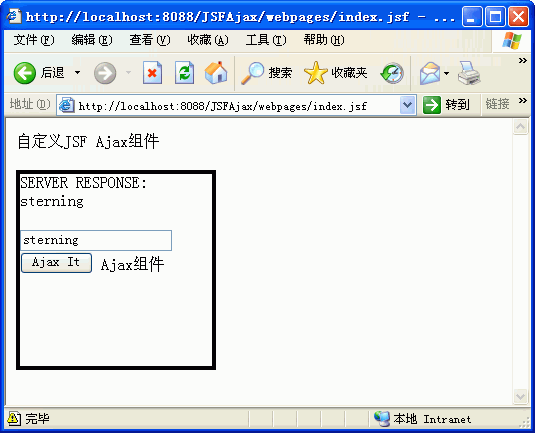
其运行效果如下图所示: