 2007年8月30日
Ubuntu 11.04
libxml2-2.7.8
网上找了一些办法都不能用,最后直接打开configure 文件,找到$RM "$cfgfile", 替换为 $RM -f "$cfgfile", 说白了就是出错了也不要停,继续执行。再运行configure, 成功
When I try to use URLConnection to check if a url is accessible using the following code:
try {
    URL url = new URL("http://169.254.169.254/latest");

    URLConnection connection = url.openConnection();
    connection.setConnectTimeout(5000);
    connection.connect();
    System.out.println("Connected successfully using url");
} catch (IOException e) {
        e.printStackTrace();
}
I expected the behavior is: connect should be success if the host is reachable, else throw exception. It works fine without the anti-virus application, but always print “connected successfully” even the host is not reachable.
Then I tried to use Socket to connect:
Socket socket = new Socket();
socket.connect(new InetSocketAddress("169.254.169.254", 80));
if (socket.isConnected()) {
    System.out.println("Connected successfully using socket");
} else {
    System.out.println("Connected failed using socket");
}
But Still got the same problem.
The solution for it:
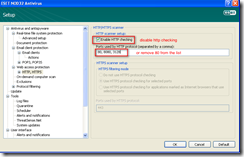
Disable http check in anti-virus, for example, in ESET NOD32, the settings is Web access protection -> Http, Https -> Http scanner
Preview support edit images, but the menu item is disabled by default when I open an image file. I thought it was because the Preview does not support this kind of file type. Recently, when I try to find a simple image editor only for add some text, oval or rectangle, I found that the Preview support it perfectly.
After customized the toolbar, the buttons enabled, and it’s very easy to add comments, but the menu item still disabled.
The following is what I found about how to customize the toolbar from the Preview Help.
Adding text to an image
You can add text to an image to describe what’s in it or when the image was created.
After you save the image, you can’t edit, move, or delete any text you added to it. If you think you’ll need to edit the text, convert the image to a PDF document, and then add notes to the PDF document. Notes added to a PDF document can be edited after they’re saved.
To add text to an image:
- If the Annotate pop-up menu isn’t in the toolbar, choose View > Customize Toolbar and drag the Annotate pop-up menu to the toolbar.
- Choose Note from the Annotate pop-up menu in the toolbar.
- Drag over the area where you want the text to appear.
- Enter your text.
Before you save the image, you can move, resize, edit, or delete the text. First choose Text Annotation from the Annotation pop-up menu in the toolbar. Then to edit the text, double-click it. To delete the text, click it so resize handles appear, and then press Delete.
摘要: 快速生成程序代码, 比如Struts, Spring, Jdbc/Hibernate所有前后台的代码.
支持Mysql, 以及支持Ado连接的数据库.
支持批量生成部分/全部模板, 保存选中的模板到Working Set
使用Javascript作为模板脚本语言
阅读全文
摘要: Generate code, e.g. all files for Struts, Spring, Jdbc/Hibernate.
Support Mysql, and database which support Ado connection
Support generate file/project files and batch generate, and you can save you selection to a named working set in batch generate mode.
Using Javascript as the template engine
阅读全文
diff -r -q -X exclude.list . testing
摘要: 集成Acegi到自己的项目中, 并且将用户信息和权限放到数据库, 提供方法允许权限动态变化,变化后自动加载最新的权限
增加Junit 测试, 这样可以在改变权限后, 方便地检查是否设置正确.
Acegi 提供的Tag不能判断当前用户对某一个URL有没有权限, 由于很多时候需要根据当前用户的权限来控制某些功能是否显示, 所以增加相应的Tag
如果当前用户没有指定url的权限,显示本部分内容
如果当前用户有指定url的权限,显示本部分内容
阅读全文
1. simple join two tables
purpose:
generate sql like:
select * from photo p
    left join artist a on p.artist_id = a.artist_id
      where a.genre = 'something' and p.genre = 'something'
code:
if(!CriteriaUtil::hasJoin($criteria, ArtistPeer::TABLE_NAME)){
    $criteria->addJoin(PhotoPeer::ARTIST_ID, ArtistPeer::ARTIST_ID, Criteria::LEFT_JOIN);
}
$criteria->add(ArtistPeer::GENRE, $genre);
$criteria->add(PhotoPeer::GENRE, $genre);
2. join two tables, add AND OR between conditions
purpose:
generate sql like:
select * from photo p
    left join artist a on p.artist_id = a.artist_id
      where (a.genre = 'some' or p.genre='something')
        and a.name = 'something'
code:
if(!CriteriaUtil::hasJoin($criteria, ArtistPeer::TABLE_NAME)){
   $criteria->addJoin(PhotoPeer::ARTIST_ID, ArtistPeer::ARTIST_ID, Criteria::LEFT_JOIN);
}
$criteria->add(ArtistPeer::GENRE, $genre);
$c = $criteria->getCriterion(ArtistPeer::GENRE);
if($c != null){
   $c->addOr($criteria->getNewCriterion(PhotoPeer::GENRE, $genre));
}
$criteria->add(ArtistPeer::NAME, $name);
Note:
It's a good habit to check if we have joined the table already. to check this, you can use the following util class, it get all the joined tables, and check if the table exists in them.
class CriteriaUtil{
    public static function hasJoin($c, $table_name){
        $joins = $c->getJoins();
        if($joins != null){
            foreach($joins as $join){
                if($join->getRightTableName() == $table_name){
                    return true;
                }
                if($join->getLeftTableName() == $table_name){
                    return true;
                }
            }
        }
        return false;
    }
}
It maybe popup an error message to say that "QI for IEnumVARIANT failed on the unmanaged server" when open the Windows Live Writer.
After search on google, I found the resolution is import some settings into registry.
Windows Registry Editor Version 5.00

[HKEY_LOCAL_MACHINE\SOFTWARE\Classes\Interface\{00020404-0000-0000-C000-000000000046}]
@="IEnumVARIANT"

[HKEY_LOCAL_MACHINE\SOFTWARE\Classes\Interface\{00020404-0000-0000-C000-000000000046}\NumMethods]
@="7"

[HKEY_LOCAL_MACHINE\SOFTWARE\Classes\Interface\{00020404-0000-0000-C000-000000000046}\ProxyStubClsid]
@="{00020421-0000-0000-C000-000000000046}"

[HKEY_LOCAL_MACHINE\SOFTWARE\Classes\Interface\{00020404-0000-0000-C000-000000000046}\ProxyStubClsid32]
@="{00020421-0000-0000-C000-000000000046}"
You can also download the file here, unzip and import it to your registry.
Original article: http://www.symfony-project.com/book/1_0/18-Performance
Clearing Selective Parts of the Cache
During application development, you have to clear the cache in various situations:
- When you create a new class: Adding a class to an autoloading directory (one of the project's
lib/ folders) is not enough to have symfony find it automatically. You must clear the autoloading configuration cache so that symfony browses again all the directories of the autoload.yml file and references the location of autoloadable classes--including the new ones. - When you change the configuration in production: The configuration is parsed only during the first request in production. Further requests use the cached version instead. So a change in the configuration in the production environment (or any environment where
SF_DEBUG is turned off) doesn't take effect until you clear the cached version of the file. - When you modify a template in an environment where the template cache is enabled: The valid cached templates are always used instead of existing templates in production, so a template change is ignored until the template cache is cleared or outdated.
- When you update an application with the
sync command: This case usually covers the three previous modifications.
The problem with clearing the whole cache is that the next request will take quite long to process, because the configuration cache needs to be regenerated. Besides, the templates that were not modified will be cleared from the cache as well, losing the benefit of previous requests.
That means it's a good idea to clear only the cache files that really need to be regenerated. Use the options of the clear-cache task to define a subset of cache files to clear, as demonstrated in Listing 18-14.
Listing 18-14 - Clearing Only Selective Parts of the Cache
// Clear only the cache of the myapp application

> symfony clear-cache myapp


// Clear only the HTML cache of the myapp application

> symfony clear-cache myapp template


// Clear only the configuration cache of the myapp application

> symfony clear-cache myapp config
You can also remove files by hand in the cache/ directory, or clear template cache files selectively from the action with the $cacheManager->remove() method, as described inChapter 12
Note:
1. We can use $cacheManager->remove() to clear cache after we deployed a new version product.
2. write code to generate models from database, and then call $cacheManager->remove() to clear cache.

Create a file backup_db.sh, and paste the following contents:
#get the first parameter as the database name
DATABASE=$1
#if no database specified, then you can set the default one
if [ -z $DATABASE ]; then

DATABASE=default_database_name_here

fi


#mysql user and password to backup the database.
MYSQLUSER=mysql_user
MYSQLPWD=mysql_password
#path to backup
ARCHIVEPATH=~/backup/db_backup
DATE=`date +%Y%m%d`
YEAR=`date +%Y`
MONTH=`date +%m`
FOLDER_MONTH=$ARCHIVEPATH/$YEAR$MONTH
if [ ! -d $FOLDER_MONTH ]; then

echo "mkdir $FOLDER_MONTH"
mkdir $FOLDER_MONTH
fi
# Backup
echo "mysqldump -u$MYSQLUSER -p$MYSQLPWD $DATABASE | gzip > $FOLDER_MONTH/$DATABASE-$DATE.sql.gz"
mysqldump -u$MYSQLUSER -p$MYSQLPWD $DATABASE | gzip > $FOLDER_MONTH/$DATABASE-$DATE.sql.gz
and you can add the script to cron job under *nix and schedule under windows:
*nix:
Save the following text in file: db_backup.at
10 * * * * ~/backup/backup_db.sh databasename
and call
You need to change the period to run the script for your business, e.g. each day, each week etc.

#server-id       = 1
log-bin         = /var/log/mysql/mysql-bin.log
#if you set the expire_logs_days = x var in the [mysqld] section of your my.cnf it will automatically rotate your bin logs after x days.
expire_logs_days = 30
#it will create a new log file when the current file reach the specified size.
max_binlog_size = 100M

edit file: /etc/network/interfaces
the original content should be something like:
# The primary network interface
auto eth0
iface eth0 inet static
address 192.168.0.5
netmask 255.255.255.0
network 192.168.0.0
broadcast 192.168.0.255
gateway 192.168.0.1
# dns-* options are implemented by the resolvconf package, if installed
dns-nameservers 192.168.0.1
add the following settings in the file:
auto eth0:1

iface eth0:1 inet static

address 192.168.0.6

netmask 255.255.255.0

network 192.168.0.0

broadcast 192.168.0.255

gateway 192.168.0.1


# dns-* options are implemented by the resolvconf package, if installed
dns-nameservers 192.168.0.1
run command in root mode:
/etc/init.d/networking restart
that's all. you can run ifconfig to check if it works.
I tested it in ubuntu 6.10.

Correct Implementation of #import
It is important to invoke ADO correctly in your program, or you can have compiler errors. The following code demonstrates the correct way to use #import with Msado10.dll the MSADO15.dll:
#import <msado15.dll>            \

no_namespace                     \

rename( "EOF", "adoEOF" )
error C2011: 'EditModeEnum' : 'enum' type redefinition
error C2011: 'LockTypeEnum' : 'enum' type redefinition
error C2011: 'FieldAttributeEnum' : 'enum' type redefinition
error C2011: 'DataTypeEnum' : 'enum' type redefinition
error C2011: 'ParameterDirectionEnum' : 'enum' type redefinition
error C2011: 'RecordStatusEnum' : 'enum' type redefinition
Here's the original solution in MSDN:
http://support.microsoft.com/kb/169496/EN-US/

Show how to add script to the client in aspx file.
/// <param name="rbl">RadioButtonList to apply script to</param>
/// <param name="page">The Page the script is going to be appended to</param>
/// <param name="script">The script to append</param>
public static void SetRadioButtonListItemScript(RadioButtonList rbl, Page page, string script)

{

for (int idx = 0; idx < rbl.Items.Count; idx++)

{

RegisterClientObjectFunction(page, rbl, idx, script);

}

}


/// <param name="page">The Page the script is going to be appended to</param>
/// <param name="rbl">RadioButtonList to apply script to</param>
/// <param name="idx">the index of the radio button</param>
/// <param name="script">The script to append</param>
static private void RegisterClientObjectFunction(Page page, RadioButtonList rbl, int idx, string script)

{

StringBuilder sw = new StringBuilder();

if (!page.IsStartupScriptRegistered(rbl.ClientID + "_" + idx.ToString() + "script"))

{

sw.Append(@"<SCRIPT>");

sw.Append(@"document.getElementById('" + rbl.ClientID + "_" + idx.ToString() + "').onclick=function() {" + script + "return true;}");

sw.Append(@"</SCRIPT>");

page.RegisterStartupScript(rbl.ClientID + "_" + idx.ToString() + "script", sw.ToString());

}

}


static private void RegisterClientObjectFunction(Page page, CheckBox chk, string script)

{

StringBuilder sw = new StringBuilder();

if (!page.IsStartupScriptRegistered(chk + "script"))

{

sw.Append(@"<SCRIPT>");

sw.Append(@"document.getElementById('"+chk.ClientID + "').onclick=function() {" + script + "return true;}");

sw.Append(@"</SCRIPT>");

page.RegisterStartupScript(chk.ClientID + "script", sw.ToString());

}

}

Add Command here to right button click in explore (Windows XP)
http://www.blogjava.net/Files/programmer/CMDHere.zip
- Download the file and unzip the file CMDHere.reg.
- Double click it to import into registry,
- Right click on any folder, you'll see there's a menu which is "Command here",
- Click it, you'll get into the cmd window with the current path is which you selected.
Or you can import the settings manually.
Windows Registry Editor Version 5.00

[HKEY_LOCAL_MACHINE\SOFTWARE\Classes\Folder\shell\Command Prompt]
@="Command Prompt"

[HKEY_LOCAL_MACHINE\SOFTWARE\Classes\Folder\shell\Command Prompt\command]
@="Cmd.exe /k pushd %L"

Set readonly for input text
document.getElementById("ctrl_id").readOnly = true; //pay attention to the readOnly, it's case sensitive.
Set option to unable to select for select control:
<option value="Genre" disabled="disabled">Genre</option>
Set select control to disabled (it has no readonly property):
<select disabled="disabled"></select>
Add a new option to a select control, it works under firefox 2.x and IE 5.x:
function addOption(select_ctrl, option_value, option_text){

var ctrl = document.getElementById(selectctl);


if(ctrl == null)

return;


var doc = ctrl.ownerDocument;

if (!doc)

doc = ctrl.document;


var opt = doc.createElement('OPTION');

opt.value = option_value;

opt.text = option_text;


ctrl.options.add(opt, ctrl.options.length);

}
Delete an option from select control:
selectctl.options[selectctl.selectedIndex] = null;
Delete all options from select control:
selectctrl.options.length = 0;
Change the css for an object:
document.getElementById("ctrl_id").className="SHOWN";