 2008年3月1日
1 package poi;
2 import java.io.FileInputStream;
3 import java.io.IOException;
4 import java.io.InputStream;
5 import java.util.Iterator;
6 import org.apache.poi.hssf.usermodel.HSSFCell;
7 import org.apache.poi.hssf.usermodel.HSSFWorkbook;
8 import org.apache.poi.ss.usermodel.Cell;
9 import org.apache.poi.ss.usermodel.Row;
10 import org.apache.poi.ss.usermodel.Sheet;
11 import org.apache.poi.ss.usermodel.Workbook;
12 import org.apache.poi.xssf.usermodel.XSSFWorkbook;
13
14 public class ReadExcel001 {
15 public static void main(String[] args) {
16 readXml("D:/test.xlsx");
17 System.out.println("-------------");
18 readXml("d:/test2.xls");
19 }
20 public static void readXml(String fileName){
21 boolean isE2007 = false; //判断是否是excel2007格式
22 if(fileName.endsWith("xlsx"))
23 isE2007 = true;
24 try {
25 InputStream input = new FileInputStream(fileName); //建立输入流
26 Workbook wb = null;
27 //根据文件格式(2003或者2007)来初始化
28 if(isE2007)
29 wb = new XSSFWorkbook(input);
30 else
31 wb = new HSSFWorkbook(input);
32 Sheet sheet = wb.getSheetAt(0); //获得第一个表单
33 Iterator<Row> rows = sheet.rowIterator(); //获得第一个表单的迭代器
34 while (rows.hasNext()) {
35 Row row = rows.next(); //获得行数据
36 System.out.println("Row #" + row.getRowNum()); //获得行号从0开始
37 Iterator<Cell> cells = row.cellIterator(); //获得第一行的迭代器
38 while (cells.hasNext()) {
39 Cell cell = cells.next();
40 System.out.println("Cell #" + cell.getColumnIndex());
41 switch (cell.getCellType()) { //根据cell中的类型来输出数据
42 case HSSFCell.CELL_TYPE_NUMERIC:
43 System.out.println(cell.getNumericCellValue());
44 break;
45 case HSSFCell.CELL_TYPE_STRING:
46 System.out.println(cell.getStringCellValue());
47 break;
48 case HSSFCell.CELL_TYPE_BOOLEAN:
49 System.out.println(cell.getBooleanCellValue());
50 break;
51 case HSSFCell.CELL_TYPE_FORMULA:
52 System.out.println(cell.getCellFormula());
53 break;
54 default:
55 System.out.println("unsuported sell type");
56 break;
57 }
58 }
59 }
60 } catch (IOException ex) {
61 ex.printStackTrace();
62 }
63 }
64 }
tomcat如果是通过windows服务启动,执行的是bin\tomcat.exe.他读取注册表中的值,而不是catalina.bat的设置.解决办法:修改注册表HKEY_LOCAL_MACHINE\SOFTWARE\Apache Software Foundation\Procrun 2.0\Tomcat6\Parameters\JavaOptions原值为-Dcatalina.home=E:\Tomcat 6.0-Dcatalina.base=E:\Tomcat 6.0-Djava.endorsed.dirs=E:\Tomcat 6.0\common\endorsed-Djava.io.tmpdir=E:\Tomcat 6.0\temp-Djava.util.logging.manager=org.apache.juli.ClassLoaderLogManager-Djava.util.logging.config.file=E:\Tomcat 6.0\conf\logging.properties
在后面增加即可:
-Xms128M
-Xmx512M
-XX:PermSize=128M
-XX:MaxPermSize=512M
必须要分行写。
最终效果如下:

当一个数据库的数据文件达到表空间的最大值时,报ORA-1653:的错误。如下:
ORA-1653: unable to extend table TEST.COMM_DTTR_SVR_LOG by64 in tablespace TEST_SPACE
解决:
可以在该表空间中增加一个数据文件,增加的数据文件为自动扩展,无限扩大。
查看数据文件的大小和最大的值,可以查询dba_data_files;
Sql>
alter tablespace TEST_SPACE
adddatafile'/Oracle/oms/oradata/pub/Norm_data001.dbf'
size 10M autoextend on MAXSIZE UNLIMITED;
或者把该表空间所在的数据文件设置成自动扩张,设置该maxsize更大,unlimited表示没有限制。
SQL>
alter database
datafile '/oracle/oms/oradata/pub/Pub_Norm_data001.dbf'
autoextend on maxsize unlimited;
共计以下4个文件 点击“下载”
login.html
welcome.html
cookie.js
common.js
login.html
<!DOCTYPE html PUBLIC "-//W3C//DTD XHTML 1.0 Transitional//EN" "http://www.w3.org/TR/xhtml1/DTD/xhtml1-transitional.dtd">
<html xmlns="http://www.w3.org/1999/xhtml">
<head>
<meta http-equiv="Content-Type" content="text/html; charset=gb2312" />
<title>login</title>
<script type="text/javascript" src="cookie.js"></script>
<script type="text/javascript" src="common.js"></script>
</head>
<body>
<form action="">
<p>
<span>UserName:</span>
<input id="userName" type="text" value=""/></p>
<p>
<span>Password:</span>
<input id="password" type="password" value=""/></p>
<p>
<span style="font-size:12px; color:blue;">记住密码</span>
<input id="saveCookie" type="checkbox" value="" /></p>
<p>
<input id="submit" type="button" value="GO" />
</p>
</form>
</body>
</html>
welcome.html
<!DOCTYPE html PUBLIC "-//W3C//DTD XHTML 1.0 Transitional//EN" "http://www.w3.org/TR/xhtml1/DTD/xhtml1-transitional.dtd">
<html xmlns="http://www.w3.org/1999/xhtml">
<head>
<meta http-equiv="Content-Type" content="text/html; charset=gb2312" />
<title>welcome</title>
</head>
<body>
<h1>Welcome!</h1>
<a href="login.html">点击返回登陆框</a>
</body>
</html>
cookie.js
//新建cookie。
//hours为空字符串时,cookie的生存期至浏览器会话结束。hours为数字0时,建立的是一个失效的cookie,这个cookie会覆盖已经建立过的同名、同path的cookie(如果这个cookie存在)。
function setCookie(name,value,hours,path){
var name = escape(name);
var value = escape(value);
var expires = new Date();
expires.setTime(expires.getTime() + hours*3600000);
path = path == "" ? "" : ";path=" + path;
_expires = (typeof hours) == "string" ? "" : ";expires=" + expires.toUTCString();
document.cookie = name + "=" + value + _expires + path;
}
//获取cookie值
function getCookieValue(name){
var name = escape(name);
//读cookie属性,这将返回文档的所有cookie
var allcookies = document.cookie;
//查找名为name的cookie的开始位置
name += "=";
var pos = allcookies.indexOf(name);
//如果找到了具有该名字的cookie,那么提取并使用它的值
if (pos != -1){ //如果pos值为-1则说明搜索"version="失败
var start = pos + name.length; //cookie值开始的位置
var end = allcookies.indexOf(";",start); //从cookie值开始的位置起搜索第一个";"的位置,即cookie值结尾的位置
if (end == -1) end = allcookies.length; //如果end值为-1说明cookie列表里只有一个cookie
var value = allcookies.substring(start,end); //提取cookie的值
return (value); //对它解码
}
else return ""; //搜索失败,返回空字符串
}
//删除cookie
function deleteCookie(name,path){
var name = escape(name);
var expires = new Date(0);
path = path == "" ? "" : ";path=" + path;
document.cookie = name + "="+ ";expires=" + expires.toUTCString() + path;
}
common.js
function $(objStr){return document.getElementById(objStr);}
window.onload = function(){
//分析cookie值,显示上次的登陆信息
var userNameValue = getCookieValue("userName");
$("userName").value = userNameValue;
var passwordValue = getCookieValue("password");
$("password").value = passwordValue;
//写入点击事件
$("submit").onclick = function()
{
var userNameValue = $("userName").value;
var passwordValue = $("password").value;
//服务器验证(模拟)
var isAdmin = userNameValue == "admin" && passwordValue =="123456";
var isUserA = userNameValue == "userA" && passwordValue =="userA";
var isMatched = isAdmin || isUserA;
if(isMatched){
if( $("saveCookie").checked){
setCookie("userName",$("userName").value,24,"/");
setCookie("password",$("password").value,24,"/");
}
alert("登陆成功,欢迎你," + userNameValue + "!");
self.location.replace("welcome.html");
}
else alert("用户名或密码错误,请重新输入!");
}
}
Oracle提示错误消息ORA-28001: the password has expired
Oracle提示错误消息ORA-28001: the password has expired,
经调查是由于Oracle11G的新特性所致, Oracle11G创建用户时缺省密码过期限制是180天, 如果超过180天用户密码未做修改则该用户无法登录。
可通过
SELECT * FROM dba_profiles WHERE profile='DEFAULT' AND resource_name='PASSWORD_LIFE_TIME'
语句查询密码的有效期设置,
LIMIT字段是密码有效天数。在密码将要过期或已经过期时可通过
ALTER USER 用户名 IDENTIFIED BY 密码 ;
语句进行修改密码,密码修改后该用户可正常连接数据库。
长久对应可通过
ALTER PROFILE DEFAULT LIMIT PASSWORD_LIFE_TIME UNLIMITED
语句将口令有效期默认值180天修改成“无限制”。出于数据库安全性考虑,不建议将PASSWORD_LIFE_TIME值设置成UNLIMITED,
建议客户定期修改数据库用户口令。
转载于
http://hi.baidu.com/yuelsygfixbqsuq/item/ddfc8e4b4888ae1e896d10c0
1、安装eclipse的jrebel插件
Help » Install New Software
然后通过 如下 URL http://www.zeroturnaround.com/update-site/
如果要离线下载的话,可以通过下载离线包的方式进行 http://www.zeroturnaround.com/update-site/update-site.zip

2、下载jrebel5破解版
下载jrebel5破解版以后解压到D盘根目录即可
下载地址 :http://download.csdn.net/detail/lushengdi/5080360
配置jrebel破解版JAR包的路径 :
3、配置jetty实现热部署
这是为jetty加载jrebel的关键。
项目右键 》 run as 》 run configuation.. 》 点击jetty项目
在mvn jetty:run的JRE管理选项卡中的VM参数中加入
-noverify -javaagent:d:/jrebel/jrebel.jar
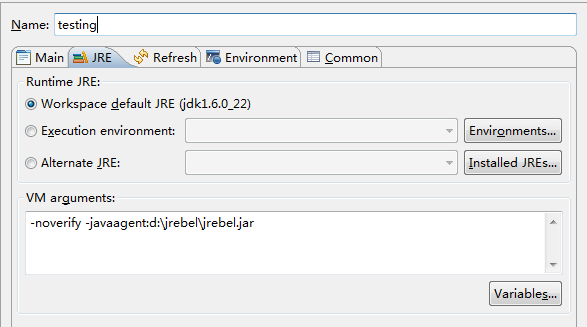
现在在eclipse中启动mvn jetty:run,jrebel将被加载,修改java代码可以不重启jetty而热部署生效了,
修改java文件后自动在输出窗口中显示重新加载的信息

tomcat 配置 参考
http://zeroturnaround.com/jrebel/how-to-install-and-use-jrebel-formerly-javarebel-in-tomcat-with-the-eclipse-ide/
摘要: 安装篇jspSmartUpload是由www.jspsmart.com网站开发的一个可免费使用的全功能的文件上传下载组件,适于嵌入执行上传下载操作的JSP文件中。该组件有以下几个特点:1、使用简单。在JSP文件中仅仅书写三五行JAVA代码就可以搞定文件的上传或下载,方便。2、能全程控制上传。利用jspSmartUpload组件提供的对象及其操作方法,可以获得全部上传文件的信息(包括文件名,大小,类...
阅读全文
摘要:
浏览器缓存内幕及解决方案 在下面三种不同的情况下,浏览器的缓存情况不同: 1).Servlet没有覆盖getLastModified方法,响应消息中无LastModified头字段,在浏览器缓存的文档无“上次修改时间”. 2).有ge...
阅读全文
纯js的判断浏览器的版本,包括IE(6,7,8),FF,chrome,opera,safari的,很好用,很多地方会用到,有时不需要为了一个效果而导入一个js库来调用,用这段代码就很好。Code:
<script type="text/javascript">
var Sys = {};
var ua = navigator.userAgent.toLowerCase();
var s;
(s = ua.match(/msie ([\d.]+)/)) ? Sys.ie = s[1] :
(s = ua.match(/firefox\/([\d.]+)/)) ? Sys.firefox = s[1] :
(s = ua.match(/chrome\/([\d.]+)/)) ? Sys.chrome = s[1] :
(s = ua.match(/opera.([\d.]+)/)) ? Sys.opera = s[1] :
(s = ua.match(/version\/([\d.]+).*safari/)) ? Sys.safari = s[1] : 0;
/*以下进行测试
if (Sys.ie) alert('IE: ' + Sys.ie);
if (Sys.firefox) alert('Firefox: ' + Sys.firefox);
if (Sys.chrome) alert('Chrome: ' + Sys.chrome);
if (Sys.opera) alert('Opera: ' + Sys.opera);
if (Sys.safari) alert('Safari: ' + Sys.safari);
if (Sys.ie == 6.0){alert("fuck!")}
*/
</script>
密码过期,需要更换新密码
SQL> alter user test identified by [new password];
解锁
SQL> alter user test account unlock;
User altered.
一般数据库默认是10次尝试失败后锁住用户
1、查看FAILED_LOGIN_ATTEMPTS的值
select * from dba_profiles
2、修改为30次
alter profile default limit FAILED_LOGIN_ATTEMPTS 30;
3、修改为无限次(为安全起见,不建议使用)
alter profile default limit FAILED_LOGIN_ATTEMPTS unlimited;
设置用户密码永不过期
1 查看用户概要文件(一般是DEFAULT)
select * from dba_users where username=test;
2 查看指定概要文件(如default)的密码有效期设置(默认在default概要文件中设置了 “PASSWORD_LIFE_TIME=180天”):
SELECT * FROM dba_profiles WHERE profile='DEFAULT' and resource_name='PASSWORD_LIFE_TIME';
3 将密码有效期由默认的180天修改成“无限制”:
sql>ALTER PROFILE DEFAULT LIMIT PASSWORD_LIFE_TIME UNLIMITED;
修改之后不需要重启动数据库,会立即生效。
转载于 http://database.51cto.com/art/201108/280966.htm
步骤一--完成一层
1、第一层十字,可能出现两种情况,可用以下公式还原
a)R2
b)D'F'RF
2、第一层角
a)D'R'DR
b)R'D'R
步骤二--第二层
a)y'RURURU'R'U'R'U' 五顺五逆
b)R'U'R'U'R'URURU 五逆五顺
步骤三--OLL
1、顶层十字
FRUR'U'F'
2、顶层角块
R'U2RUR'UR
步骤四--PLL
1、顶层角还原
x' R2 U2 R D R' U2 R D' R x
2、顶层棱还原
(RU'R)(URUR)(U'R'U'R2)
假设你的存储过程名为PROC_RAIN_JM 再写一个存储过程名为PROC_JOB_RAIN_JM 内容是: - Create Or Replace Procedure PROC_JOB_RAIN_JM
- Is
- li_jobno Number;
-
- Begin
- DBMS_JOB.SUBMIT(li_jobno,'PROC_RAIN_JM;',SYSDATE,'TRUNC(SYSDATE + 1)');
- End;
- begin
- sys.dbms_job.submit(job => :job,
- what => 'P_CLEAR_PACKBAL;',
- next_date => to_date('04-08-2008 05:44:09', 'dd-mm-yyyy hh24:mi:ss'),
- interval => 'sysdate+ 1/360');
- commit;
- end;
- variable jobno number;
- begin
- dbms_job.submit(:jobno, 'P_CRED_PLAN;',SYSDATE,'SYSDATE+1/2880',TRUE);
- commit;
- begin
- dbms_job.run(:job1);
- end;
- begin
- dbms_job.remove(:job1);
- end;
转载于
http://virgoooos.iteye.com/blog/342421
Eclipse是著名的跨平台的自由集成开发环境(IDE)。6月22日Eclipse 3.7 正式发布,代号是 Indigo 。

在 Windows 7 下初始后化,发现界面变化不大,但中文字体却面目全非,小得根本看不见,而且也看起来很不爽。其实这是 Eclipse 的默认字体换了,以前的一直是 Courier New ,这次eclipse用的字体是 Consolas ,这是一个很好的编程字体了,无奈就是中文默认太小了。

于是上网找了 Consolas 和微软雅黑混合字体,完美解决了中文字体小的问题,同时保持了Consolas字体的优雅,效果如下图:

是不是比较满意?哈哈,那就赶紧下载这个混合字体吧。
下载地址:
http://files.xiaogui.org/eclipse-indigo/YaHei.Consolas.1.12.rar
下载好后把 YaHei.Consolas.1.12.ttfw 文件复制到 C:\Windows\Fonts 目录下,这样字体就安装完成,
然后打开 eclipse 的 “preferences” , “General” -> “Appearance” -> “Colors and Fonts” ,打开 “basic” ,双击 “Text Font” ,然后选择字体:”YaHei Consolas Hybrid” ,确定即可。
操作可参考下图:


备注:在上图此处选字体的时候,只需在字体框里面输入字母 “Y”, Eclipse 就会智能的跳转至 “YaHei Consolas Hybrid” 字体。
转载于 http://xiaogui.org/eclipse-indigo-3-7-font.html
<!DOCTYPE html PUBLIC "-//W3C//DTD XHTML 1.0 Transitional//EN" "http://www.w3.org/TR/xhtml1/DTD/xhtml1-transitional.dtd">
<html xmlns="http://www.w3.org/1999/xhtml">
<head>
<meta http-equiv="Content-Type" content="text/html;charset=gb2312" />
<title>简洁Tab</title>
<style type="text/css">
<!--
body,div,ul,li{
margin:0 auto;
padding:0;
}
body{
font:12px "宋体";
text-align:center;
}
a:link{
color:#00F;
text-decoration:none;
}
a:visited {
color: #00F;
text-decoration:none;
}
a:hover {
color: #c00;
text-decoration:underline;
}
ul{
list-style:none;
}
.main{
clear:both;
padding:8px;
text-align:center;
}
/*第一种形式*/
#tabs0 {
height: 200px;
width: 400px;
border: 1px solid #cbcbcb;
background-color: #f2f6fb;
}
.menu0{
width: 400px;
}
.menu0 li{
display:block;
float: left;
padding: 4px 0;
width:100px;
text-align: center;
cursor:pointer;
background: #FFFFff;
}
.menu0 li.hover{
background: #f2f6fb;
}
#main0 ul{
display: none;
}
#main0 ul.block{
display: block;
}
/*第二种形式*/
#tabs1{
text-align:left;
width:400px;
}
.menu1box{
position:relative;
overflow:hidden;
height:22px;
width:400px;
text-align:left;
}
#menu1{
position:absolute;
top:0;
left:0;
z-index:1;
}
#menu1 li{
float:left;
display:block;
cursor:pointer;
width:72px;
text-align:center;
line-height:21px;
height:21px;
}
#menu1 li.hover{
background:#fff;
border-left:1px solid #333;
border-top:1px solid #333;
border-right:1px solid #333;
}
.main1box{
clear:both;
margin-top:-1px;
border:1px solid #333;
height:181px;
width:400px;
}
#main1 ul{
display: none;
}
#main1 ul.block{
display: block;
}
/*第三种形式*/
.menu2box{
position:relative;
overflow:hidden;
height:22px;
width:400px;
text-align:left;
background: #FFFFff;
}
#tabs2 {
height: 200px;
width: 400px;
border: 1px solid #cbcbcb;
background-color: #f2f6fb;
}
#tip2{
position:absolute;
top:0;
left:0;
height:22px;
line-height:22px;
z-index:0;
width:100px;
background: #f2f6fb;
}
#menu2{
position:absolute;
top:0;
left:0;
z-index:1;
}
#menu2 li{
display:block;
float: left;
padding: 4px 0;
width:100px;
text-align: center;
cursor:pointer;
}
-->
</style>
<script>
<!--
/*第一种形式 第二种形式 更换显示样式*/
function setTab(m,n){
var tli=document.getElementById("menu"+m).getElementsByTagName("li");
var mli=document.getElementById("main"+m).getElementsByTagName("ul");
for(i=0;i<tli.length;i++){
tli[i].className=i==n?"hover":"";
mli[i].style.display=i==n?"block":"none";
}
}
/*第三种形式 利用一个背景层定位*/
var m3={0:"",1:"评论内容",2:"技术内容",3:"点评内容"}
function nowtab(m,n){
if(n!=0&&m3[0]=="")m3[0]=document.getElementById("main2").innerHTML;
document.getElementById("tip"+m).style.left=n*100+'px';
document.getElementById("main2").innerHTML=m3[n];
}
//-->
</script>
</head>
<body>
<br />
<br />
<!--第一种形式-->
<div id="tabs0">
<ul class="menu0" id="menu0">
<li onclick="setTab(0,0)" class="hover">新闻</li>
<li onclick="setTab(0,1)">评论</li>
<li onclick="setTab(0,2)">技术</li>
<li onclick="setTab(0,3)">点评</li>
</ul>
<div class="main" id="main0">
<ul class="block"><li>新闻列表</li></ul>
<ul><li>评论列表</li></ul>
<ul><li>技术列表</li></ul>
<ul><li>点评列表</li></ul>
</div>
</div>
<br />
<br />
<!--第二种形式-->
<div id="tabs1">
<div class="menu1box">
<ul id="menu1">
<li class="hover" onmouseover="setTab(1,0)"><a href="#">新闻</a></li>
<li onmouseover="setTab(1,1)"><a href="#">评论</a></li>
<li onmouseover="setTab(1,2)"><a href="#">技术</a></li>
<li onmouseover="setTab(1,3)"><a href="#">点评</a></li>
</ul>
</div>
<div class="main1box">
<div class="main" id="main1">
<ul class="block"><li>新闻列表</li></ul>
<ul><li>评论列表</li></ul>
<ul><li>技术列表</li></ul>
<ul><li>点评列表</li></ul>
</div>
</div>
</div>
<br />
<br />
<!--第三种形式-->
<div id="tabs2">
<div class="menu2box">
<div id="tip2"></div>
<ul id="menu2">
<li class="hover" onmouseover="nowtab(2,0)"><a href="#">新闻</a></li>
<li onmouseover="nowtab(2,1)"><a href="#">评论</a></li>
<li onmouseover="nowtab(2,2)"><a href="#">技术</a></li>
<li onmouseover="nowtab(2,3)"><a href="#">点评</a></li>
</ul>
</div>
<div class="main" id="main2">
新闻内容
</div>
</div>
<br />
<br />
<br />
<br />
<br />
<br />
<br />
<br />
</body>
</html>
转换成Eclipse项目
- 启动命令行,输入play new <项目名>,Play会在当前路径下创建项目。
- 输入play eclipsify <项目名>,Play会在项目目录中创建eclipse需要的配置文件,将其转换成eclipse项目。
- 在eclipse中导入创建的项目。
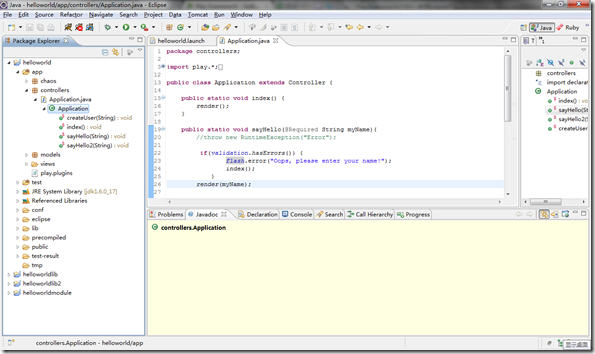
调试
Play转换eclipse项目时,在eclipse目录中生成了三个启动配置:
- JPDA:连接到已经启动的Play Server,实现alive调试
- helloworld:本地运行
- Test:测试
选中它们,右键执行Run As,即可完成相应的任务。
本地调试
直接Debug As 执行helloworld会报错:
Error occurred during initialization of VM
agent library failed to init: jdwp
ERROR: Cannot load this JVM TI agent twice, check your java command line for duplicate jdwp options.
需要:
打开helloworld.launch,找到
<stringAttribute key="org.eclipse.jdt.launching.VM_ARGUMENTS" value="-Xdebug -Xrunjdwp:transport=dt_socket,address=8000,server=y,suspend=n -Dplay.debug=yes -Dplay.id= -Dapplication.path …/>
将-Xrunjdwp:transport=dt_socket,address=8000,server=y,suspend=n 去掉。
然后Debug As,即可成功启动调试。附加Play源码后,即可调试Play本身。
转载于 http://www.cnblogs.com/Chaos/archive/2011/04/16/2018444.html
假如你的笔记本需要在家里和公司频繁地进行IP地址切换,是不是很烦?而网上大量的切换工具对Win7均无效,怎么办?请不要担心,自己DIY一个批处理文件就行了。
注意,以下是针对IPv4进行的修改。
另外,安装了360可能会有风险提醒,请大家不要担心,放心点击通过,此代码毫无风险,童叟无欺,尽可安全使用。
首先,打开记事本,新建一个"IP切换.txt",内容如下,
最后,把文件名改为"IP切换.bat"就大功告成了。
@echo off
rem //设置变量本地连接, 根据你的需要更改
set Nic="本地连接 3"
rem //可以根据你的需要更改
set Addr=192.168.1.11
set Mask=255.255.255.0
set Gway=192.168.1.1
set Dns=192.168.1.1
set Addr2=10.32.66.34
set Mask2=255.255.255.192
set Gway2=10.32.66.62
set Dns1=202.107.196.144
set Dns2=202.101.172.46
rem //以上对应分别是IP地址、子网掩码、网关、首选DNS、备用DNS ,自己根据情况修改
rem //家里的DNS和公司一样则可以用以上代码,不一样可能需要稍作修改
echo ↗Design by 鲁胜迪,龙腾虎跃↖
echo ★ 1 设置为公司IP ★
echo ★ 2 设置为***综合楼IP★
echo ★ 3 设置为动态IP ★
echo ★ 4 退出 ★
echo ●●●请选择项目回车●●●
set /p answer=
if %answer%==1 goto 1
if %answer%==2 goto 2
if %answer%==3 goto 3
if %answer%==4 goto 4
:1
echo 正在进行静态公司IP 设置,请稍等...
rem //可以根据你的需要更改
echo. I P 地址 = %Addr%
echo. 子网掩码 = %Mask%
netsh interface ipv4 set address name=%Nic% source=static addr=%Addr% mask=%Mask% gateway=%Gway% gwmetric=0 >nul
echo. 首选 DNS = %Dns%
netsh interface ipv4 set dns name=%Nic% source=static addr=%Dns% register=PRIMARY >nul
echo. 备用 DNS = %Dns%
netsh interface ipv4 add dns name=%Nic% addr=%Dns% index=2 >nul
echo ----
echo 全部设置完成!
pause
goto end
:2
echo 正在进行静态萧山区政府综合楼IP设置,请稍等...
rem //可以根据你的需要更改
echo. I P 地址 = %addr2%
echo. 子网掩码 = %Mask2%
netsh interface ipv4 set address name=%Nic% source=static addr=%addr2% mask=%Mask2% gateway=%Gway2% gwmetric=0 >nul
echo. 首选 DNS = %Dns1%
netsh interface ipv4 set dns name=%Nic% source=static addr=%Dns1% register=PRIMARY >nul
echo. 备用 DNS = %Dns2%
netsh interface ipv4 add dns name=%Nic% addr=%Dns2% index=2 >nul
echo ----
echo 全部设置完成!
pause
goto end
:3
echo 正在进行动态IP设置,请稍等...
echo. IP 地址正在从DHCP自动获取...
netsh interface ip set address %Nic% dhcp
echo. DNS地址正在从DHCP自动获取...
netsh interface ip set dns %Nic% dhcp
echo ----
echo 全部设置完成!
pause
:4
echo bye!
goto end
前言:架设基于宽带服务器要解决的几个问题
***第一个问题是:如何解决动态IP地址映射成局域网的静态IP地址
***第二个问题是:如何架设WEB服务器
***第三个问题是:如何架设FTP服务器
下面就这三个问题,提供如下的解决方案。
一.动态IP地址映射成静态IP地址
现在联接Internet的宽带用户,方式很多,如有线通、ADSL、 FTTB,但这些方式获得的因特网的IP地址是动态的(当然也可以到电信申请一个固定的IP地址,但这样的月租费特别贵,一个月可能要一千多元,而家庭动态IP用户,月租可能50-100元。当然静态IP用户可以跳过第一个问题)。如果家里有几台电脑,共享上网,设置的IP地址是局域网的IP地址,不能直接路由到因特网,所以必须找一个第三方软件作因特网动态IP地址和局域网的静态IP地址的映射。这方面的软件很多,比较优秀的软件是花生壳。
下面是花生壳软件的介绍:
花生壳是一套完全免费的动态域名解析服务客户端软件。当您安装并注册该项服务,无论您在任何地点、任何时间、使用任何线路,均可利用这一服务建立拥有固定域名和最大自主权的互联网主机。“花生壳”支持的线路包括普通电话线、ISDN、ADSL、有线电视网络、双绞线到户的宽带网和其它任何能够提供互联网真实IP的接入服务线路,而无论连接获得的IP属于动态还是静态。
花生壳3系列版本从2005年4月份发布3.0版本,已有1年多的时间,并完全替代了花生壳1.0和2.x,3.9版将是花生壳3系列的最后一个版本发布,2006年底花生壳将推出全新内核和界面的新版本。
Oray九月推出疯狂的CN,免费送CN域名,还同时免费赠送橄榄邮局系统。
活动主题页面:http://www.oray.net/Activity/0609/
花生壳3.9版新特征描述:
1、该版本增加了对英文操作系统的完全支持;
2、去除原有“花生吧”功能,降低前台程序内存占用;
3、修改了一些界面处理bug;
4、完善WebService获取信息部分,比以前登陆速度更快;
5、完善针对中文域名处理部分,对中文域名的支持更加完美;
Oray于2006年8月1日永久停止花生壳1.0、2.1版客户端服务通告
https://www.oray.net/News/News_Details.asp?ID=101
下面介绍具体的操作步骤:
1.下载花生壳客户端:下载地址1 下载地址2
2.安装花生壳,一般直接点“下一步”就可以安装完成(安装过程类似安装QQ软件)。
花生壳客户端安装后,它会随系统一起启动。在默认设置下,它会启动前台控制和后台服务,并在系统的通知区域显示为一个小盒子,当网络连通且登录到花生壳服务器时,它会是彩色的,我们现在还没连接到花生壳服务器,所以它是灰色的。
3.申请一个网域护照 ( 账户 ),才能连接到花生壳服务器(申请过程类似申请QQ号码)。
登录到 http://www.oray.net/ ,在最左边点击“免费注册oray护照”,或直接在花生壳客户端“状态”选项卡上左键单击“申请网域护照”,进入网域护照的申请网页,在那里签署用户协议、填写护照基本信息、设置密码提示问题后,就会得到一个网域护照。
如下图所示:


4.在网域申请一个免费的域名。
登录网域后,点“申请免费域名”,如下图所示:

在弹出的页面,点“免费域名”,如下图所示:

在弹出的页面,输入您喜欢的域名,如我的网站jsjzx.xicp.cn,在文本框里面输入jsjzx,再在下面您要的后缀前面打钩,再点“查询域名”,通过查看“搜索结果”,此域名已经被注册,如下图所示:

重新输入jsjzxnet,选择.xicp.net,再点“查询域名”,可以知道,此域名没有被注册,在“jsjzxnet.xicp.net”前面点一下,再点“注册选定免费域名”,如下图所示:

在弹出的页面中填入您的真实信息(当然有的私人信息还是保密比较好),如下图所示:

再点“申请免费域名”,下面弹出的页面步骤和上面一样,如下图所示:

在弹出的页面,点“确认申请”,如下图所示:

在弹出的页面,选择“是”,再点“下一步”,如下图所示:

在弹出的页面中,输入网站的一些信息,然后点“同意以下条款,提交信息”,如下图所示:

于是,二级免费域名jsjzxnet.xicp.net申请成功,如果WEB服务器设置好后,网友就可以输入http://jsjzxnet.xicp.net访问您的网站了(当然,还要做一些设置才可以,下面会具体介绍),如下图所示:

5.登录花生壳(登录过程类似登录QQ软件):
用自己申请的护照名和密码,登录花生壳服务器,如下图所示:(友情提示:最好把“自动登录,忘记密码”打上钩,这样系统开机自动就登录,花生壳服务就开启了)

点“免费域名”,如果能看到“jsjzx.xicp.net”(注意:这是我网站的二级域名,不是用上面的号码登录,而是用的另一个号码登录)就说明服务开启成功,如下图所示:

6.解决局域网的端口映射:
如果是几台电脑共享上网,必须作端口映射,才可以做服务器(如果是一台电脑,可以跳过这步)。
打开IE浏览器,输入192.168.1.1,敲回车(注意,不同的ADSL猫,IP地址不同,有的是192.168.1.254,这个IP地址,可以看您的路由器说明书,或者ADSL猫说明书,上面有说明,当然在百度也可以查到),如下图所示:

在弹出的窗口,输入用户名和密码,一般用户名admin或者root,密码admin或者root(当然可以查看说明书),点“确定”如下图所示:

在弹出的窗口中,点“转发规则”,在“服务端口”中输入80,在“IP地址”中输入192.168.1.8(这是我电脑的IP地址,您也可以设置其它IP地址),在协议中选择ALL,在启用中“打钩”。按照同样的方法,输入端口号21。如下图所示:
友情提示:设置80端口,是为了做WEB服务器,输入21端口,是为了做FTP服务器。另外,教大家一招提高BT下载速度的方法,在“服务端口”输入22557,再打开BT软件,点工具栏上的“选项”-“选项”,在弹出的窗口中的“监听端口”输入 22557,再点“确定”就可以了。另外,根据我的经验,在“全局最大上传速率”设置成30kB/s,下载速度最快,当然您也可以根据自己的网络去设置成一个合理的值。


二.架设WEB服务器
关于WEB服务器的更多详细信息见计算机网络实验三。下面只介绍我自己电脑作WEB服务器的设置。
做WEB服务器,可以用IIS,它比较简单和方便,但它有人数限制,好象同一时刻只能连接100人,所以推荐大家用 Apache。
1.下载 Apache:下载地址
2.安装Apache:基本上点“下一步”就可以。
安装好后,测试一下按默认配置运行的网站界面,在 IE 地址栏打 “http://127.0.0.1” ,点 “ 转到 ” ,如果出现配置成功,表示 Apache 服务器已安装成功。
友情提示:如果 IIS 打开了,要停止它(开始-控制面板-管理工具-服务-IIS Admin禁止),否则 apache 不能启动!
3.设置Apache:
“ 开始 ”- “ 所有程序 ”- “Apache HTTP Server 2.0.55”- “Configure Apache Server”- “Edit the Apache httpd conf Configuration file” ,点击打开。
友情提示:每次配置文件的改变,保存后, 必须在 Apache 服务器重启动后生效 ,可以用前面讲的小图标方便的控制服务器随时 “ 重启动 ” 。
查找关键字 “DocumentRoot” (也就是网站根目录),找到如下图所示地方,然后将 "" 内的地址改成你的网站根目录,地址格式请照图上的写 ,主要是一般文件地址的 “\” 在 Apache 里要改成 “/” 。 比如我的网站就是: DocumentRoot "f:/web" 。
查找 “<Directory” 来定位,将 "" 内的地址改成跟 DocumentRoot 的一样。 比如我的网站: <Directory "f:/web"> 。
查找“DirectoryIndex” (目录索引,也就是在仅指定目录的情况下,默认显示的文件名),可以添加很多,系统会根据从左至右的顺序来优先显示,以单个半角空格隔开,比如有些网站的首页是 index.htm ,就在光标那里加上 “index.htm ” 文件名是任意的,不一定非得 “index.html” ,比如 “test.php” 等,都可以。 比如我的网站: DirectoryIndex index.html 。
好了,简单的 Apache 配置就到此结束了,现在利用先前的小图标重启动,所有的配置就生效了,你的网站就成了一个网站服务器,如果你加载了防火墙,请打开 80 或 8080 端口,或者允许 Apache 程序访问网络,否则别人不能访问。然后告诉您朋友二级域名,他们就可以访问了,如我网站的新服务器地址:http://jsjzx.xicp.net。
三.架设FTP服务器
关于FTP服务器的更多详细信息见计算机网络实验四。下面只介绍我自己电脑作FTP服务器的设置。
做FTP服务器,可以用IIS,它比较简单,但管理不方便,所以推荐大家用 serv-u 。
1.下载 serv-u:下载地址
2.安装 serv-u:基本上点下一步就可以了。
3.配置serv-u:具体操作步骤点这里。
通过这三步设置,您的电脑就可以作FTP服务器和WEB服务器了,如果有任何问题和建议,请与站长QQ317154001联系。
转载于 http://cs.ecust.edu.cn/snwei/studypc/networks/server.htm
一、oracle10g安装,比较简单
1.去Oracle网站下载Vista版的Oracle:Oracle Database 10g Release 2 (10.2.0.4) for Microsoft Windows Vista x64 and Microsoft Windows Server 2008 x64
2.解压下载的安装文件10204_vista_w2k8_x64_production_db.zip
3.修改验证文件来支持windows7
修改\stage\prereq\db\refhost.xml
加入<!--Microsoft Windows 7-->
<OPERATING_SYSTEM>
<VERSION VALUE="6.1"/>
</OPERATING_SYSTEM>
修改\install\oraparam.ini,加入6.1,Windows=5.0,5.1,5.2,6.0,6.1
4.如果网卡IP是动态分配的,安装时会有警告,可以忽略,如果觉得不舒服解决方法如下:
添加Microsoft Loopback Adapter
打开“设备管理器”右键单击设备管理器窗口的计算机名->添加过时硬件->
安装我手动从列表选择的硬件->选择“网络适配器”->
选择Microsoft公司下的Microsoft Loopback Adapter,就完成了添加。
修改为固定IP,随意设置,如192.168.1.6
5.顺利安装
二、PL/SQL Developer 安装
1.下载安装
http://allroundautomations.swmirror.com/plsqldev802.exe
注册码自己搜,很多有注册机
注意:不要安装在默认的C:\Program Files (x86)目录下,否则会报错,原因是不能解析这个带()的路径
2.启动PL/SQL Developer 报以下错误

原因是oci.dll是64位的,32位应用程序PLSQL Developer无法加载,在网上搜了搜解决方法:可以装个32位的Oracle Client来解决,Client的功能我一般用不到,太大了不想装。后来参考了这篇文章免安装Oracle客户端软件-使用pl/sql配置登陆。
3.下载Oracle Client Package http://www.oracle.com/technology/software/tech/oci/instantclient/htdocs/winsoft.html
我下载的是下载instantclient-basic-win32-10.2.0.4.zip。
4.解压到C:\oracle_client下,oci所在目录为C:\oracle_client\instantclient_10_2。
5.启动PL/SQL Developer ,点击取消不要登录,在Tools\Perferences 下的Connection 配置Oracle_Home和OCI Library,如下

OracleHome:OraDb10g_home1
OCI library:C:\oracle_client\instantclient_10_2\oci.dll
6.设置系统环境变量
TNS_ADMIN=C:\oracle\product\10.2.0\db_1\NETWORK\ADMIN
NLS_LANG=AMERICAN_AMERICA.ZHS16GBK
注:NLS_LANG前半部分必须是AMERICAN_AMERICA,因为instant client不支持其他语言;而后半部分可以根据你数据库的字符集调整,如果数据库采用AL32UTF8,则可以设置AL32UTF8
7.启动PL/SQL Developer ,OK没问题了。
转载于 http://wlwolf.iteye.com/blog/618950
一.Myeclipse10下载与破解
Genuitec 公司发布了MyEclipse 10,一款Genuitec旗下的商业化Eclipse集成开发工具的升级版本。MyEclipse 10基于Eclipse Indigo构建,为Java和JavaEE项目提供了Maven3的支持。本次发布的版本中还加入了对JaveEE 6、HTML5、JPA2和JSF 2的支持。版本号10是为了庆祝即将到来的Eclipse的10周年诞辰(MyEclipse的首次发布是在8年前)。
我现在用的还是6.5的版本,6.5的版本是我觉得最好用的一个版本。 我装上了,还没感受到有哪些好用,就是感觉体积庞大,和IBM 的WID一样,是个多面手,啥事都能干,其实经常能使用的也就其中那么几个功能,要是能像插件一样,即插即用就好了。
MyEclipse 10使用最高级的桌面和Web开发技术,包括 HTML5 和 Java EE 6,支持 JPA 2.0、JSF 2.0 、Eclipselink 2.1 以及 OpenJPA 2.0. 而对 IBM WebSphere 用户来说,MyEclipse Blue 支持最新版本的 WebSphere Portal Server 7.0、WebSphere 8 以及以前的版本,无缝的支持 IBM DB2 数据库 。 MyEclipse 是一个十分优秀的用于开发Java, J2EE的 Eclipse 插件集合,MyEclipse的功能非常强大,支持也十分广泛,尤其是对各种开元产品的支持十分不错。MyEclipse目前支持Java Servlet,AJAX, JSP, JSF, Struts,Spring, Hibernate,EJB3,JDBC数据库链接工具等多项功能。可以说MyEclipse几乎囊括了目前所有主流开元产品的专属eclipse开发工 具。
以下是下载与破解链接(右击迅雷下载):
Myeclipse10 正式下载
Myeclipse10 Bule版下载
Myeclipse9/10破解包(内附详细破解步骤)
另附Myeclipse8/9/10 Verycd下载出处:Myeclipse_Verycd下载
二.Myeclipse10修改字体
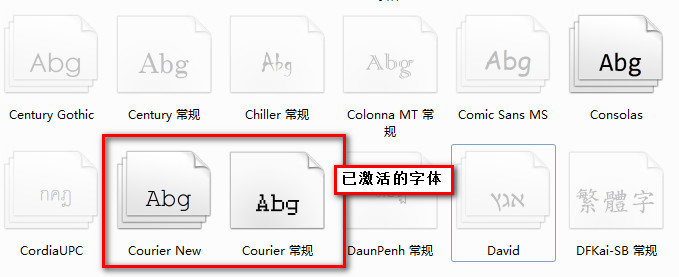
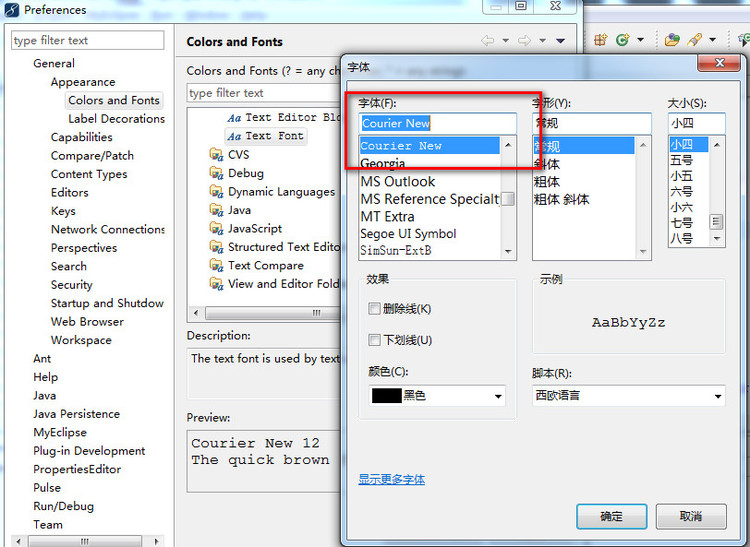
MyEclipse10 是基于Eclipse3.7内核,但在Eclipse的Preferences-〉general-〉Appearance->Colors and Fonts 中并没有找到Courier New字体,它采用的是Consolas字体,中文看着非常小非常别扭,在Windows7下,系统自带虽然有Courier New字体,但是并没有激活显示,需要手动激活,才能在软件中使用
激活方法如下:
在win7的控制面板->字体,找到Courier New,右键,显示。然后在eclipse的fonts列表中就可以选择了。上两张图
三.Myeclipse10插件安装
说到插件,myeclipse自8.X开始,插件安装就变得巨难用,通常最好还是用离线安装,在线安装很可能出问题,下面仅以SVN安装为例,其他诸如ADT15,Aptana等都可采用
1.首先下载SVN包:svn-1.6
2.解压SVN包,然后找到其中的两个文件夹:features 和 plugins
3.随意建一个文件夹(位置和名称自己定就好了,我的是E:\myEclipsePlugin\svn),然后把第二步的解压好的features 和 plugins放到这个文件夹下
4.找到myeclipse的安装目录,下面有一个configuration\org.eclipse.equinox.simpleconfigurator\bundles.info 文件。现在需要做的就是在该文件内添加的东西
5.添加的内容用下面的类生成:
- <span style="font-size:13px;">import java.io.File;
- import java.util.ArrayList;
- import java.util.List;
- /**
- * MyEclipse9 插件配置代码生成器
- *
- *
- */
- public class PluginConfigCreator
- {
- public PluginConfigCreator()
- {
- }
- public void print(String path)
- {
- List<String> list = getFileList(path);
- if (list == null)
- {
- return;
- }
- int length = list.size();
- for (int i = 0; i < length; i++)
- {
- String result = "";
- String thePath = getFormatPath(getString(list.get(i)));
- File file = new File(thePath);
- if (file.isDirectory())
- {
- String fileName = file.getName();
- if (fileName.indexOf("_") < 0)
- {
- print(thePath);
- continue;
- }
- String[] filenames = fileName.split("_");
- String filename1 = filenames[0];
- String filename2 = filenames[1];
- result = filename1 + "," + filename2 + ",file:/" + path + "/"
- + fileName + "\\,4,false";
- System.out.println(result);
- } else if (file.isFile())
- {
- String fileName = file.getName();
- if (fileName.indexOf("_") < 0)
- {
- continue;
- }
- int last = fileName.lastIndexOf("_");// 最后一个下划线的位置
- String filename1 = fileName.substring(0, last);
- String filename2 = fileName.substring(last + 1, fileName
- .length() - 4);
- result = filename1 + "," + filename2 + ",file:/" + path + "/"
- + fileName + ",4,false";
- System.out.println(result);
- }
- }
- }
- public List<String> getFileList(String path)
- {
- path = getFormatPath(path);
- path = path + "/";
- File filePath = new File(path);
- if (!filePath.isDirectory())
- {
- return null;
- }
- String[] filelist = filePath.list();
- List<String> filelistFilter = new ArrayList<String>();
- for (int i = 0; i < filelist.length; i++)
- {
- String tempfilename = getFormatPath(path + filelist[i]);
- filelistFilter.add(tempfilename);
- }
- return filelistFilter;
- }
- public String getString(Object object)
- {
- if (object == null)
- {
- return "";
- }
- return String.valueOf(object);
- }
- public String getFormatPath(String path)
- {
- path = path.replaceAll("\\\\", "/");
- path = path.replaceAll("//", "/");
- return path;
- }
- public static void main(String[] args)
- {
- /*你的SVN的features 和 plugins复制后放的目录*/
- String plugin = "E:/myEclipsePlugin/svn/";
- new PluginConfigCreator().print(plugin);
- }
- } </span>
此外Adobe Flash Builder 4.6也完美支持Myeclipse10,只是插件在安装的时候不是采用以上方式,根据官方英文文档说明,
首先要将Adobe Flash Builder 4.6安装完成,
然后进安装目录~\Adobe\Adobe Flash Builder 4.6\utilities运行Adobe Flash Builder 4.6 Plug-in Utility.exe,
最后根据安装向导设置插件安装到myeclipse10的目录~\Genuitec\MyEclipse 10,必须确保该目录下包含dropins文件
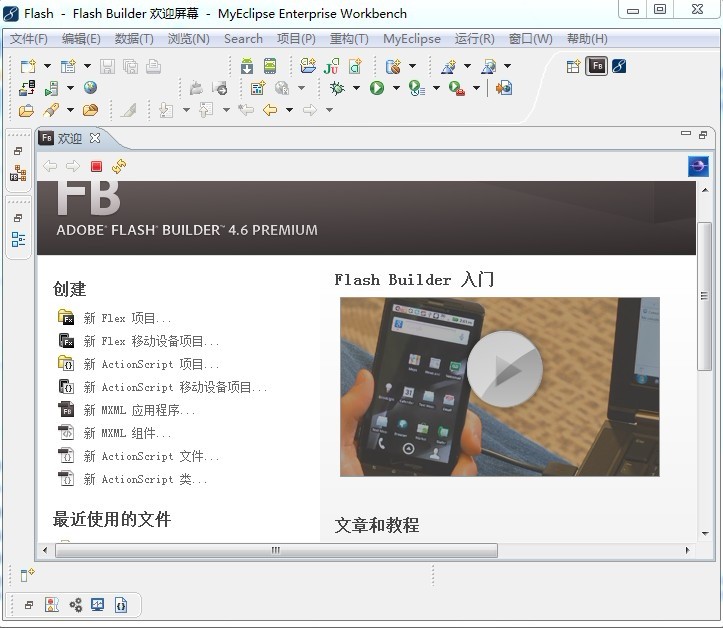
如此即可完成最新的Adobe Flash Builder 4.6插件的安装,最后启动myeclipse10,界面也随之变成中文,但有时候也会有出问题,此时进入到~\Genuitec\MyEclipse 10\Uninstall Adobe Flash Builder 4.6 Plug-in目录,运行Uninstall Adobe Flash Builder 4.6 Plug-in.exe卸载插件,重新安装,第二次必定成功,myeclipse10对插件的兼容性没有eclipse的好,千万不可尝试按 eclipse的配置去暴力修改里面的参数,否则极有可能再也起不来了!
四.Myeclipse10优化
最后谈谈如何优化Myeclipse10
1、window-preferences-MyEclipse Enterprise Workbench-Maven4MyEclipse-Maven,将Maven JDK改为电脑上安装的JDK,即不使用myeclipse提高的JDK
登记add按钮,选择你的电脑上的JDK即可(注意:不是JRE,我的值为:Java6.014)
2、window-preferences-MyEclipse Enterprise Workbench-Matisse4Myeclipse/Swing,将Design-time information(dt.jar) location 改用电脑安装的JDK的dt.jar
(即不使用myeclipse提供的dt.jar,我的值为:C:\Java6.014\lib\dt.jar)
经过以上的优化,myeclipse的启动时间可以减少2/3,Tomcat的启动速度可以减少1/2(视具体情况而定)
第一步: 取消自动validation
validation有一堆,什么xml、jsp、jsf、js等等,我们没有必要全部都去自动校验一下,只是需要的时候才会手工校验一下!
取消方法:
windows–>perferences–>myeclipse–>validation
除开Manual下面的复选框全部选中之外,其他全部不选
手工验证方法:
在要验证的文件上,单击鼠标右键–>myeclipse–>run validation
第二步:取消Eclipse拼写检查
1、拼写检查会给我们带来不少的麻烦,我们的方法命名都会是单词的缩写,他也会提示有错,所以最好去掉,没有多大的用处
windows–>perferences–>general–>validation->editors->Text Editors->spelling
第三步:取消myeclipse的启动项
myeclipse会有很多的启动项,而其中很多我们都用不着,或者只用一两个,取消前面不用的就可以
windows–>perferences–>general–>startup and shutdown (详见底端介绍)
第四步:更改jsp默认打开的方式
安装了myeclipse后,编辑jsp页面,会打开他的编辑页面,同时也有预览页面,速度很慢,不适合开发。所以更改之windows–>perferences–>general–>editors->file associations
在下方选择一种编辑器,然后点击左边的default按钮
第五步:更改代码提示快捷键(不建议使用增强提示,使用Ctrl+/在自己需要的时候提示更佳)
现在的代码提示快捷键,默认为ctrl+space,而我们输入法切换也是,所以会有冲突。谁叫myeclipse是外国人做的呢。。根本不需要切换输入法.
windows–>perferences–>general–>Keys
更改 content assist 为 alt+/
同时由于alt+/已经被word completion占用,所以得同时修改word completion的快捷键值
好了,现在的速度及方便性是不是提高了。
第六步: 更改内存使用文件
1、打开 myeclipse.ini
- -vmargs
- -Xms256m
- -Xmx1024m
- -XX:PermSize=128M
- -XX:MaxPermSize=256M
原因:大家一定对这个画面很熟悉吧: 几乎每次 eclipse 卡到当都是因为这个非堆内存不足造成的,把最大跟最小调成一样是因为不让 myeclipse 频繁的换内存区域大小
注意:XX:MaxPermSize 和 Xmx 的大小之和不能超过你的电脑内存大小
以下是有关内存的一些知识扩展:
1.堆(Heap)和非堆(Non-heap)内存
按照官方的说法:“Java 虚拟机具有一个堆,堆是运行时数据区域,所有类实例和数组的内存均从此处分配。堆是在 Java 虚拟机启动时创建的。”“在JVM中堆之外的内存称为非堆内存(Non-heap memory)”。可以看出JVM主要管理两种类型的内存:堆和非堆。简单来说堆就是Java代码可及的内存,是留给开发人员使用的;非堆就是JVM留给 自己用的,所以方法区、JVM内部处理或优化所需的内存(如JIT编译后的代码缓存)、每个类结构(如运行时常数池、字段和方法数据)以及方法和构造方法 的代码都在非堆内存中。
2.堆内存分配
JVM初始分配的内存由-Xms指定,默认是物理内存的1/64;JVM最大分配的内存由-Xmx指定,默认是物理内存的1/4。默认空余堆内存小于 40%时,JVM就会增大堆直到-Xmx的最大限制;空余堆内存大于70%时,JVM会减少堆直到-Xms的最小限制。因此服务器一般设置-Xms、 -Xmx相等以避免在每次GC 后调整堆的大小。
3.非堆内存分配
JVM使用-XX:PermSize设置非堆内存初始值,默认是物理内存的1/64;由XX:MaxPermSize设置最大非堆内存的大小,默认是物理内存的1/4。
4.JVM内存限制(最大值)
首先JVM内存限制于实际的最大物理内存,假设物理内存无限大的话,JVM内存的最大值跟操作系统有很大的关系。简单的说就32位处理器虽然可控内存空间 有4GB,但是具体的操作系统会给一个限制,这个限制一般是2GB-3GB(一般来说Windows系统下为1.5G-2G,Linux系统下为2G- 3G),而64bit以上的处理器就不会有限制了。
举例说明含义:
-Xms128m 表示JVM Heap(堆内存)最小尺寸128MB,初始分配
-Xmx512m 表示JVM Heap(堆内存)最大允许的尺寸256MB,按需分配。
说明:如果-Xmx不指定或者指定偏小,应用可能会导致java.lang.OutOfMemory错误,此错误来自JVM不是Throwable的,无法用try...catch捕捉。
PermSize和MaxPermSize指明虚拟机为java永久生成对象(Permanate generation)如,class对象、方法对象这些可反射(reflective)对象分配内存限制,这些内存不包括在Heap(堆内存)区之中。
-XX:PermSize=64MB 最小尺寸,初始分配
-XX:MaxPermSize=256MB 最大允许分配尺寸,按需分配
过小会导致:java.lang.OutOfMemoryError: PermGen space
MaxPermSize缺省值和-server -client选项相关。-server选项下默认MaxPermSize为64m -client选项下默认MaxPermSize为32m
PS:不同厂家的jdk垃圾回收算法不一样。在sun的jdk下,Xms和Xmx设置一样,可以减轻伸缩堆大小带来的压力,但在ibm的jdk下面,设置为一样会增大堆碎片产生的几率。
第七步: 修改Struts-config.xml文件打开错误
有时点击myeclipse里的struts的xml配置文件,会报错:
Error opening the editorUnable to open the editor ,unknow the editor id…..
把这个窗口关闭后才出正确的xml文件显示,这个我们这样改:
windows–>perferences–>general–>editors->file associations选择*.xml,选择myeclipse xml editor点default,ok
第八步: 取消自动验证,该成手动验证
windows-->perferences-->myeclipse-->validation
将Build下全部勾取消,保留Manual(手动) 如果你需要验证某个文件的时候,我们可以单独去验证它。方法是,在需要验证的文件上( 右键 -> MyEclipse -> Run Validation
第九步: 取消Maven更新(启动更新)
Window > Preferences > Myeclipse Enterprise Workbench > Maven4Myeclipse > Maven> 禁用Download repository index updates on startup
到此有关Myeclipse10的体验介绍完毕,欢迎大家拍砖,转载请注明出处!
转载于
Myeclipse10下载,安装,破解,插件,优化介绍(CSDN首发) http://blog.csdn.net/shimiso/article/details/7061000
前台组合一个sql语句到后台执行,效率是不是更高一点?我写过一个取id到后台删除的例子。
后台操作
Sql="delete from YourTable where" + Request("myParam")
<HTML>
<HEAD>
<TITLE> New Document </TITLE>
<META NAME="Generator" CONTENT="EditPlus">
<META NAME="Author" CONTENT="">
<META NAME="Keywords" CONTENT="">
<META NAME="Description" CONTENT="">
<SCRIPT LANGUAGE="javascript">
<!--
function look(){
if(typeof(document.form.chkItem)=="undefined") return;//如果检索的记录为一个则不能成为数组
var strTemp="( id= "
var sqlTemp="( id=0"
var mynum=0;
if (typeof(document.form.chkItem[0]) == "undefined"){//如果为一个的话,把这个的值赋予myParam
if(document.form.chkItem.checked){
sqlTemp=strTemp+document.form.chkItem.value;
mynum++;
}
}
else for (i = 0; i <document.form.chkItem.length; i++){//循环取数组的值,构造一个合法的sql语句
if (document.form.chkItem[i].checked){
var idTemp=document.form.chkItem[i].value;
strTemp=strTemp+idTemp;
sqlTemp=strTemp;
strTemp=strTemp+" OR id = "
mynum++;
}
}
sqlTemp+=" )";
document.form.myParam.value=sqlTemp;//得到所有(chkItem)的值
}
function chkAll_onClick(){
if(typeof(document.form.chkItem)=="undefined") return;//如果是一个的话不能成为数组
if (typeof(document.form.chkItem[0]) == "undefined")
document.form.chkItem.checked = document.form.chkAll.checked;//如果全选被选中的话,选项也被选中(单一情况)
else
for (i = 0; i <document.form.chkItem.length; i++)//如果全选被选中的话,选项也被选中(多个情况)
document.form.chkItem[i].checked = document.form.chkAll.checked
return;
}
//-->
</SCRIPT>
</HEAD>
<BODY>
<form action="" method=post name=form>
<INPUT id=chkAll onclick=chkAll_onClick(); type=checkbox value=ALL>全选
<SCRIPT LANGUAGE="javascript">
<!--
for(i=1;i<=5;i++)
{
document.write("<input type=checkbox name=chkItem value=选项"+i+">选项"+i+"");
}
//-->
</SCRIPT><BR>
<input type=text value="" size=80 name=myParam><BR>
<input type=button value=" 看看 " onclick=look()>
</form>
</BODY>
</HTML>
jrebel在myeclipse中的整合与配置
http://zeroturnaround.com/jrebel/using-jrebel-with-myeclipse/?utm_source=jrebelDLpage&utm_medium=idepluginlink&utm_campaign=IDE%252Bplugin
(系统版本 Windows 7 旗舰版)Windows 7真是让人又爱又恨啊!本人电脑之前已安装 SQL Server 2005,安装过程都没什么问题,很快搞定,可是装一个Oracle 10g却花了我一个晚上的时间!不过总算安装成功了!虽然还没有正式开始使用,但是兴奋之余迫不及待要和大家分享一下经验!
首先要下载支持Vista版本的Oracle 10g(以下链接地址在浏览器中打开没用,复制下面地址然后在迅雷中新建下载任务即可下载),下载完成后解压出来:http://download.oracle.com/otn/nt/oracle10g/10203/10203_vista_w2k8_x86_production_db.zip
网上搜索了一些资料,安装的第一步就是要修改安装文件目录中的两个refhost.xml文件,分别在目录db\Disk1\stage \prereq\db和\db\Disk1\stage\prereq\db_prereqs\db下。右键记事本打开对其进行编辑,找到如下代码段:
<!--Microsoft Windows vista-->
<OPERATING_SYSTEM>
<VERSION VALUE="6.0"/>
</OPERATING_SYSTEM>
在其后增加:
<!--Microsoft Windows 7->
<OPERATING_SYSTEM>
<VERSION VALUE="6.1"/>
</OPERATING_SYSTEM>
原理:Oracle 至今没有推出针对windows7的版本,在安装的版本检测时提示目前oracle不支持version为6.1的windows OS系统。从oracle官方下载oracle 10g for vista and windows2K8 x86版for windows是支持vista内核的,windows7的内核与2008以及vista的内核大致上是差不多的,经过以上修改可以绕过Oracle对系 统版本的检查而正常安装!
取消Windows 7的UAC权限保护,方法为在开始菜单运行:msconfig,找到“工具”标签,选中UAC相关条目,点击“运行”,然后将级别调为最低。(这步来自网上,本人不知道有没有必要)
设置文件夹db\Disk1\install\oui.exe兼容模式,方法为:选中文件点击右键,点“属性”,将兼容模式设为Vista SP2。
重新启动安装程序,一切按常安装走就可以了。
前期安装失败的一些问题,问题如下:
(1)正在检查网络配置需求...
检查完成。此次检查的总体结果为: 失败 <<<<
问题: 安装检测到系统的主 IP 地址是 DHCP 分配的地址。
建议案: Oracle 支持在具有 DHCP 分配的 IP 地址的系统上进行安装。但在安装之前, 必须将 Microsoft LoopBack Adapter 配置为系统的主网络适配器。有关在配置有 DHCP 的系统上安装软件的详细信息, 请参阅 Installation Guide。
解决方案:发现在检查配置环境的时候这项停滞不前,如果你点选“用户已验证”继续安装的话在安装后期会出现“无法确定主机的IP地址时产生该异常错误”, (本机网络此时设置自动获得IP地址)Oracle在用Net Configuraton配置网络服务名时需要取系统的IP地址,而如果解析IP地址错误就会出现上述异常,后期电脑安装也会停滞在这一步,只有解决才能 继续安装。 解决办法:控制面板->添加硬件->是,我也经连接了此硬件->添加新硬件设备->安装我手动列表选择硬件(高 级)->网络适配器->厂商:Microsoft 网卡:Microsoft Loopback Adapter 。不过不好意思:这个是XP里面的设置方法,Windows 7里面的设置方法稍微复杂一点,方法为:“控制面板\所有控制面板项->设备管理器->网络适配器”然后选择菜单栏的“操作->添加过 时硬件”点下一步选择“安装我手动从列表选择的硬件高级(M)”,点下一步滑动滚轮选择“网络适配器”下一步,在“厂商”那里选择 “Microsoft”,“网络适配器”那里选择“ Microsoft LoopBack Adapter ”一直下一步直到安装完成。然后回到桌面,右键“网络”->属性,你会发现两个“本地连接”,点击在你刚刚新建的那个本地连接点“属性”,双击 “Internet 协议版本4(TCP/IPv4)”然后随便设置一个IP地址就OK了。回到安装程序点击重试(电脑反应不过来的话可能要多点击两次),就可以继续安装了。
(2)正在检查 Oracle 主目录路径中的空格...
检查完成。此次检查的总体结果为: 失败 <<<<
问题: 所指定的 Oracle 主目录的路径中包含空格 ( )。
解决方案: 必须选择不包含任何空格的 Oracle 主目录路径。
(我尝试在Windows 7上安装Oracle 11g时也会出现上述问题)
如果你之前安装Oracle 10g失败,那么再次安装时一定要将之前的Oracle 10g卸载干净,具体的卸载方法如下:
1、控制面板\所有控制面板项\管理工具\服务 停滞所有Oracle的服务项
2、开始->所有程序->Oracle - OraDb10g_home1->Oracle Installation Products->Universal Installer 点击“卸载产品”,让后将你之前所安装的组件选择删除
3、运行regedit,选择HKEY_LOCAL_MACHINE\SOFTWARE\ORACLE,按del键删除这个入口。
4、运行regedit,选择HKEY_LOCAL_MACHINE\SYSTEM\CurrentControlSet\Services,滚动这个列表,删除所有Oracle入口
5、从桌面上、STARTUP(启动)组、程序菜单中,删除所有有关Oracle的组和图标
6、删除与Oracle有关的文件,选择Oracle所在的缺省目录C:\Oracle,删除这个入口目录及所有子目录.
7、手动删除你之前的Oracle安装主路径的目录。在做完这些工作之后电脑最好重启一下。
近日在配置Oracle 10G的流复制环境时,遇到一个问题,关闭数据库(shutdown immediate)后,通过SQL Plus连接数据库:conn sys/his@orc0 as sysdba,出现如下错误:
ORA-12514: TNS: 监听程序当前无法识别连接描述符中请求的服务
通过重启服务的方式启动数据库,再次连接却能成功登录,也就是说在关闭数据库状态下无法连接服务器。
开始以为是系统环境变量Oracle_SID的配置问题,因为机器有多个实例,一阵折腾后还是不能连接。后来查资料得知:
Oracle9i以后,后台进程PMON自动在监听器中注册在系统参数SERVICE_NAMES中定义的服务名,SERVICE_NAMES默认为DB_NAME+DOMAIN_NAME。监听配置文件listener.ora中可以不必指定监听的服务名。但是,当数据库处于关闭状态下PMON进程没有启动,也就不会自动注册监听的实例名,所以使用sqlplus sys/his@orc0 as sysdba 会出现ORA-12514错误。
如果在listener.ora文件中指定监听的实例名,则即使数据库处于关闭状态,仍然可以连接。
listener.ora
SID_LIST_LISTENER =
(SID_LIST =
(SID_DESC =
(SID_NAME = PLSExtProc)
(ORACLE_HOME = G:\oracle\product\10.2.0\db_1)
(PROGRAM = extproc)
)
(SID_DESC =
(GLOBAL_DBNAME = ORCL)
(ORACLE_HOME = G:\oracle\product\10.2.0\db_1)
(SID_NAME = ORCL)
)
)
LISTENER =
(DESCRIPTION_LIST =
(DESCRIPTION =
(ADDRESS = (PROTOCOL = TCP)(HOST = zyk)(PORT = 1521))
)
)
以上粗体部件为增加的内容,修改后重启监听服务后即可。
附:通过在lsnrctl中输入set display verbose,然后再通过命令service查看,服务状态为READY表示PMON自动注册的服务名,而UNKNOWN则表示该服务是手工在LISTENER.ORA中配置的数据库服务。
转载于 http://www.cnblogs.com/zyk/archive/2007/10/31/944667.html
1、局部变量能否和全局变量重名?
答:能,局部会屏蔽全局。要用全局变量,需要使用"::"。
局部变量可以与全局变量同名,在函数内引用这个变量时,会用到同名的局部变量,而不会用到全局变量。对于有些编译器而言,在同一个函数内可以定义多个同名的局部变量,比如在两个循环体内都定义一个同名的局部变量,而那个局部变量的作用域就在那个循环体内。
2、如何引用一个已经定义过的全局变量?
答:使用extern关键字。
可以使用引用头文件的方式,也可以使用extern关键字。如果用引用头文件方式来引用某个在头文件中声明的全局变量,假定你将那个变量写错了,那么在编译期间会报错。如果你用extern方式引用时,假定你犯了同样的错误,那么在编译期间不会报错,而在连接期间报错。
3、全局变量可不可以定义在可被多个.C文件包含的头文件中?为什么?
答:可以,在不同的C文件中以static形式来声明同名全局变量。
可以在不同的C文件中声明同名的全局变量,前提是其中只能有一个C文件中对此变量赋初值,此时连接不会出错。
4、语句for( ;1 ;)有什么问题?它是什么意思?
答:和while(1)相同。
5、do……while和while……do有什么区别?
答:前一个循环一遍再判断,后一个判断以后再循环。
6、请写出下列代码的输出内容
#include<stdio.h>
main()
{
int a,b,c,d;
a=10;
b=a++;
c=++a;
d=10*a++;
printf("b,c,d:%d,%d,%d",b,c,d;
return 0;
}
答:10,12,120
7、static全局变量与普通的全局变量有什么区别?static局部变量和普通局部变量有什么区别?static函数与普通函数有什么区别?
答:static全局变量的作用域局限于一个源文件内,而非static全局变量的作用域是整个源程序。
static全局变量只初始化一次,防止在其他文件单元中被引用;
static局部变量只初始化一次,下一次依据上一次结果值;
static函数在内存中只有一份,普通函数在每个被调用中维持一份拷贝。
8、程序的局部变量存在于(堆栈)中,全局变量存在于(静态区)中,动态申请数据存在于(堆)中。
9、设有以下说明和定义:
typedef union {long i; int k[5]; char c;} DATE;
struct data { int cat; DATE cow; double dog;} too;
DATE max;
则语句 printf("%d",sizeof(struct date)+sizeof(max)); 的执行结果是:52
答:DATE是一个union,变量公用空间。里面最大的变量类型是int[5],占用20个字节。所以它的大小是20。data是一个struct,每个变量分开占用空间。依次为:int4 + DATE20 + double8 = 32。
所以结果是:20 + 32 = 52。(此处假设为32位编辑器)
10、队列和栈有什么区别?
答:队列先进先出,栈后进先出。
11、写出下列代码的输出内容
#include<stdio.h>
int inc(int a)
{
return(++a);
}
int multi(int*a,int*b,int*c)
{
return(*c=*a**b);
}
typedef int(FUNC1) (int in);
typedef int(FUNC2) (int*,int*,int*);
void show(FUNC2 fun,int arg1, int*arg2)
{
INCp=&inc;
int temp =p(arg1);
fun(&temp,&arg1, arg2);
printf("%d\n",*arg2);
}
main()
{
int a;
show(multi,10,&a);
return 0;
}
答:110
12、请找出下面代码中的所以错误。
说明:以下代码是把一个字符串倒序,如"abcd"倒序后变为"dcba"。
1、#include"string.h"
2、main()
3、{
4、 char*src="hello,world";
5、 char* dest=NULL;
6、 int len=strlen(src);
7、 dest=(char*)malloc(len);
8、 char* d=dest;
9、 char* s=src[len];
10、 while(len--!=0)
11、 d++=s--;
12、 printf("%s",dest);
13、 return 0;
14、}
答:
方法1:
int main()
{
char* src = "hello,world";
int len = strlen(src);
char* dest = (char*)malloc(len+1);//要为\0分配一个空间
char* d = dest;
char* s = &src[len-1];//指向最后一个字符
while( len-- != 0 )
*d++=*s--;
*d = 0;//尾部要加\0
printf("%s\n",dest);
free(dest);// 使用完,应当释放空间,以免造成内存泄露
return 0;
}
方法2:
#i nclude <stdio.h>
#i nclude <string.h>
main()
{
char str[]="hello,world";
int len=strlen(str);
char t;
for(int i=0; i<len/2; i++)
{
t=str[i]; str[i]=str[len-i-1]; str[len-i-1]=t;
}
printf("%s",str);
return 0;
}
1、-1,2,7,28, ,126请问28和126中间那个数是什么?为什么?
第一题的答案应该是4^3-1=63
规律是n^3-1(当n为偶数0,2,4)n^3+1(当n为奇数1,3,5)
答案:63
2、用两个栈实现一个队列的功能?要求给出算法和思路!
设2个空栈A和B。
入队:将新元素push入栈A;
出队:
(1)判断栈B是否为空;
(2)如果不为空,则将栈A中所有元素依次pop出并push到栈B;
(3)将栈B的栈顶元素pop出。
3、在c语言库函数中将一个字符转换成整型的函数是atool()吗,这个函数的原型是什么?
函数名: atol
功 能: 把字符串转换成长整型数
用 法: long atol(const char *nptr);
程序例:
#include <stdlib.h>
#include <stdio.h>
int main(void)
{
long l;
char *str = "98765432";
l = atol(str);
printf("string = %s;integer = %ld\n", str, l);
return(0);
}
13、对于一个频繁使用的短小函数,在C语言中应用什么实现,在C++中应用什么实现?
答:c用宏定义,c++用inline。
14、直接链接两个信令点的一组链路称作什么?
答:PPP点到点连接。
15、接入网用的是什么接口?
答:V5接口。
16、voip都用了哪些协议?
答:H.323协议簇、SIP协议、Skype协议、H.248和MGCP协议。
17、软件测试都有哪些种类?
答:黑盒:针对系统功能的测试;白盒:测试函数功能和各函数接口。
18、确定模块的功能和模块的接口是在软件设计的哪个阶段完成的?
答:概要设计阶段。
19、程序:
unsigned char *p1;
unsigned long *p2;
p1=(unsigned char *)0x801000;
p2=(unsigned long *)0x810000;
请问p1+5= ;p2+5= 。
答案:0x801005(相当于加上5位);0x810014(相当于加上20位)。
20、请问下面程序有什么错误?
int a[60][250][1000],i,j,k;
for(k=0;k<=1000;k++)
for(j=0;j<250;j++)
for(i=0;i<60;i++)
a[i][j][k]=0;
答:应把循环语句内外换一下。
21、请问下面程序有什么错误?
#define Max_CB 500
void LmiQueryCSmd(Struct MSgCB * pmsg)
{
unsigned char ucCmdNum;
......
for(ucCmdNum=0;ucCmdNum<Max_CB;ucCmdNum++)
{
......;
}
答:死循环。
22、IP Phone的原理是什么?
答:IP电话(又称VoIP)是建立在IP技术上的分组化、数字化的传输技术。其基本原理是:通过语音压缩算法对语音数据进行压缩编码处理,然后把这些语音数据按IP等相关协议进行打包,经过IP网络把数据包传输到接收地,再把这些语音数据包串起来,经过解码解压处理后,恢复成原来的语音信号,从而达到由IP网络传送语音的目的。
23、TCP/IP通信建立的过程怎样,端口有什么作用?
答:三次握手,确定是哪个应用程序使用该协议。
24、1号信令和7号信令有什么区别,我国某前广泛使用的是那一种?
答:1号信令速度慢,但是稳定和可靠。而7号信令的特点是:信令速度快,具有提供大量信令的潜力,具有改变和增加信令的灵活性,便于开放新业务,在通话时可以随意处理信令,成本低。目前得到广泛应用。
25、列举5种以上的电话新业务?
答:“热线服务”、“转移呼叫”、“遇忙回叫”、“三方通话”、“会议电话”、“呼出限制”、“来电显示”等。
/*使用一个regexp编写一个javascript函数isvalid()他接受一个string参数如果该函数与下列电话号码格式之一匹配就返回ture,否则就返回false。
(123)456-7890
(123) 456-7890
123 / 467-7890
123-456-7890
123 456 7890
1234567890
*/
代码
function isvalid(str)
{
var regu =/(^\([1-9]{3}\)[1-9]{3}(-\d{4})?$)
|(^\([1-9]{3}\)\s[1-9]{3}(-\d{4})?$)
|(^([1-9]{3}\s\/\s[1-9]{3}(-\d{4}))?$)
|(^([1-9]{3}-[1-9]{3}(-\d{4}))?$)
|(^([1-9]{3}\s[1-9]{3}(\s\d{4}))?$)
|(^\d{10}$)/;
var re = new RegExp(regu);
if (re.test( str )) {
//alert(str+"true");
return true;
}else{
//alert(str+"false");
return false;
}
}
参考资料
用JavaScript判断日期、数字、整数和特殊字符 http://hi.baidu.com/wmqxyh/blog/item/31f8ab369cc1afbbd1a2d36a.html
JavaScript RegExp 对象参考手册 http://www.w3school.com.cn/js/jsref_obj_regexp.asp
服务器上出现了一个奇怪的问题,就是用FTP连接以后所有的
中文都显示为乱码,根本就看不清楚目录的名字,下面就把解决方法和大家分享下:
开始我以为是区域和语言选项那里的问题,开始--控制面板---格式,看了当前的格式是中文简体,又看了下其他的语言设置,都是中文简体,没有任何问题,基本可以排除不是区域语言出的问题。
接着开始检查SERV-U8.0的设置,发现了问题,解决方法如下:打开SERV-U---导航---限制和设置---FTP设置---找到OPTS UTF8 命令----编辑----选择禁用命令---然后确认---再选择全局属性-----高级选项---找到“对所有已收发的路径和文件名使用UTF-8编码”,把前面的勾去掉,确认。最后回到导航,用同样的方法设置“服务器限制和设置”,保存退出,就完成啦。
(1)表方式,将指定表的数据导出/导入。
导出:
导出一张或几张表:
代码
$ exp user/pwd file=/dir/xxx.dmp log=xxx.log tables=table1,table2
$ exp user/pwd file=/dir/xxx.dmp log=xxx.log tables=table1,table2
如果是分区表
代码
$ exp user/pwd file=/dir/xxx.dmp log=xxx.log tables=table1:tablespaces1,table2:tablespaces2
$ exp user/pwd file=/dir/xxx.dmp log=xxx.log tables=table1:tablespaces1,table2:tablespaces2
导出某张表的部分数据
代码
$ exp user/pwd file=/dir/xxx.dmp log=xxx.log tables=table1 query=\”where col1=\’…\’
and col2 \<…\”
$ exp user/pwd file=/dir/xxx.dmp log=xxx.log tables=table1 query=\”where col1=\’…\’
and col2 \<…\”
导入:
导入一张或几张表
代码
$ imp user/pwd file=/dir/xxx.dmp log=xxx.log tables=table1,table2 fromuser=dbuser touser=dbuser2 commit=y ignore=y
$ imp user/pwd file=/dir/xxx.dmp log=xxx.log tables=table1,table2 fromuser=dbuser touser=dbuser2 commit=y ignore=y
如果是分区表
代码
$ imp user/pwd file=/dir/xxx.dmp log=xxx.log tables=table1:tablespaces1,table2:tablespaces2 fromuser=dbuser touser=dbuser2 commit=y ignore=y
$ imp user/pwd file=/dir/xxx.dmp log=xxx.log tables=table1:tablespaces1,table2:tablespaces2 fromuser=dbuser touser=dbuser2 commit=y ignore=y
(2)用户方式,将指定用户的所有对象及数据导出/导入。
导出:
代码
$ exp user/pwd file=/dir/xxx.dmp log=xxx.log owner=(xx, yy)
$ exp user/pwd file=/dir/xxx.dmp log=xxx.log owner=(xx, yy)
只导出数据对象,不导出数据 (rows=n )
$ exp user/pwd file=/dir/xxx.dmp log=xxx.log owner=user rows=n
导入:
代码
imp user/pwd file=/dir/xxx.dmp log=xxx.log fromuser=dbuser touser=dbuser2
mmit=y ignore=y
imp user/pwd file=/dir/xxx.dmp log=xxx.log fromuser=dbuser touser=dbuser2
commit=y ignore=y
(3)全库方式,将数据库中的所有对象导出/导入导出:
代码
$ exp user/pwd file=/dir/xxx.dmp log=xxx.log full=ycommit=y ignore=y
$ exp user/pwd file=/dir/xxx.dmp log=xxx.log full=ycommit=y ignore=y
导入:
代码
$ imp user/pwd file=/dir/xxx.dmp log=xxx.log fromuser=dbuser touser=dbuser2
JSunspot是一个基于Jad的Class文件(Java字节码)反编译小软件.适用于2000/XP/2003操作系统,用于反编译单个或批量的Class文件.
1,安装
a,运行环境
1,需要JDK(JRE)1.5以上的版本。
注:如果不想安装JDK,也可以从其它地方拷贝JDK安装目录下的文件到程序目录下的jre目录中。
2,运行于2000/XP/2003操作系统
b,如何进行安装与卸载
运行程序目录下这个程序Setup.exe进行安装和卸载。
2,使用
a,反编译单个的Class文件:双击此Class文件即可。
注:默认反编译完成后,使用记事本打开得到的源文件,可以在配置中修改打开程序。
b,反编译批量的Class文件:右键Class文件所在的文件夹,在弹出的菜单中选择[JSunspot]即可。
注:默认不处理子目录,可以在配置中开启对子目录的递归处理。
3,配置
运行程序目录下这个程序Configuration.exe进行配置。
如果您在使用中发现任何Bug或有任何的建议,请跟帖留言。
下载地址:http://download.csdn.net/source/2506267
Tomcat(免安装版)的安装与配置
一、下载Tomcat
Tomcat可以从http://tomcat.apache.org/网站下载,选择任意版本,在 Binary Distributions 下的zip包既是。
二、配置Tomcat
1、将下载Tomcat Zip压缩包解压。
2、修改\bin\startup.bat文件:
在第一行前面加入如下两行:
SET JAVA_HOME=JDK目录
SET CATALINA_HOME=前面解压后Tomcat的目录或者%cd%
如果需要使用shutdown.bat关闭服务器的话,也按照上面加入两行。
3、这样,运行startup.bat就可以运行服务器,运行shutdown.bat就可以关闭服务器了。
4、修改\conf\tomcat-users.xml文件:
在<tomcat-users>标签内加入
<role rolename="manager"/>
<role rolename="admin"/>
<user username="admin" password="admin" roles="admin,manager"/>
这样才可以使用Tomcat的管理界面。
三、将Tomcat加入服务
1、修改bin目录中的service.bat:
REM 添加下面的一行
set CATALINA_HOME=%cd%
如果从来没有安装过Tomcat,或者保证Services.msc启动服务管理器检查没有Apache Tomcat系统服务,到此你就可以转到第二步了。否则继续往下走
REM 按照描述修改下面的几行
set SERVICE_NAME=Tomcat5
REM 上面一行,Tomcat5修改成你需要的服务名,这个将是一后使用net start/stop来操作的服务名称。
set PR_DISPLAYNAME=Apache Tomcat
REM 上面一行,Apache Tomcat改为你需要的显示服务名,这个将显示在服务管理器中。
set PR_DESCRIPTION=Apache Tomcat Server - http://jakarta.apache.org/tomcat
REM 这一行改不改无所谓,是服务的描述,根据自己的喜好决定吧。
2、运行cmd打开控制台,进入Tomat目录/bin文件夹,输入如下命令运行。
service.bat install
程序提示:The service 'Tomcat5(或者你修改一后的SERVICE_NAME)' has been installed
说明服务Tomcat已经被安装成功。
顺便说一下,运行service.bat remove可以移除服务。
3、到这里,服务添加成功,运行services.msc,可以看到添加的服务,默认状态下该服务是手动运行的,在他的属性中,将启动类型更改为“自动”,以后机器启动以后Tomcat就在后台启动了。
四、控制台控制服务的命令
启动服务
net Start 服务名
关闭服务
net stop 服务名
注:
1、此服务名可以是SERVICE_NAME,也可以是PR_DISPLAYNAME;
2、如果服务名中包含空格或者中文,请将服务名用半角双引号包含起来。
在笔记本上运行魔兽3的时候发现不能全屏问题,我的系统是win7的,经过修改注册表的方式解决了问题。
解决方法:
如果你的操作系统是1280*800或者其他分辨率,只需要进入
[HKEY_CURRENT_USER\Software\Blizzard Entertainment\Warcraft III\Video]
设置"reswidth"的值为1280,设置"resheight"的值为800就可以了。
注意在后面选"十进制"!
Adobe Acrobat Perfessional是文献检索的必备工具,主要是因为它所附带的Adobe打印机的虚拟打印功能在检索中具有非常重要的作用。仅仅用Adobe Reader是远远不够的
。但是,很多人在安装新版的Adobe Acrobat Perfessional 9.0后却发现无法正常使用其打印功能以及将office文档转化为pdf文档的功能。
【问题症状】
安装Adobe Acrobat Perfessional 9.0后,office工具栏中会显示两个按钮。正常情况下,可以点击按钮直接将当前的office文档转化为pdf文档,同样IE工具栏和右键菜单中也有这两个按钮,用来将网页转化为pdf文件,非常方便。
问题是:网页文件可以顺利转化为pdf文件,但office 文档不能转化为 pdf 文档,每次点击word上的“转化为pdf”按钮时,就弹出对话框“PDFMaker无法找到Adobe PDF Printer 的打印驱动程序,请重装Adobe Acrobat Perfessional !”不仅如此,当我们想要使用Adobe的打印功能时,也会发现找不到Adobe PDF Printer的打印驱动程序。
【问题分析】
Adobe Acrobat是通过一个虚拟打印程序实现office文档到pdf文档转化的,这个虚拟打印驱动程序就是“Adobe PDF Printer”。正常情况下,Adobe Acrobat 安装完成后,应该可以在“控制面板-打印机和传真”中增加出来一个类似“Adobe PDF Converter”的打印机,如果没有这个打印机,就说明打印驱动程序安装有问题,在装换office文档时就会出现弹出对话框“PDFMaker无法找到Adobe PDF Printer 的打印驱动程序”的问题。
【问题解决】
产生这一问题的主要原因是很多用户使用的是精简版的windows操作系统,系统把一些打印驱动需要的文件精简掉了。因此对应的解决办法是:
1、手动在控制面板添加打印机,选择“连接到此计算机的本地打印机”,并取消“自动检测并安装即插即用打印机”选择,端口选择“Adobe PDF”,如果没有这个端口,则选择创建新端口。
2、驱动程序不要在列表中选择,而是选择从磁盘安装,选择指向Acrobat文件夹下的Xtras子目录,找到AdobePDF.inf(这个就是关键的驱动程序文件):
C:\Program Files\Adobe\Acrobat 9.0\Acrobat\Xtras\AdobePDF
然后安装。
3、安装完成前前,系统会复制一些安装驱动程序必须的文件:pscript.hlp,而且不能忽略,否则驱动无法正确安装。本文的附件就是这两个文件。下载这两个文件,指定给系统相应的地址,就可以完成安装了。
4、OK,现在你的打印机中终于出现Adobe PDF Converter ,但是这个时侯office中的转换按钮还是不能正常使用,依然会弹出对话框!必须将这个打印机的名字重命名为“Adobe PDF”。重命名中,测试右键菜单和Office中的转换指令,终于顺利转换成功!!随心所欲转换office文档和pdf文档的感觉真爽啊!!!
pscript.hlp下载地址 http://download.csdn.net/down/2026377/lushengdi
刚才想ping一下,发现提示 "ping不是内部命令````````"
原因是在装jdk的时候把path给改了
解决方法:
我的电脑属性/高级/环境变量/在系统变量里找到path/编辑/
将;%SystemRoot%\system32加到最后即可(注意,是在尾部追加,分号也包括)
摘要: Code highlighting produced by Actipro CodeHighlighter (freeware)
http://www.CodeHighlighter.com/
--><html>
<head>
<meta ...
阅读全文
函数
1.ASCII
返回与指定的字符对应的十进制数;
SQL> select ascii(’A’) A,ascii(’a’) a,ascii(’0’) zero,ascii(’ ’) space from dual;
A A ZERO SPACE
--------- --------- --------- ---------
65 97 48 32
2.CHR
给出整数,返回对应的字符;
SQL> select chr(54740) zhao,chr(65) chr65 from dual;
ZH C
-- -
赵 A
3.CONCAT
连接两个字符串;
SQL> select concat(’010-’,’88888888’)||’转23’ 高乾竞电话 from dual;
高乾竞电话
----------------
010-88888888转23
4.INITCAP
返回字符串并将字符串的第一个字母变为大写;
SQL> select initcap(’smith’) upp from dual;
UPP
-----
Smith
5.INSTR(C1,C2,I,J)
在一个字符串中搜索指定的字符,返回发现指定的字符的位置;
C1 被搜索的字符串
C2 希望搜索的字符串
I 搜索的开始位置,默认为1
J 出现的位置,默认为1
SQL> select instr(’oracle traning’,’ra’,1,2) instring from dual;
INSTRING
---------
9
6.LENGTH
返回字符串的长度;
SQL> select name,length(name),addr,length(addr),sal,length(to_char(sal)) from gao.nchar_tst;
NAME LENGTH(NAME) ADDR LENGTH(ADDR) SAL LENGTH(TO_CHAR(SAL))
------ ------------ ---------------- ------------ --------- --------------------
高乾竞 3 北京市海锭区 6 9999.99 7
7.LOWER
返回字符串,并将所有的字符小写
SQL> select lower(’AaBbCcDd’)AaBbCcDd from dual;
AABBCCDD
--------
aabbccdd
8.UPPER
返回字符串,并将所有的字符大写
SQL> select upper(’AaBbCcDd’) upper from dual;
UPPER
--------
AABBCCDD
9.RPAD和LPAD(粘贴字符)
RPAD 在列的右边粘贴字符
LPAD 在列的左边粘贴字符
SQL> select lpad(rpad(’gao’,10,’*’),17,’*’)from dual;
LPAD(RPAD(’GAO’,1
-----------------
*******gao*******
不够字符则用*来填满
10.LTRIM和RTRIM
LTRIM 删除左边出现的字符串
RTRIM 删除右边出现的字符串
SQL> select ltrim(rtrim(’ gao qian jing ’,’ ’),’ ’) from dual;
LTRIM(RTRIM(’
-------------
gao qian jing
11.SUBSTR(string,start,count)
取子字符串,从start开始,取count个
SQL> select substr(’13088888888’,3,8) from dual;
SUBSTR(’
--------
08888888
12.REPLACE(’string’,’s1’,’s2’)
string 希望被替换的字符或变量
s1 被替换的字符串
s2 要替换的字符串
SQL> select replace(’he love you’,’he’,’i’) from dual;
REPLACE(’H
----------
i love you
13.SOUNDEX
返回一个与给定的字符串读音相同的字符串
SQL> create table table1(xm varchar(8));
SQL> insert into table1 values(’weather’);
SQL> insert into table1 values(’wether’);
SQL> insert into table1 values(’gao’);
SQL> select xm from table1 where soundex(xm)=soundex(’weather’);
XM
--------
weather
wether
14.TRIM(’s’ from ’string’)
LEADING 剪掉前面的字符
TRAILING 剪掉后面的字符
如果不指定,默认为空格符
15.ABS
返回指定值的绝对值
SQL> select abs(100),abs(-100) from dual;
ABS(100) ABS(-100)
--------- ---------
100 100
16.ACOS
给出反余弦的值
SQL> select acos(-1) from dual;
ACOS(-1)
---------
3.1415927
17.ASIN
给出反正弦的值
SQL> select asin(0.5) from dual;
ASIN(0.5)
---------
.52359878
18.ATAN
返回一个数字的反正切值
SQL> select atan(1) from dual;
ATAN(1)
---------
.78539816
19.CEIL
返回大于或等于给出数字的最小整数
SQL> select ceil(3.1415927) from dual;
CEIL(3.1415927)
---------------
4
20.COS
返回一个给定数字的余弦
SQL> select cos(-3.1415927) from dual;
COS(-3.1415927)
---------------
-1
21.COSH
返回一个数字反余弦值
SQL> select cosh(20) from dual;
COSH(20)
---------
242582598
22.EXP
返回一个数字e的n次方根
SQL> select exp(2),exp(1) from dual;
EXP(2) EXP(1)
--------- ---------
7.3890561 2.7182818
23.FLOOR
对给定的数字取整数
SQL> select floor(2345.67) from dual;
FLOOR(2345.67)
--------------
2345
24.LN
返回一个数字的对数值
SQL> select ln(1),ln(2),ln(2.7182818) from dual;
LN(1) LN(2) LN(2.7182818)
--------- --------- -------------
0 .69314718 .99999999
25.LOG(n1,n2)
返回一个以n1为底n2的对数
SQL> select log(2,1),log(2,4) from dual;
LOG(2,1) LOG(2,4)
--------- ---------
0 2
26.MOD(n1,n2)
返回一个n1除以n2的余数
SQL> select mod(10,3),mod(3,3),mod(2,3) from dual;
MOD(10,3) MOD(3,3) MOD(2,3)
--------- -------- ---------
1 0 2
27.POWER
返回n1的n2次方根
SQL> select power(2,10),power(3,3) from dual;
POWER(2,10) POWER(3,3)
----------- ----------
1024 27
28.ROUND和TRUNC
按照指定的精度进行舍入
SQL> select round(55.5),round(-55.4),trunc(55.5),trunc(-55.5) from dual;
ROUND(55.5) ROUND(-55.4) TRUNC(55.5) TRUNC(-55.5)
----------- ------------ ----------- ------------
56 -55 55 -55
29.SIGN
取数字n的符号,大于0返回1,小于0返回-1,等于0返回0
SQL> select sign(123),sign(-100),sign(0) from dual;
SIGN(123) SIGN(-100) SIGN(0)
--------- ---------- ---------
1 -1 0
30.SIN
返回一个数字的正弦值
SQL> select sin(1.57079) from dual;
SIN(1.57079)
------------
1
31.SIGH
返回双曲正弦的值
SQL> select sin(20),sinh(20) from dual;
SIN(20) SINH(20)
--------- ---------
.91294525 242582598
32.SQRT
返回数字n的根
SQL> select sqrt(64),sqrt(10) from dual;
SQRT(64) SQRT(10)
--------- ---------
8 3.1622777
33.TAN
返回数字的正切值
SQL> select tan(20),tan(10) from dual;
TAN(20) TAN(10)
--------- ---------
2.2371609 .64836083
34.TANH
返回数字n的双曲正切值
SQL> select tanh(20),tan(20) from dual;
TANH(20) TAN(20)
--------- ---------
1 2.2371609
35.TRUNC
按照指定的精度截取一个数
SQL> select trunc(124.1666,-2) trunc1,trunc(124.16666,2) from dual;
TRUNC1 TRUNC(124.16666,2)
--------- ------------------
100 124.16
36.ADD_MONTHS
增加或减去月份
SQL> select to_char(add_months(to_date(’199912’,’yyyymm’),2),’yyyymm’) from dual;
TO_CHA
------
200002
SQL> select to_char(add_months(to_date(’199912’,’yyyymm’),-2),’yyyymm’) from dual;
TO_CHA
------
199910
37.LAST_DAY
返回日期的最后一天
SQL> select to_char(sysdate,’yyyy.mm.dd’),to_char((sysdate)+1,’yyyy.mm.dd’) from dual;
TO_CHAR(SY TO_CHAR((S
---------- ----------
2004.05.09 2004.05.10
SQL> select last_day(sysdate) from dual;
LAST_DAY(S
----------
31-5月 -04
38.MONTHS_BETWEEN(date2,date1)
给出date2-date1的月份
SQL> select months_between(’19-12月-1999’,’19-3月-1999’) mon_between from dual;
MON_BETWEEN
-----------
9
SQL>selectmonths_between(to_date(’2000.05.20’,’yyyy.mm.dd’),to_date(’2005.05.20’,’yyyy.mm.dd’)) mon_betw from dual;
MON_BETW
---------
-60
39.NEW_TIME(date,’this’,’that’)
给出在this时区=other时区的日期和时间
SQL> select to_char(sysdate,’yyyy.mm.dd hh24:mi:ss’) bj_time,to_char(new_time
2 (sysdate,’PDT’,’GMT’),’yyyy.mm.dd hh24:mi:ss’) los_angles from dual;
BJ_TIME LOS_ANGLES
------------------- -------------------
2004.05.09 11:05:32 2004.05.09 18:05:32
40.NEXT_DAY(date,’day’)
给出日期date和星期x之后计算下一个星期的日期
SQL> select next_day(’18-5月-2001’,’星期五’) next_day from dual;
NEXT_DAY
----------
25-5月 -01
41.SYSDATE
用来得到系统的当前日期
SQL> select to_char(sysdate,’dd-mm-yyyy day’) from dual;
TO_CHAR(SYSDATE,’
-----------------
09-05-2004 星期日
trunc(date,fmt)按照给出的要求将日期截断,如果fmt=’mi’表示保留分,截断秒
SQL> select to_char(trunc(sysdate,’hh’),’yyyy.mm.dd hh24:mi:ss’) hh,
2 to_char(trunc(sysdate,’mi’),’yyyy.mm.dd hh24:mi:ss’) hhmm from dual;
HH HHMM
------------------- -------------------
2004.05.09 11:00:00 2004.05.09 11:17:00
42.CHARTOROWID
将字符数据类型转换为ROWID类型
SQL> select rowid,rowidtochar(rowid),ename from scott.emp;
ROWID ROWIDTOCHAR(ROWID) ENAME
------------------ ------------------ ----------
AAAAfKAACAAAAEqAAA AAAAfKAACAAAAEqAAA SMITH
AAAAfKAACAAAAEqAAB AAAAfKAACAAAAEqAAB ALLEN
AAAAfKAACAAAAEqAAC AAAAfKAACAAAAEqAAC WARD
AAAAfKAACAAAAEqAAD AAAAfKAACAAAAEqAAD JONES
43.CONVERT(c,dset,sset)
将源字符串 sset从一个语言字符集转换到另一个目的dset字符集
SQL> select convert(’strutz’,’we8hp’,’f7dec’) "conversion" from dual;
conver
------
strutz
44.HEXTORAW
将一个十六进制构成的字符串转换为二进制
45.RAWTOHEXT
将一个二进制构成的字符串转换为十六进制
46.ROWIDTOCHAR
将ROWID数据类型转换为字符类型
47.TO_CHAR(date,’format’)
SQL> select to_char(sysdate,’yyyy/mm/dd hh24:mi:ss’) from dual;
TO_CHAR(SYSDATE,’YY
-------------------
2004/05/09 21:14:41
48.TO_DATE(string,’format’)
将字符串转化为ORACLE中的一个日期
49.TO_MULTI_BYTE
将字符串中的单字节字符转化为多字节字符
SQL> select to_multi_byte(’高’) from dual;
TO
--
高
50.TO_NUMBER
将给出的字符转换为数字
SQL> select to_number(’1999’) year from dual;
YEAR
---------
1999
51.BFILENAME(dir,file)
指定一个外部二进制文件
SQL>insert into file_tb1 values(bfilename(’lob_dir1’,’image1.gif’));
52.CONVERT(’x’,’desc’,’source’)
将x字段或变量的源source转换为desc
SQL> select sid,serial#,username,decode(command,
2 0,’none’,
3 2,’insert’,
4 3,
5 ’select’,
6 6,’update’,
7 7,’delete’,
8 8,’drop’,
9 ’other’) cmd from v$session where type!=’background’;
SID SERIAL# USERNAME CMD
--------- --------- ------------------------------ ------
1 1 none
2 1 none
3 1 none
4 1 none
5 1 none
6 1 none
7 1275 none
8 1275 none
9 20 GAO select
10 40 GAO none
53.DUMP(s,fmt,start,length)
DUMP函数以fmt指定的内部数字格式返回一个VARCHAR2类型的值
SQL> col global_name for a30
SQL> col dump_string for a50
SQL> set lin 200
SQL> select global_name,dump(global_name,1017,8,5) dump_string from global_name;
GLOBAL_NAME DUMP_STRING
------------------------------ --------------------------------------------------
ORACLE.WORLD Typ=1 Len=12 CharacterSet=ZHS16GBK: W,O,R,L,D
54.EMPTY_BLOB()和EMPTY_CLOB()
这两个函数都是用来对大数据类型字段进行初始化操作的函数
55.GREATEST
返回一组表达式中的最大值,即比较字符的编码大小.
SQL> select greatest(’AA’,’AB’,’AC’) from dual;
GR
--
AC
SQL> select greatest(’啊’,’安’,’天’) from dual;
GR
--
天
56.LEAST
返回一组表达式中的最小值
SQL> select least(’啊’,’安’,’天’) from dual;
LE
--
啊
57.UID
返回标识当前用户的唯一整数
SQL> show user
USER 为"GAO"
SQL> select username,user_id from dba_users where user_id=uid;
USERNAME USER_ID
------------------------------ ---------
GAO 25
58.USER
返回当前用户的名字
SQL> select user from dual;
USER
------------------------------
GAO
59.USEREVN
返回当前用户环境的信息,opt可以是:
ENTRYID,SESSIONID,TERMINAL,ISDBA,LABLE,LANGUAGE,CLIENT_INFO,LANG,VSIZE
ISDBA 查看当前用户是否是DBA如果是则返回true
SQL> select userenv(’isdba’) from dual;
USEREN
------
FALSE
SQL> select userenv(’isdba’) from dual;
USEREN
------
TRUE
SESSION
返回会话标志
SQL> select userenv(’sessionid’) from dual;
USERENV(’SESSIONID’)
--------------------
152
ENTRYID
返回会话人口标志
SQL> select userenv(’entryid’) from dual;
USERENV(’ENTRYID’)
------------------
0
INSTANCE
返回当前INSTANCE的标志
SQL> select userenv(’instance’) from dual;
USERENV(’INSTANCE’)
-------------------
1
LANGUAGE
返回当前环境变量
SQL> select userenv(’language’) from dual;
USERENV(’LANGUAGE’)
----------------------------------------------------
SIMPLIFIED CHINESE_CHINA.ZHS16GBK
LANG
返回当前环境的语言的缩写
SQL> select userenv(’lang’) from dual;
USERENV(’LANG’)
----------------------------------------------------
ZHS
TERMINAL
返回用户的终端或机器的标志
SQL> select userenv(’terminal’) from dual;
USERENV(’TERMINA
----------------
GAO
VSIZE(X)
返回X的大小(字节)数
SQL> select vsize(user),user from dual;
VSIZE(USER) USER
----------- ------------------------------
6 SYSTEM
60.AVG(DISTINCT|ALL)
all表示对所有的值求平均值,distinct只对不同的值求平均值
SQLWKS> create table table3(xm varchar(8),sal number(7,2));
语句已处理。
SQLWKS> insert into table3 values(’gao’,1111.11);
SQLWKS> insert into table3 values(’gao’,1111.11);
SQLWKS> insert into table3 values(’zhu’,5555.55);
SQLWKS> commit;
SQL> select avg(distinct sal) from gao.table3;
AVG(DISTINCTSAL)
----------------
3333.33
SQL> select avg(all sal) from gao.table3;
AVG(ALLSAL)
-----------
2592.59
61.MAX(DISTINCT|ALL)
求最大值,ALL表示对所有的值求最大值,DISTINCT表示对不同的值求最大值,相同的只取一次
SQL> select max(distinct sal) from scott.emp;
MAX(DISTINCTSAL)
----------------
5000
62.MIN(DISTINCT|ALL)
求最小值,ALL表示对所有的值求最小值,DISTINCT表示对不同的值求最小值,相同的只取一次
SQL> select min(all sal) from gao.table3;
MIN(ALLSAL)
-----------
1111.11
63.STDDEV(distinct|all)
求标准差,ALL表示对所有的值求标准差,DISTINCT表示只对不同的值求标准差
SQL> select stddev(sal) from scott.emp;
STDDEV(SAL)
-----------
1182.5032
SQL> select stddev(distinct sal) from scott.emp;
STDDEV(DISTINCTSAL)
-------------------
1229.951
64.VARIANCE(DISTINCT|ALL)
求协方差
SQL> select variance(sal) from scott.emp;
VARIANCE(SAL)
-------------
1398313.9
65.GROUP BY
主要用来对一组数进行统计
SQL> select deptno,count(*),sum(sal) from scott.emp group by deptno;
DEPTNO COUNT(*) SUM(SAL)
--------- --------- ---------
10 3 8750
20 5 10875
30 6 9400
66.HAVING
对分组统计再加限制条件
SQL> select deptno,count(*),sum(sal) from scott.emp group by deptno having count(*)>=5;
DEPTNO COUNT(*) SUM(SAL)
--------- --------- ---------
20 5 10875
30 6 9400
SQL> select deptno,count(*),sum(sal) from scott.emp having count(*)>=5 group by deptno ;
DEPTNO COUNT(*) SUM(SAL)
--------- --------- ---------
20 5 10875
30 6 9400
67.ORDER BY
用于对查询到的结果进行排序输出
SQL> select deptno,ename,sal from scott.emp order by deptno,sal desc;
DEPTNO ENAME SAL
--------- ---------- ---------
10 KING 5000
10 CLARK 2450
10 MILLER 1300
20 SCOTT 3000
20 FORD 3000
20 JONES 2975
20 ADAMS 1100
20 SMITH 800
30 BLAKE 2850
30 ALLEN 1600
30 TURNER 1500
30 WARD 1250
30 MARTIN 1250
30 JAMES 950
jsp导出excel文件并设定单元格格式
<%@ page contentType="application/msexcel" %>
<!-- 以上这行设定本网页为excel格式的网页 -->
<%
response.setHeader("Content-disposition","inline; filename=test1.xls");
//以上这行设定传送到前端浏览器时的档名为test1.xls
//就是靠这一行,让前端浏览器以为接收到一个excel档
%>
<html>
<head>
<title>Excel档案呈现方式</title>
<style>
.xlsText{mso-number-format:"\@";}
</style>
</head>
<body>
<table border="1" width="100%">
<tr>
<td>姓名</td><td>身份证字号</td><td>生日</td>
</tr>
<tr>
<td>李玟</td><td class="xlsText">00111111111</td><td>1900/11/12</td>
</tr>
<tr>
<td>梁静如</td><td>00222222222</td><td>1923/10/1</td>
</tr>
<tr>
<td>张惠妹</td><td>00333333333</td><td>1934/12/18</td>
</tr>
</table>
</body>
</html>
| mso-number-format:"0" |
NO Decimals |
| mso-number-format:"0\.000" |
3 Decimals |
| mso-number-format:"\#\,\#\#0\.000" |
Comma with 3 dec |
| mso-number-format:"mm\/dd\/yy" |
Date7 |
| mso-number-format:"mmmm\ d\,\ yyyy" |
Date9 |
| mso-number-format:"m\/d\/yy\ h\:mm\ AM\/PM" |
D -T AMPM |
| mso-number-format:"Short Date" |
01/03/1998 |
| mso-number-format:"Medium Date" |
01-mar-98 |
| mso-number-format:"d\-mmm\-yyyy" |
01-mar-1998 |
| mso-number-format:"Short Time" |
5:16 |
| mso-number-format:"Medium Time" |
5:16 am |
| mso-number-format:"Long Time" |
5:16:21:00 |
| mso-number-format:"Percent" |
Percent - two decimals |
| mso-number-format:"0%" |
Percent - no decimals |
| mso-number-format:"0\.E+00" |
Scientific Notation |
| mso-number-format:"\@" |
Text |
| mso-number-format:"\#\ ???\/???" |
Fractions - up to 3 digits (312/943) |
| mso-number-format:"\0022£\0022\#\,\#\#0\.00" |
£12.76 |
| mso-number-format:"\#\,\#\#0\.00_ \;\[Red\]\-\#\,\#\#0\.00\ " |
2 decimals, negative numbers in red and signed
(1.56 -1.56)
|
摘要:
update project_main b set b.KHNR =(select khzb from test_lsd a where a.id=b.xmid ) --将a表的khzb 的值更新到b表khnr中,条件是a.id=b.xmid
create table project_main_bak as select * from project_main --创建project_main表的备份表
阅读全文
摘要: function isInt(intValue)//整数的正则表达式
function isFloat(floatValue) //小数的正则表达式
function isEmail(emailValue)//邮箱的正则表达式
function isNum(obj,alt)//数字的正则表达式
function isChar(obj,alt)//是否为字母
function isCharNum(flagValue)//是否为字母和数字(传真标识符)
function isBlank(obj,alt)//是否为空
阅读全文
flex 3.0 eclipse plugin
FLEX3正式版EXE下载地址:
http://trials.adobe.com/Applications/Flex/FlexBuilder/3/FB3_WWEJ.exe
Flex正式版插件下载地址:
http://trials.adobe.com/Applications/Flex/FlexBuilder/3/FB3_WWEJ_Plugin.exe
建议用迅雷下载
flex 3.0 eclipse plugin 注册码
1377-4161-2948-1947-9094-6300
1377-4165-7463-9669-7192-2949
1377-4163-6842-6362-1371-1304
本文来自CSDN博客,转载请标明出处:http://blog.csdn.net/faq_tong/archive/2009/05/27/4221678.aspx
联合查询
Ø Union :集合的并,不包括重复行
select field1, field2, . field_n from tables UNION select field1, field2, . field_n from tables;
Ø union all:集合的并,包括重复行
select field1, field2, .field_n from tables UNION ALL select field1, field2, field_n from tables;
Ø intersect :集合的交,不包括重复行
select field1, field2, field_n from tables INTERSECT select field1, field2, field_n from tables;
Ø minus:集合的差,不包括重复行
select field1, field2, field_n from tables MINUS select field1, field2, field_n from tables;
实例:
Id
Name
score
1
Aaron
78
2
Bill
76
3
Cindy
89
4
Damon
90
5
Ella
73
6
Frado
61
7
Gill
99
8
Hellen
56
9
Ivan
93
10
Jay
90
select * from student where id < 4 union select * from student where id > 2 and id < 6 的查询结果:
Id
Name
score
1
Aaron
78
2
Bill
76
3
Cindy
89
4
Damon
90
5
Ella
73
select * from student where id < 4 union All select * from student where id > 2 and id < 6的查询结果:
Id
Name
score
1
Aaron
78
2
Bill
76
3
Cindy
89
3
Cindy
89
4
Damon
90
5
Ella
73
select * from student where id < 4 intersect select * from student where id > 2 and id < 6的查询结果:
Id
Name
score
3
Cindy
89
select * from student where id < 4 minus select * from student where id > 2 and id < 6的查询结果:
Id
Name
score
1
Aaron
78
2
Bill
76
4
Damon
90
5
Ella
73
本文来自CSDN博客,转载请标明出处:http://blog.csdn.net/houlinghouling/archive/2009/01/09/3741174.aspx
转载于http://www.enet.com.cn/article/2008/0523/A20080523273242.shtml
转载于http://hi.baidu.com/249477929/blog/item/4f128e38196a3ac5d562251a.html
添加用户(随着用户的创建,自动产生与用户同名的schema)
CREATE USER "TESTER" PROFILE "DEFAULT" IDENTIFIED BY "TESTER" DEFAULT TABLESPACE "TESTDATA" TEMPORARY TABLESPACE "TESTTEMP" ACCOUNT UNLOCK;
赋权(说实话,这些权限是开发中使用的权限,如果用户生产环境,请自行对于用户创建相应的系统权限)
据说生产环境下,只是connect resource这样的角色就可以了。
GRANT "CONNECT" TO "TESTER";
GRANT "RESOURCE" TO "TESTER";
GRANT "DBA" TO "TESTER";
GRANT "EXP_FULL_DATABASE" TO "TESTER";
GRANT "IMP_FULL_DATABASE" TO "TESTER";
删除用户:例如创建了一个用户 A,要删除它可以这样做
connect sys/密码 as sysdba;
drop user A cascade;//就这样用户就被删除了
用户修改密码,解锁
ALTER USER "SCOTT" IDENTIFIED BY "*******"
ALTER USER "SCOTT" ACCOUNT UNLOCK
1.查看所有用户:
select * from dba_user;
select * from all_users;
select * from user_users;
2.查看用户系统权限:
select * from dba_sys_privs;
select * from all_sys_privs;
select * from user_sys_privs;
3.查看用户对象权限:
select * from dba_tab_privs;
select * from all_tab_privs;
select * from user_tab_privs;
4.查看所有角色:
select * from dba_roles;
5.查看用户所拥有的角色:
select * from dba_role_privs;
select * from user_role_privs;
Oracle中新建用户名
连接ORACLE数据库:
1、在Oracle Database Assistant中建立自己的数据库;
2、在Oracle Net8 Easy config中建立连接与自己的数据库的连接,取一个service名,IP:为本地IP 127.0.0.1,database sid为你所建立的
数据库的SID,用户名为:system,密码:manager或是自己设的密码;
3、在SQLPLUS中连接自己的数据库,用户名为:system,密码:manager或是自己设的密码,tom:你刚建立的service名.
4、显示当前连接用户:show user;
5、新建用户并授权:sql>create user tom identified by 密码;
sql> grant connect,resource to tom;//授权
注:授权还有:create any procedure,select any dictionary(登陆oem需要),select any table等.
6、在sqlplus中用刚建立的用户:tom/密码,连接;
7、建立表空间。
数据库的初始化参数文件:init+实例名.ora文件,编辑此文件中的内容,可以改变数据库使用的方法和分配的资源.
启动ORACLE数据库,在DOS方式下运行svrmgr30,然后输入connect internal,密码为:oracle,再输入startup即可.
表空间的建立:storage manager
回滚段可在storage manager中建立
启动oracle数据库
在DOS窗口下,输入svrmgr30,启动服务器管理器,输入connect internal,输入密码oracle,输入shutdown,关闭数据库,输入startup,启动数据库.
1. Oracle安装完成后的初始口令?10g以后安装的时候选高级,密码都可以自己设置,呵呵,scott/tiger是不变的。
internal/oracle
sys/change_on_install
system/manager
scott/tiger
sysman/oem_temp
建立表空间
create tablespace test1 datafile 'd:tabletest1.dbf' size 1M;
创建名为wjq的用户,其缺省表空间为test1。在SQL*PLUS以SYS用户连接数据库,运行以下脚本。
create user wjq identified by password default tablespace test1;
以用户wjq连接sqlplus
建立表:CREATE TABLE t1(empno NUMBER(5) PRIMARY KEY, ename VARCHAR2(15) NOT NULL, job VARCHAR2(10), mgr NUMBER(5),hiredate
DATE DEFAULT (sysdate), sal NUMBER(7,2), comm NUMBER(7,2));
建立表T2并指定此表的表空间为test1:CREATE TABLE t2(empno NUMBER(5) PRIMARY KEY,ename VARCHAR2(15) NOT NULL,
job VARCHAR2(10),mgr NUMBER(5),hiredate DATE DEFAULT (sysdate),sal NUMBER(7,2),comm NUMBER(7,2)) TABLESPACE test1;
插入记录:insert into t1 values(101,'wang','it',25,'',20,20);
|
jsp页面传值产生乱码
很有可能是因为表单的提交方式设成了post方式,将其去掉,设成默认的get方式就不会出现jsp页面传值产生乱码的现相了。
以上的这中情况是在
这种方式解决不了的情况下的出的结论。
摘要: 转载于http://hi.baidu.com/guoguo6688/blog/item/c160e8137cb9c6005aaf5312.html
下载前必读——
WindowsXP“三优”进阶——优化资源、优化系统、优化技巧
关于Windows Vista——下载 刻盘 安装 激活 优化 安全 比较 综合
最新下载:Windows Vista 系统资源和破...
阅读全文
经测试最新版本7.1.5.1398使用改方法破解可以使用
plsql developer 7.1.5.1398 下载地址 http://allroundautomations.swmirror.com/plsqldev715.exe
中文语言包 http://www.allroundautomations.com/plsqldevlang/70/chinese.exe
注册方法:
Product code: AT46-MUTG-QJWF-L9H6-7ZFM-XY
Serial number: 01.45678
Password: xs374ca
破解方法:
然后将附件里的注册文件aalf.dat拷贝至PL/SQL Developer安装目录下即可!
附件下载 http://www.31km.cn/upload/aalf.rar
声明:本文注册方法和破解方法转载于http://www.31km.cn/post/77.html
所有文件均安全无病毒,可放心下载。
注册方法可能会失败(本人没有注册成功),但是破解方法可用。
JBPM3.2.2下载及安装全图解教程[html版]
版权声明:
本文版权属于“鬼厉”,首发于分享文档。原始地址是:http://injava.5d6d.com/thread-3-1-1.html
欢迎各站转载,但是必须整体转载,即包括本文的全部和本版权声明。
一、相关环境
JBPM3.2.2的设计器需要用到eclipse3.3,因此,建议先
安装一个MyEclipse6.0,它已经包括了eclipse3.3。关于MyEclipse6.0的
下载安装,请看
MyEclipse6.0下载及安装破解全图解教程。这里假设myeclipse装在C:\MyEclipse6.0\目录。
二、下载
下载地址:
http://nchc.dl.sourceforge.net/s ... pdl-suite-3.2.2.zip
这个文件是目前最新版,有70多M,包括了JBPM的所有东西,当然也包括了设计器。
三、安装jbpm
将这个包解压到D:\jbpm-jpdl-3.2.2。安装好后的目录如图。


四、安装jbpm designer
第一步:在MyEclipse的根目录下建立一个叫jbpmdesigner的文件夹。如图。

第二步:将D:\jbpm-jpdl-3.2.2\designer下的eclipse目录(links除外)复制到jbpmdesigner下。最终复制完成后的效果如图。

第三步:在C:\MyEclipse6.0\eclipse\links下新建一个文件,叫jbmpdesigner.link,这是一个文件文件,用文本编辑器打开,加入以下内容:
复制内容到剪贴板
代码:
path=C:\\MyEclipse6.0\\jbpmdesigner
你也看出来了吧,这里的内容就是指向刚才新建的那个目录。这实际上是一种eclipse的插件安装方式,这种方式可以避免所有的包全放在一起而引起冲突。
五、卸载
如果你想卸载,将刚才新建的那个目录以及文件全部删除即可。
如果你的myeclipse版本不是6.0,则有可能当你启动myeclipse后,找不到jbpm
mysql jdbc 驱动下载地址
http://mysql.ntu.edu.tw/Downloads/Connector-J/mysql-connector-java-5.0.8.zip
摘要: jbpm-starters-kit-3.1.2.zip官方下载地址
http://nchc.dl.sourceforge.net/sourceforge/jbpm/jbpm-starters-kit-3.1.2.zip
阅读全文
MySQL 6 绿色精简BAT版 2.24 MB 下载
作为一名开发人员,我对绿色小软件情有独钟,因为用起来方便快捷嘛,便于携带,易于在演示系统中使用,开发时可立即进入状态. 下载地址: http://beansoft.java-cn.org/download/mysql6green.7z 2.24 MB 下载后用 7Zip, WinRAR 最新版等软件解压缩即可.
以下是详细说明:
MySQL 6 绿色精简版(BAT版本)
MySQL 6 支持外键,视图存储过程,事务等功能(绿色精简版测试通过,支持这些功能),非常方便进行开发(尤其是MyEclipse生成一对多,多对多的Hibernate/JPA映射代码,就更方便快捷了,事务功能则可以检验Hibernate或者Spring整合Hibernate时是否正确处理了事务,如果失败的话会无法真正插入数据). 版本是: 6.0.5alpha. 为了方便开发,把启动后的默认编码方式设置成为了GBK.可以配合MySQL-Front或者开源软件HeidiSQL来管理数据库. 而配合免费的MySQL管理工具 导航猫免费版(Navicat Lite),可获得不低于SQL Server的易用度, 例如可视化建表, 修改表结构, 创建外键, 修改数据, 执行查询等功能,此软件的中文版可以在http://www.navicat.com.cn/download.html 下载:*
Navicat for MySQL 简体中文
(Windows版)
*非商业使用 8.0.27 7.7 MB
地址1 http://www.navicat.com/download/navicat8lite_mysql_cs.exe
MySQL 6 绿色版使用批处理(BAT)文件执行,可以随意启动停止,使用非常方便,也很容易作为开发演示或者作为最终产品的一部分发布.
使用: 下载后解压缩到磁盘上的任意目录, 可以看到多出了一个 mysql6green 的目录. 打开这个目录, 有以下的几个文件:文件 说明
[bin] MySQL 的二进制文件
[data] MySQL 数据库文件
[share] MySQL 英文资源文件
mysql_start.bat 启动 MySQL, 双击后如果没有错误的话可以在系统进程中看到 mysqld-nt.exe, 并且可以通过 mysql 管理工具连接上, 端口 3306, 用户名 root, 密码为空
mysql_stop.bat 停止 MySQL
mysql绿色版.htm 介绍文件
原理: 首先只保留了 MySQL 的最少运行文件来减少所占用的空间. 当然如果你愿意的话留下所有的 Mysql 6 程序文件也没有问题. 然后根据 mysqladmin.exe 和 mysqld-nt.exe 的命令行参数进行工作. mysqld-nt.exe --verbose --help 可以看到所有能够使用的参数.
mysql_start.bat@echo off
@echo Mysql startup ...
start bin\mysqld.exe --default-character-set=gbk
exit
以不需要配置文件, 默认字符集为GBK的方式来启动 Mysql.
mysql_stop.bat@echo off
REM Mysql shutdown ...
bin\mysqladmin --user=root --password= shutdown
以 root 用户连接到 MySQL 执行 shutdown 命令来关闭服务器.
一些参考命令:
创建存储过程:
CREATE PROCEDURE `sp_family`()
select * from family
执行存储过程:
call sp_family()
转载于http://tech.xunlei.com/contents/cb/255788.shtml
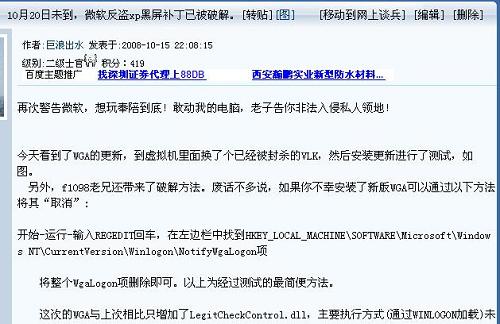
昨日有媒体爆料10月20日微软将在中国再次对盗版WindowsXP进行打击,并首次对盗版Office进行验证,盗版软件用户将被采取黑屏等手段予以打击。但是仅仅几个小时之后,就有网友发帖称“10月20日未到,微软反盗xp黑屏补丁已被破解”。
从今日中午开始,网上各大论坛相继出现标题为“10月20日未到,微软反盗xp黑屏补丁已被破解”的网帖,网友警告微软称“想玩奉陪到底”,并在随后的帖子中给出了由一名为“f1098”的网友带来的破解方法:开始-运行-输入REGEDIT回车,在左边栏中找到HKEY_LOCAL_MACHINESOFTWAREMicrosoftWindowsNT
CurrentVersionWinlogonNotifyWgaLogon项,将整个WgaLogon项删除即可。
免安装版MySQL
1、自解压免安装版mysql
2、将bin文件夹的路径加到path中
我的bin路径是C:\Program Files\mysql-5.1.6\bin
3、安装mysql服务
在命令模式下
>mysqld-nt -install
将mysql服务加到了winxp的服务中
这样就可以在服务中找到MySQL服务了
但这是我们会发现服务中MySQL的“可执行文件的路径”为“C:\mysqld-nt MySQL”
这个路径是在执行安装服务是默认的,如果你的路径不同可以通过以下方法实现修改
开始》》运行 输入regedit 回车进入注册表 找到
字串3
\HKEY_LOCAL_MACHINE\SYSTEM\CurrentControlSet\Services\MySQL
将ImagePath 的“数值数据”改为你自己的路径。
在这里我的路径是 C:\Program Files\mysql-5.1.6\bin\mysqld-nt MySQL
=================================================================
》》》》》》》》》》》可以考虑一下做一个bat服务启动文件
>net start mysql
MySQL服务已经启动成功。
C:\mysql\bin>mysql -u root
Welcome to the MySQL monitor...
结果今天用免安装版的MySQL的时候,却意外地发现了操作windows服务的方法。
如下:
===============================================
语法:sc create | delete | config 服务名 [参数]
主要参数列表:
start= demand|boot|system|auto|disabled|delayed-auto //启动类型
binPath= BinaryPathName //可执行文件路径
depend= 依存关系(以 / (斜杠) 分隔)
DisplayName= <显示名称> //屏幕显示名称
作用依次是:新建、移除、重配置服务。
例如:重新配置服务mysql的执行路径的方法是:
sc config mysql binPath= "新路径"
================================================
以后哪位大哥再遇到像文头说提到的卸载服务的问题,
以此方法便可如愿了。
sc delete xx
程序卸载了,但是在“管理工具-服务”里该服务项还是存在的,请问如何将其删除掉?
答:将该服务程序安装目录删除 开始》》运行 输入regedit 回车进入注册表 看下
字串3
\HKEY_LOCAL_MACHINE\SYSTEM\CurrentControlSet\Services 有没有 有删除次 重启看下
摘要: Mysql 免安装 配置步骤
mysql-noinstall-5.0.22下载地址 http://download.mysql.cn/download_file/zip/5.0/mysql-noinstall-5.0.22-win32.zip
配置my.ini文件
==========my.ini内容开始,不保含本行==========
[WinMySQLAdmin]
Server=D:\常用\mysql5\bin\mysqld-nt.exe
[mysqld]
basedir=D:\常用\mysql5
datadir=D:\常用\mysql5\data
# 设置mysql服务器的字符集
default-character-set=utf8
[client]
# 设置mysql客户端的字符集
default-character-set=utf8
==========my.ini内容结束,不保含本行==========
阅读全文
摘要: 不知道改如何解决这个问题,希望有高手能指点一下小弟!
D:\tomcat-6.0.2-demo\bin>startup.bat
'-Djava.util.logging.manager' 不是内部或外部命令,也不是可运行的程序
或批处理文件。
'-Djava.util.logging.config.file' 不是内部或外部命令,也不是可运行的程序
或批处理文件。
Using CATALINA_BASE: D:\tomcat-6.0.2-demo
Using CATALINA_HOME: D:\tomcat-6.0.2-demo
Using CATALINA_TMPDIR: D:\tomcat-6.0.2-demo\temp
Using JRE_HOME: C:\Program Files\Java\jdk1.5.0_09
'-Djava.endorsed.dirs' 不是内部或外部命令,也不是可运行的程序
或批处理文件。
'-Dcatalina.base' 不是内部或
阅读全文
我使用的是JSF+Spring+Hibernate,在实现文件上传时遇到了这个问题,每次上传一个文件就会出现一次这个警告,但是似乎并不影响文件的上传,文件还是可以保存到数据库中相应的表中的。
想解决这个问题,但不知道从何下手个,希望能有高手指点一下。
Hibernate: insert into WTCX.T_FILE (FILENAME, CONTENT, FILESUFFIX, FILEID) values (?, ?, ?, ?)
2008-09-19 15:56:28,125 ERROR [org.springframework.jdbc.support.lob.OracleLobHandler] - Could not free Oracle LOB
java.sql.SQLException: 必须登录到服务器
at oracle.jdbc.dbaccess.DBError.throwSqlException(DBError.java:134)
at oracle.jdbc.dbaccess.DBError.throwSqlException(DBError.java:179)
at oracle.jdbc.dbaccess.DBError.check_error(DBError.java:1160)
at oracle.jdbc.ttc7.TTC7Protocol.assertLoggedIn(TTC7Protocol.java:2196)
at oracle.jdbc.ttc7.TTC7Protocol.freeTemporaryLob(TTC7Protocol.java:3233)
at oracle.sql.LobDBAccessImpl.freeTemporary(LobDBAccessImpl.java:377)
at oracle.sql.BLOB.freeTemporary(BLOB.java:842)
at sun.reflect.NativeMethodAccessorImpl.invoke0(Native Method)
at sun.reflect.NativeMethodAccessorImpl.invoke(NativeMethodAccessorImpl.java:39)
at sun.reflect.DelegatingMethodAccessorImpl.invoke(DelegatingMethodAccessorImpl.java:25)
at java.lang.reflect.Method.invoke(Method.java:585)
at org.springframework.jdbc.support.lob.OracleLobHandler$OracleLobCreator.close(OracleLobHandler.java:412)
at org.springframework.jdbc.support.lob.SpringLobCreatorSynchronization.afterCompletion(SpringLobCreatorSynchronization.java:76)
at org.springframework.transaction.support.TransactionSynchronizationUtils.invokeAfterCompletion(TransactionSynchronizationUtils.java:133)
at org.springframework.transaction.support.AbstractPlatformTransactionManager.invokeAfterCompletion(AbstractPlatformTransactionManager.java:904)
at org.springframework.transaction.support.AbstractPlatformTransactionManager.triggerAfterCompletion(AbstractPlatformTransactionManager.java:879)
at org.springframework.transaction.support.AbstractPlatformTransactionManager.processCommit(AbstractPlatformTransactionManager.java:707)
at org.springframework.transaction.support.AbstractPlatformTransactionManager.commit(AbstractPlatformTransactionManager.java:632)
at org.springframework.transaction.interceptor.TransactionAspectSupport.commitTransactionAfterReturning(TransactionAspectSupport.java:314)
at org.springframework.transaction.interceptor.TransactionInterceptor.invoke(TransactionInterceptor.java:116)
at org.springframework.aop.framework.ReflectiveMethodInvocation.proceed(ReflectiveMethodInvocation.java:171)
at org.springframework.aop.framework.JdkDynamicAopProxy.invoke(JdkDynamicAopProxy.java:204)
at $Proxy22.insertFile(Unknown Source)
at cn.com.hd.zzjgManage.web.UploadBean.saveAction(UploadBean.java:65)
at sun.reflect.NativeMethodAccessorImpl.invoke0(Native Method)
at sun.reflect.NativeMethodAccessorImpl.invoke(NativeMethodAccessorImpl.java:39)
at sun.reflect.DelegatingMethodAccessorImpl.invoke(DelegatingMethodAccessorImpl.java:25)
at java.lang.reflect.Method.invoke(Method.java:585)
at org.apache.myfaces.el.MethodBindingImpl.invoke(MethodBindingImpl.java:129)
at org.apache.myfaces.application.ActionListenerImpl.processAction(ActionListenerImpl.java:63)
at javax.faces.component.UICommand.broadcast(UICommand.java:106)
at org.ajax4jsf.component.AjaxViewRoot.processEvents(AjaxViewRoot.java:184)
at org.ajax4jsf.component.AjaxViewRoot.broadcastEvents(AjaxViewRoot.java:162)
at org.ajax4jsf.component.AjaxViewRoot.processApplication(AjaxViewRoot.java:350)
at org.apache.myfaces.lifecycle.LifecycleImpl.invokeApplication(LifecycleImpl.java:316)
at org.apache.myfaces.lifecycle.LifecycleImpl.execute(LifecycleImpl.java:86)
at javax.faces.webapp.FacesServlet.service(FacesServlet.java:106)
at org.apache.catalina.core.ApplicationFilterChain.internalDoFilter(ApplicationFilterChain.java:290)
at org.apache.catalina.core.ApplicationFilterChain.doFilter(ApplicationFilterChain.java:206)
at org.ajax4jsf.webapp.BaseXMLFilter.doXmlFilter(BaseXMLFilter.java:141)
at org.ajax4jsf.webapp.BaseFilter.doFilter(BaseFilter.java:281)
at org.apache.catalina.core.ApplicationFilterChain.internalDoFilter(ApplicationFilterChain.java:235)
at org.apache.catalina.core.ApplicationFilterChain.doFilter(ApplicationFilterChain.java:206)
at cn.com.hd.common.filter.SessionTimeoutFilter.doFilter(SessionTimeoutFilter.java:59)
at org.apache.catalina.core.ApplicationFilterChain.internalDoFilter(ApplicationFilterChain.java:235)
at org.apache.catalina.core.ApplicationFilterChain.doFilter(ApplicationFilterChain.java:206)
at cn.com.hd.common.filter.CharacterEncodingFilter.doFilter(CharacterEncodingFilter.java:45)
at org.apache.catalina.core.ApplicationFilterChain.internalDoFilter(ApplicationFilterChain.java:235)
at org.apache.catalina.core.ApplicationFilterChain.doFilter(ApplicationFilterChain.java:206)
at org.apache.myfaces.component.html.util.ExtensionsFilter.doFilter(ExtensionsFilter.java:122)
at org.apache.catalina.core.ApplicationFilterChain.internalDoFilter(ApplicationFilterChain.java:235)
at org.apache.catalina.core.ApplicationFilterChain.doFilter(ApplicationFilterChain.java:206)
at org.apache.catalina.core.StandardWrapperValve.invoke(StandardWrapperValve.java:233)
at org.apache.catalina.core.StandardContextValve.invoke(StandardContextValve.java:191)
at org.apache.catalina.core.StandardHostValve.invoke(StandardHostValve.java:128)
at org.apache.catalina.valves.ErrorReportValve.invoke(ErrorReportValve.java:102)
at org.apache.catalina.core.StandardEngineValve.invoke(StandardEngineValve.java:109)
at org.apache.catalina.connector.CoyoteAdapter.service(CoyoteAdapter.java:286)
at org.apache.coyote.http11.Http11Processor.process(Http11Processor.java:845)
at org.apache.coyote.http11.Http11Protocol$Http11ConnectionHandler.process(Http11Protocol.java:583)
at org.apache.tomcat.util.net.JIoEndpoint$Worker.run(JIoEndpoint.java:447)
at java.lang.Thread.run(Thread.java:595)
问题:
jsf页面跳过登录界面直接进入首页,但是不能正常显示内容
原因是获取不到session变量
解决:
在web.xml中设置session filter
代码如下
<filter>
<filter-name>Session Timeout Filter</filter-name>
<filter-class>cn.com.hd.common.filter.SessionTimeoutFilter</filter-class>
<init-param>
<param-name>redirectURL</param-name>
<param-value>/loginOut.jsp</param-value>
</init-param>
<init-param>
<param-name>exceptFiles</param-name>
<param-value>/#/login.faces#/resources/css/login_css.css#/resources/images/login/dl_r1_c1.jpg#/resources/images/login/dl_r1_c2.jpg#/resources/images/login/dl_r1_c3.jpg#/resources/images/login/dl_r2_c1.jpg#/resources/images/login/dl_r2_c2.jpg#/resources/images/login/dl_r2_c3.jpg#/resources/images/login/dl_r3_c1.jpg#/resources/images/login/dl_r3_c2.jpg#/resources/images/login/dl_r3_c3.jpg#/resources/images/login/dl_r3_c4.jpg#/resources/images/login/dl_r3_c5.jpg#/loginOut.jsp</param-value>
</init-param>
<init-param>
<param-name>enable</param-name>
<param-value>true</param-value>
</init-param>
</filter>
<filter-mapping>
<filter-name>Session Timeout Filter</filter-name>
<url-pattern>/*</url-pattern>
</filter-mapping>
<session-config>
<session-timeout>30</session-timeout>
</session-config>
转载于 http://www.ojava.net/read.php?tid=7130
本教程以Apache组织的commons项目中的FileUpload项目做为jsp的文件上传组件,FileUpload项目完全尊守RFC1867规范中
关于在HTTP request 中通过Post方法提交文件的规范,该项目性能稳定快速,易于部署和使用.
本次教程以前端jsp + 后端 servlet的方式上传文件,你也可以完全在jsp中实现而不用servlet.
在开始之前你要准备以下几个东西:
1. commons-FileUpload 1.2 包
下载地址:
http://jakarta.apache.org/commons/fileupload/
2. commons-IO 1.3.1 包
下载地址:
http://jakarta.apache.org/commons/io/
3. Commons-BeanUtils 1.7 包
下载地址:
http://jakarta.apache.org/commons/beanutils/
有了上面这些东西我们就可以开始了
===============================================================================
1. 新建一个叫upload的WEB项目(我用的是Lomboz3.2开发环境)
2. 把上面下载下来的包分别解压并拷贝*.jar的文件到上面那个项目的WEB-INF/lib目录中
3.接下来我们要准备一份如下内容的upload.jsp文件,用来选择要上传的文件,
<html>
<head>
<title>Jsp+Servlet upload file</title>
</head>
<body>
<form name="upform" action="UploadServlet" method="POST" enctype="multipart/form-data">
<input type ="file" name="file1" id="file1"/><br/>
<input type ="file" name="file2" if="file2"/><br/>
<input type ="file" name="file3" id="file3"/><br/>
<input type="submit" value="Submit" /><br/>
<input type="reset" />
</form>
</body>
</html>
上面文件中有几个需要注意的地方就是
1. action="UploadServlet" 必须和后面的web.xml配置文件中对servlet映射必须保持一致.
2. method="POST" 这里必须为"POST"方式提交不能是"GET".
3. enctype="multipart/form-data" 这里是要提交的内容格式,表示你要提交的是数据流,而不是普通的表单文本.
4. file1,file2,file3表示你要3个文件一起上传,你也可以一次只上传一个文件.
===================================================================================
接下来我们要写一个与上面这个upload.jsp配套的servlet程序,就叫做UploadServlet.java吧
以下是该servlet的详细代码:
看上去有点长,不过并不复杂,很容易明白的.
import java.io.BufferedInputStream;
import java.io.BufferedOutputStream;
import java.io.File;
import java.io.FileOutputStream;
import java.io.IOException;
import javax.servlet.ServletException;
import javax.servlet.http.HttpServletRequest;
import javax.servlet.http.HttpServletResponse;
import org.apache.commons.fileupload.DefaultFileItemFactory;
import org.apache.commons.fileupload.FileItemFactory;
import org.apache.commons.fileupload.FileItemIterator;
import org.apache.commons.fileupload.FileItemStream;
import org.apache.commons.fileupload.disk.DiskFileItemFactory;
import org.apache.commons.fileupload.servlet.ServletFileUpload;
import org.apache.commons.fileupload.util.Streams;
/**
* Servlet implementation class for Servlet: UploadServlet
*
*/
public class UploadServlet extends javax.servlet.http.HttpServlet implements javax.servlet.Servlet {
File tmpDir = null;//初始化上传文件的临时存放目录
File saveDir = null;//初始化上传文件后的保存目录
public UploadServlet() {
super();
}
protected void doGet(HttpServletRequest request, HttpServletResponse response) throws ServletException, IOException {
doPost(request,response);
}
protected void doPost(HttpServletRequest request, HttpServletResponse response) throws ServletException, IOException {
try{
if(ServletFileUpload.isMultipartContent(request)){
DiskFileItemFactory dff = new DiskFileItemFactory();//创建该对象
dff.setRepository(tmpDir);//指定上传文件的临时目录
dff.setSizeThreshold(1024000);//指定在内存中缓存数据大小,单位为byte
ServletFileUpload sfu = new ServletFileUpload(dff);//创建该对象
sfu.setFileSizeMax(5000000);//指定单个上传文件的最大尺寸
sfu.setSizeMax(10000000);//指定一次上传多个文件的总尺寸
FileItemIterator fii = sfu.getItemIterator(request);//解析request 请求,并返回FileItemIterator集合
while(fii.hasNext()){
FileItemStream fis = fii.next();//从集合中获得一个文件流
if(!fis.isFormField() && fis.getName().length()>0){//过滤掉表单中非文件域
String fileName = fis.getName().substring(fis.getName().lastIndexOf(""""));//获得上传文件的文件名
BufferedInputStream in = new BufferedInputStream(fis.openStream());//获得文件输入流
BufferedOutputStream out = new BufferedOutputStream(new
FileOutputStream(new File(saveDir+fileName)));//获得文件输出流
Streams.copy(in, out, true);//开始把文件写到你指定的上传文件夹
}
}
response.getWriter().println("File upload successfully!!!");//终于成功了,还不到你的上传文件中看看,你要的东西都到齐了吗
}
}catch(Exception e){
e.printStackTrace();
}
}
public void init() throws ServletException {
/* 对上传文件夹和临时文件夹进行初始化
*
*/
super.init();
String tmpPath = "c:""tmpdir";
String savePath = "c:""updir";
tmpDir = new File(tmpPath);
saveDir = new File(savePath);
if(!tmpDir.isDirectory())
tmpDir.mkdir();
if(!saveDir.isDirectory())
saveDir.mkdir();
}
}
========================================================================================================
upload.jsp文件有了,配套的servlet也有了,现在最后剩下的就是怎么让它们配合工作了,
接着我们把WEB-INF/web.xml文件请出来,并在该文件中加入以下内容:
<servlet>
<servlet-name>UploadServlet</servlet-name>
<servlet-class>UploadServlet</servlet-class>
</servlet>
<servlet-mapping>
<servlet-name>UploadServlet</servlet-name>
<url-pattern>/UploadServlet</url-pattern>
</servlet-mapping>
写好以后再点击"保存"
==========================================================================================================
把你的upload项目整个拷贝到tomcat的webapps目录下,启动tomcat.
打开IE浏览器在地址栏中输入
http://localhost:8080/upload/upload.jsp
怎么样看到上传文件的输入框了吗? 什么,没有看到,出错了! 你仔细检查一下步骤有没有对.
好了,现在我们点击页面上的"浏览"按钮,找到我们要上传的文件,最后点击"Submit",太激动了,还不看一下你的c:"updir里面有没有你要的东西.
转载于http://www.iocblog.net/java/j2ee/j2ee-oracle-blob.html
最近做一个j2ee项目,需要在jsp页面实现对文件的上传和下载。很早以前就知道jdbc支持大对象(lob)的存取,以为很容易,做起来才发现问题多
多,读了一大堆文章,反而没有什么头绪了。正如一位网友文章所讲:“…网络上的教程99%都是行不通的,连sun自己的文档都一直错误……”,实际情况大
致如此了。
存取blob出现这么多问题,我认为大半是由数据库开发商、应用服务器商在jdbc驱动上的不兼容性带来的。而实际应用中,每个人的开发运行环境不
同,使得某个网友的solution没有办法在别人的应用中重现,以至于骂声一片。至于为什么会不兼容、有哪些问题,我没有时间去弄清,这里只说说我们怎
样解决了问题的。
基于上述原因,先列出我们的开发环境,免得有人配不出来,招人唾骂。
数据库 oracle 9i
应用服务器 bea weblogic 8.11
开发工具 jbuilder x
在jsp实现文件upload/download可以分成这样几块 :文件提交到形成inputsteam;inputsteam以blob格式入库;数据从库中读出为inputsteam;inputstream输出到页面形成下载文件。先说blob吧。
1.blob入库
(1)直接获得数据库连接的情况
这是oracle提供的标准方式,先插入一个空blob对象,然后update这个空对象。代码如下:
//得到数据库连接(驱动包是weblogic的,没有下载任何新版本)
class.forname("oracle.jdbc.driver.oracledriver");
connection con = drivermanager.getconnection(
"jdbc:oracle:thin:@localhost:1521:testdb", "test", "test");
//处理事务
con.setautocommit(false);
statement st = con.createstatement();
//插入一个空对象
st.executeupdate("insert into blobimg values(103,empty_blob())");
//用for update方式锁定数据行
resultset rs = st.executequery(
"select contents from blobimg where id=103 for update");
if (rs.next()) {
//得到java.sql.blob对象,然后cast为oracle.sql.blob
oracle.sql.blob blob = (oracle.sql.blob) rs.getblob(1).;
//到数据库的输出流
outputstream outstream = blob.getbinaryoutputstream();
//这里用一个文件模拟输入流
file file = new file("d:"proxy.txt");
inputstream fin = new fileinputstream(file);
//将输入流写到输出流
byte[] b = new byte[blob.getbuffersize()];
int len = 0;
while ( (len = fin.read(b)) != -1) {
outstream.write(b, 0, len);
//blob.putbytes(1,b);
}
//依次关闭(注意顺序)
fin.close();
outstream.flush();
outstream.close();
con.commit();
con.close();
(2)通过jndi获得数据库连接
在weblogic中配置到oracle的jdbc connection pool和datasource,绑定到context中,假定绑定名为”orads”。
为了得到数据库连接,做一个连接工厂,主要代码如下:
context context = new initialcontext();
ds = (datasource) context.lookup("orads");
return ds.getconnection();
以下是blob写入数据库的代码:
connection con = connectionfactory.getconnection();
con.setautocommit(false);
statement st = con.createstatement();
st.executeupdate("insert into blobimg values(103,empty_blob())");
resultset rs = st.executequery(
"select contents from blobimg where id=103 for update");
if (rs.next()) {
//上面代码不变
//这里不能用oracle.sql.blob,会报classcast 异常
weblogic.jdbc.vendor.oracle.oraclethinblobblob = (weblogic.jdbc.vendor.oracle.oraclethinblob) rs.getblob(1);
//以后代码也不变
outputstream outstream = blob.getbinaryoutputstream();
file file = new file("d:"proxy.txt");
inputstream fin = new fileinputstream(file);
byte[] b = new byte[blob.getbuffersize()];
int len = 0;
while ( (len = fin.read(b)) != -1) {
outstream.write(b, 0, len);
}
fin.close();
outstream.flush();
outstream.close();
con.commit();
con.close();
2.blob出库
从数据库中读出blob数据没有上述由于连接池的不同带来的差异,只需要j2se的标准类java.sql.blob就可以取得输出流(注意区别java.sql.blob和oracle.sql.blob)。代码如下:
connection con = connectionfactory.getconnection();
con.setautocommit(false);
statement st = con.createstatement();
//这里的sql语句不再需要”for update”
resultset rs = st.executequery(
"select contents from blobimg where id=103 ");
if (rs.next()) {
java.sql.blob blob = rs.getblob(1);
inputstream ins = blob.getbinarystream();
//用文件模拟输出流
file file = new file("d:"output.txt");
outputstream fout = new fileoutputstream(file);
//下面将blob数据写入文件
byte[] b = new byte[1024];
int len = 0;
while ( (len = ins.read(b)) != -1) {
fout.write(b, 0, len);
}
//依次关闭
fout.close();
ins.close();
con.commit();
con.close();
3.从jsp页面提交文件到数据库
(1)提交页面的代码如下:
<form action="handle.jsp" enctype="multipart/form-data" method="post" >
<input type="hidden" name="id" value="103"/>
<input type="file" name="filetoupload">
<input type="submit" value="upload">
</form>
(2)由于jsp没有提供文件上传的处理能力,只有使用第三方的开发包。网络上开源的包有很多,我们这里选择apache
jakarta的fileupload,在http:
//jakarta.apache.org/commons/fileupload/index.html
可以得到下载包和完整的api文档。法奥为adajspexception
处理页面(handle.jsp)的代码如下
<%
boolean ismultipart = fileupload.ismultipartcontent(request);
if (ismultipart) {
// 建立一个新的upload对象
diskfileupload upload = new diskfileupload();
// 设置上载文件的参数
//upload.setsizethreshold(yourmaxmemorysize);
//upload.setsizemax(yourmaxrequestsize);
string rootpath = getservletconfig().getservletcontext().getrealpath("/") ;
upload.setrepositorypath(rootpath+""uploads");
// 分析request中的传来的文件流,返回item的集合,
// 轮询items,如果不是表单域,就是一个文件对象。
list items = upload.parserequest(request);
iterator iter = items.iterator();
while (iter.hasnext()) {
fileitem item = (fileitem) iter.next();
//如果是文件对象
if (!item.isformfield()) {
//如果是文本文件,可以直接显示
//out.println(item.getstring());
//将上载的文件写到服务器的web-infwebstart下,文件名为test.txt
//file uploadedfile = new file(rootpath+""uploads"test.txt");
//item.write(uploadedfile);
//下面的代码是将文件入库(略):
//注意输入流的获取
…
inputstream uploadedstream = item.getinputstream();
…
}
//否则是普通表单
else{
out.println("fieldname: " + item.getfieldname()+"<br>");
out.println("value: "+item.getstring()+"<br>"); }
}
}
%>
4.从数据库读取blob然后保存到客户端磁盘上
这段代码有点诡异,执行后将会弹出文件保存对话窗口,将blob数据读出保存到本地
转载于http://hi.baidu.com/baileyfu/blog/item/373ad8436ea594149313c63b.html
JSF导航带参数
2008年04月23日 星期三 下午 05:54
在jsf的配置文件faces-config.xml中,导航通常是导到不能带参数的页面,这在某些情况会造成一些浪费,就是说你不得不写一些没有太多用处的页面,举例来说:
<navigation-rule>
<from-view-id>/login.jsp</from-view-id>
<navigation-case>
<from-outcome>succeed</from-outcome>
<to-view-id>/loginsuccess.jsp</to-view-id>
</navigation-case>
<navigation-case>
<from-outcome>fail</from-outcome>
<to-view-id>/loginfail.jsp</to-view-id>
</navigation-case>
</navigation-rule>
通常在loginfail.jsp中可能并没有什么实际的内容,只是告诉用户登录失败请重新登录,当然,有人会说,可以直接把登录失败 导航至loginsuccess.jsp上,然后通过<h:message>来显示失败信息,这样有时候会造成其他的一些问题。我们可以采取 另外一种方法,让登录失败后返回loginsuccess.jsp时带上参数来标明失败的原因:
首先,在loginBean的验证登录的方法里,定义:帐户错误返回1,验证码错误返回2,全部正确返回0,然后通过FacesContext的重定向方法来跳转并带参数,如下:
LoginBean:
public String login() {
String result = "";
int ret = authenticate(username,pwd,verifyingcode);
if(ret == 0) result = "succeed";
else
{
switch (ret) {
case 1:
result = "login.jsf?result=wrongpwd";break;
case 2:
result = "login.jsf?result=wrongcode";break;
}
try {
FacesContext.getCurrentInstance().getExternalContext().redirect(result);//重定向
} catch (IOException e) {
e.printStackTrace();
}
}
return result;
}
此时,还要注意faces-config.xml中配置的变化,去掉原来fail的导航,只保留succeed的导航即可。
这样,在loginsuccess.jsp中就可以获取result参数来做一些诸如alert的提示了。
CommonRequest.getRequest().getParameter("deptID")
1
2import javax.faces.context.ExternalContext;
3import javax.faces.context.FacesContext;
4import javax.servlet.http.HttpServletRequest;
5
6
 public class CommonRequest
  {
{
7
 public CommonRequest() {
8 }
}
9
10 public static HttpServletRequest getRequest() {
11 FacesContext facesContext = FacesContext.getCurrentInstance();
12 ExternalContext externalContext = facesContext.getExternalContext();
13 return (HttpServletRequest) externalContext.getRequest();
14
15 }
16 }
}
摘要: 问题:EMPTY_ORDERED_ITERATOR
*************************************************************************
解决方案:
在网上找了一下,找到了如下方法
java.lang.NoSuchFieldError: EMPTY_ORDERED_ITERATOR 出现是Jar 包冲突导致,删除commons-collections-2.0.jar保留commons-collections-3.0.jar 。顺便建议你清理一下你的jar目录,把重复的去掉吧,只保留最新的!
我试了上面的方法但是还是不行。我就试了下将Myeclipse中集成的Tomcat的jdk的版本从1.6换到1.5的试了一下,重启Myeclipse,启动Tomcat,发现没有报错了。
阅读全文
摘要: org.springframework.orm.hibernate3.HibernateSystemException: Named query not known: rankmanage.rankTree; nested exception is org.hibernate.MappingException: Named query not known: rankmanage.rankTree
Caused by: org.hibernate.MappingException: Named query not known: rankmanage.rankTree
阅读全文
迅速发布user项目
1、将user项目导入到myEclipse中
2、打开User.hbm.xml,
将以下代码
<class name="User" table="user">
<id name="id" column="id" type="integer">
<generator class="native"/>
</id>
<property name="username" column="username" type="string" not-null="true" />
<property name="password" column="password" type="string" not-null="true" />
</class>
改为
<class name="User" table="user1">
<id name="id" column="id" type="integer">
<generator class="native"/>
</id>
<property name="username" column="username" type="string" not-null="true" />
<property name="password" column="password" type="string" not-null="true" />
</class>
其中user1表是我自己创建的表
3、打开hibernate.cfg.xml,在可视化界面中选择数据库,并将相应的驱动导入到classpath中
4、打开applicationContext.xml,将dataSource中的各个属性改为对应的自己的数据库的参数,我的代码如下:
<bean id="dataSource" class="org.springframework.jdbc.datasource.DriverManagerDataSource">
<property name="driverClassName"
value="oracle.jdbc.OracleDriver">
</property>
<property name="url"
value="jdbc:oracle:thin:@localhost:1521:ora9i">
</property>
<property name="username" value="emp"></property>
<property name="password" value="emp"></property>
</bean>
(疑惑:其实我现在并不知道为什么class中引入的是如上代码;当我在myEclipse中右键加入dataSource后产生的代码是以下这样的:
<bean id="dataSource"
class="org.apache.commons.dbcp.BasicDataSource">
<property name="driverClassName"
value="oracle.jdbc.OracleDriver">
</property>
<property name="url"
value="jdbc:oracle:thin:@localhost:1521:ora9i">
</property>
<property name="username" value="emp"></property>
<property name="password" value="emp"></property>
</bean>
跟上面的区别就是这个class而已,但是运行是却是错误的,现在还不知道是什么原因。)
5、当完成以上各步后就可以进行测试了。
在userBean.java中的
public User getUser() { }
方法中添加以下内容
public User1 getUser() {
if (user == null) user = new User();
return user;
}
原因(个人理解):由userBean.java中
public String logoutAction(){
this.setUser(null);
return "Logout";
}
即当执行logout后,user变量设置成了null,此时应该是将原来那个user变量所占用的内存释放掉了,所以当用户再次登录的时候,就没有user这个内存区域了,所以就不能再次登录了。若要解决这个问题,就必须在getUser()方法中判断是否存在所需的内存空间,若存在则返回所存储的数据;若不存在,则创建该内存空间。
个
为你的数据库属性
hibernate.dialect设置正确的
org.hibernate.dialect.Dialect子类. 如果你指定一种方言, Hibernate将为上面列出的一些属性使用合理的默认值, 为你省去了手工指定它们的功夫.
表 4.8. Hibernate SQL方言 (hibernate.dialect)
| RDBMS |
方言 |
| DB2 |
org.hibernate.dialect.DB2Dialect |
| DB2 AS/400 |
org.hibernate.dialect.DB2400Dialect |
| DB2 OS390 |
org.hibernate.dialect.DB2390Dialect |
| PostgreSQL |
org.hibernate.dialect.PostgreSQLDialect |
| MySQL |
org.hibernate.dialect.MySQLDialect |
| MySQL with InnoDB |
org.hibernate.dialect.MySQLInnoDBDialect |
| MySQL with MyISAM |
org.hibernate.dialect.MySQLMyISAMDialect |
| Oracle (any version) |
org.hibernate.dialect.OracleDialect |
| Oracle 9i/10g |
org.hibernate.dialect.Oracle9Dialect |
| Sybase |
org.hibernate.dialect.SybaseDialect |
| Sybase Anywhere |
org.hibernate.dialect.SybaseAnywhereDialect |
| Microsoft SQL Server |
org.hibernate.dialect.SQLServerDialect |
| SAP DB |
org.hibernate.dialect.SAPDBDialect |
| Informix |
org.hibernate.dialect.InformixDialect |
| HypersonicSQL |
org.hibernate.dialect.HSQLDialect |
| Ingres |
org.hibernate.dialect.IngresDialect |
| Progress |
org.hibernate.dialect.ProgressDialect |
| Mckoi SQL |
org.hibernate.dialect.MckoiDialect |
| Interbase |
org.hibernate.dialect.InterbaseDialect |
| Pointbase |
org.hibernate.dialect.PointbaseDialect |
| FrontBase |
org.hibernate.dialect.FrontbaseDialect |
| Firebird |
org.hibernate.dialect.FirebirdDialect |
一、修复Windows 98/XP双系统启动菜单
1.修复前,在BIOS中设置从光驱启动。用Windows XP安装盘启动电脑,在加载必要的驱动后,出现Windows XP的安装界面。有三个选项:
(1)要现在开始安装Windows XP,请按“Enter”键。
(2)要用“恢复控制台”修复Windows XP安装,按“R”键。
(3)要退出安装程序,不安装Windows XP,按“F3”键;
2. 按“R”键,进入“Microsoft Windows XP (TM) 故障恢复控制台”界面;故障恢复控制台提供系统修复和故障恢复功能。系统这时会搜寻已安装的Windows XP系统文件,然后显示搜寻结果,并询问“要登录到哪个Windows XP安装(要取消,请按Enter)”,选择1. Dindows,回车,系统会再询问“管理员密码”,再键入安装Windows XP时设置的管理员密码,回车,出现Dindows〉,这时需要输入修复命令Fixboot,后面的参数为启动扇区要写入的磁盘盘符,这里填入C:,回车。修复完成,键入Exit退出。重启后就会看到久违的双重启动菜单了。并且,这样修复后基本不产生垃圾文件。
二、巧修WindowsXP 双启动菜单
在Windows98下全新安装WindowsXP,会自动生成双启动菜单,相当方便。WindowsXP是极其稳定的操作系统,但因为双启动菜单的文件一般都在C盘根目录下,很易受损。虽然你可以备份与双启动有关的文件,还可以使用Ghost把C盘整个备份下来,或制作紧急修复软盘以便受损时恢复,但如果使用者粗心大意没做备份,又没有紧急修复软盘那怎么办?难道要重装WindowsXP?还有几十个大小软件?!其实我们还有最后一招:恢复控制台。
开始时和重装一样,要选择全新安装,等安装文件复制好,电脑重新启动,选择进入恢复控制台,控制台会提示你要登录到哪个WindowsXP安装,一般就选默认的“1”,键入系统管理员密码,你就进入了控制台的Windows目录下,键入“BOOTCFG/ADD”,控制台会扫描Windows安装,几秒钟后扫描完成,提示选择要添加的安装,选“1”,接着提示输入加载识别符,可输入“MicrosoftWindowsXPProfessional”,提示输入OS加载选项,键入fastdetect,回车,键入“EXIT”,重新启动电脑,你可以看到熟悉的双启动菜单又回来了。进入系统后,把所有分区内带“$”的文件及文件夹全删掉。
三、恢复WinMe\XP双系统引导菜单
同时体验两个Windows操作系统的魅力,采用Windows Me与Windows XP双重引导,是很多用户的选择。但是,由于种种原因,很多时候你可能要重装Windows Me。而这一重装不要紧,之后你会发现用于双引导的启动选择菜单不见了(这种情况见于在DOS下重装Windows 9x、特别是格式化C盘后的重装)!那么,Windows XP到底上哪儿去了呢?
和平共处有顺序
一般而言,在安装双系统的时候,我们是先安装Windows Me,然后在另一个分区安装Windows XP。
安装了Windows Me之后,C盘引导区储存的是Windows Me的引导信息,开机后系统通过加载系统文件Io.sys和Command.com来引导Windows Me。
安装Windows XP之后,C盘引导区被Windows XP的引导信息所覆盖,用来启动Windows Me的引导信息被移到引导区以外,储存在一个名为Bootsect.dos的文件中。
实现双引导后,系统通过加载Windows XP的系统文件Ntldr来读取Boot.ini,查找其他操作系统,并显示启动选择菜单,让用户确定启动哪个系统:如果选择启动Windows Me,则通过Bootsect.dos来加载Io.sys和Command.com系统文件来引导Windows Me;如果选择启动Windows XP,则直接加载Ntldr、通过Nntdetect.com系统文件来引导Windows XP。
不同分区是前提
而一旦再次安装Windows Me时,C盘的引导区再次变成Windows Me的引导信息,即使Ntldr和Boot.ini两个文件仍存在,开机时系统也不再加载它们,因此不会出现启动选择菜单;如果格式化了C盘,这两个文件将不复存在,就更不会出现启动选择菜单了。
其实,大多数用户的Windows Me与Windows XP并没有安装在同一个分区,虽经格式化C盘、重装Windows Me,变化的仅仅是C盘的引导区、选择引导不同系统的系统文件,以及C盘上的Windows Me的安装文件和设置信息。也就是说,保存在其他分区中的Windows XP安装文件、设置信息并没有被破坏,因此,无需费时费力地重新安装和设置Windows XP,只要恢复一下C盘的引导区和选择引导系统的系统文件,就可以快速恢复Windows Me与Windows XP的双重引导,找回原来的Windows XP!
拨开迷雾见真谛
恢复Windows Me和Windows XP双重引导的方法是:
1、启动Windows Me后,执行Windows XP的安装程序。
2、按照正常的安装过程,在安装第一步“安装选项”中选择“全新安装(高级)”。
3、输入安装密码,跳过“升级驱动器”(不选“升级为NTFS文件系统”)和“下载更新的安装程序文件”两步。
4、系统开始复制安装文件,等绿色的复制进度条到头后,出现“重新启动计算机”的红色进度条,此时,迅速按下“Esc”键,禁止重新启动(成功禁止重新启动则直接进入第7步)。
5、如果没有及时按下“Esc”键而导致系统重新启动,将会出现启动选择菜单,其中包括三个启动选项(格式化C盘后重装,则只出现后两项):
Microsoft Windows XP Professional
Microsoft Windows Millennium Edition
Microsoft Windows XP Professional安装程序
6、按小键盘区的方向键,在5秒钟内选择“Microsoft Windows Millennium Edition”启动Windows Me。
7、进入C盘即可看到,根目录上已经出现了实现双引导启动需要的五个文件:“Ntldr”、“Ntdetect.com”、“Boot.ini”、“Bootfont.bin”、“Bootsect.dos”。
此外还有Windows XP的三个安装文件“ldr”、“drvltr.~_~”、“txtse-tup.sif”和一个文件夹“win_nt.~bt”,其他分区也各有一个磁盘加速文件“DRVLTR.~_~”,直接删除即可。
8、修改Boot.ini文件。在[Boot Loader]段中:将“Default=C:\WIN_NT.~BT\BOOTSECT.DAT”一行改为“Default=C:\”,如果不从启动选择菜单中进行选择,默认从C盘引导启动Windows Me;或改为“Default=multi(0)disk(0)rdisk(0)partition(2)\WINDOWS”,使系统默认从D盘引导启动Windows XP(如果Windows XP安装在E盘,将“partition(2)”中的“2”改为“3”、以此类推)。
同时,还可在[Boot Loader]段中设定启动选择菜单维持的时间(以秒为单位),将“Timeout=5”中的“5”改为你希望的时间即可。
在[Operating Systems]段中,删除“C:\WIN_NT.~BT\BOOTSECT.DAT="Microsoft Windows XP Professional安装程序"”一行,即可将Windows XP的安装选项从启动选择菜单中屏蔽掉。若是格式化C盘后重装Windows Me,还需加入“multi(0)disk(0)rdisk(0)partition(2)\WINDOWS="Microsoft Windows XP Professional"/fastdetect”一行,使系统以快速启动的方式从D盘引导Windows XP。同时,还可以在[Operating Systems]段中修改启动选择菜单显示的文字,比如:将“Microsoft Windows XP Professional”改为“Windows XP中文版”、“Microsoft Windows Millennium Edition”改为“Windows Me千禧版”,之后,选择引导菜单上显示的就是“Windows XP中文版”和“Windows Me千禧版”了。
9、重新启动就恢复双重引导了,并且,Windows XP的全部设置百分之百保持原来的状态,与重装Windows Me前没有丝毫改变。
四、修复双系统启动菜单
如果安装了了双操作系统的朋友就会知道,一般双系统都会是98/me加上2000/xp这样类型的操作系统,在安装操作系统的时候xp/2000会自动建立起一个双重系统启动菜单,双重系统的启动是因为在c盘的根目录下面含有这样几个文件:win.ini boot.ini bootfont.bin ntdetect.com ntldr io.sys msdos.sys 后面这两个是要在文件夹选项里面更改(隐藏受保护的系统文件)才能看到的。最好在其中的一个系统坏了以后先备份这几个文件,如果没有备份就先把c盘格式化了,并且安装好了98/me的话是不是感到没有办法了恢复了呢?这里介绍一种简单的方法:
先把xp/或者2000的安装光盘放入光驱,并且执行setup安装xp/2000,选择全新安装。安装程序就会继续安装,等待重启以后不要继续安装了,直接进入me/98,观察c盘根目录,多了几个文件夹,还有一些看不懂的文件。但是更改了文件夹选项里面的(隐藏受保护的系统文件)以后发现win.ini boot.ini bootfont.bin ntdetect.com ntldr io.sys msdos.sys都恢复了,那么你可以直接删除其他你看不懂的文件名很奇怪的文件夹了,因为那是为windows xp/2000安装准备的安装文件,然后打开并这样编辑boot.ini
[boot loader]
timeout=10
default=multi(0)disk(0)rdisk(0)partition(2)\WINDOWS
[operating systems]
multi(0)disk(0)rdisk(0)partition(2)\WINDOWS="①: Windows XP/2000 " /fastdetect
C:\=②: Windows ME/98
然后重新系统启动就可以了 发现双启动菜单已经恢复了。
五、双操作系统共存常见问题解答
双系统的安装顺序
问:我打算在一台电脑中安装多系统(Windows 9x/XP),请问在安装的先后顺序上有什么讲究么?应该注意哪些地方?
答:一般来说,安装顺序是先低级版本到高级版本的,也就是说首先安装Windows9x,然后在Windows9x系统下安装WindowsXP,这样做的好处是系统可以自动生成开机选择画面。
要注意的有以下几点:
1、要把每个系统安装在不同的分区中。最好的安排是:把Windows 9x安装在C盘上,Windows XP安装在D盘上。
2、针对不同的系统要选择不同的系统文件格式。对于Windows9x,要选择FAT16或FAT32的;而对于Windows XP,最好使用NTFS格式,这样系统潜力会发挥的更好。
3、在Windows9x上安装Windows XP时要选择“全新安装”,不要选择“升级安装”。
高版本如何安装低版本
问:我的系统是Windows XP,现在我想再安装一个Windows 98,请问如何在保留Windows XP的情况下安装Windows 98,做个双系统?
答:因为Windows XP下不能直接安装Windows 98,所以必须首先用Windows 98启动盘启动电脑(当然前提是在CMOS中设置先从A盘启动),然后把Windows98安装到WindowsXP以外的分区中。重启系统后,你会发现并没有双启动菜单,系统直接进入了Windows 98。不要紧,按照下一个问题的解答恢复即可。恢复完后把硬盘各分区中以“”字符打头并以“”结尾的文件删除就可以了。
恢复选择菜单
问:我安装的是Windows 98加Windows 2000操作系统,由于误操作把boot.ini文件删除了,现在启动电脑时就会出现“boot.ini非法”提示,也没有选择菜单了,而是直接进入了Windows 2000,请问该如何恢复?
答:首先在BIOS中将启动顺序调整为CD-ROM引导,然后将Windows 2000安装盘放入光驱。等自动加载完安装程序后,系统会问你是重新安装还是修复,不用管它,直接退出。最后到CMOS中把启动顺序再改为硬盘启动,这样再次开机后就会出现选择菜单了。
删除其中一个系统
问:请问在双系统中(Windows9x和Windows XP),如何在不损害一个系统的情况下删除另外一个系统?
答:如果想删除Windows9x的话,可以在Windows XP中右键单击“我的电脑”,选择“属性→高级”,点击“启动和故障恢复”中的“设置”按钮,然后把启动时间改为“0”,这样在启动时就会直接进入Windows XP,而不会在出现选择菜单了。最后把Windows 9x的Windows、Program Files目录和引导文件(包括io.sys、msdos.sys、command.com、autoexec.bat和config.sys)删除即可。
如果想删除Windows XP,首先在Windows 9x环境下把Windows XP所在的目录全部删除,然后用一张Windows 9x的启动盘(根据操作系统所定)启动,在“A:”下输入“SYS C:”,给Windows9x所在的C盘重新传系统即可。
如何访问NTFS分区
问:我的电脑是Windows 98、Windows 2000的双系统,Windows 2000所在的分区使用了NTFS文件格式,这样我在Windows 98下就不能访问它们了,请问如何在不转化为FAT格式的情况下访问它们呢?
答:目前没有太好的办法,只能使用软件NTFS for Windows 98,它是专为Windows 9x系统访问NTFS分区而设计的,使用它可以在Windows 9x环境下对NTFS分区进行读写等操作.
摘要: Oracle中取固定记录数的方法
Oracle中分页取出数据
实例:
Select * From (Select Rownum r,t.* From (select Id,Name ,age,sex,address From employee Order By age Asc) t )
Where r<=120 And r>100
阅读全文
Spring+Hibernate
1package com.dao.hibernate;
2
3import java.util.List;
4
5import org.springframework.context.support.ClassPathXmlApplicationContext;
6
7public class SpringTest {
8
9 /** *//**
10 * @param args
11 */
12 public static void main(String[] args) {
13
14 ClassPathXmlApplicationContext ctx=new ClassPathXmlApplicationContext("/applicationContext.xml");
15 User1DAO dao=(User1DAO)ctx.getBean("User1DAO");
16
17 //查找一条记录
18 User1 u=dao.findById(new Long(1));
19// p(u);
20
21// //添加一条记录
22// User1 u2=new User1();
23// u2.setUsername("sunday");
24// u2.setPassword("sunday");
25// dao.add(u2);
26// p(u2);
27
28 //修改一条记录
29// u=dao.findById(new Long(1));
30// u.setUsername("鲁胜迪");
31// dao.update(u);
32// p(u);
33//
34 //删除一条记录
35 u=dao.findById(new Long(1));
36 dao.delete(u);
37//
38// //显示所有记录
39// List list=dao.findAll();
40// for(Object o:list){
41// u=(User1)o;
42// p(u);
43// }
44 }
45
46 public static void p(User1 u){
47 System.out.println("-------------------");
48 System.out.println(u.getId());
49 System.out.println(u.getUsername());
50 System.out.println(u.getPassword());
51 System.out.println("-------------------");
52 }
53}
54
如何在Windows上完全卸载Oracle数据库(8i、9i)
1、 停止oracle所有的服务(开始-à运行-à输入services.msc)
2、 删除注册表上的ORACLE的有关键值(开始--》运行--》输入regedit)将HKEY_LOACAL_MACHINE/SOFTWARE下的主键ORACLE全部删除。
3. 下面删除Oracle服务:进入HKEY_LOACAL_MACHINE/SYSTEM主键下,在ControlSet001、ControlSet002、CurrentControlSet-->Service中删除相关的Oracle服务。(也可以在注册表中删除oracle,orcl,ora打头的注册项,可能有部分删除不了,不用管)
4. 删除Oracle软件所在的目录(Oracle软件的有些配置信息存储在这个目录(C:Program FilesOracle)) 然后再删除软件安装的实际目录,如果删除中,出现不能删除的文件,请给它改名,然后重新启动操作系统, 再删除这些文件。这样我们就彻底删除了有关的文件,对以后安装Oracle数据库没有任何影响。 如果你用Oracle的卸载程序,首先,用database configuration assistant工具删除所建立的数据库,这样就删除了数据库的数据文件, 但是不能删除Oracle可执行的文件。如果想删除的干干净净,用上面的方法。
2006年12月25日
问题:
在myEclipse的“Datasource Explorer”视图中,右键->“Hibernate Reverse Engineering”,创建对
象关系映射文件时,最后一步提示“在“generating artifacts”期间发生了内部错误”;
解决:
这个问题折腾了我近两天,查了好多资料,最后总结出可能有两种原因,对应有两种解决方法。
原因1:是MyEclipse4.1GA本身的BUG;
解决1:升级到myEclipse最新版本即可;
原因2:是oracle驱动不匹配的问题,class12.jar for jdk1.1 and jdk1.2;jdk1.4以上应该用
ojdbc1.4.jar;
解决2:
第一步:在工程中的lib中添加包ojdbc1.4.jar,并确认ojdbc1.4.jar自动加入了.classpath中;
第二步:在myEclipse的“Datasource Explorer”视图中配置oracle连接中,指定驱动类为ojdbc1.4.jar
;
ok!
参考资料:
1.MyEclipse中创建Hibernate对象关系映射文件出错解决办法
http://blog.csdn.net/baggio785/archive/2006/05/09/714329.aspx
我的开发环境:JDK1.4.2_09,Tomcat5.0.28,Eclipse3.1.2,MyEclipse4.1GA
在创建对象关系映射文件时,最后一步提示“在“generating artifacts”期间发生了内部错误”,找了
半天也没解决,后来发现原来是MyEclipse4.1GA本身的BUG,升级道MyEclipse4.1.1GA,问题就解决了
顺便说一下,MyEclipse4.1GA的注册码适用于MyEclipse4.1.1GA
MyEclipse4.1.1GA可以到MyEclipse官方网站下载,地址
http://www.myeclipseide.com/Downloads+index-req-getit-lid-45.html
要下载需要先注册的,大小为145M,MyEclipse4.1.1GA注册码可以用
License Name: hehe
License Key: uLR8ZC-956-55-5467865991428004
如果大家也遇到“在“generating artifacts”期间发生了内部错误”这个问题,不妨试试这个办法
另:网上有的人说,如果数据库是Oracle,需要把驱动升级到jdbc14.jar;
2.MyEclipse4.1做Hibernate映射出现问题!
http://www.javaeye.com/topic/18454?page=1
问:
rjzjh
由于一直以后用Hibernate2.1.7做开发,Hibernate3从未体验过,最近用MyEclipse4.1.0.GA学者做
Hibernate的开发却出现了以下问题:
由于不会贴图请看附件:
前面都能成功:关键是一后一步报
“An internal error occurred during:"Generating Artifacts"”做Mapping映射宣告失败,一直接不
到原因,而且是我跟据:
http://www.myeclipseide.com/images/tutorials/Hibernate/Hibernate.html
(自己注释:版本太旧了,无参考价值)
一步一步做下来的,怎么就错了呢?
答:
chinajavafish
你的问题是因为你的数据库服务器和你的驱动不匹配造成的。
如果数据库是SQLSERVER,请使用jtds驱动
oracle9i,最好下载最新的ojdbc14.jar驱动(官方推荐)。
如果是mysql的话,有可能是你设置驱动路径的问题。
问:
oracle换了14的驱动,也还是有问题呀.
答:
换14后要重启myEclipse。
ok!
转载于http://www.blogjava.net/flysky19/articles/89860.html
AntiVir是一款德国著名杀毒软件,自带防火墙,它能有效的保护个人电脑以及工作站的使用,以免受到病毒侵害。软件只有几M大小,它却可以检测并移除超过60万种病毒,支持网络更新。
点击下载 AntiVir PersonalEdition Classic.zip
具体功能:
1.能准确检测和清除的病毒数超过60多万种;
2.在功能对比测试中各项指标位居前茅;
3.实时病毒卫士能时刻监测各种文件操作;
4.右键快速扫描杀毒;
5.自带防火墙;
6.防护大型未知病毒;
7.支持网络更新;
本版绿色优点:
本人原创绿化提取
实现任意位置注册
支持右键扫描
无服务加载 完全绿色
本版绿色缺点:
去除了监控(红伞的一大特点没有突出)
升级不加载服务,需要手动下载库地址
如何使用:
1)解压到任意位置,运行AntiVir绿色右键杀毒版本 注册与卸载程序.exe 按照提示做即可.
2)如何升级,如果使用迅雷下载-->导入文件加内的AntiVir迅雷升级地址.lst(如果没有装迅雷,可以直接去下载地址->http://dl.antivir.de/down/vdf/ivdf_fusebundle_nt_en.zip)
3)如何升级引擎和库
下载http://dl.antivir.de/down/vdf/ivdf_fusebundle_nt_en.zip (和上面地址是一个地址)
运行文件夹里的avcenter.exe=>Updata=>Manual updata=>选择下载下来的ivdf_fusebundle_nt_en.zip文件即可升
如果我的版本过期了怎么办?
这个版本的红伞是免费的,如果key过期会限制软件的运行,要想延长
下载http://dl2.avgate.net/down/windows/hbedv.key 覆盖到原目录即可
@echo off
echo 正在清除系统垃圾文件,请稍等......
del /f /s /q %systemdrive%\*.tmp
del /f /s /q %systemdrive%\*._mp
del /f /s /q %systemdrive%\*.log
del /f /s /q %systemdrive%\*.gid
del /f /s /q %systemdrive%\*.chk
del /f /s /q %systemdrive%\*.old
del /f /s /q %systemdrive%\recycled\*.*
del /f /s /q %windir%\*.bak
del /f /s /q %windir%\prefetch\*.*
rd /s /q %windir%\temp & md %windir%\temp
del /f /q %userprofile%\cookies\*.*
del /f /q %userprofile%\recent\*.*
del /f /s /q "%userprofile%\Local Settings\Temporary Internet Files\*.*"
del /f /s /q "%userprofile%\Local Settings\Temp\*.*"
del /f /s /q "%userprofile%\recent\*.*"
echo 清除系统LJ完成!
echo. & pause
【分享】让病毒白白运行
有次朋友电脑中了病毒,我去看了一下,是个QQ病毒,由于挺长时间没有上网搜集病毒方面消息了,我对这些病毒的特性也不甚了解。我先打开“进程管理器”,将几个不太熟悉的程序关闭掉,但刚关掉一个,再去关闭另外一个时,刚才关闭的那个马上又运行了。没办法,我决定从注册表里先把启动项删除后,再重启试试,结果,我刚把那些启动项删除,然后刷新一下注册表,那些启动项又还原了,看来一般的方法是行不通了,上网下载专杀工具后,仍然不能杀掉。我知道这是因为病毒正在运行,所以无法删除。
由于这台电脑只有一个操作系统,也没办法在另一个系统下删除这些病毒,这时怎么办呢?如果大家也遇到这种情况时,我向大家推荐一种方法。
第一步:在“开始→运行”中输入CMD,打开“命令提示符”窗口。
第二步:输入ftype exefile=notepad.exe %1,这句话的意思是将所有的EXE文件用“记事本”打开。这样原来的病毒就无法启动了。
第三步:重启电脑,你会看见打开了许多“记事本”。当然,这其中不仅有病毒文件,还有一些原来的系统文件,比如:输入法程序。
第四步:右击任何文件,选择“打开方式”,然后点击“浏览”,转到Windows\System32下,选择cmd.exe,这样就可以再次打开“命令提示符”窗口。
第五步:运行ftype exefile=%1 %*,将所有的EXE文件关联还原。现在运行杀毒软件或直接改回注册表,就可以杀掉病毒了。
第六步:在每一个“记事本”中,点击菜单中的“文件→另存为”,就可看到了路径以及文件名了。找到病毒文件,手动删除即可,但得小心,必须确定那是病毒才能删除。建议将这些文件改名并记下,重启后,如果没有病毒作怪,也没有系统问题,再进行删除,
◆最后介绍一下
Ftype的用法
在Windows中,Ftype命令用来显示及修改不同扩展名文件所关联的打开程序。相当于在注册表编辑器中修改“HKEY_CLASSES_ROOT”项下的部分内容一样。
Ftype的基本使用格式为:Ftype [文件类型[=[打开方式/程序]]]
比如:像上例中的ftype exefile=notepad.exe %1,表示将所有文件类型为EXE(exefile表示为EXE类型文件)的文件都通过“记事本”程序打开,后面的%1表示要打开的程序本身(就是双击时的那个程序)。
ftype exefile=%1 %*则表示所有EXE文件本身直接运行(EXE 可以直接运行,所以用表示程序本身的%1即可),后面的%*则表示程序命令后带的所有参数(这就是为什么EXE文件可以带参数运行的原因)。
本资源由BeanSoft制作而成
从 MyEclipse 6 的下载, 安装, 从简单的 Java 应用的开发, 配置运行 MySQL, 下载配置运行 Tomcat, 下载配置运行 JBoss 等这些工具的使用, 一直到 Swing 界面开发, JSP, Servlet, Struts, Spring, Hibernate, JSF, EJB, JMS, JNDI, Web Service, EJB 2, EJB 3, JPA, UML 等等的开发, 带有语音的进行讲解. 面向新手, 不专注技术的细节, 仅仅是工具本身的介绍. 通过这些视频, 初学者可以不用在配置环境上花太多功夫而进入对代码细节的学习中.
教程内容:
0: 下载 安装 运行 HelloWorld
1 安装运行 Mysql, MySQL-Front 管理, JDBCHelloWorld 开发
2 用 MyEclipse Database Explorer 管理 MySQL 数据库
3 MyEclipse Hibernate 快速入门开发
4 MyEclipse JPA 快速入门开发
5 MyEclipse 6 + Tomcat 6 Servlet 入门开发
6 Web 入门开发
7 Struts 入门开发
8 XFire Web Service 入门
9 MyEclipse JSF快速入门
10 JSP 文件上传下载
11 Struts 文件上传
12 Hibernate 一对多
13 Struts2入门开发
14 Struts2+Spring入门开发
运行环境:
由于是*.exe文件,所以只能在win先观看,如对你造成不便请多原谅。
MyEclipse.6.实战开发讲解视频入门_视频.rar
MyEclipse.6.实战开发讲解视频入门_源代码.rar
MyEclipse.6.实战开发讲解视频入门_DOC文档.rar
下载地址:
http://groups-beta.google.com/group/SegWord/web/IKAnalyzer.jar
IKAnalyzer基于lucene2.0版本API开发,实现了以词典分词为基础的正反向全切分算法,是Lucene Analyzer接口的实现,代码使用例子如下:
import org.mira.lucene.analysis.IK_CAnalyzer <------- 引用类
import .....
public class IKAnalyzerTest extends TestCase {
RAMDirectory directory;
private IndexSearcher searcher;
public void setUp() throws Exception {
directory = new RAMDirectory();
IndexWriter writer = new IndexWriter(directory,
new IK_CAnalyzer(), <------- 实例化类
true);
Document doc = new Document();
doc.add(Field.Keyword("partnum", "Q36"));
doc.add(Field.Text("description", "Illidium Space Modulator"));
writer.addDocument(doc);
writer.close();
searcher = new IndexSearcher(directory);
}
public void testTermQuery() throws Exception {
Query query = new TermQuery(new Term("partnum", "Q36"));
Hits hits = searcher.search(query);
assertEquals(1, hits.length());
}
}
分词效果测试,命令行如下:
java -classpath IKAnalyzer.jar;lucene-core-2.0.0.jar org.mira.lucene.analysis.IK_CAnalyzer 中华人民共和国香港特别行政区
该算法适合与互联网用户的搜索习惯和企业知识库检索,用户可以用句子中涵盖的中文词汇搜索,如用“人民”搜索含“人民币”的文章,这是大部分用户的搜索思维;
不适合用于知识挖掘和网络爬虫技术,全切分法容易造成知识歧义,因为在语义学上“人民”和“人民币”是完全搭不上关系的。
分词效果:
1.实现中文单词细粒度全切分
如:中华人民共和国
0 - 2 = 中华
0 - 4 = 中华人民
0 - 7 = 中华人民共和国
1 - 3 = 华人
2 - 4 = 人民
2 - 7 = 人民共和国
4 - 6 = 共和
4 - 7 = 共和国
2.实现对专有名词的识别和切分(人名,公司名)
如:陈文平是开睿动力通讯科技有限公司董事长
0 - 3 = 陈文平 <------ 人名,非汉语词汇
4 - 6 = 开睿 <------ 公司名,非汉语词汇
6 - 8 = 动力
8 - 10 = 通讯
10 - 12 = 科技
12 - 14 = 有限
12 - 16 = 有限公司
14 - 16 = 公司
16 - 18 = 董事
16 - 19 = 董事长
18 - 19 = 长
3.对数词和量词的合理切分
如:据路透社报道,印度尼西亚社会事务部一官员星期二(29日)表示,日惹市附近当地时间27日晨5时53分发生的里氏6.2级地震已经造成至少5427人死亡,20000余人受伤,近20万人无家可归。
0 - 1 = 据
1 - 4 = 路透社
4 - 6 = 报道
。。。。。。
18 - 20 = 官员
20 - 22 = 星期
20 - 23 = 星期二
22 - 23 = 二
24 - 26 = 29
24 - 27 = 29日
26 - 27 = 日
28 - 30 = 表示
31 - 33 = 日惹
33 - 34 = 市
。。。。。。
40 - 42 = 27
40 - 43 = 27日
43 - 44 = 晨
44 - 45 = 5
44 - 46 = 5时
45 - 46 = 时
46 - 48 = 53
46 - 49 = 53分
48 - 50 = 分发
。。。。。。
52 - 54 = 里氏
54 - 57 = 6.2
54 - 58 = 6.2级
57 - 58 = 级
58 - 60 = 地震
。。。。。。
66 - 70 = 5427
66 - 71 = 5427人
71 - 73 = 死亡
72 - 73 = 亡
74 - 79 = 20000
79 - 81 = 余人
81 - 83 = 受伤
84 - 85 = 近
85 - 87 = 20
85 - 89 = 20万人
87 - 89 = 万人
89 - 93 = 无家可归
转载于 http://www.jdon.com/jivejdon/thread/30255.html
现在实现的效果是,可以用1.jsp页面调用2.jsp页面,但是问题在于1.jsp页面只能调用编译后的2.jsp
就是说,当我改变数据库中相应内容的值以后,它就不能实现做出相应的改变了。
但是当我将1.jsp和2.jsp运行时,这个问题就解决了,因为在2.jsp实现了自动刷新功能,它可以定时的去获取数据库的值。
抛出问题:那是否可以在同一页面中导入两张jsp页面,然后实现一个通过刷新实现对另一个不刷新页面的更新呢?
客户端页面代码(1.jsp)如下
<html>
<head>
<script language="javascript">
var xmlHttp;
function createXMLHttpRequest(){
if (window.ActiveXObject){
xmlHttp = new ActiveXObject('Microsoft.XMLHTTP');
}else if(window.XMLHttpRequest){
xmlHttp = new XMLHttpRequest();
}
}
function re(){
createXMLHttpRequest();
xmlHttp.open("GET","2.jsp",true);
xmlHttp.onreadystatechange = callBack;
xmlHttp.send(null);
}
function callBack(){
if (xmlHttp.readyState == 4) {
if (xmlHttp.status == 200) {
var str = xmlHttp.responseText;
t.innerHTML=str;
setTimeout('re()',1000);
}
}
}
</script>
</head>
<body onload="javascript:re();">
<span id=t>123</span>
</body>
_____________________________________
服务器端代码(2.jsp)如下
<%@ page language="java" import="java.util.*" pageEncoding="UTF-8"%>
<jsp:directive.page import="java.sql.ResultSet"/>
<!DOCTYPE HTML PUBLIC "-//W3C//DTD HTML 4.01 Transitional//EN">
<html>
<meta http-equiv="Refresh" content="10">
<jsp:useBean id="db" scope="session" class="news.sql_data"/>
<body>
<%
String sql="select * from hzt_task t where title='lsd' ";
ResultSet rs=db.executeQuery(sql);
//int i=0;
while(rs.next()){
// runpercent=rs.getString("runpercent");
out.println(rs.getString("runpercent"));
// i++;
}
%>
</body>
</html>
<body>
<div id='aa'>
sdfdsfdsf
<input name="" type="button" onclick="aa();"/>
</div>
<script language="javascript">
function aa(){
document.getElementById('aa').innerHTML='123123';
}
</script>
</body>
摘要: 备份,在开始运行中CMD
exp ay_user/ay@zhf file=e:\名称.dmp log=e:\log.txt full=y
//ay_user 用户名 zhf 密码 要备份的数据库名和地址,log=e:\log.txt 备份生成的日志文件的地址和名称。full=y完全备份
还原,在开始运行中CMD
imp zhf/huifeng@zhf file=f:\名称.dmp log=f:\log.txt full=y
阅读全文
可以将下边的代码嵌入到html,jsp,asp,php或aspx文件中!
截图
代码如下:
<body>
<input type="button" value="start" onclick="processBar.changeMode();if(processBar.isMoving){this.value='Stop';}else{this.value='Start';}">
</body>
<script>
if(window.ActiveXObject) document.execCommand("BackgroundImageCache",false,true);
function ProcessBar(){
this.width = 256;
this.height = 18;
this.top = 0;
this.left = 0;
this.backImg = "process_back.gif";
this.foreImg = "process.gif";
this.backDiv = document.createElement("div");
this.foreDiv = document.createElement("div");
this.fontDiv = document.createElement("div");
this.isMoving = false;
this.nowLength = 0;
this.moveInterval = 100;
this.moveRange = 1;
this.timer;
ProcessBar.nowObj = this;
this.init = function(){
this.foreDiv.style.backgroundImage = "url(" + this.foreImg + ")";
this.foreDiv.style.backgroundRepeat = "no-repeat";
this.foreDiv.style.position = "absolute";
this.foreDiv.style.width = this.nowLength;
this.foreDiv.style.height = this.height;
this.foreDiv.style.top = 0;
this.foreDiv.style.left = 0;
this.fontDiv.style.background = "transparent";
this.fontDiv.style.position = "absolute";
this.fontDiv.style.width = this.width;
this.fontDiv.style.height = this.height;
this.fontDiv.style.top = 2;
this.fontDiv.style.left = 0;
this.fontDiv.style.textAlign = "center";
this.fontDiv.style.fontSize = "13px";
this.fontDiv.appendChild(document.createTextNode(" "));
this.backDiv.style.backgroundImage = "url(" + this.backImg + ")";
this.backDiv.style.backgroundRepeat = "no-repeat";
this.backDiv.style.position = "absolute";
this.backDiv.style.width = this.width;
this.backDiv.style.height = this.height;
this.backDiv.style.top = this.top;
this.backDiv.style.left = this.left;
this.backDiv.appendChild(this.foreDiv);
this.backDiv.appendChild(this.fontDiv);
document.body.appendChild(this.backDiv);
}
this.changeMode = function(){
this.isMoving = !this.isMoving;
if(this.isMoving){
this.timer = window.setInterval(ProcessBar.nowObj.moving, this.moveInterval);
}else{
window.clearInterval(this.timer);
}
}
this.moving = function(){
ProcessBar.nowObj.nowLength += ProcessBar.nowObj.moveRange;
ProcessBar.nowObj.foreDiv.style.width = ProcessBar.nowObj.nowLength;
ProcessBar.nowObj.fontDiv.firstChild.data = Math.ceil((ProcessBar.nowObj.nowLength/ProcessBar.nowObj.width )*100) + "%";
if(ProcessBar.nowObj.nowLength >= ProcessBar.nowObj.width ){
window.clearInterval(ProcessBar.nowObj.timer);
ProcessBar.nowObj.fontDiv.firstChild.data = "Complete!";
}
}
}
var processBar = new ProcessBar();
processBar.backImg = "http://screenprint2007.cpp114.com/UserFiles/20070412155452218.gif";
processBar.foreImg = "http://screenprint2007.cpp114.com/UserFiles/20070412155424937.gif";
processBar.top = 100;
processBar.left = 20;
processBar.init();
</script>
//创建临时表空间
create temporary tablespace test_temp
tempfile 'E:\oracle\product\10.2.0\oradata\testserver\test_temp01.dbf'
size 32m
autoextend on
next 32m maxsize 2048m
extent management local;
//创建数据表空间
create tablespace test_data
logging
datafile 'E:\oracle\product\10.2.0\oradata\testserver\test_data01.dbf'
size 32m
autoextend on
next 32m maxsize 2048m
extent management local;
//创建用户并指定表空间
create user testserver_user identified by testserver_user
default tablespace test_data
temporary tablespace test_temp;
//给用户授予权限
grant connect,resource to testserver_user;
//以后以该用户登录,创建的任何数据库对象都属于test_temp 和test_data表空间,这就不用在每创建一个对象给其指定表空间了。
在使用电脑的过程中,我们会遇到各种各样的问题。在那些自己不能独立解决的问题面前,我们只能求助于专业的技术人员或者找经验丰富的朋友帮忙。可是技术人员不可能时时都在身边,那还有没有其他办法可以得到技术人员的协助呢?
微软早就为我们在Windows XP中内置了一个通过网络的远程协助工具:“远程桌面连接”。通过远程桌面连接我们可以控制其他安装了Windows XP、Windows 2000或者Windows Server 2003的计算机。在客户计算机上选择:开始|所有程序|附件|通信|远程桌面连接,在弹出的对话框中输入你要远程连接的计算机的IP地址(如图1所示)。如果对方允许你连接的话,就可以控制对方系统,就好像你正坐在对方的计算机前操作对方计算机的键盘和鼠标一样。

图1 连接远程桌面
相对的,我们也可以设置Windows XP使得其他人可以远程控制我们的计算机。在“我的电脑”上点击右键,选择“属性”然后在弹出的对话框中选择“远程”,然后选中“远程桌面”(如图所示),之后选择“选择远程用户”在其中输入可以访问的用户名。这样其他用户就可以远程控制你的计算机,以便可以远程帮你解决问题。

图2 开启远程桌面
Windows XP中的远程连接允许我们可以从技术人员和朋友那里得到远程协助,这些用户可以在你允许的时间内远程控制你的计算机,并且他们的一切动作都是在你的监视之下的。当然为了得到远程协助你还需要在网络防火墙中开放3389端口。
将表t_uaer的字段ID设置为自增:(用序列sequence的方法来实现)
----创建表
Create table t_user(
Id number(6),userid varchar2(20),loginpassword varchar2(20),isdisable number(6)
);
----创建序列
create sequence user_seq
increment by 1
start with 1
nomaxvalue
nominvalue
nocache
----创建触发器
create or replace trigger tr_user
before insert on t_user
for each row
begin
select user_seq.nextval into :new.id from dual;
end;
----测试
insert into t_user(userid,loginpassword, isdisable)
values('ffll','liudddyujj', 0);
insert into t_user(userid,loginpassword, isdisable)
values('dddd','zhang', 0)
select * from t_user;
就可以看出结果。
***********************************************************************
对sequence说明:
increment by :用于指定序列增量(默认值:1),如果指定的是正整数,则序列号自动递增,如果指定的是负数,则自动递减。
start with :用于指定序列生成器生成的第一个序列号,当序列号顺序递增时默认值为序列号的最小值 当序列号顺序递减时默认值为序列号的最大值。
Maxvalue:用于指定序列生成器可以生成的组大序列号(必须大于或等于start with,并且必须大于minvalue),默认为nomaxvalue。
Minvalue:用于指定序列生成器可以生成的最小序列号(必须小于或等于starr with,并且必须小于maxvalue),默认值为nominvalue。
Cycle:用于指定在达到序列的最大值或最小值之后是否继续生成序列号,默认为nocycle。
Cache:用于指定在内存中可以预分配的序列号个数(默认值:20)。
在sequence中应注意:
1、 第一次NEXTVAL返回的是初始值;随后的NEXTVAL会自动增加你定义的INCREMENT BY值,然后返回增加后的值。CURRVAL 总是返回当前SEQUENCE的值,但是在第一次NEXTVAL初始化之后才能使用CURRVAL,否则会出错。一次NEXTVAL会增加一次SEQUENCE的值,所以如果你在同一个语句里面使用多个NEXTVAL,其值就是不一样的。
2、 如果指定CACHE值,ORACLE就可以预先在内存里面放置一些sequence,这样存取的快些。cache里面的取完后,oracle自动再取一组到cache。 使用cache或许会跳号, 比如数据库突然不正常down掉(shutdown abort),cache中的sequence就会丢失. 所以可以在create sequence的时候用nocache防止这种情况。
关键字:自增 sequence序列 increment start with
基于Java的全文索引/检索引擎——Lucene
Lucene不是一个完整的全文索引应用,而是是一个用Java写的全文索引引擎工具包,它可以方便的嵌入到各种应用中实现针对应用的全文索引/检索功能。
Lucene的作者:Lucene的贡献者Doug Cutting是一位资深全文索引/检索专家,曾经是V-Twin搜索引擎(Apple的Copland操作系统的成就之一)的主要开发者,后在Excite担任高级系统架构设计师,目前从事于一些INTERNET底层架构的研究。他贡献出的Lucene的目标是为各种中小型应用程序加入全文检索功能。
Lucene的发展历程:早先发布在作者自己的www.lucene.com,后来发布在SourceForge,2001年年底成为APACHE基金会jakarta的一个子项目:http://jakarta.apache.org/lucene/
已经有很多Java项目都使用了Lucene作为其后台的全文索引引擎,比较著名的有:
对于中文用户来说,最关心的问题是其是否支持中文的全文检索。但通过后面对于Lucene的结构的介绍,你会了解到由于Lucene良好架构设计,对中文的支持只需对其语言词法分析接口进行扩展就能实现对中文检索的支持。
全文检索的实现机制
Lucene的API接口设计的比较通用,输入输出结构都很像数据库的表==>记录==>字段,所以很多传统的应用的文件、数据库等都可以比较方便的映射到Lucene的存储结构/接口中。总体上看:可以先把Lucene当成一个支持全文索引的数据库系统。
比较一下Lucene和数据库:
| Lucene |
数据库 |
索引数据源:doc(field1,field2...) doc(field1,field2...)

            \  indexer /

            _____________

            | Lucene Index|

            --------------

            / searcher \

            结果输出:Hits(doc(field1,field2) doc(field1...))
|
 索引数据源:record(field1,field2...) record(field1..)

            \  SQL: insert/

            _____________

            | DB  Index   |

            -------------

            / SQL: select \

            结果输出:results(record(field1,field2..) record(field1...))
|
Document:一个需要进行索引的“单元”
一个Document由多个字段组成 |
Record:记录,包含多个字段 |
| Field:字段 |
Field:字段 |
| Hits:查询结果集,由匹配的Document组成 |
RecordSet:查询结果集,由多个Record组成 |
全文检索 ≠ like "%keyword%"
通常比较厚的书籍后面常常附关键词索引表(比如:北京:12, 34页,上海:3,77页……),它能够帮助读者比较快地找到相关内容的页码。而数据库索引能够大大提高查询的速度原理也是一样,想像一下通过书后面的索引查找的速度要比一页一页地翻内容高多少倍……而索引之所以效率高,另外一个原因是它是排好序的。对于检索系统来说核心是一个排序问题。
由于数据库索引不是为全文索引设计的,因此,使用like "%keyword%"时,数据库索引是不起作用的,在使用like查询时,搜索过程又变成类似于一页页翻书的遍历过程了,所以对于含有模糊查询的数据库服务来说,LIKE对性能的危害是极大的。如果是需要对多个关键词进行模糊匹配:like"%keyword1%" and like "%keyword2%" ...其效率也就可想而知了。
所以建立一个高效检索系统的关键是建立一个类似于科技索引一样的反向索引机制,将数据源(比如多篇文章)排序顺序存储的同时,有另外一个排好序的关键词列表,用于存储关键词==>文章映射关系,利用这样的映射关系索引:[关键词==>出现关键词的文章编号,出现次数(甚至包括位置:起始偏移量,结束偏移量),出现频率],检索过程就是把模糊查询变成多个可以利用索引的精确查询的逻辑组合的过程。从而大大提高了多关键词查询的效率,所以,全文检索问题归结到最后是一个排序问题。
由此可以看出模糊查询相对数据库的精确查询是一个非常不确定的问题,这也是大部分数据库对全文检索支持有限的原因。Lucene最核心的特征是通过特殊的索引结构实现了传统数据库不擅长的全文索引机制,并提供了扩展接口,以方便针对不同应用的定制。
可以通过一下表格对比一下数据库的模糊查询:
| |
Lucene全文索引引擎 |
数据库 |
| 索引 |
将数据源中的数据都通过全文索引一一建立反向索引 |
对于LIKE查询来说,数据传统的索引是根本用不上的。数据需要逐个便利记录进行GREP式的模糊匹配,比有索引的搜索速度要有多个数量级的下降。 |
| 匹配效果 |
通过词元(term)进行匹配,通过语言分析接口的实现,可以实现对中文等非英语的支持。 |
使用:like "%net%" 会把netherlands也匹配出来,
多个关键词的模糊匹配:使用like "%com%net%":就不能匹配词序颠倒的xxx.net..xxx.com |
| 匹配度 |
有匹配度算法,将匹配程度(相似度)比较高的结果排在前面。 |
没有匹配程度的控制:比如有记录中net出现5词和出现1次的,结果是一样的。 |
| 结果输出 |
通过特别的算法,将最匹配度最高的头100条结果输出,结果集是缓冲式的小批量读取的。 |
返回所有的结果集,在匹配条目非常多的时候(比如上万条)需要大量的内存存放这些临时结果集。 |
| 可定制性 |
通过不同的语言分析接口实现,可以方便的定制出符合应用需要的索引规则(包括对中文的支持) |
没有接口或接口复杂,无法定制 |
| 结论 |
高负载的模糊查询应用,需要负责的模糊查询的规则,索引的资料量比较大 |
使用率低,模糊匹配规则简单或者需要模糊查询的资料量少 |
全文检索和数据库应用最大的不同在于:让最相关的头100条结果满足98%以上用户的需求
Lucene的创新之处:
大部分的搜索(数据库)引擎都是用B树结构来维护索引,索引的更新会导致大量的IO操作,Lucene在实现中,对此稍微有所改进:不是维护一个索引文件,而是在扩展索引的时候不断创建新的索引文件,然后定期的把这些新的小索引文件合并到原先的大索引中(针对不同的更新策略,批次的大小可以调整),这样在不影响检索的效率的前提下,提高了索引的效率。
Lucene和其他一些全文检索系统/应用的比较:
| |
Lucene |
其他开源全文检索系统 |
| 增量索引和批量索引 |
可以进行增量的索引(Append),可以对于大量数据进行批量索引,并且接口设计用于优化批量索引和小批量的增量索引。 |
很多系统只支持批量的索引,有时数据源有一点增加也需要重建索引。 |
| 数据源 |
Lucene没有定义具体的数据源,而是一个文档的结构,因此可以非常灵活的适应各种应用(只要前端有合适的转换器把数据源转换成相应结构), |
很多系统只针对网页,缺乏其他格式文档的灵活性。 |
| 索引内容抓取 |
Lucene的文档是由多个字段组成的,甚至可以控制那些字段需要进行索引,那些字段不需要索引,近一步索引的字段也分为需要分词和不需要分词的类型:
需要进行分词的索引,比如:标题,文章内容字段
不需要进行分词的索引,比如:作者/日期字段 |
缺乏通用性,往往将文档整个索引了 |
| 语言分析 |
通过语言分析器的不同扩展实现:
可以过滤掉不需要的词:an the of 等,
西文语法分析:将jumps jumped jumper都归结成jump进行索引/检索
非英文支持:对亚洲语言,阿拉伯语言的索引支持 |
缺乏通用接口实现 |
| 查询分析 |
通过查询分析接口的实现,可以定制自己的查询语法规则:
比如: 多个关键词之间的 + - and or关系等 |
|
| 并发访问 |
能够支持多用户的使用 |
|
关于亚洲语言的的切分词问题(Word Segment)
对于中文来说,全文索引首先还要解决一个语言分析的问题,对于英文来说,语句中单词之间是天然通过空格分开的,但亚洲语言的中日韩文语句中的字是一个字挨一个,所有,首先要把语句中按“词”进行索引的话,这个词如何切分出来就是一个很大的问题。
首先,肯定不能用单个字符作(si-gram)为索引单元,否则查“上海”时,不能让含有“海上”也匹配。
但一句话:“北京天安门”,计算机如何按照中文的语言习惯进行切分呢?
“北京 天安门” 还是“北 京 天安门”?让计算机能够按照语言习惯进行切分,往往需要机器有一个比较丰富的词库才能够比较准确的识别出语句中的单词。
另外一个解决的办法是采用自动切分算法:将单词按照2元语法(bigram)方式切分出来,比如:
"北京天安门" ==> "北京 京天 天安 安门"。
这样,在查询的时候,无论是查询"北京" 还是查询"天安门",将查询词组按同样的规则进行切分:"北京","天安安门",多个关键词之间按与"and"的关系组合,同样能够正确地映射到相应的索引中。这种方式对于其他亚洲语言:韩文,日文都是通用的。
基于自动切分的最大优点是没有词表维护成本,实现简单,缺点是索引效率低,但对于中小型应用来说,基于2元语法的切分还是够用的。基于2元切分后的索引一般大小和源文件差不多,而对于英文,索引文件一般只有原文件的30%-40%不同,
|
自动切分 |
词表切分 |
| 实现 |
实现非常简单 |
实现复杂 |
| 查询 |
增加了查询分析的复杂程度, |
适于实现比较复杂的查询语法规则 |
| 存储效率 |
索引冗余大,索引几乎和原文一样大 |
索引效率高,为原文大小的30%左右 |
| 维护成本 |
无词表维护成本 |
词表维护成本非常高:中日韩等语言需要分别维护。
还需要包括词频统计等内容 |
| 适用领域 |
嵌入式系统:运行环境资源有限
分布式系统:无词表同步问题
多语言环境:无词表维护成本 |
对查询和存储效率要求高的专业搜索引擎
|
目前比较大的搜索引擎的语言分析算法一般是基于以上2个机制的结合。关于中文的语言分析算法,大家可以在Google查关键词"wordsegment search"能找到更多相关的资料。
安装和使用
下载:http://jakarta.apache.org/lucene/
注意:Lucene中的一些比较复杂的词法分析是用JavaCC生成的(JavaCC:JavaCompilerCompiler,纯Java的词法分析生成器),所以如果从源代码编译或需要修改其中的QueryParser、定制自己的词法分析器,还需要从https://javacc.dev.java.net/下载javacc。
lucene的组成结构:对于外部应用来说索引模块(index)和检索模块(search)是主要的外部应用入口
| org.apache.Lucene.search/ |
搜索入口 |
| org.apache.Lucene.index/ |
索引入口 |
| org.apache.Lucene.analysis/ |
语言分析器 |
| org.apache.Lucene.queryParser/ |
查询分析器 |
| org.apache.Lucene.document/ |
存储结构 |
| org.apache.Lucene.store/ |
底层IO/存储结构 |
| org.apache.Lucene.util/ |
一些公用的数据结构 |
简单的例子演示一下Lucene的使用方法:
索引过程:从命令行读取文件名(多个),将文件分路径(path字段)和内容(body字段)2个字段进行存储,并对内容进行全文索引:索引的单位是Document对象,每个Document对象包含多个字段Field对象,针对不同的字段属性和数据输出的需求,对字段还可以选择不同的索引/存储字段规则,列表如下:
| 方法 |
切词 |
索引 |
存储 |
用途 |
| Field.Text(String name, String value) |
Yes |
Yes |
Yes |
切分词索引并存储,比如:标题,内容字段 |
| Field.Text(String name, Reader value) |
Yes |
Yes |
No |
切分词索引不存储,比如:META信息,
不用于返回显示,但需要进行检索内容 |
| Field.Keyword(String name, String value) |
No |
Yes |
Yes |
不切分索引并存储,比如:日期字段 |
| Field.UnIndexed(String name, String value) |
No |
No |
Yes |
不索引,只存储,比如:文件路径 |
| Field.UnStored(String name, String value) |
Yes |
Yes |
No |
只全文索引,不存储 |
public class IndexFiles {

//使用方法:: IndexFiles [索引输出目录] [索引的文件列表] ...

public static void main(String[] args) throws Exception {

String indexPath = args[0];

IndexWriter writer;

//用指定的语言分析器构造一个新的写索引器(第3个参数表示是否为追加索引)

writer = new IndexWriter(indexPath, new SimpleAnalyzer(), false);


for (int i=1; i<args.length; i++) {

System.out.println("Indexing file " + args[i]);

InputStream is = new FileInputStream(args[i]);


//构造包含2个字段Field的Document对象

//一个是路径path字段,不索引,只存储

//一个是内容body字段,进行全文索引,并存储

Document doc = new Document();

doc.add(Field.UnIndexed("path", args[i]));

doc.add(Field.Text("body", (Reader) new InputStreamReader(is)));

//将文档写入索引

writer.addDocument(doc);

is.close();

};

//关闭写索引器

writer.close();

}

}
索引过程中可以看到:
- 语言分析器提供了抽象的接口,因此语言分析(Analyser)是可以定制的,虽然lucene缺省提供了2个比较通用的分析器SimpleAnalyser和StandardAnalyser,这2个分析器缺省都不支持中文,所以要加入对中文语言的切分规则,需要修改这2个分析器。
- Lucene并没有规定数据源的格式,而只提供了一个通用的结构(Document对象)来接受索引的输入,因此输入的数据源可以是:数据库,WORD文档,PDF文档,HTML文档……只要能够设计相应的解析转换器将数据源构造成成Docuement对象即可进行索引。
- 对于大批量的数据索引,还可以通过调整IndexerWrite的文件合并频率属性(mergeFactor)来提高批量索引的效率。
检索过程和结果显示:
搜索结果返回的是Hits对象,可以通过它再访问Document==>Field中的内容。
假设根据body字段进行全文检索,可以将查询结果的path字段和相应查询的匹配度(score)打印出来,
public class Search {

public static void main(String[] args) throws Exception {

String indexPath = args[0], queryString = args[1];

//指向索引目录的搜索器

Searcher searcher = new IndexSearcher(indexPath);

//查询解析器:使用和索引同样的语言分析器

Query query = QueryParser.parse(queryString, "body",

new SimpleAnalyzer());

//搜索结果使用Hits存储

Hits hits = searcher.search(query);

//通过hits可以访问到相应字段的数据和查询的匹配度

for (int i=0; i<hits.length(); i++) {

System.out.println(hits.doc(i).get("path") + "; Score: " +

hits.score(i));

};

}

}
在整个检索过程中,语言分析器,查询分析器,甚至搜索器(Searcher)都是提供了抽象的接口,可以根据需要进行定制。
Hacking Lucene
简化的查询分析器
个人感觉lucene成为JAKARTA项目后,画在了太多的时间用于调试日趋复杂QueryParser,而其中大部分是大多数用户并不很熟悉的,目前LUCENE支持的语法:
Query ::= ( Clause )*
Clause ::= ["+", "-"] [<TERM> ":"] ( <TERM> | "(" Query ")")
中间的逻辑包括:and or + - &&||等符号,而且还有"短语查询"和针对西文的前缀/模糊查询等,个人感觉对于一般应用来说,这些功能有一些华而不实,其实能够实现目前类似于Google的查询语句分析功能其实对于大多数用户来说已经够了。所以,Lucene早期版本的QueryParser仍是比较好的选择。
添加修改删除指定记录(Document)
Lucene提供了索引的扩展机制,因此索引的动态扩展应该是没有问题的,而指定记录的修改也似乎只能通过记录的删除,然后重新加入实现。如何删除指定的记录呢?删除的方法也很简单,只是需要在索引时根据数据源中的记录ID专门另建索引,然后利用IndexReader.delete(Termterm)方法通过这个记录ID删除相应的Document。
根据某个字段值的排序功能
lucene缺省是按照自己的相关度算法(score)进行结果排序的,但能够根据其他字段进行结果排序是一个在LUCENE的开发邮件列表中经常提到的问题,很多原先基于数据库应用都需要除了基于匹配度(score)以外的排序功能。而从全文检索的原理我们可以了解到,任何不基于索引的搜索过程效率都会导致效率非常的低,如果基于其他字段的排序需要在搜索过程中访问存储字段,速度回大大降低,因此非常是不可取的。
但这里也有一个折中的解决方法:在搜索过程中能够影响排序结果的只有索引中已经存储的docID和score这2个参数,所以,基于score以外的排序,其实可以通过将数据源预先排好序,然后根据docID进行排序来实现。这样就避免了在LUCENE搜索结果外对结果再次进行排序和在搜索过程中访问不在索引中的某个字段值。
这里需要修改的是IndexSearcher中的HitCollector过程:
...

 scorer.score(new HitCollector() {

private float minScore = 0.0f;

public final void collect(int doc, float score) {

if (score > 0.0f &&			  // ignore zeroed buckets

(bits==null || bits.get(doc))) {	  // skip docs not in bits

totalHits[0]++;

if (score >= minScore) {

/* 原先:Lucene将docID和相应的匹配度score例入结果命中列表中:

* hq.put(new ScoreDoc(doc, score));	  // update hit queue

* 如果用doc 或 1/doc 代替 score,就实现了根据docID顺排或逆排

* 假设数据源索引时已经按照某个字段排好了序,而结果根据docID排序也就实现了

* 针对某个字段的排序,甚至可以实现更复杂的score和docID的拟合。

*/

hq.put(new ScoreDoc(doc, (float) 1/doc ));

if (hq.size() > nDocs) {		  // if hit queue overfull

hq.pop();			  // remove lowest in hit queue

minScore = ((ScoreDoc)hq.top()).score; // reset minScore

}

}

}

}

}, reader.maxDoc());
更通用的输入输出接口
虽然lucene没有定义一个确定的输入文档格式,但越来越多的人想到使用一个标准的中间格式作为Lucene的数据导入接口,然后其他数据,比如PDF只需要通过解析器转换成标准的中间格式就可以进行数据索引了。这个中间格式主要以XML为主,类似实现已经不下4,5个:
数据源: WORD       PDF     HTML    DB       other

\          |       |      |         /

XML中间格式

|

Lucene INDEX
目前还没有针对MSWord文档的解析器,因为Word文档和基于ASCII的RTF文档不同,需要使用COM对象机制解析。这个是我在Google上查的相关资料:http://www.intrinsyc.com/products/enterprise_applications.asp
另外一个办法就是把Word文档转换成text:http://www.winfield.demon.nl/index.html
索引过程优化
索引一般分2种情况,一种是小批量的索引扩展,一种是大批量的索引重建。在索引过程中,并不是每次新的DOC加入进去索引都重新进行一次索引文件的写入操作(文件I/O是一件非常消耗资源的事情)。
Lucene先在内存中进行索引操作,并根据一定的批量进行文件的写入。这个批次的间隔越大,文件的写入次数越少,但占用内存会很多。反之占用内存少,但文件IO操作频繁,索引速度会很慢。在IndexWriter中有一个MERGE_FACTOR参数可以帮助你在构造索引器后根据应用环境的情况充分利用内存减少文件的操作。根据我的使用经验:缺省Indexer是每20条记录索引后写入一次,每将MERGE_FACTOR增加50倍,索引速度可以提高1倍左右。
搜索过程优化
lucene支持内存索引:这样的搜索比基于文件的I/O有数量级的速度提升。
http://www.onjava.com/lpt/a/3273
而尽可能减少IndexSearcher的创建和对搜索结果的前台的缓存也是必要的。
Lucene面向全文检索的优化在于首次索引检索后,并不把所有的记录(Document)具体内容读取出来,而起只将所有结果中匹配度最高的头100条结果(TopDocs)的ID放到结果集缓存中并返回,这里可以比较一下数据库检索:如果是一个10,000条的数据库检索结果集,数据库是一定要把所有记录内容都取得以后再开始返回给应用结果集的。所以即使检索匹配总数很多,Lucene的结果集占用的内存空间也不会很多。对于一般的模糊检索应用是用不到这么多的结果的,头100条已经可以满足90%以上的检索需求。
如果首批缓存结果数用完后还要读取更后面的结果时Searcher会再次检索并生成一个上次的搜索缓存数大1倍的缓存,并再重新向后抓取。所以如果构造一个Searcher去查1-120条结果,Searcher其实是进行了2次搜索过程:头100条取完后,缓存结果用完,Searcher重新检索再构造一个200条的结果缓存,依此类推,400条缓存,800条缓存。由于每次Searcher对象消失后,这些缓存也访问那不到了,你有可能想将结果记录缓存下来,缓存数尽量保证在100以下以充分利用首次的结果缓存,不让Lucene浪费多次检索,而且可以分级进行结果缓存。
Lucene的另外一个特点是在收集结果的过程中将匹配度低的结果自动过滤掉了。这也是和数据库应用需要将搜索的结果全部返回不同之处。
我的一些尝试:
- 支持中文的Tokenizer:这里有2个版本,一个是通过JavaCC生成的,对CJK部分按一个字符一个TOKEN索引,另外一个是从SimpleTokenizer改写的,对英文支持数字和字母TOKEN,对中文按迭代索引。
- 基于XML数据源的索引器:XMLIndexer,因此所有数据源只要能够按照DTD转换成指定的XML,就可以用XMLIndxer进行索引了。
- 根据某个字段排序:按记录索引顺序排序结果的搜索器:IndexOrderSearcher,因此如果需要让搜索结果根据某个字段排序,可以让数据源先按某个字段排好序(比如:PriceField),这样索引后,然后在利用这个按记录的ID顺序检索的搜索器,结果就是相当于是那个字段排序的结果了。
从Lucene学到更多
Luene的确是一个面对对象设计的典范
- 所有的问题都通过一个额外抽象层来方便以后的扩展和重用:你可以通过重新实现来达到自己的目的,而对其他模块而不需要;
- 简单的应用入口Searcher, Indexer,并调用底层一系列组件协同的完成搜索任务;
- 所有的对象的任务都非常专一:比如搜索过程:QueryParser分析将查询语句转换成一系列的精确查询的组合(Query),通过底层的索引读取结构IndexReader进行索引的读取,并用相应的打分器给搜索结果进行打分/排序等。所有的功能模块原子化程度非常高,因此可以通过重新实现而不需要修改其他模块。
- 除了灵活的应用接口设计,Lucene还提供了一些适合大多数应用的语言分析器实现(SimpleAnalyser,StandardAnalyser),这也是新用户能够很快上手的重要原因之一。
这些优点都是非常值得在以后的开发中学习借鉴的。作为一个通用工具包,Lunece的确给予了需要将全文检索功能嵌入到应用中的开发者很多的便利。
此外,通过对Lucene的学习和使用,我也更深刻地理解了为什么很多数据库优化设计中要求,比如:
- 尽可能对字段进行索引来提高查询速度,但过多的索引会对数据库表的更新操作变慢,而对结果过多的排序条件,实际上往往也是性能的杀手之一。
- 很多商业数据库对大批量的数据插入操作会提供一些优化参数,这个作用和索引器的merge_factor的作用是类似的,
- 20%/80%原则:查的结果多并不等于质量好,尤其对于返回结果集很大,如何优化这头几十条结果的质量往往才是最重要的。
- 尽可能让应用从数据库中获得比较小的结果集,因为即使对于大型数据库,对结果集的随机访问也是一个非常消耗资源的操作。
参考资料:
Apache: Lucene Project
http://jakarta.apache.org/lucene/
Lucene开发/用户邮件列表归档
Lucene-dev@jakarta.apache.org
Lucene-user@jakarta.apache.org
The Lucene search engine: Powerful, flexible, and free
http://www.javaworld.com/javaworld/jw-09-2000/jw-0915-Lucene_p.html
Lucene Tutorial
http://www.darksleep.com/puff/lucene/lucene.html
Notes on distributed searching with Lucene
http://home.clara.net/markharwood/lucene/
中文语言的切分词
http://www.google.com/search?sourceid=navclient&hl=zh-CN&q=chinese+word+segment
搜索引擎工具介绍
http://searchtools.com/
Lucene作者Cutting的几篇论文和专利
http://lucene.sourceforge.net/publications.html
Lucene的.NET实现:dotLucene
http://sourceforge.net/projects/dotlucene/
Lucene作者Cutting的另外一个项目:基于Java的搜索引擎Nutch
http://www.nutch.org/ http://sourceforge.net/projects/nutch/
关于基于词表和N-Gram的切分词比较
http://china.nikkeibp.co.jp/cgi-bin/china/news/int/int200302100112.html
2005-01-08 Cutting在Pisa大学做的关于Lucene的讲座:非常详细的Lucene架构解说
特别感谢:
前网易CTO许良杰(Jack Xu)给我的指导:是您将我带入了搜索引擎这个行业。
http://hi.baidu.com/%B3%BF%D1%F4%C2%FE%B2%BD/blog/item/9478602deaa1cd37349bf7d5.html
我的例子就是2.0的,现在给你的是两个域,你可以用n个域
BooleanQuery typeNegativeSearch = new BooleanQuery();
QueryParser parser = new QueryParser("contents", new Analyzer());
parser.setDefaultOperator(QueryParser.AND_OPERATOR);
query = parser.parse(queryString);
QueryParser parser2 = new QueryParser("adISELL", new Analyzer());
query2 = parser2.parse("\"2\"");
QueryParser parser3 = new QueryParser("adISELL", new Analyzer());
query3 = parser3.parse("\"2\"");
QueryParser parser4 = new QueryParser("adISELL", new Analyzer());
query4 = parser4.parse("\"2\"");
QueryParser parser4 = new QueryParser("adISELL", new Analyzer());
query4 = parser4.parse("\"2\"");
。。。。
QueryParser parser..n = new QueryParser("adISELL", new Analyzer());
query..n = parser..n.parse("\"2\"");
typeNegativeSearch.add(query,Occur.MUST);
typeNegativeSearch.add(query2,Occur.MUST);
typeNegativeSearch.add(query3,Occur.MUST);
typeNegativeSearch.add(query4,Occur.MUST);
.....
typeNegativeSearch.add(query..n,Occur.MUST);
hits = searcher.search(typeNegativeSearch);
1, 几种span的querySpanTermQuery:检索效果完全同TermQuery,但内部会记录一些位置信息
,供SpanQuery的其它API使用,是其它属于SpanQuery的Query的基础。
SpanFirstQuery:查找方式为从Field的内容起始位置开始,在一个固定的宽度内查找所指定的
词条。
SpanNearQuery:功能类似PharaseQuery。SpanNearQuery查找所匹配的不一定是短语,还有可
能是另一个SpanQuery的查询结果作为整体考虑,进行嵌套查询。
SpanOrQuery:把所有SpanQuery查询结果综合起来,作为检索结果。
SpanNotQuery:从第一个SpanQuery查询结果中,去掉第二个SpanQuery查询结果,作为检索结
果。
2, 多条件索引关系
BooleanClause用于表示布尔查询子句关系的类,包括:BooleanClause.Occur.MUST,
BooleanClause.Occur.MUST_NOT,BooleanClause.Occur.SHOULD。有以下6种组合:
1.MUST和MUST:取得连个查询子句的交集。
2.MUST和MUST_NOT:表示查询结果中不能包含MUST_NOT所对应得查询子句的检索结果。
3.MUST_NOT和MUST_NOT:无意义,检索无结果。
4.SHOULD与MUST、SHOULD与MUST_NOT:SHOULD与MUST连用时,无意义,结果为MUST子句的检索
结果。与MUST_NOT连用时,功能同MUST。
5.SHOULD与SHOULD:表示“或”关系,最终检索结果为所有检索子句的并集。
1.在oracle客户端中按照如下路径找到tnsnames.ora文件,并以文本格式打开
D:\oracle\ora92\network\admin\tnsnames.ora
2.在打开的文本中加入以下内容
LSD_192.168.1.32 =
(DESCRIPTION =
(ADDRESS_LIST =
(ADDRESS = (PROTOCOL = TCP)(
HOST = 192.168.1.32)(PORT = 1521))
)
(CONNECT_DATA =
(
SID = ora9i)
(SERVER = DEDICATED)
)
)
3.打开oracle客户端,进行连接服务器的操作
此时可以发现在"数据库"选项中多出了"LSD_192.168.1.32"这条记录,
如果选择该项,就可以连接到ip为192.168.1.32的服务器上
数据库的SID为 ora9i.
lucene默认根据匹配度对搜索结果降序排,如果对某个域进行排序?
通常分两步:
step1)建索引时
doc.add(new Field("audittime", row.get("audittime").toString(),
Field.Store.NO, Field.Index.UN_TOKENIZED));
关键点是你需要排序的字段建索引时应该采用Field.Index.UN_TOKENIZED,至于需不需要Field.Store.NO看实际情况,反正不影响排序
step2)搜索时
public Hits search(SearchVO searchVO) throws IOException {
................
Sort sort = this.buildSort(searchVO);
Hits hits = searcher.search(query, sort);
return hits;
}
private Sort buildSort(SearchVO searchVO) {
if (searchVO.getOrderby() == null || searchVO.getOrderby().length() < 1) {
return null;
}
Sort sort = new Sort(searchVO.getOrderby(),
(searchVO.getAscflag() == 1 ? false : true));
return sort;
}
关键点是通过建立一个Sort实例然后传给IndexSearcher 的另一个重载方法search(Query query,Sort sort);
通过Sort你可以指定排序字段名,升序降序.
如果你需要特指字段类型,你需要使用 new Sort(SortField field)
或者你需要通过多字段排序,你需要使用 new Sort(SortField[] fields)
我就不再赘述了
题外话:
使用lucene 排序是很简单的,但如何发挥它的效果是一个值得思考的地方.
如果你是实时的更新lucene索引我没话说(这需要相当谨慎的设计).
如果你定时更新索引,就会有些问题,比如你要排序的字段更新速度很快,你应该如何显示它? 因为你排序的数据(即建索引时的数据)和当前的数据并不完全同步,这会给显示带来问题.如果你显示建索引时的数据,这样排序本身没问题,但客户会很奇怪我的数据明明是6了怎么还显示4.如果你显示当前的数据就更奇怪了,客户可能会奇怪我的数据是1000怎么排名第4,排名第一的才500? 如果你的数据更新缓慢,这样做不会有什么问题.但更新很快的话就是灾难了.
Lucene 是一个基于 Java 的全文检索工具包,你可以利用它来为你的应用程序加入索引和检索功能。Lucene 目前是著名的 Apache Jakarta 家族中的一个开源项目,下面我们即将学习 Lucene 的索引机制以及它的索引文件的结构。
在这篇文章中,我们首先演示如何使用 Lucene 来索引文档,接着讨论如何提高索引的性能。最后我们来分析 Lucene 的索引文件结构。需要记住的是,Lucene 不是一个完整的应用程序,而是一个信息检索包,它方便你为你的应用程序添加索引和搜索功能。
架构概览
图一显示了 Lucene 的索引机制的架构。Lucene 使用各种解析器对各种不同类型的文档进行解析。比如对于 HTML 文档,HTML 解析器会做一些预处理的工作,比如过滤文档中的 HTML 标签等等。HTML 解析器的输出的是文本内容,接着 Lucene 的分词器(Analyzer)从文本内容中提取出索引项以及相关信息,比如索引项的出现频率。接着 Lucene 的分词器把这些信息写到索引文件中。
图一:Lucene 索引机制架构

用Lucene索引文档
接下来我将一步一步的来演示如何利用 Lucene 为你的文档创建索引。只要你能将要索引的文件转化成文本格式,Lucene 就能为你的文档建立索引。比如,如果你想为 HTML 文档或者 PDF 文档建立索引,那么首先你就需要从这些文档中提取出文本信息,然后把文本信息交给 Lucene 建立索引。我们接下来的例子用来演示如何利用 Lucene 为后缀名为 txt 的文件建立索引。
1. 准备文本文件
首先把一些以 txt 为后缀名的文本文件放到一个目录中,比如在 Windows 平台上,你可以放到 C:\\files_to_index 下面。
2. 创建索引
清单1是为我们所准备的文档创建索引的代码。
清单1:用 Lucene 索引你的文档
package lucene.index;
            import java.io.File;
            import java.io.FileReader;
            import java.io.Reader;
            import java.util.Date;
            import org.apache.lucene.analysis.Analyzer;
            import org.apache.lucene.analysis.standard.StandardAnalyzer;
            import org.apache.lucene.document.Document;
            import org.apache.lucene.document.Field;
            import org.apache.lucene.index.IndexWriter;
            /**
            * This class demonstrates the process of creating an index with Lucene
            * for text files in a directory.
            */
            public class TextFileIndexer {
            public static void main(String[] args) throws Exception{
            //fileDir is the directory that contains the text files to be indexed
            File   fileDir  = new File("C:\\files_to_index ");
            //indexDir is the directory that hosts Lucene's index files
            File   indexDir = new File("C:\\luceneIndex");
            Analyzer luceneAnalyzer = new StandardAnalyzer();
            IndexWriter indexWriter = new IndexWriter(indexDir,luceneAnalyzer,true);
            File[] textFiles  = fileDir.listFiles();
            long startTime = new Date().getTime();
            //Add documents to the index
            for(int i = 0; i < textFiles.length; i++){
            if(textFiles[i].isFile() && textFiles[i].getName().endsWith(".txt")){
            System.out.println("File " + textFiles[i].getCanonicalPath()
            + " is being indexed");
            Reader textReader = new FileReader(textFiles[i]);
            Document document = new Document();
            document.add(Field.Text("content",textReader));
            document.add(Field.Text("path",textFiles[i].getPath()));
            indexWriter.addDocument(document);
            }
            }
            indexWriter.optimize();
            indexWriter.close();
            long endTime = new Date().getTime();
            System.out.println("It took " + (endTime - startTime)
            + " milliseconds to create an index for the files in the directory "
            + fileDir.getPath());
            }
            }
|
正如清单1所示,你可以利用 Lucene 非常方便的为文档创建索引。接下来我们分析一下清单1中的比较关键的代码,我们先从下面的一条语句开始看起。
Analyzer luceneAnalyzer = new StandardAnalyzer();
|
这条语句创建了类 StandardAnalyzer 的一个实例,这个类是用来从文本中提取出索引项的。它只是抽象类 Analyzer 的其中一个实现。Analyzer 也有一些其它的子类,比如 SimpleAnalyzer 等。
我们接着看另外一条语句:
IndexWriter indexWriter = new IndexWriter(indexDir,luceneAnalyzer,true);
|
这条语句创建了类 IndexWriter 的一个实例,该类也是 Lucene 索引机制里面的一个关键类。这个类能创建一个新的索引或者打开一个已存在的索引并为该索引添加文档。我们注意到该类的构造函数接受三个参数,第一个参数指定了存储索引文件的路径。第二个参数指定了在索引过程中使用什么样的分词器。最后一个参数是个布尔变量,如果值为真,那么就表示要创建一个新的索引,如果值为假,就表示打开一个已经存在的索引。
接下来的代码演示了如何添加一个文档到索引文件中。
Document document = new Document();
            document.add(Field.Text("content",textReader));
            document.add(Field.Text("path",textFiles[i].getPath()));
            indexWriter.addDocument(document);
|
首先第一行创建了类 Document 的一个实例,它由一个或者多个的域(Field)组成。你可以把这个类想象成代表了一个实际的文档,比如一个 HTML 页面,一个 PDF 文档,或者一个文本文件。而类 Document 中的域一般就是实际文档的一些属性。比如对于一个 HTML 页面,它的域可能包括标题,内容,URL 等。我们可以用不同类型的 Field 来控制文档的哪些内容应该索引,哪些内容应该存储。如果想获取更多的关于 Lucene 的域的信息,可以参考 Lucene 的帮助文档。代码的第二行和第三行为文档添加了两个域,每个域包含两个属性,分别是域的名字和域的内容。在我们的例子中两个域的名字分别是 "content"和"path"。分别存储了我们需要索引的文本文件的内容和路径。最后一行把准备好的文档添加到了索引当中。
当我们把文档添加到索引中后,不要忘记关闭索引,这样才保证 Lucene 把添加的文档写回到硬盘上。下面的一句代码演示了如何关闭索引。
利用清单1中的代码,你就可以成功的将文本文档添加到索引中去。接下来我们看看对索引进行的另外一种重要的操作,从索引中删除文档。
从索引中删除文档
类IndexReader负责从一个已经存在的索引中删除文档,如清单2所示。
清单2:从索引中删除文档
File   indexDir = new File("C:\\luceneIndex");
            IndexReader ir = IndexReader.open(indexDir);
            ir.delete(1);
            ir.delete(new Term("path","C:\\file_to_index\lucene.txt"));
            ir.close();
|
在清单2中,第二行用静态方法 IndexReader.open(indexDir) 初始化了类 IndexReader 的一个实例,这个方法的参数指定了索引的存储路径。类 IndexReader 提供了两种方法去删除一个文档,如程序中的第三行和第四行所示。第三行利用文档的编号来删除文档。每个文档都有一个系统自动生成的编号。第四行删除了路径为"C:\\file_to_index\lucene.txt"的文档。你可以通过指定文件路径来方便的删除一个文档。值得注意的是虽然利用上述代码删除文档使得该文档不能被检索到,但是并没有物理上删除该文档。Lucene 只是通过一个后缀名为 .delete 的文件来标记哪些文档已经被删除。既然没有物理上删除,我们可以方便的把这些标记为删除的文档恢复过来,如清单 3 所示,首先打开一个索引,然后调用方法 ir.undeleteAll() 来完成恢复工作。
清单3:恢复已删除文档
File   indexDir = new File("C:\\luceneIndex");
            IndexReader ir = IndexReader.open(indexDir);
            ir.undeleteAll();
            ir.close();
|
你现在也许想知道如何物理上删除索引中的文档,方法也非常简单。清单 4 演示了这个过程。
清单4:如何物理上删除文档
File   indexDir = new File("C:\\luceneIndex");
            Analyzer luceneAnalyzer = new StandardAnalyzer();
            IndexWriter indexWriter = new IndexWriter(indexDir,luceneAnalyzer,false);
            indexWriter.optimize();
            indexWriter.close();
|
在清单 4 中,第三行创建了类 IndexWriter 的一个实例,并且打开了一个已经存在的索引。第 4 行对索引进行清理,清理过程中将把所有标记为删除的文档物理删除。
Lucene 没有直接提供方法对文档进行更新,如果你需要更新一个文档,那么你首先需要把这个文档从索引中删除,然后把新版本的文档加入到索引中去。
提高索引性能
利用 Lucene,在创建索引的工程中你可以充分利用机器的硬件资源来提高索引的效率。当你需要索引大量的文件时,你会注意到索引过程的瓶颈是在往磁盘上写索引文件的过程中。为了解决这个问题, Lucene 在内存中持有一块缓冲区。但我们如何控制 Lucene 的缓冲区呢?幸运的是,Lucene 的类 IndexWriter 提供了三个参数用来调整缓冲区的大小以及往磁盘上写索引文件的频率。
1.合并因子(mergeFactor)
这个参数决定了在 Lucene 的一个索引块中可以存放多少文档以及把磁盘上的索引块合并成一个大的索引块的频率。比如,如果合并因子的值是 10,那么当内存中的文档数达到 10 的时候所有的文档都必须写到磁盘上的一个新的索引块中。并且,如果磁盘上的索引块的隔数达到 10 的话,这 10 个索引块会被合并成一个新的索引块。这个参数的默认值是 10,如果需要索引的文档数非常多的话这个值将是非常不合适的。对批处理的索引来讲,为这个参数赋一个比较大的值会得到比较好的索引效果。
2.最小合并文档数
这个参数也会影响索引的性能。它决定了内存中的文档数至少达到多少才能将它们写回磁盘。这个参数的默认值是10,如果你有足够的内存,那么将这个值尽量设的比较大一些将会显著的提高索引性能。
3.最大合并文档数
这个参数决定了一个索引块中的最大的文档数。它的默认值是 Integer.MAX_VALUE,将这个参数设置为比较大的值可以提高索引效率和检索速度,由于该参数的默认值是整型的最大值,所以我们一般不需要改动这个参数。
清单 5 列出了这个三个参数用法,清单 5 和清单 1 非常相似,除了清单 5 中会设置刚才提到的三个参数。
清单5:提高索引性能
/**
            * This class demonstrates how to improve the indexing performance
            * by adjusting the parameters provided by IndexWriter.
            */
            public class AdvancedTextFileIndexer  {
            public static void main(String[] args) throws Exception{
            //fileDir is the directory that contains the text files to be indexed
            File   fileDir  = new File("C:\\files_to_index");
            //indexDir is the directory that hosts Lucene's index files
            File   indexDir = new File("C:\\luceneIndex");
            Analyzer luceneAnalyzer = new StandardAnalyzer();
            File[] textFiles  = fileDir.listFiles();
            long startTime = new Date().getTime();
            int mergeFactor = 10;
            int minMergeDocs = 10;
            int maxMergeDocs = Integer.MAX_VALUE;
            IndexWriter indexWriter = new IndexWriter(indexDir,luceneAnalyzer,true);
            indexWriter.mergeFactor = mergeFactor;
            indexWriter.minMergeDocs = minMergeDocs;
            indexWriter.maxMergeDocs = maxMergeDocs;
            //Add documents to the index
            for(int i = 0; i < textFiles.length; i++){
            if(textFiles[i].isFile() && textFiles[i].getName().endsWith(".txt")){
            Reader textReader = new FileReader(textFiles[i]);
            Document document = new Document();
            document.add(Field.Text("content",textReader));
            document.add(Field.Keyword("path",textFiles[i].getPath()));
            indexWriter.addDocument(document);
            }
            }
            indexWriter.optimize();
            indexWriter.close();
            long endTime = new Date().getTime();
            System.out.println("MergeFactor: " + indexWriter.mergeFactor);
            System.out.println("MinMergeDocs: " + indexWriter.minMergeDocs);
            System.out.println("MaxMergeDocs: " + indexWriter.maxMergeDocs);
            System.out.println("Document number: " + textFiles.length);
            System.out.println("Time consumed: " + (endTime - startTime) + " milliseconds");
            }
            }
|
通过这个例子,我们注意到在调整缓冲区的大小以及写磁盘的频率上面 Lucene 给我们提供了非常大的灵活性。现在我们来看一下代码中的关键语句。如下的代码首先创建了类 IndexWriter 的一个实例,然后对它的三个参数进行赋值。
int mergeFactor = 10;
            int minMergeDocs = 10;
            int maxMergeDocs = Integer.MAX_VALUE;
            IndexWriter indexWriter = new IndexWriter(indexDir,luceneAnalyzer,true);
            indexWriter.mergeFactor = mergeFactor;
            indexWriter.minMergeDocs = minMergeDocs;
            indexWriter.maxMergeDocs = maxMergeDocs;
|
下面我们来看一下这三个参数取不同的值对索引时间的影响,注意参数值的不同和索引之间的关系。我们为这个实验准备了 10000 个测试文档。表 1 显示了测试结果。
表1:测试结果

通过表 1,你可以清楚地看到三个参数对索引时间的影响。在实践中,你会经常的改变合并因子和最小合并文档数的值来提高索引性能。只要你有足够大的内存,你可以为合并因子和最小合并文档数这两个参数赋尽量大的值以提高索引效率,另外我们一般无需更改最大合并文档数这个参数的值,因为系统已经默认将它设置成了最大。
Lucene 索引文件结构分析
在分析 Lucene 的索引文件结构之前,我们先要理解反向索引(Inverted index)这个概念,反向索引是一种以索引项为中心来组织文档的方式,每个索引项指向一个文档序列,这个序列中的文档都包含该索引项。相反,在正向索引中,文档占据了中心的位置,每个文档指向了一个它所包含的索引项的序列。你可以利用反向索引轻松的找到那些文档包含了特定的索引项。Lucene正是使用了反向索引作为其基本的索引结构。
索引文件的逻辑视图
在Lucene 中有索引块的概念,每个索引块包含了一定数目的文档。我们能够对单独的索引块进行检索。图 2 显示了 Lucene 索引结构的逻辑视图。索引块的个数由索引的文档的总数以及每个索引块所能包含的最大文档数来决定。
图2:索引文件的逻辑视图

Lucene 中的关键索引文件
下面的部分将会分析Lucene中的主要的索引文件,可能分析有些索引文件的时候没有包含文件的所有的字段,但不会影响到对索引文件的理解。
1.索引块文件
这个文件包含了索引中的索引块信息,这个文件包含了每个索引块的名字以及大小等信息。表 2 显示了这个文件的结构信息。
表2:索引块文件结构

2.域信息文件
我们知道,索引中的文档由一个或者多个域组成,这个文件包含了每个索引块中的域的信息。表 3 显示了这个文件的结构。
表3:域信息文件结构

3.索引项信息文件
这是索引文件里面最核心的一个文件,它存储了所有的索引项的值以及相关信息,并且以索引项来排序。表 4 显示了这个文件的结构。
表4:索引项信息文件结构

4.频率文件
这个文件包含了包含索引项的文档的列表,以及索引项在每个文档中出现的频率信息。如果Lucene在索引项信息文件中发现有索引项和搜索词相匹配。那么 Lucene 就会在频率文件中找有哪些文件包含了该索引项。表5显示了这个文件的一个大致的结构,并没有包含这个文件的所有字段。
表5:频率文件的结构

5.位置文件
这个文件包含了索引项在每个文档中出现的位置信息,你可以利用这些信息来参与对索引结果的排序。表 6 显示了这个文件的结构
表6:位置文件的结构

到目前为止我们介绍了 Lucene 中的主要的索引文件结构,希望能对你理解 Lucene 的物理的存储结构有所帮助。
总结
目前已经有非常多的知名的组织正在使用 Lucene,比如,Lucene 为 Eclipse 的帮助系统,麻省理工学院的 OpenCourseWare 提供了搜索功能。通过阅读这篇文章,希望你能对 Lucene 的索引机制有所了解,并且你会发现利用 Lucene 创建索引是非常简单的事情。
转载于http://www.128kj.com/article/article5/lucene4.html
step1.安装JDK。
step2.Java开发环境配置(略)
本文使用jdk1.5.0_06,安装目录为:C:\Java\jdk1.5.0_06。
step3.Tomcat安装(略)
本文使用Tomcat 5.0,安装目录为:C:\Java\Tomcat 5.0。
step4.Lucene开发环境配置
1)解压下载的lucene-1.4.zip,可以看到lucene-core-1.4.jar和lucene-demos-1.4.jar这两个文件。本文解压目录为:C:\Java\lucene-1.4。
2)将lucene-core-1.4.jar和lucene-demos-1.4.jar文件所在路径添加到classpath。
本文将C:\Java\lucene-1.4\lucene-core-1.4.jar;C:\Java\lucene-1.4\lucene-demos-1.4.jar添加到classpath中。
二、Lucene开发包中Demo调试
控制台应用程序
step1.建立索引
>java org.apache.lucene.demo.IndexFiles C:\Java\lucene-1.4\src
将对C:\Java\lucene-1.4\src下所有文件建立索引,同时,在当前命令行位置将生成“index”文件夹。
step2.执行查询
>java org.apache.lucene.demo.SearchFiles
将会出现“Query:”提示符,在其后输入关键字,回车,即可得到查询结果。
Web应用程序
step1.将lucene-core-1.4.jar和lucene-demos-1.9.1.jar这两个文件复制到C:\Java\Tomcat 5.0\common\lib
step2.解压下载的lucene-1.4.zip,可以看到luceneweb.war文件。将该文件复制到C:\Java\Tomcat 5.0\webapps
step3.重启Tomcat服务器。
step4.建立索引
>java org.apache.lucene.demo.IndexHTML -create -index D:\opt\lucene\index ..
step5.执行查询
http://localhost:8080/luceneweb
step6.如果上一步执行失败,报出无法找到index目录的信息
修改/luceneweb/下的configuration.jsp文件,String indexLocation = "/opt/lucene/index";改为String indexLocation = "D:\\opt\lucene\\index";
在文本框中输入关键字,执行,即可得到查询结果。
热键篇: Template:Alt /修改处:窗口->喜好设定->工作台->按键->编辑->内容辅助。个人习惯:Shift SPACE(空白)。简易说明:编辑程序代码时,打sysout Template启动键,就会自动出现:System.out.println(); 。
设定Template的格式:窗口->喜好设定->Java->编辑器->模板。
程序代码自动排版:Ctrl Shift F
修改处:窗口->喜好设定->工作台->按键->程序代码->格式。
个人习惯:Alt Z。
自动排版设定:窗口->喜好设定->Java->程序代码格式制作程序。
样式页面->将插入tab(而非空格键)以内缩,该选项取消勾选
,下面空格数目填4,这样在自动编排时会以空格4作缩排。
快速执行程序:Ctrl F11
个人习惯:ALT X
修改处:窗口->喜好设定->工作台->按键->执行->启动前一次的启动作业。
简易说明:第一次执行时,它会询问您执行模式,
设置好后,以后只要按这个热键,它就会快速执行。
<ALT Z(排版完)、ATL X(执行)>..我觉得很顺手^___^
自动汇入所需要的类别:Ctrl Shift O
简易说明:
假设我们没有Import任何类别时,当我们在程序里打入:
BufferedReader buf =
new BufferedReader(new InputStreamReader(System.in));
此时Eclipse会警示说没有汇入类别,这时我们只要按下Ctrl Shift O
,它就会自动帮我们Import类别。
查看使用类别的原始码:Ctrl 鼠标左键点击
简易说明:可以看到您所使用类别的原始码。
将选取的文字批注起来:Ctrl /
简易说明:Debug时很方便。
修改处:窗口->喜好设定->工作台->按键->程序代码->批注
视景切换:Ctrl F8
个人习惯:Alt S。
修改处:窗口->喜好设定->工作台->按键->窗口->下一个视景。
简易说明:可以方便我们快速切换编辑、除错等视景。
密技篇:
一套Eclipse可同时切换,英文、繁体、简体显示:
1.首先要先安装完中文化包。
2.在桌面的快捷方式后面加上参数即可,
英文-> -nl "zh_US"
繁体-> -nl "zh_TW"
简体-> -nl "zh_CN"。
(其它语系以此类推)
像我2.1.2中文化后,我在我桌面的Eclipse快捷方式加入参数-n1 "zh_US"。
"C:\Program Files\eclipse\eclipse.exe" -n "zh_US"
接口就会变回英文语系噜。
利用Eclipse,在Word编辑文书时可不必将程序代码重新编排:
将Eclipse程序编辑区的程序代码整个复制下来(Ctrl C),直接贴(Ctrl V)到
Word或WordPad上,您将会发现在Word里的程序代码格式,跟Eclipse
所设定的完全一样,包括字型、缩排、关键词颜色。我曾试过JBuilder
、GEL、NetBeans...使用复制贴上时,只有缩排格式一样,字型、颜
色等都不会改变。
外挂篇:
外挂安装:将外挂包下载回来后,将其解压缩后,您会发现features、
plugins这2个数据夹,将里面的东西都复制或移动到Eclipse的features
、plugins数据夹内后,重新启动Eclipse即可。
让Eclipse可以像JBuilderX一样使用拖拉方式建构GUI的外挂:
1.Jigloo SWT/Swing GUI Builder :
http://cloudgarden.com/jigloo/index.html
下载此版本:Jigloo plugin for Eclipse (using Java 1.4 or 1.5)
安装后即可由档案->新建->其它->GUI Form选取要建构的GUI类型。
2.Eclipse Visual Editor Project:
http://www.eclipse.org/vep/
点选下方Download Page,再点选Latest Release 0.5.0进入下载。
除了VE-runtime-0.5.0.zip要下载外,以下这2个也要:
EMF build 1.1.1: (build page) (download zip)
GEF Build 2.1.2: (build page) (download zip)
3.0 M8版本,请下载:
EMF build I200403250631
GEF Build I20040330
VE-runtime-1.0M1
安装成功后,便可由File->New->Visual Class开始UI设计。
安装成功后,即可由新建->Java->AWT与Swing里选择
所要建构的GUI类型开始进行设计。VE必须配合着对应
版本,才能正常使用,否则即使安装成功,使用上仍会
有问题。
使用Eclipse来开发JSP程序:
外挂名称:lomboz(下载页面)
http://forge.objectweb.org/project/showfiles.php?group_id=97
请选择适合自己版本的lomboz下载,lomboz.212.p1.zip表示2.1.2版,
lomboz.3m7.zip表示M7版本....以此类推。
lomboz安装以及设置教学:
Eclipse开发JSP-教学文件
Java 转exe篇:
实现方式:Eclipse搭配JSmooth(免费)。
1.先由Eclipse制作包含Manifest的JAR。
制作教学
2.使用JSmooth将做好的JAR包装成EXE。
JSmooth下载页面:
http://jsmooth.sourceforge.net/index.php
3.制作完成的exe文件,可在有装置JRE的Windows上执行。
Eclipse-Java 编辑器最佳设定:
编辑器字型设定:工作台->字型->Java编辑器文字字型。
(建议设定Courier New -regular 10)
编辑器相关设定:窗口->喜好设定->Java->编辑器
外观:显示行号、强调对称显示的方括号、强调显示现行行、
显示打印边距,将其勾选,Tab宽度设4,打印编距字段设80。
程序代码协助:采预设即可。
语法:可设定关键词、字符串等等的显示颜色。
附注:采预设即可。
输入:全部字段都勾选。
浮动说明:采预设即可。
导览:采预设即可。
使自动排版排出来的效果,最符合Java设计惯例的设定:
自动排版设定:窗口->喜好设定->Java->程序代码制作格式。
换行:全部不勾选。
分行:行长度上限设:80。
样式:只将强制转型后插入空白勾选。
内缩空格数目:设为4。
Eclipse 的教学文件:
Eclipse 3.0系列热键表 - 中英对照解说版 (by sungo) ~New~
Window GCC CDT用Eclipse开发C、C (by sungo) ~New~
其它:
扩充Eclipse的Java 开发工具(中文)
使用Eclipse开发J2EE 应用程序(中文)
使用Eclipse平台进行除错(中文)
用Eclipse进行XML 开发(中文)
开发Eclipse外挂程序(中文)
国际化您的Eclipse外挂程序(英文)
将Swing编辑器加入Eclipse(英文)
如何测试你的Eclipse plug-in符合国际市场需求(英文)
Eclipse 的相关网站:
http://eclipse-plugins.2y.net/eclipse/index.jsp
http://www.eclipseplugincentral.com/
http://www.okjava.net.cn
lucene是apache的一个开源项目,一个开放源代码的全文检索引擎工具包。今天初学了一下。
1. 首先下载最新版的lucene
http://apache.mirror.phpchina.com/lucene/java/lucene-2.2.0.zip
2. 解压下载的包,会看到两个jar文件。打开eclipse,新建个工程,在该工程处点右键,选择properties,在 Libraries项中导入那两个jar文件。
3. 找到IndexFiles.class,双击打开,如图:

再点击菜单栏上的run,选择open run dialog, 在arguments项填入 lucene解压的目录/src

运行,就可以看到一些搜索结果了
4. 再选择SearchFiles.class,运行,有可能需要open run dialog中改一下设置,然后程序会让我们输入搜索词,输入即可。
今天仅仅初步了解了一下lucene,最近一直都会跟进,感觉lucene还是比较有意思的,也比较实用。
转载于http://hi.baidu.com/homefovever/blog/item/94121e3da42396ed3c6d97c5.html
1.在网上下载了lucene 2.2版,http://jakarta.apache.org/Lucene/
2.然后分别安装了jdk1.6和tomcat5.5
3.建一个目录d:\lucenetest\index,在里面放一些文本文件和网页文件
4.进入dos模式,输入命令:java org.apache.lucene.demo.IndexFiles d:\lucenetest\index
如:c:\>java org.apache.lucene.demo.IndexFiles d:\lucenetest\index 按回车,
这时会索引d:\lucenetest\index目录下的所有文件,包括子目录中的文件,并将索引文件写入:c:\index目录中
(自动创建的,根据你的dos符起始路径,将在其下建index目录)。
输入命令:java org.apache.lucene.demo.SearchFiles
如:c:\>java org.apache.lucene.demo.SearchFiles 回车
5. Query:在这里输入检索内容
 环境变量还是附上
 CLASSPATH :.;%JAVA_HOME%\lib\tools.jar;%JAVA_HOME%\lib\lucene-core-2.0.0.jar;%JAVA_HOME%\lib\lucene-demos-2.0.0.jar
  JAVA_HOME C:\Program Files\Java\jdk1.6
  path 加上 %JAVA_HOME%\bin
6.lucene 安装中可能会出现很多问题,与你jdk 1.6的安装和TOMCAT的安装有一定的关系。
http://searcher.org.cn/html/lucene/20070921/212.html
不少论坛或个人都推出了Ghost版系统,装机超简单,节省时间,在网管和装机商等人群中流传极广,只要用Ghost“恢复”一下,软件、驱动、补丁就全了,这其中最著名的应该就是“番茄花园”了。
正是为了照顾通用性和集成的驱动,这类Ghost版通常不太稳定,而且有很多都开始集成流氓插件!
1.首先,店主给装的是猪猪猫的电脑城装机版(具体是哪一版就几不得了,因为还没有坚持3天),一看里面就有插件!而且集成的软件太多了!可能是为了电脑城的人装机方便吧!说实话那系统速度一般!稳定性也一般般!
不久还下载了猪猪猫的2003(当然不如xp用的爽了啊)很快就下岗了!感觉就是不适合我们用!接着上岗的是笔记本专用版!速度到还是可以的,就是那硕大的字体怎么看怎么就不爽!在猪猪猫论坛里看了好多版本都是那样的,就再也不看了!
2.下面说说xunchi,相对来说xunchi还是相当不错的。gohst最佳优化版,速度很快,稳定性也强!不足之处是不支持USB,另外在“我的电脑”里面有个“打印机” 看这有点碍眼!XUNCHI IE7&MEDIA PLAY 11这个嘛,相传还是相当不错的!不过很可惜我没有装上,因为装的时候忘了把视频拔下来,结果蓝屏了(深度的5.2也是这样的)!建议大家以后装的时候注意咯!
3.诺德尔网吧系统(nodeer)这个速度是其他系统比不了的啊!装好了之后PF值才36!!256的内存玩CS一点都不卡!精简了不少的组件,当然稳定性还行咯!!安全就相对逊色了许多了啊!因为不能打补丁!一打就蓝屏!用这个的人也要注意咯!诺德尔snow新春正式版,这个就不如前一个
版本咯!速度相对前一个慢了一些!其他没有什么区别了,就是集成了驱动,比较方便!(似乎还有病毒,用他的时候中了威金,结果把全盘都格了!)网吧系统,大家慎重选择!玩游戏追求速度的人首选!
4.番茄花园,是拿同学的安装盘装的。美化自动安装的那种!里面的流氓插件不敢恭维。相信大家都知道咯!不过速度和稳定性还好啊!有点能耐的人把不想要的都除掉,相信还是一个很漂亮很好用的系统啊!
5.龙帝国。都说他是ghost的鼻祖!确实名副其实啊!稳定,没有插件,有速度而且安全!代表那就多咯!fxzm大侠的0425,1008都用过,而且刻盘收藏!至今还是广为流传的啊!另外就是西门的了!用的就是(电脑公司版)7.0版。当然还是继承了龙帝国的传统咯!也有很多有特色的地方!装完之后,可以删除驱动,除去残余病毒和熊猫!
另外特别爽的就是开机集成的“超级急救工具箱”了!里面东西多了去了!ghost一键还原,老毛挑E,PE工具箱,dos.......相当适用啊!!不过有点小问题,OFFICE组件ppt有点问题,画笔用不了!另外我同学在考试系统里面做ppt都不评分!当然也不是每个人都用ppt的啦,小问题咯!还有就是风之客的5.0了!个人觉得这个也是相当不错的!不仅美观(喜欢里面的主题,壁纸),而且速度也不错!驱动是相当的齐全!谁说fxzm退隐了龙帝国就后继无人了!江山代有人才出啊!
6.雨林木风。也是相当有特色的啊!都说他的后起之秀!果不其然啊!干净!速度!纯净!1.8!3.0!3.1都是代表咯!最初的1.8,有时会弹出内存不能为read,不能为written,让人郁闷啊!到了3.0和3.1就好多了啊 !确实进步不小!刻了盘帮同学装了十几台,用的都不错!现在的雨林木风正在成长!相信会有更多好东西诞生!
7.系统之家。装过纪念版!其实速度一般,稳定性相对好!驱动也全!其实也是因人而异,我觉得一般!很多人用的也很好!毕竟是系统之家的力作啊!
8.xp原版(上海市政府) 当然是没有话说了!装上驱动之后PF值110多!很多系统都是以他为蓝本的!
总结一下吧!!
当然下载的远不止这些了,可惜的是还有很多好的系统没有测试,至今还有赢政的技术人员稳定版和OFFICE2007版!东海5.0,7.3!龙卷风1.0, 2.7!霏凡会员1.0都还在盘里闲着呢!
在买了电脑后短短的三个月里就下了这么多系统,装了这么多系统,渐渐的也没有换系统的兴趣了,但是却有了装系统的经验了!帮不少的同学装了系统!也帮他们解决了不少系统方面的问题!相信对你们也有一点帮助吧!
说到底,系统xp到底只有一个。ghost再多也是别人的,也是大众化的。重要的是个性化,符合自己的使用习惯才是最重要的。精简,优化.....最终都是为个性化服务的!真正最好的系统其实在你们自己的手里!
Lucene开发环境配置;Lucene开发包中Demo调试。
一、Lucene开发环境配置
step1.Lucene开发包下载
下载地址1:http://mirror.vmmatrix.net/apache/lucene/java/
下载地址2:http://apache.justdn.org/lucene/java/
从中选择合适的版本,本文使用lucene-1.9.1.zip。
step2.Java开发环境配置(略)
本文使用jdk1.5.0_06,安装目录为:C:\Java\jdk1.5.0_06。
step3.Tomcat安装(略)
本文使用Tomcat 5.0,安装目录为:C:\Java\Tomcat 5.0。
step4.Lucene开发环境配置
1)解压下载的lucene-1.9.1.zip,可以看到lucene-core-1.9.1.jar和lucene-demos-1.9.1.jar这两个文件。本文解压目录为:C:\Java\lucene-1.9.1。
2)将lucene-core-1.9.1.jar和lucene-demos-1.9.1.jar文件所在路径添加到classpath。
本文将C:\Java\lucene-1.9.1\lucene-core-1.9.1.jar;C:\Java\lucene-1.9.1\lucene-demos-1.9.1.jar添加到classpath中。
二、Lucene开发包中Demo调试
控制台应用程序
step1.建立索引
>java org.apache.lucene.demo.IndexFiles C:\Java\lucene-1.9.1\src
将对C:\Java\lucene-1.9.1\src下所有文件建立索引,同时,在当前命令行位置将生成“index”文件夹。
step2.执行查询
>java org.apache.lucene.demo.SearchFiles
将会出现“Query:”提示符,在其后输入关键字,回车,即可得到查询结果。
Web应用程序
step1.将lucene-core-1.9.1.jar和lucene-demos-1.9.1.jar这两个文件复制到C:\Java\Tomcat 5.0\common\lib
step2.解压下载的lucene-1.9.1.zip,可以看到luceneweb.war文件。将该文件复制到C:\Java\Tomcat 5.0\webapps
step3.重启Tomcat服务器。
step4.建立索引
>java org.apache.lucene.demo.IndexHTML -create -index D:\opt\lucene\index ..
step5.执行查询
http://localhost:8080/luceneweb
在文本框中输入关键字,执行,即可得到查询结果。
参考资料:http://lucene.apache.org/java/docs/gettingstarted.html
JDom是不错的API,算得上简单高效,最重要是已经成为jcp的一部分,这个咱得弄弄。不过www.jdom.org上写文档的人实在太懒,文档出奇的少,流传得最广的恐怕是IBM上面的一篇《JDom让java XML变得容易》,不过这篇文章只涉及基本的读写操作,远不能胜任实际工作。花了两天时间,把JDom的基本操作整理出来了,涵盖了大部分的操作:元素、属性、命名空间、PI、DTD、Schema,应付一般的应用没什么问题。反正我没有在网上见到更加详尽的版本,你见过的话,请留下连接。暂时来不及编写详细的说明,先帖几段程序,对有经验的Java开发者来说,已经足够了。程序都已经经过了实际的测试,我使用的JDom是0.9版。
1、创建XML文档:
package org.bromon.jdom.example;
import java.io.*;
import org.jdom.*;
import org.jdom.input.*;
import org.jdom.output.*;
public class CreateXML
{
public void Create()
{
try
{
Document doc = new Document();
ProcessingInstruction pi=new ProcessingInstruction("xml-stylesheet","type="textxsl" href="test.xsl"");
doc.addContent(pi);
Namespace ns = Namespace.getNamespace("http://www.bromon.org" );
Namespace ns2 = Namespace.getNamespace("other", "http://www.w3c.org" );
Element root = new Element("根元素", ns);
root.addNamespaceDeclaration(ns2);
doc.setRootElement(root);
Element el1 = new Element("元素一");
el1.setAttribute("属性", "属性一");
Text text1=new Text("元素值");
Element em = new Element("元素二").addContent("第二个元素");
el1.addContent(text1);
el1.addContent(em);
Element el2 = new Element("元素三").addContent("第三个元素");
root.addContent(el1);
root.addContent(el2);
//缩进四个空格,自动换行,gb2312编码
XMLOutputter outputter = new XMLOutputter(" ", true,"GB2312");
outputter.output(doc, new FileWriter("test.xml"));
}catch(Exception e)
{
System.out.println(e);
}
}
public static void main(String args[])
{
new CreateXML().Create();
}
}
2、DTD验证的:
package org.bromon.jdom.example;
import java.io.*;
import org.jdom.*;
import org.jdom.input.*;
import org.jdom.output.*;
public class XMLWithDTD
{
public void validate()
{
try
{
SAXBuilder builder = new SAXBuilder(true);
builder.setFeature("http://xml.org/sax/features/validation";,true);
Document doc = builder.build(new FileReader("author.xml"));
System.out.println("搞掂");
XMLOutputter outputter = new XMLOutputter();
outputter.output(doc, System.out);
}catch(Exception e)
{
System.out.println(e);
}
}
public static void main(String args[])
{
new XMLWithDTD().validate();
}
}
需要说明的是,这个程序没有指明使用哪个DTD文件。DTD文件的位置是在XML中指定的,而且DTD不支持命名空间,一个XML只能引用一个DTD,所以程序直接读取XML中指定的DTD,程序本身不用指定。不过这样一来,好象就只能使用外部式的DTD引用方式了?高人指点。
3、XML Schema验证的:
package org.bromon.jdom.example;
import java.io.*;
import org.jdom.*;
import org.jdom.input.*;
import org.jdom.output.*;
public class XMLWithSchema
{
String xml="test.xml";
String schema="test-schema.xml";
public void validate()
{
try
{
SAXBuilder builder = new SAXBuilder(true);
//指定约束方式为XML schema
builder.setFeature("http://apache.org/xml/features/validation/schema";, true);
//导入schema文件
builder.setProperty("http://apache.org/xml/properties/schema/external-noNamespaceSchemaLocation";,schema);
Document doc = builder.build(new FileReader(xml));
System.out.println("搞掂");
XMLOutputter outputter = new XMLOutputter();
outputter.output(doc, System.out);
}catch(Exception e)
{
System.out.println("验证失败:"+e);
}
}
}
使浏览器能自动下载JVM的方法
<OBJECT
classid = "clsid:8AD9C840-044E-11D1-B3E9-00805F499D93"
codebase = "http://java.sun.com/products/plugin/1.4/jinstall-1_4-windows-i586.cab#Version=1,4,1,0"
WIDTH = "100%" HEIGHT = "500" >
<PARAM NAME = CODE VALUE = "nz.astarte.planwise.gantt.GanttApplet" >
<PARAM NAME = CODEBASE VALUE = "." >
<PARAM NAME = ARCHIVE VALUE = "pwgantt.jar" >
<PARAM NAME = "type" VALUE = "application/x-java-applet;version=1.4">
<PARAM NAME = "scriptable" VALUE = "false">
<PARAM NAME = "projectId" VALUE="<%=theForm.getProjectId().toString()%>" >
<PARAM NAME = "userId" VALUE="<%=userId%>" >
<PARAM NAME = "logLevel" VALUE="INFO" >
<COMMENT>
<EMBED
type="application/x-java-applet;jpi-version=1.4.1"
CODE="nz.astarte.planwise.gantt.GanttApplet"
CODEBASE="."
ARCHIVE="pwgantt.jar"
WIDTH="100%"
HEIGHT="500"
projectId="<%=theForm.getProjectId().toString()%>"
userId="<%=userId%>"
logLevel="INFO"
scriptable=false
pluginspage="http://java.sun.com/j2se/1.4.1/download.html">
<NOEMBED>
Could not find a plugin supported by your browser. Please download Sun's Java Plugin 1.4.1
</noembed>
</EMBED>
</COMMENT>
</OBJECT>
import java.applet.Applet;
import java.awt.FlowLayout;
import java.awt.HeadlessException;
import javax.swing.JApplet;
import javax.swing.JFormattedTextField;
import javax.swing.JFrame;
import javax.swing.JLabel;
public class AppletLifeCycle extends JApplet {
public AppletLifeCycle()throws HeadlessException {
super();
}
public void destroy() {
System.out.println("Applet start() is invoked!");
}
public String getAppletInfo() {
return "This is my default applet created by Eclipse";
}
public void init() {
getContentPane().setLayout(new FlowLayout());
getContentPane().add(new JLabel("Applet init() is invoked!"));
System.out.println("Applet init() is invoked!");
}
public void start() {
getContentPane().add(new JLabel("Applet start() is invoked!"));
System.out.println("Applet start() is invoked!");
repaint();
}
public void stop() {
System.out.println("Applet stop() is invoked!");
}
public static void main(String []args){
//Applet程序里面有了main方法后,程序就可以像Application一样运行了。
JApplet applet =new AppletLifeCycle();//实例化一个applet
JFrame frame=new JFrame("AppletLifeCycle");//实例化一个顶级窗口frame
frame.setDefaultCloseOperation(JFrame.EXIT_ON_CLOSE);
frame.getContentPane().add(applet);//将applet放到顶级窗口中
frame.setSize(200,100);
applet.init();
applet.start();
frame.setVisible(true);
}
}