Outlook2010有一个新功能,叫做"快速步骤",可以把一些经常用到的功能"自动化"。
如,发群体邮件。
以给"设计组"发邮件为例说明:
A.准备好收件人
新建一封邮件,把设计组的收件人依次设置好,然后把收件人地址拷贝出来以备使用。
B建立快速步骤
1.在"快速步骤"处单击"新建"
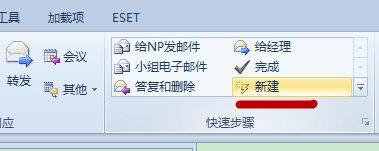
2.在弹出的窗口中,操作选择"新邮件"。
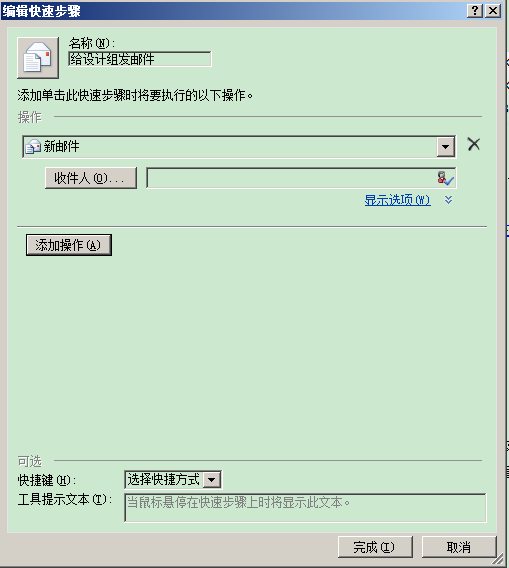
3.把刚才准备好的收件人地址复制到"收件人"后面的文本框中。
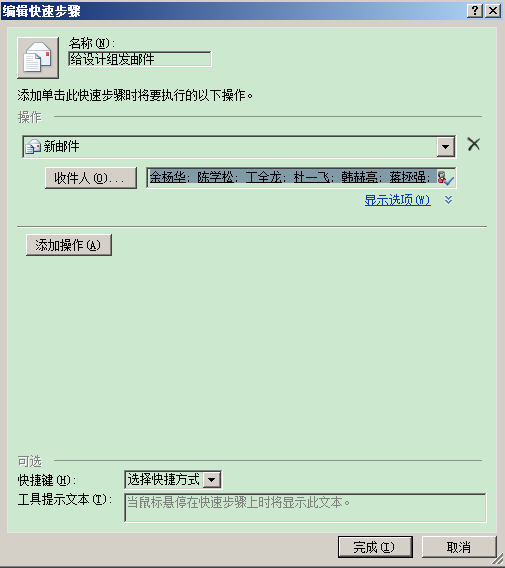
注意:一定是复制过去,不要尝试点击"收件人"按钮。(那个不能用,可能需要安装企业服务器)
4.点击"显示选项"可以设置抄送等其他选项。
5.完成。在快速步骤中即会出现一个新的链接,试试吧:)
今天要发一个用户手册,大概有21M。outlook提示附件大小超过限制。
解决方法:
打开注册表:
[HKEY_CURRENT_USER\Software\Microsoft\Office\14.0\Outlook\Preferences]
新建一个“DWORD”类型的值
名称为:MaximumAttachmentSize
值设置为:0
今天调试系统发现从java输出的时间和系统时间不同。总是差8个小时。代码如下:
SimpleDateFormat format = new SimpleDateFormat("yyyy-MM-dd HH:mm:ss");
System.out.println(format.format(new Date()));
感觉可能是时区不对,确实了下操作系统的时区设置的也正确。重启电脑看了下BIOS的时间也是对的。无奈上网查找。
终于找到原来是注册表时区设置不正确。
看这里:http://huiy.javaeye.com/blog/200512
注册表对应项:HKEY_LOCAL_MACHINE\SOFTWARE\Microsoft\Windows NT\CurrentVersion\Time Zones
解决之道:
1.备份Time Zones这一项
2.从正常的并且是相同系统的机器中导出该项,然后倒入到自己机器中
下载:注册表信息
显示隐藏文件和文件夹
通常情况下, 一些服务器上会隐藏着一些以点开始的的文件名, 常见的如 ".htaccess" 或 ".profile".
想要在远程服务器上显示这些隐藏文件
1、选择界面上的 [站点管理器] 标签
2、选择想要看到隐藏文件的远程服务器站点
3、右键,选择 [属性]
4、选择 [操作] 标签
5、选择最下面的 [过滤]
6、选中 [启用过滤(E)] 和 [启用服务器端过滤(服务器应用过滤)(S)]
7、在 [远程过滤(M)] 右侧的输入框中输入:
-a
8、单击 [确定]
9、完成...
在textarea中输入的文本。如果含有回车或空格。在界面上显示的时候则不哪么正常。回车消失了,空格变短了。
如何解决这个问题呢。有2种方法。
1.使用<pre>标签
w3c对pre元素是这样定义的:pre 元素可定义预格式化的文本。被包围在 pre 元素中的文本通常会保留空格和换行符。而文本也会呈现为等宽字体。
更详细的内容请参考
http://www.w3school.com.cn/tags/tag_pre.asp
也就是说包含在pre标签中的回车和空格会正常的显示出来。包括你在页面代码中输入的。所以如果使用pre元素你需要这样写:
<pre>要输出的文本</pre>
,而不是这样:
<pre>
要输出的文本
</pre>
后一种写法 文本前的空白也会被显示的。除非你真的希望这样:)
2.对文本内容进行替换。
回车和空格不能正确显示,究其原因是他们各自的表示方式不同。在textarea里面输入的回车是字符"\r",html中的回车(换行)是"<br/>"。
textarea中输入的空格是空白" ",而html中的一个空格是" "。理所当然不能正确显示。好了现在知道了原因就有了第二种解决方案了。
只要我们将输入的文本中相应的"元素"替换成html认识的就ok了。因此下面一行代码即可解决问题:
"要输出的文本".replaceAll(" "," ").replaceAll("\r","<br/>");
等等。这里还有一点小问题。把一个空格替换成一个" "空格看上去仍然要少些。如果你喜欢可以替换成2个。
最后,除了回车和空格以外还有很多空白字符如tab等,如果你喜欢可以一并处理了^_^
最后的最后,如果本来的文本是很长的一行,使用pre标签后就不会自动换行。结果页面出现横向滚动条。不知道有没有好的解决方法?
而将第二种方法处理过的文本放在<p>标签中显示,就可以显示正常。
文件编码导致的sun.io.MalformedInputException异常
如果你没有使用ibm的jdk,却依然遇到了这个问题。
如果你的异常是在解析xml的时候出现的,如果你的异常是某些地方有某些地方没有。
例如tomcat里面没有,weblogic上有。抑或这个domain有那个domain却没有。而确实是同一个应用。
哪么你遇到的可能和笔者要讲的是同一个问题。
你的xml文件本身是UTF-8编码(注意是文件是UTF-8编码,不是xml文件里面指定的文件内容是UTF-8编码)?
你的xml文件里面含有中文?
你使用UltraEdit编辑xml文件?
删掉中文,问题依旧?
那么可以肯定你的问题就是笔者要讲的问题
首先给出解决方案:
方案一:
1.xml用记事本打开,删除里面的中文。
2.在windows 本地新建一个txt文件,用记事本(注意不能用UltraEdit)打开。
3.将xml里面的内容复制到新建的txt文件中。
4.将txt文件重名为xml文件的名称。覆盖原来的xml文件
5.看看问题是不是解决了,咔咔 神奇吧。
方案二:(适用于使用eclipse ide的程序员们,其他的能更改文件编码的程序也行,不过没测试过)
1.将xml文件的内容剪切出来,保存在别处,什么文件都行,最后是txt中。留下一个空的xml文件
2.将空的xml文件的编码修改成GBK。注意是文件的编码,不是xml的那个声明。当然这里已经删了。
3.这时候是否看到文件的头部有乱码? 删之!
4.将原来文件的内容烤回来
5.ok问题解决,这种方法不用删除中文。
问题的根源:
估计有些人已经明白是什么原因了。呵呵,那就是xml文件那个BOM的头导致的这个问题!
哦?还有没明白的?下面详细说明下:
xml文件分为两种,一种是有BOM信息的,它表示文件是xml格式
另外还有没有BOM信息的xml文件。
就是这个特殊的BOM信息导致了解析xml出错。
那跟UltraEdit有什么关系?UltraEdit在编辑xml文件的时候会自动加上这个可恶的BOM信息。
详细的log4j配置说明
一直没有认真研究过log4j的配置,这几天比较闲,认真的看了看。现在总结下。
Log4j有三个主要的组件:Loggers(记录器),Appenders(输出源)和Layouts(布局)。
log4j的配置文件也可以是多种格式的,但主要是xml文件和properties文件
1.配置根logger:
语法:log4j.rootLogger =[level],appenderName1,appenderName2,...
level :OFF、FATAL、ERROR、WARN、INFO、DEBUG、ALL的其中一个。
appenderName:日志输入的目的地,可以有多个地方
根logger是一定存在的,根logger指定了默认的日志配置。
2.配置日志输入的目的地(appender)
语法:log4j.appender.appenderName = fully.qualified.name.of.appender.class
fully.qualified.name.of.appender.class 可以是以下的几种:
(1).org.apache.log4j.ConsoleAppender(控制台)
(2).org.apache.log4j.FileAppender(文件)
(3).org.apache.log4j.DailyRollingFileAppender(每天产生一个日志文件)
(4).org.apache.log4j.RollingFileAppender(文件大小到达指定尺寸的时候产生一个新的文件)
(5).org.apache.log4j.WriterAppender(将日志信息以流格式发送到任意指定的地方)
其中每一个又有不同的配置选项:
(1).org.apache.log4j.ConsoleAppender(控制台)的选项
Threshold=WARN:指定日志消息的输出最低层次。
ImmediateFlush=true:默认值是true,意谓着所有的消息都会被立即输出。
Target=System.err:默认情况下是:System.out,指定输出控制台
(2).org.apache.log4j.FileAppender的选项
Threshold=WARN:指定日志消息的输出最低层次。
ImmediateFlush=true:默认值是true,意谓着所有的消息都会被立即输出。
File=mylog.txt:指定消息输出到mylog.txt文件。
Append=false:默认值是true,即将消息增加到指定文件中,false指将消息覆盖指定的文件内容。
(3).org.apache.log4j.DailyRollingFileAppender的选项
Threshold=WARN:指定日志消息的输出最低层次。
ImmediateFlush=true:默认值是true,意谓着所有的消息都会被立即输出。
File=mylog.txt:指定消息输出到mylog.txt文件。
Append=false:默认值是true,即将消息增加到指定文件中,false指将消息覆盖指定的文件内容。
DatePattern='.'yyyy-ww:每周滚动一次文件,即每周产生一个新的文件。当然也可以指定按月、周、天、时和分。即对应的格式如下:
1)'.'yyyy-MM: 每月
2)'.'yyyy-ww: 每周
3)'.'yyyy-MM-dd: 每天
4)'.'yyyy-MM-dd-a: 每天两次
5)'.'yyyy-MM-dd-HH: 每小时
6)'.'yyyy-MM-dd-HH-mm: 每分钟
(4).org.apache.log4j.RollingFileAppender
Threshold=WARN:指定日志消息的输出最低层次。
ImmediateFlush=true:默认值是true,意谓着所有的消息都会被立即输出。
File=mylog.txt:指定消息输出到mylog.txt文件。
Append=false:默认值是true,即将消息增加到指定文件中,false指将消息覆盖指定的文件内容。
MaxFileSize=100KB: 后缀可以是KB, MB 或者是 GB. 在日志文件到达该大小时,将会自动滚动,即将原来的内容移到mylog.log.1文件。
MaxBackupIndex=2:指定可以产生的滚动文件的最大数。
3.配置日志输入的格式
log4j.appender.A1.layout.ConversionPattern=%-4r %-5p %d{yyyy-MM-dd HH:mm:ssS} %c %m%n
这里需要说明的就是日志信息格式中几个符号所代表的含义:
-: 信息输出时左对齐;
%p: 输出日志信息优先级,即DEBUG,INFO,WARN,ERROR,FATAL,
%d: 输出日志时间点的日期或时间,默认格式为ISO8601,也可以在其后指定格式,比如:%d{yyy MMM dd HH:mm:ss,SSS},输出类似:2002年10月18日 22:10:28,921
%r: 输出自应用启动到输出该log信息耗费的毫秒数
%c: 输出日志信息所属的类目,通常就是所在类的全名
%t: 输出产生该日志事件的线程名
%l: 输出日志事件的发生位置,相当于%C.%M(%F:%L)的组合,包括类目名、发生的线程,以及在代码中的行数。举例:Testlog4.main(TestLog4.java:10)
%x: 输出和当前线程相关联的NDC(嵌套诊断环境),尤其用到像java servlets这样的多客户多线程的应用中。
%%: 输出一个"%"字符
%F: 输出日志消息产生时所在的文件名称
%L: 输出代码中的行号
%m: 输出代码中指定的消息,产生的日志具体信息
%n: 输出一个回车换行符,Windows平台为"rn",Unix平台为"n"输出日志信息换行
可以在%与模式字符之间加上修饰符来控制其最小宽度、最大宽度、和文本的对齐方式。如:
1)%20c:指定输出category的名称,最小的宽度是20,如果category的名称小于20的话,默认的情况下右对齐。
2)%-20c:指定输出category的名称,最小的宽度是20,如果category的名称小于20的话,"-"号指定左对齐。
3)%.30c:指定输出category的名称,最大的宽度是30,如果category的名称大于30的话,就会将左边多出的字符截掉,但小于30的话也不会有空格。
4)%20.30c:如果category的名称小于20就补空格,并且右对齐,如果其名称长于30字符,就从左边交远销出的字符截掉。
下面是一个详细的配置样例
og4j.rootLogger=DEBUG,CONSOLE,A1,im
#DEBUG,CONSOLE,FILE,ROLLING_FILE,MAIL,DATABASE
log4j.addivity.org.apache=true
###################
# Console Appender(输出到控制台)
###################
log4j.appender.CONSOLE=org.apache.log4j.ConsoleAppender
log4j.appender.Threshold=DEBUG
log4j.appender.CONSOLE.Target=System.out
log4j.appender.CONSOLE.layout=org.apache.log4j.PatternLayout
log4j.appender.CONSOLE.layout.ConversionPattern=[framework] %d - %c -%-4r [%t] %-5p %c %x - %m%n
#log4j.appender.CONSOLE.layout.ConversionPattern=[start]%d[DATE]%n%p[PRIORITY]%n%x[NDC]%n%t[THREAD] n%c[CATEGORY]%n%m[MESSAGE]%n%n
#####################
# File Appender 输出到文件
#####################
log4j.appender.FILE=org.apache.log4j.FileAppender
log4j.appender.FILE.File=file.log
log4j.appender.FILE.Append=false
log4j.appender.FILE.layout=org.apache.log4j.PatternLayout
log4j.appender.FILE.layout.ConversionPattern=[framework] %d - %c -%-4r [%t] %-5p %c %x - %m%n
# Use this layout for LogFactor 5 analysis
########################
# Rolling File
########################
log4j.appender.ROLLING_FILE=org.apache.log4j.RollingFileAppender
log4j.appender.ROLLING_FILE.Threshold=ERROR
log4j.appender.ROLLING_FILE.File=rolling.log
log4j.appender.ROLLING_FILE.Append=true
log4j.appender.ROLLING_FILE.MaxFileSize=10KB
log4j.appender.ROLLING_FILE.MaxBackupIndex=1
log4j.appender.ROLLING_FILE.layout=org.apache.log4j.PatternLayout
log4j.appender.ROLLING_FILE.layout.ConversionPattern=[framework] %d - %c -%-4r [%t] %-5p %c %x - %m%n
####################
# Socket Appender
####################
log4j.appender.SOCKET=org.apache.log4j.RollingFileAppender
log4j.appender.SOCKET.RemoteHost=localhost
log4j.appender.SOCKET.Port=5001
log4j.appender.SOCKET.LocationInfo=true
# Set up for Log Facter 5
log4j.appender.SOCKET.layout=org.apache.log4j.PatternLayout
log4j.appender.SOCET.layout.ConversionPattern=[start]%d[DATE]%n%p[PRIORITY]%n%x[NDC]%n%t[THREAD]%n%c[CATEGORY]%n%m[MESSAGE]%n%n
########################
# Log Factor 5 Appender
########################
log4j.appender.LF5_APPENDER=org.apache.log4j.lf5.LF5Appender
log4j.appender.LF5_APPENDER.MaxNumberOfRecords=2000
########################
# SMTP Appender 发送邮件
#######################
log4j.appender.MAIL=org.apache.log4j.net.SMTPAppender
log4j.appender.MAIL.Threshold=FATAL
log4j.appender.MAIL.BufferSize=10
log4j.appender.MAIL.From=chenyl@hollycrm.com
log4j.appender.MAIL.SMTPHost=mail.hollycrm.com
log4j.appender.MAIL.Subject=Log4J Message
log4j.appender.MAIL.To=chenyl@hollycrm.com
log4j.appender.MAIL.layout=org.apache.log4j.PatternLayout
log4j.appender.MAIL.layout.ConversionPattern=[framework] %d - %c -%-4r [%t] %-5p %c %x - %m%n
########################
# JDBC Appender 输出到数据库
#######################
log4j.appender.DATABASE=org.apache.log4j.jdbc.JDBCAppender
log4j.appender.DATABASE.URL=jdbc:mysql://localhost:3306/test
log4j.appender.DATABASE.driver=com.mysql.jdbc.Driver
log4j.appender.DATABASE.user=root
log4j.appender.DATABASE.password=
log4j.appender.DATABASE.sql=INSERT INTO LOG4J (Message) VALUES ('[framework] %d - %c -%-4r [%t] %-5p %c %x - %m%n')
log4j.appender.DATABASE.layout=org.apache.log4j.PatternLayout
log4j.appender.DATABASE.layout.ConversionPattern=[framework] %d - %c -%-4r [%t] %-5p %c %x - %m%n
log4j.appender.A1=org.apache.log4j.DailyRollingFileAppender
log4j.appender.A1.File=SampleMessages.log4j
log4j.appender.A1.DatePattern=yyyyMMdd-HH'.log4j'
log4j.appender.A1.layout=org.apache.log4j.xml.XMLLayout
###################
#自定义Appender
###################
log4j.appender.im = net.cybercorlin.util.logger.appender.IMAppender
log4j.appender.im.host = mail.cybercorlin.net
log4j.appender.im.username = username
log4j.appender.im.password = password
log4j.appender.im.recipient = corlin@cybercorlin.net
log4j.appender.im.layout=org.apache.log4j.PatternLayout
log4j.appender.im.layout.ConversionPattern =[framework] %d - %c -%-4r [%t] %-5p %c %x - %m%n
参考:http://www.builder.com.cn/2008/0517/866964.shtml
当采用Windows 2000/XP/2003系统的局域网用户拔掉连接本机网卡的网线时,或该用户的网卡与局域网中的网络设备没有正常连接时,桌面上的“任务栏”中会显示“本地连接,网络电缆没有插好”的提示。为什么Windows系统能够自动检测出客户机与网络设备的连通情况呢?这是因为Windows 2000/XP/2003系统中内置了“媒体感知(Media Sense)”功能。
认清“媒体感知”功能
对于一般的局域网用户来说,“媒体感知”功能确实起到了非常重要的作用。当网卡或网线出现问题时,客户机不能与局域网中的网络设备正常连通,这时“媒体感知”功能就能立刻检测出问题,并发出警告,方便了大家对网络的故障的排查。
但大家在进行某些特殊的调试工作时,智能化的“媒体感知”功能反而会影响正常工作。
例如程序员使用便携设备(如笔记本电脑)调试某些TCP/IP应用程序,而TCP/IP程序在测试过程中需要脱离局域网环境,程序员需要拔掉测试机器上的网线。这时聪明的“媒体感知”功能就立刻检测出本机和局域网设备没有正常连通,接着就会禁用捆绑在网卡上的某些网络协议,其中就包括TCP/IP协议。由于TCP/IP协议被禁用了,这样该TCP/IP应用程序就无法进行调试了,因此大家在某些特殊情况下必须禁用Windows系统的“媒体感知”功能。
提示:当网卡与网络设备没有正常连通时,“媒体感知”功能不会禁用所有的网络协议,如NetBEUI和IPX/SPX协议就不受影响,本机的环路测试也可正常进行。
禁用“媒体感知”功能
如何为TCP/IP协议禁用Windows系统内置的“媒体感知”功能呢?通过修改注册表就能实现。下面笔者以Windows XP系统为例,介绍实现“禁用”的方法。
进入注册表编辑器,展开“HKEY_LOCAL_MACHINE\SYSTEM\CurrentControlSet\Services\Tcpip\Parameters”项,新建一个“DisableDHCPMediaSense”
,数据类型为“DWORD值”,将该值设置为“1”。重新启动Windows XP系统后,就禁用了“媒体感知”功能。
现在,即使拔掉网线,TCP/IP协议也不会被禁用,TCP/IP应用程序的调试工作可以照常进行。要想恢复“媒体感知”功能,也很简单,只要将注册表中 “DisableDHCPMediaSense”的值修改为“0”,或者删除“DisableDHCPMediaSense”,重新启动系统即可。
上次折腾了半天,终于把延时加载配置好了。可是不配置事务总是觉得怪怪的。so..决定把事务也配置好。虽然是个小项目吧^_^.
<!-- 事务配置 -->
<!-- 事务管理器 用于hibernate的事务管理器-->
<bean id="transactionManager" class="org.springframework.orm.hibernate3.HibernateTransactionManager">
<property name="sessionFactory">
<ref bean="sessionFactory"/>
</property>
</bean>
<!-- 事务拦截器 用于对拦截的方法开启事务,其中指定了一些只读事务-->
<bean id="transactionInterceptor" class="org.springframework.transaction.interceptor.TransactionInterceptor">
<property name="transactionManager" ref="transactionManager"/>
<property name="transactionAttributes">
<props>
<prop key="*">PROPAGATION_REQUIRED,-Exception</prop>
<prop key="list*">PROPAGATION_REQUIRED,readOnly</prop>
<prop key="*list">PROPAGATION_REQUIRED,readOnly</prop>
<prop key="display*">PROPAGATION_REQUIRED,readOnly</prop>
<prop key="*display">PROPAGATION_REQUIRED,readOnly</prop>
<prop key="*view">PROPAGATION_REQUIRED,readOnly</prop>
<prop key="find*">PROPAGATION_REQUIRED,readOnly</prop>
<prop key="main*">PROPAGATION_REQUIRED,readOnly</prop>
</props>
</property>
</bean>
<!-- 自动代理,配置使所有service层bean使用事务拦截器 -->
<bean class="org.springframework.aop.framework.autoproxy.BeanNameAutoProxyCreator">
<property name="beanNames">
<list>
<value>*Service</value>
</list>
</property>
<property name="interceptorNames">
<list>
<value>transactionInterceptor</value>
</list>
</property>
</bean>
<bean class="org.springframework.transaction.interceptor.TransactionAttributeSourceAdvisor">
<property name="transactionInterceptor" ref="transactionInterceptor"/>
</bean>
<!-- 事务配置结束 -->
简单说明一下,其中是用了spring提供的
BeanNameAutoProxyCreator这个自动代理服务,自动对名为XXXService的的bean使用使用拦截器开启事务,而在transactionInterceptor则定义了事务的属性,限定了一些只读的事务以提搞效率。
由于Spring控制的Hibernate的生命周期只针对数据层和服务层,而未管理到表现层,所以在表现层使用延时加载会出现the owning Session was closed或者no session or session was closed的异常信息。针对这一点,可以通过hibernate filter的方式来解决。
在WEB.xml文件中配置filter.
<!-- hibernate session filter -->
<filter>
<filter-name>OpenSessionInViewFilter</filter-name>
<filter-class>
org.springframework.orm.hibernate3.support.OpenSessionInViewFilter
</filter-class>
</filter>
<filter-mapping>
<filter-name>OpenSessionInViewFilter</filter-name>
<url-pattern>*.do</url-pattern>
</filter-mapping>
我们的系统架构是struts+spring+hibernate,struts跟spring的整合是在struts-config.xml里加了个plugin
<plug-in
className="org.springframework.WEB.struts.ContextLoaderPlugIn">
<set-property property="contextConfigLocation"
value="/WEB-INF/classes/applicationContext.xml" />

</plug-in>
在WEB.xml中配置hibernateFilter 后,还需要在struts-config.xml里把plugin去掉,在WEB.xml里加上如下代码:
<!--Spring ApplicationContext-->
<context-param>
<param-name>contextConfigLocation</param-name>
<param-value>/WEB-INF/classes/applicationContext.xml</param-value>
</context-param>
<listener>
<listener-class>
org.springframework.web.context.ContextLoaderListener
</listener-class>
</listener>
这样配置之后如果没有配置事务,是有问题的。不能进行update和insert操作了。
怎么办呢?只需要在filter中加入一个参数
<init-param>
<param-name>singleSession</param-name>
<param-value>true</param-value>
</init-param>
就可以了,当然这样 每次访问dao都会新开个session,对性能的影响还是比较大的。最好的办法当然是配置事务了。
做web开发总要有点像样的工具,下面就介绍一下我用到的工具。
1.当然是浏览器,由于ie对插件的支持不好,而且对w3c的标准也支持不好。所以做web开发还是选择firfox吧。不过话说回来,国内目前ie浏览器的市场仍然占据绝对优势,所以在FF(firfox)中调试好的网页最好还是在拿回ie瞅瞅。
2.接下来就是FF的各种插件啦,他们可都是我的好帮手。
首先要说的是firebug,相信很多人都对他都很熟悉了。可以说是我见过的最好用的html、css和js调试工具了。提供了点选功能,可以很方便的查看网页上各个元素的css样式,并可以时时更改。js方面可以在js的控制台里面可以显示js的log,在应用中使用log4js产生日志就可以在这里看见了,可给js代码设置断点进行调试。还有一个script视图,可以查看当前页面的js对象。在net视图里面则可以看到各种资源加载的时间,方便性能调试。官方网站http://www.getfirebug.com/。firebug 还有一个插件YSlow(插件的插件?^_^) 是基于一下14条提高效率的原则来评价你的网页http://www.yahooapis.com/performance/index.html#rules YSlow的下载地址http://www.yahooapis.com/yslow/
3.ColorZilla 颜色拾取器,不用多说,就是可以快速的获取web页面上颜色的rgb十六进制,方便web设计,看见别人的网站颜色好看,直接一点拿来己用,咔咔。还可方便的缩放页面。下载地址http://www.iosart.com/firefox/colorzilla/
4.fasterfox 其实这个是个fiefox的性能优化器,不过它还可以计算网页整体的加载时间和清除ff的缓存。用来消除缓存的影响还是很有用地。地址: http://fasterfox.mozdev.org/
5.说到缓存,下面这个可以查看ff的缓存并可进行搜索和排序 CacheViewer 地址:https://addons.mozilla.org/en-US/firefox/addon/2489
6.IE Tab 可以在ff使用ie核心打开标签页,地址:https://addons.mozilla.org/en-US/firefox/addon/1419
做web开发的时候,有时候需要根据键盘进行一些操作,例如按下Enter的时候提交表单,禁止用户输入某些特殊字符,设置快捷键等等。这时候需要找出用户按下的是那些按键,每次都找对照表太麻烦了.so..写了这么个小程序来测试按键。^_^
其中的charCode是根据ascii表转换的,不一定准确。
下面是ascii编码表:

源代码:
<script type="text/javascript">
function showKey(e){
e = e || window.event;
document.getElementById("keyCode").value = e.keyCode;
document.getElementById("charCode").value = String.fromCharCode(e.keyCode);
document.getElementById("shiftKey").value = e.shiftKey;
document.getElementById("ctrlKey").value = e.ctrlKey;
document.getElementById("altKey").value = e.altKey;
}
$(document).ready(function(){
document.onkeydown = showKey;
});
</script>
<br />
<table>
<tbody>
<tr>
<td>keyCode : </td>
<td><input id="keyCode" type="text" /> </td>
</tr>
<tr>
<td>charCode : </td>
<td><input id="charCode" type="text" /> </td>
</tr>
<tr>
<td>shift-key : </td>
<td><input id="shiftKey" type="text" /> </td>
</tr>
<tr>
<td>ctrl-key : </td>
<td><input id="ctrlKey" type="text" /> </td>
</tr>
<tr>
<td>alt-key : </td>
<td><input id="altKey" type="text" /> </td>
</tr>
</tbody>
</table>
其中我使用了jquery来初始化document的onkeydown事件。如果你不使用jquery可以用下面这段代码
window.onload = function(){
document.onkeydown = showKey;
};
代替
$(document).ready(function(){
document.onkeydown = showKey;
});