在java中改变菜单的外观,想必只有傻瓜才会这么干吧,哈哈哈~~~你不许笑,只许我笑.因为随便笑人家是傻瓜不是一个礼貌的孩子:) 好了,说实现思路吧 .javax.swing包中的组件都是继承JComponent组件 JComponent组件中有一个方法setBorder(Border border) 用来设置组件的边框 Boder是一个接口,在avax.swing.border包中
那么改变菜单的外观就可以首先从这个来着手了.因此我们需要一个实现这个接口的类.好了,来看看这个接口的方法吧 :
void paintBorder(Component c,
Graphics g,
int x,
int y,
int width,
int height)按指定的位置和尺寸绘制指定组件的边框。
参数:
c - 要为其绘制边框的组件
g - 绘制的图形
x - 所绘制边框的 x 坐标位置
y - 所绘制边框的 y 坐标位置
width - 所绘制边框的宽度
height - 所绘制边框的高度
//附注:边框就是在这个方法中给画出来的
--------------------------------------------------------------------------------
Insets getBorderInsets(Component c)返回该边框的 insets。
//附注一下:该类是容器边界的表示形式。它指定容器必须在其各个边缘留出的空间。这个空间可以是边
//界、空白空间或标题。
参数:
c - 要应用此边框 insets 值的组件
--------------------------------------------------------------------------------
isBorderOpaque
boolean isBorderOpaque()返回此边框是否透明。如果边框为不透明,则在绘制它时将用自身的背景来填充。
首先来看看效果图: 请注意右上角是椭圆的噢,这个就暗示了我们可以把菜单弄成任意形状,只要你愿意!
按照这种思路,同样的,你也可以改变右键弹出菜单的外观
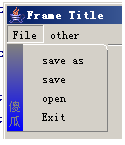
接口的实现类 至于画图用到的方法,详见JAVA API.
import java.awt.*;
import java.awt.geom.*;
import javax.swing.*;
import javax.swing.border.*;
public class MyBorder implements Border
{
//设置边框四周留出的空间
protected int m_w=6;
protected int m_h=6;
protected int m_left=16;
//设置边框的前景色跟背景色
protected Color m_topColor = Color.white;
protected Color m_bottomColor = Color.gray;
public MyBorder() {
m_w=6;
m_h=6;
m_left=16;
}
public MyBorder(int w, int h) {
m_w=w;
m_h=h;
}
public MyBorder(int w, int h, Color topColor,
Color bottomColor) {
m_w=w;
m_h=h;
m_topColor = topColor;
m_bottomColor = bottomColor;
}
public Insets getBorderInsets(Component c) {
return new Insets(m_h, m_left, m_h, m_w);
}
public boolean isBorderOpaque() { return true; }
public void paintBorder(Component c, Graphics gd,
int x, int y, int w, int h) {
Graphics2D g = (Graphics2D) gd;
w--;
h--;
g.setColor(m_topColor);
g.drawLine(x, y+h, x, y+m_h);
g.drawArc(x, y, 2*m_w, 2*m_h, 180, -90);
g.drawLine(x, y, x+w-m_w, y);
g.drawArc(x+w-2*m_w, y, 2*m_w, 2*m_h, 90, -90);
int stringHeitht = y+h-5;
Point2D.Float p1 = new Point2D.Float(x,y+h);
Point2D.Float p2 = new Point2D.Float(x,y);
GradientPaint gradient = new GradientPaint(p1,Color.blue,p2,Color.gray,false);
//g.setColor(Color.YELLOW);
//g.drawRect();
g.setPaint(gradient);
g.fillRect(x,y,x+m_left,y+h);
g.setColor(Color.GRAY);
g.drawString("瓜",((x+m_left)-g.getFontMetrics().charWidth('傻'))/2,stringHeitht);
int simpleFontHeitht = g.getFontMetrics().getHeight();
stringHeitht-=simpleFontHeitht;
g.drawString("傻",((x+m_left)-g.getFontMetrics().charWidth('傻'))/2,stringHeitht);
g.setColor(m_bottomColor);
g.drawLine(x+w, y+m_h, x+w, y+h);
// g.drawArc(x+w-2*m_w, y+h-2*m_h, 2*m_w, 2*m_h, 0, -90);
g.drawLine(x, y+h, x+w, y+h);
//g.drawArc(x, y+h-2*m_h, 2*m_w, 2*m_h, -90, -90);
}
}
剩下的就是把这个边框给它装上去了.在JMenu中有一个方法getPopupMenu()得到弹出菜单对象JPopupMenu;
然后调用这个JPopupMenu对象的setBorder方法就行了.下面是完整的测试程序
import java.awt.Toolkit;
import javax.swing.SwingUtilities;
import javax.swing.UIManager;
import java.awt.Dimension;
public class Application1 {
boolean packFrame = false;
/**
* Construct and show the application.
*/
public Application1() {
MenuFaces frame = new MenuFaces();
// Validate frames that have preset sizes
// Pack frames that have useful preferred size info, e.g. from their layout
if (packFrame) {
frame.pack();
}
else {
frame.validate();
}
// Center the window
Dimension screenSize = Toolkit.getDefaultToolkit().getScreenSize();
Dimension frameSize = frame.getSize();
if (frameSize.height > screenSize.height) {
frameSize.height = screenSize.height;
}
if (frameSize.width > screenSize.width) {
frameSize.width = screenSize.width;
}
frame.setLocation( (screenSize.width - frameSize.width) / 2,
(screenSize.height - frameSize.height) / 2);
frame.setVisible(true);
}
/**
* Application entry point.
*
* @param args String[]
*/
public static void main(String[] args) {
SwingUtilities.invokeLater(new Runnable() {
public void run() {
try {
UIManager.setLookAndFeel(UIManager.getSystemLookAndFeelClassName());
}
catch (Exception exception) {
exception.printStackTrace();
}
new Application1();
}
});
}
}
import java.awt.*;
import java.awt.event.*;
import javax.swing.*;
public class MenuFaces
extends JFrame {
JPanel contentPane;
BorderLayout borderLayout1 = new BorderLayout();
JMenuBar jMenuBar1 = new JMenuBar();
JMenu jMenuFile = new JMenu();
JMenuItem jMenuFileExit = new JMenuItem();
JMenuItem jMenuItem1 = new JMenuItem();
JMenuItem jMenuItem2 = new JMenuItem();
JMenuItem jMenuItem3 = new JMenuItem();
JMenu jMenu1 = new JMenu();
JMenuItem jMenuItem4 = new JMenuItem();
public MenuFaces() {
try {
setDefaultCloseOperation(EXIT_ON_CLOSE);
jbInit();
}
catch (Exception exception) {
exception.printStackTrace();
}
}
/**
* Component initialization.
*
* @throws java.lang.Exception
*/
private void jbInit() throws Exception {
contentPane = (JPanel) getContentPane();
contentPane.setLayout(borderLayout1);
setSize(new Dimension(400, 300));
setTitle("Frame Title");
jMenuFile.setText("File");
jMenuFileExit.setText("Exit");
jMenuFileExit.addActionListener(new MenuFaces_jMenuFileExit_ActionAdapter(this));
jMenuItem1.setText("open");
jMenuItem2.setText("save");
jMenuItem3.setText("save as");
jMenu1.setText("other");
jMenuItem4.setText("tt");
jMenuBar1.add(jMenuFile);
jMenuBar1.add(jMenu1);
jMenuFile.add(jMenuItem3);
jMenuFile.add(jMenuItem2);
jMenuFile.add(jMenuItem1);
jMenuFile.add(jMenuFileExit);
jMenu1.add(jMenuItem4);
JPopupMenu tt = jMenuFile.getPopupMenu();
MyBorder myBorder = new MyBorder();
tt.setBorder(myBorder);
setJMenuBar(jMenuBar1);
}
/**
* File | Exit action performed.
*
* @param actionEvent ActionEvent
*/
void jMenuFileExit_actionPerformed(ActionEvent actionEvent) {
System.exit(0);
}
}
class MenuFaces_jMenuFileExit_ActionAdapter
implements ActionListener {
MenuFaces adaptee;
MenuFaces_jMenuFileExit_ActionAdapter(MenuFaces adaptee) {
this.adaptee = adaptee;
}
public void actionPerformed(ActionEvent actionEvent) {
adaptee.jMenuFileExit_actionPerformed(actionEvent);
}
}
欢迎加入QQ群:30406099